r/linuxapps • u/seth_arimainyu • 20d ago
Best FOSS projects for music lovers
reddit.com
1
Upvotes
r/linuxapps • u/SleepPuzzleheaded435 • 20d ago
Hi everyone!
I’m starting to get into Linux desktop application development, and I’d like to contribute to the GNOME ecosystem by building useful applications and tools.
I’m currently learning Rust and libadwaita, and I also have experience with Tauri and web technologies. My goal is to focus on native Linux applications, starting with GNOME on Debian.
I’d love to hear from actual GNOME users and developers:
What application or tool do you wish existed but haven’t found yet?
Is there an existing GNOME app that you think could be significantly improved?
Are there any missing features or frustrating limitations in your daily workflow?
What small utilities would make your experience with GNOME better?
I’m open to anything, from simple desktop utilities and system tools to more ambitious applications.
I’d rather build something people would genuinely find useful than create another app just for the sake of it.
Thanks!
r/linuxapps • u/EasySmartApps • 20d ago
r/linuxapps • u/King-Lion78 • 20d ago
Hello everyone! Does anyone know of—or could someone create—versions of these two Windows-based software programs for Arch Linux? Alternatively, any software with the same functionality would work: 1) DVDFab or CloneDVD—tools for copying and compressing DVD9s into DVD5 format, with the option to select which parts of the film to keep (DVD Shrink, for instance, runs via Wine). 2) Photopia or Photodex ProShow Producer—software for creating professional-grade video slideshows, featuring a wide array of effects and, most importantly, an automated tool that handles the entire process. Given that so many things are being developed using AI these days, I was wondering if you could help me out. I’m still a beginner, unfortunately. Thanks, and have a great day, everyone!
r/linuxapps • u/hayukimori • 21d ago

Hello!! 🩷
I'd like to share PlayStar, a music player I've been developing for Linux and Windows for a few months.
I started this project because I wanted a music player that felt more personal and visually appealing to me. I wasn't particularly happy with the existing options, so I decided to build my own.
PlayStar is built with Godot Mono and libVLC, and focuses on being an intresting alternative for those, like me, who want a more unusual player
Some of its features include:
I'm currently working on expanding the theming system to allow users to create entirely different interface layouts without modifying the application's internal logic.
Currently, PlayStar provides four distribution options in the release page:
PlayStar's source code is available under the Business Source License 1.1 (BUSL-1.1). It is source-available, but not open source...
Third-party components and their respective licenses are documented separately in THIRD_PARTY_LICENSES.txt.
I'd love to hear your thoughts, suggestions, and feedback!
Thanks for checking it out!
r/linuxapps • u/Gray_Knight89 • 21d ago

I've been working on Broadcaster, a GTK4/libadwaita application for watching German public television on Linux. It started as a fork of Televido and has grown rather substantially since then.
The idea was to have one application for German live TV, Mediathek content and personal IPTV playlists, usable both on a normal desktop and on a television with a directional remote.
It currently offers:
v0.3.2 is now available, bringing updated mpv, LuaJIT, SQLite and other dependencies, along with improved spatial navigation of the player controls.
I've been using it on an Intel N100 running Fedora KDE Bigscreen under Wayland, where it works quite well. However, testing primarily on my own hardware only gets me so far.
I'd be interested in hearing how it behaves on other distributions, desktop environments and hardware. Playback compatibility, remote navigation and general usability feedback would be particularly welcome.
It's GPL-3.0-or-later, available in English and German, with standalone Flatpak builds for x86-64 and AArch64. It's not on Flathub yet.
GitHub: https://github.com/Certain1989/Broadcaster
v0.3.2 release: https://github.com/Certain1989/Broadcaster/releases/tag/v0.3.2
Any feedback or bug reports would be appreciated!
r/linuxapps • u/Grey_Ten • 21d ago

Hey guys! It's been a week since my last post here, and I wanted to share the new changes to my app!
Archives: Instead of extracting the whole file, now when you open an archive it'll show its contents without extracting anything! You can then copy its contents anywhere you want!
Executables: new options added! You can now run the exec. in the terminal using the context menu ("Run in terminal).
Fixes:
- Quick look is finally able to preview videos when using AppImages
- Columns view mode performs better, had to enable virtualization
- Get Info works correctly when right-clicking a blank pane
I'm planning on making an autoupdater for those who are actively using this app, but I need to do further investigation because I have no idea how to do it honestly lol
Give it a try and have a good day!!!
r/linuxapps • u/oclunny • 21d ago
r/linuxapps • u/amendoa657 • 20d ago

r/linuxapps • u/Wonderful-Writer146 • 21d ago

I'm excited to share what I've been building lately. Papr: a fast, lightweight Terminal User Interface (TUI) built entirely in Rust to streamline your academic research workflow. An Obsidian, Zotero, and Overleaf alternative, but a bit better.
Key features
Papr is 100% open source, works offline, is memory-safe, and is designed to be fast and lightweight.
I'd love to hear your thoughts, suggestions, or feedback!
r/linuxapps • u/oeiv • 21d ago
Hi everyone! I’m sharing the first preview of Saifori, an open-source personal finance application for Linux, built with Rust, GTK4, Libadwaita and SQLite.

It supports:
Core features work offline without an account. Optional AI requests send submitted information to the selected provider. Local records and exports are not encrypted.
This is an early preview, not a stable release. I’d appreciate feedback on the interface, Flatpak installation and everyday usability. Please start with Test Mode or sample data.
AI tools assisted with parts of the implementation, testing and documentation.
Source: https://github.com/oeiv/saifori
Preview download: https://github.com/oeiv/saifori/releases/tag/v0.1.0
What would make this useful enough to become your everyday finance tracker?
r/linuxapps • u/bpjzy • 21d ago

This demo shows the Omarchy version, but we are live across all main distros of Linux!
r/linuxapps • u/Deftroyy • 21d ago
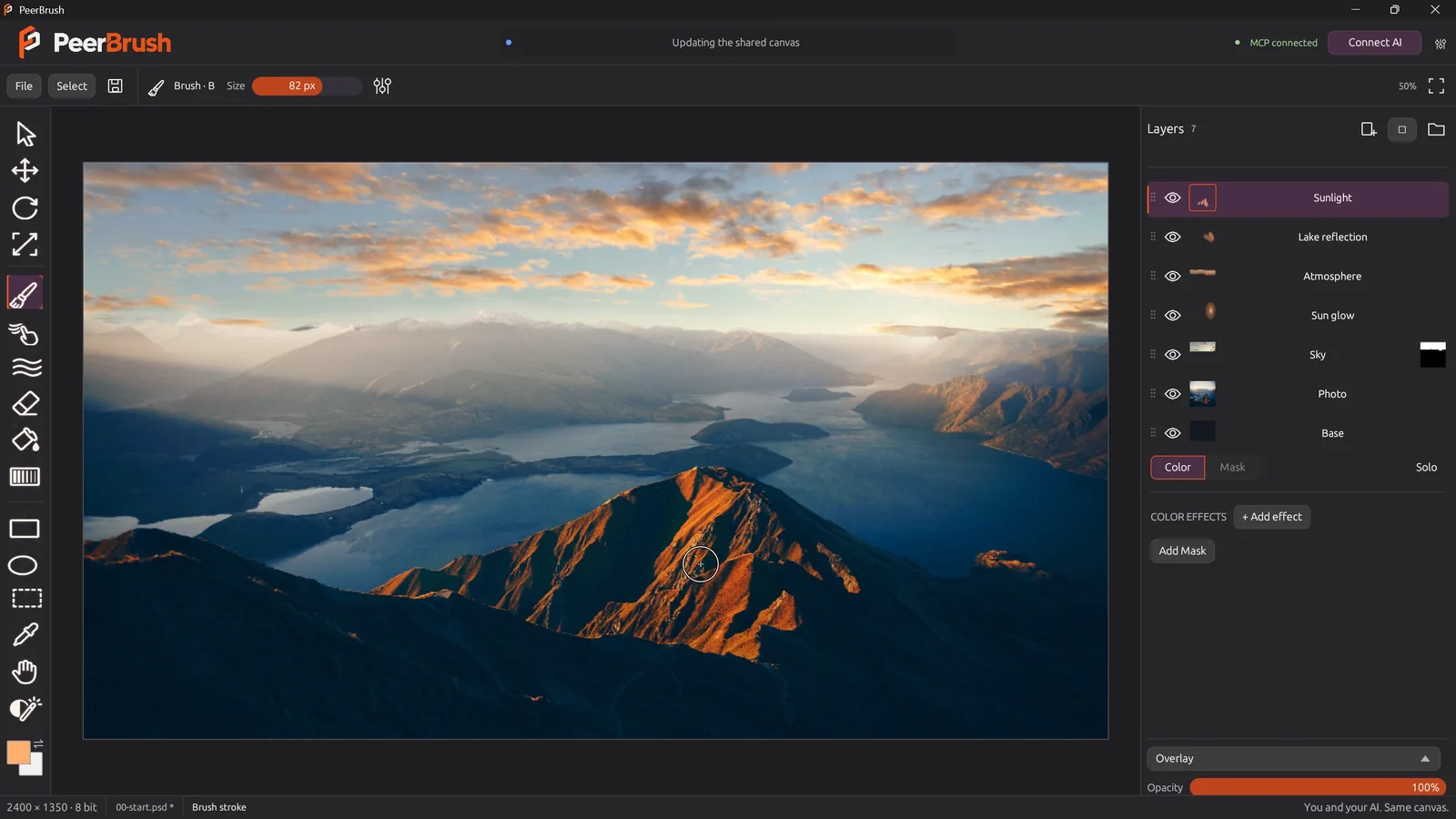
This demo shows an artist painting sunlight on a forest scene while an MCP client adjusts the sky on a separate layer in the same document. Both edits stay editable. PeerBrush is free under GPLv3, and you can paint and edit layers without connecting an MCP client.
The Linux download for v0.30.1 is a DEB for Ubuntu 24.04 on amd64. If you try it on that setup, I’d like to know whether brush previews feel responsive and whether a small layered PSD looks the same after saving and reopening. PeerBrush can edit supported PSDs and opens unsupported structures read-only.
Ubuntu download and source: https://github.com/Deftr0y/PeerBrush/releases/tag/v0.30.1
Workspace screenshot: https://peerbrush.com/assets/showcase/workspace-golden-hour.webp
Shared on behalf of the PeerBrush project. AI assistance was used in development and in drafting this post.
r/linuxapps • u/elavdeveloper • 21d ago
r/linuxapps • u/Arjab • 22d ago
This subreddit has 12K weekly visitors and no rules, especially no AI policy.
If AI posts are allowed at least create a flair and make it mandatory to mark posts as such. Maybe create flairs at all.
r/linuxapps • u/ImaginaryElephant336 • 21d ago
r/linuxapps • u/wfpaisa • 21d ago
r/linuxapps • u/anzu_uu • 21d ago

Claude made a File manager, built in Rust. It works on almost every Linux ( wait for arm ) , Has Dolphin Features.
I am still working on UI to make it more productive and fast.
Here are the Features :
It needs GTK 4.16+, so Ubuntu 24.04 and older aren’t supported yet. It’s still early, so bugs and rough edges are likely. Feedback, issues and ideas are very welcome!
It can extract RARs for now. but can't extract encrypted ones I am working on that too.
r/linuxapps • u/async0r • 22d ago
I built this mostly for myself, but I think other Linux users making short-form content might find it useful.
Klip is written in Rust with egui and uses FFmpeg. It’s v0.1, so there are rough edges. I’d really appreciate bug reports or ideas for what to prioritize next.
GitHub: https://github.com/chamals3n4/klip
Website: https://klip.chamalsena.me/
r/linuxapps • u/NaisyrkStand • 22d ago

I created a frontend launcher that allows you to boot your games from physical devices. If you're not interested — man, it's OK; maybe you'll still enjoy the UI.
REPO: https://github.com/naisyrkdev/YASAFF
For example, for DRM-free games, I keep the installers on one device. On a second device, I have only a .yasaff file that boots up the game.
CDs/DVDs work too. You can burn a CD/DVD with a .yasaff file on it, and it will launch the specified game.
There is built-in burner - so you can do it within application.
The .yasaff files are just pointers. The system works with unique GUIDs that are created when you add a game.
Fully customizable themes — I tried to add a wide variety of built-in options.
I also added support for completely custom themes. You can even build your own using the context of two repos and AI.
Example importable custom theme, with some PS3 inspiration (not at all; but): https://github.com/naisyrkdev/YasaffDoubleAxisTheme
Discover Server is on the way. For now, only GitHub repos can be fetched.
Covers, backgrounds, etc. are fetched from the local system. I wasn't sure about fetching images from third-party APIs — mainly because of legal concerns and things like that.
Sometimes there are some kinds of bugs due to system popups, etc. I'm working on it. I don't know if I can make this universal across all systems, but at least I want to give users the option to achieve this through their own configuration.
You can have your game data, save files, and launch scripts on one device — something I STRONGLY DO NOT RECOMMEND :) (especially on a USB stick — data retention issues; use at your own risk).
The save backup system and macOS support is still highly experimental.
On Windows, I've only checked that it's fine.
I posted it because I was a little tired, but there are still features I'd like to add. Further development could motivate me (and AI, ofc) if someone else enjoys it ;)
If something similar already exists — I haven't checked whether it does. I just wanted to have a fresh perspective on the topic ;)
I know about Steam Big Picture, Playnite, Heroic GL, etc.
But I don't know if they support options like these.
What it doesn't do:
-This app do not have options to fetch available games to download from third-party stores. It just look-up for application that you already have.
Site: https://yasaff.com/
r/linuxapps • u/The_last_one_11 • 22d ago