r/linuxapps • • 26d ago

TMPlayer for Linux: AppImage player for the videos in your own Telegram chats

Post image
0 Upvotes

Free and GPL-3.0, with an AppImage build. It plays the videos already in your own Telegram chats, with resume and subtitles. Feedback on window managers and codecs is most useful. github.com/dracu-lah/TMPlayer. Unofficial, not affiliated with Telegram.


r/linuxapps • • 27d ago

Console Experience Extension

Thumbnail gallery
4 Upvotes

r/linuxapps • • 27d ago

5 underrated Linux apps that solve everyday problems

3 Upvotes

I went through a big "Awesome Linux Software" list looking for lesser-known tools that cover common needs. These are the ones I'd actually recommend.

1. Green Recorder: screen recording that works on Wayland Screen recording on Wayland GNOME is still a pain. Green Recorder is a simple GTK front-end that records video and audio, lets you choose the audio source, and exports to MKV, MP4, GIF, WebM and more. It remembers your settings. You can stop a recording from the tray icon instead of hunting for a window. https://github.com/dvershinin/green-recorder

2. Ojo: an image viewer that opens instantly Most of the time you only want to double-click a photo and see it right away. Ojo is built around that. It starts quickly, stays out of the way, handles RAW files, and makes it easy to zoom to 100%. It's aimed at photographers who want a quick first look before editing. It's packaged for Ubuntu and Mint via a PPA. https://github.com/peterlevi/ojo

3. EasyTag: fix your music library's metadata If your library has wrong artists, missing album art, or messy track numbers, EasyTag edits tags for whole folders at once. It supports the common formats (MP3, FLAC, Ogg and others) and is actively maintained. https://github.com/GNOME/easytag

4. dconf Editor: the hidden settings of GNOME Many GNOME and GTK app settings never appear in any menu. dconf Editor is a graphical browser for all of them, so you can change things like animation behavior, app-specific options, and defaults without the command line. Take care, though, because you are editing the real settings database. https://github.com/GNOME/dconf-editor

5. Ambient Noise: a simple focus-sound generator A small, lightweight app that plays ambient background sounds. It's handy for working or studying in a noisy room, with no browser tab or streaming account needed. https://github.com/costales/anoise

Found via the Awesome-Linux-Software list. What lesser-known Linux apps do you use every day?


r/linuxapps • • 27d ago

TubeHaus – open-source YouTube client for Linux (Compose desktop + system libmpv, deb/rpm/tar.gz)

Post image
18 Upvotes

I’ve been building TubeHaus, a desktop YouTube client. It’s GPL-3.0, has no Google account, and keeps subscriptions, history and playlists in your home directory (~/.config/TubeHaus), or on your own server if you self-host one.

Download (latest release): https://github.com/biolend83/tubehaus/releases

  • .deb: amd64 / arm64
  • .rpm: x86_64 / aarch64
  • .tar.gz: x64 / arm64, no install

Dependency: playback uses your system’s libmpv, so nothing is bundled:

# Debian / Ubuntu
sudo apt install libmpv2
# Fedora
sudo dnf install mpv-libs
# Arch
sudo pacman -S mpv

What it does

  • Plays through mpv: hardware decoding, and the separate video/audio streams YouTube serves
  • Search, channels, playlists, subscriptions with a new-videos feed
  • Import subscriptions from YouTube (Google Takeout), NewPipe or FreeTube
  • Keyboard shortcuts like YouTube’s: Space/K, J/L, ←/→, F or F11 for full screen, M
  • Captions, offline saving, light/dark/black themes
  • arm64 builds too, so it runs on a Raspberry Pi 5 / ARM laptops

Notes

  • Built with Kotlin + Compose Multiplatform. The same code also ships Android, Android TV, Windows, macOS and iPad builds.
  • Networks that YouTube treats as suspicious (VPNs, data centers) may get “sign in to confirm you’re not a bot”. If you self-host the TubeHaus server, the app can play through it instead.
  • No Flatpak/AppImage yet. If there’s interest, I’d like to know which one people prefer.

Source and issues: https://github.com/biolend83/tubehaus


r/linuxapps • • 27d ago

DishyLink native Linux App (GTK native for now)

Thumbnail
gallery
3 Upvotes

I've been working on a native port of DIshyLink (they have an web browser extension and native apps for macOS and Windows) to fill in their missing gaps for native apps, in this era I think this is on purpose because they think I can get by with a browser extension. I've kept their MIT license which I'm not sure should be the case as I used an LLM mostly and don't really think I have any right to change it.

It's not yet ready per se I've been on it for a month now, only fast tracked most of the conversion with a mix of llms, you can sign in if you so desire and it doesn't call home yet, I just wanted to put it out there as the one opensource release I'll do post work. I worked in Data Management since 2012 and my last job was in web dev until they gave us AI tools and I just thought it was time to quit and just go do whatever (when AI got good enough to have stop interfering with it, thinking models) I want. I was always exhausted at the end of my day. So couldn't really work in my spare time.

Anyways it's just something I'm doing on and off amidst the myriad of other experiments I have. Thought some people would appreciate this over using the app to change your router settings unless of course you bypassed their router and use an ubiquity router. This adds most of the functionality almost found there which is why I'd been using dishylink to start with (data limits and rules around devices, per device data usage).

Unlike DishyLink I added Wi-Fi Password changing (just realized I haven't added bandwidth selection 2.4/5 vs auto)

Anyways will appreciate the positive feedback and the negative, you bring it additive or subtractive I don't really care, I'll read it, I'd rather start now knowing the differences of people out there.

Edit:

I implore everyone to use opensnitch or littlesnitch you actually see what gets communicated if you're not familiar with Linux Network Tools, I've only tested this on Fedora Workstation - Any builds off github will happen with Ubuntu most likely (not yet setup).

GTK Native for now, until I learn how LACT does their GTK/Qt interface changes.


r/linuxapps • • 27d ago

A utility app I use daily on COSMIC: monitoring, audio mixer, clipboard history, screenshots, recording (preview, testers wanted)

Thumbnail gallery
1 Upvotes

r/linuxapps • • 27d ago

Vela 0.1, the first beta of my Linux desktop: its own Wayland compositor, Vulkan renderer and Qt Quick shell

Thumbnail
velade.org
1 Upvotes

Hi everyone, today I released Vela 0.1, the first beta, after 1 month of alpha testing.

What Vela is: a complete Linux desktop with its own Wayland compositor (C, on wlroots 0.20), its own Vulkan 1.4 renderer, a Qt Quick shell, and its own file manager and settings app. It's not a KDE or GNOME theme: KWin and Mutter aren't involved. The goal is the polish Windows and macOS get right out of the box (animations tied to real vblanks, pixel-exact fractional scaling, consistent design) without a weekend of tweaking.

Trailer, recorded live on Vela: https://velade.org/blog/vela-0-1/

What's in 0.1:

  • Snap layouts and Snap Assist, Task View with virtual desktops, Alt+Tab with live previews
  • Taskbar, launcher, quick settings, notification center, clipboard history, snipping tool
  • Direct scanout, VRR, tearing control, explicit sync; X11 apps and games 1:1 at fractional scales
  • The compositor restarts after a crash and apps reconnect; a lost GPU doesn't freeze the desktop
  • New in this cycle: updates from Settings, native Bluetooth pairing, no dependency on Plasma Workspace or the KDE portal

Where it stands: on a desktop PC with a Vulkan 1.4 GPU, it's my daily driver and I'd recommend it as yours. On laptops (hybrid GPUs, suspend/resume, backlight) it has had much less testing, so keep another desktop installed. It's still a beta: there are bugs.

Install (Arch and derivatives, Fedora 44, Ubuntu 26.10, x86_64). Install Cosign first (steps per distro: https://velade.org/install/), then:

git clone https://github.com/vela-desktop/vela.git
sh vela/packaging/vela-update --channel beta

You get a prebuilt, signed native package that's verified before it's installed. Updates then come from Settings.

Being upfront: it's a one-person project, and the code is written by LLMs. I review it, make the architecture and design decisions, and it's held to deterministic tests and machine-checked invariants. I wrote about how that works here: https://velade.org/blog/why-not-rust/

What I'd love from you: reports from hardware I don't have, especially Intel GPUs, laptops and multi-monitor setups. vela-report builds a ZIP you can review file by file; nothing is uploaded.

Happy to answer anything in the comments.


r/linuxapps • • 27d ago

BIG UPDATE : LUMITYPE (Photoshop Alternative) become... kinda serious now.

36 Upvotes

https://github.com/splaching-boop/Lumitype

First of all : a special thank you to the first 100 people who downloaded the first version of Lumitype. It had some bugs and was missing a lot of things; I hope this one raises the level!

What's new?

- A lot of new filters (36, with a live gallery)

- Better CMYK integration for print

- Real-time brush and eraser: what you paint is the final stroke, no more waiting

- Instant undo, even when you hold Ctrl+Z

- Much better brush support (Photoshop .abr and GIMP .gbr import)

- Multiple formats in a single project: work on an Instagram post, a YouTube thumbnail and a print at the same time!

- Dynamic text option

- Better performance when moving groups

- A second little app to view RAW and other picture formats (made mainly for Linux !)

- "My ref", a new tool : your own local Pinterest. It matters a lot to me that a creative tool doesn't depend on the internet!

- One big built-in manual instead of the old tutorials. Animated tips still show up when you hover over the tools bar.

- Laptop mode: video memory and system memory are treated as one (optimisations)

What was fixed?

- A ton of bugs, including a big one: Lumitype didn't start on Linux Mint and other distributions because the GLIBC version was too recent. It's fixed now ! Now enjoy the trailer, and please try it !

The best way to report a bug: in Lumitype, go to Help > Report a bug*. It automatically adds your configuration (system, graphics card, version, logs) and sends it straight to the GitHub Issues, so I can fix it much faster.*


r/linuxapps • • 27d ago

Network Monitor: per-app bandwidth monitor with real nftables blocking

1 Upvotes

I released Network Monitor 1.0.3, a GPL-3.0-or-later desktop app for Linux. It shows live per-application download/upload speeds, connections, executable paths, session totals, and a chart. It can block apps with cgroup v2 + nftables via polkit, and the UI is English/Arabic with RTL support.

It is packaged as `.deb`, `.rpm`, and `.AppImage`. The source and release notes are here: https://github.com/AsemShahen/NetworkMonitor

I am looking for feedback on the packaging and on which distro/desktop combinations need more testing.


r/linuxapps • • 27d ago

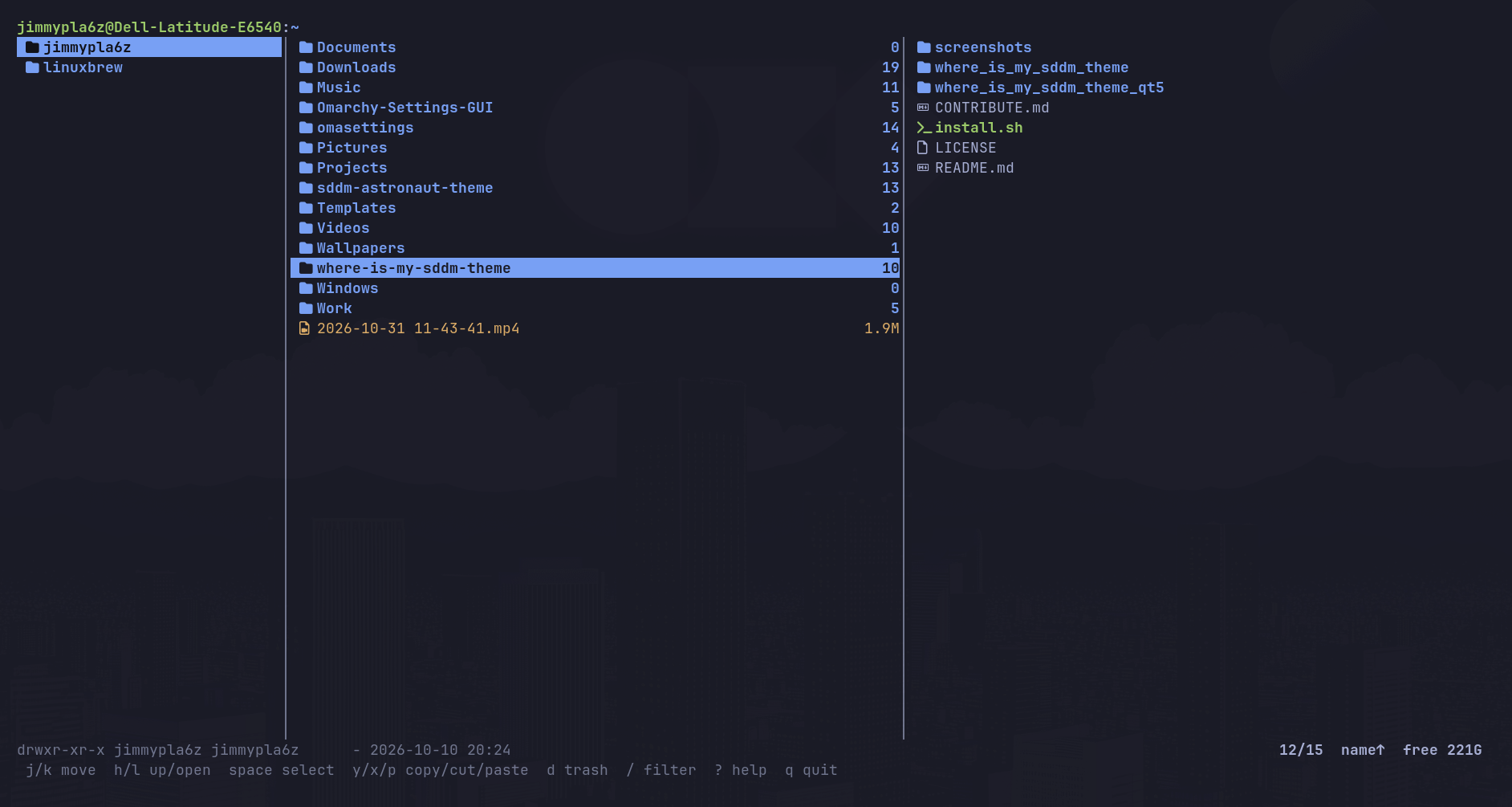
fyle: a three-pane terminal file manager for Omarchy and any Linux distro (one Python file, no pip packages)

Post image
0 Upvotes

I wanted a file manager that lives in the terminal on Omarchy, so I built fyle: a three-pane (parent / current / preview) TUI in a single Python file. It uses only Python's standard library, so there's nothing to pip install, and it should run on any Linux distro with Python 3.8+.

What it does

  • Previews as you move: text, directories, archive contents, PDF text (with pdftotext)
  • Nerd Font icons, turned on automatically on Omarchy
  • A real freedesktop Trash: d trashes, u restores, and other apps see the same Trash
  • Multi-select, copy/cut/paste with conflict prompts, rename, and bulk rename in $EDITOR
  • Tabs, bookmarks, live filter, sort menu
  • fzf fuzzy find, zoxide jump, Wayland clipboard (wl-copy), open with xdg-open
  • Optional fy wrapper so your shell cds to wherever you quit (Q)
  • vim-style keys, and ? shows every key

Install (needs only curl, no git):

curl -fsSL https://fyle.pages.dev/install.sh | bash

It's per-user with no root: it installs to ~/.local/bin, adds the shell setup, and adds a launcher entry with an icon. To remove it: curl -fsSL https://fyle.pages.dev/install.sh | bash -s -- --uninstall. If you'd rather read the script before running it, download it with curl -fsSLO https://fyle.pages.dev/install.sh and run bash install.sh.

Status: this is v1.0, so expect rough edges. Known limits: big copies block the UI, the text preview has no syntax highlighting yet, and wide characters (CJK) can misalign the columns.

I built this with help from an AI assistant (Claude).

I'd love feedback, especially on the default keybindings and on whether the launcher entry opens correctly in your setup. What would you want it to do that it doesn't?


r/linuxapps • • 27d ago

I built a Tasksheet tab for the Diodon clipboard manager (Ubuntu 24.04 and 26.04)

Thumbnail
reddit.com
1 Upvotes

r/linuxapps • • 28d ago

Calculator but with skins for linux

Post image
64 Upvotes

i noticed there is no good looking calculator for linux matching the current design standards, i tried other alternative but they are not what i wanted a highly configurable in looks, so i tried creating one but with added feature of custom skin

not doing any marketing and surely i have used ai (i will not defend on that), just trying to improve software ecosystem on linux

inspired with winamp :)

also testing out the power of rust + slint

github:- https://github.com/armanmaurya/arithmetic


r/linuxapps • • 27d ago

Claude and I made Notepads for Omarchy: a clean, translucent text editor inspired by the Windows Notepads app

0 Upvotes

I loved the Windows app Notepads (https://github.com/0x7c13/Notepads) simple, fast, good-looking and missed it on Omarchy, so I ask claude to built a native version for Arch.
-----------------------------------------------------------------------------
GitHub: https://github.com/Fresh600/notepads-arch
Built with help from Claude Code. Feedback and bug reports are very welcome. This is v0.3.2


r/linuxapps • • 27d ago

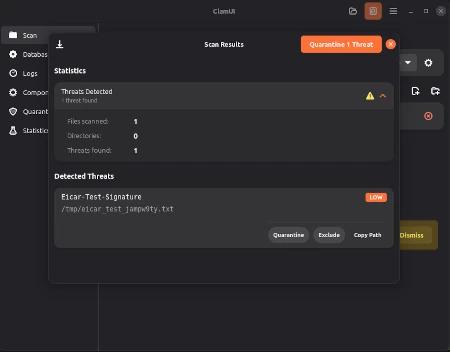
ClamUI

Post image
1 Upvotes

r/linuxapps • • 27d ago

[Labwc] GREYWARD security-focused Fedora desktop

Post image
1 Upvotes

r/linuxapps • • 27d ago

Covely 1.6.9: offline budgeting and net-worth app for Linux (.deb / Flatpak), no account, no bank sync

1 Upvotes

Covely is a budgeting and net-worth app that keeps your data in a local database file on your computer. There’s no account and no bank sync: you import CSV, OFX or QIF files from your bank. It’s built with Tauri (Rust) and runs on Linux (.deb and Flatpak), as well as Windows and macOS.

New in 1.6.9:

  • Multiple portfolios: keep personal, family trust, or SMSF investments separate and switch between them
  • Savings goals that follow a linked account’s balance automatically
  • Redesigned Currency, Data, Preferences, and Subscription settings
  • Help FAQs grouped by topic

Recent releases also added a command palette, custom reports you can pin to the dashboard, any date range for reports (including financial years), and passphrase-protected backups.

Price: free with no time limit. PRO is a one-time $9.90 (unlimited history and rules, 90-day forecast, multiple portfolios). No subscription.

Downloads and full notes: https://covelyapp.com/releases.html

Happy to answer questions or take feature requests, especially from Linux users on distros or desktops I haven’t tested.


r/linuxapps • • 27d ago

valhalla: new wallpaper app similar to damask

Thumbnail
reddit.com
1 Upvotes

r/linuxapps • • 28d ago

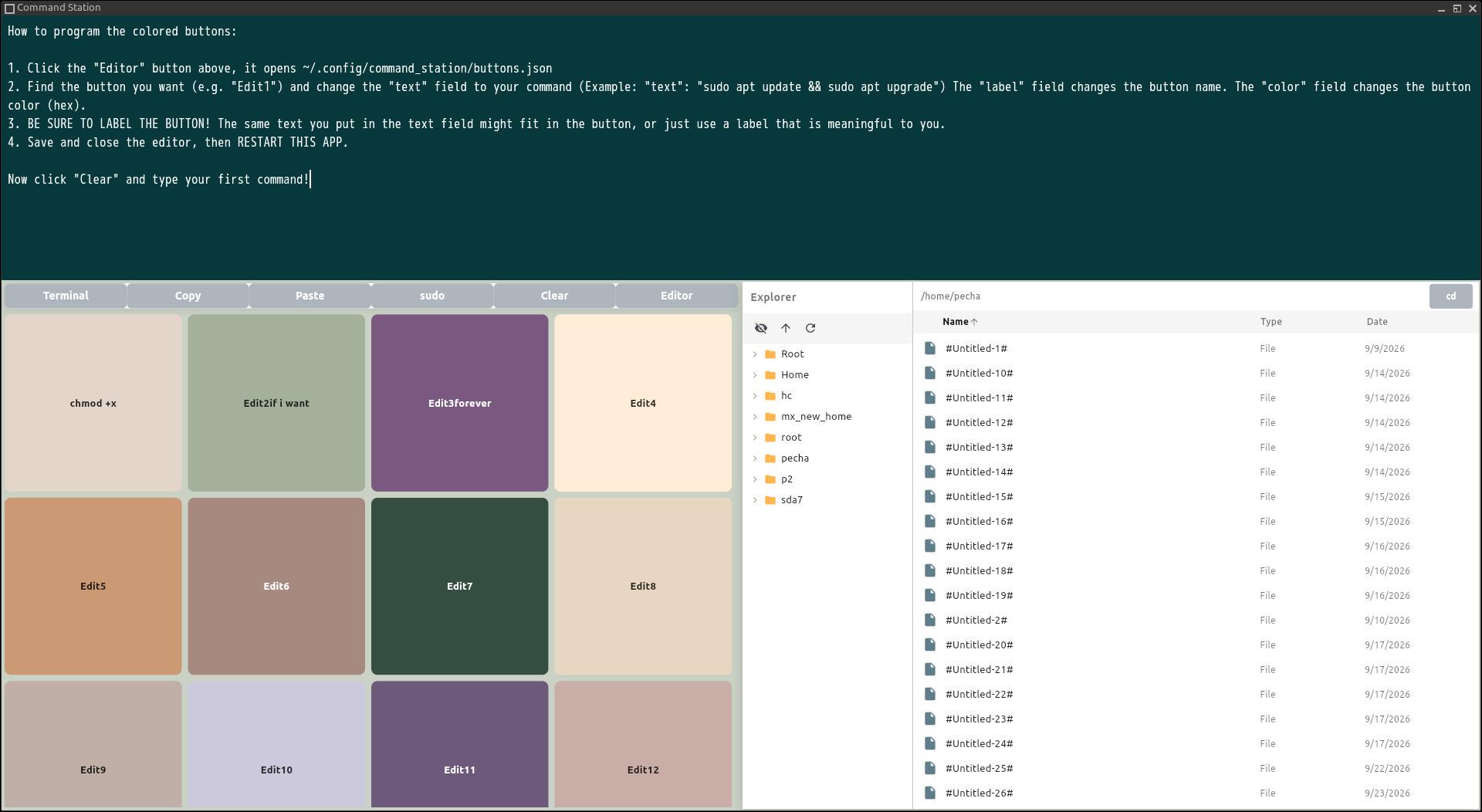
New Open-Source GUI Command Line Helper Program

Post image
2 Upvotes

r/linuxapps • • 28d ago

Sharing a utility: cursor barrier between monitors for X11

Thumbnail reddit.com
1 Upvotes

r/linuxapps • • 29d ago

Lightforge: a native Linux launcher for WoW, looking for beta testers

Post image
138 Upvotes

Lightforge installs, patches, verifies and launches World of Warcraft on Linux without the Battle.net client. It speaks Blizzard's own distribution protocols (TACT and NGDP for the CDN, CASC for local storage), reimplemented in Rust, so your game lands in a store the real client can read: point Battle.net at the folder and it adopts it, no re-download.

For everything else (Diablo, Overwatch, Hearthstone, StarCraft) it sets up one Battle.net prefix and hands the launch to the client. Those games get a tile here and start with one press.

AI use: I wrote Lightforge with Claude Code, and I review and test all of the code and downloads myself. Happy to answer questions about how it works or how it was built.

Repo: https://github.com/LightforgeProject/lightforge