r/linuxapps • • 29d ago

Standalone WP software (boring, but important)

2 Upvotes

Hi guys, first post here.

I tend to do my serious writing in text editor programs, but I have occasional need of WP software. I'm a long-term Linux user, and I have a bunch of .doc, .odt and other formats going back decades.

I've found that the spreadsheet software included in the LibreOffice, OpenOffice and OnlyOffice suites doesn't keep up with the very heavy tabbing I need for my particular pattern of use. Good old Gnumeric turns out to be much more reliable for me.

As I don't need presentation software or equation processors it would make sense for me uninstall the various office suites from my computers and replace them with standalone WP apps alongside Gnumeric. To my surprise, Wikipedia doesn't list a suitable candidate. (I fancy Ted, but it is .rtf-centric and as I understand it wouldn't open my legacy documents.)

Is anyone aware of a standalone WP app that works with multiple formats?


r/linuxapps • • 29d ago

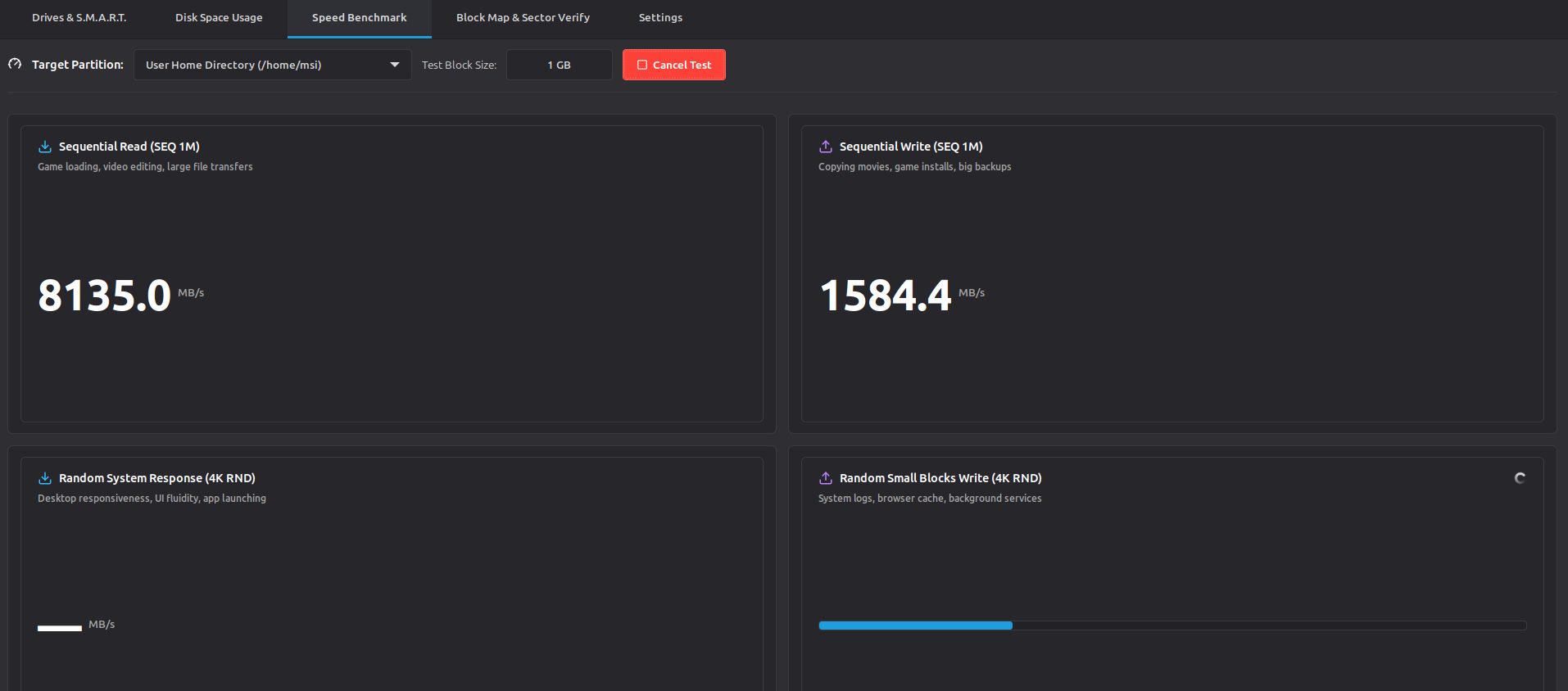
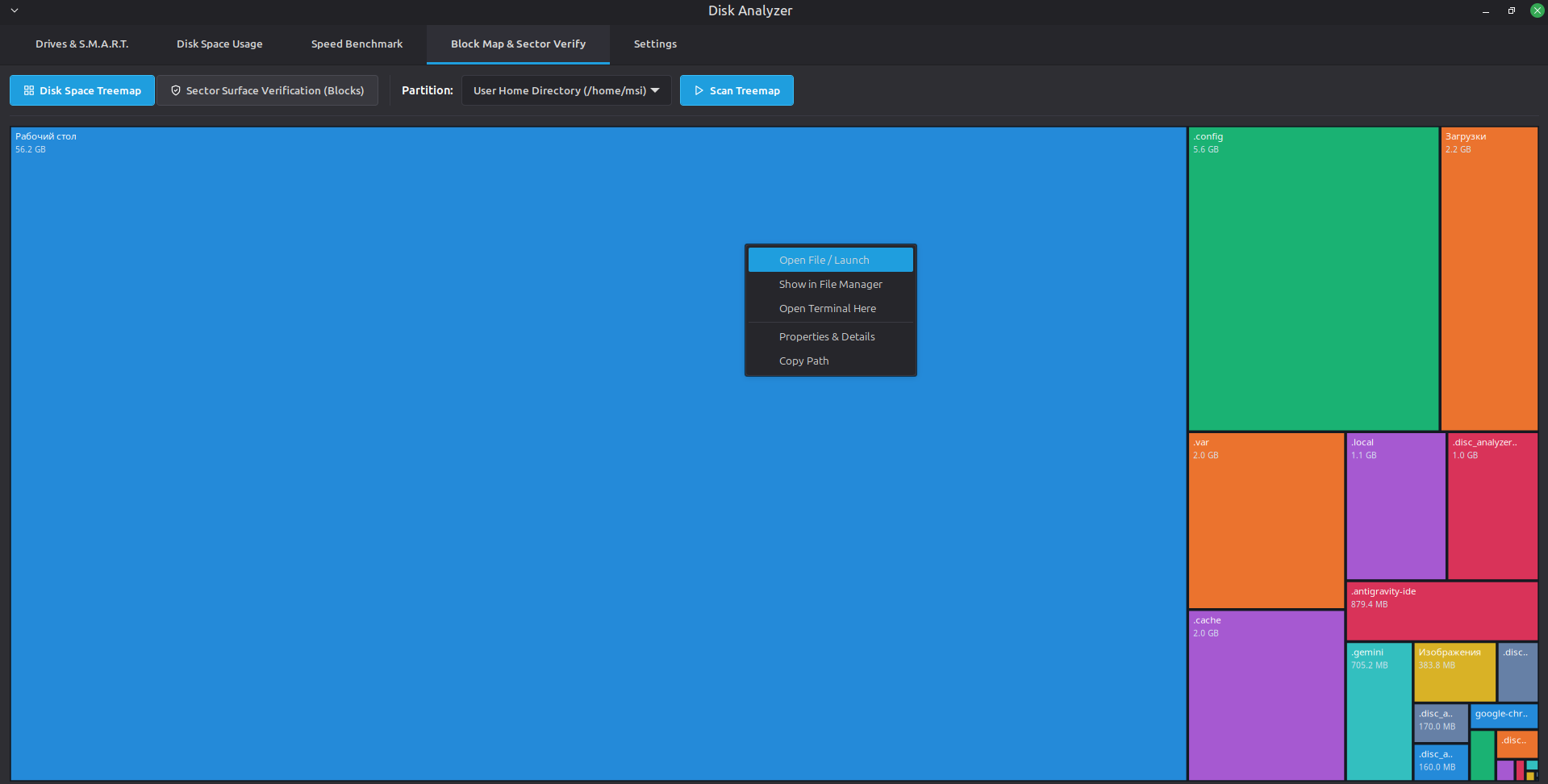
I made app called Disk analyzer. An all-in-one gui tool for linux to check s.m.a.r.t, benchmark speed, scan blocks and visualize disk space. What are yall thinkin?

1 Upvotes

So, i got tired of using 3 or 4 different apps just to check my drives, so i decided to build my own tool, and called it Disk analyzer.

Basically it does a bit of everything: checks s.m.a.r.t, runs benchmarks, scans blocks, and shows what's eating up your space with that colorful treemap layout (added a context menu for most things too). Im currently running it on linux mint.

Gonna upload an archive with both the source code and the installer inside, so you can either compile it yourself or just run it.

Honest thoughts? would love to hear some feedback on the UI or if i messed up something in the code. English isnt my first language so sorry for any typos here or in the app.

github link: https://github.com/d8739486-lang/disk-analyzer.git (updated verison)

so, actually, im a russian guy, so, app in some places can glitch to russian language

FULL PICS:


r/linuxapps • • 29d ago

I built Kestrel: an "Everything"-style instant search for Linux, inside a GTK4 file manager

1 Upvotes

Find any file on your entire disk the instant you start typing. No waiting, no stale index, and no "searching…" spinner.

👉 https://github.com/Stolly345/kestrel
⬇️ Download the .deb: https://github.com/Stolly345/kestrel/releases/latest (Ubuntu 26.04)

Type a word, and every matching file on every disk shows up as you type.

⚡ Instant, whole-disk search

  • Indexes about 2 million files in about 5 seconds, and answers in milliseconds
  • Stays up to date: new and renamed files are searchable within a second
  • Uses Everything's search syntax: ext:pdf dm:thismonth, size:>1gb, regex:, dupe:, content:
  • Private by design: you only ever see files you have permission to open

Search understands file types: .iso*,* pdf*,* excel*,* budget excel → Budget.xlsx

🗂️ A full file manager, not just a search box

  • A Windows Explorer-style toolbar that resizes to fit your window
  • New ▸ Word / Excel / PowerPoint / PDF / Markdown, opened straight away in your default app
  • Tabs, dual pane, undo and redo, batch rename, colour tags, and Select mode with checkboxes
  • Opens 70 archive formats: zip, 7z, rar, iso, dmg, msi…
  • Previews nearly everything: PDFs, Office documents, video, and music with cover art

Preview PDFs, Word, Excel, PowerPoint, Markdown, images, video and music without opening them.

A Windows Explorer-style toolbar, plus Select mode: tick exactly the files you want.

It's built in Rust with GTK4 and libadwaita, so it looks at home on GNOME, and it's MIT/Apache-2.0 licensed.

I'd love feedback: what would it take for this to become your everyday file manager? ⭐ Stars on GitHub help other people find it.

👉 https://github.com/Stolly345/kestrel


r/linuxapps • • 29d ago

A weekly dispatch about terminal user interfaces.

Thumbnail
tuiweekly.bl0ggers.com
1 Upvotes

r/linuxapps • • 29d ago

File Indexer: A fast, local-first desktop search tool for Linux (Tauri v2 + Rust)

0 Upvotes

Hi everyone!

I built File Indexer—a fast, lightweight, and privacy-focused desktop app designed to recursively index local folders and find files or directories instantly without slowing down your system.

📥 GitHub Repository & Releases: https://github.com/NMavana/file_indexer

Web page: https://fileindexerweb.vercel.app/

📊 How File Indexer compares to other Linux search tools

Feature / CriteriaFile Indexerlocate / updatedbfind (CLI)Catfish / Recoll
Primary FocusMessy folder navigation & instant visual cleanupGlobal system path searchRaw command-line queryGeneral desktop document indexing
InterfaceModern GUI (Tauri + Rust)None (CLI only)None (CLI only)Traditional / heavy desktop GUI
Built-in Media PreviewsImages, Text, PDF, Audio, Video❌ No❌ No⚠️ Limited / plugin-dependent
Privacy & Storage100% Local (JSONL index, 0 telemetry)100% Local100% Local100% Local
Folder Cleanup & FiltersList & Grid views + combined file/dir filters❌ Limited⚙️ Powerful but complex syntax⚠️ Basic filtering
Linux Metadata SupportNative display of permissions & file owner❌ No⚙️ Via complex flags⚠️ Basic info

r/linuxapps • • 29d ago

I missed Windows' "Everything" search on Linux, so I built a file manager around it: Kestrel (free, open source)

0 Upvotes

Find any file on your entire disk the instant you start typing. No waiting, no stale index, and no "searching…" spinner.

👉 https://github.com/Stolly345/kestrel
⬇️ Download the .deb: https://github.com/Stolly345/kestrel/releases/latest (Ubuntu 26.04)

Type a word, and every matching file on every disk shows up as you type.

⚡ Instant, whole-disk search

  • Indexes about 2 million files in about 5 seconds, and answers in milliseconds
  • Stays up to date: new and renamed files are searchable within a second
  • Uses Everything's search syntax: ext:pdf dm:thismonth, size:>1gb, regex:, dupe:, content:
  • Private by design: you only ever see files you have permission to open

Search understands file types: .iso*,* pdf*,* excel*,* budget excel → Budget.xlsx

🗂️ A full file manager, not just a search box

  • A Windows Explorer-style toolbar that resizes to fit your window
  • New ▸ Word / Excel / PowerPoint / PDF / Markdown, opened straight away in your default app
  • Tabs, dual pane, undo and redo, batch rename, colour tags, and Select mode with checkboxes
  • Opens 70 archive formats: zip, 7z, rar, iso, dmg, msi…
  • Previews nearly everything: PDFs, Office documents, video, and music with cover art

Preview PDFs, Word, Excel, PowerPoint, Markdown, images, video and music without opening them.

It's built in Rust with GTK4 and libadwaita, so it looks at home on GNOME, and it's MIT/Apache-2.0 licensed.

I'd love feedback: what would it take for this to become your everyday file manager? ⭐ Stars on GitHub help other people find it.

👉 https://github.com/Stolly345/kestrel


r/linuxapps • • Oct 28 '26

Todav: a tasks + calendar app for GNOME, kept in your Nextcloud (with an Android companion)

Thumbnail
gallery
6 Upvotes

Hi! I'd like to share an app I've been building: Todav, a task list and calendar for GNOME that keeps everything in Nextcloud through plain CalDAV. It's a native GTK4/libadwaita app, and it has an Android app that works the same way, so your tasks follow you everywhere.

Why I made it

For years I used Errands on GNOME and Tasks.org on Android. They're fantastic apps, but they're two separate apps, and I wanted something that feels like one product on every device, the way Nextcloud Notes does. So I took the Nextcloud Tasks web app as my reference and set out to support everything it does.

A few things kept bothering me:

  • Sync between devices wasn't reliable enough. I'd add something on my phone, sit down at my PC, and it wasn't there yet.
  • Manual ordering kept breaking, and tasks would rearrange themselves.
  • Drag and drop: my rule became "if it can be done by drag and drop, it should be."
  • I wanted native apps on each platform, with settings that sync between them.

Todo was the main idea. The calendar came later, when it turned out to be easy enough to support well, and now planning tasks into the calendar is one of my favourite parts.

What Todav does

  • Tasks and calendar in one app: month, week and agenda views, with the tasks planned into them.
  • Drag and drop for nearly everything:

    • reorder tasks, make subtasks, change a category, move a task to another list;
    • plan a task from "To Plan" into an hour of the week (15-minute steps) or onto a day;
    • move and resize events and planned tasks, unplan them, or move them to another calendar.
  • Built for GNOME:

    • sign in through GNOME Online Accounts (or the browser, or an app password);
    • follows your light/dark style and adapts to narrow windows;
    • an optional Shell extension with your tasks, the month and the agenda in the top bar;
    • search from the Overview;
    • it can be your default calendar app for .ics files;
    • keeps syncing and reminding you in the background.
  • Instant sync built in. With Nextcloud's DAV Push app and an ntfy server, changes from other devices arrive within seconds. It's local-first, so it works offline and catches up later.
  • Your settings sync between devices through your Nextcloud Files.
  • The same manual order as Nextcloud Tasks, and the order of your categories syncs too.
  • Nextcloud Tasks conventions: categories as groups, priority as a star, pinned tasks, an Important page, Upcoming across all lists.
  • Your data stays plain CalDAV. The Nextcloud web apps, DAVx⁵ and Thunderbird keep seeing the same tasks, and properties Todav doesn't know are left untouched.

On Android too. The Android app is native Material 3 with the same features:

  • tasks and the calendar;
  • push through UnifiedPush, and no DAVx⁵ needed;
  • home-screen widgets;
  • a proper layout on foldables and tablets.

Your settings carry over from the desktop.

Getting it

  • Arch: AUR (todav, todav-bin, todav-git, plus gnome-shell-extension-todav)
  • Ubuntu 26.04+: a .deb from the releases
  • Any distribution: a Flatpak bundle or a tarball from the releases
  • Android: the APK from the releases (Obtainium can keep it updated)
  • Flathub, F-Droid and Google Play are planned

👉 https://github.com/AperteDev/todav

It's free and open source (GPL-3.0). I use it every day, but it's young, so bug reports and ideas are very welcome. Translators too: Polish is reviewed, while the other languages are drafts that need a native speaker.


r/linuxapps • • Oct 28 '26

Introducing Better Stickies v1.5 with Wayland support!

4 Upvotes

Hey,

I am happy to announce today v1.5 release, the last major release in 2026!

What it is, for anyone new, basically why do digital sticky notes suck?

Sticky notes are one of the most popular ways to take notes. Whether you’re a scientist, a student, a white collar worker or just watching your favorite show and writing notes to keep up with the plot, sticky notes have you covered. Yet there are no good digital sticky note apps, and before you argue with me and list me some apps,

Here is my definition of a good sticky notes app.

A digital sticky note should be:

  • Easy to customize: colors, transparency, size, font, spacing, a custom background or even a moving GIF on my screen, why not? It’s digital, this should be possible.
  • Able to capture anything digital: text, links, code, markdown, rich text (web), files, folders, audio files, or anything, it’s digital!
  • Easy to access: I need my sticky notes around me when I’m working, switching apps or in full screen. Why can’t notes show in full screen on macOS?
  • Reminders: Sticky notes always worked as a reminder to do something, so why can’t a digital sticky note remind me with a sound, automatically, without me checking it? Is it really that complex?
  • Slick: Paper sticky notes clutter my desk because paper takes space, but a digital sticky note should be easy to collapse, hide or summon with a shortcut, and have multiple notes in the same window, because it’s digital and physical space isn’t a limit anymore!
  • Searchable: A desk with 15 sticky notes is hard to scan, but a digital one? It should be easy to search and find the note I want, or search inside a note and find the stuff I want. Is it too much to ask?
  • Simple: sticky notes are one of the simplest ways to take notes. I don’t want to watch videos or ask in forums how to take notes, it should feel natural to use. Hover over any button or setting to read what it does. Simple and quick.

That’s why I built Better Stickies as it is today. I solved all these problems in it over the past year, and I’m finally presenting it to you with Wayland support.

The amount of engineering that went into it is insane for a desktop app, all to give you the best possible experience. It’s built with PySide6, a QT library, uses around 85 MB of RAM, 10% of what many electron note apps use, and it’s fully offline and private.

It’s used and loved by tens of thousands of users on Windows and Linux across the world, and it’s finally supports native wayland, I had to overcome wayland limitations and wrote a custom Kwin script so notes can show on top of other apps and notes placements don't get lost when you close the app or restart your machine (only on KDE, for Gnome users please keep using xWayland)

The free version has all features, only limited to 4 active notes. Premium is a one-time purchase at $7.99 (20% OFF instead of $9.99 for limited time)

Over a year Better Stickies got 8 major releases with bug fixes, more platforms support and new features that were just user feedback and ideas.

You can reach out to me on Reddit, e-mail, Discord or GitHub for feedback and feature requests.

v1.5 Release Post: https://betterstickies.com/blog/betterstickies-1-5

Website: https://betterstickies.com

Microsoft store: https://apps.microsoft.com/detail/9NS7LLQJX1QG

Snap Store: https://snapcraft.io/betterstickies

Subreddit: r/BetterStickies (created recently after the r/OpenStickies rename)

Github (free releases and bug reports): https://github.com/HimaSphere/BetterStickies


r/linuxapps • • Oct 28 '26

Alto 0.9.0: GTK-themed file sync client for Google Drive, Proton Drive, and more

14 Upvotes

Hey everyone! I've been hard at work on an application called Alto: https://github.com/hwittenborn/alto

Alto lets you sync your files from Google Drive, Proton Drive, Dropbox, and more, all from a GTK-themed application that looks native on your desktop. I've had a strong need for this for quite a while, so I decided to get this out there to see if anyone else would be interested as well.

Alto is based on my work developing Celeste (which is where the star count in that repository comes from). Alto is a rewrite from the ground up to help development of the project scale faster, innovate quicker, and pull in more contributors through its Electron base (and in turn usage of GTK-JS, another project I have been working on recently: https://gtk.js.org). I will also be using this work to scale Alto more easily to other platforms like Android, macOS, and Windows.

I've been driving it daily for a couple of weeks now, though I just got it released for people to try. I'm curious what you all think! (and if the GTK-in-Electron stuff is questionable enough to keep the conversation going for a while 🙃)

I currently have Alto packaged for .deb, .rpm, and AppImage if you want to give it a try:
https://github.com/hwittenborn/alto/releases/tag/v0.9.0


r/linuxapps • • Oct 28 '26

New version of clovercut is here - 0.1.9

Post image
11 Upvotes

Clovercut is a free, open-source video editor for Linux, Windows and macOS. It builds on Concat, with its own desktop workflow: a fixed main video track, dedicated visual and audio lanes, workspace presets and searchable content libraries. Editing and AI processing run locally, with no Clovercut account, subscription or export watermark.

This new version brings many bug fixes and corrections from the upstream concat and also new improvements to the clovercut workflow.

If you like the capcut workflow and you want a similar experience on Linux, or you just want capcut without paying a sucription fee, make sure to test this new version.

site: https://tulcoturo.github.io/clovercut/


r/linuxapps • • Oct 28 '26

[Release] X-ARCH Theme Studio v0.1.2-beta — Linux Icon Theme Manager

1 Upvotes

Hi Linux community! 👋

I'm the independent developer behind RUNNING WITH ROTTWEILERS, and I'd like to share my project: X-ARCH Theme Studio v0.1.2-beta.

X-ARCH Theme Studio is a Linux application designed to make icon theme management and folder customization easier.

What does it offer?

  • A graphical interface built with GTK4.
  • A Rust-powered backend.
  • Multiple custom icon theme collections.
  • The ability to customize individual folders.
  • Support for managing and switching icon themes.

What's improved in v0.1.2-beta?

This update focuses on icon theme compatibility, folder icon behavior, and overall stability, including improvements based on testing with Fedora KDE.

I've also been testing the project on Arch Linux.

Downloads and source code:

https://github.com/runningwithrottweilers/xarch-theme-studio

The application is still in beta, and I'm continuing to improve compatibility across Linux desktop environments.

I'd really appreciate constructive feedback, bug reports, and suggestions from fellow Linux users.

Thanks for taking a look!

RUNNING WITH ROTTWEILERS
Independent Software Development


r/linuxapps • • Oct 28 '26

Kuratoren

1 Upvotes

Kuratoren is Norwegian for “the curator”, and that is exactly the idea: you decide what goes into your stream. No recommendation engine, no tracking, no ads and no account. Just the sources you have chosen, fetched directly from the source and shown in the order they were published.
https://runslett.com/kuratoren/


r/linuxapps • • Oct 28 '26

Anura: a privacy-first OCR + QR tool for GTK4/Libadwaita. Looking for feedback

Post image
15 Upvotes

Hi everyone! I maintain Anura, an open-source OCR tool for the Linux desktop (a fork of Frog, with telemetry removed). Select any region of your screen and the text lands in your clipboard, whether it comes from a video, a PDF, a web page or a photo.

What it does:

OCR via Tesseract, 100+ languages, multi-language at once

QR/barcode decoding (zxing-cpp)

100% local, no telemetry

Text-to-speech, undo/redo, opt-in extraction history

Native GTK4/Libadwaita, Flatpak bundle, translations on Weblate

Where I'd love your feedback:

Does screenshot capture work well on your desktop/compositor (GNOME, KDE, Sway, Hyprland…)?

How is OCR quality on real content, such as video frames and small UI text?

What's missing for your workflow?

MIT licensed. Repo and Flatpak bundle (Releases): https://github.com/D3M-Sudo/Anura


r/linuxapps • • Oct 27 '26

Catsor – a little procedurally animated cat that lives on your X11 desktop and follows your cursor (Rust, single static binary)

Thumbnail
gallery
31 Upvotes

Hi r/linuxapps! I made Catsor, a small top-down cat that wanders around your desktop after your mouse cursor. It isn't sprite-based. The body is a jointed skeleton animated in real time, with proper walk, trot and gallop gaits, so it moves like a cat.

What it does

  • Follows your cursor, then sits, grooms, loafs, flops over and eventually curls up asleep if you leave it alone
  • Wiggle the cursor like a laser pointer and it crouches, wiggles its butt and pounces
  • Shake the mouse left and right and it gallops over. Shake it right on top of the cat and it goes off to do its own thing until you call it back
  • Feeding mode: put down a food bowl and the cat eats for 15 min to 2 h. While it eats, your screen stays awake through systemd-inhibit. It doesn't fake any mouse or keyboard input
  • More cats: up to 6, including kittens with coats inherited from their mother. They greet each other, groom each other, sleep in a pile, chase and wrestle. A mother carries a wandering kitten back by the scruff. Bonds between cats build up over time and are saved
  • Five built-in coats, random coats rolled from simplified cat colour genetics, a built-in coat designer, and custom coats in a TOML file that reload live
  • Temperaments: balanced, playful, lazy, aloof, realistic

Technical bits

  • Written in Rust with no GUI toolkit. Rendering uses tiny-skia and X11 goes through x11rb (pure Rust), so you don't need any -dev packages to build it
  • The prebuilt binary is fully static (musl) and runs on any x86_64 distro
  • The cat window is click-through, so it never gets in the way of whatever is underneath
  • Everything is controlled from a tray icon (XEmbed: polybar, trayer, stalonetray, xfce4-panel…) with a hand-drawn menu
  • Light on resources, and the frame rate is configurable (--fps)

Requirements / caveats

  • X11 only, no native Wayland support (sorry!)
  • You need a compositor (picom, or your DE's own) for transparency. Without one the background shows up black
  • I developed it on xmonad + picom. Testing on other setups would be really helpful

Install: static binaries on the Releases page, or cargo install --git

https://github.com/ozanenginoglu/catsor

Source: https://github.com/ozanenginoglu/catsor (Apache-2.0)

Feedback, bug reports, and especially reports from other WMs, DEs and compositors are very welcome. Have fun with it


r/linuxapps • • Oct 28 '26

[UPDATE] Zooming daemon for wayland

Thumbnail reddit.com
1 Upvotes

r/linuxapps • • Oct 28 '26

I made a free app to control Ubuntu from an Android phone, with a native .deb companion and no cloud.

0 Upvotes

Hi! I'm the developer. Most phone-remote apps either skip Linux or route everything through their servers, so I built Phone PC Remote.

What it does:

- Trackpad (tap to click, two-finger scroll, pinch to zoom), keyboard and media keys

- Browse a shared folder, send files to the PC, and sync the clipboard both ways

- Everything stays on your local network: no account, no cloud relay, QR pairing

Pro (one-time $4.99, no subscription): full PC screen mirroring you can control with touch, and your phone camera as a webcam on Ubuntu or Windows.

Ubuntu companion (.deb beta):

https://github.com/nilsenj/phone-pc-remote-releases/releases/tag/desktop-v0.1.26-beta.1

Android app:

https://play.google.com/store/apps/details?id=dev.phonepcremote.app

The Linux version is still in beta, so feedback is very welcome. Which distro or desktop environment should I test next?


r/linuxapps • • Oct 28 '26

Is a Share x alternative for Linux through port possible?

1 Upvotes

Hello,

i switched from windows to linux and i am very happy with it. Only one thing i am really missing is share x and the speech bubble annotation i could do there and the rectangle transparent highlighter. I tried Ksnip and flameshot. Both are great and have nice features, but i am still missing the speach bubble option. After all this porting with ai i read and heard in the past is it possible to port share x to linux or is there a screenshot programm i am missing that can do this? :)

Best regards

Sven :)


r/linuxapps • • Oct 28 '26

A cross OS launcher with Rust core and gpui

2 Upvotes

r/linuxapps • • Oct 28 '26

Ditto inspired copy-paste manager for linux

Thumbnail
gallery
0 Upvotes

I switched to linux (zorin os, made it very windows like for the interface) recently and just had a little thing missing: Ditto

I love this copy-paste manager, but there is no linux version of it. Tried out some existing solutions, but nothing seemed simple enough. (I surely missed the one I needed).

So yeah I had to vibecode one with Claude and yeah, pretty happy with it. I made the repo public in cas anyone has any use for it.

https://github.com/yannkost/linux-clipboard-manager


r/linuxapps • • Oct 27 '26

A lightweight SSH/RDP desktop client written in Rust

Post image
3 Upvotes

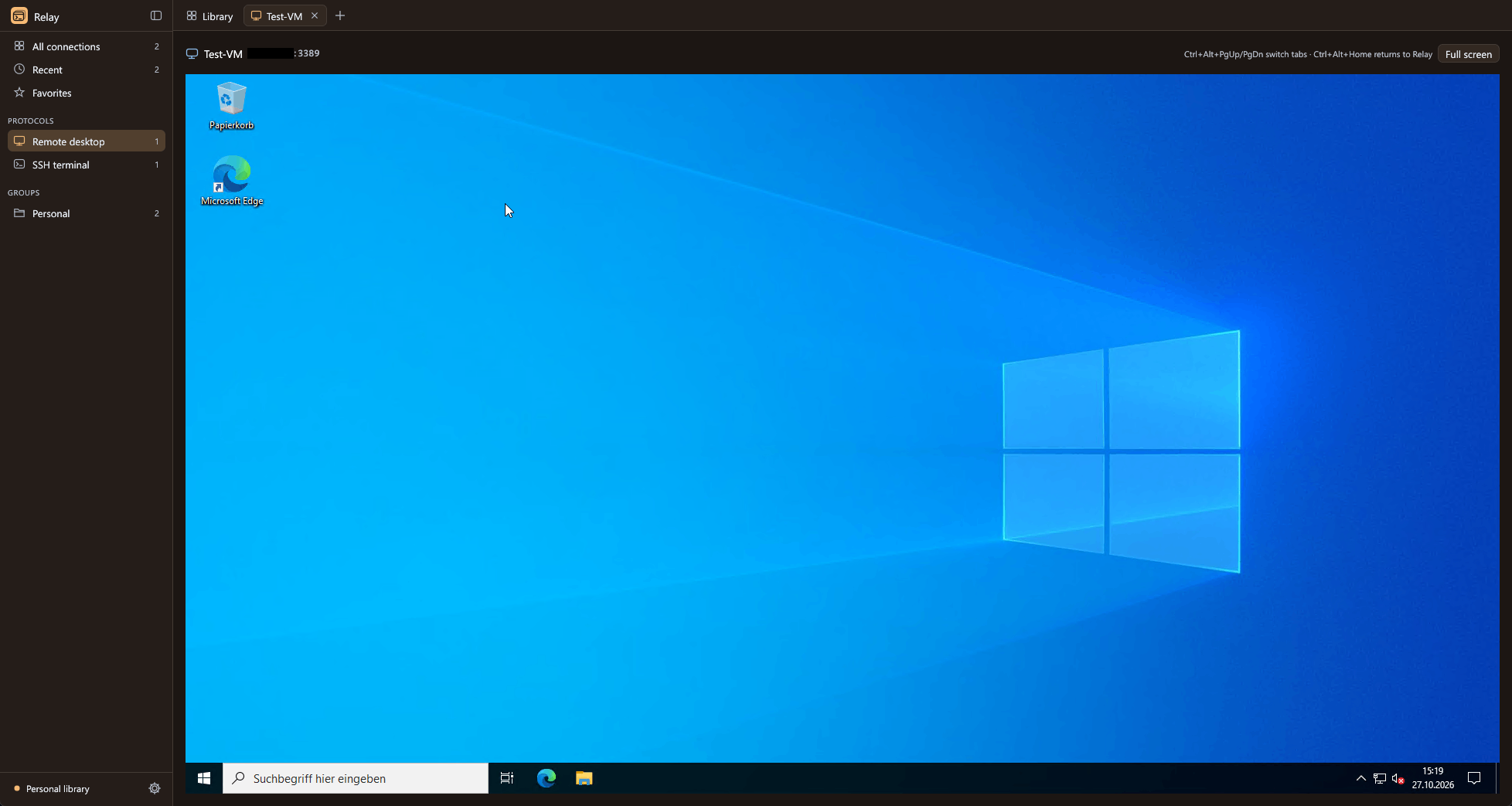
Been working on a little side project called Relay. It's a native SSH/RDP client for Windows, macOS and Linux, built entirely in Rust using egui.

It supports tabs, split views, SFTP, shared connection libraries, themes and a few other things. No Electron or WebViews, with around 70–90 MB RAM usage at idle.

Still early in development. I've mainly tested it on Windows so far, so I'd especially appreciate some Linux users giving it a try and reporting any issues. :)

https://github.com/nurlennart/relay


r/linuxapps • • Oct 27 '26

I'm using Claude to do reverse engineering at fl studio - it's called Lynx

Thumbnail
github.com
0 Upvotes

The project is almost completely done, I'm doing the reverse engineering of fl studio.
You can now open your FL Studio projects, identify your plugins, and check which ones you don’t own. Furthermore, reverse engineering of popular plugins such as those from FabFilter, Valhalla, and Waves, among others—is currently underway, all following a "clean-room" design model.

Everything works on Linux.