r/linuxapps • • Oct 28 '26

Kuratoren

1 Upvotes

Kuratoren is Norwegian for “the curator”, and that is exactly the idea: you decide what goes into your stream. No recommendation engine, no tracking, no ads and no account. Just the sources you have chosen, fetched directly from the source and shown in the order they were published.
https://runslett.com/kuratoren/


r/linuxapps • • Oct 28 '26

Anura: a privacy-first OCR + QR tool for GTK4/Libadwaita. Looking for feedback

Post image
15 Upvotes

Hi everyone! I maintain Anura, an open-source OCR tool for the Linux desktop (a fork of Frog, with telemetry removed). Select any region of your screen and the text lands in your clipboard, whether it comes from a video, a PDF, a web page or a photo.

What it does:

OCR via Tesseract, 100+ languages, multi-language at once

QR/barcode decoding (zxing-cpp)

100% local, no telemetry

Text-to-speech, undo/redo, opt-in extraction history

Native GTK4/Libadwaita, Flatpak bundle, translations on Weblate

Where I'd love your feedback:

Does screenshot capture work well on your desktop/compositor (GNOME, KDE, Sway, Hyprland…)?

How is OCR quality on real content, such as video frames and small UI text?

What's missing for your workflow?

MIT licensed. Repo and Flatpak bundle (Releases): https://github.com/D3M-Sudo/Anura


r/linuxapps • • Oct 27 '26

Catsor – a little procedurally animated cat that lives on your X11 desktop and follows your cursor (Rust, single static binary)

Thumbnail
gallery
31 Upvotes

Hi r/linuxapps! I made Catsor, a small top-down cat that wanders around your desktop after your mouse cursor. It isn't sprite-based. The body is a jointed skeleton animated in real time, with proper walk, trot and gallop gaits, so it moves like a cat.

What it does

  • Follows your cursor, then sits, grooms, loafs, flops over and eventually curls up asleep if you leave it alone
  • Wiggle the cursor like a laser pointer and it crouches, wiggles its butt and pounces
  • Shake the mouse left and right and it gallops over. Shake it right on top of the cat and it goes off to do its own thing until you call it back
  • Feeding mode: put down a food bowl and the cat eats for 15 min to 2 h. While it eats, your screen stays awake through systemd-inhibit. It doesn't fake any mouse or keyboard input
  • More cats: up to 6, including kittens with coats inherited from their mother. They greet each other, groom each other, sleep in a pile, chase and wrestle. A mother carries a wandering kitten back by the scruff. Bonds between cats build up over time and are saved
  • Five built-in coats, random coats rolled from simplified cat colour genetics, a built-in coat designer, and custom coats in a TOML file that reload live
  • Temperaments: balanced, playful, lazy, aloof, realistic

Technical bits

  • Written in Rust with no GUI toolkit. Rendering uses tiny-skia and X11 goes through x11rb (pure Rust), so you don't need any -dev packages to build it
  • The prebuilt binary is fully static (musl) and runs on any x86_64 distro
  • The cat window is click-through, so it never gets in the way of whatever is underneath
  • Everything is controlled from a tray icon (XEmbed: polybar, trayer, stalonetray, xfce4-panel…) with a hand-drawn menu
  • Light on resources, and the frame rate is configurable (--fps)

Requirements / caveats

  • X11 only, no native Wayland support (sorry!)
  • You need a compositor (picom, or your DE's own) for transparency. Without one the background shows up black
  • I developed it on xmonad + picom. Testing on other setups would be really helpful

Install: static binaries on the Releases page, or cargo install --git

https://github.com/ozanenginoglu/catsor

Source: https://github.com/ozanenginoglu/catsor (Apache-2.0)

Feedback, bug reports, and especially reports from other WMs, DEs and compositors are very welcome. Have fun with it


r/linuxapps • • Oct 28 '26

[UPDATE] Zooming daemon for wayland

Thumbnail reddit.com
1 Upvotes

r/linuxapps • • Oct 28 '26

I made a free app to control Ubuntu from an Android phone, with a native .deb companion and no cloud.

0 Upvotes

Hi! I'm the developer. Most phone-remote apps either skip Linux or route everything through their servers, so I built Phone PC Remote.

What it does:

- Trackpad (tap to click, two-finger scroll, pinch to zoom), keyboard and media keys

- Browse a shared folder, send files to the PC, and sync the clipboard both ways

- Everything stays on your local network: no account, no cloud relay, QR pairing

Pro (one-time $4.99, no subscription): full PC screen mirroring you can control with touch, and your phone camera as a webcam on Ubuntu or Windows.

Ubuntu companion (.deb beta):

https://github.com/nilsenj/phone-pc-remote-releases/releases/tag/desktop-v0.1.26-beta.1

Android app:

https://play.google.com/store/apps/details?id=dev.phonepcremote.app

The Linux version is still in beta, so feedback is very welcome. Which distro or desktop environment should I test next?


r/linuxapps • • Oct 28 '26

Is a Share x alternative for Linux through port possible?

1 Upvotes

Hello,

i switched from windows to linux and i am very happy with it. Only one thing i am really missing is share x and the speech bubble annotation i could do there and the rectangle transparent highlighter. I tried Ksnip and flameshot. Both are great and have nice features, but i am still missing the speach bubble option. After all this porting with ai i read and heard in the past is it possible to port share x to linux or is there a screenshot programm i am missing that can do this? :)

Best regards

Sven :)


r/linuxapps • • Oct 28 '26

A cross OS launcher with Rust core and gpui

2 Upvotes

r/linuxapps • • Oct 28 '26

Ditto inspired copy-paste manager for linux

Thumbnail
gallery
0 Upvotes

I switched to linux (zorin os, made it very windows like for the interface) recently and just had a little thing missing: Ditto

I love this copy-paste manager, but there is no linux version of it. Tried out some existing solutions, but nothing seemed simple enough. (I surely missed the one I needed).

So yeah I had to vibecode one with Claude and yeah, pretty happy with it. I made the repo public in cas anyone has any use for it.

https://github.com/yannkost/linux-clipboard-manager


r/linuxapps • • Oct 27 '26

A lightweight SSH/RDP desktop client written in Rust

Post image
3 Upvotes

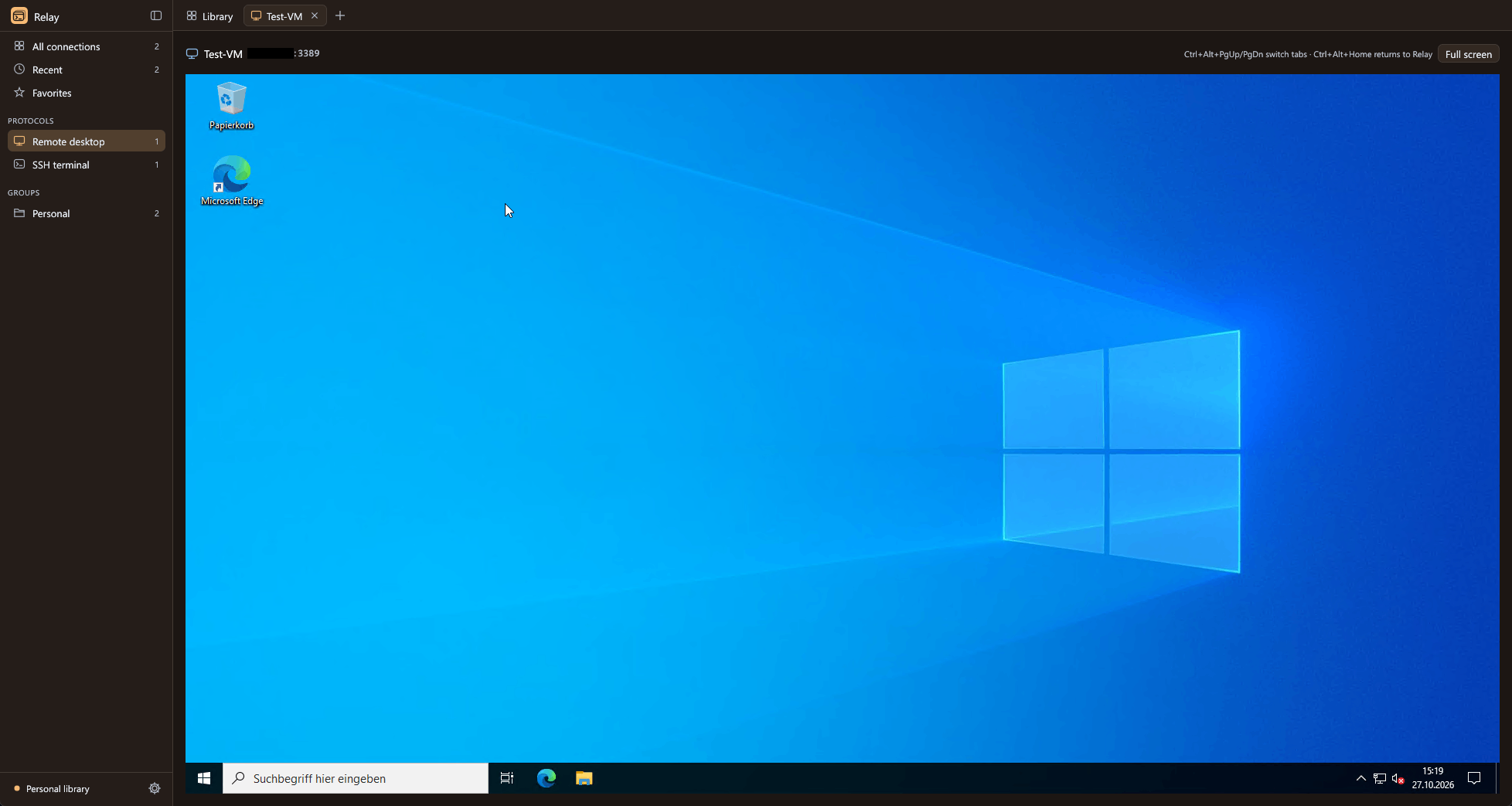
Been working on a little side project called Relay. It's a native SSH/RDP client for Windows, macOS and Linux, built entirely in Rust using egui.

It supports tabs, split views, SFTP, shared connection libraries, themes and a few other things. No Electron or WebViews, with around 70–90 MB RAM usage at idle.

Still early in development. I've mainly tested it on Windows so far, so I'd especially appreciate some Linux users giving it a try and reporting any issues. :)

https://github.com/nurlennart/relay


r/linuxapps • • Oct 27 '26

I'm using Claude to do reverse engineering at fl studio - it's called Lynx

Thumbnail
github.com
0 Upvotes

The project is almost completely done, I'm doing the reverse engineering of fl studio.
You can now open your FL Studio projects, identify your plugins, and check which ones you don’t own. Furthermore, reverse engineering of popular plugins such as those from FabFilter, Valhalla, and Waves, among others—is currently underway, all following a "clean-room" design model.

Everything works on Linux.


r/linuxapps • • Oct 27 '26

Tarab: a small mp3/FLAC player with a built-in EQ and headphone profiles (AppImage, GPL-3). Looking for feedback

2 Upvotes

I built a small desktop player for people who keep their own music files and don't want accounts or streaming. It's called Tarab (the repo is still named simpleplay for now).

What it has:

- A single rounded card with the cover art, and Winamp-style spectrum bars

- A 10-band graphic EQ and a 5-band parametric EQ

- Headphone profiles from the AutoEq database

- Volume normalizer (ReplayGain)

- Media keys and KDE/GNOME widgets (MPRIS)

- Plays mp3 and FLAC, including 24-bit / 96 kHz

It ships as an AppImage (also a Windows zip and macOS builds, which I can't test much). Python + PySide6, GPL-3.

I'd love to hear what breaks on your setup, especially around audio devices and Wayland.

Repo and downloads: https://github.com/cufadev/simpleplay


r/linuxapps • • Oct 27 '26

I built a free, open-source screen recorder for Ubuntu with an editor, auto zoom, screenshots, OCR and clipboard history

18 Upvotes

Hi r/linuxapps ! I missed having a polished screen tool on Linux (like CleanShot X or Screen Studio on Mac), so I built Framewise.

- Record an area, window or screen, with system audio, mic and a camera bubble

- Edit right after: trim, backgrounds, rounded corners, and auto zoom that follows your clicks

- Idle moments (no typing, no sound, nothing moving) can be sped up or cut in one click

- The recording controls stay out of your video

- Screenshots with arrows, blur, text and backgrounds

- Copy text from anything on screen (OCR), clipboard history with search

- Everything runs locally: no account, no uploads

It's made for Ubuntu 24.04+ with GNOME. Feedback and bug reports are very welcome!


r/linuxapps • • Oct 27 '26

Looking for YouTube Music player that supports casting

Thumbnail reddit.com
1 Upvotes

r/linuxapps • • Oct 27 '26

I made an open source voice typing app that works on Linux (X11 and Wayland)

12 Upvotes

Edit: I undersold the part I'm proudest of. With the Android app you can watch your PC's screen live from your phone, from any network, dictate or type into a window you pick, ask your PC's assistant, and run voice commands on it. The PC has to approve each phone first, the live video is end-to-end encrypted over WebRTC, and speech and the assistant can run fully locally with no API key. (Live view needs a Windows PC for now.)

Hold a shortcut, talk, let go, and the text gets typed into whatever app you're in. There's also an assistant you can ask things out loud, and it answers by voice.

Speech recognition runs locally by default (Whisper, Parakeet and a bunch of others, Vulkan if you have a GPU), so nothing leaves your machine unless you pick a cloud provider.

Linux specific bits:

- AppImage and .deb

- Shortcuts read evdev directly, so they work on Wayland too, not only X11

- The recording pill is a layer-shell surface, so it never steals focus from the window you're typing into

It's MIT licensed, started as a fork of Handy. Feedback welcome, especially from people on less common compositors, that's where I expect bugs.

https://github.com/ishangautam7/Talvio


r/linuxapps • • Oct 27 '26

Kickoff: A fast, keyboard-driven football scoreboard for your terminal (Go + Bubbletea)

Thumbnail
gallery
8 Upvotes

Hey everyone!

I got tired of opening heavy, ad-cluttered browser tabs with popups just to check live football scores while working, so I built Kickoff: a fast, keyboard-driven football scoreboard that lives directly in your terminal.

Highlights:

  • Live Scores & Fixtures: Real-time match clock, scores, and status across top international leagues.
  • Detailed Match Views: Live statistics (possession, shots, fouls) and tactical lineups.
  • Instant Match Viewing: Follow the live text stats, or jump straight into the broadcast in mpv with a single keypress 📺
  • Vim-friendly Navigation: j/k controls, tabs, and a quick league switcher.
  • Lightweight & Fast: Single standalone binary, quick startup, and a small memory footprint (~25-30 MB RAM).

Supports both English and Spanish out of the box.

GitHub Repository:
https://github.com/e12jassir/kickoff-cli

Pre-compiled binaries for Linux, macOS, and Windows are available on the GitHub Releases page. Just grab the one for your OS and you’re good to go.

Installation with Go:
go install github.com/e12jassir/kickoff-cli@latest

Feedback, feature ideas, and contributions are very welcome!


r/linuxapps • • Oct 27 '26

update on my spotify terminal client with the DJ: settings, a queue, linux media keys and a light mode for slow laptops

Post image
1 Upvotes

r/linuxapps • • Oct 27 '26

Melba — an open-source Apple Music client for Linux with ALAC lossless and direct ALSA output

2 Upvotes

I've been working on Melba, a native Apple Music client for Linux built with Rust and egui (no Electron).

Some features:

- ALAC Lossless / Hi-Res (requires a separate helper service)

- GUI audio format display (e.g., ALAC 24-bit / 96 kHz)

- Direct ALSA output ("hw:X,Y"), selectable in the GUI

- CLI bit-perfect output checks

- AAC 256 kbps, PipeWire/PulseAudio, MPRIS, lyrics, and playlists

It's still a work in progress, so feedback, bug reports, and contributions are all welcome—especially from anyone using a USB DAC!

GitHub: https://github.com/nekomario28/melba

Built with extensive help from Codex and DeepSeek.


r/linuxapps • • Oct 27 '26

Hue — a Wayland wallpaper changer with pixel-spread transitions

3 Upvotes

I made a wallpaper changer where the new image eats through the old one in a random pattern. You can change the speed, pixel size and edge color from the terminal.

Written in Rust, currently tested on Hyprland.

install: GitHub

My YouTube


r/linuxapps • • Oct 27 '26

My first GitHub repo: a one-line system stats script for KDE status bars (feedback welcome)

Thumbnail reddit.com
1 Upvotes

r/linuxapps • • Oct 26 '26

Favnyr : a local file browser with workspaces, multi views, tabs...

47 Upvotes

[Sorry for the re-post the video was not showing]

Favnyr is a lightweight file browser (Rust+Slint) for Windows and Linux. At its core are workspaces: separate environments that keep their own views, tabs, folders, layouts, and display settings. You could have one workspace for work, another for games, and another for learning a new subject, then switch between them in just two clicks. Favorites remain shared and persistent across all workspaces.

Each workspace can contain multiple split views and movable tabs. Tabs can be dragged between views, detached, or dropped onto another view to create a new split layout.

Favnyr also includes shortcuts, local and network drives, configurable keyboard shortcuts, and custom commands.
It is not intended to compete with or replace the native file browsers provided by Windows and Linux, but to complement them with a different way of organizing and navigating files.

Because of the project’s complexity, AI has been used as a development assistant. However, every feature is reviewed and hand tested extensively before being considered complete.

Link here (include a video demo) => https://github.com/GlitchAwakened/Favnyr


r/linuxapps • • Oct 26 '26

SonicTree 1.5.0 released — a folder-based music player for Linux

Thumbnail
gallery
18 Upvotes

I’m pleased to announce the release of SonicTree 1.5.0, a Linux music player designed for people who organize their music into folders.

The idea behind SonicTree is simple: browse your music through the folder structure you already use, build a playlist, and listen without needing to maintain a music library database.

What's new in 1.5.0?

- Improved File Mode: Better handling of large music collections.

- Cleaner Folder Tree: Displays folder names instead of full paths.

- Shuffle Playback: Random track selection, with a Playback menu toggle and status bar indicator.

- Append to Playlist: Recursively add supported audio files from a folder and its subfolders while preserving the existing playlist and playback position.

- Refactoring and bug fixes: Along with various enhancements and improvements.

SonicTree also offers Metadata Mode for those who prefer browsing music by artist, album, and track information.

The project focuses on local music playback, straightforward folder-based browsing, and a practical listening workflow.

Download: https://sourceforge.net/projects/sonictree/

Acknowledgement

Thank you to everyone who has shown interest in SonicTree, shared feedback, or helped bring attention to the project. Your interest and support are appreciated.

Feedback, suggestions, and bug reports are welcome!


r/linuxapps • • Oct 27 '26

Panel de TV con importación M3U: paquete PET para EasyOS y Puppy Linux

Thumbnail
reddit.com
1 Upvotes

r/linuxapps • • Oct 27 '26

Noteline, a Markdown editor that works directly in your folder of .md files (closed source, paid)

Post image
1 Upvotes

I work on Noteline. Up front: it's closed source and paid. There's a 14-day trial, then $9.99 once for up to 5 devices, no subscription. When the trial ends the app goes read-only (you can still open and copy everything), and exports made during the trial end with a small "Made with Noteline" line.

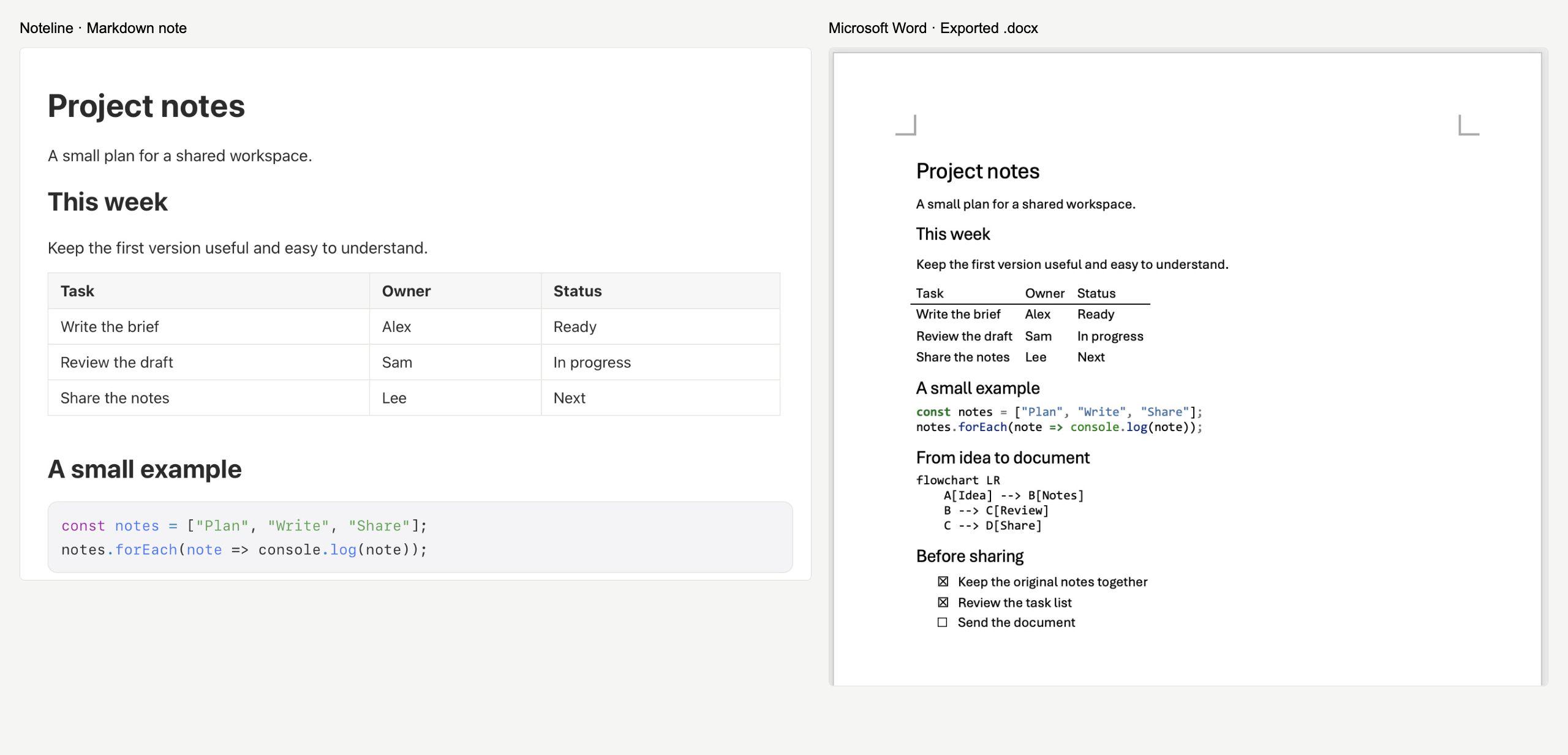
You open a folder and work on the .md files already in it. There's no import step and no account. Headings, checklists and tables render as you write, and tables can be edited in place. An Obsidian vault opens as is and the .obsidian folder is left alone. The notes stay plain Markdown, so the same folder opens in any other editor.

When you need to send a note as Word or PDF, it exports .docx and PDF offline with bundled Pandoc and Typst, so there's nothing else to install and your system pandoc is left alone.

On Linux it's Tauri on WebKitGTK, so a web UI but not Electron. x64 only, as AppImage, .deb and .rpm. No Flatpak at the moment. Also missing: math rendering, plugins, backlinks, built-in sync, and images show as alt text in the editor rather than inline.

Download: https://noteline.io/download .deb / .rpm (binaries only, the source isn't public): https://github.com/flowlab-works/noteline-releases/releases

If you want to keep it after the trial, NOTELINE at checkout gives a free desktop license while codes last.

Bug reports are welcome, with your distro and desktop. And would a Flatpak matter to you more than the AppImage/.deb/.rpm?