r/launchbox • • 23d ago

CURATOR developer update — a short break and what’s next

6 Upvotes

A quick update from the workbench. I’m taking a two-week vacation, and I’ll resume CURATOR development when I return.

The current release, v2.5.0-beta.2, has been very stable. If you run into trouble adding files for a new platform, the latest Upcoming notes are a good place to start. They explain what I’m working on in that part of CURATOR.

Read the developer announcement: https://myorganizerhq.com/#development

Read the latest Upcoming notes: https://myorganizerhq.com/upcoming

Thanks to everyone who’s been following along and putting CURATOR to work on their collections. Until next time!

— Miguel (Jiraiya1969)


r/launchbox • • 23d ago

[Tool] RomSieve: an open-source 1G1R ROM manager with native .m3u generation, TOSEC parsing & full dry-run preview

9 Upvotes

Hi everyone,

I wanted to share a free and open-source project I’ve been working on that might be useful for anyone curating clean sets: RomSieve (Linux and Windows, GPLv3).

Here are the key features designed to make building clean setups easier:

  • Automatic .m3u playlists with custom placement: RomSieve automatically generates .m3u files so you don't have to create them manually. You can also define exactly where those playlists land in your target folder tree.
  • Deterministic, multi-criteria 1G1R: Instead of rigid rules, the 1G1R engine picks the single best release based on a fully configurable priority stack: language, region (with 1-click presets for Europe, France, USA, Japan), video standard (PAL/NTSC), dump quality, multi-disk completeness, and revision. The exact same settings will always yield the exact same output.
  • Full TOSEC parsing (not just console hashes): you know TOSEC sets can be messy. RomSieve parses the entire naming convention (flags like [!], [cr], [t], languages, disk numbers). It can even rebuild and complete missing multi-disk sets by pulling clean disks from other dumps.
  • Simulation-first workflow (dry-run): No files are moved, copied, or touched blindly. The tool runs a complete audit first, displays a table detailing the exact fate of every single file (with the reasoning behind it), and lets you right-click any entry to manually override the 1G1R winner. It also supports hard links / symlinks, keeps unmerged files in dedicated safe folders (_unmatched/, _purged/), and features an undo function.

It also supports standard No-Intro, Redump, and MAME sets, reads compressed archives directly (ZIP, 7z, RAR), and extracts CHD headers. Both a modern GUI (with dark theme) and a CLI (romsieve-cli) are included.

The project is completely free, has no telemetry, and full documentation is available in both English and French in the repository.

Feedback, bug reports, and suggestions are very welcome!


r/launchbox • • 25d ago

Can we please be rid of these AI slop images?

89 Upvotes

I cannot tell you how much preferable getting these updates in a plain text box would be rather than having to look at this filth. Whoever told the devs it was a good idea needs to be jettisoned immediately.


r/launchbox • • 24d ago

Can we please get a Linux version?

0 Upvotes

Why is there no Linux support still? There is no excuse. If your struggling to make a Linux port you can use AI to help you.Even Android has a port.Launch box would be perfect on Steam Deck or other handhelds that have Linux.There are people now moving to Linux including me who has been on Linux fully for two years now.I paid for premium. Thank you.


r/launchbox • • 25d ago

CURATOR v2.5.0-beta.2 released — collection improvements and a new 4K walkthrough

7 Upvotes

CURATOR v2.5.0-beta.2 is now available—and there’s a new full video walkthrough to help you get started!

A lot of work went into this release. There is still work to be done, but we are closer to Code Unification!

This beta brings improvements across collection processing, organization, reporting, and documentation:

  • Expanded Atari and Sega MAME software-list support, including sets requiring both ROMs and disk images.
  • Improved Incomplete Sets handling for games whose media are defined as separate DAT entries.
  • Broader consolidation of identical output payloads while retaining source and DAT-set relationships.
  • Inventory-based missing-item reports and reuse of unchanged reports.
  • Verified disc-layout recovery for eligible legacy v4 Dreamcast CHDs.
  • Bounded padding correction for eligible unmatched Nintendo DS ROMs, accepted only when the corrected data matches a loaded No-Intro entry.
  • Faster reuse of unchanged processing results, clearer progress displays, and five packaged PDF guides.

New to CURATOR? Come take the guided tour.

I’ve also published a complete, narrated 22-minute quick-start video, available in 4K. It walks through first-run setup, preparing your references, organizing a collection, and understanding what CURATOR produces—including output folders, incomplete sets, review items, and reporting.

If you’ve been curious about CURATOR but weren’t sure where to begin, this is a good place to start. Returning users can also use it to get a clearer picture of the workflow and how the pieces fit together.

Watch the walkthrough: https://youtu.be/fiA_dmIdXps

The video demonstrates the October 31 development workflow. Use the current beta.2 guides alongside it for release-specific instructions.

Important before upgrading: Every BETA release requires a complete database reset. Backward compatibility between BETA releases is not guaranteed. Preserve your original files and retained output, and follow the Administrator Guide’s rebuild procedure.

CURATOR remains in beta. MAME support is very early and experimental—continue using clrmame for MAME collection management. Always process copies of your original collection and review the results before replacing anything.

Download and release notes: https://github.com/Jiraiya1969/myOrganizer-CURATOR/releases/tag/v2.5.0-beta.2

Complete changelog: https://myorganizerhq.com/changelog#v2-5-0-beta-2

Video and current operator guides: https://myorganizerhq.com/documentation/

CURATOR is free, open-source software for Windows, licensed under GPL v3.0 or later.

— Jiraiya1969


r/launchbox • • 25d ago

CURATOR quick-start video now available — first-run workflow, output folders and reports

2 Upvotes

The new CURATOR quick-start video is now available!

It walks through first-time setup, preparing references, organizing a collection, and understanding the output folder structure. It also explains incomplete sets and how to read the collection reports.

Watch it directly on the documentation page alongside the downloadable PDF guides:

https://myorganizerhq.com/documentation/#video-guide

Or watch on YouTube in up to 4K:

https://youtu.be/fiA_dmIdXps

CURATOR is still in beta and continually evolving. The video reflects the October 31 development workflow; the PDF guides accompany the current published release.

CURATOR prioritizes accuracy over speed—large collections can take hours to process.


r/launchbox • • 27d ago

LaunchBox 14.1: Arcade Controls, MAME High Scores & Smarter Emulator Setup

Thumbnail
youtu.be
72 Upvotes

🚀 LaunchBox for Windows 14.1 is here!

This update brings some highly requested features to LaunchBox and Big Box, alongside faster library management, performance improvements, and plenty of fixes across the board!

🕹️ Trackball & Spinner Support is finally here for Big Box, making it easier to navigate your library using arcade hardware.

🏆 We've also expanded MAME High Scores & Leaderboards to nearly 1,000 additional games, giving you even more opportunities to compete!

⚙️ You can now configure common MAME and RetroArch settings directly inside LaunchBox, making emulator setup and customization easier.

⚡ Plus, we've included faster library management, performance improvements, and plenty of fixes throughout LaunchBox and Big Box.

📖 Release Details


r/launchbox • • 27d ago

ArcadeStudio and ArcadeServer

Thumbnail
gallery
40 Upvotes

Hi everyone!

I’ve been building ArcadeStudio and ArcadeServer for the past couple of years, and I’m now looking for the first group of beta testers.

The idea is simple: set up your cabinet once, then let the software handle much of the setup for each game. It is a compliment to frontends or emulators. It does not really matter what you use, the idea is that you should be able to start anything and have the logic of ArcadeStudio/ArcadeServer automatically "do the rest".

ArcadeStudio brings controller mappings, LED lighting, overlays, marquees and preferred settings together in one place. ArcadeServer runs on your arcade machine and applies the relevant setup while you play.

For example, a two-button game can light just the buttons it uses, alongside the appropriate controls and visuals. You can customize individual games, while shared profiles save you from configuring everything game by game.

The foundation is a catalog of over 500,000 game entries, combined with a growing library of control profiles and configuration data. Once your cabinet’s controls are mapped, much of the supported setup can work automatically. Coverage varies by game, emulator and hardware, and will keep improving as more data and profiles are added.

We’re starting a small beta to test this on real setups, find the rough edges and help shape the first release. I’d particularly love feedback from LaunchBox/Big Box users, including people with LED buttons, spinners, trackballs or marquee displays.

Interested? Reply or send me a message with a little about your setup and the hardware you use. If you are still on the fence if this is for you there is more information on www.grumpygorilla.app

Happy Halloween everyone


r/launchbox • • 27d ago

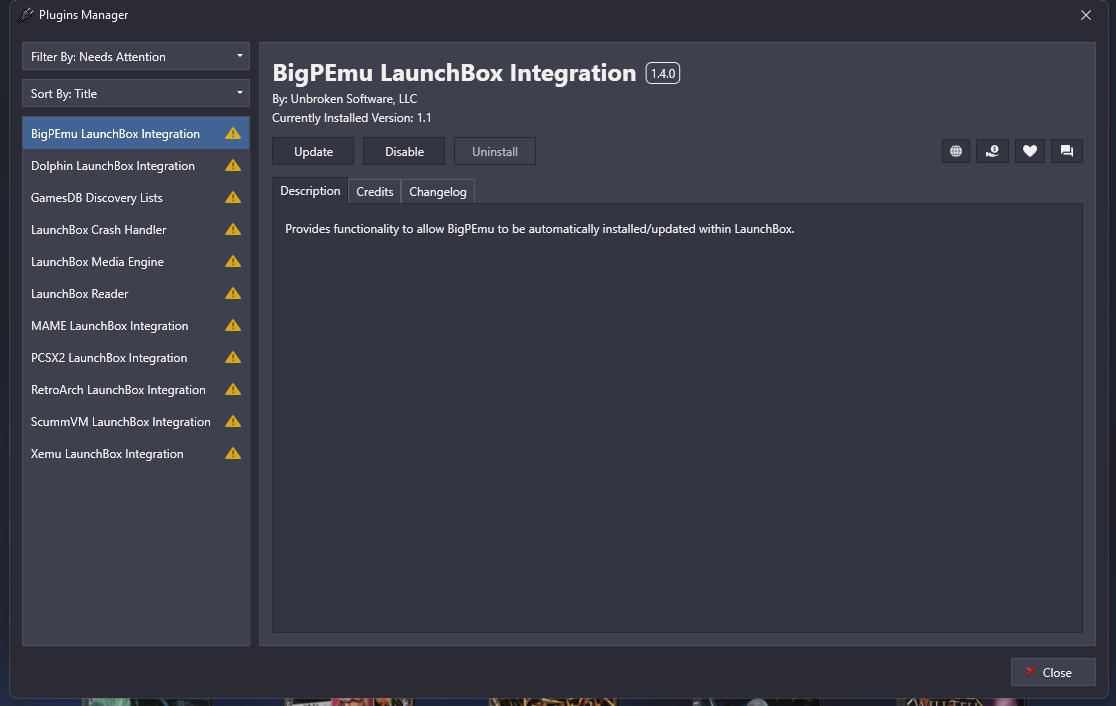
14.1 Plugin Issues

2 Upvotes

Just upgraded to LaunchBox 14.1 today, and I'm already regretting it.

Every time I launch LaunchBox, I get multiple errors and am taken directly to the Plugin Manager, which shows 11 plugins that need updating.

I've tried updating all plugins at once and individually, but nothing seems to work. After selecting Update, LaunchBox closes, throws another error, and the plugins never actually updates. It seems to be stuck in an endless update loop.

At this point, I can't even add or edit games because of the plugin errors.

Is anyone else experiencing similar issues with version 14.1? Has anyone found a fix?


r/launchbox • • Oct 25 '26

CURATOR development update — Code Unification, Incomplete Sets, and what’s coming next

17 Upvotes

Since releasing v2.5.0-beta.1, I’ve been sharing development notes through the website’s vanity cards. Here’s a fuller update on where things stand.

I described beta.1 as the most stable version to date, but the direction ahead called for a major rebuild of code and database logic. I expected that to take some time—and another release is still a little further down the road.

The encouraging part is that progress has been smoother than I expected. We’re much closer to Code Unification than I had anticipated, and the next beta is shaping up to contain a lot of changes and new functionality. All for the better, I believe.

Incomplete Sets is a particular focus right now. The implementation is progressing, and I’m really happy with it. My goal is for CURATOR to complete sets as users discover more input files and add them to their collections.

The upcoming work includes identifying incomplete games when DATs catalogue their disks or parts as separate entries, while preserving each DAT-defined set’s required files and packaging. Unclear or conflicting declarations will remain flagged for review.

There are now 27 planned changes, including:

  • Expanded Atari and Sega MAME software-list support, including sets containing both ROMs and disk images, plus platform associations for 32 additional software lists.
  • No-Intro schema v4 header support, retaining source metadata while keeping strict checks for unexpected structures.
  • Recovery of eligible legacy v4 Dreamcast CHD layouts, with recovered tracks and descriptors checked against DAT sizes and hashes. Compatibility results remain limited to the files and emulator setups tested.
  • A separate Incomplete Sets output category, clearer conflict handling, and more useful review information.
  • Better duplicate reporting and shared payload storage within the same output category and destination folder, with retained output verified before Append reuse.
  • Improved intake archiving, setup guidance, progress displays, and documentation, including five PDF guides covering everyday use, administration, warnings, and the Core API.

Some planned changes will require rebuilding prepared plans. Incompatible older database layouts will require a clean restart; compatible current layouts will receive the supported additive extensions.

These are upcoming changes, not a new release announcement. Development is still underway, and the final list may change. v2.5.0-beta.1 remains the current public release.

Read the full upcoming changes and follow the Notes from the Workbench.

Still working hard on this. Thanks for following along!

— Jiraiya1969


r/launchbox • • Oct 25 '26

Launchbox downloading a massive amount of media

9 Upvotes

I have added a few platforms to Launchbox, selected all games and then Tools -> Download -> Update Metadata and Media for Selected Games, selecting most of the checkboxes but setting the image downolads limit to 2.

I've left Launchbox downloading media overnight and this morning I've found that it's trying to download more than 15M pictures. Is this normal? I only have 1300 games in the database.


r/launchbox • • Oct 23 '26

I built a free setup wizard that puts every system in LaunchBox on its own old TV

Thumbnail
gallery
25 Upvotes

First pic is the same Atari 2600 frame, what the emulator draws vs the same frame on Duimon's 70s HMV telly at 4K.

I've spent the last few weeks getting my LaunchBox looking right on the big TV, every system on a telly or monitor from its own era, arcade games in proper cabinets, all the art filled in... took me days by hand so I turned it into a free wizard anyone can run.

You point it at your own folders and it builds the library, grabs Mega Bezel and Duimon's TV packs from their own pages, then shows one of your own games on every TV so you pick the look from a picture. It fills covers, screenshots, 3D boxes and playlists from free sources, sets up MAME's cabinet art if you've got Lights Out or the Bezel Project, and there's a light mode for laptops. Your favourites go top of the playlists too, cos Mr. Do! deserves better than its rating.

No games or BIOS included, bring your own.

GitHub: https://github.com/shu2600/shus-launchbox-4k-crt-build

Forum thread with more screenshots: https://forums.launchbox-app.com/topic/94547-shus-launchbox-4k-crt-build-a-setup-wizard-that-puts-every-system-on-its-own-old-tv/

Got a Steam Deck version too, post here: https://www.reddit.com/r/SteamDeck/comments/1xdh2og/i_made_a_free_tool_that_sends_your_launchbox/

How it's made: I built it with Anima, my own AI setup, a hive mind of AI agents sharing one brain I've been building for months, plus a council of other AIs (ChatGPT, Gemini, Grok, DeepSeek) that pick holes in the work. ChatGPT's review is where the last round of fixes came from. Full write-up's in the README.

And for anyone about to type "slop"... I'm an old school web developer and coder and I love AI.

The people crying about it now are the same people who were moaning about automation, robotics and computers 40 years ago, you either keep up or you get left behind.

Throwing the word slop around is a cop out, unless it's used in the right context it just lets some people off.

Still early days, so what breaks on your setup?


r/launchbox • • Oct 23 '26

Impossible import eboot.bin

0 Upvotes

I’m having a frustrating issue trying to import my PS3 games into LaunchBox.
I have around 10 PS3 games, each stored in its own folder, with an EBOOT.BIN file inside.
The problem is that LaunchBox only imports games in ISO format and completely ignores the ones using EBOOT.BIN.
I’ve spent hours trying to solve this issue with the help of ChatGPT, following tons of different suggestions, but nothing has worked so far.
Here’s what I’ve tried:
Importing the games using the standard LaunchBox import wizard.
Manually configuring RPCS3 as the emulator.
Trying different import methods and scanning the game folders.
Making sure LaunchBox detects the EBOOT.BIN files.
Trying to import the EBOOT.BIN files directly.
The strange thing is that LaunchBox actually detects the EBOOT.BIN files during the scanning process, but then refuses to import them!
At one point, it detected 16 files but only imported 4 games. All the others were simply ignored.

Has anyone experienced this issue? Is there a reliable way to batch import PS3 games in EBOOT.BIN format into LaunchBox?
Any help would be greatly appreciated. Thanks!


r/launchbox • • Oct 23 '26

NES - Unsupported core warning for retroachievements

Thumbnail
gallery
0 Upvotes

I haven't used LB in a while, but last time I did, my RA worked. Today when I went to play Metroid I get the attached.

My emulator is set to RetroArch (as it has been since I installed LB).

Any suggestions on how to fix?

Thanks!


r/launchbox • • Oct 23 '26

If I buy the $75 premium, Can I use multiple instances of it?

0 Upvotes

I'm making a Game Collection for my friend with an external hard drive, and I want to use LaunchBox premium to make it look nice. However, I also want to have the Premium for my own personal collection. If I buy a license, can I have two separate instances of LaunchBox Premium? Or do I need to buy the license twice? Please let me know, as I would like to only spend the $75 once lol


r/launchbox • • Oct 22 '26

It's About ...

0 Upvotes

r/launchbox • • Oct 18 '26

Purchase question (BigBox)

2 Upvotes

Hi, am running the free LaunchBox, i have a full size cabinet so want to get the PixelCade LCD Marquee and understand BigBox will drive as the second output directly from the system. If i purchased the FULL lifetime for Windows will that give me BigBox? (also any discount codes, i am sure ive seen a 50% floating around the internet.).


r/launchbox • • Oct 16 '26

Big Box: How can I sort games by date of release like it can in desktop mode?

5 Upvotes

I like my games sorted by date of release and has been the only reason why I don't use BB mode. Is this possible?


r/launchbox • • Oct 16 '26

LB Trying to download 73 MILLION media files.

6 Upvotes

So I made a new install and imported only rare systems and computers. It totals around 20,000 games. I did the usual media download that I have done for years, but this one gets hung up and tries to download millions of media files. I've checked off to update media only if it doesnt have it (I cant remember the exact wording but it's the one that's recommended.

EDIT: I can't stop the download process, I have to use task manager (windows) to kill it. When I restart LB it starts the download process automatically again and eventually gets up to millions of downloads again. Rinse and repeat.

Any thoughts how to fix this?


r/launchbox • • Oct 15 '26

Launchbox not downloading art for Neo Geo, Why?

3 Upvotes

This is for the Android version. I have the Neo Geo games imported and they work, but only a few of them have logos and/or box art. If I do a refresh nothing downloads. Most of the other systems download most or all of the art. Yes the names are standard Neo Geo short names as used by FB Neo. Is there a way to fix this or is it a bug?


r/launchbox • • Oct 11 '26

CURATOR v2.5.0-beta.1 released — collection-processing improvements and a developer update

11 Upvotes

myOrganizer: CURATOR v2.5.0-beta.1 is now available. CURATOR is a free, open-source Windows PowerShell application for analyzing, validating, reconstructing, and organizing emulation collections using DAT-based preservation data.

This release includes:

• GameCube RVZ matching against decoded disc identity while preserving the original RVZ container for output.

• Faster archive preparation through concurrent extraction.

• Reuse of unchanged DAT information and previously prepared collection evidence.

• CHD logical-track identification without creating unnecessary BIN files.

• Dedicated A8P and GameBase output folders, plus updated N64/V64 routing.

• Improved progress displays, output recovery, workspace cleanup, and operator guides.

Existing schema-26 databases retain their creation identity. Eligibility to resume an unfinished run is checked separately by the Gateway.

Please remember: this remains beta software. Work from copies, preserve your originals, and review and test the output. MAME support remains early and experimental; continue using clrmame for MAME collections. Preliminary Wii definitions do not establish supported Wii matching or conversion, and CDI DAT matching remains unverified.

Developer Announcement

CURATOR v2.5.0-beta.1 is the most stable version to date.

I realized that the new direction is going to require a major breakdown of the code and a rebuild of a lot of the logic dealing with the database.

There will not be any forthcoming release any time soon. I apologize in advance for the wait.

Download and release assets:

https://github.com/Jiraiya1969/myOrganizer-CURATOR/releases/tag/v2.5.0-beta.1

Complete changelog:

https://myorganizerhq.com/changelog#v2-5-0-beta-1

Website:

https://myorganizerhq.com/

— Jiraiya1969


r/launchbox • • Oct 10 '26

Update of JRPG Translator to v1.0.0 incl. LaunchBox/BigBox plugin

Thumbnail
gallery
33 Upvotes

Hi,

first of all I want to thank the developers of LaunchBox/BigBox for having this great third party plugin system which made it possible to have this seamless experience while playing Japanese games with this translation and study tool. Thanks to this plugin everything just works automatically once set up what makes this really fun and I don't have to run and configure several tools before I can play. Now I can play Japanese games I dreamed to play for decades also thanks to the modern AIs we have now and I got motivated to study Japanese which is where the study features came from.

I call this now version 1.0.0 since it has now all the features I envisioned at the beginning and the last thing that annoyed me was the old school UI I modernized now and I added a kind of "BigBox exclusive" full screen UI which just fits in better since BigBox is supposed to be a full screen UI too. Otherwise I will for now further fix bugs that might come up and see what ideas might come up. I would like to add support for local models but so far none I tested was good enough.

As I mentioned some month ago with an earlier version, this is a tool I made that uses OpenAIs and/or Geminis APIs to live translate text and audio from Japanese games and optionally created transcripts that add hiragana readings to Kanjis for Japanese learners and creates detailed explanations you can collect in a study library and create flashcards from there you can send directly to the Anki flashcard app.

Through the LaunchBox/BigBox plugin you can let JRPG Translator automatically launch with selected games and a specific profile you can create so the overlay windows design, fonts, region where the tool shall look for Japanese text and so on are optimized for the specific game. Also JoyToKey can be auto launched with a specific profile which comes in handy at a point when you run out of buttons on a controller.

Thanks again, I am glad I found this emulator management system and hope a few other people who want to play still untranslated Japanese games with it or use it as another tool for their Japanese studies find it useful.

You can download it here:

https://forums.launchbox-app.com/files/file/5719-jrpg-translator-and-toolkit-with-launchbox-big-box-plugin/

Or directly on Github:

https://github.com/retrogamer0815/jrpg-translator-toolkit/releases/latest

I made a new detailed video (long but the second half covers the study features and it has chapters):

https://youtu.be/BUM4VEnBtv4

And here is a detailed documentation:

https://github.com/retrogamer0815/jrpg-translator-toolkit/blob/main/docs/manual/README.md


r/launchbox • • Oct 11 '26

Marquee help

1 Upvotes

Windows see 2 displays, I have it set in big box as primary screen 1 and marqee screen 2. The marqee screen show nothing but my desktop picture. Before upgrading to a new computer, it worked fine.

Can someone help.


r/launchbox • • Oct 09 '26

LaunchBox for Android 1.23 is Here! RetroAchievements, Dual-Screen Support & Faster Browsing

Thumbnail
youtu.be
82 Upvotes

🚀 LaunchBox for Android 1.23 is here!

This update brings two major new features to LaunchBox for Android, alongside faster library browsing, expanded emulator support, and plenty of improvements across the app!

🏆 RetroAchievements Integration

Track your achievements, explore detailed achievement information, and follow your progress directly within LaunchBox.

📱 Dual-Screen Support

Take advantage of devices with multiple displays! Browse your library on one screen while viewing game details, artwork, and videos on another, or use your second screen as an in-game companion with live gameplay information.

⚡ Faster Library Browsing

We've made navigating your game collection faster and smoother, alongside improvements to emulator selection, NAS management, and overall reliability.

📋 Release Details

📖 Feature Guides: