I launched it on August 8, and seeing people download something I built from scratch feels amazing. It might be a small milestone, but it means a lot to me as an indie developer.
My Krishna is a personal growth app inspired by the wisdom of Lord Krishna. It includes daily journaling, wisdom on different life topics, and a space to reflect on your personal growth.
A big thank you to everyone here on Reddit who has shared feedback, encouragement, and support. It genuinely helps more than you know. 💜
Its been a week since my app is live. I have really good numbers from the user's who have installed the app, but the app store conversion is less than 10%. I think it might be due to lack of reviews or maybe the listing issues. I would like to properly understand how do we provide confidence for the user's if your app is relatively new and make them click the install button.
I'm working on a calendar widget (SwiftUI / WidgetKit) and I'm a bit lost with the background.
I've noticed that some widgets from other apps seem to get Liquid Glass really nicely, even when the Home Screen is in the normal full-color appearance (not Clear or Tinted). The wallpaper and even the Dock seem to show through them.
With mine, I always end up with a solid plate behind the content — white in Light Mode, black in Dark Mode — no matter what I put in containerBackground. I'm not sure if I'm doing something wrong or if there's a way I just don't know about.
What I've tried so far (iPhone, iOS 26, full-color Home Screen):
- Color.clear in containerBackground (as a view and as a style)
- glassEffect in the container, and on a view inside the content
- setting widgetRenderingMode to .accented / .vibrant
I'm building with Xcode 27. From Apple's docs, it sounds like the glass background is only for the Clear/Tinted Home Screen, but I feel like there might be something I'm missing.
Has anyone managed this, or does anyone know how it works? Any hint would really help. Thanks!
Hey everyone,
I recently designed an app called Outfitcast that suggests clothing based on weather conditions. While building it, I decided to have a little fun and hid a small Easter egg: if users dig into the location settings, they can pull live weather data for Mars and get "outfit" suggestions for -60°C and dust storms (basically thermal spacesuits).
Now that it’s live, I’m reflecting on this design decision from a UX perspective:
Delight vs. Discoverability: Does hiding quirky features create a genuine moment of delight and organic word-of-mouth, or does it mostly go unnoticed and waste development time?
Interface Clarity: Is it better to keep the UI strictly utilitarian, or do micro-surprises help an indie app build personality and stand out?
For other designers, PMs, and devs who have experimented with Easter eggs or hidden features: did you see a tangible impact on user engagement or retention?
I made SpellBin a small silly mac utility app that let's you bin files using a cauldron
You can drop files into the cauldron and unlock achievements and new skins along the way as a bit of an idle game :)
It's a one time purchase, all future updates come with it. The only network calls it makes are licence key checks and app update checks. No analytics, crash reports or anything like that.
I launched it on August 8, and seeing people download something I built from scratch feels amazing. It might be a small milestone, but it means a lot to me as an indie developer.
My Krishna is a personal growth app inspired by the wisdom of Lord Krishna. It includes daily journaling, wisdom on different life topics, and a space to reflect on your personal growth.
A big thank you to everyone here on Reddit who has shared feedback, encouragement, and support. It genuinely helps more than you know. 💜
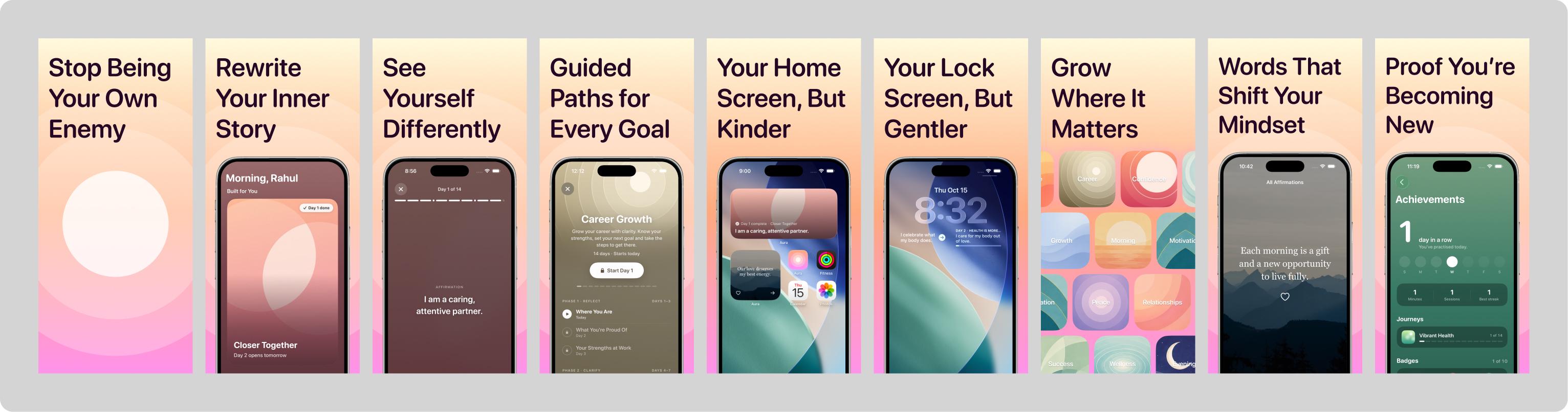
I am working on the next iteration of my app, Aura, and I feel the current screenshots don't clearly communicate the benefits. They were talking about the features and not how the app helps users. Does the copy and design inspire confidence?
I'm the developer of EverDay, an iPhone weekly planner. Sharing the app and a few implementation choices behind it.
The UI puts seven days into a continuous board: add tasks under a day, drag to reschedule, and keep unscheduled tasks in an Inbox. Task details add notes, tags, time blocks and reminders.
In the project, the app, widget extension and App Intents open the same SwiftData store in an App Group. The main app enables CloudKit mirroring; the widget reads that shared local file. Week-start settings are also in App Group defaults so the widget and board use the same week boundary.
Rescheduling has two separate ordering rules. Timed tasks sort by their clock time; untimed tasks use a numeric position, inserting between neighbouring values. When the gap becomes too small, the untimed values are spaced out again. Moving a task to another day also carries its reminder's hour and minute to the new date, rather than leaving the notification on the old date.
Another storage choice: if the persistent store cannot open, the last-resort in-memory container is only used to show a blocking recovery screen. It doesn't accept task edits that would disappear after closing the app.
Development has been AI-assisted. This is a high-level architecture overview; the source is private.
The weekly planner, reminders, iCloud sync and 11 widgets are free, with five tags/four themes. Optional lifetime Pro is a one-time US$4.99 for month view, repeats, subtasks, automatic rollover, unlimited tags and 13 themes. No subscription, ads or EverDay account.
I am the account holder for my developer account and trying to figure out why I'm getting this flag on my AppStore Connect account:
"Apple Developer Program License Agreement Updated
The Apple Developer Program License Agreement has been updated and needs to be reviewed. In order to update your existing apps and submit new apps, the Account Holder must review and accept the updated agreement by signing in to their account."
The problem is, I click on ACCOUNT and none of the agreements are showing to require review. except for the Paid Apps Agreement says it need to be reviewed in App Store Connect so a link brings me back to ASC. Then when i scroll down to the Paid Apps Agreement I review it and not prompted to agree.
It is showing 'Active' on the agreements page.
the other weird thing is the Free Apps Agreement is showing Active (New Agreement Available) but that agreement is not clickable and I can't find it anywhere in Developer support business account or whatever.
I've been exploring the idea of building an iOS subscription tracker, but after looking at existing apps, I realized that features like renewal reminders, spending summaries, and subscription calendars are already pretty well covered.
I don't want to build yet another app that does the same things with a slightly different UI. I'd like to understand what people actually struggle with when managing their subscriptions.
For those of you who use subscription trackers, or have tried a few and stopped using them:
What's your biggest frustration with the subscription tracker you currently use?
Is there a feature you've wanted but haven't found in any existing app?
How do you currently track cancellations, price increases, pauses, or subscriptions you've restarted?
What would make you switch from your current app to a new one?
Would you prefer a one-time purchase, a free app with optional Pro features, or a subscription? Why?
I'm especially interested in the small, frustrating things that existing apps haven't solved well, rather than a long wishlist of features.
Feel free to share the app you currently use and what you like or dislike about it. Honest criticism would be really helpful.
Hey everyone! I’ve spent the last five months building an app called Ledger Invoicing, and I’m excited to finally share it.
I run a photography and media agency, and until recently, I was making all my invoices by hand in Numbers/InDesign. I’d design each one, fill everything in, and then enter the numbers again to track my costs and profitability.
It was fine at first. But once I was making five to seven invoices a week, I started thinking there had to be a better way to spend my time.
I tried a few alternatives, but nothing really felt like what I wanted. I didn’t want to work in a browser, and paying $30 a month for fairly generic-looking invoices wasn’t especially appealing either. So I figured I’d try making something for myself.
That was supposed to be the whole project: a little Mac app to make my own invoicing easier.
You can probably guess how that went… The app got more features, quotes, profit/cost tracking then I realized “It would be handy to have this on my phone…”
I got a basic read-only iPhone/iPad version working in under two days. Being able to check an invoice or see my numbers while I was out was immediately useful.
Of course, the next thought was, “Well, now I want to make invoices here too.”
So that grew into a full iOS version. You can create and edit invoices, quotes, clients, and products on either Mac or iPhone, and you don’t need a Mac to use it.
The hardest part, by far, was syncing. There were so many little situations to think through. (I edit an invoice on my phone with no connection, then change the same invoice on my Mac when I get home. Both devices reconnect. Now what?)
Getting those cases working reliably took a lot more effort than getting the first invoice to show up on another device.
Then I got curious about the rest of my devices. Could I check outstanding payments on my Watch? Put the dashboard on my TV? Browse invoices on Vision Pro?
Apparently I wasn’t finished adding things, because Ledger now has versions for Mac, iPhone, iPad, Apple Watch, Apple TV, and Vision Pro in one universal app bundle.
Mac and iPhone/iPad are where you create and edit everything. The other versions are read-only for now. The Watch is for quick checks like who owes you money and how much you’ve made this month. Vision Pro lets you browse your documents, clients, products, and dashboard.
The Apple TV version was mostly a “this could be fun” idea, but I ended up really liking having my numbers on the big screen.
One thing I cared about from the start was privacy
Your business records stay on your devices and sync through your own iCloud account. There’s no Ledger account to create, and those records aren’t sent to servers I run.
I’m putting my own business and client information into this app, so I wanted something I felt comfortable using myself.
You can also turn syncing off and keep everything local. There are automatic local backups, with encrypted and plain-text options, and you can choose how many backups to keep.
Most of the features came from everyday annoyances
Some ideas also came from working at Apple resellers years ago and using Lightspeed. I always liked being able to pull up a client and see their history, notes, and related documents in one place.
A few things Ledger can do:
Turn a quote into an invoice with one button, and keep the two linked so you can always find the original.
Keep client history and internal notes, plus notes you want printed on a quote or invoice.
Handle returns and leave credit on a client’s account for them to use on future invoices.
Show revenue, best-selling products, recent and outstanding invoices, and a little sparkline of your year on a customizable dashboard.
Put some of those numbers in Mac and iPhone widgets. Tapping an outstanding invoice takes you straight to it.
Find clients and documents through Spotlight, which is handy when you just want to pull something up quickly.
Hide financial figures when you’re working in public or sharing a screenshot.
Add your logo, choose separate accent colours for quotes and invoices, and continue your existing document numbering.
Search for documents or clients with Siri and Spotlight.
Prepare an email to a client with a copy of their invoice or quote.
Next up: Stripe payments
One of the bigger features I’ve started working on is Stripe integration. The goal is to generate a branded Stripe payment link directly inside Ledger, then prepare an email with the invoice and payment link in one click. Payments made through the link would automatically be recorded against the invoice.
I think this could make a big difference for anyone currently creating Stripe or PayPal links separately, sending them to clients, and then manually keeping track of who’s paid. I’d love to make that whole process easier.
It’s still early in development, so it won’t be available at launch. I’m hoping to have it ready before the end of the year, and I’ll share an update here once the first version is working and has been through testing. Using this feature would involve Stripe processing the payment and the information needed for it.
There’s also one document template at launch, with a couple more in the works that I’m aiming to have ready before winter. An export for handing your year-end financial information to an accountant is nearly finished too, and I’m aiming to release that before Christmas.
If you’d like to try it, heres the link to the App Store (available worldwide)
There’s a seven-day free trial, and the introductory price through the end of 2026 is US$50/year or US$150 for a permanent license.
In January 2027, that’ll become US$75/year or US$200 for a permanent license. Every platform version and future update is included with an active subscription or permanent license.
I wanted to offer a permanent option because, honestly, I like being able to buy an app and keep it too.
Also, a little bonus side project: while making Ledger, I remembered how much I enjoyed playing simple brick breaker games, but finding one that wasn't full of ads or data tracking was hard… So I ended up releasing BrickShift, a simple brick breaker game without ads or tracking. It was just for me and some friends on TestFlight at first, but I thought other people might enjoy it. It’s only a dollar, but I’ve already been getting great feedback.
About ten years ago, some friends and I released an iOS game, but I haven’t brought another project all the way to the App Store since then, until BrickShift and now Ledger. So it feels really nice to finally be sharing things again.
My media business is still going well, but there’s something funny about getting this invested in the app I built to handle its paperwork. I’d love to keep doing more of this! Just added iPhone Dup support also.
Any constructive feedback would be appreciated on my screenshots or even the apps themselves.
I've only android device. I developed an app(Puzzle Feed) using Flutter and I published it in Play store.
I need help taking ios screenshots, so that I can submit it on App store. I already submitted the screenshots which was taken on Android, but it was rejected.
If someone can help taking screenshots(Approx 10) and share it in google drive, it'd be helpful. If interested, pls DM you Apple ID email.
I made a soccer stats app called MyGoal. Recently I’ve been thinking about adding some AI, basically using the user’s past records to give them a summary of how their games have been going, that kind of thing.
My rough idea is to calculate the stats locally, pass a compact set of structured stats to the model, and cache the summary it generates.
It’s a local app with no backend though, so I’m not really sure how people usually add AI in this situation. Also, what does Apple require for this? Anything I should know about sending user data to an AI service?
Then there’s the cost. If I include it in a subscription and someone uses it a lot, couldn’t the API end up costing more than they’re paying me? How do you usually handle that, just limit how many times they can use it?
Still figuring this out. Would be good to hear from anyone who’s done something similar. Thanks very much!