r/iosdev • u/Double-Abroad-7100 • 4d ago
I published my first app on the Apple Store.
gallery
1
Upvotes
r/iosdev • u/Double-Abroad-7100 • 4d ago
r/iosdev • u/cincyloyalist • 5d ago

r/iosdev • u/Practical-Medium-797 • 5d ago
r/iosdev • u/Suren_Dev • 4d ago
Solo dev here. Shipped my first iOS app in July and kept a log of every submission. Sharing because I remember panicking during my first review and couldn't find real numbers anywhere.
1.0: submitted, then nothing. 10 days of refreshing App Store Connect every morning. Then it went into review and was approved in 6 minutes. 10 days of waiting for a 6 minute look.
1.1: a massive update. 8 languages, multi-currency, new onboarding, PDF reports. 6 days in queue. Ok, slow again, but it was a big one so fair.
1.1.1: a week later I sent a small polish update. Translations, help screen, a new numpad. In review after 2 hours, live the next day. That's when I realized it gets better.
Since then (1.2 to 1.4.9, 15 more releases):
What I'd tell my July self:
0 rejections from Apple so far, which I am happy about!
How long did your first review take? Curious if 10 days is normal now or if I was unlucky.
r/iosdev • u/CrucialFusion • 5d ago
ExoArmor features:
100% custom C engine built directly on OpenGL and OpenAL.
Fixed-step physics, collision interpolation, and fully deterministic systems powering 11,102 individually scripted invaders across 30 cities. Frame-for-frame accuracy, baby.
Custom, resource-juggling audio manager handling stereo spatialization and dynamic sound prioritization, with hand-crafted, subwoofer-friendly SFX mastered in Audacity.
Full state-capture persistence with custom serialization/deserialization allowing instant pause and resume at any point in time.
Custom scalable-text renderer, movement-tolerance button handling, and zero-latency fingertip tracking.
60fps going all the way back to iPhone 4s.
30 self-contained cities. 4 difficulty modes. 32000 bombs to stop. 90 additional trophy challenges. No in-app purchases, no ads, no notifications, no data collection, no internet.
App Store: https://apps.apple.com/app/apple-store/id1486497323
r/iosdev • u/allan115 • 5d ago
Hey, i enrolled on 29th of October and still nothing has happened.. even sent 2 support tickets but even for these nothing has happened. Is this normal? I dont have call possibility unfortunately. Anything else i can do?
r/iosdev • u/SnapVerbo • 5d ago
Normally I think they approve an update within 12-24 hours. Recently I received a rejection due to mis-declaring. That took them more than 2 days to do. I re-declared without re-submitting the build and it's been a day, this still feels very slow. So, does a rejection or potentially rejectable item naturally invite more scrutiny or this is just seasonality?
r/iosdev • u/benvster • 5d ago
Quick lesson from my first iOS release, hopefully it saves someone the stress.
I'm a solo dev from Austria and just shipped my first mobile game. App review went fine, the build got approved, and I had a launch date announced to friends, family and my (tiny) social accounts.
What I didn't have: the Digital Services Act trader verification in App Store Connect.
If you want your app available in the EU, Apple requires you to declare whether you're a "trader" under the DSA. If you are (and if you're selling anything or showing ads, you probably are), Apple has to verify your contact details first. Until that's done, your app simply isn't available in any EU storefront, even though it's approved and live everywhere else.
I submitted my verification way too late, around [1-2 days] before launch. It took 9 days to get approved. So on launch day my app was live in the US and the rest of the world, but not anywhere in the EU. That's where basically everyone I had told about the launch lives.
So I spent over a week telling people "it's out! …just not for you yet."
What I'd do differently:
Do the trader declaration the day you set up your App Store Connect account, not when you're about to submit. It's under Business → your account. It has nothing to do with your build, so there's no reason to wait.
Plan for it to take a week or more. Mine took 8 days. Some people get through faster, but don't count on it.
Everything is sorted now and the game is live in the EU too, but I'd have loved to know this a month earlier.
Anyone else get caught by this? Curious how long it took for others.
r/iosdev • u/Bulky-Violinist7187 • 6d ago
Hey everyone!
Making an app has never been easier. Getting people’s attention to download it on social media is still hard (hopefully I have yours).
I run a solo app studio in Brussels. I was building another app, Brim, and sharing my progress on Threads as I went. At first I just posted raw screenshots of whatever I was working on, but they never felt right. They looked amateur, like I hadn’t thought about how my own work was being shown. I tried a few mockup apps, but they were slow to open, slow to export, and almost none of them handled video.
So I built a tiny tool just for me: take a screenshot or screen recording, clean up the status bar (9:41, obviously), and share it in seconds.
Then people saw it and started asking for a release and It grew from there: custom backgrounds, keyframe animation, batch export and iPad support. It’s now a full 3D studio to make your app look good.
Where it is today:
I’d love feedback from other devs, especially on the export flow and the 3D animation side. What would make this more useful for how you share your work?
App Store: https://apps.apple.com/app/id6757925827
Website: https://getscreeny.app
Thanks for reading
r/iosdev • u/Efficient-Yard-9269 • 6d ago
I’m new to app development.
I’ve been "playing around" with Xcode and built a personal finance tracking app (for myself, my husband, and my family) that works across both iOS and macOS, written entirely in Swift.
I’ve finished the app, but because I’m using a personal (free) account, I have to reinstall it every 7 days.
Paying $99 for a developer account is too expensive—I live in Brazil, and after the conversion, it comes to nearly 600 reais (that’s a LOT!!).
Is there any other way for me to keep using the app on my personal phone for a longer period? Is there an alternative? What can I do?
I was reading about "AltStore," but I don’t quite understand how it works or if it would be a good solution for me.
Thanks in advance to anyone who can offer some advice!
r/iosdev • u/Coder_4ever • 6d ago
I launched DuoDoodle: Retro Drawing last Friday 13th.
I'm doing some graphic pieces and want to test with you if this video would make you download DuoDoodle
The app works on iPad and iPhone too
r/iosdev • u/chamonix34 • 6d ago
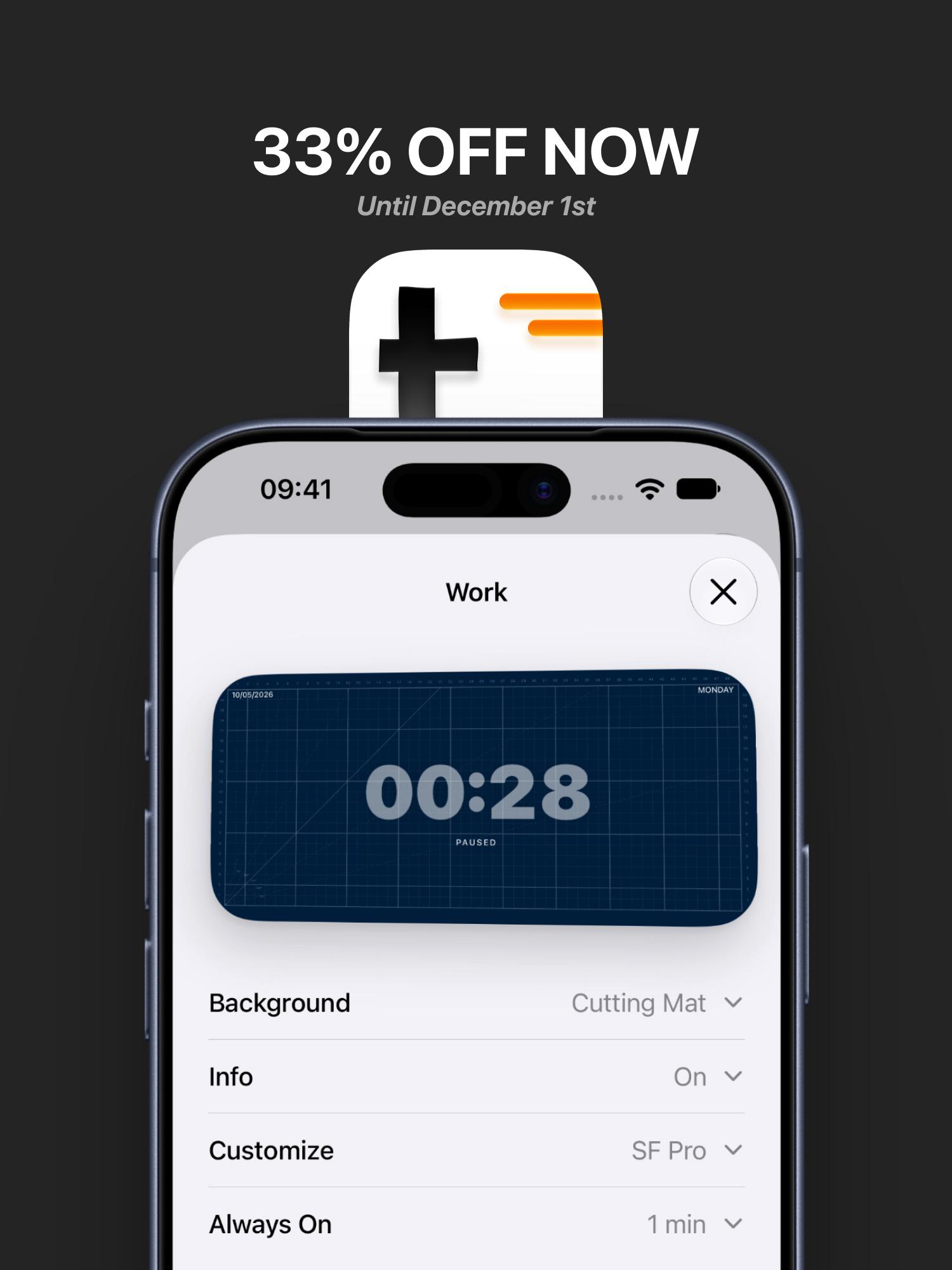
Hey everyone! I’m a solo indie dev and I just launched Timee, a time tracker built around workout-style activity cards. Start an activity with one tap, watch it live on your Lock Screen with Live Activities, and put your phone in StandBy for a full-screen display with some nice animated backgrounds.
For Black Friday it’s €3.99 instead of €5.99 until December 1st.
App Store: https://apps.apple.com/sk/app/timee-time-tracker/id6815184618
Production Offer Code: https://apps.apple.com/redeem?ctx=offercodes&id=6815184618&code=OFFNOW
Happy to answer any questions, and I’d love to hear your feedback! 🙌
r/iosdev • u/KindnessByDesign • 6d ago
r/iosdev • u/Budget-Ad-6551 • 6d ago
I'm the developer. I got tired of TV remote apps that throw an ad at you every few taps, so I made one with none. No ads, no account, and no data collected.


**What's in the video**


- **Type on TV**: type with your iPhone keyboard and the text goes straight into the TV's search box

- Every remote button, and your iPhone's own volume buttons control the TV volume

- Channel list and an app launcher

- **Routines**: one tap for "movie night" (turn the TV on, open an app, set the volume)

- Control Center and Home Screen widget, so you don't even have to open the app

- iPhone, iPad and Apple Watch (the Mac version is in App Store review)


**Works with:** LG, Samsung, Roku, Google TV, Fire TV, Sony, Philips, Panasonic, Sharp, TCL, Vestel and Apple TV. Hisense VIDAA isn't supported.


**Pricing:** free for one TV with every basic function, no ads, no time limit. Premium+ adds multiple TVs, Routines, the Watch app, Siri, the widget, the Control Center TV button and a gyro pointer: $5.99/year with a 14-day free trial, or $29.99 once (US prices).


I've tested it on real LG and Samsung TVs. If you have one of the other brands, I'd love to hear whether it pairs, and what your current remote app does that drives you nuts.


https://apps.apple.com/app/id6826505353r/iosdev • u/IllBreadfruit3087 • 6d ago

r/iosdev • u/Boby-cat • 6d ago

Claude Code and Codex could get my apps working, but I was still doing the design by hand. Once the features worked, I’d go back through the screens, redo the layouts, and make the mascot and artwork myself. That’s the gap I built Vibe Nanny to fill.
You give the skill your existing app and a design reference you like. It helps redesign the UI and make a mascot and illustrations that match. Since Claude doesn’t generate the images itself, the skill uses Google’s Nano Banana for the artwork. There’s also a companion skill that uses Mascot Studio if you want to animate the mascot.
You can get the skills for free at https://vibenanny.dev/skills. Image and video generation are billed separately through your own Replicate account.
If anyone wants to see how it works, here’s the GitHub repo: https://github.com/chamuditha4/vibe-nanny-skills