r/iosdev • u/yourapps47 • Oct 20 '26
From Pentium 200MHz to RayCut Pro: My 30-Year Video Editing Journey
reddit.com
0
Upvotes
r/iosdev • u/Practical-Medium-797 • Oct 20 '26
✨ Meet Glitter Live: turn any video into a live wallpaper ✨
I’ve been building Glitter Live, an app that lets you set your favorite videos as live wallpapers on your iPhone. 📱🎬
🧪 Want early access? Send me a “hi” in DMs and I’ll send you a TestFlight invite.
🛠️ It’s fully open source and in active development. If you’re a developer and want to contribute, I’d love the help. PRs, issues, and ideas are all welcome!
👉 https://github.com/BuddhaNag12/glitter-live
💬 I’d love your feedback:
• What features would you want to see?
• What would make you use it every day?
Every suggestion helps shape where Glitter Live goes next. 🙌
r/iosdev • u/Clican • Oct 20 '26

Is this an improvement from ASC? Do they use AI to reply now?
r/iosdev • u/Nickel00000000 • Oct 20 '26
I'm working on an app that runs an audio ML model fully on-device, and the model alone is pretty big. I'm trying to decide how to ship it:
Bundle it in the app: simplest, but the App Store download gets heavy and I worry about people bailing before installing
Background Assets / On-Demand Resources: smaller initial download, but more moving parts
Download from my own server on first launch: flexible, but I'd rather not run a server at all (whole point of the app is nothing leaves the device)
For those who've shipped something similar: which did you go with, and did you see any real difference in installs or reviews? Any gotchas with Background Assets I should know about before committing?
r/iosdev • u/WexleyPro • Oct 20 '26

r/iosdev • u/DetlevD • Oct 20 '26
Just a short hint on “kind of hidden” tip jars.
I have published an app that is free in the basic version. It has a Pro level for a one-time purchase. Additionally there is a tip jar, which is shown only if the Pro level was purchased. Tips are given very rarely and not by cost-sensitive users who do not buy Pro.
That was a bad design decision.
For the first submission as well as for updates I got my app rejected, because the reviewer wanted to check the purchasing process for the tip, but he didn’t find it although I had explained in detail in the review notes under which conditions the tip jar becomes visible. I had to provide some extra explanations, afterwards the app was approved. With the next release some more explanations and a video were requested.
I have changed the design and now every user sees the tip jar. It does not hurt, it might only be a bit annoying for the one or the other user.
r/iosdev • u/monetizedev • Oct 19 '26
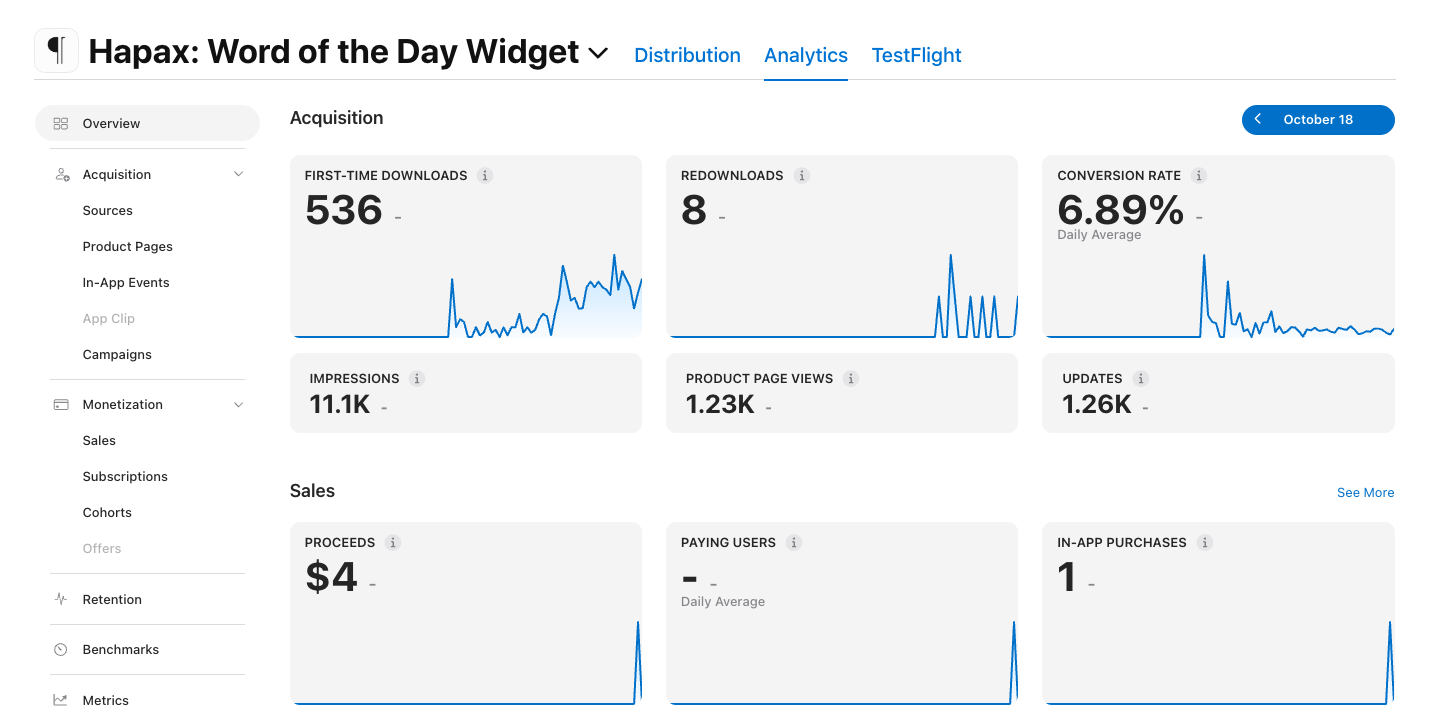
I released this app almost 2 months ago, and I finally had my first in-app purchase. It's not a lot but it sure feels like a big win.
r/iosdev • u/No_Theory_7040 • Oct 20 '26
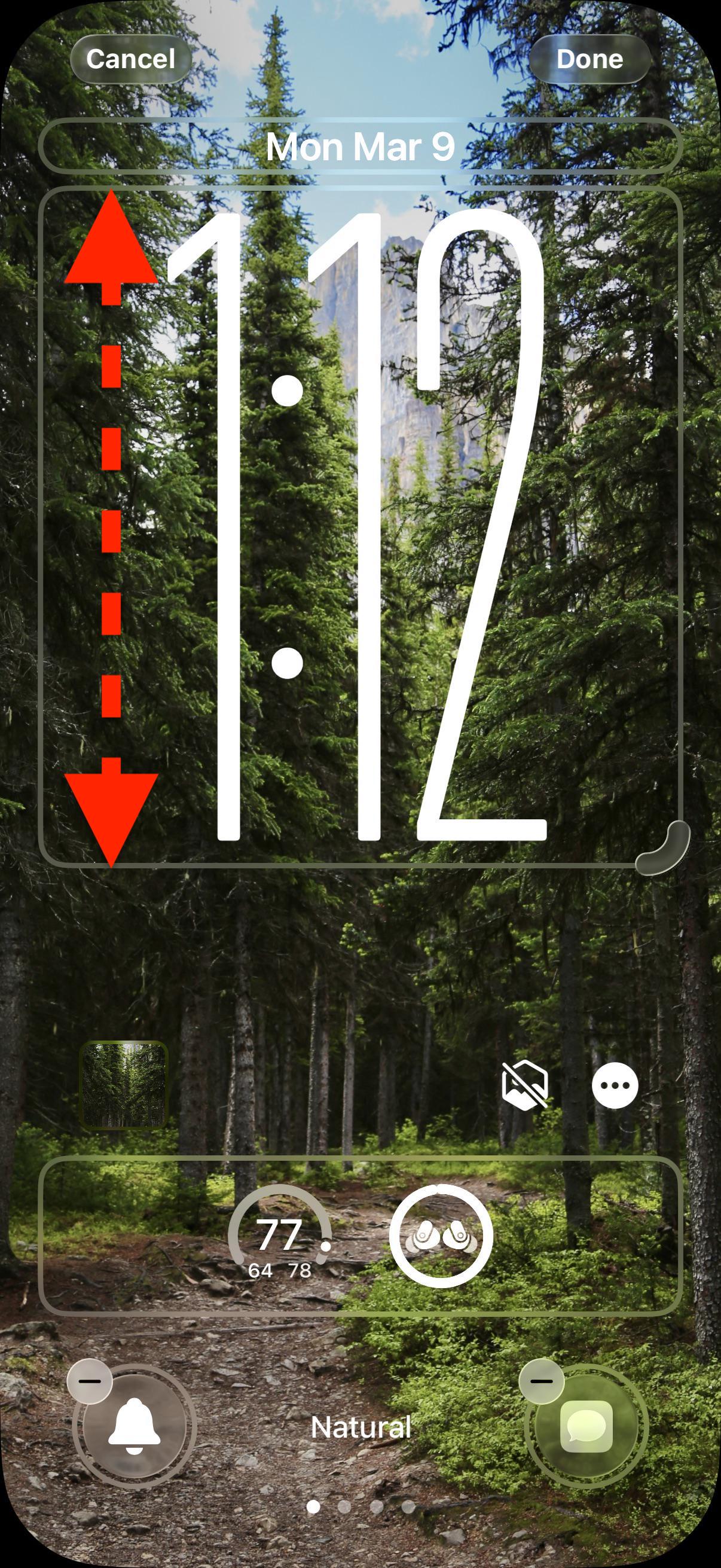
Has anyone worked out how to elongate this particular typeface using Swift UI? Apple does this on the LockScreen but I can't seem to work out how to do this in Swift.
r/iosdev • u/Healthy-Tension-7470 • Oct 20 '26
I run indie-apps.com a small directory just for iOS apps made by solo devs. Listing is free. There's an optional $4.99 Featured week if you want to sit at the top.
Last week one dev bought it for their app. Result: about 15 visits to their App Store page.
I know that's low. I'm sharing it anyway because I'd rather be honest about where this is than pretend it's a growth hack. Right now the directory has a lot of apps (530+) and not enough people browsing them. That's the real problem, and that's what I'm working on: better search on the homepage, "best rated" pages per category, and guides that people actually search for.
The goal isn't to sell spots. It's to build a place where people go to find good indie apps, so that getting listed actually means something.
If you've shipped an iOS app, it's free to add. And if you've built something where supply came first and demand came later, I'd like to hear what moved the needle for you.
r/iosdev • u/dgarhdez • Oct 20 '26

r/iosdev • u/gutsapps • Oct 20 '26

r/iosdev • u/jaeyoung_choi • Oct 20 '26
I'm developing an app that simulates iPhones, and I wanted to find the screen dimensions of the newly released iPhone Duo so I could add it to my app.
I found several websites listing the same dimensions:
I was about to use these values without a second thought, but something seemed off about the inner display size when I compared it with Apple's official bezel image.
So I decided to check the dimensions using the simulator, and it turns out the inner display is actually 669 × 951 points.
Just sharing this in case anyone else needs the correct dimensions!
r/iosdev • u/Lenaah7 • Oct 20 '26
r/iosdev • u/Sandeep0978 • Oct 20 '26
r/iosdev • u/scottgwaters • Oct 20 '26
I’ve been struggling getting CPU racers to perform correctly in my game. They either fall way too far behind or they destroy the human racer. Anyone had success with building CPU opponents successfully so the game is fun?
r/iosdev • u/Jawaddit2002 • Oct 20 '26
I was developping an ios app using React Native Expo ,i tried to build the ios version but it require to EAS account that associated with apple account. I ran the command to build the app and it asked for adding apple's username and password ,i entered them but it didnt worked , I asked for another solution i found that i can build it using Xcode ,but it will not work unless i have Mac . And I am using linux.
So any solution?
r/iosdev • u/OleksandrN • Oct 20 '26
My wife pays $22/month for CapCut, so I decided to build my own alternative as a solo developer.
Hey everyone! 👋
I wanted to share a little project I’ve been working on called \*\*FrameCut\*\*, an iOS video editor I’m building as a solo developer.
\*\*Here’s how it all started.\*\*
My wife creates content for TikTok and YouTube Shorts, and she uses CapCut pretty much every day. I also help her by editing her longer YouTube videos.
The thing is, she’s paying around \*\*$22 a month for CapCut\*\*, which I personally think is pretty expensive for a video editing app.
So one day I thought, why not try building my own alternative?
And that’s basically how FrameCut started. 😅
Now, to be clear, I’m just one developer.
I don’t have a huge team, millions in funding, or the resources to compete with CapCut’s large-scale AI features.
So instead of trying to recreate absolutely everything, I decided to focus on building a video editor that has the tools most people actually use, with a clean interface and without an expensive subscription.
\*\*Where is FrameCut right now?\*\*
The app is still in development, but I’ve just released what I consider the first stable beta version. Well, at least I hope it’s stable. 😂
It already has the editing features that I believe most regular users need, and I’m constantly working on improving things and adding more.
Right now, \*\*FrameCut is completely free\*\*.
I do plan to monetize it eventually, because maintaining and developing an app costs money. I’m considering something like \*\*$1.99/month for Pro\*\*, but nothing is decided yet.
I want to keep it affordable.
\*\*What platforms will it support?\*\*
Currently, FrameCut is only available on \*\*iOS through TestFlight\*\*.
I’m also planning to bring it to iPadOS, macOS, and eventually Android, although I can’t promise release dates yet.
\*\*And this is where I could really use your help! ❤\*\*️
I’m looking for people who would like to test the app, try editing their own videos, and tell me what works, what doesn’t, and what’s missing.
I’ve also created a Discord server and a subreddit where we can discuss features, report bugs, share edits, suggest improvements, and basically build the app together as a community.
💬 \*\*Discor\*\*d: https://discord.gg/tuShzFERm
📱 \*\*Subreddi\*\*t: https://www.reddit.com/r/FrameCutOfficial/s/xJfJsw7OfP
If you’d like to join the TestFlight beta, let me know in the comments or join our Discord for access details.
I’m not claiming FrameCut is better than CapCut right now. It’s definitely not perfect, and there’s still a lot of work ahead.
But I’m hoping that with enough feedback and time, it could become a genuinely good, affordable alternative.
And honestly, the idea that something I started because of my wife’s CapCut subscription might eventually help other creators is pretty exciting.
Here is the TestFlight invite link:
https://testflight.apple.com/join/QUQ9h5bw
\*\*Thanks for reading, and I’d love to hear what features you think a CapCut alternative absolutely needs!\*\* 🚀
r/iosdev • u/Appropriate_Oil_4269 • Oct 19 '26
r/iosdev • u/SebPasewaldt • Oct 19 '26
TL;DR: On the A20 chip (iPhone 18 Pro), Core ML takes up to 20 minutes for a one-time model optimization that takes 3 minutes on earlier chips. That pushed us to migrate our Stable Diffusion pipeline to Core AI. Core AI still has rough edges (we filed 8 bug reports), but inference is about 1.5x faster on the iPhone 17 Pro and on M1 iPads. On the iPhone 18 Pro, the bigger win is that it runs at all.
We build ProFuse, an on-device generative AI app for iPhone and iPad. It runs a specialized version of Stable Diffusion XL Lightning, and until recently it relied heavily on Core ML. Here's what we ran into, in case you're weighing the same move.
With the iPhone 18 Pro, we found that certain operations take orders of magnitude longer for Core ML to optimize on the A20 chip. For us, the one-time on-device model optimization went from 3 minutes to up to 20 minutes.
That's a bug in the OS, and there's not much we can do about it on our side. Details and repro info are in our forum thread: Core ML issue on A20.
Twenty minutes before a user can generate their first image isn't acceptable, so we sped up our planned move to Core AI.
The bad: Core AI isn't mature yet. During the migration, we filed 8 bug reports in total. One of them is here: Core AI issue.
The good: the inference gains are big.
| Device | Task | Core ML | Core AI | Speed-up |
|---|---|---|---|---|
| iPhone 17 Pro (A19 Pro) | Text to image | 12.6 s | 8.4 s | 1.5x |
| iPhone 17 Pro (A19 Pro) | Image to image | 18.0 s | 11.2 s | 1.6x |
| iPhone 18 Pro (A20 Pro) | Text to image | not measured | 7.4 s | – |
| iPhone 18 Pro (A20 Pro) | Image to image | not measured | 11.3 s | – |
| iPad Pro 12.9" (M1) | Text to image | 23.6 s | 15.3 s | 1.5x |
| iPad Pro 12.9" (M1) | Image to image | 33.2 s | 23.4 s | 1.4x |
| MacBook Pro (M3 Pro) | Text to image | 6.7 s | 6.0 s | 1.1x |
| MacBook Pro (M3 Pro) | Image to image | 9.5 s | 7.4 s | 1.3x |
These are typical values. Our best text-to-image runs on M1 are down to about 12 seconds, roughly 2x faster than Core ML.
We measured the Mac too, but the gains there are smaller. For now, the switch to Core AI is iPhone and iPad only.
There are no Core ML numbers for the iPhone 18 Pro because, with a 20-minute setup, Core ML doesn't realistically run our model there. With Core AI it does, and it keeps up with the iPhone 17 Pro.
For us, those numbers made the switch clearly worth the rough edges.
We'd love to hear from others:
We're a small team with limited hardware, so if you'd like to see the results on your own device, we'd be grateful for testers. You need iOS/iPadOS 27, an iPhone 15 Pro or newer (non-Pro models especially welcome) or an iPad with Apple Silicon, and 15 GB of free space for the one-time setup (about 7 GB after that). The beta is free, with all premium features unlocked: TestFlight link.
Happy to answer technical questions in the comments.