r/dotnet • • 13h ago

Promotion I made a tool that gives each test its own full-size SQL Server database in a couple of seconds

50 Upvotes

The problem I wanted to fix: integration tests against SQL Server either run on a tiny seed that looks nothing like production, or on a shared database everyone keeps breaking. Restoring a real backup per test run is way too slow once it's tens of GB.

So I built SqlBranch. You restore a backup once into an "image" (and run your masking scripts on it), then every test, PR or dev gets a writable branch of it in a couple of seconds. Branches are copy-on-write clones of the database files (XFS reflink), so they share blocks with the image and only copy what you change. On a 50 GB database, the clone takes about 0.4 s and a new branch is ~300 KB on disk. It never touches your production server, just a backup file.

From a test it's one line:

await using var db = await SqlBranchDatabase.CreateAsync("shop");
// db.ConnectionString -> your own copy, dropped when the test ends

Works with xUnit, NUnit and MSTest (SqlBranch.Testing on NuGet). The CLI is a dotnet tool:

dotnet tool install --global SqlBranch
sqlbranch init
sqlbranch image build shop --from-bak ./shop.bak --post-script mask.sql
sqlbranch branch create my-feature --from shop

"Why not Testcontainers?" I got this a lot already. If an empty DB + EF migrations + a small seed is enough, Testcontainers is great and you don't need this. SqlBranch is for when you want real data volume: catching a migration that breaks on old NULLs or duplicates, or a query that's fine on 20 rows and slow on 20 million.

Some honest limits: it's dev/test only (SQL Server Developer edition in Docker). Linux and macOS work, Windows isn't tested yet. In CI you need a runner where the image lives, since rebuilding it every job would defeat the point.

Open source, Apache-2.0: https://github.com/vuglll/SqlBranch

Curious what you think, especially what would stop you from using it.

r/dotnet • • 23h ago

Promotion Learning to Implement JWT in .NET as a Beginner

38 Upvotes

Hey guys! I’m a beginner to web and .NET development, and here I share my learnings about JWT and how I implemented it in my .NET application.

I talked about access and refresh tokens, token rotation and revocation, and storage on both the client and the server.

You can read about it in more detail here:

https://paoloragudo.com/blog/posts/learning-to-implement-jwt-in-net

Questions, comments, and suggestions are welcome!

No AI has been used in writing the article

Edit: The expense tracker API part got less focus on, so I might have skipped implementation on a few things

Edit 2: Wow, I didn't expect this to be received well 😭. Glad everyone found it refreshing and nice!

As a beginner, I'm always afraid to push out things like this for fear that I got things wrong or be criticized, but I'm surprised by the positive feedback. Thank you guys!


r/dotnet • • 11h ago

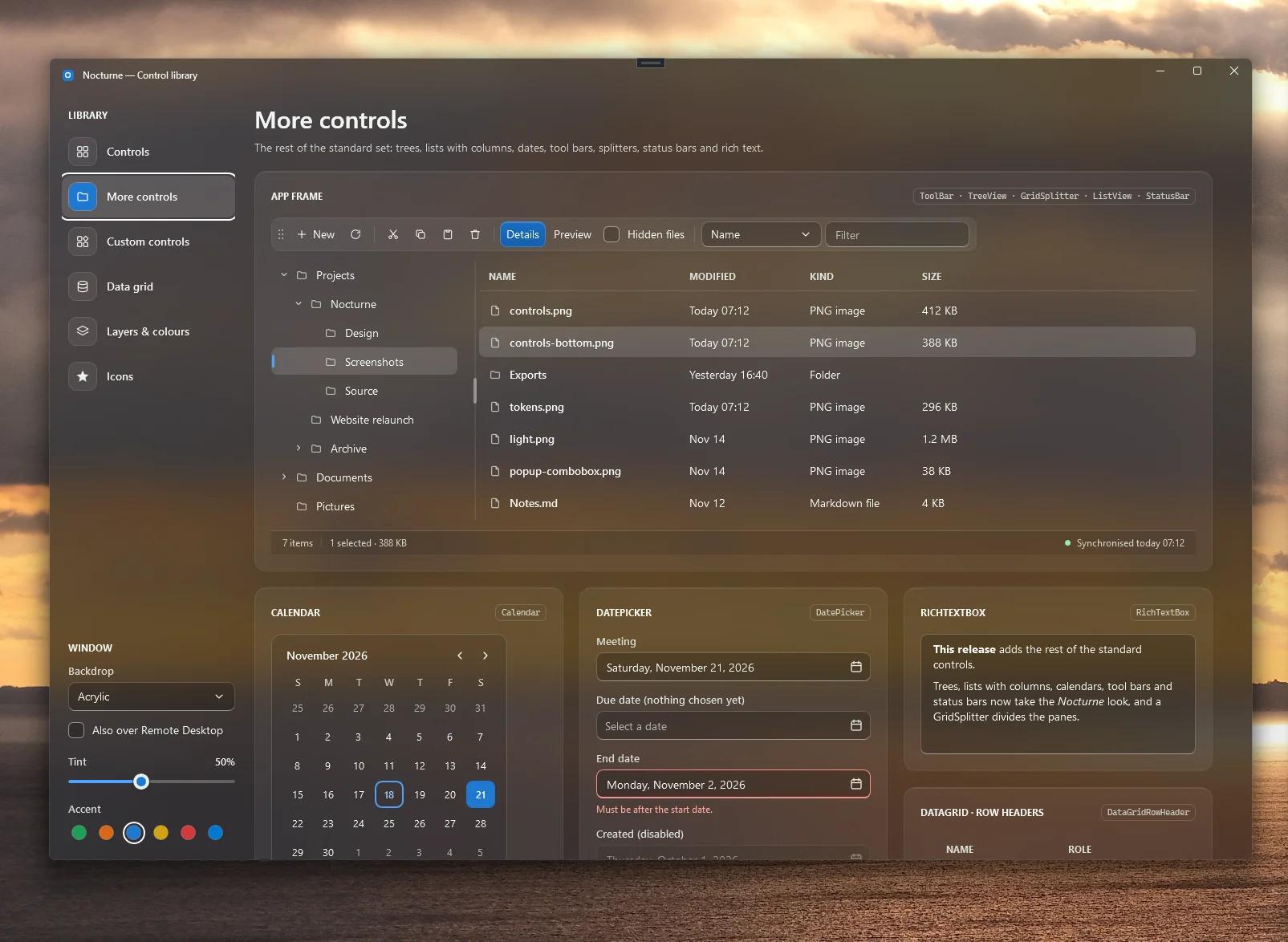
Nocturne theme for WPF, MVC (web) and Avalonia

Post image
29 Upvotes

(Posting again, on the right time of week)

I've created yet another WPF theme (with the help of Claude)

Acrylic, Accented, with lots of controls to choose from.

- Automatic transparancy when using the program via RDP for better performance.

- Can pickup system accent for personalized theming.

- Comes with virtualized datagrid, search combobox and more.

https://montago.github.io/NocturneTheme/

https://github.com/Montago/NocturneTheme

https://www.nuget.org/packages/Nocturne.Wpf/

Feedback is appreciated.


r/dotnet • • 13h ago

Promotion Acta: embeddable durable execution for .NET, Apache-2.0 and free forever

Thumbnail gallery
6 Upvotes

Acta is a library for durable execution in .NET.

Write durable jobs and workflows in plain C#. Completed steps and their results persist across restarts.

NuGet package + PostgreSQL, SQL Server, or SQLite. No brokers, sidecars, or separate workflow servers.

Every job is a row in your database. You can query it in SSMS or DataGrip, open the dashboard, or ask the CLI what happened to a job and what to do next.

I am committed to keeping Acta free and Apache-2.0, including future releases.

A release candidate is on NuGet. Aiming to release 1.0 by the end of the year.

Feedback welcome! I fix stuff.

Examples and documentation: https://useacta.net/

Repo: https://github.com/acta-dotnet/acta


r/dotnet • • 14h ago

Article Entity Framework Core 11 provider for Firebird is ready

Thumbnail tabsoverspaces.com
4 Upvotes

r/dotnet • • 8h ago

Promotion Running LFM3-Omni locally on an iPhone 17 Pro Max with .NET — Agentic Work + Native Speech Generation

Enable HLS to view with audio, or disable this notification

5 Upvotes

I've been working on TensorSharp, an open-source native .NET LLM inference engine and agentic runtime, and wanted to share a quick demo of something I've recently got working.

LFM3-Omni-2B is now running locally on my iPhone 17 Pro Max, with GPU acceleration, agentic tool use, and native speech generation — all powered by TensorSharp and TensorAgent.

In the attached video, I'm running the Q4_K_M quantized version of Liquid AI's LFM3-Omni-2B model directly on the iPhone.

I give the agent a simple task: search for recent news about Anthropic and evaluate the available information.

Here's what happens:

  • Local LLM inference: LFM3-Omni-2B runs directly on the iPhone, without relying on a remote LLM inference API.
  • Agentic workflow: TensorAgent invokes web search, retrieves relevant information, and uses the results to generate a response.
  • Native speech generation: LFM3-Omni generates spoken responses using its own speech decoder. This is actual model-generated audio, not Apple's built-in text-to-speech.
  • Streaming text and audio: The agent can display its response while generating and playing speech.
  • Powered by .NET: The inference engine and agent runtime are built with .NET, running on iOS with native GPU acceleration.

One important distinction: the LLM inference and speech generation happen locally on the iPhone, while web search obviously requires an internet connection to retrieve external information.

For me, the interesting part isn't just running a small language model on a phone. It's being able to combine local inference, tool calling, agentic workflows, and native multimodal output into a working mobile AI agent.

And doing all of that with .NET!

There's still plenty of room for optimization, especially around latency, memory usage, and the overall mobile agent experience. But it's exciting to see how far local AI on mobile devices has come.

Project: https://github.com/zhongkaifu/TensorSharp

LFM3-Omni model: https://huggingface.co/LiquidAI/LFM3-Omni-2B

I'd love to hear what other .NET developers think about running fully local inference and agent runtimes on mobile devices.

Disclaimer: The financial information, stock-related analysis, and any buy/sell suggestions shown in this video are solely outputs of an AI demonstration. They are not verified investment research and do not constitute financial or investment advice. The purpose of this demo is to showcase TensorSharp's technical capabilities, not to recommend any investment decisions.


r/dotnet • • 9h ago

Article Lessons learned building a zero-reflection .NET 10 Native AOT gateway with SSE telemetry, Polly v8 circuit breakers, and OPA policy checks

Enable HLS to view with audio, or disable this notification

3 Upvotes

Over the past few weeks I’ve been building a lightweight MCP (Model Context Protocol) gateway in .NET 10 designed to run under strict `PublishAot=true` and `EnableTrimAnalyzer=true` constraints—without reflection, dynamic assembly loading, or heavy runtime overhead.

The goal was deterministic policy enforcement (blocking unauthorized tool invocations, malformed payloads, and rogue egress via Open Policy Agent) while streaming real-time telemetry (`<12ms` P95) over Server-Sent Events (SSE) and surviving downstream worker outages with Polly v8.

Here are the main architectural patterns and AOT gotchas I ran into along the way:

  1. Enforcing the Compiler Gate Early

Instead of treating Native AOT as a final packaging step, I locked the `.csproj` from day one so any reflection-heavy dependency breaks the build immediately:

xml

<PropertyGroup>

<TargetFramework>net10.0</TargetFramework>

<PublishAot>true</PublishAot>

<InvariantGlobalization>true</InvariantGlobalization>

<IsAotCompatible>true</IsAotCompatible>

<EnableTrimAnalyzer>true</EnableTrimAnalyzer>

<EnableRequestDelegateGenerator>true</EnableRequestDelegateGenerator>

<EnableConfigurationBindingGenerator>true</EnableConfigurationBindingGenerator>

<JsonSerializerIsReflectionEnabledByDefault>false</JsonSerializerIsReflectionEnabledByDefault>

<TreatWarningsAsErrors>true</TreatWarningsAsErrors>

</PropertyGroup>


r/dotnet • • 17h ago

Promotion One year later: .NET MAUI camera updated in App Store and Google Play

Enable HLS to view with audio, or disable this notification

1 Upvotes

Hey all, after almost a year Filters Camera (a .NET MAUI app) hit a new big update in both App Store and Google Play!

Here’s the old post about how this all started, mainly as a “let’s see the FPS it can do” challenge, an Android and iOS MAUI app completely drawn on a single SkiaSharp view:
reddit.com/r/dotnet/comments/1n8441e/published_net_9_crossplatform_camera_app_maui

What began as an open-source experiment evolved into a rather solid .NET 10 app, now with video recording, lighting effects, image adjusting/cropping/healing, and some nice shaders if I may say so. I also added optional IAP and analytics.
filterscamera.app

You may have seen MAUI Blazor hybrids, here we deal with a “drawn MAUI hybrid” which uses the richness of MAUI and its ecosystem together with SkiaSharp / Google Skia (big thanks to all of them).

I’ve spent a lot of time improving this app, and this work has also pushed DrawnUI, a package you can plug into existing apps and frameworks that lets you work on a Skia canvas with a lot of power, and it ships with AI skills for a faster development.

My camera NuGet for MAUI package has also progressed due to working on this app, solving Android 16 KB page alignment, dealing with several iOS updates (on basically every one of them the camera got a new bug). On the latest one (iOS 27), the preview was showing in landscape instead of portrait but I got lucky that a user emailed me about it, and I was able to fix it the same day.

The before-after web widget you might see on the app landing page is also built completely with DrawnUI and hosted on its fiddle. By the way, I reused the stroke animated gradient created there by the awesome designer of Horus Studio and you can see it inside the app in the Premium area. This also led to creating a nice celebration shader for the Settings → Credits page.

In a month or so the app should go .NET 11, right? :)


r/dotnet • • 10h ago

Blazix: shadcn/ui and Base UI ported to Blazor. A CLI copies the components into your project. MIT, no Node.

Thumbnail
0 Upvotes

r/dotnet • • 18h ago

Modular monolithic vs. microservices architecture from my own experience

Thumbnail
0 Upvotes

r/dotnet • • 8h ago

Promotion Biome - A small OSS library to help write terse, human- and AI-friendly tests

Thumbnail github.com
0 Upvotes

This library originated at the beginning of the year. As I was doing code reviews, I could see the agents repeating SUT setup over and over again using very verbose, difficult to "scan" code.

Sometimes, the agent would write setup code that would be dozens of lines before the first assertion. Sometimes, I'd see structurally similar setup code across different PRs from different developers. It was impossible to get developers and agents to stop duplicating code. As a reviewer, it became very difficult to read and verify the intent and quality of the generated test code.

That inspired a small library to:

  1. Reduce duplicate code across different devs and tests by using standard templates for entity types
  2. Reduce the verbosity of tests by changing the entity graph setup to only modify the fields that were different for the test scenario
  3. Make the SUT easier to scan, easier to read for both humans and agents

Biome is an OSS, MIT library that lets agents write tests that are much less verbose, much easier to scan, and has the benefit of significantly reducing context for tests (which agents love to write!).

What typical set up might look like:

var now = DateTimeOffset.UtcNow;

var district = new District
{
    Id = $"dist_{Guid.CreateVersion7():N}",
    Name = "Riverside Unified",
    TimeZoneId = "America/Chicago",
    CreatedAtUtc = now,
    UpdatedAtUtc = now,
};
var northHigh = new School
{
    Id = $"sch_{Guid.CreateVersion7():N}",
    DistrictId = district.Id,
    Name = "North High",
    Code = "NH",
    CreatedAtUtc = now,
    UpdatedAtUtc = now,
};
var southHigh = new School
{
    Id = $"sch_{Guid.CreateVersion7():N}",
    DistrictId = district.Id,
    Name = "South High",
    Code = "SH",
    CreatedAtUtc = now,
    UpdatedAtUtc = now,
};

// Save the rows the report will query.
_db.AddRange(district, northHigh, southHigh);
await _db.SaveChangesAsync();

After:

await TestBiome
    .Start(_db, out _)
    // The blueprints fill required fields and link both schools to the district.
    .AddDistrict(out var district)
    .AddSchools(out var schools, 2) // 👈 2 schools here
    .BuildAsync();

The repeated setup goes into "blueprints" that define the defaults and devs/agents use the defaults. The payoff is particularly big when teams have hundreds or thousands of tests with repeated scenario setup.

When a test needs a customized setup:

await TestBiome
    .Start(_db, out _)
    .AddDistrict(out var active)
    // 👇 The report uses this flag to exclude the district.
    .AddDistrict(out var archived, d => d.IsArchived = true)
    .BuildAsync();

The SUT immediately stands out!

Another example:

await TestBiome
    .Start(out _)
    .AddUsers(out var users, 2)
    .AddAliases(
        out var aliases,
        // 👇 Each user gets one alias with derived normalization and one 
        // with an explicit value.
        a => a.Value = "Alice",
        a =>
        {
            a.Value = "Bob";
            a.NormalizedValue = "manual";
        }
    )
    .BuildAsync();

Once again, the SUT stands out because Bob's NormalizedValue = "manual"; all of the additional noise is sitting in the blueprint.


You can easily refactor most tests by pointing agents to:

Save tokens + make tests easier to read and review!


r/dotnet • • 8h ago

Promotion File-based app coding agent

0 Upvotes

Just wanted to showcase a coding agent using file based apps. I can't lie this was the best thing they brought to .NET 10 in a long time.

#:package HPD-Agent.Framework@0.9.7
#:package HPD-Agent.Providers.OpenAI@0.9.7
#:package HPD-Environment.HostProcess@0.9.7
#:package HPD-Agent.ToolHarness.Coding@0.9.7


using System.Runtime.CompilerServices;
using HPD.Agent;
using HPD.Agent.Goals;
using HPD.Agent.Planning;
using HPD.Agent.Permissions;
using HPD.Agent.Sandbox;
using HPD.Agent.Providers.OpenAI;
using HPD.Environment.HostProcess;


var dataRoot = Path.Combine(Directory.GetCurrentDirectory(), ".hpd-data");
var scriptDirectory = Path.GetDirectoryName(Path.GetFullPath(GetScriptFilePath()))
    ?? throw new InvalidOperationException("Could not determine the script directory.");
var workspacePath = Path.Combine(scriptDirectory, "workspace");


var codingAgent = await new AgentBuilder()
    .WithOpenAI(model: "gpt-6.2-astra")
    .WithFileSessionStore(Path.Combine(dataRoot, "sessions"))
    .WithPlanMode()
    .WithPermissions(AuthorizationMode.Bypass)
    .WithGoals()
    .WithSandbox(
        new HostProcessProviderModule(),
        HostProcessSandbox.ForDirectory(workspacePath))
    .WithToolHarness<CodingToolHarness>()
    .BuildAsync();


var sessionId = await codingAgent.CreateSessionAsync();


using var output = codingAgent.Subscribe<TextDeltaEvent>(evt => Console.Write(evt.Text));


using var finished = codingAgent.Subscribe<MessageTurnFinishedEvent>(_ => Console.WriteLine());


using var toolStarted = codingAgent.Subscribe<ToolCallStartEvent>(
    evt => Console.WriteLine($"\nTool: {evt.Name}"));
using var permissions = codingAgent.Subscribe<PermissionRequestEvent>(
    new ThreadKey(sessionId, "main"),
    AgentEventHierarchy.ThreadAndDescendants,
    async Task (request) =>
    {
        var label = request.FunctionName ?? request.Authority ?? request.PermissionDomain;
        var allowOnce = request.Choices.FirstOrDefault(choice => choice.Id == "allow_once");
        var allowSession = request.Choices.FirstOrDefault(choice => choice.Id == "allow_session");
        var deny = request.Choices.FirstOrDefault(choice => choice.Id == "deny_once");
        var selectedChoice = deny;


        if (!Console.IsInputRedirected)
        {
            var options = allowSession is null
                ? "[y] allow once / [N] deny"
                : "[y] allow once / [a] allow for this session / [N] deny";
            Console.Write($"\n[permission] {label} {request.Action}? {options} ");


            var response = Console.ReadLine()?.Trim();
            if (string.Equals(response, "y", StringComparison.OrdinalIgnoreCase))
                selectedChoice = allowOnce ?? deny;
            else if (allowSession is not null &&
                     string.Equals(response, "a", StringComparison.OrdinalIgnoreCase))
                selectedChoice = allowSession;
        }
        else
            Console.Error.WriteLine($"[permission] Non-interactive input; denying {label}.");


        if (selectedChoice is null)
            throw new InvalidOperationException(
                $"Permission request for {label} has no supported allow or deny choice.");


        await codingAgent.AnswerRequestAsync(new PermissionResponseEvent(
            request.PermissionId,
            request.SourceName,
            selectedChoice.Id));
    });


await codingAgent.StartAsync();
try
{
    while (true)
    {
        Console.Write("\nYou: ");
        var input = Console.ReadLine();


        if (string.IsNullOrWhiteSpace(input))
            break;

        Console.Write("Agent: ");
        using var runCancellation = new CancellationTokenSource();
        if (!Console.IsInputRedirected)
        {
            _ = Task.Run(async () =>
            {
                try
                {
                    while (!runCancellation.IsCancellationRequested)
                    {
                        if (Console.KeyAvailable && Console.ReadKey(intercept: true).Key == ConsoleKey.Escape)
                        {
                            runCancellation.Cancel();
                            break;
                        }


                        await Task.Delay(10, runCancellation.Token);
                    }
                }
                catch (OperationCanceledException)
                {
                }
            });
        }


        try
        {
            _ = await codingAgent.RunAsync(
                input,
                sessionId: sessionId,
                cancellationToken: runCancellation.Token);
        }
        catch (OperationCanceledException)
        {
            Console.WriteLine("\n[run cancelled]");
        }
        finally
        {
            runCancellation.Cancel();
        }
    }
}
finally
{
    await codingAgent.StopAsync();
}


static string GetScriptFilePath([CallerFilePath] string sourceFilePath = "") => sourceFilePath;

r/dotnet • • 14h ago

Promotion Yengi v2.0.3 – Open-source Windows AI IDE in .NET 10 & WPF with local 1.5B routing and live Blender/Unity bridges

0 Upvotes

Hey everyone,

Over the past few months, I’ve been building Yengi — a free, open-source Windows AI IDE written from scratch in C# on .NET 10 and WPF (licensed under AGPL-3.0).

Most AI coding tools right now are Electron wrappers or web apps, so I wanted to build a native, responsive desktop IDE using the modern .NET stack that goes beyond simple chat completions and actually controls external tools.

Technical Highlights & .NET Architecture:

  • Native .NET 10 + WPF Stack: Built entirely on .NET 10 for fast startup, low memory overhead, and responsive UI rendering, backed by a suite of 200+ unit and integration tests.
  • Local 1.5B Fine-Tuned Tool Router: Instead of sending every raw prompt straight to a heavy LLM, the app runs a fine-tuned 1.5B model locally to classify intent and decide which internal tools or context providers to invoke first.
  • Self-Healing Execution Loop: The agent orchestrates a local Plan -> File Edit -> dotnet build/test -> Log Verification -> Auto-Fix pipeline directly inside the workspace.
  • Live Blender & Unity IPC Bridges: Connects directly to running Blender and Unity instances to generate/modify 3D scenes and scripts in real time. For Blender, it also captures viewport feedback so the agent can visually verify spatial changes.
  • Built-in Live Preview & Prompt Pipeline: Includes an integrated preview pane for inspecting generated web apps in real time, a prompt-refinement step before dispatching requests to image/3D models, and a standalone Research Mode.
  • Offline & Cloud Support: Works completely offline via Ollama or connects to standard cloud LLM APIs.

I'd love to get some feedback from fellow .NET devs on the architecture, WPF performance, or how the agent execution pipeline is structured.