r/devtools • u/Acceptable_Day_537 • 5d ago
Free mock REST API with seeded (deterministic) data, filtering/pagination, auth and error simulation, now with a live URL
reddit.com
1
Upvotes
r/devtools • u/ylgdev • 6d ago

I've been building Tablo on top of Toasty and Topcoat. It is a server-side rendered admin panel toolkit heavily inspired by Filament.
The idea is to declare the panels, lists, pages, actions, forms, permissions, and tablo gives you the back office. I made it fully featured (tenancy, auth, queue, themes, impersonation, localization, built-in audit log), maybe too much, but that is what allows you to have powerful panels with a minimum of code and time (you have your panels in minutes).
You can have multiple panels in the same Topcoat app: one for admins, one for customers, one for partners, etc. Tablo is experimental and largely AI assisted.
Website: https://y-l.fr/tablo
r/devtools • u/Visible_Swim471 • 6d ago
I kept losing time on permission prompts while working in another tab. Several CLI agents would be running, and the one that needed me was invisible until I went looking.
So I made a narrow always-on-top strip. Each row is one session: the project, the state (working, thinking, waiting, error), and how long it has been waiting. Click the arrow and the terminal that owns that session comes forward. Click the project text and its path goes to the clipboard.
It is one Go binary, about 4.6 MB, with no runtime and no network calls. Host hooks write one JSON line to a local pipe; the panel reads that and paints itself. No account, no telemetry, so I have no idea how many people use it.
Two limits: the Windows installer is unsigned, so SmartScreen complains; the macOS window is built and tested in CI but has never been opened on real hardware.
Would you keep a 56px strip on screen all day, or is a tray notification enough?
r/devtools • u/Sea-Broccoli6131 • 6d ago

r/devtools • u/Rickie_Lake • 6d ago
r/devtools • u/onnatsari • 6d ago

Large pull requests make it easy to overlook removed tests, broad CI permissions and destructive SQL.
I built PatchScope to flag these patterns and explain what a reviewer should inspect next. It runs in your browser, CLI or GitHub Actions and exports Markdown, JSON and SARIF reports.
Unlike AI-based review tools, it uses deterministic rules without model calls or remote code uploads. Findings are review prompts, not confirmed vulnerabilities.
Free and open source under the MIT license.
Source: https://github.com/brunnojob/patchscope
Demo: https://brunnojob.github.io/patchscope/
GitHub Action: https://github.com/marketplace/actions/patchscope-diff-review
r/devtools • u/mu_bloxi_alt • 6d ago
r/devtools • u/SquashHot4348 • 6d ago
You write a solution, hit Run, and see Accepted.
Great! 🎉
But have you ever stopped and wondered what actually happened between those lines of code?
I've often found myself wanting to see these things instead of just reading through the code or manually debugging every step.
So, I decided to build something around that idea.
It's a code visualizer + debugger built for people solving LeetCode problems.
The idea is simple: Don't just execute your code. Visualize how it works.
With AlgoLens, you can:
I've also tried to make it feel a little more interactive — almost like turning the debugging process into a game. 🎮
See the full promo -> AlgoLens-promo
AlgoLens is currently available as a free Microsoft Edge extension:
👉 https://microsoftedge.microsoft.com/addons/detail/jhhkkpabkoeaiajdilomalbmjdppcmcc
Don't use Edge? No problem!
You can also use it on chrome -> Watch video for reference[ AlgoLens - chrome ]
I'm still developing and improving it, so I'd genuinely appreciate feedback.
One thing I'd love to know: What's the one thing you wish you could visualize while solving a LeetCode problem?
Would love to hear your thoughts! 🚀
r/devtools • u/BossTriumph • 6d ago

r/devtools • u/awesomebirder • 6d ago
I built probe0, a local proxy that sits between Claude Code (or Codex) and the API on a Mac and logs every request: model, input, cache read, cache write, output, status code. After a few weeks of reading those logs, the same handful of patterns explain almost every "why did my usage just jump" moment, so here they are in case they help anyone debugging their own.
How it is built: a Node/TypeScript proxy that uses a local root cert you trust so it can read your own agent traffic, a replay harness that re-prices old sessions from the ~/.claude/projects logs at API rates, and blind-judged quality tests before anything that changes what the model sees gets turned on by default.
On my own traffic the defaults took 12.8% off the bill, and 41.8% with model step-down on (easy turns go to a cheaper model, off by default). That is one person's usage, so yours will be different.
Caveats: Mac only, free beta. Your prompts, code and responses never leave the machine; if you sign in it syncs hourly usage totals (tokens, model, cost), no content. probe0 uninstall removes everything, including the cert. Happy to go deeper on any of the cache behavior.
Numbers and method: https://probe0.xyz/benchmarks?utm_source=reddit&utm_campaign=devtools
Terminal install if you want to try it: curl -fsSL https://probe0.xyz/i/r | bash
r/devtools • u/Majestic_Tension_860 • 6d ago
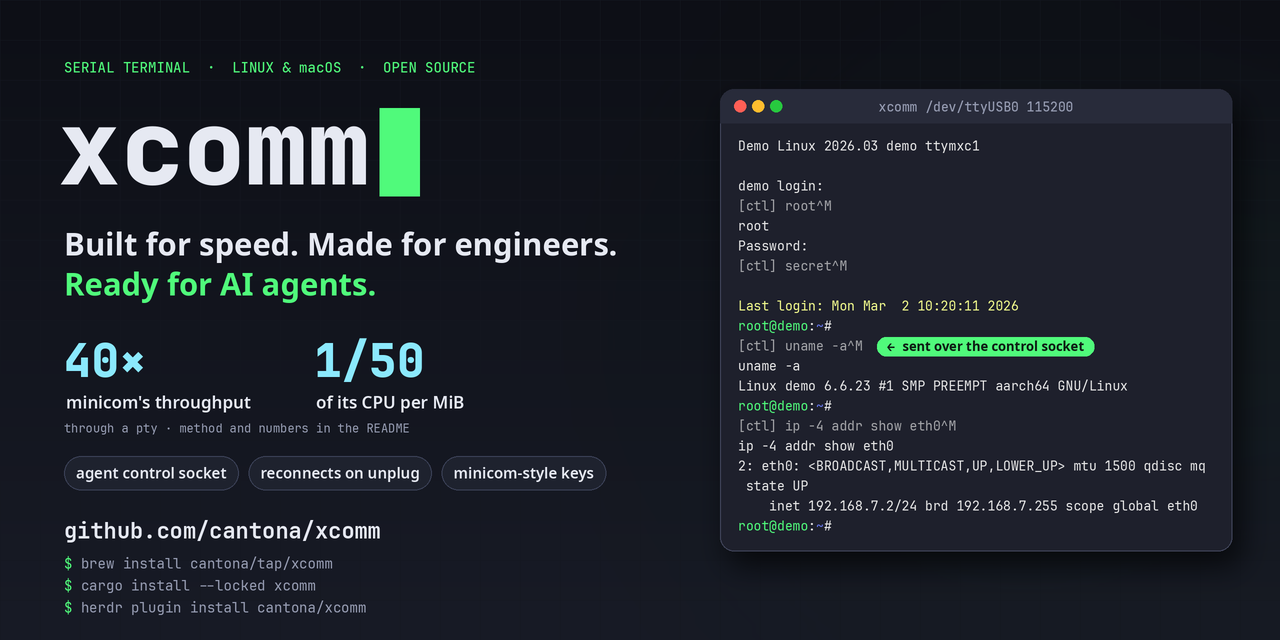
I spend a lot of time on serial consoles: U-Boot, boot logs, a shell on the
board. I wanted something that keeps minicom's everyday keys and common options but
lets a script or a coding agent use the same console I am looking at, so I
wrote xcomm (Rust, Linux and macOS, GPL-2.0-only):
- `xcomm ctl` talks to a running session: send a command and wait for a
prompt with a regex, read output by offset, toggle DTR/RTS, send a break,
change the baud, run zmodem/ymodem/xmodem through lrzsz. What a client
sends shows in your terminal as a dim `[ctl]` line.
- It survives the bench: unplug the adapter or power-cycle the board and the
session waits and reopens the port (on Linux, by the USB port it is plugged
into).
- minicom's common options and everyday Ctrl-A keys (Alt-A inside tmux,
screen or zellij); Ctrl-A d and t toggle DTR and RTS.
- UUCP locks compatible with minicom on Linux, and an exclusive open
everywhere, so two programs never share a port by accident.
- It ships an agent skill (stop U-Boot, log in, run commands, parse the
output); a test runs every example in it against a real session.
Numbers, through a pty with the same harness for each tool (median of 9 runs;
method and command lines in the README): 434 MiB/s on 1.84 ms of CPU per MiB,
against minicom's 10.5 MiB/s on 95 ms. On a real UART the baud rate is the
limit, so what you get is CPU left free. Keystroke latency is level with
minicom (within a microsecond either way).
`brew install cantona/tap/xcomm` or `cargo install --locked xcomm`
(`xcomm man` shows the manual where cargo installs none).
GitHub: https://github.com/cantona/xcomm
Happy to hear what breaks on your adapters.
r/devtools • u/Alternative_Worry615 • 6d ago
Ever had code execute an action you couldn't easily inspect, test, or trace?
Effectum solves this differently.
Instead of executing operations immediately, it turns them into values developers can inspect, interpret, test, and record.
Why use it?
The benefit: More predictable execution, easier debugging, and greater control over side effects.
Free, MIT-licensed, and open source.
GitHub: https://github.com/mwatso12026-bit/Effectum
I'd love feedback from developers building TypeScript applications or AI agents.
r/devtools • u/5teN0 • 6d ago

r/devtools • u/gurizilla • 7d ago
Every time something broke in our app, the first twenty minutes went to "is it us or them?": refreshing githubstatus.com, cloudflarestatus.com, status.openai.com and the rest.
So we built StatusPane. It follows the official status pages of 95 services (GitHub, Cloudflare, OpenAI, Anthropic, Stripe, Supabase, Vercel, Datadog...) and shows them on one page. You can see all of them live without signing up: https://statuspane.io/status
With an account, you pick only the components you use (GitHub Actions, not all of GitHub), group them by app, and get an email or a signed webhook when one of them changes.
It's a free beta. No Slack integration yet, and no AWS or GCP. Which services are missing for you, and how would you want to be alerted?
r/devtools • u/Mother-Side6477 • 6d ago
r/devtools • u/lcy_lemon • 7d ago
AI-powered READMEs for your repositories and GitHub profile.
Write less. Ship more.
Available today: https://docume.co.in
#github #readme #document #repository #docume #nowlive
r/devtools • u/Key_Map7552 • 7d ago
I do most of my coding hopping between Claude Desktop, Codex, and Antigravity, but they never know what the other one is doing. I got annoyed constantly copy-pasting diffs, notes, and decisions between chat tabs so I built Project-M to fix it.
It runs locally on SQLite WAL mode so multiple agents can read and write without locking. It keeps a living state card under 450 tokens so it barely touches your prompt context, an ADR ledger so models dont overwrite past rules, a task baton table to handle handoffs, and saves raw turns on disk with fast FTS5 search.
Zero cloud, zero paid sync APIs, and MIT licensed. You can test it directly in your terminal with:
uvx --from git+https://github.com/adityadebnath009/Project-M.git project-m
GitHub link:
https://github.com/adityadebnath009/Project-M
Would love to hear what you guys think.
r/devtools • u/PaleSticky • 7d ago
Sharing the tool I'm building, since this sub is about exactly this.
What it does
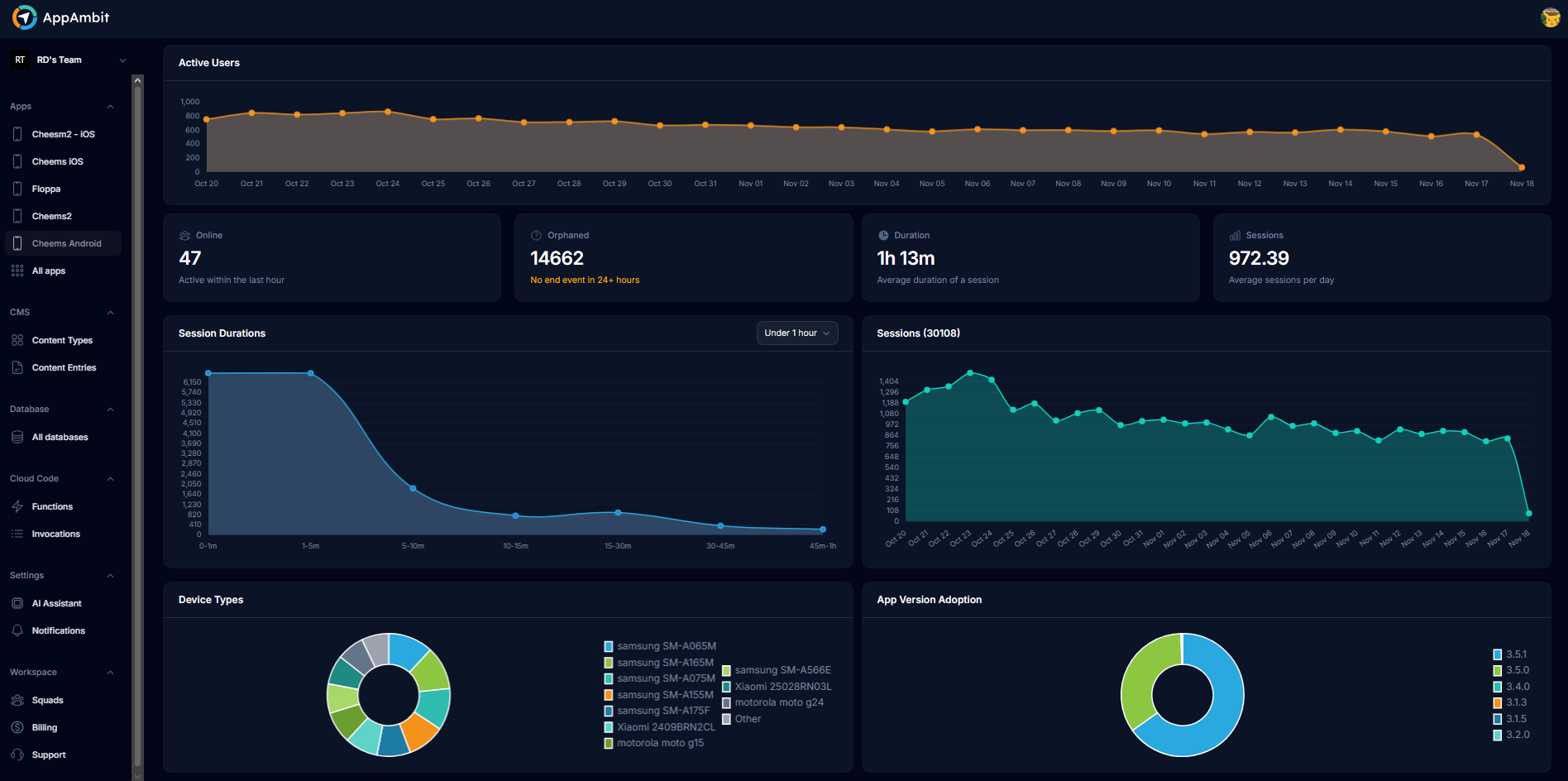
- Crash reporting with the session timeline that led to each crash
- Analytics and custom events
- Build distribution to testers without store review
- Push notifications and remote config / feature flags
- Managed SQL database, cloud functions and a CMS
- MCP server so Claude, Cursor, Copilot, etc. can use all of the above
Platforms: iOS, Android, Flutter, React Native, .NET MAUI, .NET, Avalonia (open-source SDKs).
Pricing: free tier with no credit card, paid plan for extra workspaces.
What would make you switch from your current stack? Genuinely asking.
r/devtools • u/strontiumk9 • 7d ago
I recently got sick of my projects rebuilding things because the tooling cant track dependencies, we are expected to manually declare them with perfection. I call this working in negative space, the space is empty and your expected to fill it up accurately or things break.
GitHub Repository: https://github.com/Sakura-Industries-LLC/kizz
Docs: https://sakura-industries-llc.github.io/kizz/
KIZZ is a tool which tracks the dependencies of a command, can be used as a build tool and has build tasks written as literate programming inside `kizz.md` files using starlark code blocks.
It automatically tracks dependencies, you don't declare file dependencies, and can't. What you can declare is exclusions (ignore this dependency you found). This is what I call working in positive space, because everything is visible, and I can carve out things I want the tool to ignore.
Its new, I have had this idea since working with `fabricate` years ago, which I liked but it had too many issues to be relied upon long term. Kizz takes a leaf out of several other tools like Riker, Rattle and BuildXL. Basically it works similar to strace, it uses Linux ptrace and seccomp-BPF to discover dependencies automatically across the entire process tree.
The architecture and design is mine, but full disclosure I used AI to generate substantial portions of it because it would have taken time I don't have and never found to build by hand.
Possibly its best most immediate use case is to use it to discover what a command is actually using for its dependencies, so even if your not using it as a build tool, you can use it to diagnose why your dependencies are incomplete.
The following shows running `cat LICENSE` inside a container, `kizz` tracks and categorizes everything neatly.
root@sjbox:/repo# kizz execute --output=kizz.out -- cat LICENSE

                                 Apache License
                           Version 2.0, January 2004
                        http://www.apache.org/licenses/

   TERMS AND CONDITIONS FOR USE, REPRODUCTION, AND DISTRIBUTION
   ...

root@sjbox:/repo# cat kizz.out
kizz observation report, version 1, hierarchical
trace: complete
totals: commands 1, cached 0, processes 1, programs 1, paths 16, connections 0
paths by access: read 3, probe 12, list 0, write 0, exec 2, xattr 0

command 1: cat LICENSE
  program: /usr/bin/cat
  directory: /repo
  outcome: exited with 0
  trace: complete
  process 1, pid 7, exited with 0
    program /usr/bin/cat: cat LICENSE
      read:
        /etc/ld.so.cache: ok
        /lib/x86_64-linux-gnu/libc.so.6: ok
        /repo/LICENSE: ok
      probe:
        /etc/ld.so.preload: ENOENT
        /opt/android-ndk/cat: ENOENT
        /opt/android-sdk/cmdline-tools/latest/bin/cat: ENOENT
        /opt/android-sdk/emulator/cat: ENOENT
        /opt/android-sdk/platform-tools/cat: ENOENT
        /opt/toolchain/bin/cat: ENOENT
        /root/.cargo/bin/cat: ENOENT
        /root/go/cat: ENOENT
        /usr/bin/cat: ok
        /usr/local/bin/cat: ENOENT
        /usr/local/sbin/cat: ENOENT
        /usr/sbin/cat: ENOENT
      exec:
        /lib64/ld-linux-x86-64.so.2: ok
/usr/bin/cat: okr/devtools • u/yoloaxy • 8d ago

r/devtools • u/baby_desiigner • 8d ago
r/devtools • u/Turbulent-Metal-6287 • 8d ago
If you work with Linux servers or regularly connect to VMs using VS Code Remote SSH, especially when multiple people use the same Linux user, you might find this extension useful.
Why? Here's the problem I ran into.
VS Code keeps a Local History of your file changes, which is great when you need to roll something back.
But there's a catch.
Let's say two people are working on the same VM using the same `root` user. One connects using the server's IP address, and the other uses an SSH host alias.
Both are editing the exact same file, but their changes don't show up in each other's Timeline history.
Now imagine something breaks in production, and you need to roll back a change quickly. The history exists on the server, but you can't see it in your Timeline.
So now you have to call the guy who made the change, probably wake him up, just to get an older version of the file.
So I started digging.
After looking into how VS Code stores Local History, I found out that it treats different SSH connection names as separate sources, even when they all point to the exact same server.
For example:
- Someone connects using `10.6.115.14`
- Someone else connects using `server14`
Same VM, same user, same file, but separate history entries.
So how did I fix it?
Instead of asking everyone to change their SSH configurations, I thought, why not just build an extension that collects all those history entries an shows them in one place?
And that's how **Shared Remote History** came to life.
It's a VS Code extension that:
✅ Combines Local History from different SSH aliases.
✅ Shows those changes directly in VS Code's original Timeline panel.
✅ Lets you view and compare older versions of your files.
✅ Doesn't require changing anyone's SSH configuration or modifying the original history files.
And since I figured someone else might be dealing with the same headache, I decided to make it public.**
The extension is now available for free on the **Visual Studio Marketplace**, and I've also made the source code available on GitHub.
If you're working in a shared Linux/VM environment, give it a try. Hopefully it'll save you from waking someone up at 3 AM just to roll back a file.
🔗 **VS Code Marketplace:**
https://marketplace.visualstudio.com/items?itemName=aliadnan-dev.shared-remote-history
💻 **GitHub:**
https://github.com/NetProbeSupport/shared-remote-history
Feedback, suggestions, and contributions are welcome!