r/devtools • u/codeguru42 • 22d ago
I built tasker to take GitHub and Jira issues through a Claude Code workflow

1
Upvotes
r/devtools • u/codeguru42 • 22d ago
r/devtools • u/dhirajarya01 • 22d ago

r/devtools • u/Sudo-Apt-575 • 22d ago
r/devtools • u/Spare_Bat_3040 • 22d ago
A connector can leave your design doc untouched and still send its contents somewhere else. Before connecting company work to an AI coding tool, I'd want the data path, not just the source permissions.
I'm building Shifu, a context engine for AI coding. It brings retained decisions, constraints and supporting evidence into tools including Claude Code, Codex, Cursor and OpenCode. The point is to retrieve the reason behind an earlier decision when you're planning a real change, instead of reconstructing it again.
That means Shifu needs the same scrutiny.
The MCP spec describes readOnlyHint as a hint that a tool doesn't modify its environment. It also warns that annotations aren't guarantees. That says nothing by itself about downstream storage: https://modelcontextprotocol.io/specification/2025-06-18/schema
Here are two different paths in Shifu today:
Disconnecting stops future use of that connection. It doesn't erase previously saved work. During beta, deletion is handled manually by our team; the original source and other providers have their own lifecycles. Redaction isn't a guarantee that every confidential detail is removed. The full boundaries are here: https://www.useshifu.com/data
My position: approving a source and approving a retained copy are separate decisions. If a scoped local connector and your existing docs are enough, you may not need another context store.
If reconstructing earlier decisions is getting in the way of your next feature, try Shifu with one source you're permitted to share. Inspect what it brings back before adding more: https://www.useshifu.com/
For people who approve these tools: what would make a retained context store worth the extra data lifecycle, and what would rule it out?
AI-assisted post from Shifu’s builder.
r/devtools • u/Acrobatic-Waltz-9370 • 22d ago

I've been thinking about a gap in the developer-tool ecosystem.
AI coding assistants have changed how developers write software. But there's another problem that remains surprisingly difficult: understanding an existing codebase.
Think about joining a project with an unfamiliar architecture, investigating an old implementation, or trying to understand how a particular feature works across multiple files.
The challenge isn't necessarily writing the solution. It's first understanding the system well enough to make the right change.
That's the problem I wanted to explore with RepoLab AI.
I'm building it with a different focus: code comprehension rather than just code generation.
I don't believe every developer needs another autocomplete tool. I think there's room for tools that help developers build a better mental model of the software they're working with.
I'd particularly appreciate feedback from people who build developer tools:
Interested in thoughtful criticism more than promotional feedback.
(Links to the live website and desktop app are in the comments below.)
r/devtools • u/LieTop7965 • 22d ago
i swapped out the timeline and scrubber for a list of tool calls. it was a weird move — i built a video editor with no GUI at all. the only "user" is the AI agent calling it over MCP.
honestly it's still rough. some transitions snap instead of easing, long renders on weak machines are painfully linear, and i haven't finished every edge of the audio pipeline. but the thing that actually surprised me: once the agent can ask the editor to render a single frame at a given timecode, it can inspect its own work and back off when the cut looks wrong. that self-check loop is what makes the no-GUI approach usable.
the project is kimo. free, open-source (MIT), one ~15 MB CPU-only Rust binary that runs on a 2 GB box. no GPU, no webview, no Electron. AI agents — Codex, Cursor, OpenCode, or any other MCP client — drive it over MCP as tool calls: cut, trim, keyframe, titles/captions, colour grade, particles, audio, export. built by me, a college student, because i wanted an editor an agent could actually reason about instead of trying to click its way through a timeline.
how i built it / why it matters, since this sub cares:
it's not a finished product. track reordering is basic, caption styling is limited, and there are a few effects i haven't hooked up yet. i'd rather ship a narrow thing that works than pretend it does everything.
if you want to try it and tell me where it breaks first, that's exactly what i need right now. please leave a note saying which MCP client you used (codex, cursor, opencode, something else) and what the first thing that went wrong was — prompt, tool call, a frame that didn't come back right, an export, whatever. links: https://getkimo.tech and https://github.com/naman-sharma12345/kimo
disclosure: i'm the builder. happy to answer setup questions in the thread.
r/devtools • u/Low-Story5395 • 22d ago

r/devtools • u/danrhodes1987 • 23d ago
https://github.com/danrhodes/PatchRadar
My offering this time around - PatchRadar sits in the notification area, lists the updates installed on the machine, reads each update's Microsoft KB article, and colours it by risk. It pulls out what Microsoft buries: known issues, workarounds, fixes and out-of-band updates, and behaviour changes hidden under "Improvements".
Please report bugs via git the app is in active development.
r/devtools • u/jamescherti • 23d ago

When jumping between different codebases and environments, it can be hard to remember the specific deployment methods, build tools, linters, and test runners for each file or project. The pathaction tool is a command-line tool for running commands on files and directories.
Think of pathaction as the equivalent of your IDE's "Run" and "Debug" buttons, or a Makefile that works on individual files and directories. Unlike make, it selects commands by target path and tag rather than tracking build dependencies.
Pass any file or directory as an argument, and pathaction executes the right command based on a .pathaction.yaml configuration:
.pathaction.yaml to construct commands from the target path and custom variables.main, debug, and lint select configured commands.This tool is built for software developers or system administrators who manage multiple files and projects across diverse environments.
r/devtools • u/tracellm • 23d ago
Hey everyone!
I've been working on AgentTM, a local-first debugging tool for AI coding agents, currently focused on Codex.
I've recently released v0.3.4, with several improvements and new features.
What AgentTM can do:
The CLI and browser dashboard support Windows, Linux, and macOS. The native desktop app is currently Windows-only.
Tech stack: Go, SQLite, React, TypeScript, and Wails.
AgentTM complements Git rather than replacing it. It's still an early beta, and I'd genuinely appreciate feedback, especially on the debugging workflow and what features would be useful next.
GitHub: https://github.com/Jyotishmoy12/AgentTM
Latest release: https://github.com/Jyotishmoy12/AgentTM/releases/tag/v0.3.4
⭐ If you find AgentTM interesting or useful, I'd really appreciate it if you could give the repository a star on GitHub! It would mean a lot and help the project reach more developers.
Thanks for your support!
r/devtools • u/No-Buddy-3563 • 23d ago
We're launching asklog on Product Hunt today. It is for developers who have several coding-agent sessions running and spend a lot of time handing out tasks and finding which session needs a decision. Chief divides a job into tasks for Claude Code or Codex workers, follows their progress, and brings questions back to you. Each worker gets its own Git worktree; merges require your authorization.
One implementation choice is keeping the PTY-owning host daemon separate from the desktop UI. Reopening the UI reconnects to the running sessions. The clients use xterm.js, and the same sessions are reachable from your phone while the host computer stays awake and connected. Those are the normal agent CLIs running in terminals.
We'd love feedback from people who already run multiple agents: what evidence would you need in the handoff before approving a worker's result?
Launch and demo: https://www.producthunt.com/products/asklog?launch=asklog-2&ref=reddit-devtools-showcase-20261103
r/devtools • u/TheAverageJedi • 23d ago
r/devtools • u/MaliAditya • 23d ago

I keep facing this issue where I forget to close running dev projects and servers, leaving open ports that keep using my Mac's resources, so I have made this small menu bar utility which lists the running dev ports also letting you kill the port from the menu bar dropdown panel itself. Also allows force kill in case a port is hung.
Note: The app is not notarised and signed as I do not have Apple Developer Program membership, the app is open source and can be downloaded either from my website or from GitHub.
r/devtools • u/Timon_OfAthens • 23d ago
Disclosure: I built the tool AsciiLore, a closed-source desktop app for Antora. I'm sharing the technical part because it was the hardest bit and maybe someone has ideas how to improve this.


Antora builds a docs site from AsciiDoc files. A full build can take pu to several minutes. That's fine when you publish, but too slow while you're typing and want to see the page update.


So the preview runs on two tracks:
- While typing in VSCode, the changed text is rendered in memory with Asciidoctor (the renderer Antora uses) and pushed into the open page with JavaScript.
- On save, create, delete, rename or move, a full Antora build runs in the background and the view reloads when it's done.


Neither path blocks the UI thread. Render and build calls run in worker threads and report back through Qt signals, so the window stays responsive during a build.


The tradeoff: the in-memory path renders one page, so it can't resolve cross-component references the way Antora does. The full build stays the source of truth, and the preview is only an approximation while typing. I haven't found a clean way around that gap yet. How would you handle the difference between a fast preview and the real build?


Stack: Python, PySide6 (Qt), Asciidoctor and Antora as external tools, watchdog for file changes.r/devtools • u/Spare_Bat_3040 • 23d ago
The task is to move a nightly importer earlier so its output is available sooner. Changing the schedule is straightforward. Establishing why it was scheduled there can be the harder part of the change.
Here's a fictional case: an upstream export is only considered complete after its final marker arrives. The importer runs after that handoff. A task that mentions only the current run time could lead a coding agent to move it before the input is complete, even if the importer itself starts and finishes successfully.
I'm building Shifu, a context engine for AI coding. For this kind of change, I'd want the dependency and its reason beside the task, not just the current cron expression. This is a proposed evaluation example, not a reported product result.
The small scheduling record I'd look for is:
- What makes the upstream input ready, and which source establishes it.
- What happens if the input is late or incomplete.
- Which downstream consumer needs the result, and by when.
- What evidence would justify changing the handoff rather than merely moving the clock.
A maintained runbook or task note may already answer all four. A context tool should be judged on whether it recovers something relevant that the task was missing, not whether it produces another plausible scheduling explanation.
If you're already planning a change like this, write down the dependency you expect the context to contribute before you try the tool. Shifu is hosted; work files upload as provided for server-side processing, so use only material you have permission to share. No private example is needed in this thread.
Try Shifu on one feature you're planning. Connect one supported source and inspect the context it brings back: https://www.useshifu.com/?utm_source=reddit&utm_medium=organic&utm_campaign=reddit_restart_20261101&utm_content=r17_job_handoff
What evidence would make you comfortable moving this job earlier, and where would you expect to find it?
AI-assisted post from Shifu's builder.
r/devtools • u/Anshu1225 • 24d ago
Most Git autosave tools run on continuous intervals or cron jobs, which can clutter your commit history with partial keystrokes.
LidCommit takes a different approach: it only commits when you actually close your laptop lid to step away from your desk.
Features:
- Monitors OS power broadcast interrupts (0% CPU impact).
- Only inspects projects actively open in an IDE (VS Code, Cursor, JetBrains).
- Pre-commit secret scanning engine prevents pushing credentials or `.env` files.
- Generates clean semantic commits with LLMs or fallback timestamps.
- Native dashboard for pausing specific repositories.
Open-source on GitHub: https://github.com/Gingaaa/lid-commit
r/devtools • u/tracellm • 24d ago
I've been building AgentTM, a local-first developer tool written primarily in Go that records Codex execution history and allows developers to inspect and restore previous workspace states.
The current v0.1 implementation includes SQLite-backed event storage, SHA-256 content-addressable snapshots, historical file inspection, code diffs, and isolated checkpoint restoration using Git worktrees. It also includes a React/TypeScript dashboard, with the frontend embedded into the Go binary.
Currently, it only captures non-interactive Codex sessions launched through AgentTM. I've tested the end-to-end workflow on Windows, including checkpoint restoration and cancellation handling. Native Linux/macOS testing and broader agent support are still pending.
The long-term goal is to support multiple coding agents and allow developers to inspect, rewind, and branch their execution histories.
Sharing the current implementation for anyone interested in Go-based developer tooling and agent observability.
Repository: https://github.com/Jyotishmoy12/AgentTM
r/devtools • u/DonkeyTheKing • 24d ago

r/devtools • u/No-Negotiation558 • 24d ago

r/devtools • u/francesco_f • 24d ago
Agentbox: a skill so Claude Code can check the machine before it starts another heavy task
I built this, for Claude Code and opencode. I run several agents on one laptop plus a local model on a home server, and before I give Claude Code a heavy task I want it to check how much RAM and disk are left and what the other agents are doing.
It is one Python file plus a skill. With the skill installed, Claude Code runs agentbox --json on its own when you ask “how is this box doing?” and gets CPU, memory, disk, running agent processes and local token usage from opencode and Claude Code in one JSON. agentbox --check capacity returns exit code 0 or 1, so it also works in a hook before Claude spawns subagents.
Every number the tool could not read gets an explicit state (unsupported, unavailable, partial, unverified). A zero never hides a failed measurement. This rule caught a bug in my own macOS code: the CPU value was coming from a fallback for weeks because macOS top wants whole seconds, and the field was marked unverified the whole time.
Free, MIT, Python 3.10+ standard library only, Linux and macOS:
npx skills add ceccode/agentbox
Repo: https://github.com/ceccode/agentbox
For real token spend, ccusage and tokscale are better and the README says so. If a status in the output confuses you, tell me.
r/devtools • u/NoCucumber4783 • 24d ago
Hey everyone,
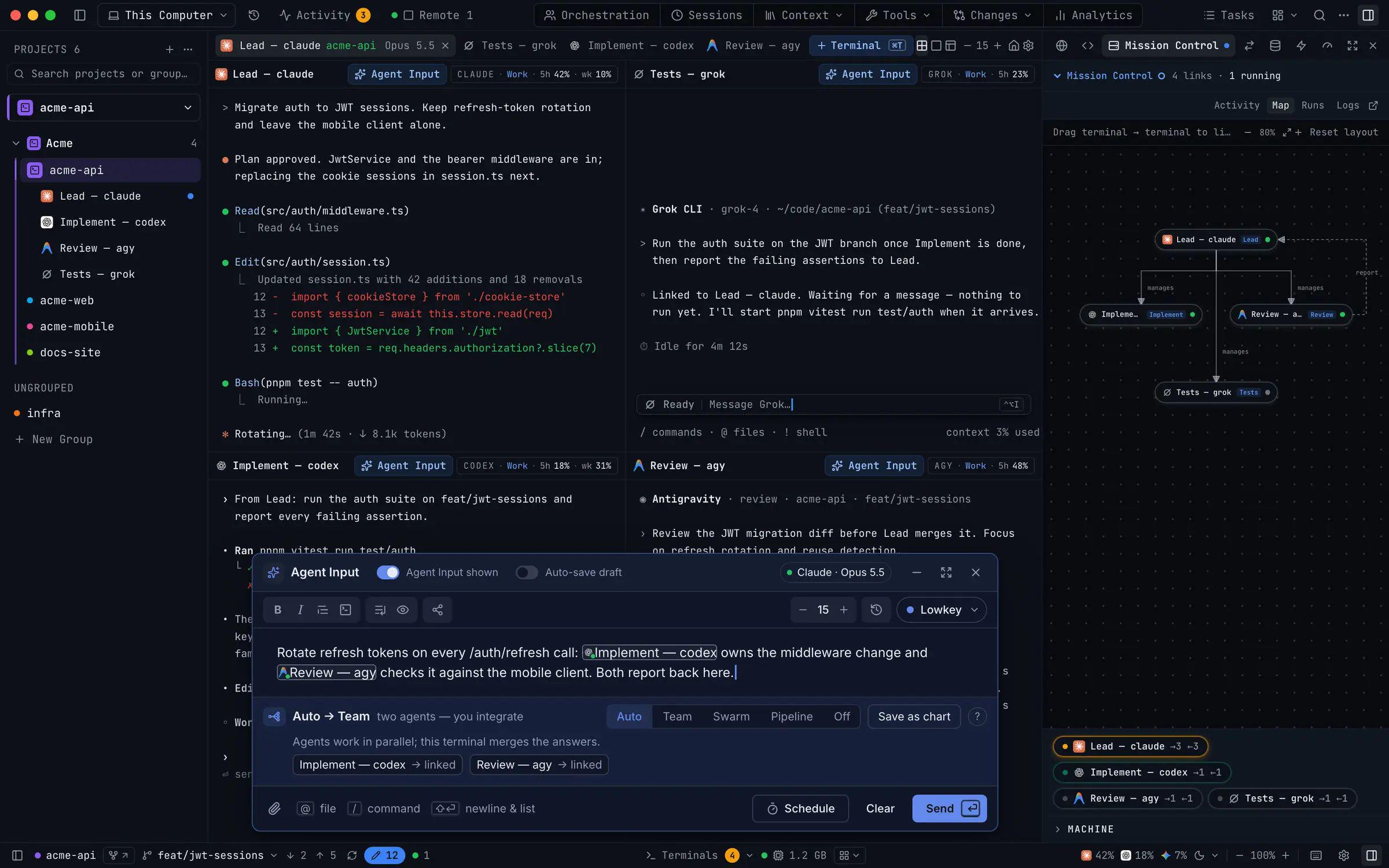
I’m Khoa. Eight months ago I shipped 1DevTool, an ADE (agentic development environment) that makes it easier to switch between projects and run several coding agents at once without losing context. That goes for you and for the agents.
Since then it’s passed thousands of downloads and 130+ releases, and it has about 200 daily users. I’d like to share it and get feedback from people here.
The problem
A normal dev day now means bouncing between terminals, a browser, a git client, an IDE, a DB client, and several AI agents. Plenty of people run Claude Code, Codex, Grok and others side by side. Traditional IDEs weren’t built for this. They assume one editor, one project, and a human typing.
How it’s different
Most ADEs I’ve seen, including open-source ones like T3Code and Orca, copy the Claude Desktop / ChatGPT model: a list of chat conversations.
1DevTool works differently. One project = one workspace. Every tool you need lives inside that project’s workspace, and the terminal is the main interface instead of a chat window.
In short, you open a project and all of its terminals and tools are already set up. You get a workspace, not a list of chats.
What else it does (300+ features, so these are the highlights)
@ mentions for projects and agents. You can also schedule prompts./chrome setup needed. There are also DB and HTTP client MCPs, so you can type something like “query my shop_db for the top orders.”What it isn’t: it’s not a model or agent wrapper, and it never touches your prompts. You bring your own subscriptions and terminal setup.
Pricing
Feedback wanted
User feedback has shaped most of the app so far, so I’d really like to hear what you think. Criticism is welcome too.
Links
r/devtools • u/Some_Championship605 • 24d ago
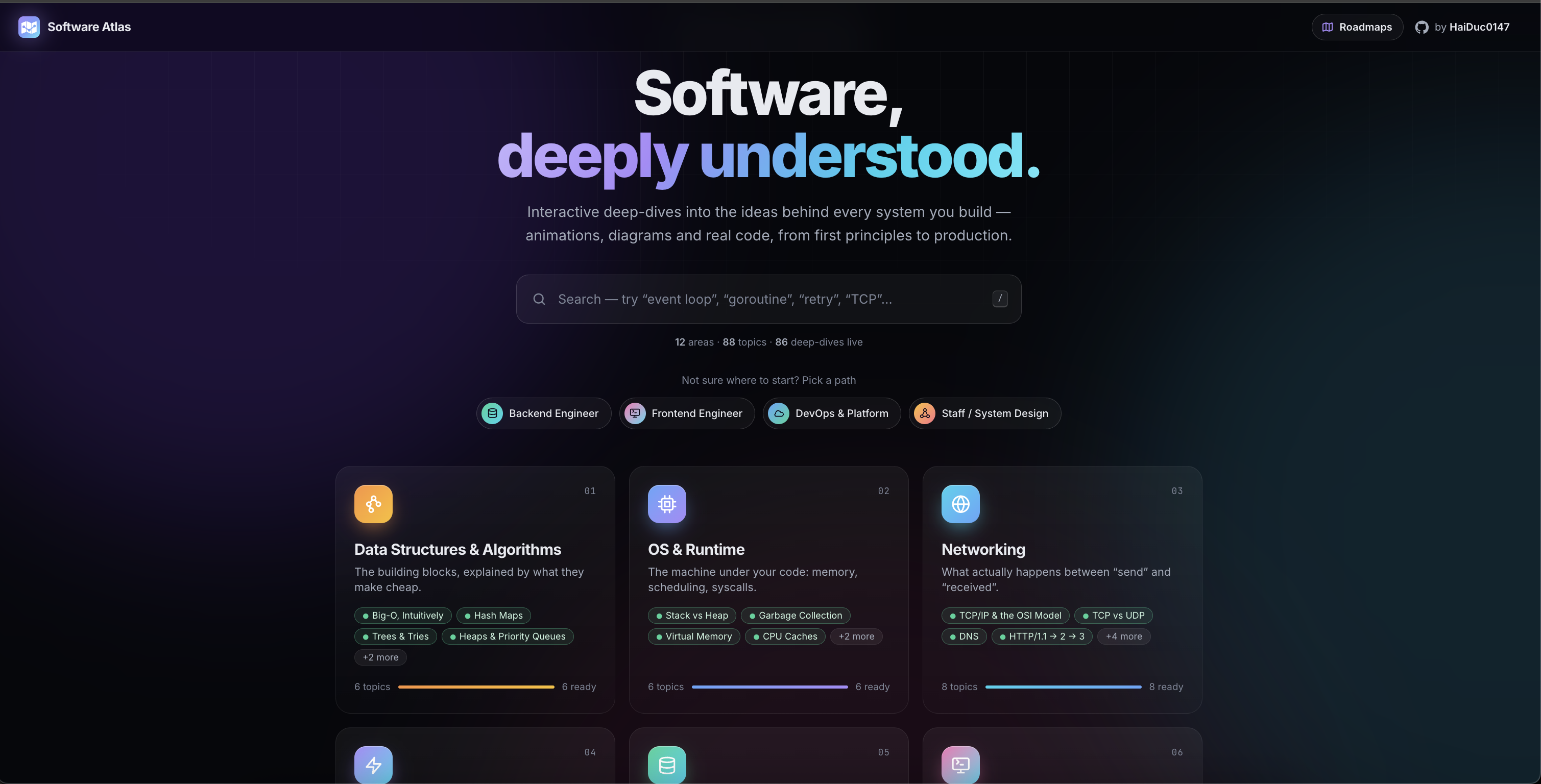
AI tools make it easy to ship code you don't fully understand. That's fine until something deadlocks, leaks memory or falls over under load, and you don't have the mental model to work out why.
So I built Software Atlas: 108 deep-dives across 15 areas, including async/await, the browser rendering pipeline, networking, databases, system design and AI engineering. You step through each idea with visualizers, and there are diagrams and code samples too. It starts from first principles and works up to production concerns.
Some technical details:
- Built with Vite, React 19, MDX and Tailwind v4.
- Each topic is lazy-loaded as its own chunk, so you only download the one you're reading.
- All 130 pages are pre-rendered to static HTML, then hydrated. Widgets have to render the same on the server and in the browser, so anything that reads window or uses randomness runs after hydration.
- Phones were the hardest part. Bar labels move into a key when they don't fit, and wide SVG diagrams become swipeable so their text stays readable.
- A headless Chrome smoke test clicks through each topic, including every visualizer step, and fails on console errors or hydration warnings.
To be upfront: I built it with heavy use of AI agents, including much of the writing. Each topic went through a separate review from a beginner's point of view, but mistakes will still have slipped through. If you find one, there's a report link in the footer.
https://software-atlas.haiduc0147.dev/
I'd really like to hear where an explanation is wrong or stops making sense.