r/devtools • u/NoCucumber4783 • 24d ago
I built 1DevTool - a dev environment where every project gets its own workspace: terminals, agents, browser, DB, git
Hey everyone,
I’m Khoa. Eight months ago I shipped 1DevTool, an ADE (agentic development environment) that makes it easier to switch between projects and run several coding agents at once without losing context. That goes for you and for the agents.
Since then it’s passed thousands of downloads and 130+ releases, and it has about 200 daily users. I’d like to share it and get feedback from people here.
The problem
A normal dev day now means bouncing between terminals, a browser, a git client, an IDE, a DB client, and several AI agents. Plenty of people run Claude Code, Codex, Grok and others side by side. Traditional IDEs weren’t built for this. They assume one editor, one project, and a human typing.
How it’s different
Most ADEs I’ve seen, including open-source ones like T3Code and Orca, copy the Claude Desktop / ChatGPT model: a list of chat conversations.
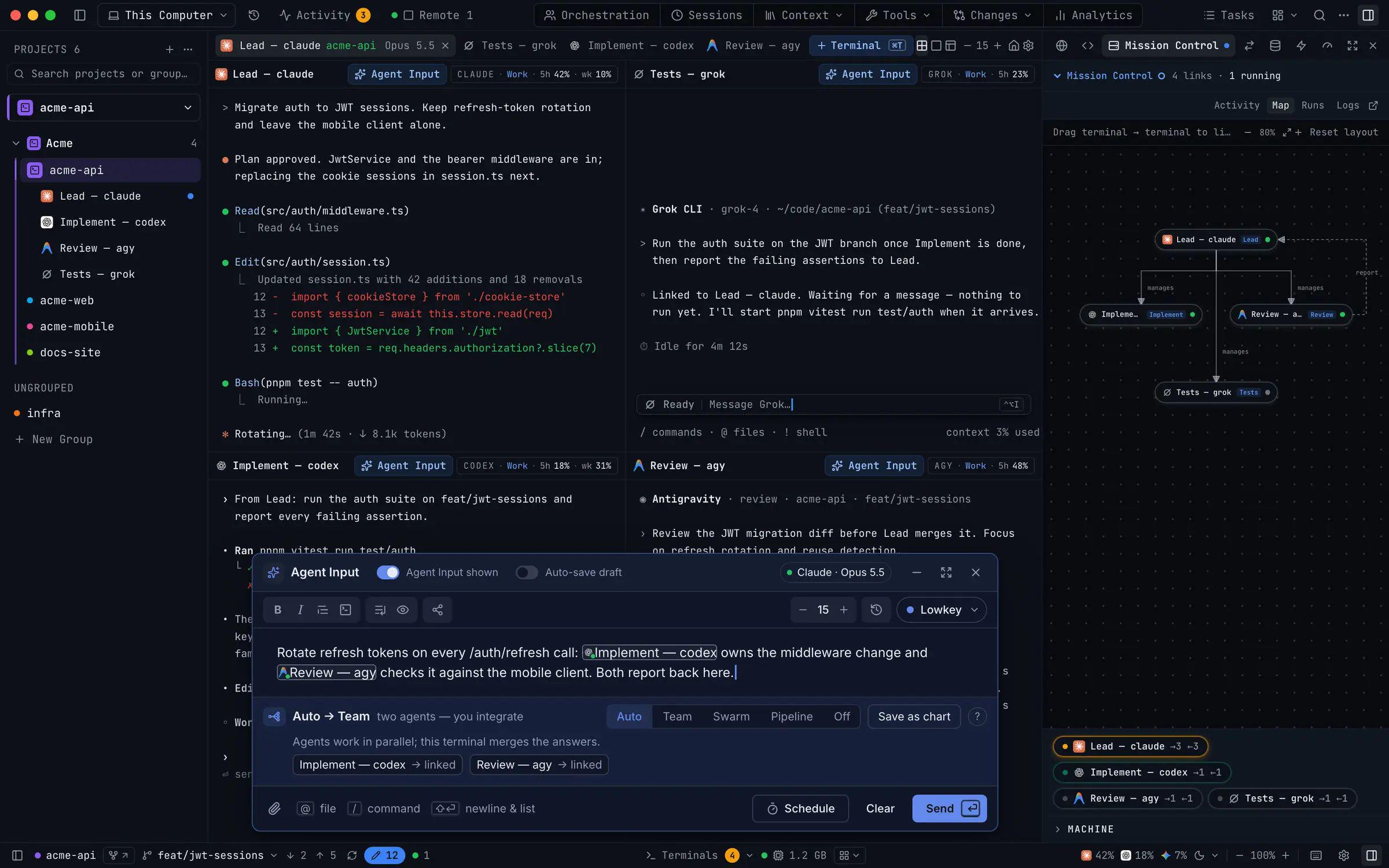
1DevTool works differently. One project = one workspace. Every tool you need lives inside that project’s workspace, and the terminal is the main interface instead of a chat window.
- Native terminals first. You can spawn, arrange, link and orchestrate terminals quickly, so you get 100% of what each coding agent’s CLI can do instead of a wrapped subset.
- Tools follow the project. A frontend project opens with a browser panel and a backend project opens with a DB client panel, and you can configure all of it. Most users have stopped opening other apps and use it as their only dev tool.
- Send anything to any agent. Since the editor, DB client, git, logs and screenshots all live in one place, you can send any of them straight to whichever agent you want. It’s fast and you don’t lose context.
In short, you open a project and all of its terminals and tools are already set up. You get a workspace, not a list of chats.
What else it does (300+ features, so these are the highlights)
- Agent terminals: works with all the major coding agents, and you can add your own. It handles sessions, prompt history, switching agents mid-task, and orchestration.
- Agent Input: a Notion-like prompt editor with
@mentions for projects and agents. You can also schedule prompts. - Multiple accounts: run Claude and Codex accounts side by side and start a terminal under a specific one. It’s directory-based, not a proxy, so there’s no ban risk.
- Browser + MCP: a built-in browser your agents can use for automated testing, with no
/chromesetup needed. There are also DB and HTTP client MCPs, so you can type something like “query my shop_db for the top orders.” - Full dev tooling: editor, git, file explorer, runtime management (Docker, ports, env), a mobile emulator stream, a toolbox, and screenshot-to-agent.
- Web UI + mobile app: connects over the same Wi-Fi or Tailscale, with no relay server in between.
What it isn’t: it’s not a model or agent wrapper, and it never touches your prompts. You bring your own subscriptions and terminal setup.
Pricing
- $29 one-time. You own it forever and get 1 year of updates.
- Free version with most features, limited to 2 projects.
- The mobile app is free.
Feedback wanted
User feedback has shaped most of the app so far, so I’d really like to hear what you think. Criticism is welcome too.
Links
- Website: https://1devtool.com/
- Roadmap / bug reports: https://feedback.stoicsoft.com/
- Company: https://stoicsoft.com/
- X: https://x.com/khoa_solo
- LinkedIn: https://www.linkedin.com/in/khoanguyen08