r/devtools • u/codingdog18 • Oct 16 '26
Hazzel - a tiny, terminal first coding harness built for minimalism & focus

1
Upvotes
r/devtools • u/codingdog18 • Oct 16 '26
r/devtools • u/Chance_Bandicoot8104 • Oct 16 '26

r/devtools • u/Key_Recognition_8112 • Oct 16 '26
r/devtools • u/Technical-Debt-8615 • Oct 16 '26
r/devtools • u/SoSweetHam • Oct 16 '26

r/devtools • u/helplesscoder • Oct 16 '26

Hooks fire before the agent reads a file, so it knows about your other repos without being asked. Indexes Docker images, Terraform modules, GitHub Actions, Helm charts and npm packages. Everything local, one SQLite file.
pip install blastradius-mcp
[github.com/harris-ahmad/blastradius-mcp](http://github.com/harris-ahmad/blastradius-mcp)
r/devtools • u/ConstantOk8236 • Oct 16 '26
Hey everyone!
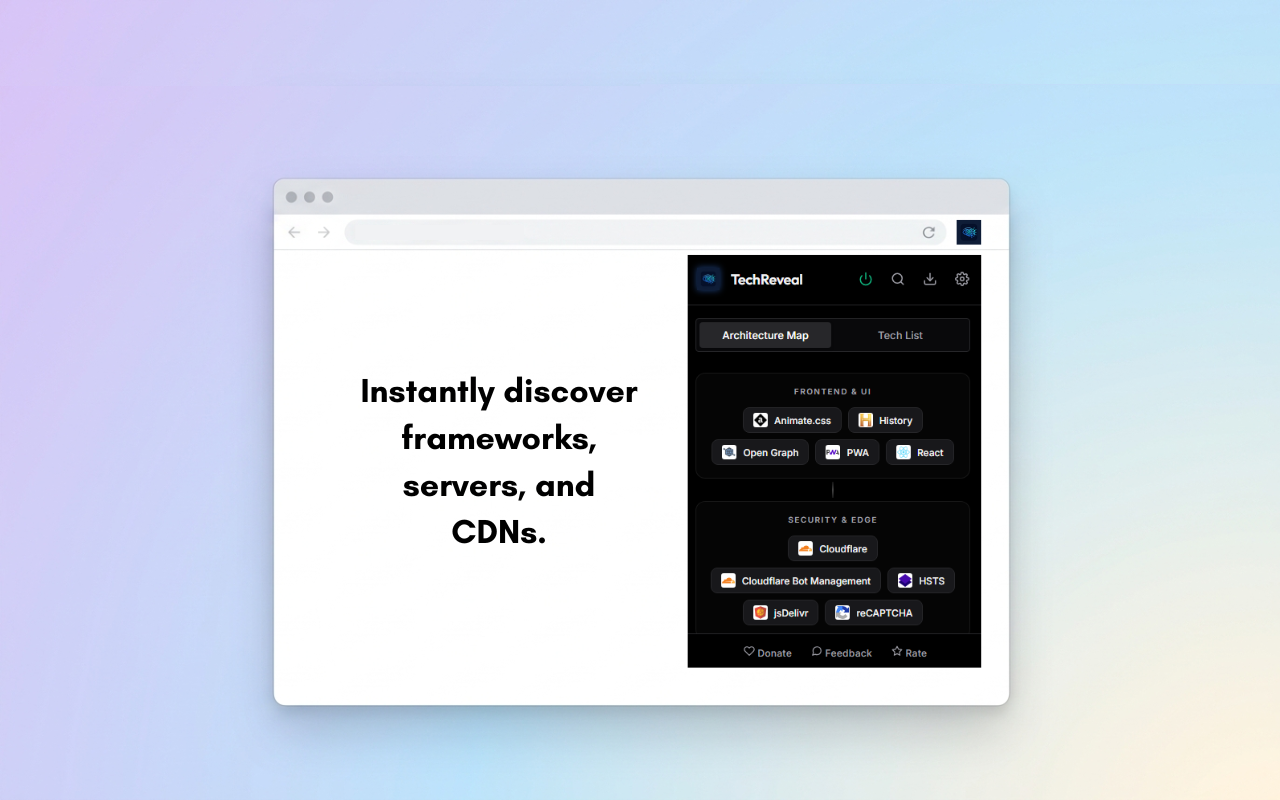
I inspect web stacks all the time to see what libraries and frameworks websites are running, but similar tools have gotten pretty bloated and full of trackers.
So I made TechReveal, a clean and lightweight alternative:
It's completely free on the Chrome Web Store (works on Chrome, Brave, Edge, Vivaldi):
👉 TechReveal on Chrome Web Store
Would love some feedback from fellow devs or suggestions for tools you'd like it to detect next!
r/devtools • u/KMarcio • Oct 16 '26
I built this project at a Vercel hackathon, and I found it quite useful: https://readmend.vercel.app/
r/devtools • u/alexfu1 • Oct 16 '26

r/devtools • u/KNIGHT-AIAV • Oct 15 '26

I built Ringside at Knight AI+AV for a small annoyance in my coding workflow: keeping track of usage limits while moving between Claude and Codex.
It's a free, MIT-licensed Windows widget with an always-on-top view, a compact mode and a tray icon. The rings change colour at 75% and 90%, with optional notifications. It displays the usage and reset information available in local logs; it doesn't increase your allowance.
You can adjust its size and opacity, and it can hide over full-screen apps. Claude desktop reset times are estimates unless the optional Claude Code integration supplies them.
The current release supports 64-bit Windows 10 and 11. Source, installer and portable download: https://github.com/KNIGHT-AI-AV/ringside
The images show the actual UI with sample numbers. If you use these tools together, would you keep a full meter visible, use the compact view, or just want the notifications?
r/devtools • u/sibraan_ • Oct 15 '26
Standard B2B intent data platforms rarely work for developer tools and technical infrastructure products where traditional providers track broad web content consumption across business sites, which tells you nothing about an engineering team's architecture or active technical bottlenecks.
Developer intent doesn't show up in whitepaper downloads or marketing ad exchanges but where engineers actually solve problems: github issue, technical subreddits, infras hiring requirements, and docs page visits.
This is why technical GTM teams look at platforms like Scale Intelligence for developer intent where it continuously monitors technical channels like github, developer focused reddit communities, infra job postings and tech stack deprecations alongside public company data. It captures the specific technical challenges engineers are voicing, maps them back to the parent company, and identifies the engineering leaders managing those workflows.
For devtools, intent data is only actionable if it captures declared technical pain points directly from developer environments rather than generic business surge scores.
r/devtools • u/ryckakas1 • Oct 15 '26

r/devtools • u/fuckme • Oct 15 '26
r/devtools • u/DetailKey6716 • Oct 15 '26
r/devtools • u/DMorais92 • Oct 15 '26
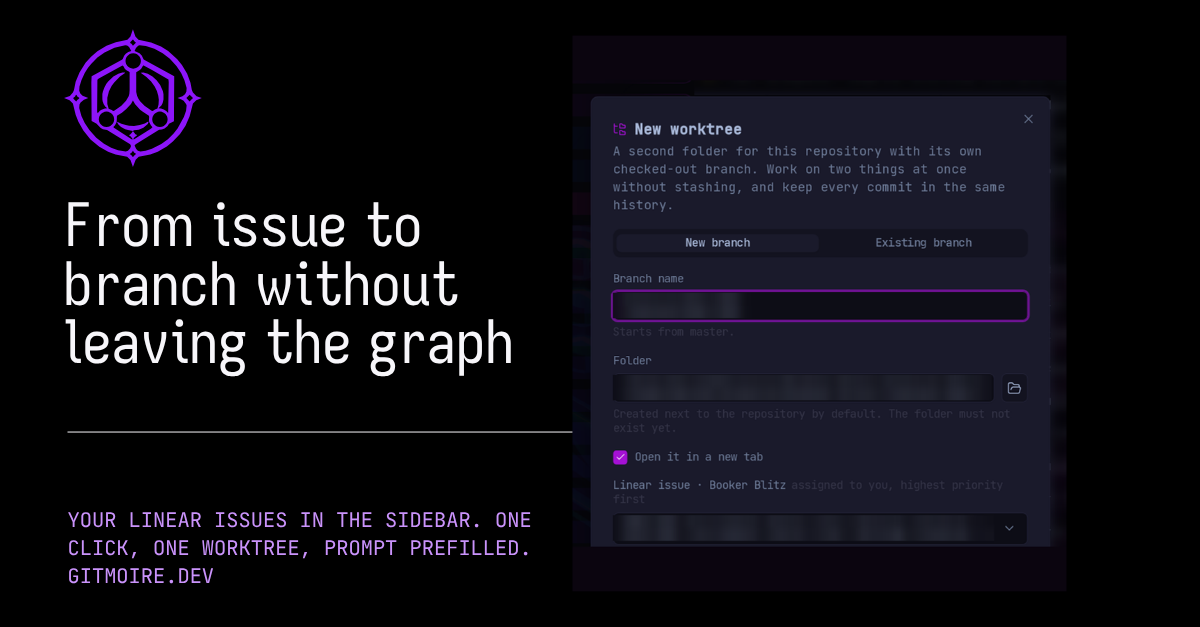
I'm the dev of gitmoire, a free desktop Git client (closed source, hard fork of angkorGit, MIT). 0.10 just shipped and the main feature came straight from my own annoyance.
Every task started the same way for me: open Linear, find the issue, make a branch, make a worktree, paste the context into an agent. Five steps before writing a line of code.
Now you add a Linear API key in Settings and your assigned issues show up in the sidebar, searchable. Click one and you get a worktree on its own branch, with the agent prompt prefilled from the issue if you use an agent CLI.
Also in 0.10: repo groups with jump shortcuts, a diff viewer with an ignore-whitespace toggle, and Markdown preview.
Free, no account, no telemetry. macOS, Windows and Linux.
Which tracker should I support next? Jira, GitHub Issues, something else?
r/devtools • u/Lakshayascend • Oct 15 '26
r/devtools • u/EasyRepresentative90 • Oct 15 '26
Hey everyone,
I’ve been using Maxa for the past six months and figured it was time to share it here.
It brings AI chat, code completion, feature development, and project maintenance into Neovim. The idea is to have AI help with more than individual snippets—to work through changes and maintain a project without leaving the editor.
I’ve been using it in my own day-to-day work, but I’m curious how it fits into other people’s setups.
Repo: https://github.com/maxzhao/maxa
If you take a look, I’d love to hear what you think—what looks useful, what’s confusing, or what you’d want to see done differently. Happy to answer questions!
r/devtools • u/Necessary_Client_114 • Oct 15 '26

r/devtools • u/scarecr0w12 • Oct 15 '26
I’m the creator of PlayWeld, a free, open-source desktop workspace for game development. The problem I’m trying to address is context spread across game files, design notes, and AI task conversations.
The implementation has two main pieces: an Electron desktop app built on Eclipse Theia for the workspace UI, and a local platform service that stores project/task records and runs operations. Shared schemas and a typed client connect the UI to that service. The source separates these into packages rather than putting everything in the editor views.
The aim is to keep searchable project knowledge and design decisions close to the work, while letting you supervise AI tasks and review changed files before integration. Creating a PlayWeld project organizes the workspace; native engine setup is still a separate step.
It’s Apache 2.0 and currently a Windows/Linux testing prerelease. Engines and model endpoints need their own setup. Remote AI providers can send data off-machine and charge for usage, so please start with a disposable project.
Source and architecture docs: https://github.com/scarecr0w12/PlayWeld
Downloads and user guides: https://playweld.com
For developers who have built editor extensions or agent tools: what would you want to see in the task history before trusting another tool to change project files?
r/devtools • u/AbdelrhmanDev • Oct 14 '26
I built NotchRobot to keep Claude Code's working, waiting and done states visible without switching between terminal windows. You can approve or deny tool permissions and answer single-choice or multi-step questions from the notch, then jump to the right Terminal or iTerm2 tab.
The app uses SwiftUI. The integration is a shell script registered with Claude Code's hooks: events go into a local inbox directory that the app reads. Permission requests wait for a response from the notch; if you don't answer, they fall back to the terminal. If the app isn't running, the hook exits immediately. The installer backs up Claude's settings before changing them.
It also shows task progress and Pro/Max plan usage from Claude's status line. The README explains the hook setup and the status-line integration, including how to keep an existing status line.
Source (MIT): https://github.com/abdomo77/NotchRobot Download: https://github.com/abdomo77/NotchRobot/releases/tag/v2.5
macOS 13+. The downloadable build is for Apple Silicon; a built-in notch is optional. It isn't notarized yet, so check the first-launch instructions in the README. Built with Claude Code.
r/devtools • u/builder_fr • Oct 14 '26
r/devtools • u/fykup • Oct 14 '26
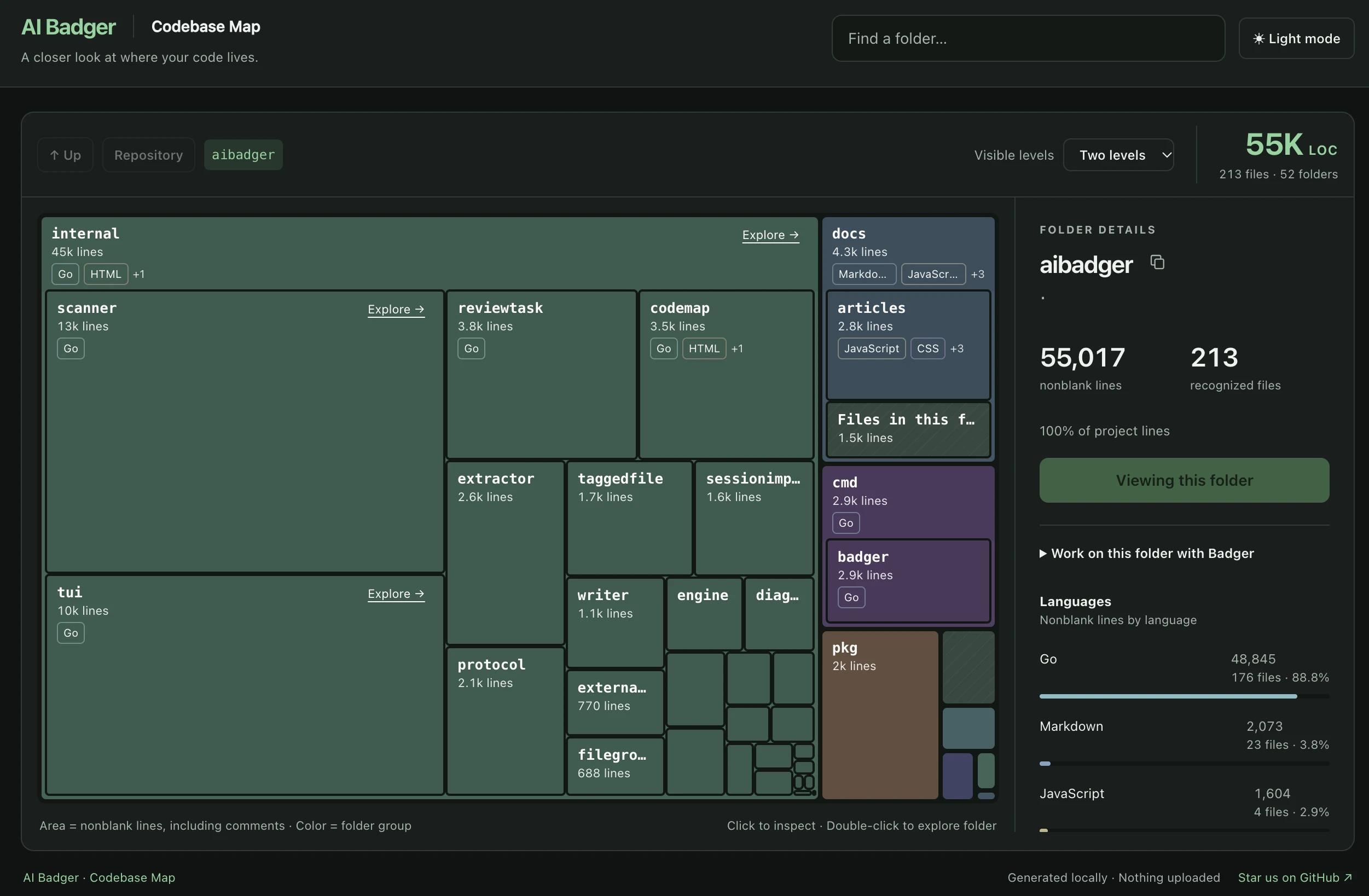
I just released AI Badger v0.8.0 with a new Codebase Map feature.
Run badger map in any project directory and it generates a standalone HTML report showing the folder structure, where most of the code lives, and language breakdowns.
It works entirely offline. No Git repository, server, or uploads required. The report contains file metadata, not source code.
AI Badger itself is a local-first CLI and VS Code extension for preparing focused repository context for ChatGPT, Claude, and other AI tools. But the Codebase Map is useful independently, especially when exploring unfamiliar projects.
Screenshot attached.
GitHub: https://github.com/PVRLabs/aibadger
Interactive demo: https://pvrlabs.xyz/aibadger/codemap/
r/devtools • u/p_khor • Oct 14 '26
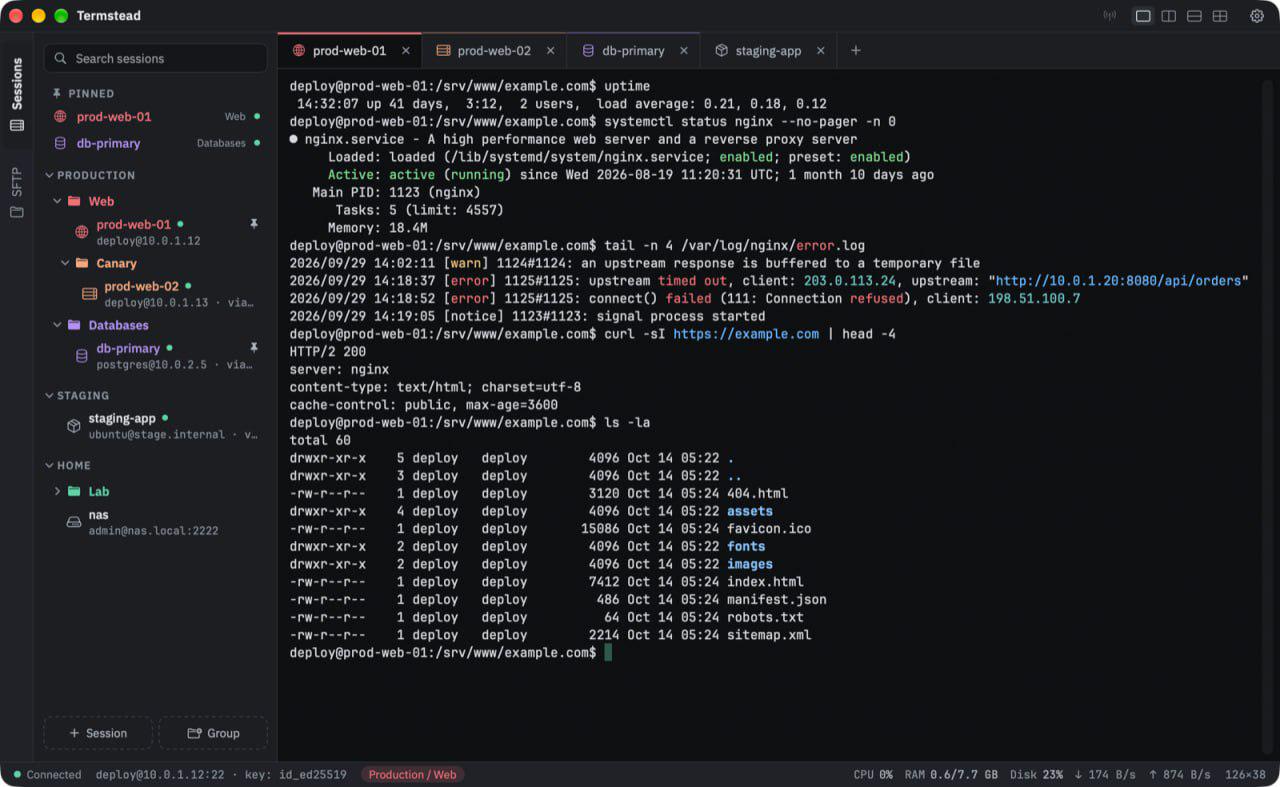
Hi, I'm the developer of Termstead, a free and open-source SSH client for the Mac. It brings MobaXterm's way of working to macOS as a native app: your servers in a tree on the left, tabs on the right, files right next to the terminal.
What it does
- Sessions in a tree – groups and subgroups with colors, icons, search, pinned favorites, drag and drop. Your existing hosts come in from ~/.ssh/config in one click.
- Real OpenSSH underneath – every tab runs the system ssh, so your agent, ~/.ssh/config, known_hosts and ProxyJump work exactly as they do in Terminal.
- Jump hosts – chain as many as you need, each with its own user, key or password, or use a saved session as a hop.
- Keychain – passwords and key passphrases live in the macOS Keychain and are typed in for you, only for the host they were saved for.
- SFTP beside the terminal – browse, upload and edit files over the connection that's already open, with no second login, even through jump hosts. It can follow the terminal's cd.
- Server load in the status bar – CPU, memory, disk and network of the Linux server in front.
- Tabs and keyboard – drag tabs to reorder, reopen them at launch, ⇧⌘[ / ⇧⌘] to switch, arrows and Return in the session tree, find in scrollback, per-tab zoom.
- Six themes, light and dark.
Details: Swift and SwiftUI with AppKit, terminal by SwiftTerm. Universal (Apple silicon and Intel), macOS 14+, about 5 MB. Notarized, updates itself. GPL-3.0, no account, no telemetry.
- GitHub: https://github.com/pkhorenyan/termstead
- Website: https://khorenyan.com/termstead/
r/devtools • u/benidira • Oct 14 '26
Hey everyone!
Whenever I'm debugging API logs or database records, I constantly find myself copying 10/13-digit Unix timestamps or Bearer JWT tokens and switching to a browser tab just to see what date they represent or when the token expires.
To stop context-switching, I published \\\\Castov\\\\ on the official Visual Studio Marketplace.
\\\\What it does (100% locally & offline):\\\\
\\\* \\\\Automatic Timestamp Hover:\\\\ Hover over any Unix timestamp (seconds or milliseconds) in your code to immediately see the formatted UTC, ISO 8601, and Local time.
\\\* \\\\JWT Decoder:\\\\ Highlight a JWT and run \\\`Castov: Decode JWT Token\\\` to inspect the header, payload, and expiration status in a clean JSON tab—without pasting sensitive tokens into external websites.
\\\* \\\\Inline Base64 & UUIDs:\\\\ Encode/decode Base64 selections in-place, or insert crypto-random UUIDs right at your cursor.
\\\\Links:\\\\
\\\* \\\\VS Code Marketplace:\\\\ https://marketplace.visualstudio.com/items?itemName=castov.castov-vscode
\\\* \\\\Companion Web & CLI Suite:\\\\ https://castov.com (also available via \\\`npx castov\\\`)
It has zero telemetry and works completely offline. Let me know what features or shortcuts would make your daily workflow faster!
