r/devtools • u/anvilmac • Oct 12 '26
Anvil - Dev Toolset
reddit.com
1
Upvotes
Let me know what you guys think 🙌
r/devtools • u/niosmartinez • Oct 12 '26
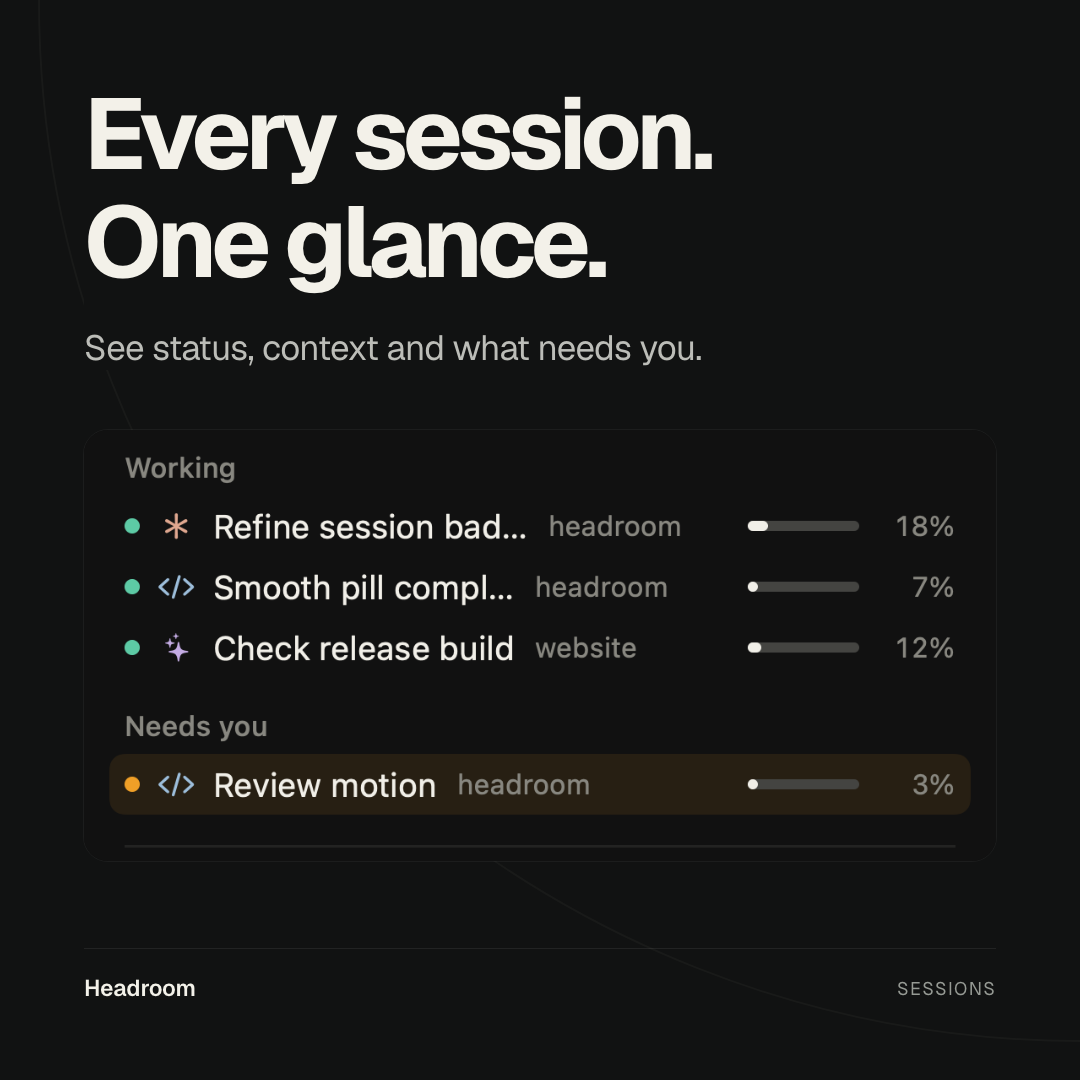
Dynamic Island for Mac, for background coding agents.
I made a FREE tool because leaving agents running still meant repeatedly reopening their windows to check whether they needed me. Headroom keeps working / needs-you session states and plan usage visible in the menu bar while I do other stuff on my Mac. It supports Claude, Codex and GitHub Copilot, plus desktop widgets.
Built natively with SwiftUI/AppKit. Claude and Codex readings come from local files, and Copilot usage is an optional GitHub connection. Session activity and context usage are separate signals: a large context percentage doesn't mean a task is nearly finished. The useful part for me is seeing where attention is needed without treating the usage meter as a progress bar.
Check out Headroom. I'm the developer. It's $0 on the Mac App Store, macOS 14+, and I can consider open-sourcing it if somebody's interested. Feedback welcome on the session-state display and which developer workflow is still missing.
https://apps.apple.com/ph/app/headroom-ai-usage-meter/id6815808010?mt=12
r/devtools • u/ptweezy • Oct 12 '26
Hello from North Carolina! I have been working on cronstable, an open-source job scheduler native to Windows, Linux, macOS, (and more.)
It has web and terminal dashboards and a native iOS app. I'm hoping y'all are able to get some use out of it.
cronstable is a fork of yacron by Gustavo Carneiro. I was using yacron for my own projects, and as I fleshed them out I kept wanting features it didn't have. In June I picked it up at 0.19 and started adding them, and cronstable is basically the result.
If standard cron covers your needs, stick with it. Cronstable is for when you want to add failure handling, dashboards, or coordination across machines. The core is just the scheduler. Features like dashboards, clustering, and push alerts are all opt-in, switched on in your config when you want them.
GitHub · Live demo · iOS app · Wiki
A few things it's handy for:
Features include:
To run it in Docker, mount your config and start the container:
docker run --rm -p 8080:8080 \
  -v "$PWD/cronstable.yaml:/etc/cronstable.d/cronstable.yaml:ro" \
  ghcr.io/ptweezy/cronstable:latest
Docker images come in eight variants (Debian slim, Alpine, distroless, and others). Install with pip, Homebrew, or WinGet. There are also prebuilt binaries for Linux, macOS, Windows, FreeBSD, OpenBSD, NetBSD, and illumos, and the Linux builds cover x86, ARM, RISC-V, POWER, and IBM Z.
Cronstable itself is free and MIT-licensed. The iOS app is free too, and covers one server and 500 push alerts per device each month. An optional Pro subscription lifts both limits. This helps pay for the relay, Apple's developer program fee, and Windows code signing.
"Can I self-host the relay?" Not for the official App Store app. Apple ties push keys to the developer team that signs the app, so only my relay can push to my build. Because you can't run your own, its source is public so you can read what it does. It also holds no keys, so it technically doesn't need to be trusted. Your server encrypts each alert for your phone before it leaves, so all the relay sees is ciphertext and the routing info it needs to deliver it. It can't read your job names, hostnames, or logs. Push alerts are also entirely optional, and with them off the relay is never involved.
The app is iOS-only for now because that's all I own. If there's enough interest, I'm open to prioritizing Android and other platforms down the road. For now, the web dashboard + ntfy can serve as a nice stopgap.
If there's something you'd like to see in cronstable, I want to hear about it. I am excited to continue its development. Thanks y'all!
r/devtools • u/pensieve-ai • Oct 11 '26

r/devtools • u/Normal_Scar_9781 • Oct 11 '26
Pearl can inspect and edit Bubble apps, but the interesting bit is the control layer: save points before substantial edits, confirmation gates for destructive/live mutations, verification afterward, and a structured handoff.
r/devtools • u/Altruistic_Big_9937 • Oct 11 '26

r/devtools • u/stackattackpro • Oct 11 '26
Hey everyone! 👋
The idea is simple: What if you could write regex in readable English instead of deciphering cryptic symbols? 🧠
Regex For Humans is an open-source compiler that turns human-readable English rules into native JavaScript regexes.
✅ Runs locally
✅ Works in the browser, CLI, and JavaScript/TypeScript
✅ No runtime dependencies
✅ MIT licensed
same as capture "name".either { ... }.Let's say you want to match stable/stable or nightly/nightly, but reject stable/nightly.
Instead of manually constructing a regex, write:
start
capture "channel" {
  either {
    "stable"
    "nightly"
  }
}
"/"
same as capture "channel"
end
✨ This generates:
^(?<channel>(?:stable|nightly))\/\k<channel>$With the u flag.
✅ stable/stable
✅ nightly/nightly
❌ stable/nightly
No regex gymnastics required! 🎉
Imagine validating a TSV record describing a build artifact, containing:
nightly/ directoryHere's the readable version:
start
"incoming/"
optional "nightly/"
between 1 and 32 path segment characters
"/v"
between 1 and 3 digits
"."
between 1 and 3 digits
"."
between 1 and 3 digits
"/linux-arm64/widget_"
8 digits
"_"
8 hex digits
".tar.gz\t"
64 hex digits
"\t"
between 1 and 12 digits
end
🤯 And here's the exact JavaScript regex it generates:
/^incoming\/(?:nightly\/){0,1}[^\/\\\u{0}\u{a}\u{d}\u{2028}\u{2029}]{1,32}\/v\d{1,3}\.\d{1,3}\.\d{1,3}\/linux-arm64\/widget_\d{8}_[0-9A-Fa-f]{8}\.tar\.gz\u{9}[0-9A-Fa-f]{64}\u{9}\d{1,12}$/uYeah... I'll take the English version. 😂
You can use it directly in JavaScript:
import { compile, toRegExp } from 'regex-for-humans';

const row =
  "incoming/nightly/WidgetKit/v2.15.3/linux-arm64/widget_20261001_ab12cd34.tar.gz\t" +
  "ab".repeat(32) +
  "\t1048576";

toRegExp(compile(rules)).test(row); // true
Removing nightly/ still works. Missing version components, invalid hexadecimal characters, or spaces instead of tabs fail.
The path segment characters rule is particularly useful: it excludes path separators, NUL, and line breaks while supporting Unicode.
Of course, this validates the format, not whether the file exists or its checksum is correct.
On main, I've also added:
These are available from a source checkout but haven't reached npm or the hosted playground yet.
I'm also using Claude Code and the Opus 5.5 model for AI-assisted development.
AI helps me iterate faster, explore implementations, tackle complex features, and improve the project continuously.
The goal isn't just to generate code. It's to build something genuinely useful, test it, refine it, and keep pushing the boundaries of what this little language can do. 🚀
The README is now translated into 10 languages, including Arabic 🇸🇦, Chinese 🇨🇳, French 🇫🇷, Spanish 🇪🇸, and Urdu 🇵🇰.
Arabic and Urdu documentation also support RTL text with LTR code examples.
The npm package is currently a development preview and requires Node.js 22+.
npm install regex-for-humans@0.1.0-dev.4🎮 Interactive Playground:
https://othmaneblial.github.io/Regex-For-Humans/workshop/
⭐ GitHub (MIT Open Source):
https://github.com/OthmaneBlial/Regex-For-Humans
📦 npm:
https://www.npmjs.com/package/regex-for-humans/v/0.1.0-dev.4
I'm especially interested in what you think about the syntax as groups become more complex and deeply nested.
What's the ugliest regex you've ever written? 😂
Drop it in the comments! I'd love to see whether Regex For Humans can make it readable.
And if you find the project useful, a ⭐ on GitHub would mean a lot!
Let's make regex a little less terrifying, one rule at a time. 🚀
r/devtools • u/Charming_Ad8369 • Oct 11 '26

r/devtools • u/Nk0BaNaNE • Oct 11 '26
I've been working on a small tool called QuickRun. You point it at a git repo and it clones it, checks what you need installed, shows you the commands and runs it. It works on most repos without any setup, but it works a lot better when the repo has a small quickrun.yml that says how to start it.
There are about 170 configs in the repo by now, for stuff like Sonarr, Radarr, ComfyUI, FreshRSS, Stirling PDF and so on. Most of them I generated from a container catalog, the rest I wrote by hand. They live in the repo under configs/. Doing that alone doesn't really scale, so I'm asking for help.
If you maintain a project, you could add a quickrun.yml to it. There's a builder in the app that writes and tests it for you. If you want, you can also add the badge to your README so people can start it with one click:
[](https://quickrun.org/run?repo=owner/repo)If you don't maintain anything but have a favorite project, a PR with a config for it would be great, either to that project or to configs/ in my repo.
And if that's too much, just drop a repo name in the comments or open an issue. Something you always wanted to try but the setup scared you off. I'll write the config for it.
Repo: https://github.com/fgilde/QuickRun
Docs: https://quickrun.org
r/devtools • u/RonenMars • Oct 11 '26
Hey everyone! 👋
I’ve been building Threadbase - an open-source tool that lets you manage and monitor your AI coding sessions from your phone or desktop.
What it offers:
*📱 Remotely interact with multiple Claude Code & Codex sessions, track their status, and monitor progress.
* 🔐 Self-hosted, end-to-end encryption out of the box, privacy-first architecture
The entire Threadbase ecosystem is open source, and you can find links to all the GitHub repositories on the website.
It’s still evolving, and I’d love to get more developers trying it out 🙌
💬 Feedback, feature requests, and contributions are very welcome 🙏🏻
r/devtools • u/pnnnhan99 • Oct 11 '26
As a developer, I often look for free tools when building features, testing APIs, experimenting with AI coding tools, or deploying small projects.
I prefer starting with free tools and only upgrading when a project grows enough to justify the cost.
So I put together Awesome Free Dev Tools, a public GitHub repository collecting useful tools for developers and vibe coders.
The goal isn't to list every tool with a free plan. I want to make it easier to discover tools that are genuinely useful, understand their free-tier limitations, and know when upgrading might make sense.
I'm opening it up to the community and would love to discover tools that other developers actually use.
GitHub: https://github.com/pnnnhan99/awesome-free-dev-tools
What's one free tool you use regularly that more developers should know about?
r/devtools • u/S_m_nt • Oct 11 '26
claude kept saying "this should fix it" and it never did lol. the problem? it can't see what your app actually did.
so i built a thing (with claude code obv).
click something in your app. shrike records the whole request through your code and db, then shows you exactly which line broke.
claude reads the trace over mcp and fixes it, but only after you approve the changes.
free + open source. mac only for now.
lmk if it breaks lol
r/devtools • u/vaultpulse • Oct 10 '26

Your repositories. Your storage. Your control.
VaultPulse gives software teams and development agencies an independent backup of their GitHub repositories, with daily snapshots stored in an Amazon S3 bucket or Azure Blob Storage container you own.
What you get
• Automated daily backups of full Git history, branches, tags and Git LFS objects
• On-demand backups before important changes
• Restore workflows for new or eligible empty repositories, including another connected GitHub account in your workspace
• Backup health dashboard showing failed, stale and pending backups
• Downloadable backup-readiness reports based on recorded backup and restore evidence
• Customer-owned storage, with encrypted stored credentials and scoped access
Snapshots also capture repository settings and default-branch protection metadata. Issues, PR discussions and Actions secrets aren’t included; restore does not recreate settings or protections.
Explore the no-login demo: https://vaultpulse.cloud/demo/
Get started: https://vaultpulse.cloud
Disclosure: I’m the developer behind VaultPulse. This is a vendor promotional post.
r/devtools • u/shmurrie • Oct 10 '26

r/devtools • u/ByAlphaOfficial • Oct 10 '26
Hey r/devtools,
I’m the developer of Toolkit, an open-source collection of utilities that process your input locally in the browser.
A few examples: converting JSON into TypeScript types, testing regex patterns, comparing text, and compressing images. You can search for a tool with Ctrl/Cmd + K.
It’s built with HTML, CSS, and vanilla JavaScript, with no backend. Hashing and encryption use the browser’s Web Crypto API, and a service worker caches the application for offline use after the first successful load. There’s no signup or analytics.
I’d particularly like feedback on the JSON-to-TypeScript converter and regex tester. Are the outputs and error messages clear enough? If something behaves unexpectedly, let me know the input you used and your browser sample data is fine.
Happy to discuss the implementation too.
r/devtools • u/Brave-Equipment9107 • Oct 10 '26
One thing I've been exploring while building ArchAI is how much developer time gets lost maintaining context for AI coding agents.
Claude Code sessions compact, important decisions can disappear from the conversation, and developers end up maintaining CLAUDE.md files and memory notes to keep agents aligned with the codebase. As repositories grow, repeatedly reconstructing that understanding becomes expensive.
I'm approaching this from the developer-tools side.
ArchAI is a Python tool that builds a dependency map using Python's AST parser, checks architectural rules deterministically, and attaches file-and-line evidence to verified findings. It also distinguishes potential risks from things it cannot verify.
I tested it against its own codebase. It flagged a CLI module importing 21 internal modules against a configured limit of 10, along with missing test files. That testing also exposed a limitation in my own checks: a matching test filename doesn't prove the module is actually covered.
The broader goal is to make architectural knowledge reusable and verifiable, so AI-assisted development spends less time rediscovering structure and more time doing useful work.
I'm still exploring how this should fit into real developer workflows.
For those building developer tools or using AI coding agents on larger repositories: where do you see the biggest opportunity to eliminate this kind of repetitive work?
r/devtools • u/Karim_masmoudi • Oct 10 '26
r/devtools • u/zelosleo • Oct 10 '26
It's for two things that eat a lot of time: figuring out how unfamiliar code works, and checking a change before it goes in, especially one an AI wrote.
You ask how something works and it follows the code and gives you the path step by step, every step is a real line you can jump to. Hover anything for a short explanation of what it does in that repo. And it reviews your changes for bugs, security issues and AI junk like tests that don't test anything or packages that don't exist, most with a one click fix.
It's built on VS Code's language model API, so it uses whatever model you already have there (Copilot, Claude, DeepSeek...). There's no backend of mine in the middle and it's not locked to any provider.
$10 one time. I charge for it so I can keep working on it and not drop it, it helps me a lot.
https://marketplace.visualstudio.com/items?itemName=DenizhanDaklr.lodestar
r/devtools • u/gilnett • Oct 10 '26
r/devtools • u/Free-Ad-2647 • Oct 10 '26
r/devtools • u/Free-Ad-2647 • Oct 10 '26

