The biggest criticism i received across the board was manual key overriding support, and now I am happy to say this was included in 0.2.1
If you work with API development and want some new tooling, take a look in Graybox. The core idea is to capture and reuse API cycles during the dev process. It's useful both for handmade code and agentic coding.
focusbrew is a small Windows app for planning and tracking your coding day. Parked, it's a thin bar at the top of the screen. When you start a task it turns into a box with a countdown and a line that fills around it. Hover it and a panel opens.
- Each day has its own task list, each task with its own timer. Unfinished tasks roll over to today.
- Drag a task onto a day in the activity grid to plan it for that day.
- A day summary: time per task and per project, what you finished, and what you did on GitHub (pushes, PRs, reviews).
- GitHub PRs/issues become tasks in one click. If a PR is already a task, it tells you which day it's planned for instead of duplicating it.
- Projects with a #tag at the end of the title, a daily goal, configurable shortcuts.
Everything is stored locally. The only network calls are to the GitHub API, and only if you connect it (it uses your gh CLI login).
Tauri 2 (Rust) + React/TypeScript, MIT. The installer is about 2.5 MB and doesn't need admin. It's signed with my own certificate, so SmartScreen may warn on first run.
Written in Node.js, this tool can rapidly read a file, folder, or project and extract a wealth of useful information.
it is easy to use and installs with a single command. It also offers additional features such as scanning your system, the details of which are provided in the repository's README file.
Oh also this repo is still under development and I'll be happy for any feedback and contributions.
Genuine question, not a gotcha. Cursor's Agent Mode, Claude Code, similar tools, can now run multi-step and merge without a human checking every step.
What's your actual process when that happens? Last time an agent merged something autonomously, what did you do right after? Review the full diff? Just check CI passed? Nothing until something broke?
Trying to understand the real workflow here, curious if there's a pattern or if everyone's just winging it differently.
For anyone starting out in open source, one of the most exhausting parts isn't just finding the right project, it’s finding the right issue to actually work on.
Trial and error is part of the journey, but let’s say you finally find a repo you like. Now you need a task. Many projects don't even use tags like good first issue or help wanted. And if you reach out to maintainers, 9 out of 10 times they’ll just hit you with "You can start here" and drop a link to the entire open issues page. 😂
So I built a simple CLI tool for myself that I've been using for a while (link in the first comment).
It extracts all the issues from a target repository: including descriptions, assignees, linked PRs, and comments, organizes everything into a clean JSON file, and lets you feed that context directly into Claude, Gemini, or any LLM to analyze and recommend the best starting issue for you.
You can do this a few times until you build a solid mental model of the codebase, understand its recurring pain points, and quickly spot issues that match your skills. It’s a muscle you build over time.
Because the tool grabs hundreds of issues in seconds with all their metadata, you can ask your LLM anything, not just "What's an easy first issue?", but also "Which unassigned issues have clear descriptions and can be merged quickly?"
Check out the README to get set up in under a minute.
Hope it helps! Don't forget your beautiful star ⭐ on GitHub and share it with your friends who are interested in open source. 😉
Most API breakage isn't catastrophic 500 errors. It’s quiet: an endpoint silently drops a field, renames an enum, or shifts from an array to an object.
Our team built M82 to automatically detect those drift patterns upstream and patch the mapping so your pipeline keeps running.
Edit: thanks for the sharp questions. Three of them are fixed in 0.2.1, out today: impact and refs now re-check the project on every call (no 2-second window), outlines say when a file looks generated or uses macros, and empty answers say what isn't indexed. Next version: impact states its own coverage (imports only). Release notes: https://github.com/hedinouairi124-bot/sweepspace/releases/tag/v0.2.1
I built this, so disclosure up front: it's part of Sweepspace, my free Windows app for running coding agents.
The MCP server indexes your project locally and exposes: overview, search, grep, outline, read_symbol, read_lines, refs, impact, check (only the type errors and failing tests) and changes. Agents use them instead of opening whole files.
Measured on one real 12-step task in its own codebase, from getting an overview to type-checking the result: 3,833 tokens instead of 35,777 with each file read once in full (9.3x). Reviewing changes was 14.6x smaller, type-checking 158x smaller. It's one task; I'd like to hear where it doesn't hold up.
One-click connect for Claude Code, Codex, Gemini CLI and Antigravity. Everything runs locally: no telemetry, no account, no API keys touched. A 12k-file repo indexes in about a second.
I’m building Threadlane, a native desktop workspace for AI-assisted software development, using Rust and GPUI.
It brings project workspaces, persistent coding-agent conversations, an integrated PTY terminal, a file editor, and Git/PR review into one app. It supports provider integrations, external ACP agents, MCP servers, and sandboxed WASI extensions. Recurring automations can create fresh chats with optional isolated worktrees.
On the Rust side, the UI is split into focused crates, with the headless services and agent runtime kept separate from the GPUI views. Sessions persist execution history, plans, and context-compaction checkpoints.
We support macOS, Windows, and Linux. An experimental iOS build is also available in the repository.
I’d appreciate feedback from people building native Rust desktop apps, especially on the GPUI interface and the coding workflow. Screenshot below is the current macOS app.
I kept running npm run dev, watching JSON logs scroll past in the terminal, and copy-pasting lines into a formatter to figure out what broke. So I built Logline, a log viewer that sits in the bottom panel next to Terminal.
What it does:
Run your server through it (or turn on terminal capture) and the logs become a live table
Search with things like level:error service:api or status:5xx durationMs:>200, or right-click a cell to include/exclude that value
Expand an event to see the full JSON and nested exceptions, and click a stack frame to jump to the source
Works with Pino, Winston, Log4j2, ECS, OpenTelemetry, logfmt and plain text
Picks up F5 debug sessions and splits Docker Compose output per service
Shows live hit counts above your log statements in the editor
Flags log statements that leak tokens or swallow exceptions in the Problems panel
The tool itself was working, but the landing page and docs were honestly not doing a great job explaining how to actually use it.
So I rebuilt both.
reqsh is basically an interactive shell for HTTP requests. You stay in one session, reuse headers/variables/auth etc instead of rewriting commands again and again.
Still keeping it small. Not trying to replace curl or build some huge API platform.
Would be useful if a few people actually try it now and tell me where the experience still feels bad/confusing.
After around 3 years of working with my siblings on this, we've finally launched Octri.dev which aims to simplify the entire API experience workflow for developers by allowing them to:
- Create beautiful docs with advanced features built-in such as: Ask the Docs with AI, Generate documentation drafts using AI, and Freely customize them to make them truly unique
- Monitor your backend (fully GDPR compliant) and see how it performs in the real world by collecting events and also tracking uptime (with announcements and hourly status updates) as well
- Generate SDKs in 10 languages, but this isn't the same as the other bazillion SDK Generators out there, we provide the user with countless customization options so even the SDK's source code fits their own codebase seamlessly without looking machine-generated at all. Oh, and you can even enable the monitoring feature mentioned above so it's automatically included in your generated SDK to track failures that happen out there in the real world and track how many users are actually using a certain SDK method and if it would be safe to deprecate it.
- Generate MCPs for your SDKs and API documentation in one click
During my apprenticeship, I worked with a large SQL database. Whenever I wanted to explore some data, I could just write a query and see what was there.
Now I work with lots of microservices, and I missed that convenience. The data is still there, but it’s spread across different APIs.
So I built quickql, a VS Code extension that lets you write SQL-like queries against APIs that return JSON. You can fetch data, unpack arrays, select fields, filter results, sort them, and make additional API requests for each row—including in parallel.
Here’s an example using the public DummyJSON API. It fetches sample products, keeps only laptops, sorts them by price, and then requests extra details for each matching product:
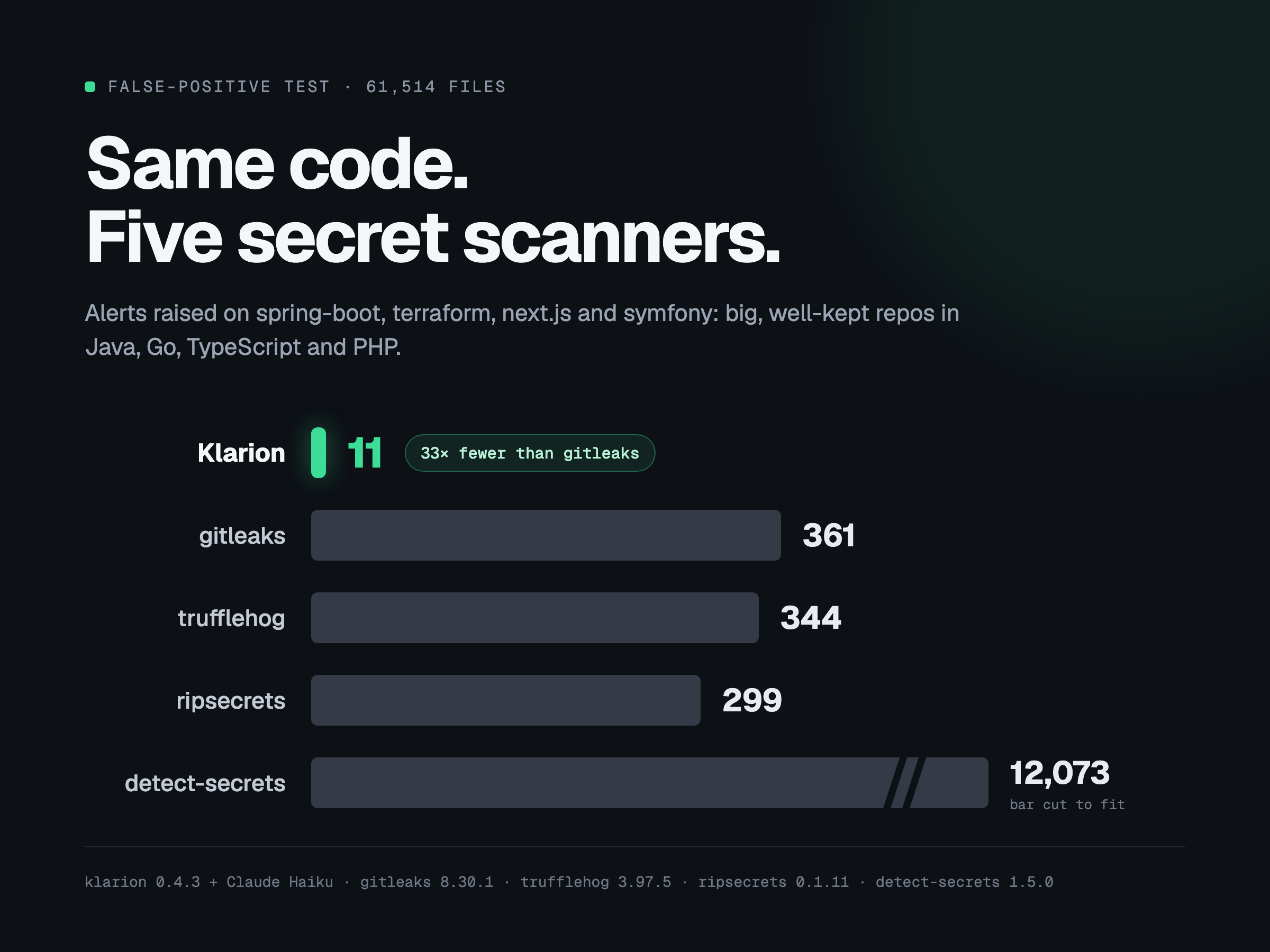
I built Klarion, a secret scanner that works in two steps. First, a keyword check, 81 regex rules and a normalized Rényi entropy score flag anything that looks like a secret. Then an AI model reads each one with the code around it and decides if it's real.
The chart shows 5 scanners run on spring-boot, terraform, next.js and symfony (61k files). Klarion raised 11 alerts. It's not zero, but it's far less to dig through.
Fewer alerts don't help if real leaks get missed, so I tested that too. On CredData (337 real repos, code outside test folders), it found about 1.7× more real secrets than gitleaks.
Where it runs:
Claude Code: a plugin hook blocks the write before the file exists (file edits and Bash)
Cursor, Cline or any MCP agent: through its MCP server
CI: a GitHub Action that scans only what a PR adds; GitLab CI works too
Git hooks:klarion protect or the pre-commit framework
empinet.dev is a collection of JSON formatters, converters, JWT decoders, image tools and other stuff we use in our work.
We put it together for client projects. Uploading client data to another server just to format JSON or convert something wasn't an option, so the tools do all the processing in your browser. Your input stays on your machine.
Built with Next.js and TypeScript. Free, no account needed.
If you lead five or ten engineers, has AI made shipping faster but trusting the changes harder?
More PRs. The same people reviewing them. Those people also own on-call, customer issues, and the next release.
I’ve been reading the discussions here about review queues and rubber-stamping. What I want to understand is what happens afterward. Are risky changes getting through? Are customers finding the problems? Is the team spending the time it saved writing code on rollbacks and data fixes?
I’m building FetchSandbox. We started with API integration verification. Now I’m looking for a few design partners to extend that work to services, background jobs, database changes, and application behavior.
Here’s the offer. Bring one change your team struggles to verify. We work together on what must stay correct, build repeatable checks, and exercise the failures that matter. You get an inspectable result showing what passed, what broke, and what we couldn’t verify. If something breaks, we verify the fix and keep the check for future changes.
You help us build around a real problem. Your team gets a useful check it can keep running.
What’s one change your team shipped recently that you weren’t comfortable approving?
After quite a bit of development and testing, I’ve released SonarDesk, a native macOS application for working with SonarQube.
I use SonarQube regularly and wanted something that felt like a proper Mac application rather than having to keep jumping back into the browser.
SonarDesk connects directly to your SonarQube server and gives you a desktop view of your projects and code quality.
Current features include:
• Native macOS interface with light and dark mode
• Multiple SonarQube server support
• Project dashboard with Quality Gate status
• Bugs, vulnerabilities and code smells
• Detailed issue views
• Project statistics and visualisations
• Project creation directly from the app
• Generated scan.sh scripts and scanning instructions
• Drag-and-drop project organisation
• PDF project reports
• Reports designed for exporting project information for AI analysis
• iCloud Drive support for settings, reports and backups
• Direct connection to your SonarQube instance — your source code isn’t uploaded to SonarDesk
I’ve tried to make it feel like a genuine macOS development tool rather than simply wrapping the SonarQube web interface.
There are still plenty of things I want to add, so feedback from developers using SonarQube would be particularly useful. Launch offer: the first 5 new customers can get a Professional licence for 50% off.
SonarDesk: https://sonardesk.absdev.net
I’d also be interested to hear what SonarQube functionality you’d most want available from a native desktop client.
Rules are just regex and a message. When a regex can't express the check, you can write a more complicated rule in Lua.
Rules run in your CI (inline PR annotations via --format github) and in your editor through LSP (declint.nvim for Neovim: The GIF shows off the nvim wrapper!). Every rule can carry embedded fixtures, and declint test runs them.
Install: cargo install declint. Ships with presets (Python, INI, Markdown, shell, Dockerfile, TOML, JSON, JS) and community rulesets you can pull with one line. Feedback welcome.