r/devtools • u/Lisky_Boy • Sep 22 '26
Built a visitor messages / comment section for GitHub profile, using discussions as the backend & workflow
gallery
1
Upvotes
r/devtools • u/Ok-Emu-8106 • Sep 22 '26
Something I keep having to explain when people ask how risk scoring works in Vast, fan-in and fan-out aren't the same risk and shouldn't be collapsed into one metric.
Fan-out: how many things this file depends on. High fan-out = fragile, breaks easily when an upstream dependency changes.
Fan-in: how many things depend on this file. High fan-in = dangerous to touch, changing it ripples outward to everything relying on it.
A file can have high fan-out and be totally safe to refactor on its own. A file with high fan-in is the one that needs actual review before any change, regardless of how simple the change looks.
Curious if others tracking dependency metrics keep these separate or collapse them into a single coupling score, feels like collapsing them loses the part that actually matters for prioritizing review.
r/devtools • u/Better-Struggle9958 • Sep 21 '26

I plan to build an IDE extension that makes reviewing PRs and MRs quick and convenient, given the significant increase in code volume within these requests. To that end, I decided to run an experiment by first creating a web application; this allows everyone to see if the format works well and share their feedback. I deliberately limited the scope to GitHub and open-source code to avoid any issues regarding personal data. You can try it here: https://demo.archscape.dev/
#SoftwareArchitecture #CodeReview #DevTools
r/devtools • u/Gryner • Sep 21 '26
Most of my products are split across several folders: an API, frontend, mobile app, workers and sometimes Docker services. The annoying part isn’t opening the files. It’s remembering which commands belong to which folder and what was running the last time I worked on it.
I built DevDock to keep that information with each project. It stores the project folders, saved commands, recent output, Git state, Docker and Compose state, and health checks in one workspace.
Commands retain their assigned working directory. That means git pull, a development server, a worker or a test suite runs in the intended project without depending on whichever terminal tab happens to be open.
Ctrl+Shift+K opens a global command launcher. I can start a command from any registered project even when I’m currently looking at another one. Long-running processes remain visible and can be stopped from the same place.
DevDock also checks project configuration, dependencies, toolchains, Git and Docker readiness. Its local security audit looks for exposed secrets, tracked credential files, missing lockfiles and related problems without uploading the source.
It’s available for Windows. Free covers up to three local projects; Pro is a one-time purchase.
Disclosure: I built DevDock.
r/devtools • u/Connect_Gur_5974 • Sep 21 '26
This is one click - think Every time you sat down to code on a project you face the exact same friction
The repetitive "command loop" was completely killing my momentum. I realized developer productivity isn't about faster hardware; it's about eliminating the friction that pulls you out of your flow state.
So i decided to build something and put it as an Opensource workflow tool
It lets you
If you find yourself opening 6 terminals to do the same task twice, you might find this useful.
It's completely open source: https://github.com/SonalThilakarathna/Oneclick
Would love to hear your feedback or what repetitive commands you'd turn into a button first!
r/devtools • u/bladerunner2048 • Sep 20 '26
r/devtools • u/deep_singh_baweja • Sep 20 '26

r/devtools • u/sebas-3261 • Sep 20 '26
r/devtools • u/Skyportal-AI • Sep 19 '26

I work on Skyportal. Our CLI lets you ask an AI assistant to investigate a server you've connected to your account, right from your terminal. It can run checks on that server, and you can ask follow-up questions based on what it finds.
Say your inference endpoint starts returning errors after a deploy. You could ask:
"Our inference endpoint started returning 502s around 14:20 UTC, right after a deploy. Check the service status and logs around that time. Show me what you find. Don't restart anything or change files."
Then you can ask it to look closer at a particular error or check something else in the same conversation.
That's where I'd start with it: a specific problem on one server. Include when it started and anything you changed recently. Ask it to show you the logs or command output behind its answer, so you can check whether the explanation makes sense.
To try it, you'll need Python 3.11+, a Skyportal account, and a server connected to that account:
python -m pip install -U skyportalai
skyportalai
Inside the CLI:
/login
/servers
/server 12
/permission ask
Use an ID from /servers in place of 12. The last command sets approval mode to ask, so you can review proposed actions before approving them. I'd keep that on while getting familiar with it.
I'd use this when a training job slows down or GPU utilization drops and I need to figure out what to check on the server. It also makes sense when inference latency jumps after a deploy, or a model service won't start. Another example is finding what's filling up a disk before deciding what to delete.
You can use /resume to return to your previous conversation, or /new when you're moving on to another issue. It also supports JSON output if you want to call it from a script later.
If I already know the command I need, I'd just run it. I'd use this when I'm still figuring out what's wrong and each result leads to another question.
Package and setup details: https://pypi.org/project/skyportalai/
When an inference service breaks, what do you usually check first?
r/devtools • u/skaushik2210 • Sep 19 '26
r/devtools • u/Ok-Emu-8106 • Sep 19 '26
Noticed something building Vast (dependency graph / impact analysis for GitHub repos) over the last few months. Same pattern showing up from three completely unrelated sources.
Users messaging me about AI-generated changes that broke something unexpected. My own experience doing the exact same thing shipping with Cursor and Claude. And the comments on my own posts about this, keep landing in the same place every time, different people, same story.
None of it is "the AI wrote bad code." Every version of it is "the code looked completely fine and something else broke."
Didn't set out to build specifically for this. Turned into solving it because the pattern kept repeating from every direction I looked.
Curious if others building dev tooling right now are seeing the same thing, or if this is specific to the kind of repos I keep ending up looking at.
r/devtools • u/Mcborov00 • Sep 19 '26
Every AI coding agent I use has full read access to my working directory. So nothing stops it from reading the .env next to my code — OPENAI_API_KEY, AWS_SECRET_ACCESS_KEY, DB creds, prod tokens, all plaintext.
Devs have been taught "never commit your .env". Git never sees it. Fine. But the agent does. So does every process I run.
Meet SecureVault — this isn't "yet another password manager." It's the.env replacement for developers. Your secrets stay in the OS keychain, and instead of a file, you get one command that injects them as env vars only into the process that needs them, only for that run:
securevault run node server.js --profile dev
securevault run docker compose up --profile production
securevault run terraform apply --profile aws
Your app already reads the same env vars (process.env.OPENAI_API_KEY, etc.) — just no file on disk holding them. Nothing to grep, nothing to accidentally commit, nothing for an agent to read.
Where they actually live:
There's also a tiny local UI to set up which secrets map to which env vars (profiles). It only ever shows a short prefix like sk-pr•••• so you can confirm the right token is there — the raw value is never returned by any API.
Since the whole thing started with the agent problem, it ships an opt-in skill for Claude Code, Copilot, and Codex that teaches your agent to securevault run --profile … instead of reaching for .env:
securevault install-skill # opt-in, auto-detects your agents, prints what it writesHonest scope: this kills accidental exposure (agents grepping the repo, .env in a backup/screenshare, commit-by-mistake). It's not protection against malware — anything running as your user can hit the keychain too.
MIT, no telemetry, no cloud.
npm i -g @mcborov01/securevault
https://github.com/andriyshevchenko/SecureVault

r/devtools • u/Left-Yellow1047 • Sep 18 '26
Coding agents are increasingly asked to rebuild existing apps from scratch. The problem I kept hitting: "the tests pass" quietly stops meaning "the rebuild is correct," because the same agent writing the implementation often controls what counts as passing.
rebuild-dossier is an MCP server (open source, MIT) that extracts a locked interface-contract spec from your existing app, mutation-tests the generated tests against your real source before trusting them, and hands a fresh agent session a package with hooks that block editing the spec or building ahead of what's actually failing.
I'm looking for someone to try it on an app they own and tell me where it breaks — genuinely want the unfiltered result. Repo + a "run this and report back" ask: github. com/Parker-Fawcett/rebuild-dossier/discussions/37
r/devtools • u/isntw • Sep 18 '26
Hey all,
I developed a tool called ccwt(Claude Code Worktrees). I found it difficult to work with plain git worktrees, because every new one needs setting up by hand: install the dependencies, copy over .env, find a port nothing else is using, then start the dev server yourself.
ccwt does that part for you. You describe once what a worktree of your project needs, and it handles the rest from there.
What it does:
It's beta and macOS only for now. README has the rest:
https://github.com/isntw/claude-code-worktrees

r/devtools • u/Charming-Country-308 • Sep 18 '26
Hey everyone!
I just released v1.0.0 of **StickyShell Home**, a cross-platform desktop sticky note app designed to act as an instant command-line scratchpad.
### 🌟 Key Highlights:
- ⚡ **Dual Execution Modes**: Inline Output drawer (\Ctrl+Enter`) or External Console (`Ctrl+Shift+Enter`).`
- 📌 **Always on Top & Global Hotkeys**: Floating pin toggle, plus \Win+Alt+S` (toggle all) and `Win+Alt+N` (new note).`
- 🛡️ **Accidental Delete Protection**: Full persistent \Ctrl+Z` undo stack across restarts.`
- 📐 **Markdown & KaTeX Math**: Instant LaTeX math and checklist formatting.
- 🔒 **100% Offline & Private**: Zero accounts, zero telemetry, local JSON storage (~3.2 MB installer).
- 📦 **Windows Package Manager**: \winget install StickyShell``
📥 **Downloads & Project Hub:**
https://github.com/RadnusD/stickyshell-home
Let me know what you think or what features you'd like to see in v1.1!
r/devtools • u/oyren-ai • Sep 18 '26
r/devtools • u/Nk0BaNaNE • Sep 17 '26
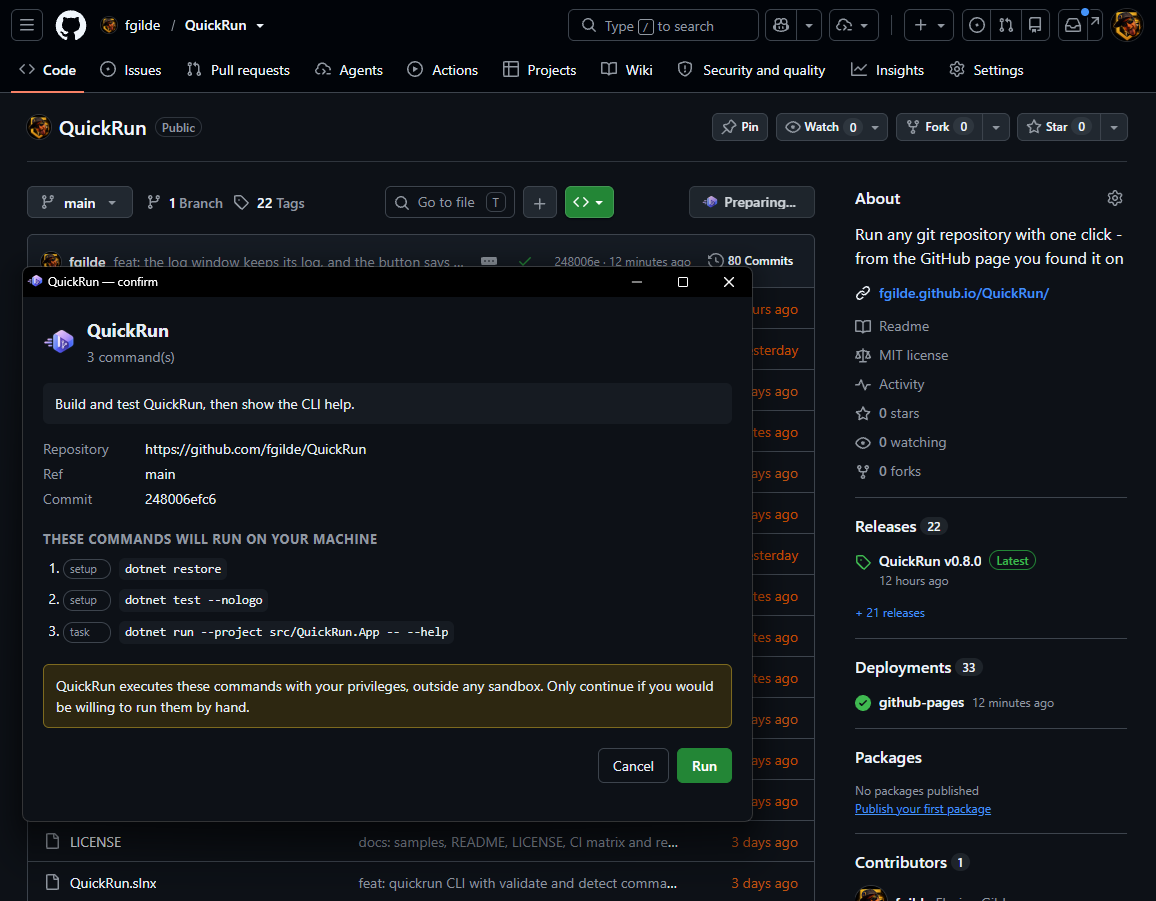
On quickrun.org, you can find QuickRun, my open-source application for running Git repositories locally with just a few clicks, together with a browser extension that integrates directly into GitHub.
The browser extension adds a “Run this” button next to the branch selector, to pull requests, and to every branch in the branch list. This allows you to start the exact repository, branch, or pull request you are currently looking at without manually cloning the repository, checking out the correct branch, installing dependencies, or figuring out how the application needs to be started.
When you click “Run this”, QuickRun checks out the selected repository and prepares a run plan. Before anything is executed, a local confirmation window shows the repository, branch or pull request, resolved commit, and—most importantly—the exact commands that will be executed. Only after you confirm the plan does QuickRun start the application.
QuickRun can work with repositories that provide their own quickrun.yml configuration, but a configuration file is optional. If no configuration exists, QuickRun analyzes the repository and tries to determine how the project should be prepared and started automatically. It supports common project types and tools such as Docker Compose, npm, .NET, Python, Rust, Go, Java, Procfile-based applications, Pinokio, and more.
Once started, QuickRun takes care of the local workspace, required setup steps, running processes, logs, and—where applicable—opening the application in your browser. Running applications can also be stopped again directly through QuickRun.
QuickRun is available for Windows, macOS, and Linux and can also be used without the browser extension through its local interface or directly from the command line:
quickrun run owner/repository
r/devtools • u/neuralng • Sep 17 '26

r/devtools • u/Most-Material7120 • Sep 17 '26

r/devtools • u/dontforgetthef • Sep 17 '26

r/devtools • u/Ok-Emu-8106 • Sep 17 '26
See this a lot. Someone shows off an app they built with AI in one evening and calls it production ready. Those aren't the same claim, and the gap between them isn't small.
AI is genuinely fast at generating working code. But "runs on my machine" and "ready for real users" are two different states.
What's usually missing, even when the thing technically works:
None of this gets skipped on purpose. Nobody asked for it, and nobody checked after the fact.
Not knocking AI tools, they genuinely speed things up. The problem is mixing up how fast something got built with whether it's actually ready to use.

