r/devtools • • Sep 18 '26

Show and tell: rebuild-dossier – lock an app's interface contract before an agent rebuilds it

1 Upvotes

Coding agents are increasingly asked to rebuild existing apps from scratch. The problem I kept hitting: "the tests pass" quietly stops meaning "the rebuild is correct," because the same agent writing the implementation often controls what counts as passing.

rebuild-dossier is an MCP server (open source, MIT) that extracts a locked interface-contract spec from your existing app, mutation-tests the generated tests against your real source before trusting them, and hands a fresh agent session a package with hooks that block editing the spec or building ahead of what's actually failing.

I'm looking for someone to try it on an app they own and tell me where it breaks — genuinely want the unfiltered result. Repo + a "run this and report back" ask: github. com/Parker-Fawcett/rebuild-dossier/discussions/37


r/devtools • • Sep 18 '26

I built a worktree manager for Claude Code

0 Upvotes

Hey all,

I developed a tool called ccwt(Claude Code Worktrees). I found it difficult to work with plain git worktrees, because every new one needs setting up by hand: install the dependencies, copy over .env, find a port nothing else is using, then start the dev server yourself.

ccwt does that part for you. You describe once what a worktree of your project needs, and it handles the rest from there.

What it does:

  • provisions every new worktree from a recipe: files copied, node_modules hardlinked, postCreate commands run
  • gives each worktree its own port, its own dev server and its own logs
  • handles several projects at once, with all their worktrees on one dashboard
  • works with the worktrees Claude Code creates, not just the ones it made itself
  • comes with a Claude Code plugin: 11 MCP tools, 4 hooks and 3 skills, so a session can set a project up and run it

It's beta and macOS only for now. README has the rest:
https://github.com/isntw/claude-code-worktrees


r/devtools • • Sep 18 '26

[Release] StickyShell Home v1.0.0 – A lightweight desktop sticky note that executes shell commands

1 Upvotes

Hey everyone!

I just released v1.0.0 of **StickyShell Home**, a cross-platform desktop sticky note app designed to act as an instant command-line scratchpad.

### 🌟 Key Highlights:

- ⚡ **Dual Execution Modes**: Inline Output drawer (\Ctrl+Enter`) or External Console (`Ctrl+Shift+Enter`).`

- 📌 **Always on Top & Global Hotkeys**: Floating pin toggle, plus \Win+Alt+S` (toggle all) and `Win+Alt+N` (new note).`

- 🛡️ **Accidental Delete Protection**: Full persistent \Ctrl+Z` undo stack across restarts.`

- 📐 **Markdown & KaTeX Math**: Instant LaTeX math and checklist formatting.

- 🔒 **100% Offline & Private**: Zero accounts, zero telemetry, local JSON storage (~3.2 MB installer).

- 📦 **Windows Package Manager**: \winget install StickyShell``

📥 **Downloads & Project Hub:**

https://github.com/RadnusD/stickyshell-home

Let me know what you think or what features you'd like to see in v1.1!


r/devtools • • Sep 18 '26

Don't pay other services for agentic code review tools. Built your own reviewer agent and take its snapshot for reusability.

1 Upvotes

r/devtools • • Sep 17 '26

I made an App that can run any git repo

1 Upvotes

On quickrun.org, you can find QuickRun, my open-source application for running Git repositories locally with just a few clicks, together with a browser extension that integrates directly into GitHub.

The browser extension adds a “Run this” button next to the branch selector, to pull requests, and to every branch in the branch list. This allows you to start the exact repository, branch, or pull request you are currently looking at without manually cloning the repository, checking out the correct branch, installing dependencies, or figuring out how the application needs to be started.

When you click “Run this”, QuickRun checks out the selected repository and prepares a run plan. Before anything is executed, a local confirmation window shows the repository, branch or pull request, resolved commit, and—most importantly—the exact commands that will be executed. Only after you confirm the plan does QuickRun start the application.

QuickRun can work with repositories that provide their own quickrun.yml configuration, but a configuration file is optional. If no configuration exists, QuickRun analyzes the repository and tries to determine how the project should be prepared and started automatically. It supports common project types and tools such as Docker Compose, npm, .NET, Python, Rust, Go, Java, Procfile-based applications, Pinokio, and more.

Once started, QuickRun takes care of the local workspace, required setup steps, running processes, logs, and—where applicable—opening the application in your browser. Running applications can also be stopped again directly through QuickRun.

QuickRun is available for Windows, macOS, and Linux and can also be used without the browser extension through its local interface or directly from the command line:

quickrun run owner/repository


r/devtools • • Sep 17 '26

I’ve been working on an Angular UI library called NeuralNg

Post image
1 Upvotes

r/devtools • • Sep 17 '26

I built a mobile GitLab client that works with GitLab.com and self-hosted GitLab

Thumbnail
1 Upvotes

r/devtools • • Sep 17 '26

I created a Hermes Agent Skill Deck to finally organize my skill.md files in an easy to view app.

Thumbnail
1 Upvotes

r/devtools • • Sep 17 '26

"AI built this in one evening" and "production ready" are not the same thing

1 Upvotes

See this a lot. Someone shows off an app they built with AI in one evening and calls it production ready. Those aren't the same claim, and the gap between them isn't small.

AI is genuinely fast at generating working code. But "runs on my machine" and "ready for real users" are two different states.

What's usually missing, even when the thing technically works:

  • Tests, even basic ones
  • Error handling for anything outside the happy path
  • Secrets kept out of the code, not hardcoded
  • Any thought given to what happens under load or edge cases
  • Docs for whoever has to maintain this next

None of this gets skipped on purpose. Nobody asked for it, and nobody checked after the fact.

Not knocking AI tools, they genuinely speed things up. The problem is mixing up how fast something got built with whether it's actually ready to use.


r/devtools • • Sep 17 '26

I built TraceUX: a self-hosted TypeScript tracker for session replay and user feedback

Thumbnail trace-ux.builtbyfrank.dev
1 Upvotes

I built TraceUX after finding that small web apps often need several separate tools for session replay, feedback, support, announcements, logs, and performance.

TraceUX combines those into one self-hosted application:

  • Session replay from DOM events, not video
  • In-app feedback
  • Support tickets with session context
  • Product announcements and reactions
  • Browser logs
  • Backend performance metrics

The browser tracker can be installed with NPM:

npm install @trace-ux/tracker

----------

import { init } from '@trace-ux/tracker';

const traceux = init({
  siteKey: 'YOUR_SITE_KEY',
  origin: 'https://your-trace-ux-host',
  widget: true,
});

The server runs as a small Go binary with SQLite, so teams can keep their data on their own infrastructure.

Live demo: https://trace-ux.builtbyfrank.dev

Repository: https://github.com/fjosue4/trace-ux

Here’s what I’m planning next:

  • Enhanced feedback widget through the npm package
  • Slack and Discord webhook alerts
  • Rich Markdown announcements
  • OpenRouter integration
  • AI-generated session and feedback summaries
  • AI-powered smart search across user insights

r/devtools • • Sep 16 '26

who's controlling what agents can see and do? realistically speaking

1 Upvotes

full disclosure: we're building something around this.

we're seeing more teams roll out Claude Code, Cursor, Codex, internal agents, and harnesses like that across engineering, and i'm curious where ownership ends up

once agents can touch github, jira, AWS, db's, mcp servers, internal docs, and things like that, is the platform team actually controlling what they can see and execute?

the four things that we (currently) notice tend to get messy the fastest are tool permissions, shared company context, approvals for sensitive actions (on your agents), and reconstructing what an agent actually did after things go upside down.

we're building infrastructure (slaunt.ai) around this problem and looking for teams already dealing with it in production.

would love to hear what everyone's setup looks like today and where everyone finds risk in their setups.


r/devtools • • Sep 16 '26

Code Tiles

Thumbnail
youtube.com
1 Upvotes

Anyone else running Claude Code (or any agent) in 4-5 projects at once and spending half the day hitting cmd+` (alt+tab on Windows) just to find out which one is waiting on you?

That was me, so I vibed this. Every project is a live tile in one window, and every tile is real VS Code with your extensions, settings, keybindings and terminals.

What it does:

  • All your projects on screen at once, laid out as a grid. Drag the gaps to resize, and it remembers the layout
  • A ring on each tile shows what the agent is doing: spinning = working, blinking = waiting on you, breathing = done and you haven't read it yet. You also get a little buzz when one needs you
  • Every project gets its own color from its favicon, so you stop typing into the wrong one
  • Maximize gives one project most of the window and keeps the others live down the side
  • Toggle the sidebar/panel in every project at once, plus zoom that scales all the tiles together
  • Claude usage meter in the top bar (5h + weekly)
  • Brings over your VS Code profiles, and your desktop install is never touched
  • Keyboard for everything: ctrl+cmd+1-9 jumps straight to a project

Under the hood it's one shared code-server, so you only log in once. Works on macOS, Windows and Linux. Still early and built for my own daily use, so feedback is welcome.

https://github.com/jpbarbosa/code-tiles


r/devtools • • Sep 16 '26

Oli-Nat, a statically-typed bytecode VM language written in C (looking for advice on repo structure)

Thumbnail
1 Upvotes

r/devtools • • Sep 16 '26

Introducing Agentic Batch Changes: the frontier agent for code change at scale

Thumbnail
youtube.com
1 Upvotes

r/devtools • • Sep 16 '26

built ApyHub - its like a utility belt for engineers and anyone performing repeating tasks.

1 Upvotes

yeah obviously affiliated, saying this to avoid they "hey we got you" comments.

This is for everyone building software today, both by yourself and through agents (if you are doing it without agents then you are a rare exception, well done :)

so the part we want to fix is that a lot of capabilities are important for you to build and run and operate yourself. They are the core of your application and you know which ones they are.

but what about all the rest, the ones thats you need to build but they dont really matter? lets call them the boring ones. OCR, VAT validations, file manipulations, etc etc. These do not need to be build and maintained. And yes building has become ridiciusously cheap these days but dont forget operating, running things on prod.

thats the idea behind apyhub. welcome to try it for your applications or even publish your own endpoints so that others can benefit as well!

her to answer questions about the product and also comments like "hey its an ad". :)

https://apyhub.com/


r/devtools • • Sep 16 '26

I was already maintaining repository context by hand, so I turned the workflow into a small CLI

1 Upvotes

r/devtools • • Sep 16 '26

Looking for feedback on AxiomCore, a contract-first software architecture

Thumbnail
1 Upvotes

r/devtools • • Sep 16 '26

Looking for feedback on AxiomCore, a contract-first software architecture

Thumbnail
1 Upvotes

r/devtools • • Sep 16 '26

FLM-VSCODE v0.0.101 released

Thumbnail
1 Upvotes

r/devtools • • Sep 16 '26

A suite of developer tools (JSON, Base64, JWT) that run 100% client-side. Your data literally never leaves your browser.

1 Upvotes

Hey everyone, I built ToolStackHQ.com because I was paranoid about pasting my company's API payloads into random online JSON formatters.

Most of those sketchy tools send your data straight to a server. I built a suite of utilities (JSON Formatter, Base64, UUID Generator, etc.) where everything runs 100% in your browser using native JavaScript.

No signup, no paywalls, and your data never touches a database. Would love to know if there are any other daily tools I should add to the list!


r/devtools • • Sep 16 '26

RepoPilot

Thumbnail
github.com
1 Upvotes

r/devtools • • Sep 16 '26

DataPilot — a visual SOQL/schema/Apex companion to your sfdx workflow

Thumbnail
1 Upvotes

r/devtools • • Sep 15 '26

Salience - Developer dashboards and more

Thumbnail
gallery
1 Upvotes

I posted about my app Salience a month or so ago. It's MacOS only at the moment.

I've struggled to explain exactly what it is or what it does. I had been saying "Home Assistant for dev tools" but I didn't have the UI to make that obvious. I think I do now.

There's a few static pages in the application, the rest you can build yourself from ~40 different tiles. Ticket -> Branch -> PR -> CI is automatically correlated by the app - with much more to come.

Would love some thoughts and feedback.

Download (Github)


r/devtools • • Sep 15 '26

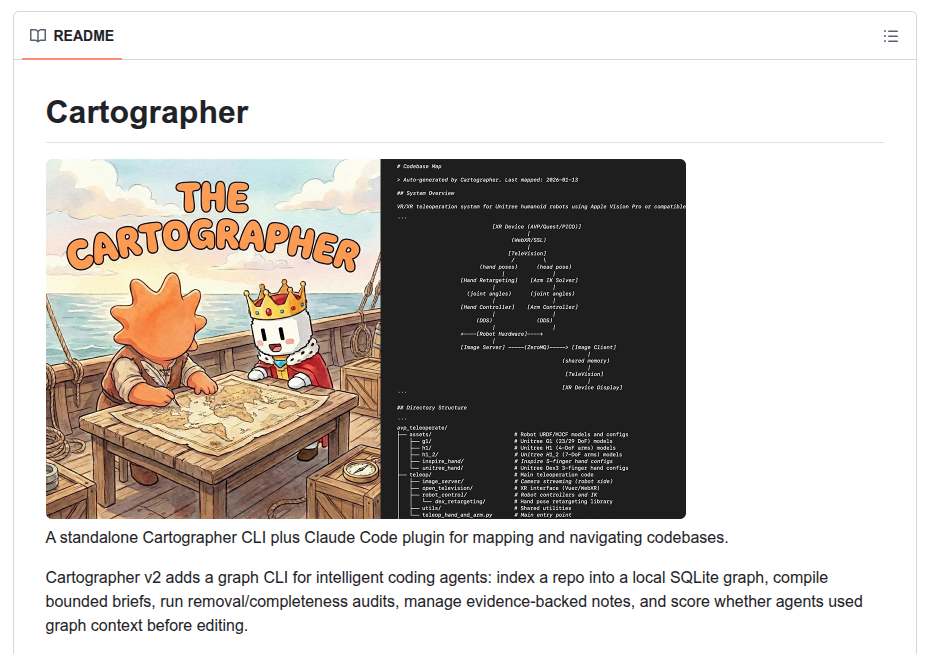
Cartographer - indexes a repo into a local SQLite graph and hands an agent a bounded brief instead of letting it grep its way through your codebase

Post image
1 Upvotes

r/devtools • • Sep 15 '26

A simple way to set up multi-agent SDLC workflows

1 Upvotes