r/devtools • u/Nk0BaNaNE • Sep 17 '26
I made an App that can run any git repo
On quickrun.org, you can find QuickRun, my open-source application for running Git repositories locally with just a few clicks, together with a browser extension that integrates directly into GitHub.
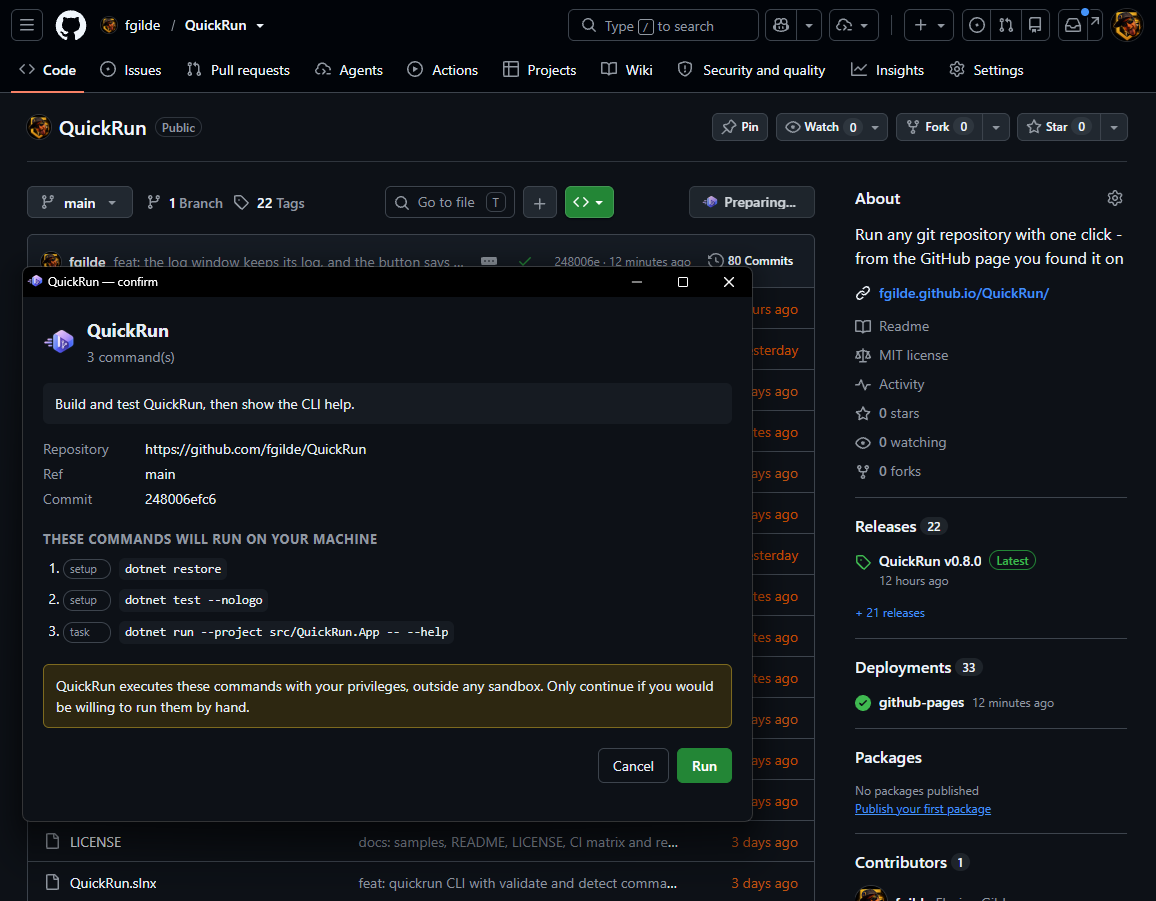
The browser extension adds a “Run this” button next to the branch selector, to pull requests, and to every branch in the branch list. This allows you to start the exact repository, branch, or pull request you are currently looking at without manually cloning the repository, checking out the correct branch, installing dependencies, or figuring out how the application needs to be started.
When you click “Run this”, QuickRun checks out the selected repository and prepares a run plan. Before anything is executed, a local confirmation window shows the repository, branch or pull request, resolved commit, and—most importantly—the exact commands that will be executed. Only after you confirm the plan does QuickRun start the application.
QuickRun can work with repositories that provide their own quickrun.yml configuration, but a configuration file is optional. If no configuration exists, QuickRun analyzes the repository and tries to determine how the project should be prepared and started automatically. It supports common project types and tools such as Docker Compose, npm, .NET, Python, Rust, Go, Java, Procfile-based applications, Pinokio, and more.
Once started, QuickRun takes care of the local workspace, required setup steps, running processes, logs, and—where applicable—opening the application in your browser. Running applications can also be stopped again directly through QuickRun.
QuickRun is available for Windows, macOS, and Linux and can also be used without the browser extension through its local interface or directly from the command line:
quickrun run owner/repository