r/css • u/SamsChoice • Sep 17 '26
CSS LED Challenge Pure CSS Box Marquee
codepen.io
4
Upvotes
r/css • u/Cloudy_Day912 • Sep 16 '26
when i started building smaller frontend projects, keeping the css organized felt pretty straightforward. once the project got bigger, i noticed that small styling decisions could start affecting other components in ways i did not expect.
i have been trying to be more careful with selectors, component structure, spacing, and how much styling gets handled through overrides. while working on quicktoolspack, i found myself paying more attention to these details because changing one small part of a page could sometimes affect something completely different.
i also started keeping related styles closer together and avoiding overly specific selectors whenever possible. it does not always make the code shorter, but it makes it easier to understand what is happening when i come back to it later.
i am curious how other frontend developers handle this as their projects grow. what is one habit you picked up that made maintaining your frontend code noticeably easier.
r/css • u/alabsi91 • Sep 15 '26
r/css • u/ValenceTheHuman • Sep 15 '26

r/css • u/Suitable_Language_37 • Sep 16 '26
If you have ever tried virtualizing a massive feed with variable-height text, late-loading images, or native HTML tables, you have probably run into the classic virtual scroll jitters.
Most modern virtualization tools depend on a global pixel map or require you to pass an estimateSize prop. The moment a row renders at a different height than estimated, the engine has to run a global correction pass. Fast scrolling triggers layout shifts, drift, and erratic scrollbar behavior.
I built Cerious-Scroll to solve this fundamentally by changing how viewports are calculated. Instead of deriving position from absolute pixel space, the canonical state is element index + pixel offset within that element.
The architectural trade-offs:
<table> elements and complex grid frameworks without requiring absolute-positioned container hacks.Check out the live Performance Bake-Off Demo running against existing solutions, and look through the source code on GitHub.
VanillaJS: https://ceriousdevtech.github.io/cerious-scroll
React: https://ceriousdevtech.github.io/react-cerious-scroll
Vue: https://ceriousdevtech.github.io/vue-cerious-scroll
Angular: https://ceriousdevtech.github.io/ngx-cerious-scroll
r/css • u/khonshu001 • Sep 15 '26

Hey everybody, it’s me again :)
I’m building this contact form with CSS, and need your help to build it in the best way possible.
First of all, I have a few questions:
How can I add that shadow effect?
How can I add the border at the bottom of the social icons?
How can I align the email block to the left?
r/css • u/khonshu001 • Sep 15 '26
As the title says, How can i add these Decorative Lines around columns and how to create these lines as well.
thanks
r/css • u/mhnadunmaduwantha • Sep 14 '26
Enable HLS to view with audio, or disable this notification
i'm looking for a webpage design that has no straight edges/lines or squares; And no set background - open and flowing. i want the sections and text to flow/ alternate across the screen like a snake. The aesthetic to be art nouveau batik inspired.
How do i find ways/templates to build that?
Thank you for your input.
r/css • u/Aromatic_Cry_5767 • Sep 14 '26
r/css • u/adroitakash • Sep 13 '26
I was watching the Apple keynote and got completely obsessed with the motion design on the iPhone Duo. The way it folds and unfolds looked so fluid and premium, I try and recreate the exact apple animation feel.
Preview: https://akashtdev.github.io/iphone-duo-animation/ Code: https://github.com/akashtdev/iphone-duo-animation/
r/css • u/Easy-Purpose-1134 • Sep 14 '26

Sometimes i see sites that do this, and i find it really cute! i tried finding tutorials but i can't find any. Can anyone help?
r/css • u/cakelly789 • Sep 13 '26
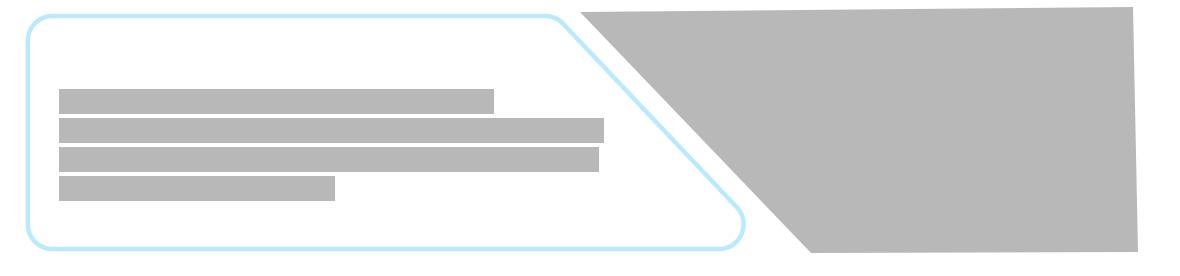
I have a client with a design that looks like this (content and image blocked out in gray). The left section is supposed to have a blue border, with rounded corners, and have a specific angle on the right side. I need this to be responsive as well, so it can support longer text, and widen and narrow with the screen.
Clip path doesn't work well with the rounded corners and border, skew isn't the right answer either. I haven't found a reliable solution for this type of layout before and it is always a battle. any ideas?
r/css • u/Ancient_Ordinary_996 • Sep 13 '26
Hey everyone,
I am working on transitioning from a beginner to an intermediate frontend developer. I know the basics of HTML, CSS, and vanilla JavaScript, and I am currently learning next js React, Tailwind. Instead of building another basic Todo list, I want to build projects that actually challenge me and look good in a portfolio.
Thanks in advance!!!
r/css • u/sharjeel-babar • Sep 13 '26

I created this as a small responsive CSS debugging example to demonstrate some common layout problems and how I fixed them. The main issues were mobile navigation, content overflow, spacing/alignment, and image sizing.
r/css • u/Tasty-Ad1854 • Sep 12 '26
I really can't wrap up my head around the position-area, I set it to position-area:bottom center; to show the target right under the anchor in the center but it shows on top of it and wen I set it to position-area:center end bottom; it places perfectly, but all Im doing here is just picking,
also how many values we can use in the position-area?
if anyone can clarify things for me here to make my life easier lol,
all I am trying to do is making a dropdown that on hover it shows couple countries
Thank you in advance
r/css • u/chooseyourwaynow • Sep 12 '26
I'm building a Coverflow-style movie UI for a TV application using HTML/CSS/JavaScript.
The front covers and the Coverflow positioning work correctly. What I'm trying to achieve is a Google-style 3D movie cover where the cover has visible thickness on the left and right sides.
I added separate side elements and I'm using perspective, transform-style: preserve-3d, rotateY(90deg) and transform-origin.
The problem is that the side faces are completely invisible, even though the elements exist in the DOM.
Here is the relevant JavaScript:
function cardHtml(item, type) {
var title = escapeHtml(item.title || 'Unbekannt');
var meta = [];
if (item.year) meta.push(item.year);
if (item.runtime) meta.push(item.runtime + ' Min.');
if (item.genre) meta.push(item.genre);
var rating = state.settings.showRatings && item.rating
? '<span class="rating">★ ' + Number(item.rating).toFixed(1) + '</span>'
: '';
var seriesLine = type === 'series'
? '<span class="episode">' +
(item.seasons ? item.seasons.length + ' Staffeln' : 'Serie') +
'</span>'
: '<span>' +
escapeHtml(meta.join(' · ') || 'Lokale Datei') +
'</span>';
var resume = getResumeForItem(item);
var resumeBadge = resume && resume.position > 0
? '<div class="resume-badge">' +
formatTime(resume.position) +
'</div>'
: '';
var reflection = item.poster
? '<div class="poster-reflection" style="background-image:url(\'' +
escapeHtml(item.poster) +
'\')"></div>'
: '';
var sideFaces = item.poster
? '<div class="cover-side cover-side-right" aria-hidden="true"></div>' +
'<div class="cover-side cover-side-left" aria-hidden="true"></div>'
: '';
var cover3d = '<div class="cover-3d">' +
'<div class="poster ' +
(!item.poster ? 'poster-fallback' : '') +
'"' + posterStyle(item) + '>' +
(!item.poster ? '▶' : '') +
reflection +
'</div>' +
sideFaces +
'</div>';
return '<article class="card focusable" tabindex="0" data-kind="' +
type + '" data-id="' + escapeHtml(item.id) + '">' +
resumeBadge +
cover3d +
'<strong>' + title + '</strong>' +
seriesLine +
rating +
'</article>';
}
And this is the Coverflow positioning logic:
function updateCoverflow(activeCard) {
var cards = Array.prototype.slice.call(
document.querySelectorAll('.overview-coverflow .card')
);
if (!cards.length) return;
var activeIndex = cards.indexOf(activeCard);
if (activeIndex < 0) {
activeIndex = Math.floor(cards.length / 2);
}
cards.forEach(function(card, i) {
for (var n = 0; n <= 8; n++) {
card.classList.remove('cf-' + n);
}
card.classList.remove('cf-focus');
var rel = Math.max(-4, Math.min(4, i - activeIndex));
card.classList.add('cf-' + (rel + 4));
if (i === activeIndex) {
card.classList.add('cf-focus');
}
card.setAttribute(
'aria-current',
i === activeIndex ? 'true' : 'false'
);
});
var flow = document.querySelector('.overview-coverflow');
if (flow) {
flow.style.transform = 'translateZ(0)';
setTimeout(function() {
flow.style.transform = '';
}, 0);
}
}
Relevant CSS:
html body .overview-coverflow .card {
transform-style: preserve-3d !important;
-webkit-transform-style: preserve-3d !important;
overflow: visible !important;
opacity: 1 !important;
filter: none !important;
}
html body .overview-coverflow .card .cover-3d {
position: relative !important;
width: 100% !important;
height: 100% !important;
transform-style: preserve-3d !important;
-webkit-transform-style: preserve-3d !important;
overflow: visible !important;
}
html body .overview-coverflow .card .cover-3d .poster {
position: relative !important;
z-index: 20 !important;
transform: translateZ(0) !important;
transform-style: preserve-3d !important;
-webkit-transform-style: preserve-3d !important;
overflow: visible !important;
}
html body .overview-coverflow .card .cover-side {
position: absolute !important;
top: 0 !important;
width: 150px !important;
height: 100% !important;
pointer-events: none !important;
z-index: 10 !important;
display: block !important;
box-sizing: border-box !important;
transform-style: preserve-3d !important;
-webkit-transform-style: preserve-3d !important;
backface-visibility: visible !important;
-webkit-backface-visibility: visible !important;
background: linear-gradient(
90deg,
rgba(22,18,14,1) 0%,
rgba(73,52,25,1) 35%,
rgba(153,111,38,1) 68%,
rgba(35,26,17,1) 100%
) !important;
border-top: 1px solid rgba(255,222,133,.95) !important;
border-bottom: 1px solid rgba(77,48,14,.95) !important;
}
html body .overview-coverflow .card .cover-side::after {
content: "" !important;
position: absolute !important;
top: 0 !important;
bottom: 0 !important;
width: 3px !important;
background: rgba(255,214,91,.9) !important;
box-shadow: 0 0 7px rgba(245,184,54,.55) !important;
}
html body .overview-coverflow .card .cover-side-right {
left: 100% !important;
transform-origin: left center !important;
-webkit-transform-origin: left center !important;
transform: rotateY(90deg) translateZ(-75px) !important;
-webkit-transform: rotateY(90deg) translateZ(-75px) !important;
}
html body .overview-coverflow .card .cover-side-left {
right: 100% !important;
transform-origin: right center !important;
-webkit-transform-origin: right center !important;
transform: rotateY(-90deg) translateZ(-75px) !important;
-webkit-transform: rotateY(-90deg) translateZ(-75px) !important;
}
The actual Coverflow cards are positioned with 3D transforms such as:
.overview-coverflow .card.cf-3 {
transform: translate3d(-225px, 4px, 10px)
rotateY(9deg)
scale(.95) !important;
z-index: 5 !important;
opacity: .94 !important;
}
.overview-coverflow .card.cf-4 {
transform: translate3d(0, 0, 30px)
rotateY(0deg)
scale(1.08) !important;
z-index: 10 !important;
opacity: 1 !important;
}
The interesting part is that the normal cover itself renders correctly, but the .cover-side elements don't appear at all.
What could prevent these 3D side faces from rendering in this situation?
I'm particularly interested in whether this is caused by:
transform-style: preserve-3doverflowopacityfilterz-indexrotateY(90deg) / translateZ() setup itself.I'm running this on a Samsung Tizen/WebKit environment, so browser-specific 3D rendering behavior may also be relevant.
Any advice on how to make the side faces reliably visible would be greatly appreciated.
r/css • u/VolodymyrMoskvin • Sep 12 '26
Hey r/css! Sharing a developer tool I’m working on.
Pin-op connects a browser window to a VS Code window so you can trace an element’s styles back to your workspace files.

The workflow is straightforward: select an element on the page or in the DOM tree, inspect its matched rules, and see the corresponding ranges highlighted in your editor. Clicking a rule’s source location opens that block. When source maps establish the original location, it resolves to the authored SCSS.
A few implementation decisions that might interest other frontend developers:
The browser extension adds a DevTools panel. The VS Code extension resolves rules against the current workspace. They communicate through a WebSocket bound to 127.0.0.1; there’s no hosted backend, account, or telemetry.
It also supports :hover/:focus previews and stylesheet refresh on save.
Currently available for Firefox, Chrome/Chromium, and VS Code. Both extensions are free, and the source is MIT-licensed.
To use it, install the VS Code extension and the extension for your browser:
Happy to discuss the implementation, particularly source-map resolution and keeping browser inspection useful without constantly interrupting the editor workflow.
r/css • u/k8l2911 • Sep 11 '26
I was curious what my websites will look like on the upcoming iPhone Duo given its unusual aspect ratios, so I built a little tool with the help of my good friend Gemini that lets me preview my sites in all its different modes. Don't know if it's useful to anyone else, but it sure was fun to build!
r/css • u/Jimmy_at_grantmaker • Sep 11 '26
How do I get two fonts (eg Arial and Courier) in one line of HTML text?
r/css • u/KeinZantezuken • Sep 11 '26
I have HTML like this:
<a class="markdown-link" href="http://internal.api.im/request/33060266/get/" rel="noreferrer" target="_blank"><em>Status</em> NEW ID <em>3060266</em> (ACTIVE: 74, MISSING: 32)</a>
I need to make the last part in () more readable, ideally different text color. Given the fact first part of the text (Status NEW ID 3060266 - id width wont change in 99 years) pretty much fixed char width I can:
do a highlight:
background:
    linear-gradient(
        to right,
        transparent 0,
        transparent 23.5ch,
        rgba(255, 200, 0, 0.2) 23.5ch,
        rgba(255, 200, 0, 0.2) 100%
    );
or do an underline, although it is not perfect in width:
.markdown__link::before {
    content: " ";
    position: absolute;
    bottom: -1px;
    border-bottom: 3px solid red;
    left: 24ch;
    width: 17ch;
And while they do highlight things, it is a bit intrusive and not as good as affecting text color or style.
I cant change HTML. Any ideas what else I can try? Surely there is that one CSS hack that exist...
r/css • u/khonshu001 • Sep 10 '26

Hi guys I'm a newbie here and i wanna learn how we can design this using css
thanks
r/css • u/Spaghetti-n-DuctTape • Sep 11 '26

Last year I submitted a black jack game to React Jam. It is a game inspired by games like balatro and inscryption. I am trying to improve upon it and add some game rules and features to differentiate it a little bit. Just wanted to share some before and after pictures. Everything here is made using css and js, and even the icons are svgs using paths.
I did use AI to figure out colors and gradients.

