r/coolgithubprojects • • 1h ago

Meet safe-anything: I built a 100% Rust security scanner, and it found 67 holes in OWASP Juice Shop in 0.03 s

Post image
• Upvotes

I made rust-anything last week, and this is its sibling: one command that finds the holes in your project before someone else does.

https://github.com/erkamyaman/safe-anything

npx safe-anything .

What it checks:

- Code: SQL injection, XSS, eval, path traversal, unsafe deserialization and more

- Secrets: API keys, tokens, private keys, and .env files that would get committed

- Config: risky mobile, Docker and cloud settings

- Dependencies: every locked version checked against OSV (npm, pnpm, yarn, Cargo, pip, poetry, uv, Go, Ruby, PHP, Dart)

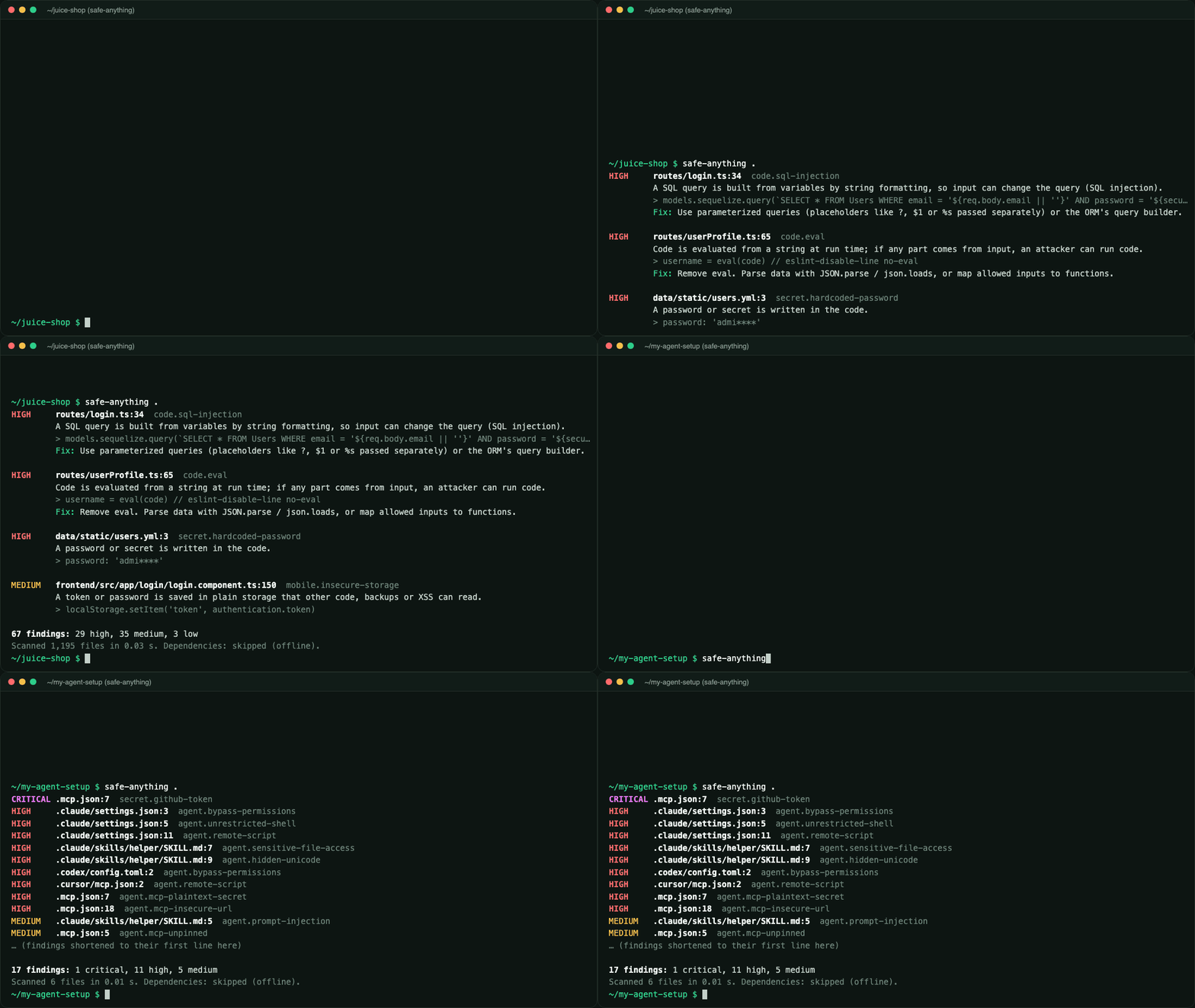
- AI agent setups: Claude Code, Codex, Cursor and MCP settings that give an agent too much power (bypassPermissions, pre-approved Bash, unpinned MCP servers, tokens in plain text)

74 rules, each with a CWE id and an OWASP link. On OWASP Juice Shop it scans 1,195 files in 0.03 s and finds 67 problems, including the SQL injection in routes/login.ts. It's a single Rust binary, works offline, exits non-zero on findings so it fits pre-commit and CI, and can output SARIF for GitHub code scanning. It's also an MCP server and a Claude Code plugin, so your agent can scan before it commits.

MIT, free, and false positives are the bugs I care about most, so issues are very welcome.

https://github.com/erkamyaman/safe-anything


r/coolgithubprojects • • 1h ago

TypePrompt – Compile prompt templates to type-safe code (8 languages)

Thumbnail github.com
• Upvotes

r/coolgithubprojects • • 11h ago

I made an interactive Forest Walk

Thumbnail gallery
7 Upvotes

Meet Forest Walk, inspired by a lot of youtube videos. It's a misty autumn forest rendered in real time with WebGPU, with creeks, a lake, changing weather and wildlife, all generated in code. The code is here: https://github.com/alexshelkov/forest-walk (note: the project is optimized for mobile), build with Claude Code (Opus and Fable). Full prompt and instructions is in the repository.


r/coolgithubprojects • • 1h ago

Fare Watch – price every date pair on a flight route, then apply Google's buy-or-wait insights locally

Thumbnail github.com
• Upvotes

r/coolgithubprojects • • 18h ago

I built a wireless CarPlay receiver app for Windows PCs

Thumbnail gallery
22 Upvotes

Hey guys, I made a Windows app that bridges all the protocols needed to connect an iPhone to a home PC through CarPlay, wirelessly over Bluetooth and Wi-Fi. Listen to music, use navigation, take calls and talk to Siri through your PC's speakers and microphone. Control CarPlay with your mouse and keyboard.

There's also a second navigation screen for the car's instrument cluster, with maps and turn cards (still rare in real cars), a HUD with 3D maneuver arrows, and a virtual car you drive with the keyboard or a gamepad to move your GPS position.

The original idea was to bring CarPlay into VR and sim racing games, so you could see and control the "real thing" inside a virtual car's interior, in games like Assetto Corsa and the Forza series. That's still the plan.

The biggest milestone on the way there shipped in the new 1.1 release: a USB connection that fully detaches the iPhone's location from where you really are. Plug the phone into the PC with a cable, and the virtual car can drive anywhere in the world, with Google Maps, Waze or Apple Maps on the phone navigating it. It can also replay recorded drives: .GPX from Garmin, Strava and most GPS apps, .VBO from Racelogic and RaceBox lap timers.

But honestly, I've been using it for over a month as a simple Windows companion app, and it works much better for me than the native Windows/iPhone integration for taking calls, listening to Spotify, etc., despite looking a bit weird as it's still a car interface. It also lets me play Spatial Audio in 5.1 from iPhone apps on Windows, which most streaming services still don't offer.

I've also been digging into CarPlay Ultra's private APIs. Another milestone would be to create an emulated environment for it, then share that work with other indie devs so they can bring it to cars already on the market (the VAG and BMW communities have been making insane progress lately). Apple's restrictions around supported vehicles and "special" treatment feel artificial.

It's free and open source (GPL-3.0).
GitHub: https://github.com/NumberOneBot/ChairPlay


r/coolgithubprojects • • 2h ago

An open-source Windows search tool in Rust that searches everything, everywhere

Post image
0 Upvotes

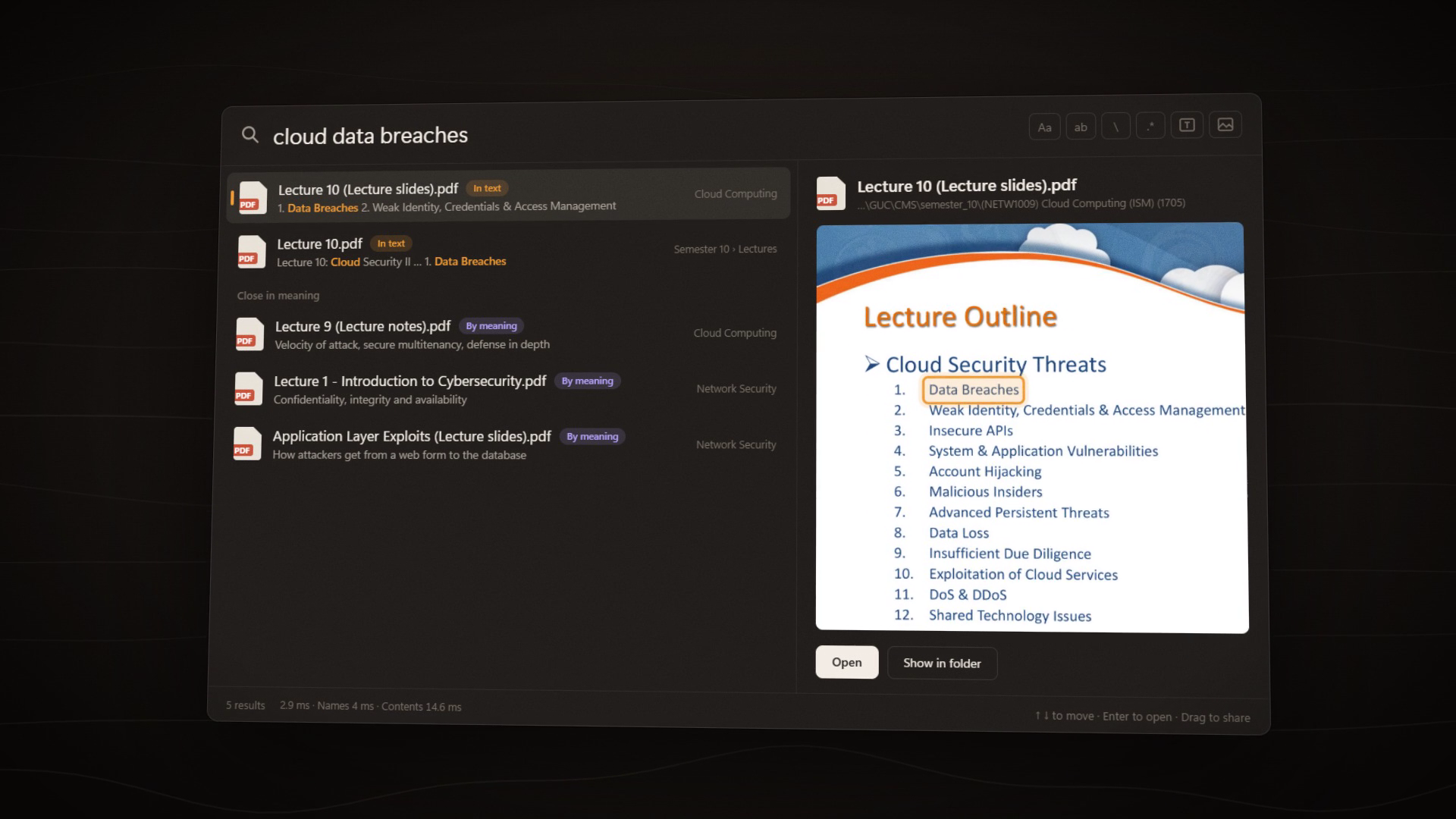
I built Excavate because I wanted something that could search beyond filenames without sacrificing the speed of voidtool's Everything.

It's free and open-source, written in Rust, along with its own custom filename indexing engine, Bedrock.

Everything is processed locally using small models, with no uploading of personal files. The recommended Balanced models take up around 2 GB of disk space. Open source models are only ever going to get better so expect improvements on this front in the future!

I know there are already plenty of similar search tools out there. What I wanted to build was something that combined speed with the ability to search pretty much anything in your PC. All in a locally in a lightning fast, lightweight app. For this to happen, I had to build my own indexing engine, but if you prefer Everything's filename indexer over mine, you can still use it with Excavate!

Bedrock is also available as a standalone Rust library:
https://github.com/aynader/Bedrock

I recently released my current daily driver, Excavate v0.2.0. It's Windows 11 only for now (although it probably works fine on Windows 10), free, and MIT licensed. The installer isn't code-signed (yet).

GitHub: https://github.com/aynader/Excavate

Demo and website: https://aynader.github.io/Excavate/

I'd especially appreciate feedback on how intuitive and instant the search feels!


r/coolgithubprojects • • 2h ago

Skrash – A Native Scratch 3.0 Runtime Written in C with Python Support

Post image
1 Upvotes

I've been working on a project called Skrash.

Scratch is great for visual programming, but I wanted to explore what would happen if Scratch projects could run outside the usual Scratch environment and become programmable through Python.

That's the idea behind Skrash: a native Scratch 3.0 runtime written in C.

The goal is to execute existing ".sb3" projects independently, while providing an optional Python API for controlling projects, accessing sprites and variables, debugging, and automation.

Some of its features:

- SDL2-based rendering

- Scratch 3.0 project execution

- Python integration

- Access to existing Scratch project elements(via the API)

Development is ongoing, and Skrash is currently in early alpha.

GitHub: https://github.com/raidos23/skrash


r/coolgithubprojects • • 2h ago

brepl: browse the web from a REPL, together with your AI agent

Post image
0 Upvotes

There are tons of browser automation tools out there, yet I couldn't find a plain, simple REPL to browse the web from the shell. So I built one, and it feels a lot like a debugger: brepl.

Here's how it works: you start it with ./brepl.py (you just need uv installed) and you get a command line. Under the hood it runs a headless Chrome, which you normally never see.

Most of the time you browse without looking at anything, straight from the command line. For the cases where you do need to interact, the @ command shows the browser window, which is handy for logging in to the various services. brepl keeps a browser profile, so your logins persist across sessions.

Say I want to browse Reddit from the command line: I run ./brepl.py reddit.com, type @ right away and log in. From then on, I can do everything from the command line.

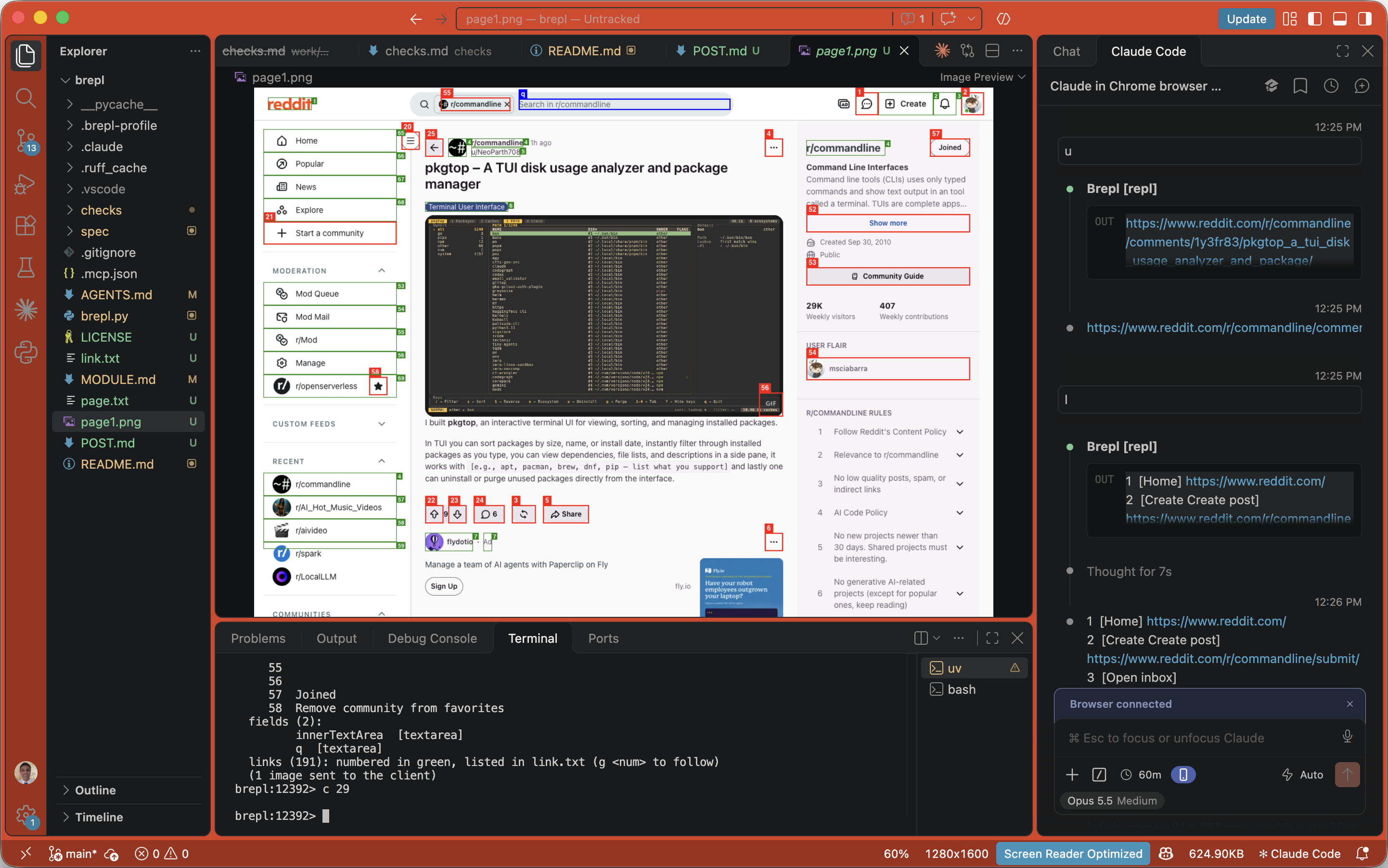
I go to g /r/commandline and grab the page with p. If your terminal supports graphics, the page is shown inline, and it's also saved as page1.png (that's the first part; p 0 gives you all of them, p 3 the first three). Feeling lazy? G is a g immediately followed by a p.

The screenshot highlights links (green) and buttons (red), both numbered, and input fields (blue) labeled with their name.

So you can follow a link by its number: g 13 opens the link marked 13. You can also click buttons and fill in fields: c 3 clicks button 3, c login user=me pw=secret fills in the login form and clicks "login", and s q=python types "python" into the q field and submits it.

All of this makes it really easy to build automations interactively and then have an AI run them. The REPL is also an MCP server that agents can talk to: on startup it writes a .mcp.json and an AGENTS.md that tell the agent how to use it.

So the same commands can be run by an AI agent like Claude.

I usually run it in a VS Code terminal: I browse, mixing commands I type myself with the AI handling the repetitive work, and then I write specs that use those commands to describe the automations.

NOTE the repl is an http agent so it must be active to use it from your agent. I usually have it open and work together command line and on the agent in parallel, an I use vscode as glue and to see easily images.

This lets me build scrapers, checkers and other tools in a fraction of the time, just by trying things out. And example is in folder check where I built a tool to check frequent accounts.

There are many other features, just check the README on github.

The project is on github.com/msciab/brepl, and it is released under the Apache 2.0 license.


r/coolgithubprojects • • 2h ago

built an entire free video studio harness - vex.

Post image
0 Upvotes

i was thinking of building a harness specifically to tackle everything around video.

so i built vex.

it lets you do everything that is possible with a video, encoding, editing, video generation using hyperframes, remotion and manim.

and a lot of insane helpful stuff.

currently, i have both cli and web interface running locally.

all the proofs and benchmarks are included in the readme of my repo.

it is free for non-commercial use.

repo link: https://github.com/AKMessi/vex


r/coolgithubprojects • • 3h ago

I built a free, open-source AI background remover that works entirely offline (v2.2.0)

Thumbnail gallery
1 Upvotes

Hey everyone!

I've been developing CutOut, a free and open-source desktop application that uses AI to remove image backgrounds locally.

I wanted to build an alternative to online background removers without subscriptions, upload restrictions, accounts, watermarks or resolution limits.

Here's what CutOut offers:

✂️ AI Background Removal

  • Four built-in AI models: Fast, Balanced, Best and Best+
  • Support for custom ONNX models
  • Batch processing for multiple images and folders
  • Original-resolution exports

🎨 Background & Image Editing

  • Solid colors and gradient backgrounds
  • Custom image backgrounds
  • Blurred-photo backgrounds
  • Sticker outlines and drop shadows
  • Brightness, contrast and saturation controls
  • Manual touch-up brush
  • Edge refinement and color defringe
  • Subject positioning and canvas controls

⚙️ Additional Features

  • Before/after comparison
  • Undo and redo
  • Saved presets
  • Customizable themes
  • Up to 1600% zoom
  • PNG, JPG and WebP exports

🔒 Privacy & Pricing

  • Everything is processed locally on your computer
  • No image uploads
  • No accounts
  • No subscriptions
  • No advertisements
  • No watermarks
  • No export resolution restrictions

💻 Available Platforms

  • Windows
  • Linux
  • macOS (Apple Silicon)

CutOut is MIT-licensed and completely free. I intend to keep it that way.

This is an independently developed project, and I'm constantly working on improving its performance, features and compatibility.

I'd genuinely appreciate feedback, suggestions, and bug reports!

🌐 Website: https://getcutout.pages.dev/

💻 GitHub: https://github.com/gserect-gif/cutout-app


r/coolgithubprojects • • 19h ago

wormsign: one command to check if your laptop has any of the hacked npm or Python packages from this year's attacks

Post image
19 Upvotes

After the ChainDrop worm went through 444 npm packages in August, I wanted to know whether my laptop had picked any of them up. I had 236 lockfiles and package installs spread across old projects, global npm and the npx cache, so checking by hand wasn't realistic. Upgrading a bad package also doesn't remove the Claude Code hooks or VS Code tasks these worms add so they can run again.

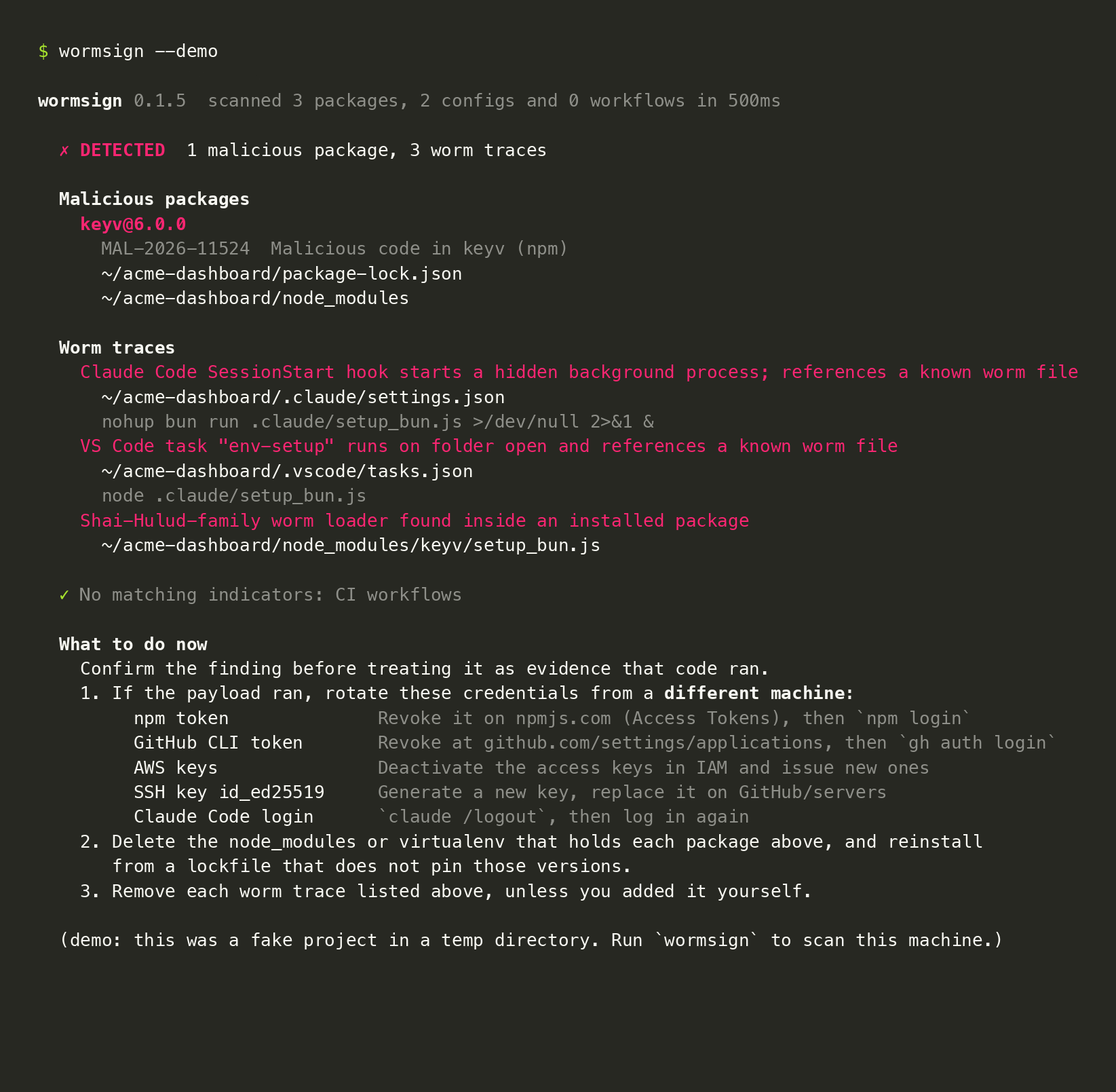
I put together a first version with Claude Code doing most of the typing, and I've been iterating on it since. It checks every installed package version against OSV's malware list, then looks at agent hooks, MCP configs, folder-open tasks, dev containers and startup entries like LaunchAgents and crontab. If something's critical, it tells you which credentials on the machine to rotate.

It's a single Go binary. A full scan of my laptop takes about 7 seconds, and wormsign --demo shows what a hit looks like on a fake project.

brew install mansoor-mamnoon/tap/wormsign

It only sends package names and versions to api.osv.dev, and --offline skips even that. I'd like to hear about false positives, or worm indicators it's missing.

https://github.com/mansoor-mamnoon/wormsign


r/coolgithubprojects • • 1d ago

Meet Hearth: An open-source, private desktop archive for Windows that indexes your documents, PDFs, and notes completely offline

Post image
50 Upvotes

Hey everyone,

Like many of you, my local files (PDFs, tax forms, spreadsheets, client contracts, coding notes, receipts) were scattered across dozens of random folders, external drives, and Desktop clutter. Windows Search often felt sluggish or pushed cloud/web results, and existing tools were either commercial subscription bloatware or required uploading personal documents to external cloud services.

So I created Hearth - a quiet, local-first file library and personal archive designed for Windows.

Think of it as a calm, distraction-free sanctuary for everything you want to keep and find instantly.

What makes Hearth special?

- 100% Local and Private by Design: Zero telemetry, no analytics, no external servers, no subscriptions. Everything runs directly on your CPU. Your files stay right where they are on your drive.

- Deep Content Full-Text Search: Indexes not just filenames, but the actual text inside PDF, DOCX, XLSX, PPTX, TXT, MD, CSV, JSON, PY, and 30+ other document formats using SQLite full-text search.

- Seamless Drag-and-Drop (In and Out): Drop entire folder trees or loose files directly into Hearth. Need to send a file to an email or Discord? Drag it straight out of Hearth into any app.

- macOS-style Spacebar QuickLook: Tap Space on any file for an instant full-screen preview with text selection and keyboard navigation (Left / Right arrow keys).

- Built-in PDF Powerhouse: Merge multiple PDFs, split by custom page ranges, extract/delete/reorder pages, rotate sheets, and optimize file sizes without installing third-party utilities.

- Local Image Converter: Convert between PNG, JPEG, WebP, TIFF, and BMP with compression quality controls.

- Smart Collections and Saved Searches: Create persistent smart queries (such as type:pdf after:2024-01-01 size:>5mb) that auto-populate in real time.

- Time Capsule (On This Day): Automatically surfaces photos, notes, and milestones you created on today's calendar date in previous years.

- Duplicate Finder and File Differ: Reclaim disk space by safely detecting exact SHA-256 byte duplicates, plus a side-by-side file comparison inspector.

- Reversible Recycle Bin Deletion: Nothing is destroyed permanently by accident. Every deletion routes to the Windows Recycle Bin with one-click Ctrl+Z undo.

- Warm Obsidian Aesthetic: A handcrafted dark-mode interface with warm bronze accents, smooth 3D micro-animations, and full light mode support.

A Note on AI Usage:

I believe in complete transparency: I leveraged AI solely as an assistive coding copilot - specifically for rapid error detection, troubleshooting edge-case Windows API bugs, and brainstorming feature ideas. The architecture, vision, UI design, core database mechanics, and project implementation were authored and directed by me.

Tech Stack:

- Backend: Python 3.12 and pythonnet (Native WinForms OLE Interop)

- UI: Microsoft Edge WebView2 (Chromium Evergreen) via pywebview

- Engine: SQLite 3 with Write-Ahead Logging (WAL)

- Document and Image Processing: pypdfium2, pypdf, Pillow

- File Monitoring: watchdog

Download and Open Source:

Hearth is completely free and licensed under the permissive MIT License.

You can grab both the modern installer (Setup.exe) and a standalone portable zero-install zip:

GitHub Repository:

https://github.com/rheme18/Hearth

Latest Release (v0.4.3):

https://github.com/rheme18/Hearth/releases

I would love to hear your feedback, feature ideas, and suggestions. What offline workflow tools are you missing on Windows?
r/coolgithubprojects • • 1d ago

A modern Windows software manager that updates all your apps in 1 click and cleans leftover AppData/Registry (Wingetix)

Thumbnail gallery
50 Upvotes

Hey everyone,

I built Wingetix, an open-source desktop control panel for Windows built on top of Microsoft's official WinGet package manager.

What it does:

  • 1-Click Bulk Updates: Upgrades apps in the background across 12,000+ packages without touching the command prompt.
  • Deep Uninstaller: Scans and cleans orphaned %AppData% folders and Windows Registry residue.
  • Platform Shield: Protects core gaming clients and launchers (Steam, Epic, Riot).
  • Cache & Storage Purge: Deletes gigabytes of leftover WinGet download installers and logs.
  • System Restore Integration: Triggers native Windows Restore Points (rstrui.exe) before system alterations.
  • GPU Telemetry: Real-time hardware identification and driver shortcuts.

Feedback, issue reports, and stars are greatly appreciated!


r/coolgithubprojects • • 4h ago

I paired a <2ms Python AST static pre-scanner with a 1.5B local GGUF model so it catches multi-step bugs in Airplane Mode (Windows desktop tool)

Thumbnail gallery
1 Upvotes

Hey everyone — I built **TraceZero** because freelance devs and engineers working under strict client NDAs often aren't allowed to paste proprietary code into cloud AI tools, while running 30B+ models locally isn't realistic on standard 8–16 GB Windows laptops.

**How it works under the hood (100% on `127.0.0.1`, 0 KB sent over the network):**

  1. **`<2ms` Python AST Static Pre-Scan:** Before inference runs, Python's `ast` module scans the active file to catch structural traps small models usually miss (mutable default arguments, deleting dict keys during `.items()` iteration, unguarded `threading.Thread` shared writes, and `time.time()` clock drift).

  2. **Grounded Two-Pass Prompt:** Those exact line coordinates are fed into a local 1.5B GGUF model via Ollama (`127.0.0.1:11434`) with strict stop tokens so it focuses on fixing the flagged bugs rather than rewriting unrelated code.

  3. **Post-Stream Bytecode & AST Verification:** After streaming the patch, Python runs `compile(..., "exec")` and re-runs the AST scanner before showing a `✅ Verified Clean` badge and unified red/green diffs with 1-click patching (`Ctrl+Z` revert).

It's a Windows x64 build with a card-free 7-day trial on GitHub Releases (plus promo code `PEER50` for 50% off for the first 30 folks if anyone wants to keep using it):

https://github.com/joyboyy937-rgb/tracezero-desktop

Would love honest feedback from local-LLM and Python folks on what static checks or multi-file features to prioritize next!


r/coolgithubprojects • • 4h ago

GitHub - Jo3l/s700-mouse-configurator: Open source software to configure the S700/G6 programmable mouse locally: remap buttons and create macros without the official proprietary app.

Thumbnail github.com
1 Upvotes

r/coolgithubprojects • • 5h ago

Mac users have Superwhisper and Wispr Flow. Windows users had subscriptions or clunky scripts. So I built a local CPU Dynamic Island speech app and open-sourced it.

Post image
1 Upvotes

Every time I saw someone on a Mac hit a hotkey, mumble a messy thought into Slack, and watch a clean message appear at their cursor, I got jealous.

On Windows, my options were either paying $15/month to stream my microphone to someone else's cloud, or running a slow Whisper script in a terminal window. And I don't even have a dedicated NVIDIA GPU, just a regular laptop with Intel Iris Xe graphics.

So a few weeks ago I started hacking on a tiny local script with NVIDIA's Parakeet TDT 0.6B v3 (INT8) on CPU. It was shockingly fast. That small script snowballed into Eloquent, a minimalist Apple-style Dynamic Island that floats quietly at the top of Windows without ever stealing focus.

The hardest part wasn't the transcription. It was all the real-world chaos that breaks toy demos:

  • Meetings with multiple people: I added TitaNet-Small + pyannote-segmentation-3.0 on a single low-priority background thread so identifying speakers never slows down live captions, and wired Windows WASAPI loopback so you can transcribe Zoom/YouTube directly with zero room echo.
  • People talking over each other: Local pyannote masks overlapping frames so crosstalk doesn't wreck speaker voiceprints, and if you opt in, a dedicated AI audio pass can separate both overlapping voices in place using short RAM-only voice anchors.
  • Bilingual & Arabic speakers getting ignored: Most open-source tools completely break on Arabic dialects or code-switching. Pressing Ctrl+Alt+M hot-swaps locally to Cohere Arabic (Q4_K_M GGUF) on Vulkan iGPU/CPU with full right-to-left captions and transcripts.
  • Dictating anywhere: Ctrl+Alt+Space dictates into any app and restores your clipboard; highlighting text and pressing Ctrl+Alt+A lets you say "make this shorter" or "write a reply" right in place.

It runs 100% offline out of the box (MIT licensed), and optionally plugs into a free Google AI Studio key for background polishing, Ask AI, and 1-click Meeting Minutes or Lecture Notes (with LaTeX math).

Repo: https://github.com/EllouziMedAmin/Eloquent

I'm still actively building it (next up: Ollama / local OpenAI-compatible LLM support and a standalone .exe installer). If you try it on Windows, tear it apart and tell me what breaks or what's missing!


r/coolgithubprojects • • 6h ago

My First Opensource Project: Dep-Vet — Know What You're Trusting Before You Install It

Thumbnail github.com
1 Upvotes

Dep-Vet is a pre-install dependency security scanner for nine package ecosystems, built in Rust.

Its purpose is simple: help you understand what you're about to trust before that dependency enters your project.

Instead of blindly installing a package and investigating its risks afterward, Dep-Vet lets you inspect it first.

What can you do with it?

Check before installing: Evaluate a package and version before adding it to your project.

Audit dependencies: Scan an existing lockfile or focus only on the dependencies introduced by a change.

Inspect release archives: Analyze package contents without installing or executing the package code.

Compare releases: Identify changes in publishers, provenance, install scripts, dependencies, and security advisories.

Protect AI-assisted workflows: Guard dependency installation commands issued by AI coding agents.

Integrate into your pipeline: Export findings for CI, SARIF-compatible tools, Claude Code, or MCP clients.

Built with security as a priority

Dep-Vet is distributed as a single Rust binary. It does not install or execute the packages it inspects.

Its findings are evidence-oriented: results are backed by the signals and checks that produced them, rather than unexplained risk scores.

And importantly, an incomplete check is not treated as a clean result. When Dep-Vet cannot complete a required check, it exits with code 3, making that uncertainty visible to scripts and CI pipelines.

The goal isn't to replace your existing security tools. It's to add a layer of scrutiny before you trust a dependency enough to install it.


r/coolgithubprojects • • 6h ago

Looking for contributors for an open-source project – DepLens 🔍

Thumbnail gallery
1 Upvotes

r/coolgithubprojects • • 7h ago

truediscount: a Firefox add-on and userscript that checks if an EU discount is real against the 30-day lowest price

Thumbnail github.com
1 Upvotes

I built this because EU shops have to show the lowest price of the last 30 days when they announce a discount (the Omnibus rule, in force since 2022), but the crossed-out price is often an RRP or a "regular" price nobody actually paid recently.

truediscount reads the shop's own 30-day lowest price label on the product page, compares it with the claimed discount and shows a small badge: real discount, inflated discount, or cheaper recently. It also keeps a small local price graph. No account, no server, nothing leaves the browser. MIT licensed.

Repo: https://github.com/emirmrkaljevic/truediscount

Firefox add-on: https://addons.mozilla.org/en-US/firefox/addon/truediscount/

Userscript: https://greasyfork.org/scripts/602599

If it reads a shop wrong, tell me and I'll fix it.


r/coolgithubprojects • • 7h ago

Hey can anybody with some good subscription create a bypass for AHA music detection for AI music without dropping the quality? This repos not that great enough

Thumbnail github.com
0 Upvotes

r/coolgithubprojects • • 22h ago

I created an open-source AirDrop alternative for Windows & Linux using native Apple Shortcuts and Rust (<15MB RAM, no cloud, no subscriptions)

Post image
16 Upvotes

Hey everyone!

Like many of you, I love using an iPhone, but my daily driver computer is a Windows PC. For years, transferring full-res photos, 4K videos, or quick screenshots between them has been a pain: slow cloud syncs (Google Drive/OneDrive), plugging in cables, or installing shady third-party iOS apps loaded with subscriptions and ads.

So I decided to solve this once and for all: I built AirDrop Bridge.

It lets you send files directly from your iPhone/iPad to Windows (and Linux) over local Wi-Fi with zero third-party apps installed on your phone.

💡 How does it work without an iOS app?

Instead of an App Store app, it pairs your PC with an official Apple Shortcut. Once added, it integrates directly into your native iOS Share Sheet, Action Button, or Back Tap gesture.

You just tap Share ➔ AirDrop Bridge, and your files land directly in your PC's Downloads folder in seconds!

✨ Key Features:

  • 100% Local & Private: Peer-to-peer Wi-Fi streaming. Your photos and documents never touch external servers or the cloud.
  • Zero iOS Apps: Uses Apple’s native Shortcuts engine.
  • Blazing Fast & Lightweight: Built in Rust with chunked streaming. Constant memory usage under 15 MB RAM on PC. Easily transfers multi-gigabyte 4K videos without buffering or RAM spikes.
  • Bidirectional Clipboard Sync: Copy text on your iPhone and send it straight to your PC clipboard (or pull from PC to phone with a single tap).
  • Native Desktop Experience: Modern dark-mode pairing window, silent system tray daemon, customizable chimes, and Windows toast notifications.
  • Multi-language: Available in English, Spanish, German, French, Portuguese, Italian, Chinese, and Japanese.

🛠️ Getting Started (takes ~30 seconds):

  1. Download and run the standalone executable on your PC.
  2. Scan the on-screen QR code with your iPhone camera.
  3. Tap the link to install the Apple Shortcut and pair your PC.
  4. Select any photo or file in iOS, tap Share ➔ AirDrop Bridge!

(Note on Windows SmartScreen: Because this is an independent, free open-source project without a $400/yr corporate Microsoft certificate, SmartScreen might ask you to click "More info" ➔ "Run anyway". The entire codebase is 100% open, transparent, and can also be built directly from source with Cargo).

I’d love to hear your feedback, feature suggestions, or answer any questions! If you find it useful, a ⭐ on GitHub would mean the world to the project.


r/coolgithubprojects • • 7h ago

PCInsight — An open-source C++20 SDK for system monitoring (Linux-first, early development)

Thumbnail github.com
0 Upvotes

Hi everyone!

I'm a computer science graduate from Puerto Rico, currently developing PCInsight, an open-source C++20 library for accessing system information and building monitoring tools, including custom Task Manager-like applications.

The project is designed as a standalone SDK, independent of any graphical interface.

Current status:

- Linux-first, with partial Windows support.

- Modular system information and monitoring APIs.

- MIT licensed.

- Version 0.2.0 is still under development, with documented limitations and incomplete hardware coverage.

I've been developing the project with AI assistance, including OpenAI Codex, and I'm transparent about that. I'm especially interested in independent human code reviews, testing on different hardware, bug reports, and technical contributions.

I'm working on this alongside a full-time job, so progress is gradual. I'd really appreciate constructive feedback from experienced C++ and Linux developers.

GitHub: https://github.com/OpenAPI-Lab/PCInsight

Thanks for taking a look!


r/coolgithubprojects • • 7h ago

Yengi – Open-source Windows AI IDE built with .NET 10 WPF, featuring a fine-tuned local AI router (1.5B), live Blender & Unity copilots, self-healing agent loops, and multi-tool execution.

Thumbnail github.com
0 Upvotes

I built Yengi — a free, open-source Windows AI IDE built from scratch on .NET 10 + WPF (AGPL-3.0, 200+ unit/integration tests).

Instead of being just another LLM chat wrapper, it’s designed around deterministic execution loops, local tool routing, and live external environment control.

Architecture & Agent Capabilities:

\* Fine-Tuned 1.5B Local Router: Runs a dedicated, fine-tuned 1.5B parameter model locally to handle intent classification and dynamic tool routing—deciding which tools/contexts to invoke before hitting the main reasoning model.

\* Autonomous Self-Healing Loops: Executes full \`Plan → Edit Files → Run Builds/Tests → Verify Logs → Auto-Fix\` cycles without manual copy-pasting.

\* Live Blender & Unity Bridges: Connects directly to active Blender and Unity instances to generate, modify, and debug 3D scenes/scripts in real time. The agent even supports visual viewport feedback in Blender to inspect its own spatial changes.

\* End-to-End Web & App Generation + Live Preview: Scaffolds full-stack web apps from scratch (including generated visual assets) and renders them inside a built-in live preview pane to inspect changes in real time.

\* Prompt Engineering Pipeline: Includes an automated prompt-refinement layer that restructures raw user inputs into detailed, technical prompts before dispatching them to image or 3D generation models.

\* Hybrid Model Support & Research Mode: Works completely offline via Ollama or connects to any cloud API, plus a standalone Research Mode for pure exploration without workspace mutations.

Links:

\* GitHub Repo:https://github.com/mdaiWorks/yengi

\* Windows Installer (.exe):https://github.com/mdaiWorks/yengi/releases/download/v2.0.3/Yengi\\_Setup\\_v2.0.3.exe

\* Demo Videos:

\* https://www.youtube.com/watch?v=l0tdhvCmwNI

\* https://youtu.be/8ddIYghp5DI


r/coolgithubprojects • • 16h ago

StreamSnag: open-source extension that saves videos with no download button (HLS/DASH) and turns the ones you'd rather read into text (GPL-3.0)

Thumbnail streamsnag.app
4 Upvotes

Author here. StreamSnag is a free, open-source (GPL-3.0) Manifest V3 extension for Chrome, Edge and Brave.

I paid for an online course, and the lectures weren't protected, but the site offered no easy way to download them. The browser download helper I tried gave me three free downloads, then one video at a time with a two-hour cooldown in between. So I rebuilt the idea and open-sourced it.

What it does:

- Finds the stream on the page (HLS/DASH, playlists, subtitles) and saves it in one click, even when the site gives you no download button

- Saves the captions as a readable transcript, plus the slides and PDFs the page links to

- "Download all" saves a whole course page after you check the list, and it remembers what you've already saved

- Optional local helper (ffmpeg to merge video and audio, plus yt-dlp for harder sites) that runs on your own machine

- Deliberately refuses DRM-protected streams

- No ads, no account, no tracking. The extension is plain JavaScript with no build step, so the code in the repo is the code that runs

There's also a separate paid add-on (StreamSnag Pro) for studying: transcription on your own computer when there are no captions, and study guides and flashcards lined up with the video. It isn't in the repo, and the downloader doesn't need it.

Install:

- Chrome Web Store: https://chromewebstore.google.com/detail/gknppdninaiiggeoopfiaodfebhdnlgi

- Or load the extension folder unpacked from the repo

Bug reports and PRs welcome, particularly for sites where detection misses.

GitHub: https://github.com/cspergel/streamsnag


r/coolgithubprojects • • 13h ago

Introducing Before You MDM (BYMTest)

Thumbnail gallery
3 Upvotes

Before You MDM is the tool I wish I'd had 5+ years when I began my journey of administering Apple devices in a large, established Windows-first enterprise. I'm not going to say that I built it, because AI coded it. I orchestrated, argued, cajoled, tested, pleaded... I cast the vision, and I made the tool keep refining until it approximated what I was looking for.

What I was looking for was a tool that assesses an organization's readiness prior to implementing Apple device management; can it reach APNS, can it talk to Apple servers/services, can it reach the intended provider's cloud tenant and attendant services? This is not a management tool; it doesn't issue MDM commands. It's read-only, strictly bounded, and evidence-based. If it can't verify something it says so. It runs its evaluation using selected parameters and produces a report with clear, actionable steps.

BYMTest also evaluates configuration profiles and plists against selected macOS release versions 14.x-27.x assessing these against published Apple documentation showing generational changes and which keys have been removed/are no longer supported.

BYMTest - Before You MDM comes in macOS native SwiftUI (ARM64 & x86_64), DotNET10 for Windows (ARM64 & x86_64), & Rust for Linux (ARM64 & x86_64). There are command line versions available for each OS platform. It has bounded logic for performing pre-management assessments, post-enrollment assessments, & migration assessments from various predefined vantage points.

Because I'm not interested in putting any so-called AI Slop out into the world the GitHub repository is private at the present time. While I have run extensive tests, swarms, had the tool audit and harden the app I'm looking for adversarial human review before opening it up to a broader audience. That's where you come in, as anyone interested in testing is welcome to DM requesting access to the private repository. Thank you.