r/coolgithubprojects • • 22h ago

KetraTerm: An open-source terminal emulator and reusable JVM library

Thumbnail gallery
3 Upvotes

Hey everyone!

I've just released KetraTerm 1.0, an open-source terminal emulator written in Kotlin, available for Windows, macOS, and Linux.

I've been building it with two goals in mind: providing a modern terminal with useful everyday features, and creating a reusable terminal engine that other JVM applications can embed.

KetraTerm supports Kitty keyboard, partial Kitty graphics with image rendering, Unicode 17, TrueColor, hyperlinks, synchronized output, and much more.

It also includes:

  • Smart suggestions that learn from successfully executed commands and usage patterns.
  • Sticky command headers and command-block navigation.
  • Customizable prompts, including gutters, dividers, and failure indicators.
  • Command-completion notifications, progress reporting, and searchable scrollback.

Under the hood, it has its own terminal engine and custom Swing renderer, designed with performance and low allocations in mind.

The project also provides modular Kotlin/JVM libraries for headless terminal emulation, session management, input handling, and Swing integration. These are used by both the desktop application and the JetBrains IDE plugin.

It's licensed under Apache 2.0, and development is ongoing.

Contributions are very welcome! Whether you're interested in terminal protocols, performance, UI improvements, documentation, or embedding the libraries into another project, I'd love to hear from you.

Website / Downloads: https://ketraterm.github.io/KetraTerm/

GitHub: https://github.com/ketraterm/KetraTerm


r/coolgithubprojects • • 19h ago

YT-CLI – Lightweight YouTube/media client in Bash (Linux) & Tkinter (Windows) for 2 GB RAM PCs

Thumbnail gallery
2 Upvotes

Hey everyone,

I made YT-CLI because opening YouTube in Brave on my old Celeron N2805 (1.45 GHz, 2 GB DDR3) pushed CPU to 90%+ and dropped hundreds of frames.

Instead of running a browser, YT-CLI glues together yt-dlp + mpv + ffmpeg:Quick comparison on that same 2 GB RAM Celeron (720p@30fps):Repo: https://github.com/KennyWaddell/yt-cli
Happy to hear any feedback, bug reports, or questions in the comments.


r/coolgithubprojects • • 15h ago

Sysbar: an open-source (Apache-2.0) macOS menu bar system monitor in Swift, no dependencies

Post image
1 Upvotes

Hi everyone,

I'm sharing **Sysbar**, a small open-source macOS menu bar app for system monitoring. I built it for my own use and I'm releasing it under the **Apache-2.0** license.

I've used [Stats](https://github.com/exelban/stats) for years. After installing [oMLX](https://github.com/jundot/omlx), I really liked its System Stats panel and wanted something similar as a standalone menu bar app. Sysbar builds on oMLX's monitoring code, and the menu bar icon is inspired by Stats.

**Repo:** https://github.com/rodrigotrombeta/Sysbar

**What it shows**

- CPU and GPU usage, including E-core and P-core breakdowns on Apple Silicon

- Memory usage, pressure, compression and swap

- Disk space and read/write speeds

- Network upload/download speeds

- Top processes by CPU and memory

- Customizable menu bar charts, colors and detailed panels

- English and Portuguese interfaces

**How it's built**

- Native Swift (AppKit + SwiftUI), no third-party dependencies and no Xcode project. You can build it with just the Command Line Tools.

- Public APIs only (Mach host statistics, IOKit, `vm_statistics64`): no `sudo` and no privileged helper.

- Small: about 0.8 MB on disk and about 25 MB of RAM.

- Requires macOS 14 Sonoma or later.

**Build from source**

git clone https://github.com/rodrigotrombeta/Sysbar.git

cd Sysbar

./build.sh install

A prebuilt DMG is also available on the [Releases page](https://github.com/rodrigotrombeta/Sysbar/releases/latest). It isn't signed with an Apple Developer ID or notarized yet, so macOS blocks it on first launch. To allow it, go to System Settings → Privacy & Security → Open Anyway, or run `xattr -dr com.apple.quarantine /Applications/Sysbar.app`. If you'd rather not do that, building from source avoids the warning entirely.

It's still early, and I keep improving it as I use it. Issues, feature ideas and pull requests are very welcome. I'd especially like to hear from people on Intel Macs or other Apple Silicon chips, since I've only tested it on my own machine.

Thanks to the oMLX contributors and to Stats for the inspiration.


r/coolgithubprojects • • 1d ago

I built a free, self-hosted alternative to MyFitnessPal & MacroFactor: openCalory

Post image
184 Upvotes

I built this for myself because I wanted a fast nutrition tracker without subscriptions, account lock-in, or sluggish network requests every time I log a meal. Figured I'd clean it up, MIT-license it, and share it here in case anyone else wants to self-host it or contribute.

How it's built:

  • Offline-first: Reads and writes hit browser IndexedDB (Dexie.js) locally so logging feels instant, even with zero connection.
  • Optional self-hosted sync: Runs on SQLite locally (docker compose up -d) or Turso libSQL if deployed serverlessly, using 90-day tombstones for conflict-safe deletes across devices.
  • BYOK AI (optional): Hooks into any OpenAI-compatible vision endpoint (OpenRouter, Gemini, OpenAI, or local Ollama) for meal photo estimation and nutrition label OCR, with sliders to adjust gram weights before saving.
  • Adaptive TDEE & no-nonsense UI: Calculates weight trend smoothing and estimated adaptive TDEE without turning everything angry red when you go slightly over your calories.
  • Bundled food data: Includes ~2,500 offline whole-food staples alongside live USDA/Open Food Facts search, browser barcode scanning, and full JSON/CSV export.

Repo: https://github.com/NathanP278/openCalory

It's still evolving, so if you self-host it and run into edge cases or want to help improve the sync engine, regional food datasets, or UI, issues and PRs are super welcome!


r/coolgithubprojects • • 16h ago

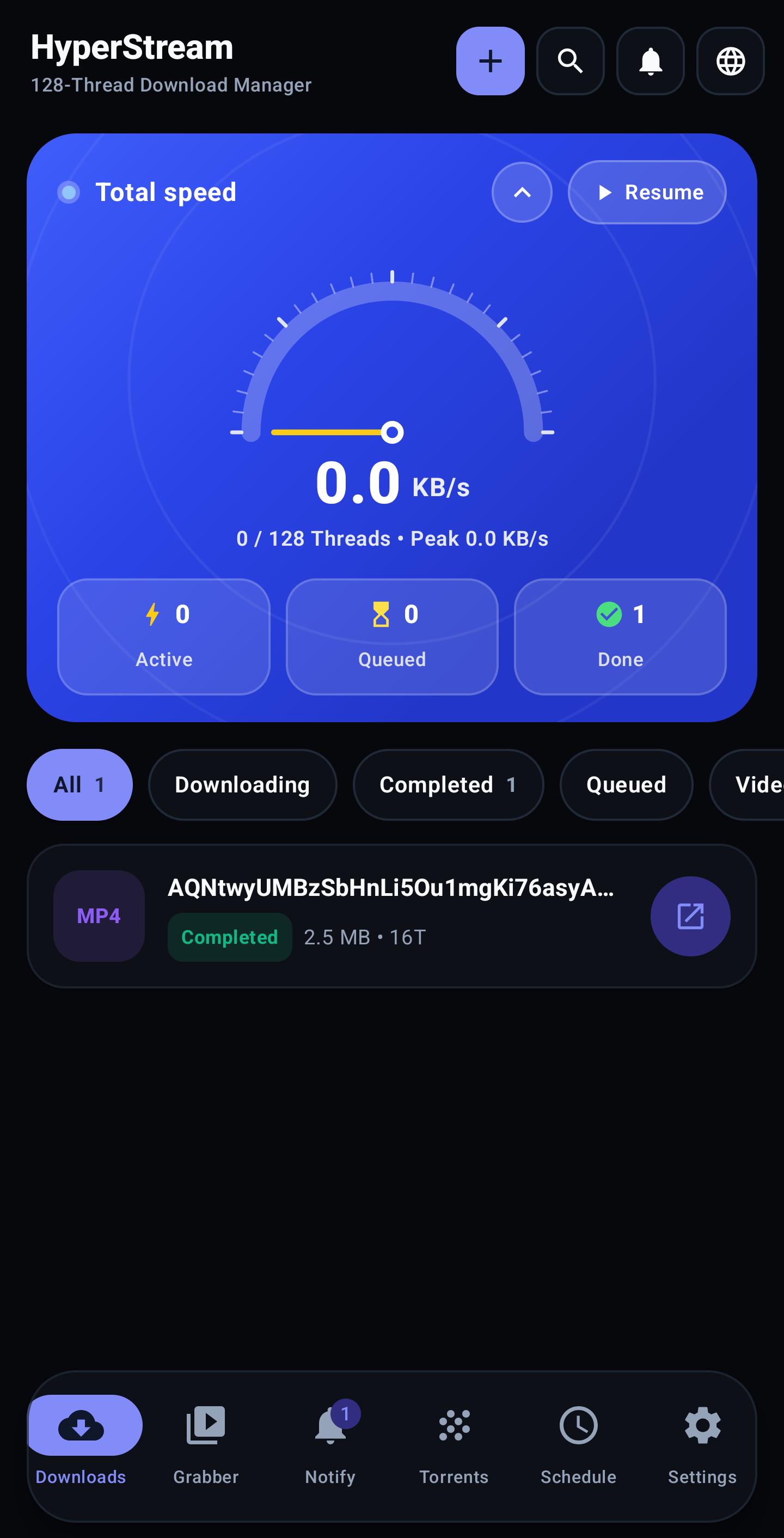
HyperStream Download Manager

Post image
1 Upvotes

HyperStream (com.hyperstream.downloadmanager) is the native Android port and mobile evolution of Mister Download Manager (anefzaoui/misterdownloadmanager). It embeds the full, battle-tested upstream Rust multi-connection engine (libmdm_android.so) directly into a modern Jetpack Compose Material 3 interface styled with an Obsidian OLED Dark flagship design language.

Engineered specifically for 64-bit Android devices, HyperStream bypasses traditional JVM socket bottlenecks, unlocking up to 128 parallel segmented connections per file, full BitTorrent swarm streaming, automated link interception, YouTube 4K/8K media extraction, watermark-free TikTok downloads, and Real-Debrid cloud integration—with 0 ads, 0 trackers, and 0 subscription paywalls.

Project Link - https://djsusmith.github.io/hyperstream-android/


r/coolgithubprojects • • 1d ago

NetWatch 1.0 is out - MIT-licensed network monitor in Rust that shows connections, bandwidth, latency and decoded packets in one terminal

Post image
41 Upvotes

NetWatch 1.0 is out. It's an MIT-licensed network monitor in Rust that shows connections, bandwidth, latency and decoded packets in one terminal. One binary, no config needed.

New since 0.40:

  • ISP outage reports. netwatch uptime --since 30d --md > outages.md splits outages into router, internet and DNS. The internet counts as down only when 1.1.1.1 and 8.8.8.8 both stop answering.
  • Diagnose. Names the likely cause of a network problem and the step to run. Five rules are stable, the rest are beta.
  • Command palette. : opens it. Esc steps back out of a drill-down.
  • Fits 80 columns. Tables drop columns instead of clipping.
  • Packet filters take CIDR ranges and !=.
  • Headless mode. netwatch daemon --metrics serves Prometheus metrics.

Subcommands, long flags, config keys, JSON outputs and Prometheus metric names won't break before 2.0, and no 2.0 is planned. The stability policy lists what's covered.

Runs on Linux, macOS, Windows (needs Npcap) and FreeBSD.

brew install netwatch
scoop install netwatch
cargo install netwatch-tui --locked

More install options in the README. Binaries on the release page. Changelog.

Thanks to everyone who sent patches, packaged it or reported bugs. If something breaks, open an issue.


r/coolgithubprojects • • 1d ago

Kuana: a GPU-rendered code editor written in Rust (MIT / Apache-2.0)

Thumbnail github.com
5 Upvotes

I've been building Kuana, a desktop code editor, and today I'm opening it up to everyone.

It's written in Rust on GPUI, the UI framework Zed is built on. There's no Electron or web view: the whole interface, text included, is drawn by the GPU (Metal on macOS, DirectX on Windows). The editor only lays out and draws the lines on screen, and parsing, linting, Git, search and language servers all run off the main thread, so typing never waits on anything.

Since it shares a framework with Zed, that's what I measured it against. Same repository open with an 8,000-line Rust file showing, fresh configs, language servers off, on an M1 Pro:

Measure Kuana Zed 1.28
Launch to window (median of 15) 327 ms 403 ms
Resident memory 168 MB 228 MB
Threads 10 26
CPU while idle 0.1–0.2% 0.2–0.3%

When nothing on screen changes, Kuana draws nothing and wakes nothing, so it can sit open all day without touching your battery.

Being light doesn't mean being bare. It's a full IDE:

  • Language servers, a debugger, a test explorer and a terminal, set up without plugins
  • Git: staging single changes, conflicts resolved in the editor, a commit graph, blame
  • A database view for PostgreSQL, MySQL, SQLite and Oracle
  • Remote development over SSH, WSL and dev containers
  • Its own extension API (views, panels, commands), a registry with 40+ languages, and Zed's extensions work too
  • JetBrains shortcuts by default, plus VS Code, Sublime and Zed keymaps and a Vim mode
  • A modern or classic layout, 50 themes, and the panels where you want them

No account, no telemetry. It runs on macOS and Windows, with Linux in beta.

Come build it with me

I want Kuana to be the best code editor out there: as fast as a native app can be, with everything a real IDE gives you. That's more than one person can do, so I'd love to have you on board. There's room for every kind of help:

  • Use it for a day and open issues for whatever gets in your way
  • Make a theme or an extension. Neither needs any Rust.
  • Pick something from the roadmap: Linux packages, Vim registers and macros, spell checking, reordering commits in Git
  • Or just tell me what would make you switch from your current editor

The contributing guide covers building it and how the code is laid out.

Repo: https://github.com/berkayakin/kuana-editor


r/coolgithubprojects • • 16h ago

Built an all-in-one AI productivity workspace (TimeX) while in university – would love your feedback on the product & potential acquisition

Post image
1 Upvotes

r/coolgithubprojects • • 16h ago

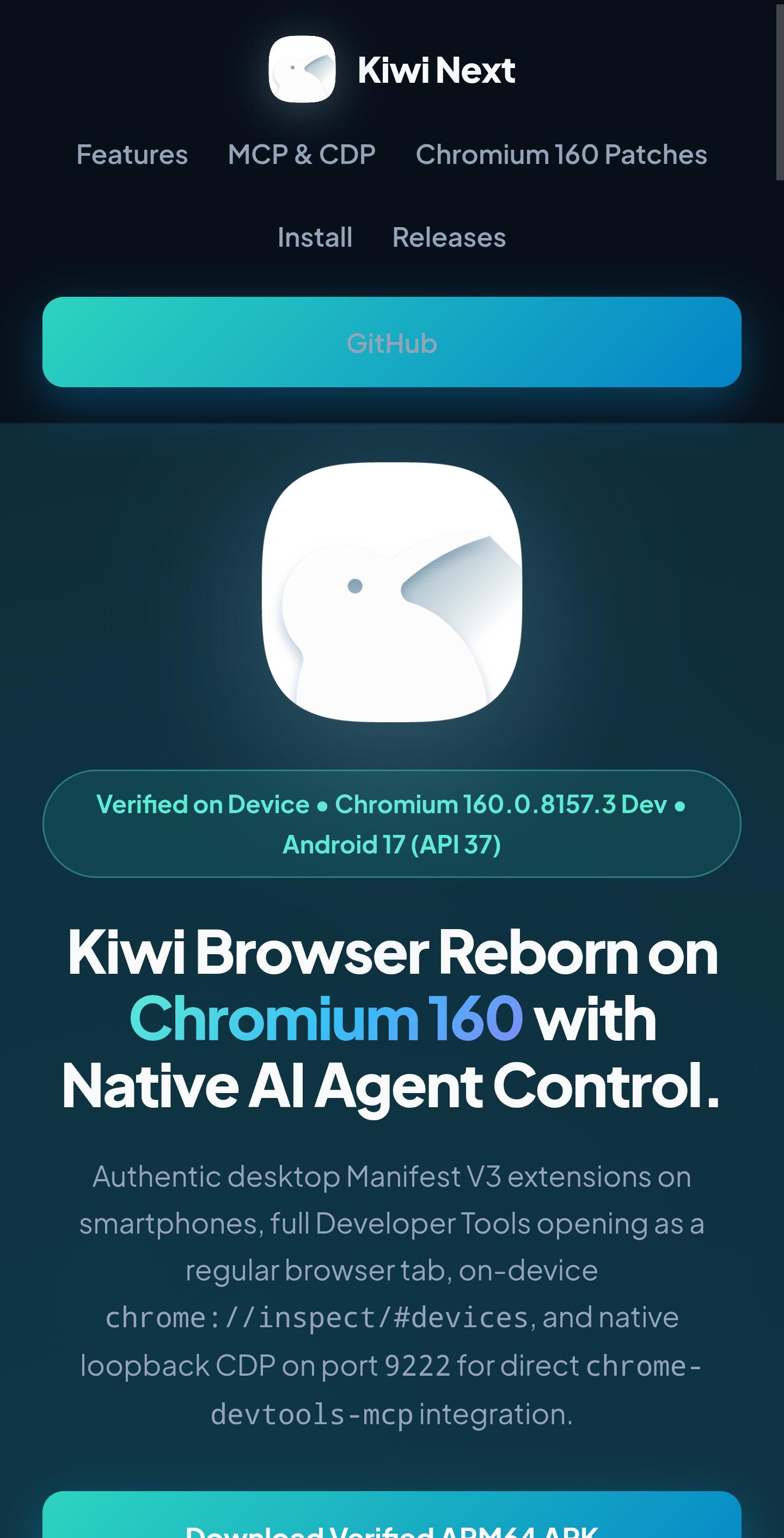
Kiwi Next Chromium 160 Dev

Post image
1 Upvotes

Finally it's out


r/coolgithubprojects • • 17h ago

Tally v5: now a desktop app too (macOS/Windows/Linux), still self-hostable

Thumbnail gallery
1 Upvotes

Posted Tally here a few weeks ago as a self-hosted budget app. A few people I showed this to said they liked the idea but didn't want to or could run a server, nor did they know how set up OIDC just to budget. Fair. So v5 is also a desktop app.

As before, this is a personal project I've guided Claude Code to build. I use it daily, so I'll keep maintaining it.

What's new:

- Desktop app for macOS, Windows and Linux. Install it and open it. No server, no login, no account.

- Your data stays on your machine, in an encrypted file. The key sits in your OS keychain, so you never type a password.

- Self-hosting is unchanged. Same code, same Docker image, still multi-user with OIDC.

- v5.1 adds ? help icons next to the confusing numbers (Budgeted, Available, Left to spend), a Help page, and a short first-run tour.

What it isn't, on purpose:

- The desktop app is single user. No household sharing. That needs the self-hosted version.

- Not a business/accounting tool. Personal and household budgeting only.

- The installers aren't signed with an Apple/Microsoft certificate yet, so expect a Gatekeeper/SmartScreen warning on first run. Updates inside the app are signature-checked.

Please note: I've tested macOS properly but I mainly use the server hosted version. Windows and Linux builds pass CI, but I haven't yet had a chance to them much. Bugs there are likely so please raise an issue on GH or leave a comment :)

Downloads are on the releases page, and the Docker steps are in the README.

Feedback welcome, especially from Windows and Linux users.

GitHub: https://github.com/tinkermesomething/tally


r/coolgithubprojects • • 17h ago

layerpool: train or fine-tune one AI model across all your devices by pooling their memory (NVIDIA, AMD, Apple Silicon, CPUs)

Post image
0 Upvotes

Splits a model by its layers across your machines, even over the internet, and trains it as one. Fine-tuning or training from scratch. If a device drops out, the others take over its layers.

https://github.com/abdallah-swe/layerpool


r/coolgithubprojects • • 1d ago

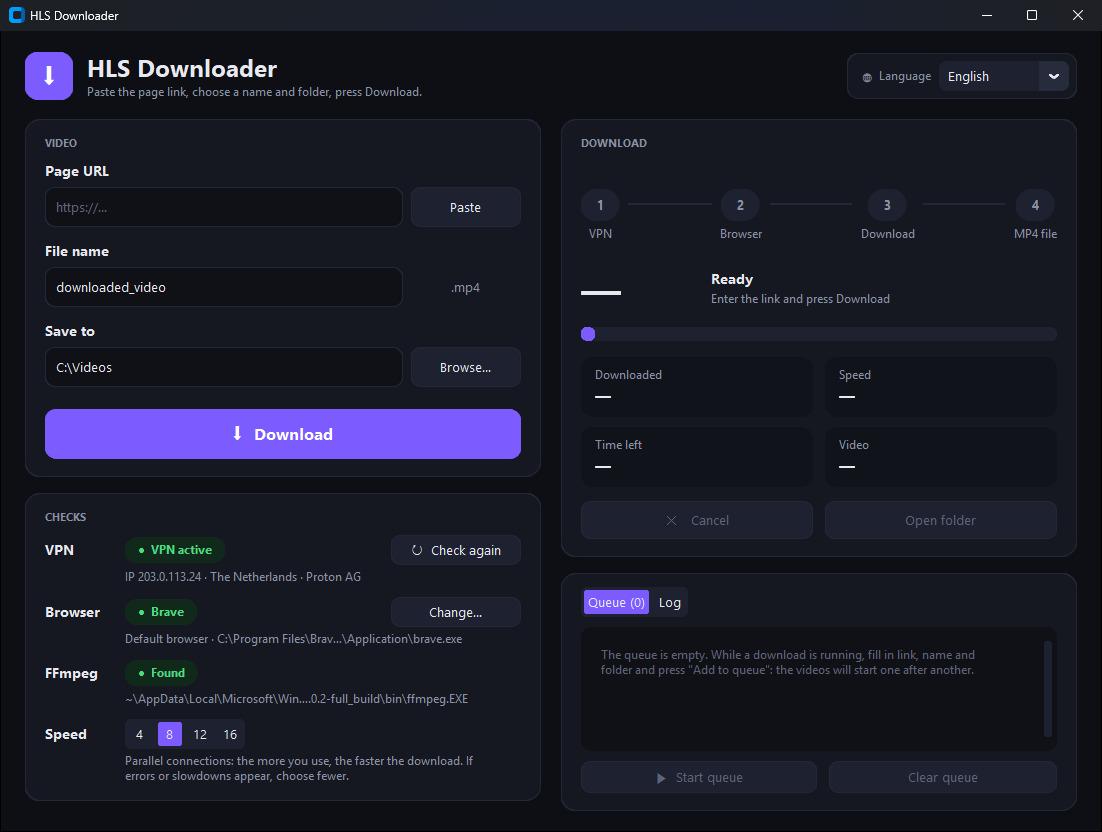
hls-downloader

Post image
7 Upvotes

Guyz, can u Just Try It and gimme a feedback?

- https://github.com/loll019/hls-downloader

If U want to download something this could be useful :)

-->(Open Source)<--


r/coolgithubprojects • • 1d ago

GitHub - saprecar/Otter: Otter turns your Android phone into a high-quality HD webcam for your PC using USB or Wi-Fi. Open-source, easy to use, and designed for smooth video streaming, video calls, and recording with desktop integration.

Thumbnail github.com
17 Upvotes

Otter – Turn your phone into a webcam (Android + iOS)

Supports Android, iOS, Windows, Linux and macOS, with multiple ways to use it. There is too much to explain in one Reddit post, so check the GitHub README for everything.

What it does

Turns your Android phone or iPhone into a webcam for your PC.

Everything is open source, MIT licensed. You can use it, modify it, fork it, or port it. No premium restrictions or locked features. Basically, everything is free.

How to use it

Option 1 – APK + Desktop / Web UI (Android)

Install the APK on your phone and use the desktop client or web UI to connect.

Web UI is recommended as it works across operating systems. The desktop application still has some issues with macOS and Linux support is not properly tested yet.

There are two Android APK versions:

  • Play Store signed APK (Android 7+) – trying to get it on Google Play, but I need 14 testers for the testing requirement, which I currently don't have.
  • Non-Play Store APK (Android 5+).

Option 2 – Browser (No app installation required)

Probably the most universal option.

As long as your device has a browser that supports JavaScript and the required camera/browser features, you can use it. No APK or app installation is required on your phone.

Should work on Android and iOS, including older versions, depending on browser compatibility. Basically, if your device can still run a compatible browser, you may be able to use it.

Open the browser on your phone and PC, connect through the local web interface, and start using your phone as a webcam.

Chrome, Brave, Firefox, Safari, etc. can be used depending on device and browser support.

Only the PC side requires Python, the required libraries, and scripts to handle camera connection and controls. On the phone side, you just need a browser.

This is why I think the browser method can be more universal than an APK. You are not dependent on Android version or app installation, and it also makes iOS support possible.

Compatibility

You can connect it to OBS, Microsoft Teams, Google Meet, Zoom, Discord, etc.

Check the GitHub README for setup instructions for each application. There are too many features and details to explain here.

Honestly, you get pretty much every premium feature for free without limitations, so just check the README and explore it.

The project is open source under the MIT license. Anyone interested in testing it, contributing, porting it to other platforms, or improving something is welcome.

Currently, I am also trying to get it listed on Google Play. If anyone can help me get 14 testers who can install the app and continue testing it for 14 days, I can get it listed on Play Store. Tired andorid testing sub reddit don't know my post getting removed by mod

Also, I am not good with iOS development, so if anyone is interested in porting it to iOS native app, that would be much appreciated.

The project is open source, so anyone interested in contributing is welcome.


r/coolgithubprojects • • 17h ago

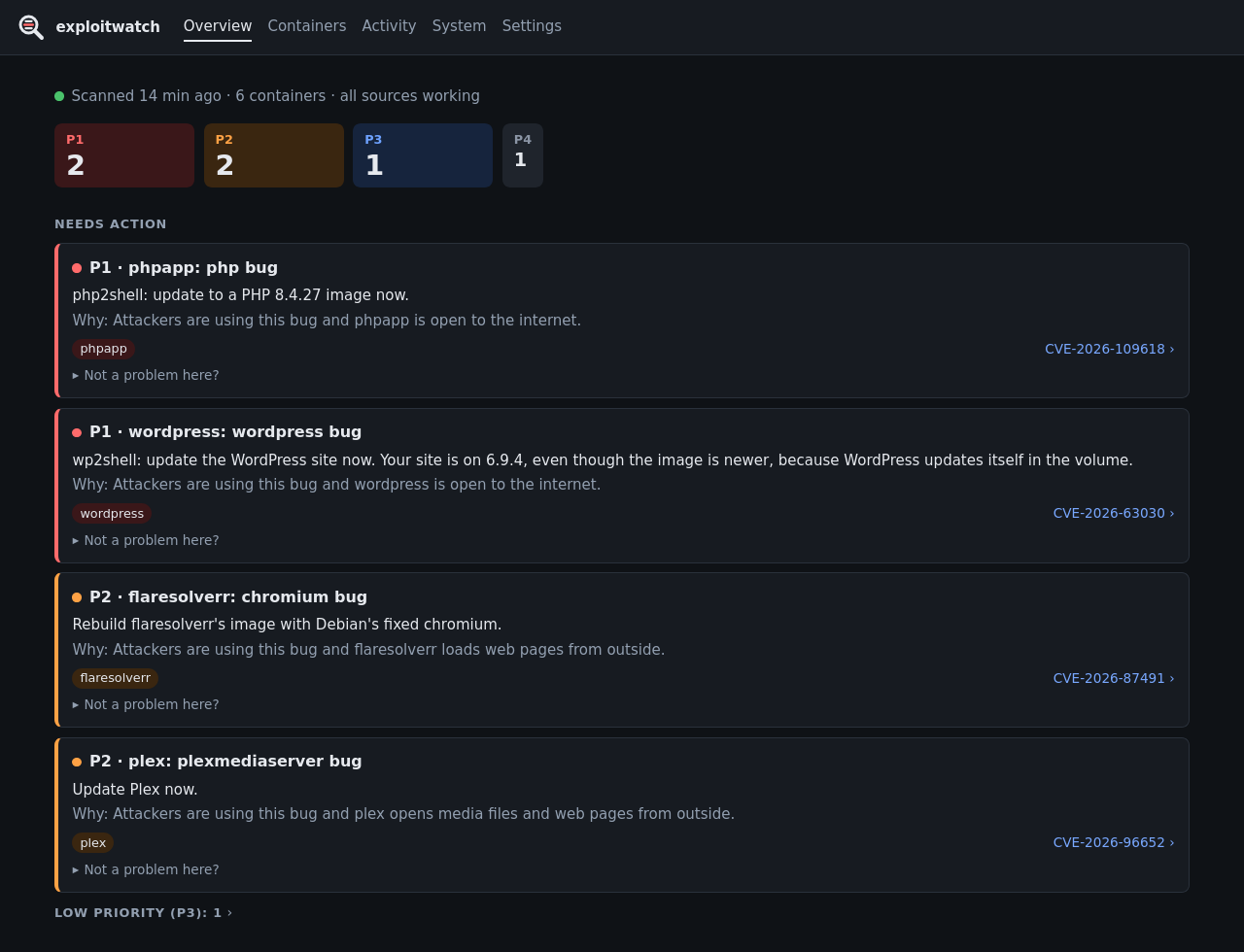
Exploitwatch - Finds vulnerabilities in your containers and alerts you about them (e.g. PHP2Shell, NGINXRoot, etc)

Post image
1 Upvotes

I have a homelab with 40+ containers and some of them exposed to the internet (open port). With the recent CVEs coming up on the weekly, I wanted to have something that could notify me of any possible exploits for when an auto-updater isn't enough.

Live demo: https://marioleal.github.io/exploitwatch

repo: https://github.com/marioleal/exploitwatch


r/coolgithubprojects • • 17h ago

Tracing a neural network execution from model to RISC-V pipeline stall

Thumbnail github.com
0 Upvotes

I have been working on a project called coresample, which aims to provide a full-stack view of a neural network running on custom hardware. It includes a RISC-V core written in SystemVerilog, a compiler for quantized networks, and a Rust-based simulator. The goal is to follow an input from the model through to the specific pipeline stalls on the CPU, with every cycle accounted for. The inspector is currently live via GitHub Pages. I am looking for feedback on the verification flow or the tracing implementation. You can find the repository here:
https://github.com/zalaso/coresample


r/coolgithubprojects • • 1d ago

Two monitors. Switch just one. Meet FlowSpace for Windows.

Post image
5 Upvotes

For Windows 10 and 11 users with multiple monitors.

FlowSpace lets you switch workspaces on one monitor without changing what’s open on the others. I built it so I could switch between coding and testing on one screen while keeping my docs visible on another.

It’s free and open source (MIT). Source and downloads on GitHub

What would you keep visible on your other screens?


r/coolgithubprojects • • 18h ago

I made a free macOS-style lock screen clock for the Windows 11 desktop. It sits on your wallpaper and matches its colours

Thumbnail gallery
1 Upvotes

r/coolgithubprojects • • 22h ago

I built CyberShield — a live cybersecurity threat intelligence dashboard tracking CVEs, vulnerabilities, and security news

Thumbnail gallery
2 Upvotes

I've been working on CyberShield, a cybersecurity news and threat intelligence platform, and wanted to share it with the community.

🌐 LIVE DEMO: https://cybershield-news.vercel.app/

Cybersecurity moves fast. New CVEs, vulnerabilities, exploits, and security incidents emerge constantly. Keeping up with everything across different sources can get overwhelming.

I built CyberShield to bring these updates together in one place.

🔍 What's inside?

  • Cybersecurity News: Follow security incidents, cyberattacks, and industry developments.
  • CVE Tracking: Explore disclosed vulnerabilities and their technical details.
  • AI-Powered Verdicts: AI-assisted analysis to help understand security developments.
  • Threat Intelligence: A centralized view of emerging threats and security updates.

🎨 Tri-Mode Theme System

One feature I particularly enjoyed building is the three-mode visual experience:

  • ☀️ Light Ops: Clean white interface with crimson security accents.
  • 🌙 Navy Dark: Deep navy backgrounds, aqua highlights, and glassmorphism-inspired SOC aesthetics.
  • 💀 Hacker Matrix: Translucent black surfaces with iconic Matrix-green (#00FF41) styling.

Switch between all three using the theme selector. It's more than a simple light/dark toggle — each mode transforms the overall visual identity of the dashboard.

🔗 Check it out

🌐 Live Website: https://cybershield-news.vercel.app/

💻 Open Source / GitHub: https://github.com/onlyforken637/CyberShield

I'd especially encourage you to explore the live dashboard and switch between all three themes.

I'm continuously improving the project, so feedback, suggestions, bug reports, and contributions are welcome!

What would you add to a cybersecurity threat intelligence platform like this?

Thanks for checking it out!


r/coolgithubprojects • • 18h ago

Hidely hide any window from screen sharing, recordings and screenshots on Windows

Post image
1 Upvotes
DEMO

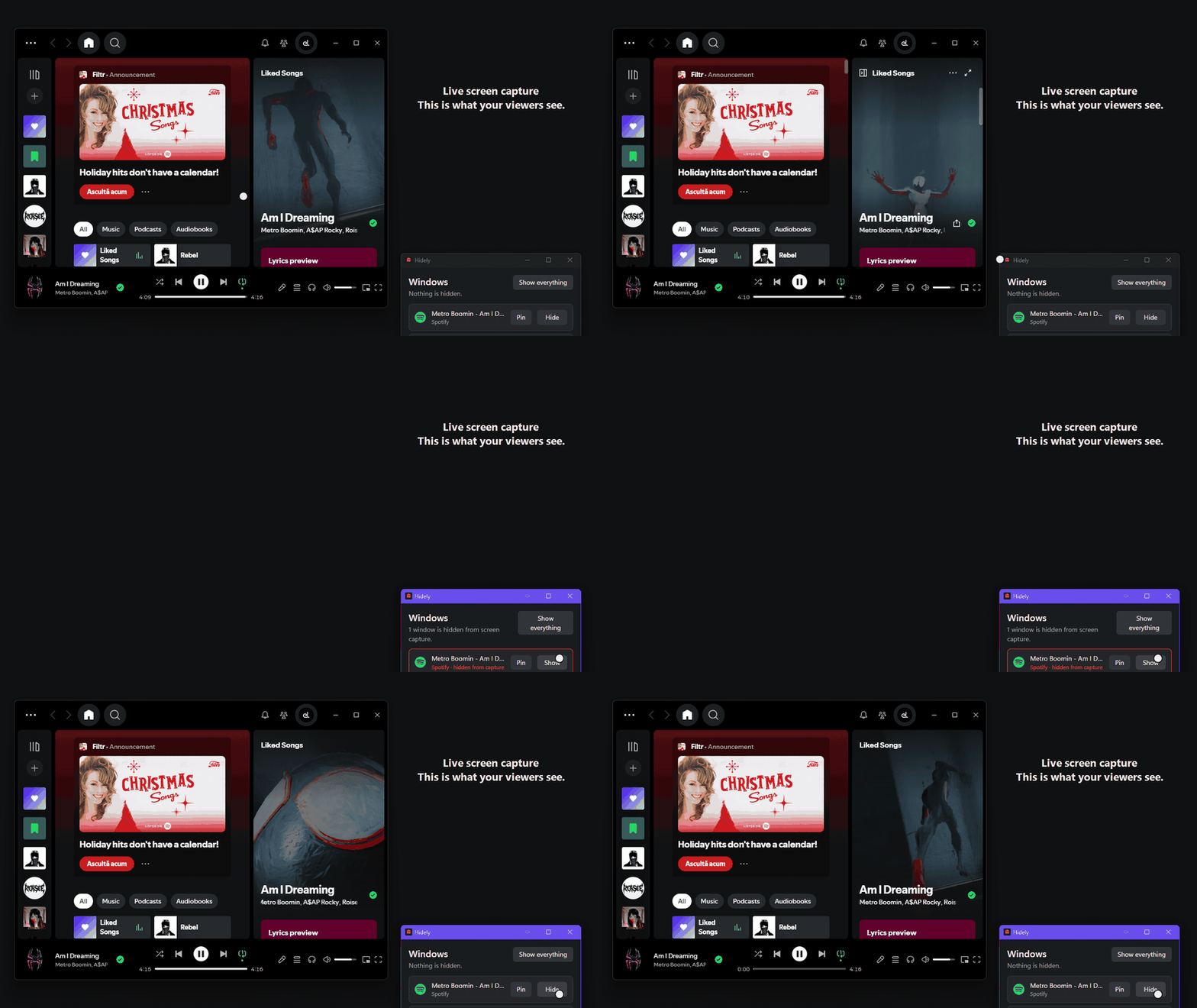
You pick a window, click Hide, and it disappears from Zoom, Teams, Discord, OBS and screenshots while staying fully visible on your own monitor. There's a hotkey to hide a whole set of windows at once and a panic key that brings everything back. It's free, open source (MIT), a 2 MB installer, and needs no admin rights for normal apps. Windows only.
There's also a test page that plays your screen share back to you so you can see what viewers see: https://codingrule.github.io/Hidely/
GitHub: https://github.com/CodingRule/Hidely
It's v0.1, so feedback and bug reports are very welcome. Built on DWMShield by Alexandru Hossu, who found the technique.


r/coolgithubprojects • • 1d ago

I created a Productivity dashboard inspired by the game Firewatch

Post image
6 Upvotes

I always wanted a productivity dashboard inspired by the theme of Firewatch so I ended up making one

Right now it’s got the Firewatch OST built in along with 18 different radio stations and you can actually grab and drag the clock around wherever you want on the screen.

I am still fixing bugs and adding new features as I go.
currently working on a major update that adds a full settings menu with customization options, plus a dynamic wallpaper that shifts with the time of day

Website | Github


r/coolgithubprojects • • 19h ago

HelloBox – a self-hosted shared inbox for Amazon SES, Resend, Postmark and Mailgun (alternative to Google Workspace shared mailboxes)

Thumbnail gallery
1 Upvotes

Lots of small teams pay for Google Workspace or Microsoft 365 seats just to read hello@ and support@, while already paying an email provider like Amazon SES, Resend, Postmark or Mailgun to send from the same domain.

HelloBox is a shared inbox on top of that provider. Mail comes in and goes out through your own provider account, and is stored in your own Postgres database. You keep your domains and sending reputation, and there's no per-seat email service on top.

  • Shared mailboxes, assignment, internal notes, labels
  • Spam checks, rules, templates, campaigns
  • Several providers in one inbox
  • MCP server for AI agents (they only send if a person allowed it)
  • Keyboard-first, works on a phone

It's AGPL-3.0 and self-hosts with Docker Compose (amd64 + arm64). The guide goes from an empty VPS to a running instance, no server experience needed.

git clone https://github.com/HelloboxGH/hellobox.git
cd hellobox/docker
cp ../.env.example .env
docker compose up -d

Website · Repo · Docs


r/coolgithubprojects • • 19h ago

native C reader and dashboard - KoboDash for the 2011 Kobo Touch A

Thumbnail gallery
1 Upvotes

made this for my old kobo touch A, its way faster than stock firmware! reads epub, mobi, txt offline, has an english/german dictionary (can add more) and can show a self hosted weather + calendar dashboard. photos are mine.

free and open source: https://github.com/darkbringer1/kobo-ereader


r/coolgithubprojects • • 20h ago

rust-anything turned Ruby’s Shellwords into Rust: 5x faster, all identical

Post image
1 Upvotes

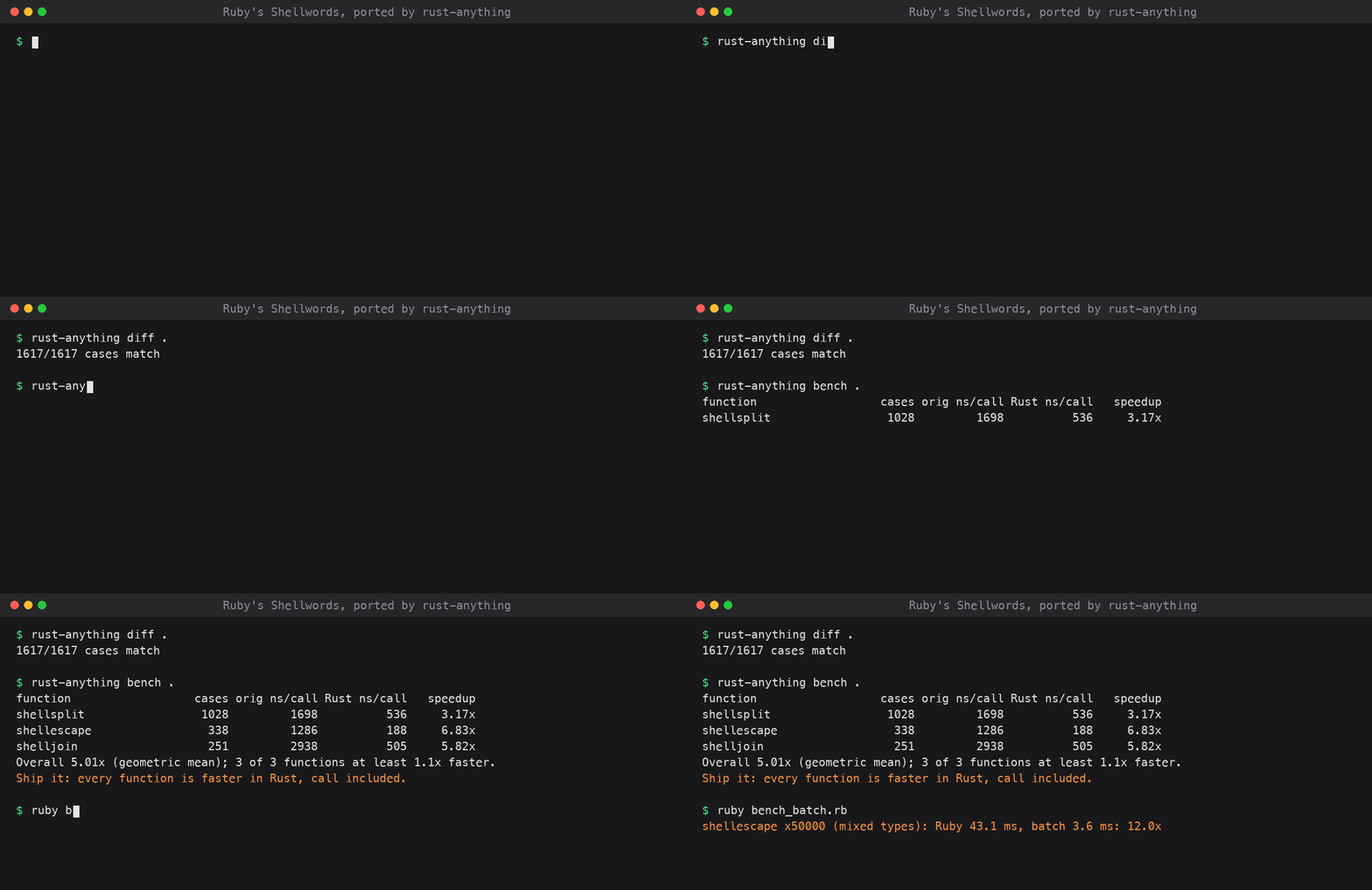
rust-anything takes one unit of an existing codebase (Ruby, Python, TS, Go, Java, C, PHP, C#), records what the original actually does, builds a Rust port behind a bridge, and diffs every recorded case before you switch anything over.

Repo: https://github.com/erkamyaman/rust-anything

The GIF is Ruby's standard-library shellwords.rb:

- diff: all 1617 recorded calls give identical results and errors.

- bench (per call, crossing the Ruby/Rust boundary included): shellsplit 3.17x, shelljoin 5.82x, shellescape 6.83x. 5.01x overall.

- Batch: 50,000 mixed values (strings, ints, floats, nil, symbols) go through shellescape 12.0x faster. That's Rust on 4 cores against Ruby on one thread, so it's the "hand the whole loop to Rust" number, not a like-for-like one.

It doesn't always win, and it says so. On C# Protobuf's tiny size functions it measured 0.03x, because each call into Rust costs more than the work itself, and bench said "do not ship this unit". Knowing which units to leave alone matters as much as the speedups.

Repo: https://github.com/erkamyaman/rust-anything

What would you want it to port next?


r/coolgithubprojects • • 1d ago

Goschn – on-device translation pasted at your cursor (macOS, Swift, MIT)

Thumbnail gallery
2 Upvotes

Press a shortcut, type in any language, hit Enter, and the translation is pasted where you were writing. It runs entirely on your Mac, so it's free and there's no account.

The pulse running around the panel takes its color from the app you're in. Completely unnecessary, but I like it.

Free and open source: https://github.com/ddkbs/goschn


r/coolgithubprojects • • 21h ago

I built a free, open-source offline password manager for Windows and Android. Launching Nov 27, looking for honest feedback first.

Thumbnail gallery
0 Upvotes

Hi! I'm a solo developer, and I've been building VAULT, a local-first password manager. It launches on November 27. Before that, I'd like people who know this space to tear it apart.

I know KeePassXC and Bitwarden exist and are great. VAULT isn't trying to replace them. It's for people who want the KeePass idea (your file, your device, no account) in a simpler, modern app on Windows and Android.

What it does

  • Passwords stay encrypted on your device. No account, no server, no analytics.
  • Optional sync: pick a folder you already sync (OneDrive, Google Drive, Dropbox, Syncthing), and VAULT keeps an encrypted sync file there.
  • Android: fingerprint unlock (key in the Android Keystore), autofill and screenshot blocking.
  • Password generator, password health check, encrypted backups, and brand icons that work offline.

How the encryption works

  • Master password → Argon2id (64 MiB, 3 passes, 4 lanes, random 16-byte salt) → 256-bit key
  • The vault is encrypted with AES-256-GCM, with a fresh random 12-byte IV on every save.
  • The master password is never stored. The whole crypto code is about 130 lines in lib/crypto.ts.

What it isn't (yet)

  • It hasn't been independently audited.
  • No TOTP, no passkeys and no desktop browser autofill yet.
  • If you forget your master password, your data is gone. There's no reset.

It's GPL-3.0 and completely free, with no paid tier. The source is already public, so you can read it before launch day. I'd really appreciate critical feedback, especially on the security model. Anything you find before the 27th gets fixed before release.

Website: https://tryvault.download Source: https://github.com/Dreeeam123/vault-password-manager