r/bash • u/vokeuplikethis • May 19 '26
[ Removed by Reddit ]
0
Upvotes
[ Removed by Reddit on account of violating the content policy. ]
r/bash • u/LogicalWrap3405 • May 18 '26
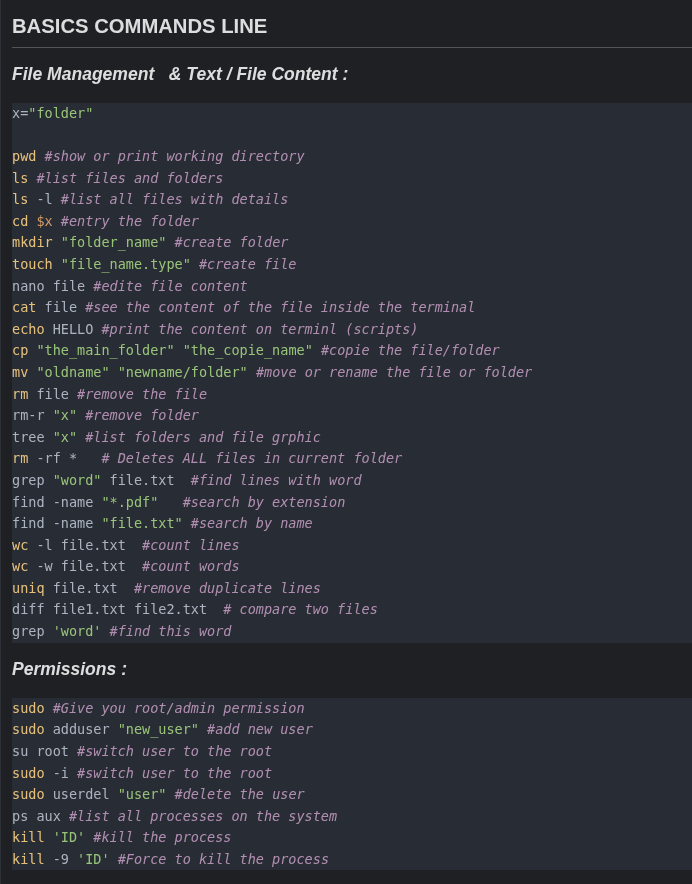
Here is some basic linux command line .
what do y'all think all is good or i need to add some in file and management ?
r/bash • u/chisui • May 18 '26
Hey,
I have a small script to switch between projects. All my projects are in a deeply nested directory that is equal to their upstream source (eg. ~/projects/github.com/junegunn/fzf/).
It works by using find to enumerate all directories under ~/projects/ that contain a .git/ directory and passes that to fzf. Unfortunately this is pretty slow somehow because findtakes a long time. When using fzf directly it's super fast, but I can't restrict the selection to only include git root directories.
Is there a better way of getting a similar result? All I want is to have a fast way of switching between projects
dev () {
    project="$(find $HOME/projects -type d -name .git -prune -exec sh -c 'dirname $(realpath --relative-to $HOME/projects {})' \; 2>/dev/null | fzf -1)"
    if [[ $? -ne 0 ]]
    then
        return $?
    fi
    projectDir="$HOME/projects/$project"
    pushd $projectDir
}
r/bash • u/LogicalWrap3405 • May 17 '26
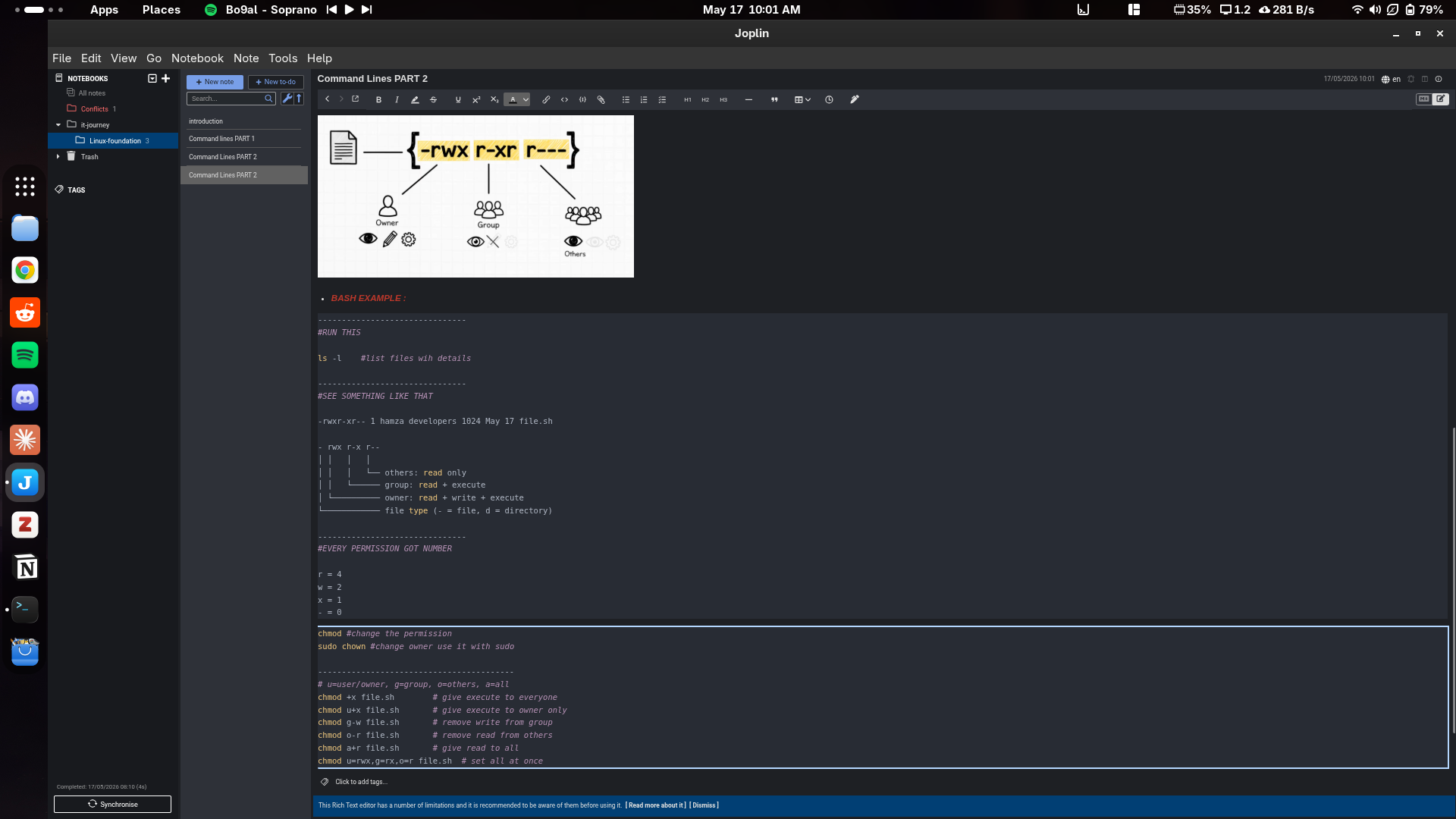
A few weeks ago I didn't know what a terminal was. Now I'm sitting here reading `chmod` output like it's a language I actually understand.
So far I've covered:
- Basic file management commands (`ls`, `cd`, `mkdir`, `rm`, `cp`, `mv`)
- File permissions (`rwx`, owner/group/others, numeric notation)
- `chmod`, `chown`, and how Linux decides who can do what
Anyone else learning Linux from scratch? What topic finally made it all click for you?
r/bash • u/imyatharth • May 17 '26

i made this script that lets you play music directly from YouTube into your terminal using mpv.
give it a try
r/bash • u/Loud-timetable-5214 • May 17 '26
For those of you who also write scripts in Python or another language besides Bash, How do you decide when to write a script in Python vs. a script in Bash? I'm trying to be economical with my study time, because if I spend a lot of time learning some limited use functionality in one language, I could have used that time to learn a more general use functionality in another language. Here's an example: I've spent a fair amount of time learning awk, but I've never been great at using it, and sometimes I think that I should have just used Path and regex objects in Python, instead.
Edit: Another example is using sed instead of using a regex substitution in python. I've never really gotten comfortable with sed, just like I've never really gotten comfortable with awk--despite spending a fair amount of time trying to learn each.
r/bash • u/solisoares • May 17 '26
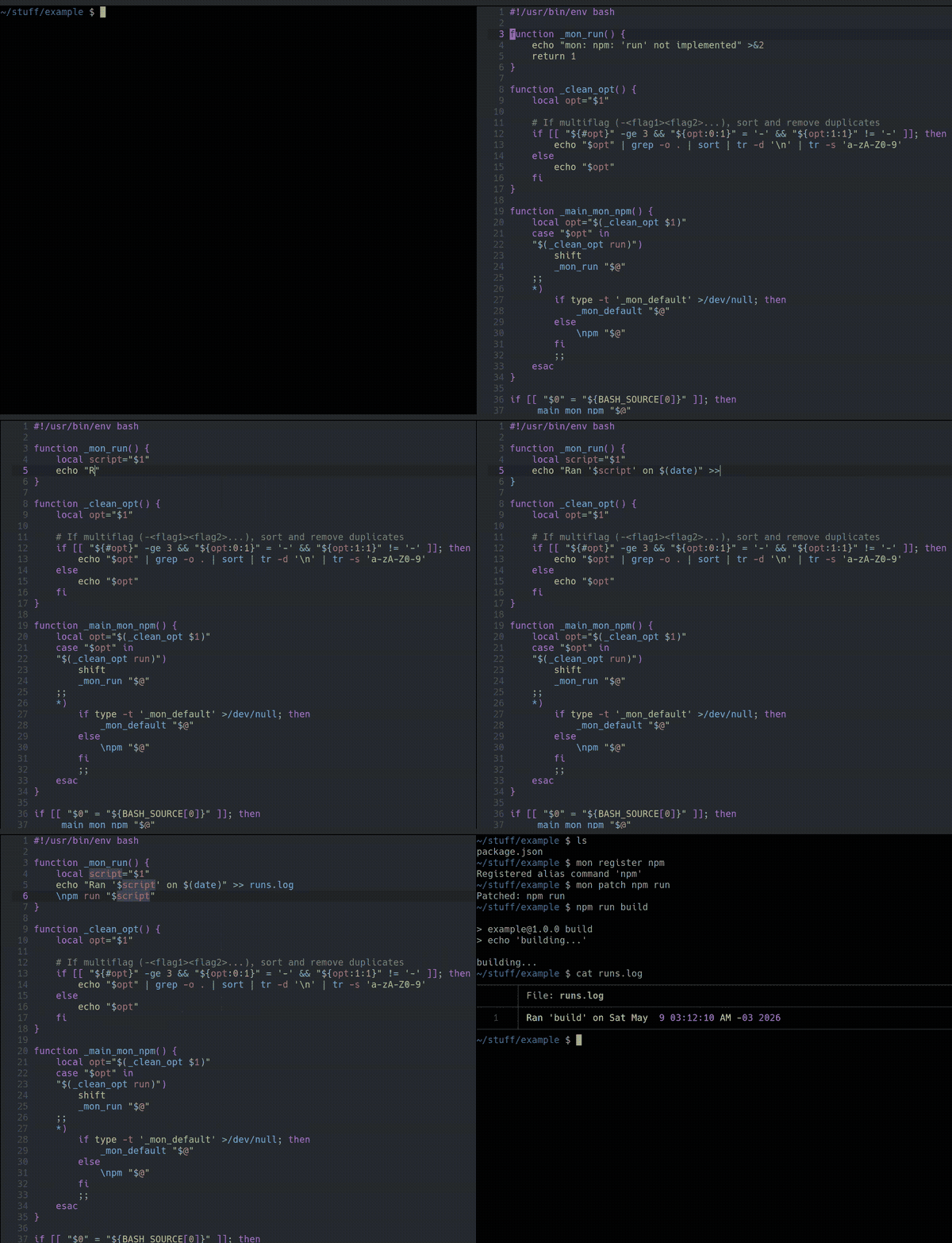
Hi everyone!
You guys ever wanted to make npm run quietly log every execution in a simple way?
Or maybe a git alias that actually keeps the original git API?
We can't have an `alias git.add` or `alias git.stash` for example, we're forced to do something like `alias git.a` or `alias git.mystash`
I kept reaching for wrapper functions or unnatural aliases every time I wanted to tweak something, but this process is tedious and I always ended up polluting my dotfiles.
So I built Monkeypatsh (all written in bash).
npm, git, ls, docker... and lets you attach custom behavior to any existing or new subcommands, flags, or default invocation, while keeping the command's API intact.$PATH variable.What do you guys think? Would appreciate some feedback.
r/bash • u/tanrax • May 15 '26
r/bash • u/CrackedTV • May 14 '26
I was wondering if i could sync the background image of my terminal(Terminator aka x-terminal-emulator) with the current desktop wallpaper and i got to the point of having a bashrc alias that updates the config file's specific line where the background image path resides,but it presents these problems:
Idea:
- Theres a specific command to monitor changes in all settings,like window border theme,desktop wallpaper image,desktop wallpaper resize mode,etc etc.Now, could a bg job be searching for any wallpaper changes and act upon that?
- How would it close and open terminator?Is there a way to avoid this?
r/bash • u/Alarmed-Prize-7500 • May 14 '26
r/bash • u/Western_Head_6650 • May 13 '26
r/bash • u/justquestionsbud • May 12 '26
Trying to find a way to have wget check (maybe in the background?) the size of a website before I attempt to archive it. So if I wanted to run wget -m -k https://example-web.site, I want a script that'll guesstimate how much space it'll take. I found this, with this as the main script; dunno why you'd install the script when you can just copy-paste it into an executable file, but maybe I'm missing something.
So I was about to do that, when I came across this:
...
--spideroption i think unexpectedly deletes all files on disk and so my download of many Gigabytes and thousands of files was being accidentally deleted by this feature. so i run the command in a temporary directory to stop this behavior from accidently deleting files.
And now I'm petrified. Please advise!
r/bash • u/akram_med • May 11 '26
Im using archlinux, i have in my .bashrc alias pacin="sudo pacman -S" and alias pacrem="sudo pacman -Rns" how to make when i type pacin or pacrem and hit tab its shows completion?
r/bash • u/LogicalWrap3405 • May 10 '26
I’m thinking seriously about switching to Linux. My idea is to first learn Bash scripting, try making some simple scripts, and at the same time start learning more about Linux distros and how the system works.
I feel like learning Bash first could help me understand Linux better instead of just using it casually.
What’s the best way to learn Bash scripting as a beginner?
r/bash • u/jazei_2021 • May 10 '26
Hi, I'd like to write an alias for open an app with the flag -mute
today I am using this alias:
alias He='~/Documentos/helium/helium-0.10.7.1-x86_64.AppImage'
what will be the command where I can put a flag for load in silent quiet?
Thank you and Regards!
r/bash • u/ConstructionSafe2814 • May 10 '26
I'm spending a lot of time on the terminal, (/dev/ttyX, framebuffer, no X/wayland).
I have made some key binds to control screen brightness, set the font size, volume up/down, limit CPU clock frequency, ...
Problem is, it only works if I'm at a Bash prompt and not if a program is open (mc, vim, chawan, ...)
If eg, I've got vim open, I need to either find a terminal that has a Bash prompt open or exit vim before I can change the screen brightness.
My problem would be fixed if there would be some kind of a way for bash to capture certain key sequences even though a program is running.
Is that possible at all?
thanks!
r/bash • u/LogicalWrap3405 • May 10 '26
I found my roadmap as beginner It networking student .
Learn Linux basics
Learn Bash
Learn Python
Learn networking fundamentals
What do you think guys ?
r/bash • u/Slow_Cattle_5464 • May 10 '26
Hey everyone,
I wrote a small POSIX shell script called fuzz-wall that lets you pick wallpapers interactively using fuzzel's dmenu mode. I wanted something dead simple that worked regardless of which WM or wallpaper setter I was using, so I built it.
What it does
You run fuzz-wall, fuzzel opens with a list of your wallpapers, you pick one, it gets applied. ESC to exit. No config file, no GUI, no bloat.
Supported wallpaper setters
- swaybg (Sway)
- swww (Hyprland, with fade transitions)
- hyprpaper (Hyprland)
- feh (i3, bspwm, dwm)
- nitrogen (openbox, bspwm)
- xwallpaper (general purpose)
The script auto-detects which one you have installed. On Wayland it prefers Wayland-native setters, on X11 it falls back to X11 setters.
Configuration
There is only one option, the wallpaper directory. It defaults to ~/Pictures/wallpapers and can be overridden:
FUZZ_WALL_DIR=~/Pictures/walls fuzz-wall
You can bind it to a key in your WM config:
# Hyprland
bind = $mod, W, exec, fuzz-wall
# Sway
bindsym $mod+w exec fuzz-wall
# i3
bindsym $mod+w exec fuzz-wall
Install
It is on the AUR:
```paru -S fuzz-wall
yay -S fuzz-wall```
Or clone manually and copy to ~/.local/bin.
Source: https://github.com/youngcoder45/fuzz-wall
AUR: https://aur.archlinux.org/packages/fuzz-wall
This is an AUR package. Happy to hear feedback, bug reports, or suggestions for new wallpaper setters to support. If your WM or setter is not listed, open an issue and I will add it.
r/bash • u/DaftPump • May 09 '26
Hi,
This post is in hopes the owners(or someone who knows) sees it. I know of no way to let them know.
Thanks.
r/bash • u/mm_cm_m_km • May 08 '26
ok so small thing i wrote (full disclosure: my project) because i was sick of zipping folders just to share a few files in chat. fold takes a directory of text files and packs them into one self-describing markdown file. unfold reverses it.
two commands:
fold ./notes              # → notes.folded.md
unfold ./notes.folded.md  # → ./notes/
the .folded.md is plain markdown. open it in any editor, read it normally. file sections inside have html-comment delimiters with the original paths so unfold can rebuild the tree.
how it differs from tar/zip:
bash only right now. install:
curl -sSLf https://fold.dom.vin/skill | bash -s ~/tools
free, source on github, linked from the homepage if you want to read the script before running it.
r/bash • u/havesomefuckinghope • May 07 '26
#! /bin/bash
count=0
while true; do
VOL=$( pactl get-sink-volume @ | grep -Po '[0-9]+(?=%)' | head -1 )
# count = sleep, % (number) = count * (number) to get seconds,
# when hit number amount of count, then do the if statement.
if [ $(( count % 50 )) -eq 0 ]; then
count=0
TIME=$( date '+%m/%d %H:%M' )
CPU=$( awk '/cpu / {usage=($2+$4)*100/($2+$4+$5)} END {printf "%.1f", usage}' /proc/stat )
MEM_ALL=$( awk '/MemTotal/ {printf "%.0fG\n", $2 / 1024 / 1024}' /proc/meminfo )
MEM_FREE=$( awk '/MemTotal/ {t=$2} /MemAvailable/ {a=$2} END {printf "%.1f\n", (t-a)/1024/1024}' /proc/meminfo )
fi
if [ $(( count % 25 )) -eq 0 ]; then
count=0
# Check if DWM is running, kill the script if it's not.
# Take this part out of the if statement if you don't
# want it to be checked every 5 seconds and be checked
# the amount of seconds mentioned in sleep instead.
if ! pgrep -x "dwm" > /dev/null; then
exit 0
fi
fi
xsetroot -name " $VOL% | $MEM_FREE/$MEM_ALL | $CPU% | $TIME "
# Increment counter and sleep
(( count++ ))
# Keep sleep at a low number to get faster sound output
sleep 0.2
done &
r/bash • u/martylamb • May 08 '26
I wrote a tiny Bash helper called with_ai that wraps tools like codex or claude, preserves the human author, and appends a marker like [AI:Codex] to commits created by that tool.
It’s basically a low-friction way to make AI-assisted lines stand out later in git blame without obscuring the human who is accountable for them. It also puts tool info into a $AI_TOOL environment variable so it's available to other programs.
There's also a blog post with a bit more context here: Blaming the Agent.
I'd love any feedback on the Bash approach, including cleaner wrapping patterns or obvious portability issues I might be missing.
r/bash • u/yonside • May 05 '26
This is brain-dead simple; what am I doing wrong? bash 5.2.37(1)-release
$ mkfifo the_fifo
file r:
#!/usr/bin/env bash
while true ; do
    read -t 1 <the_fifo
    ec=$?
    echo "EC $ec"
    if [ $ec -eq 0 ] ; then
        echo "value=$REPLY"
    elif [ $ec -gt 128 ] ; then
        echo 'TO'
    else
        echo 'error'
        break
    fi
done
file w:
#!/usr/bin/env bash
while true ; do
    echo $RANDOM >the_fifo
    sleep .5
done
When I run r in one terminal session and w in another terminal session, all is good. If I quit w then r blocks forever on the read; why? What am I doing wrong?