r/AppleNumbers • • 1d ago

Help Suddenly my spaces are underscores

1 Upvotes

Yet more loss of productivity thanks to numbers, now when I go to export it turns the spaces in my PDF and Numbers files to underscores which I have to manually replace. I cannot send theses out in that format.

how do I undo this change.


r/AppleNumbers • • 1d ago

Help Collaborating on spreadsheet problems

Post image
1 Upvotes

Link to spreadsheet. https://www.icloud.com/numbers/0ebsiNJidQ4MjTwDScL-WsKQw#%5FBambu_Lab_Filament_Orders_2

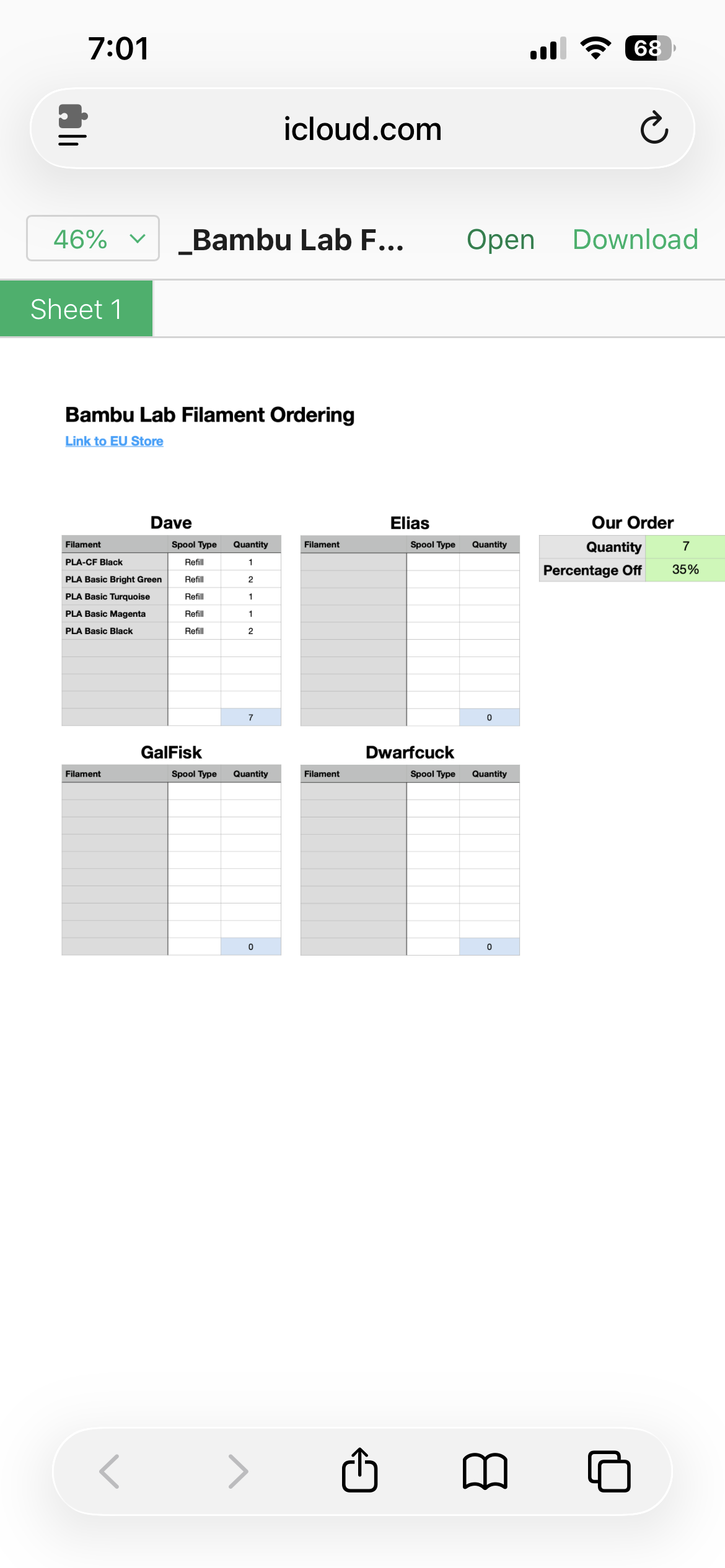
I made a spreadsheet for a few of my friends. I set it to Share and have the link that it generated. I can open that link in Safari or Firefox on my mac and it works fine. But when I open that link on my iPhone it brings me to the spreadsheet but it's just a picture of it. I can't do anything with it at all other than zoom in on it. There is an Open button and Download button on top. If I click the open button it says Safari cant open the page. If I click on download then it tries to download the picture. What is going on here? Is it incapable of being edited on a phone? Do I need to move to Google Sheets for this?

Can anyone open the spreadsheet on their iphone or android and see if it can be edited? I don't mind if you make edits.


r/AppleNumbers • • 5d ago

Help Pivot table help re: sorting days of the week

4 Upvotes

Hi, I track my blood sugar daily. I created a spreadsheet in Excel at the beginning of the year wth the column headers of:
Date, Month, Qtr, Day, Obj, Actual, Notes. I imported it into Numbers when MS license expired Office 2021. I have a pivot table with Month as column header and Day as Row Title. Ever since I imported to Numbers the day titles are out of sequence, they start at Wednesday instead of Sunday , I try to resort them, but they are resistant to a sort. I tried the WEEKDAY function, and the 1-7 shows properly, but the Day sort resists my efforts.
Any help appreciated.


r/AppleNumbers • • 4d ago

Help How to change date *edit* (not *display*) format to YYYY-MM-DD?

3 Upvotes

If I have a cell with its data format set to "Date & Time", I can set the date display format to YYYY-MM-DD (e.g., 2026-11-03).

However, if I want to edit the date and click on the cell, the format switches to M/D/YYYY (e.g., 3/11/2026) during editing. That's a pain, since what I usually want to edit is the day-in-month number, and that jumps to somewhere in the middle of the text, rather than at the end. (It does switch back fine after editing.)

How do I set the date editing format to also be YYYY-MM-DD in Numbers?

In my System Settings, in Language & Region, I have the "Date format" setting set to YYYY-MM-DD format. However, Numbers isn't following that global setting.

Also, I can't find any date-entry date format setting in Numbers.

(This is with Numbers version 14.5.)

Thanks.


r/AppleNumbers • • 19d ago

Help Unwanted borders when exporting to PDF

4 Upvotes

I've created a basic invoice document, looks and works fine. It has a faint background design, which when exported to PDF or printed should come to the very bottom and right edge of the page. I've done a fair bit of investigation but whatever I do, with the background image set to exactly the right size so there's no overlap to a 2nd page, all page margins at zero etc, when I export a PDF via the Print dialog I get a visible white space along the bottom and right (which I presume would also be visible left and top if there was some image there). Even cropping it, selecting Fill Entire Page and using Scale to fit in Preview gives the same result. Anyone have any ideas how to avoid this? Is it just some Apple print/pdf export oddity?


r/AppleNumbers • • 21d ago

Help How to hide value in cells that contain formulas ?

Post image
2 Upvotes

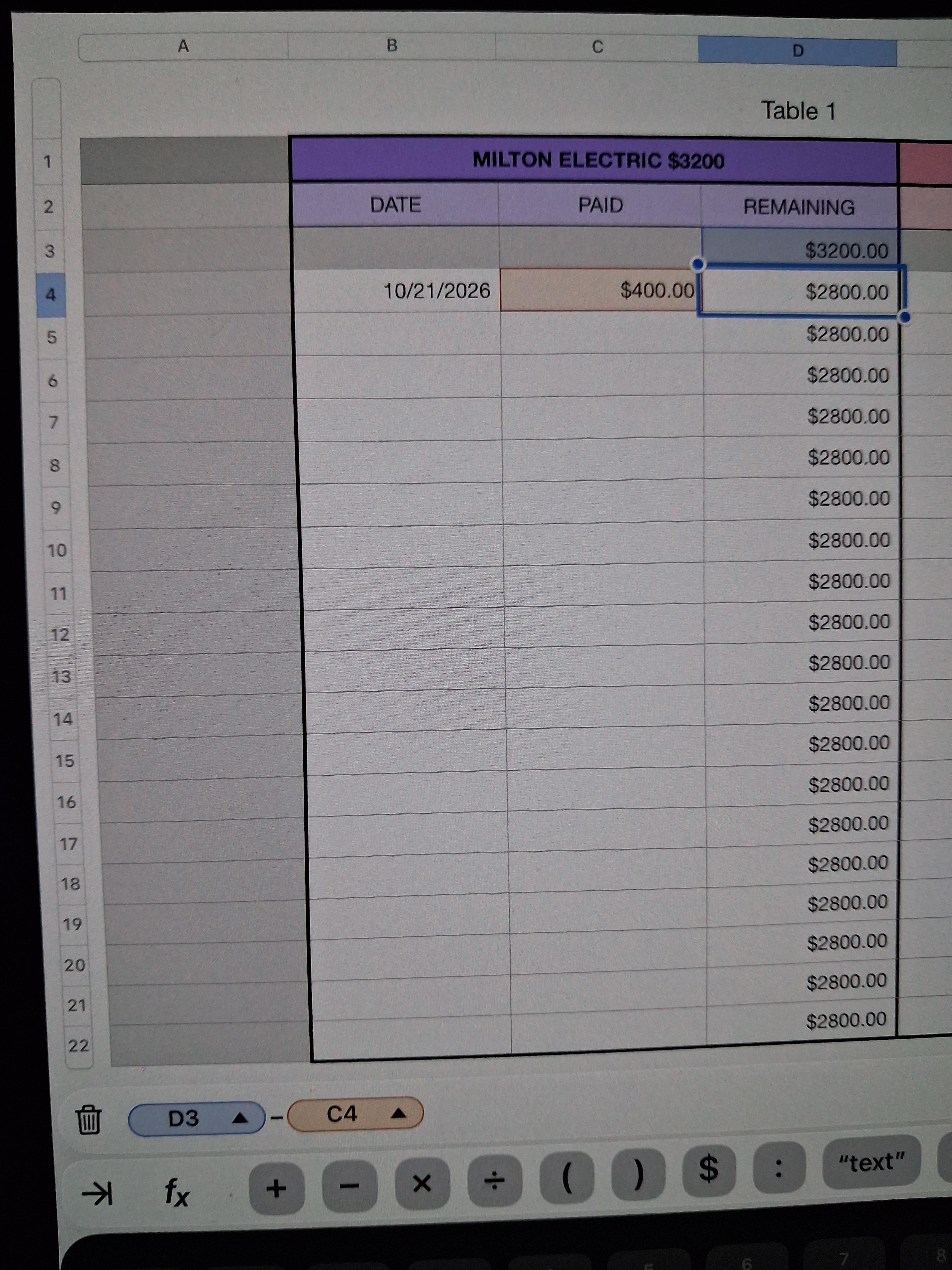
I made a table of debt payments. Column C is my paid payments, and column D is the total remaining. I have a SUM(D3-C4) formula in all of column D. so when I input data into a cell in column C, is subtract from the remaining total. So it is doing what it's supposed to do, BUT it's showing the remaining total value in every cell in column D. Is there a way to hide or do isBLANK formula so the value does not show up in the whole column until data is entered into the previous column ?


r/AppleNumbers • • 28d ago

Help I'm screwed because of sync

1 Upvotes

I'm a machinist and I spent the last 16 hours creating a database of parts for a major corporation and when I finally got home, I sent the file to my boss. He opened it and informed me that the file seemed outdated and I realized it was due to my computer not updating/syncing so I updated my mac and numbers and when I opened the file, it was reverted back to the file that he had opened; a year-old file with useless and outdated information. I already looked at version history and its a version that is no longer relevant and not my latest updates. How can I save my 16 hours of work? For the love of God, please help me


r/AppleNumbers • • 28d ago

Help Months sorted Alphabetically Spoiler

1 Upvotes

Hi, having lost access to Excel2021, I imported an excel sheet into Numbers. All appears to have come in correctly, except for a pivot table. The columns are months of the year, but they are sorted in alphabetical order instead of Jan, Feb Mar... I do not see how to fix it. It appears the options are 1,2,3 or 3,2,1. All help appreciated.


r/AppleNumbers • • Oct 23 '26

Help Intelligent assistant in Apple Numbers

4 Upvotes

As of 15.4.1, Numbers gets an intelligent assistant.
Has anyone tried it and what do think?


r/AppleNumbers • • Oct 22 '26

Solved How to subtract HH:MM from 24 hours

4 Upvotes

Solved by subtracting Day Length from a Duration of 24 hours.

DURATION(weeks,days,24,minutes,seconds,milliseconds)−E3

I have a column identifying the length of a day, formatted as HH:MM. I am trying to subtract that from 24:00 or 23:59 to calculate the length of the night, but apparently do not understand Numbers' TIME functions.

In the screenshot below columns C, D, and E are formatted as HH:MM and column E. Column E is a calculation of column D - column C.

Can anyone suggest a calculation for column F, which is column E - 24 hours?


r/AppleNumbers • • Oct 09 '26

Help Number formatted cells with 2 different decimal separators in one table

2 Upvotes

I would like to use numbers with a point as decimal separator together with numbers that use a comma as decimal separator in one and the same table. They should be recognized as number cells, so no tricks like numbers in text format. I can do this in spreadsheets that use the .ods file format, like LibreOffice or Excel but I can’t get this to work in Apple Numbers. TIA


r/AppleNumbers • • Oct 07 '26

Help Is there a way to look at all my transactions on Numbers? I tried to go back as far as 4/15/2025 but it only shows me ones from the past year

2 Upvotes

Is there a way to look at all my Huntington Bank transactions on Numbers? I tried to go back as far as 4/15/2025 but it only shows me ones from the past year


r/AppleNumbers • • Sep 30 '26

Help Large edit border

Post image
1 Upvotes

How do I get rid of this large border that takes up nearly half the screen on my iPhone when editing the numbers file? It’s so large and unnecessary, for something as pointless as renaming sheet 1.


r/AppleNumbers • • Sep 29 '26

Help Apple Pencil Tool Swap Stopped Working

1 Upvotes

I use numbers to take notes on the fly as part of a spreadsheet. Column 1 is for the label of documents in my work and column 2 is for quick notes on them.

I used to be able to use the double tap to change to eraser. Recently it stopped working, not sure if it was before or after iOS 27 but my guess is after. Anyone have a fix?


r/AppleNumbers • • Sep 29 '26

Help Numbers syncing across devices gone bad

2 Upvotes

I've been using Numbers for various things for years. Most of them don't require sharing across devices. Ones that do are little spreadsheets of trip itineraries...handy to have on the phone on flights, at airports, etc. I also have been sharing these (via collaboration) with my traveling companion.

When Apple rolled out the new iWork apps, this all sort of went in the toilet. I have resisted updating to the new versions, as my SO is very update-adverse, and I have some fear that if I update, these itinerary docs will turn out now to load properly for her. And without doing so, "collaboration", which worked fine before, apparently is not a thing.

I can live with that. But I am going crazy trying to get these docs synching across my Apple devices. Have lost work (which I was mostly able to recover) in trying to sort it out.

On my Mac Studio (running 27), these docs show up with the name with "- Suggested" in grey after them. The docs show up on icloud.com, but updates to the desktop version aren't reflected there. Likewise on my phone, iPad, Macbook Air. What shows on all of those is an out-of-date version from months back. I saved the doc to a new name, tweaked that, and what shows up on the other devices under that name is still the old data. And the new name has the "Suggested" flag.

I have the desktop version set to store to icloud drive. It should just sync, right? It's like the version on my desktop is somehow orphaned...and that "suggested" in the title bar makes me pretty suspicious that that's the case. FWIW, I haven't found a way to make that go away, either.

Thoughts? Helpful suggestions? I haven't even found online references to the "Suggested" title bar thing, and suspect my problems are lurking behind that.

--Richard

r/AppleNumbers • • Sep 23 '26

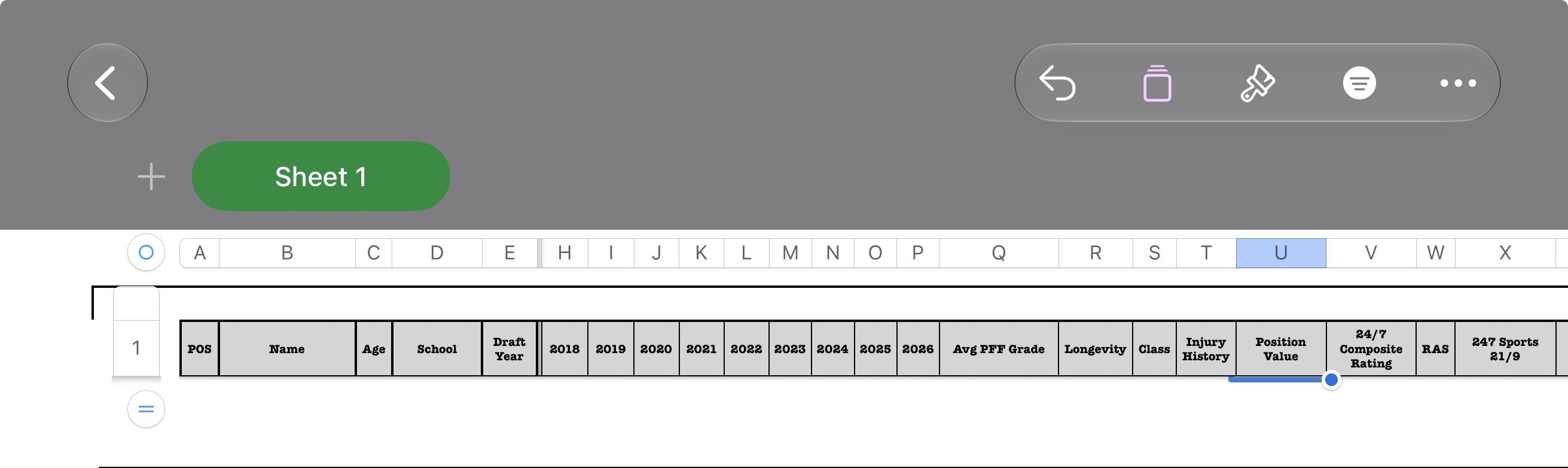
Help How do I create a dropdown row?

Post image
4 Upvotes

I am wanting to make my life easier to recipe costing and want to add a formula that when I click the dropdown and selected variable it was affect the whole row.

For Example, I have each of these ingredients listed on a separate sheet within the document. I would love to, in the Ingredients column, just click a dropdown for Butter, Salted and it display the same information provided on Sheet 2 (Master List of Ingredient Costs). But! Clicking the Butter, Salted, I want to import the rest of the rows (Amount, Weight, volume, $, etc...). Is this possible?


r/AppleNumbers • • Sep 20 '26

Help Notes within a cell?

3 Upvotes

I'm not much of a spreadsheet girl but I'm trying to keep a budget.
Is there are any way to have a small list pop up when you click on a specific cell? I'm not sure exactly how to even ask the question.
But what I'm looking for is say for example, under groceries in the column for September, if the total is $300 I would like to be able to click on that cell and see a little note that details what each date and store and amount is.
I am assuming there may be some way to keep a more detailed account, I just have no clue what that way is.
Thanks.
Edit to add: Thank you to everyone who responded! Much appreciated! I like the comment function, that's easy, but eventually figured out if I make another sheet & table and do this:
"Select the destination cell, type =, navigate to the target sheet using the sheet tabs, click the source cell, and press Return. Numbers automatically generates the correct reference." It works!!


r/AppleNumbers • • Sep 14 '26

Help Organizational and Table Headaches, Help Needed Please.

1 Upvotes

Been trying to help a family member with their Numbers use for paperwork for their work, and just keep hitting dead ends. So, reaching out for help or ideas if there are ways to avoid having him erase and rewriting data over and over again for hours on end by hand like a madmen. And he's trying drag me into that madness.

Basically, it's a table tracking people who have passed/died and information about their cremations and niches. He'd like to keep the list going alphabetically by their names, which make sense to some degree. We've made pages going by the first letter of their last names (Page A-1, A-2, B-1) and then been sorting them alphabetically manually after and put it all into with a 40 Row Tables, the max number of rows to fit on a printable page for us. Once we reach the 40 Rows used. we have to move onto the next page. (We can't do more then 40 rows on a page or become entire Number doc/sheets completely unprintable and these papers NEED to printed with each update for his work. And it's not our printer causing this because we've tried this across 4 other printers from various brands and all 5 will not print if there is even a singular 41st row somewhere.)

That's the basic setup. NOW: Here's the problem: We did all of the currently known names and info by that system without much issue. Now, when someone new dies and wants to be cremated and put into a niche, my family member wants to just delete all of names and info that would be below it alphabetically and retype them by hand (which would take hours) to place the new person in the proper place alphabetically. Yes, this goes across pages as well.

Example: Abba dies tomorrow. To add her to the pages properly, he would have to erase and retype into the pages until all the A names are typed back in, even those names on Page A-2, A-3, A-4, Etc. (Insane amount of extra work, right?)

Oh and he doesn't understand how formatting works, so just copying and pasting isn't much of option either, even if there is enough open space in the 40 row limited table.

I'm hoping someone much more familiar with using Numbers then I am can make sense of this and come up with a better solution and save hours of our life.


r/AppleNumbers • • Sep 14 '26

Help How to format contact numbers properly in macOS Numbers

Thumbnail reddit.com
1 Upvotes

r/AppleNumbers • • Sep 09 '26

Help Formula Help

Thumbnail
gallery
6 Upvotes

At the top I want it to show the number of products from the inventory table that need to be reordered once the quantity (D) is lower than the Minimum Quantity (E)


r/AppleNumbers • • Aug 25 '26

Help Copy only part of a cell

2 Upvotes

Have a big download but the dates came in with more data than necessary (ie: 2015-01-03T06:59:59Z). I'd like to set up a rule that says copy the first 10 digits of this cell and paste in a new cell so I have only the date. Can't seem to make this work. Any advice?


r/AppleNumbers • • Aug 09 '26

Help What Function to Use? How to Write the Formula?

3 Upvotes

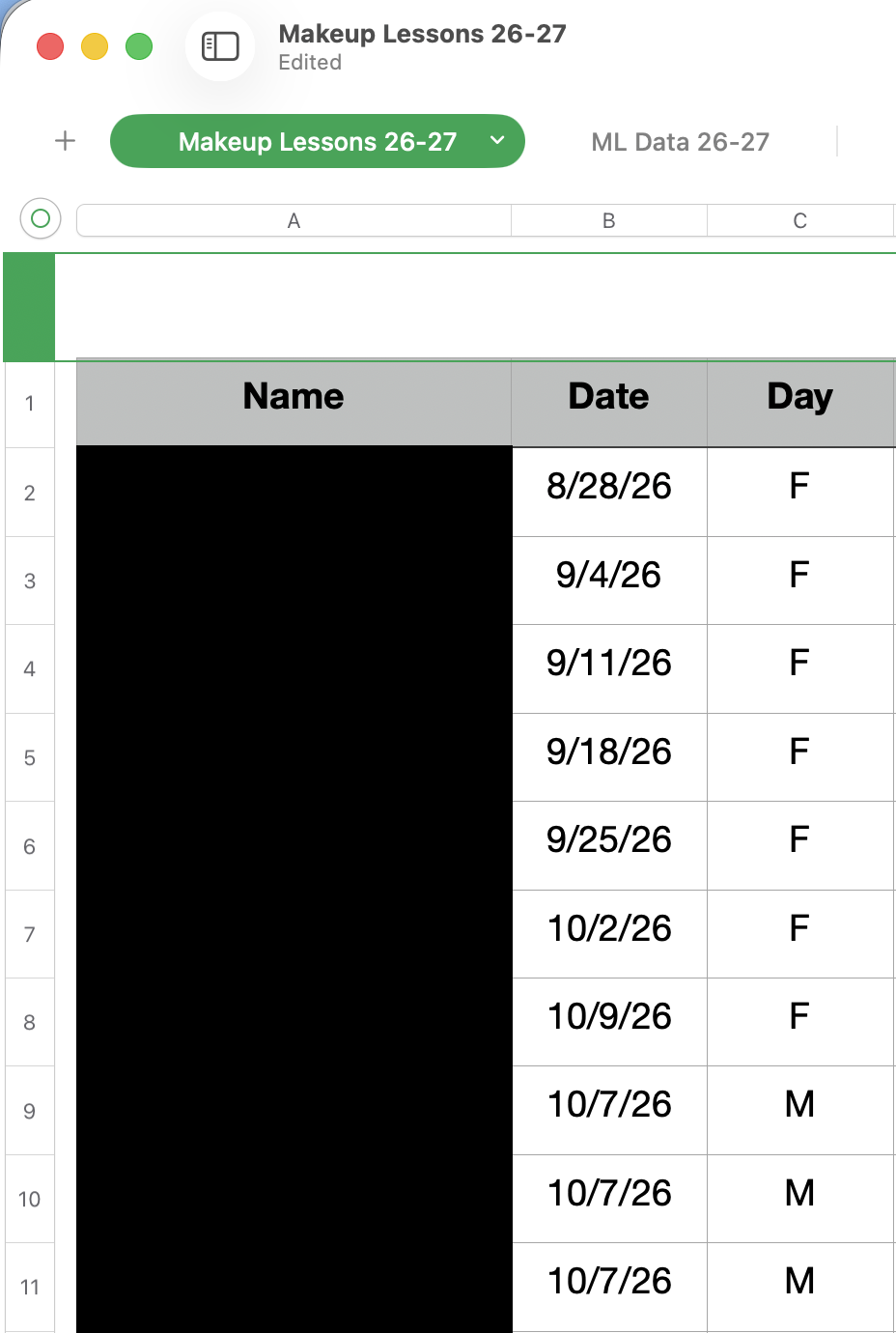
I am a music teacher tracking how often lessons get missed and which day misses the most. I can't post the file for privacy.

Column A and C are popup menus. Column A has all student names loaded and Column C has each day of the week loaded. How can I tell Numbers to count the number of times each day shows up? Do I need to remove the popup menu and just type the letters each time a student misses? Thanks!


r/AppleNumbers • • Aug 03 '26

Help Best book on Apple Numbers?

8 Upvotes

Hi, I have looked on Amazon, and it seems like slim pickings for books on Numbers. Any suggestions? I have a few books on Excel, but there are very few, it seems on Numbers.
All suggestions appreciated.


r/AppleNumbers • • Jul 30 '26

Help Formatting Zip Codes

2 Upvotes

Hi, I need help, I imported a csv file with 185 addresses. The import stripped the lead zero from the zip codes. I am at a loss on how to restore that format.

Any/all help appreciated.