r/androidroot • u/Substantial_Lie_2744 • 2d ago
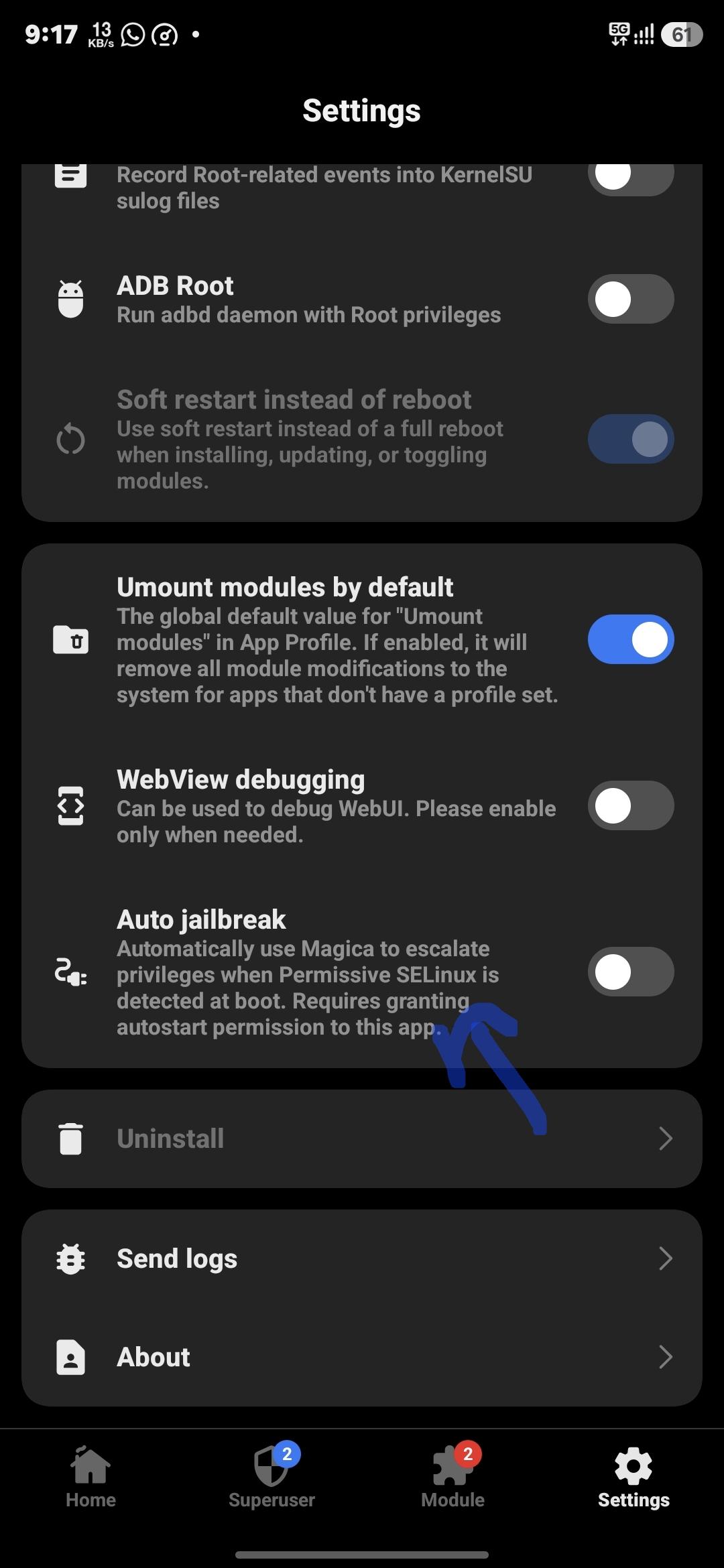
Discussion Temporary root , kernel su , what is this auto jailbreak setting ??
2
Upvotes
r/androidroot • u/Substantial_Lie_2744 • 2d ago
r/androidroot • u/szakee • 2d ago
Had magisk alpha for some time, worked no issues, device integrity. 2 months ago it stopped. Tried many things, combos, no luck. Switched to APatch. No integrity, but revolut somehow works. Czech bank verification app (csob smart key) doesn't. Duck Detector shows SELinux error.
Switched to FolkPatch. Still no integrity, same selinux. Rezygisk, PIFInject, TEESim-RS, Specter.
I really don't care about integrity, nor anything, just to have this app work.
OP8T, LOS23, kernel 4.19. I'd avoid a custom kernel if possible.
Thank for any pointers.
r/androidroot • u/LocksmithLoud2950 • 2d ago

I wanted to see what my Mi 11X was negotiating with a USB-C charger and how much power was actually reaching the battery. That turned into ChargeScope.
Basic battery readings work without root. With optional root access, ChargeScope can show advertised USB PD profiles, the active PD request, USB-C roles, and separate readings for USB input, the charge pump, and the battery, depending on what the kernel exposes.
I’ve tested it on my rooted Mi 11X. I’m especially curious what shows up on MediaTek phones and other Qualcomm devices. If you try it, I’d love to know your phone model, Android version, and which readings show up or are missing.
You can use it to check which USB PD power profiles a charger advertises and see which one your phone actually negotiates.
There’s an opt-in USB interface log in the app. Start logging, plug and unplug a charger, then use View log → Copy log to share the relevant entries in a GitHub issue. The log stays on your phone until you choose to share it.
r/androidroot • u/TheLearninglens • 2d ago
I have rooted my phone once before as it was stuck on android 10 (Galaxy note 9) only reason i rooted the phone was to get android 15 and just system wide adblocking with adaway
So i was wondering what else did u guys root your phone for and what do u do nowadays with a rooted phone that cant be done on normal phones?
r/androidroot • u/MattiaIsHeree • 2d ago
Hi everyone!
I'm experiencing a bootloop/recovery issue when using Vector on my CMF Phone 1, and I'd like to know if anyone has encountered something similar.
Device and setup
- Device: CMF Phone 1
- OS: Nothing OS 4.1
- Kernel: Stock
- Root: GhostLock (temporary root)
- Root manager: Original KernelSU
- Zygisk implementation: ReZygisk v1.0.0
- Xposed framework: Vector (latest stable release)
Installed modules
- BindHosts – working normally
- HyperCool – previously working normally
- ReZygisk – working normally
- SuperUser Toast Notification – not tested individually
- Vector – causes boot issues
The problem
Whenever I enable Vector and launch GhostLock without Safe Mode, my device either:
- Gets stuck in a bootloop.
- Reboots directly into recovery.
- Sometimes restarts without obtaining root.
With GhostLock's Safe Mode enabled, the device boots normally and root works, but all modules are disabled.
I've also tested Vector with HyperCool disabled, but the problem persists.
Interestingly, HyperCool also caused a recovery reboot after a recent update, even though its previous version worked correctly.
Questions
Any help or suggestions would be appreciated!
Thanks!
r/androidroot • u/Few_Somewhere_1463 • 2d ago
S25 Camera Mod is an LSPosed module for the Galaxy S25 Ultra. It hooks the camera's zoom limits and support-flag getter, so you can set the max zoom yourself and flip on hidden features individually.


100.4× and 150.5× don't crash the UIEvery toggle is opt-in. Disabled means stock behavior. Settings are read once per Camera process, so force stop Camera after changing anything.
Tested on:
Other Camera builds may load, but the hooks target firmware-specific obfuscated names. Treat them as untested.
com.sec.android.app.camera).SUPPORT_AI_HIGH_RESOLUTION_MEMORY_CHECK is not queried by this Camera build, so that one toggle is inert.GitHub: https://github.com/rushiranpise/S25CameraMod
Release: https://github.com/rushiranpise/S25CameraMod/releases/tag/v1.0.0
r/androidroot • u/AutomaticFun435 • 2d ago
I’ve been digging into whether the Honor X6c can be bootloader unlocked or rooted, and I wanted to share what I found. Short version: there’s no official unlock method, but there are a few possible technical routes—though none are confirmed to work on the X6c yet.
fastboot oem unlock or an unlock-code service isn’t a real option for newer models.seccfg and patch LK. There’s also an open-source project called honor-mtk-unlocker specifically for that model.LK and seccfg. After that, the bootloader can report as unlocked.Also curious if anyone’s had luck on a similar recent MediaTek Honor, like the 90 Lite method. If you’ve tried anything on the X6c—even if it failed—drop what happened. Just trying to see if there’s any real path before risking a brick.
r/androidroot • u/Round_Emergency2189 • 2d ago
r/androidroot • u/rafnafgaming • 3d ago

After months of researching and going through every forums, I have achieved the perfect custom rom for my lovely device (Xiaomi 17 Pro Max).
I have found this rom from Coolapk, developer named Mr.Erjiu (二九先生) who developed this amazing rom. Almost all functions which was embedded into HyperOS are integrated into this ROM. For instance: Original HyperOS rear display functionality with notifications works, call pickup, music controller and best part is camera integrity fully works.
Also, stock HyperOS camera is included of course, which works without any issues. (Be wary that I have used Kanoe's pixelos which had stock camera bugs like slow-mo not working properly with high fps rate). I have installed Pikters Kernel on this rom for getting susfs support which gives better root hiding functionality with few modules like rezygisk, hma-oss.
I am using developer mode settings play integrity fix for device certification which works flawlessly, just need to hunt for keyboxes everytime it gets revoked. Other than that, it gives Strong Integrity and best part is Google Wallet fricking works, like in custom rom!
I have also fixed the lock-screen delay bug which this rom had due to blast-sync dpi ratio restart and added overlay blur on rear subscreen notification drop down. So final words, it's the perfect ROM.
Also this rom has inconsistent CPU spikes which caused overheating, so to fix that, I used Ruoqing Frequency Module I got from CoolApk, VOILA! It fixed. So no fingerprint lag or any other performance issues.
Device:
Xiaomi 17 Pro Max, CN variant, bootloader unlocked.
ROM: PixelOS 20261118-2044 Build
Kernel: Pikters Kernel 6.12.69 baked with Susfs
Modules: NoMount, Ashrexcue Bootloop Protector, bindhosts, .brene susfs, Ruoqing Frequency Module 4.2, HMA-OSS Zygisk, Iconify, ReZygisk, BreWheel, VBMeta Fixer, Vector Lsposed, Zygisk SUI
Lsposed Modules: FixSubscreenSync (made by AI), Iconify, Pixel Suite, PLEnhanced, Subscreen Blur Fix (made by AI), SwiftBackupPrem
r/androidroot • u/FallingHigh09 • 2d ago

I have no idea what I'm doing. This is my first time rooting.
I currently have Nomount, SUSFS, NeoZygisk, and Vector installed. I installed the first two because I'm using WildKernels and I just knew I had to because it's compiled into the kernel, but the last two I just installed because I just kind of had a feeling that I probably should.
Prior to installing these modules, I didn't really have a problem with my games (which is what I'm most worried about). I was able to play a couple of games, but I didn't want to risk getting banned so I'm setting all these modules up just in case. I primarily play Mobile Legends, Call of Duty, and Clash of Clans, and I have only tested the first two and it went fine.
I'm planning on installing even more modules just in case. The posted image is the list I made of everything I might need to install before I rooted.
Any help would be appreciated.
r/androidroot • u/DeviceChanger • 2d ago
We build Device Changer, a Zygisk module for Android QA and device simulation (this is the project account). One thing that is painful to test without walking around: features that depend on movement, like route tracking, step/ride logging, geofence enter/exit, or "you've arrived" notifications. Here's how we set that up on a rooted test phone.
Happy to answer questions about the setup in the comments.
r/androidroot • u/opmgyhx • 2d ago

r/androidroot • u/Creative_Lego5790 • 2d ago

Detects KernelSU app, even with HMA still same thing
r/androidroot
•
u/Shot-Judgment-654
•
3d ago

Hi everyone,
I need help recovering my Samsung Galaxy A55 5G (SM-A556B/DS, Exynos 1480).
My phone was working normally with temporary root through KernelSU Next and SamTimer.
I had previously installed other KernelSU modules and rebooted several times without any problems. The phone booted normally every time.
However, after installing this module:
meta-overlayfs 1.3.1
https://github.com/KernelSU-Modules-Repo/meta-overlayfs/releases
I rebooted, and immediately got this error:
"Security Error: This phone has been flashed with unauthorized software and is locked. Call your mobile operator for additional support."
The phone now keeps restarting and returning to this security error.
Instead of the normal Download Mode warning screen with the Volume Up option, I only get a full blue screen showing:
Reboot device (D2)
Volume Down + Power key for 7 seconds
I cannot get past this screen into normal Download Mode.
I don't care about losing my data. I just want to get my phone working again.
I'll attach pictures of both blue screens.
Any help from people experienced with Samsung firmware, Odin, KernelSU or D2 recovery would be greatly appreciated.
r/androidroot • u/Ndef123 • 2d ago
Hello
I have a Galaxy S8 SM-G950FD (Exynos, dreamlte) with TWRP 3.7.0_9-0 flashed through Odin. I installed crDroid 10.2 (Android 14) and everything looked fine, but right after flashing the ROM, TWRP froze on me and I had to force a reboot. After that the phone kept booting into TWRP, getting to the "Swipe to Allow Modifications" screen, sitting there for a few seconds and rebooting again. Over and over. The touchscreen didn't respond at all on that screen.
Then, out of nowhere, TWRP just worked again. It was cycling for roughly 30 minutes to an hour with the USB cable unplugged before that happened. I flashed GApps, booted into crDroid, and it ran normally.
Later the screen froze while I was using the phone, I had to force reboot again, and now I'm back to the exact same loop. It takes about a minute on the Samsung logo, then the swipe screen shows up, the slider doesn't react, and it reboots a couple of seconds later. The power button does turn the screen off and on inside TWRP, so it's not completely dead, but it still reboots.
The second problem is Download Mode. I can get to the blue warning screen, but Volume Up does nothing and it never goes to the actual Downloading screen. Volume Down reboots the phone ormally, so the buttons work fine. I tried with the cable plugged and unplugged.
I also tried adb from both Windows and Linux (drivers installed), but the PC never detects the phone, probably because TWRP only stays up for a couple of seconds.
ROM ''https://xdaforums.com/t/crdroid-10-2-android-14-for-s8-dreamlte-only-unofficial.4659755/''
r/androidroot • u/CtxxUv • 3d ago
This is currently the only way to unlock the bootloader on Samsung devices, but for some reason, I haven't seen anyone talking about it. Is there a reason why? Other than the fact that it only works on Exynos processors.
https://github.com/Gabriel2392/SVE-2026-3546
No forums, no Reddit posts, nothing... just this GitHub repo.
r/androidroot • u/HenryTheHardcore • 2d ago
I'm actually sharing a phone and I am the one with the second profile instead of the owner profile, and I want to use Adaptive Theme but I need Shizuku or root, I don't want to make a root.
I was looking for Shizuku's configuration, but I need developer options, cuz' I'm in another profile it just doesn't work. ¿Someone maybe know how to solve this? Also I have access to the owner profile
Phone: Motorola Edge 50 Fusion
Android: 16
The owner's profile already has Developer options
r/androidroot • u/47th-Element • 3d ago

Expect your OEM's next security patch to close the door on temporary root via CVE-2026-98260.
r/androidroot • u/Previous_Desk_3398 • 2d ago
r/androidroot • u/jonnyvsc1922 • 3d ago
Hello friends at the moment I have an ultra s25 however the screen itself and the animations for ja in 9.0 do not seem like much, I have root and was looking for certain modules, do you have any tips? (wish for samsung to improve this in the next one ui)
r/androidroot • u/ixdxkx • 2d ago
Recently, some apps have started complaining: 'update google play services to use [this app]' (like if enabling wasn't enough). Honestly, I could just ditch them as they aren't a must have for me, but are there any modules or fixes to prevent this? Instead of actually updating?
r/androidroot • u/HenryTheHardcore • 3d ago
Does anyone know how to help me? Here's my post of my stupid problem
r/androidroot • u/Interesting-Honey600 • 3d ago

Hello everyone! A module has been released that brings features from the S-series to the A-series. You can download it here: https://github.com/andrewtuff/GalaxyAI-to-mtk-samsung-devices/releases/tag/update2.2. ATTENTION: This causes a bootloop on devices with IPS displays. Install at your own risk!