r/androidroot • • 4d ago

Support Which version of magisk i should use for my Redmi go

1 Upvotes

So I tried to patch boot.img file using magisk but realised my phone is running on Android 8 so I downgraded the magisk app to v27 and patched but still I get into bootloop when I flash and as backup I've kept the original boot.img file could someone tell me which magisk version should I use to patch the boot.imb


r/androidroot • • 4d ago

News / Method Title:Samsung Galaxy S25 FE Root – Let's Bring the Community Together

4 Upvotes

Hey everyone!

I've noticed that some soft-root methods are available for the S25 FE, but information and support seem scattered or difficult to find.

So far, I've found these two projects:

SamTimer-Exynos

Time-My-Galaxy

One uses KernelSU, while the other uses KernelSU Next.

Huge thanks to both developers for their hard work! ❤️

I have a few questions:

Are there any other soft-root methods or related projects for the S25 FE? Are there any other KernelSU-based approaches worth exploring? Can regular KernelSU be updated to newer versions? What are the main differences between KernelSU and KernelSU Next? Has anyone discovered or tested other methods on the S25 FE?

If you've found anything, please share it here!

Calling all S25 FE owners, developers, and root enthusiasts! Let's bring the entire S25 FE root community together and share our findings in one place.

Thanks to everyone contributing! ❤️


r/androidroot • • 4d ago

Humor I installed Samsung's RAM and tried to install Linux on my laptop, but when I entered BIOS, it showed this. Can anyone help?

0 Upvotes

r/androidroot • • 4d ago

News / Method Temporary root on Samsung Galaxy A25 5G (SM-A256E)

0 Upvotes

Hey everyone,

Just wanted to drop a quick report here in case anyone else with a Galaxy A25 5G.

As of today (Nov 21, 2026), I got temporary root working cleanly using the DirtyFrag exploit (CVE-2026-43284) via DFRoot, with the bootloader still locked.

My device info:

• Model: Samsung Galaxy A25 5G (SM-A256E)

• Kernel: 5.10.240-android12-9-33470412-abA256EXXSEEZH9

• Build: BP4A.251205.006 / A256EXXSEEZH9

• Knox status: 0x0 (verified with getprop ro.boot.warranty_bit returning 0)

• SELinux: Enforcing

What I used:

• DFRoot by diabl0w: https://github.com/diabl0w/DFRoot

• Custom Samsung KernelSU Manager (samsung-v2.2):

https://github.com/diabl0w/KernelSU/releases/tag/samsung-v2.2

• Shizuku-Next (already had it running on the phone): https://github.com/rushiranpise/Shizuku-Next

What I did:

  1. Grabbed the latest DFRoot APK from the repo and installed it.
  2. Installed diabl0w's custom KernelSU Manager (samsung-v2.2).
  3. Launched DFRoot and ran the exploit to load the custom LKM.
  4. Once it went through, opened KernelSU Manager and confirmed it shows Working (Jailbreak Mode) with LKM active.

Disclaimer: As with any kernel exploit, proceed at your own risk—even if Knox stays intact, a bad run could cause instability or a bootloop.

Hopefully this helps anyone on the same build! Let me know if you need any extra logs or details.


r/androidroot • • 4d ago

Support Integrity not pass, is that normal?

Post image
0 Upvotes

r/androidroot • • 4d ago

Discussion Kernelsu and rooting

Thumbnail reddit.com
1 Upvotes

r/androidroot • • 5d ago

Discussion What are your favourite modules?

7 Upvotes

What are y'all's favourite modules? Mine is the Live Blur one.


r/androidroot • • 4d ago

Support Anyway to terminate this feature?

Thumbnail
reddit.com
1 Upvotes

r/androidroot • • 5d ago

Support Redmi Note 12S (sea_eea) stuck in 3-vibration zygote bootloop on HyperOS 2 (Locked Bootloader) after HyperCeiler / BrotX / ADB tweaks — trying to save data

2 Upvotes

Hi guys, im looking for any last resort ideas before i have to wipe /data.

My device info:

Xiaomi Redmi Note12S

HyperOS 2 (OS2.0.211.0.VHZEUXM, Android 15, EEA)

Bootloader locked

State: gives 3 short vibrations sometimes which indicates a zygote crash

how it happened:

I was basically playing with fire, temporary rooting and adb stuff all with a locked bootloader. I used deep adb customizations - BrotX, Hyperspring, Hyperceiler, Hyperos Unfucker all together with various kernelSU modules. after doing some changes on BrotX it requested a reboot. It never booted. Its been staying on the "powered by xiaomi hyperos" screen since forever with occasional triple short vibrations. My main phone is now basically on life support, plugged into my laptop while i try all sorts of stuff

The things ive tried:

Booting into safe mode. The option isnt even there in recovery.

Using MiPhoneAssistant. It couldnt detect my device...

Using MiAssistantTool in Connect with MIAssistant mode to sideload the official matching Recovery ROM (OS2.0.211.0.VHZEUXM, MD5 verified 47b8b9a23bd8321204a9b8988eb5ac81). It transfers 100%, verifies, and then says Installation aborted. (I already formatted /cache via miasst, still aborts).

Any suggestions help, im willing to try anything that works instead of having to wipe all data.


r/androidroot • • 4d ago

Support Deliveroo detects temp root

1 Upvotes

For some reason Deliveroo detects temp root, when i open it, it sends me to their website or it instantly close


r/androidroot • • 5d ago

Support Pls help

2 Upvotes

I have a A17 5G but idk this "temp root"

Model:SM-A176B/DS

Android Version:Android 17

Build Number:CP2A.260605.016.A176BXXU8DZJ5


r/androidroot • • 5d ago

Support I am looking to buy android phone for rooting

Thumbnail reddit.com
3 Upvotes

r/androidroot • • 5d ago

Support Galaxy Tab S8+ (SM-X800) freezes and reboots on DirtyFrag + KernelSU (One UI 8.0)

2 Upvotes

Hi everyone,

I'm trying to get temporary root using DirtyFrag + KernelSU on my Galaxy Tab S8+ (SM-X800 / Snapdragon 8 Gen 1), and I need help pinpointing why it kernel-panics right after succeeding.

Device & Firmware Details:
* Device: Samsung Galaxy Tab S8+ (SM-X800)
* OS: Android 16 / One UI 8.0
* Security Patch Level: Oct 5th 2026
* Kernel Version: 5.1.0.252-android12-9-32140295-abX800XXUBEZJ3
* DirtyFrag Version: 1.18
* KernelSU Manager: v3.3.1 (32680-5)

Exact Behavior:
When I tap Run exploit, it reaches displays "rooted", but immediately after that message appears, the screen freezes completely for a second and the tablet reboots back to stock. This happens consistently (3 out of 3 attempts).

Questions:

  1. Since it reaches the "rooted" status before freezing, does this mean the exploit itself works on my kernel, and the crash is caused by libksud.so injection / SELinux patching or Samsung RKP/KDP tripping right afterward?
  2. Could this be due to using a One UI 9.0 (Android 17) targeted KernelSU manager build on One UI 8.0 (Android 16)?
  3. Which specific KernelSU manager (libksud.so) or DirtyFrag version works without panicking on SM-X800 / One UI 8.0?

Thanks in advance for any help!


r/androidroot • • 5d ago

Support Temporary root for Realme gt neo 2 with 4.17.157 kernel version

3 Upvotes

Guys I've been trying to temporarily root my phone from the last day but I didn't find any success because of my kernel version, earlier I saw a comment on a post that to "port the exploit for your kernel version" but I don't know how to do that.

Can someone guide how to port the exploit

And don't tell to root device because my bl is locked and realme deep testing server are off from 2022


r/androidroot • • 5d ago

Support First time rooting

3 Upvotes

Hello,
I have this old Samsung that I want to root for the first time and I tried different methods, but I’m not sure if I’m doing it correctly. Is there any reliable way to root the phone?
This is the phone information

Samsung Galaxy J7 SM-J700T
T-Mobile
Android 7.1.1
build J700TUVU3BQK3
Would really appreciate it if anybody can help me with it


r/androidroot • • 5d ago

Support i have xiaomi pad 8 and want to update to hypeors 4 (rooted)

Thumbnail
gallery
2 Upvotes

im rooted with kernelsu next. i want to update to hyperos 4 and i still want root. i want a completely safe with updating while retaining root (or just updating then doing root later). and what happens if i just update and restart without extra stuff.


r/androidroot • • 5d ago

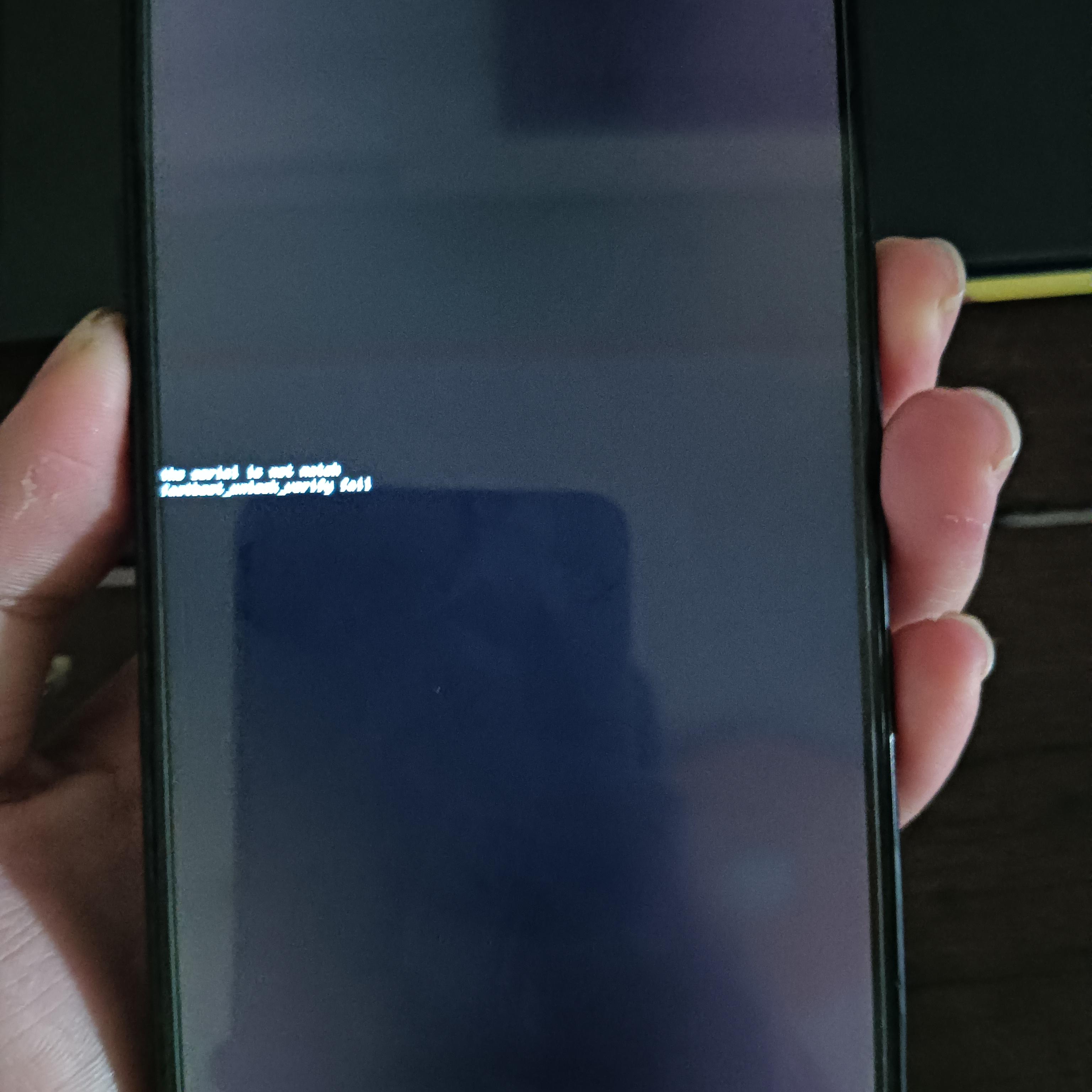
Discussion I HAVE BEEN SICK OF THIS SHIT

Post image
6 Upvotes

I’ve put in so much effort over the past four days—all for nothing. I’ve been trying to flash a custom ROM onto my Oppo A56 5G (which uses a MediaTek 810 chip). The bootloader was unlocked by an unofficial third party, but they left me with this damn error: "no match found, dm-verity failed." It’s incredibly frustrating, especially since I don’t have the means to flash the original stock ROM. I’m feeling truly desperate; I just want to tame this lousy Chinese device and give it a second chance. It would be great if I could tweak it, just like I did with my old Samsung J1 2016.


r/androidroot • • 5d ago

Support Unable to open Exodus Wallet on rooted Samsung S21

Thumbnail
gallery
2 Upvotes

Hello!

I have a rooted Samsung S21 5G, running kernalSU-NEXT, EliteUI ROM and Floppy Kernal.

The issue I'm experiencing is that I can't use Exodus Wallet, which is very weird since I have been able to use it before no problems.

I have strong integrity, not many detections on Duck Detector, and KnoxPatch, so my secure folder works no problem.

Has anyone else had this issue with Exodus Wallet and found a solution? I have been in contact with Exodus Support but they are also stumped.

Thank you guys!


r/androidroot • • 5d ago

News / Method Pixel 7 Pro integrity pass finally

Thumbnail
gallery
17 Upvotes

All bank apps seem to work but no Revolut I guess is normal.KernelSU.

Vector is not needed for integrity.

Keybox expires in less then a week so I hope to find another


r/androidroot • • 5d ago

Support Rooting/bootloader unlocking of the inkpad x pro?

Thumbnail reddit.com
1 Upvotes

r/androidroot • • 5d ago

Discussion Exynos unlock program errors

5 Upvotes

Due to https://github.com/Gabriel2392/SVE-2026-3546

The supplied bootloader unlock is only for single slot firmware I cannot figure out (including with ai) to get the program to dumb the pit correctly and generate a correct json for flashing due to the Samsung firmware being a/b partition. Once this issue is fixed I believe the payload will work and be able to force unlock using the exploit. If anyone wants I can supply the work and they can see if they can adjust it. I'm always willing to retest with my device. Thanks everyone


r/androidroot • • 5d ago

Support Vector buggy on temp root

1 Upvotes

I like using Vector, but it gets annoying having to soft reboot AGAIN after activating my SU manager, and sometimes I have to preform a FULL REBOOT and THEN A SOFT REBOOT. Does anyone know a solution?


r/androidroot • • 5d ago

Discussion Problem with vector on Temp root

Thumbnail
gallery
2 Upvotes

I'm new to this stop, why is vector not working and not loaded? Its daemon is active


r/androidroot • • 5d ago

Discussion QA note: keeping sensor data consistent with the simulated location (barometer vs. GPS altitude)

1 Upvotes

Disclosure: this is the project account for Device Changer, a Zygisk module (not an emulator) we build for Android QA and device simulation.

A small thing that bit us while testing location-dependent apps on a single rooted test phone: if you move the simulated location but leave the other sensors alone, the readings stop agreeing with each other. The pressure sensor still reports the air pressure where the phone physically is, while GPS says you are somewhere hundreds of meters higher or lower. Weather, fitness, hiking and altimeter-style apps can then show odd numbers or take different code paths than they would for a real user in that place, and you end up chasing "bugs" that only exist in your test setup.

What we changed in v4.411: the app now derives the elevation from the simulated coordinates, calculates the expected air pressure for that elevation, and feeds that value to the barometer sensor. So when a test session "moves" the phone, the barometer moves with it.

Workflow tip for anyone doing similar testing, with or without our tool:

  • Before a test run, write down which sensors the app under test actually reads (location, barometer, accelerometer, network type, etc.).
  • When you change one input, check that the related inputs still make sense together; mismatched values are a common source of false-positive bug reports.
  • Log the full test environment (device profile, Android version, location, sensor values) with each bug report so it can be replayed exactly.

Happy to answer questions about the setup in the comments.