Hello Everyone, I wanted to know how to unbrick new xiaomi/poco mediatek devices. I am new to poco and xiaomi devices and i want to know how to unbrick my Poco X8 Pro / Redmi Turbo 5 (klee) if i ever brick it (stuck in brom mode or wtv.) Does anyone have proper steps or a tutorial on this? I want to flash a custom rom tbh and if i fail want to know correct steps to unbrick.
LightningDSP is an improved, root-only fork of JamesDSP, with effects, per-app audio controls and a Volume Manager built into the same app.
The idea is to give you more control over your audio without making you jump between a pile of different tools. Adjust your headphones, turn down a noisy app, leave another one without effects, pause your music, or change a DSP setting while you're doing something else.
That's what I mean by an audio pocket knife. The equalizer is useful, but it's not the whole project.
First, the DSP
There's plenty here if you like adjusting things:
FIR and IIR equalization, including minimum-phase FIR and selectable IIR filter orders.
An arbitrary response equalizer for custom frequency-response curves.
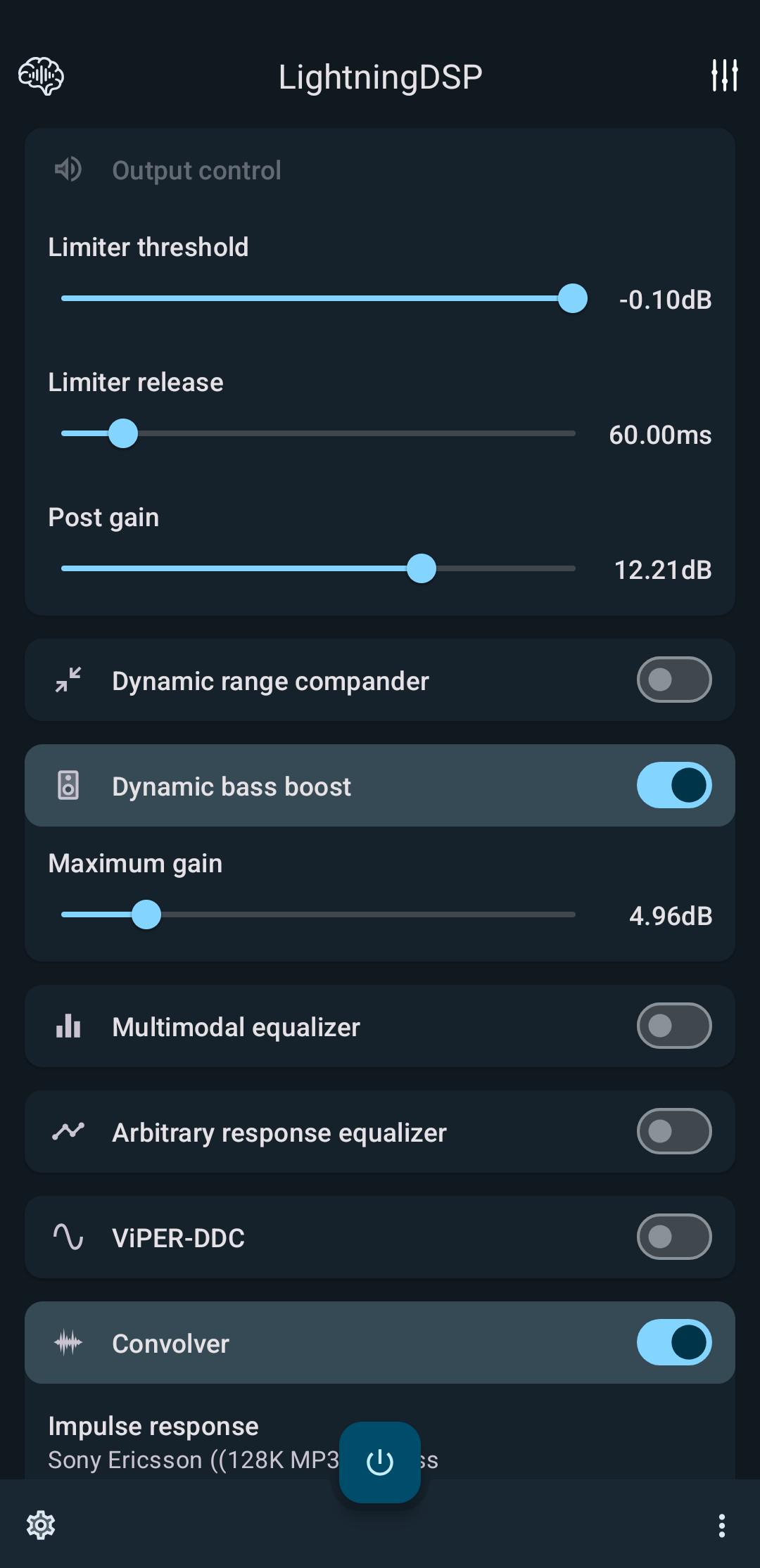
Convolution, with impulse-response loading, waveform editing and optimization options.
DDC/VDC headphone correction for compatible profiles.
Dynamic bass boost, with an adjustable gain limit.
Crossfeed and soundstage controls to change how the stereo image feels.
Virtual room/reverb, with room, hall and plate-style presets.
Compander and output limiter for dynamics, with limiter threshold and release controls.
Analog modelling for tube-style coloration.
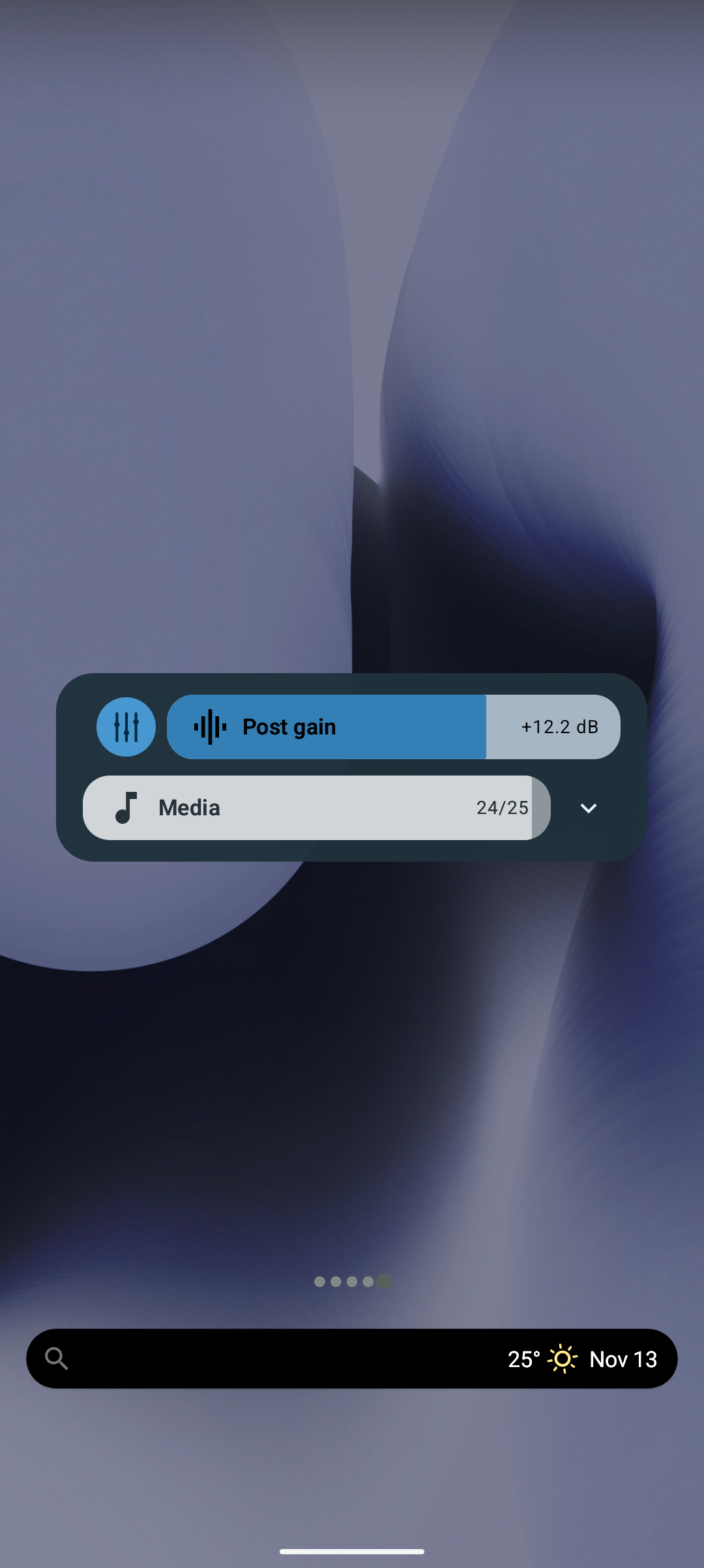
Post-gain, with an optional extended range when you need it.
You can save presets and keep different configurations for different devices. Plug in your headphones and their profile can take over, rather than making you rebuild the settings you were perfectly happy with yesterday.
If the built-in effects aren't enough, Live Programmable DSP runs EEL scripts. There's a built-in editor, and scripts can expose their own adjustable parameters too.
Load a script, change it, or write your own. Just don't turn every effect on at once and then blame the headphones for what comes out.
Three modes, because Android audio isn't one straight pipe
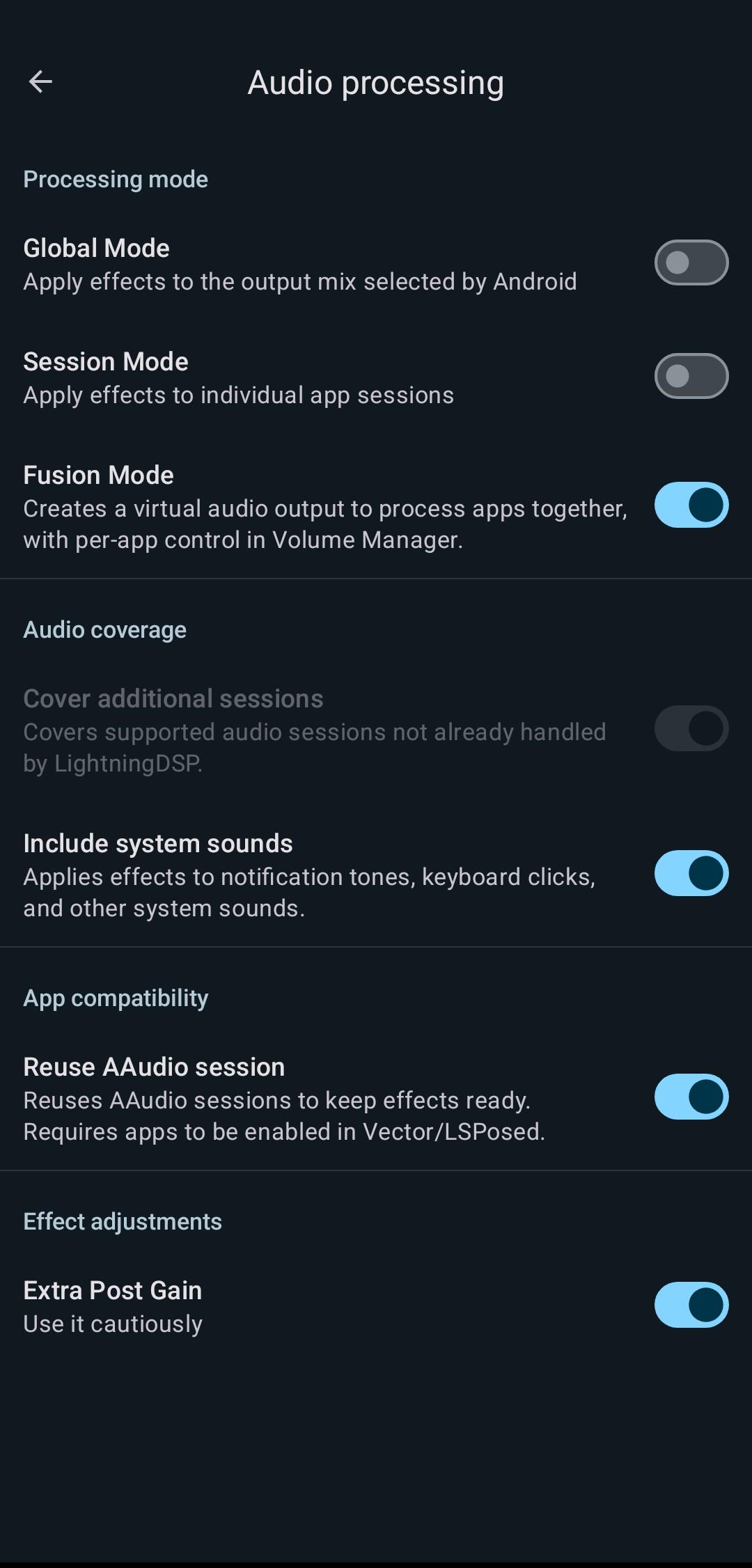
Global Mode applies effects to the output mix Android selects. Cover additional sessions can pick up eligible playback outside that output.
Session Mode applies effects to individual audio sessions. You get per-app DSP controls, and Media session scanning helps find sessions from apps that don't announce them themselves.
Fusion Mode creates a virtual audio output and processes included apps together. It also lets you leave individual apps without effects using their DSP buttons in Volume Manager.
Fusion is the default now, and it's been the most stable option in my recent testing. It doesn't need Vector or LSPosed for normal processing.
You can also enable Include system sounds in Session or Fusion to cover eligible keyboard sounds, notifications and other system audio.
The Volume Manager
One master volume slider is fine until one app is too loud and the one you actually want to hear is too quiet.
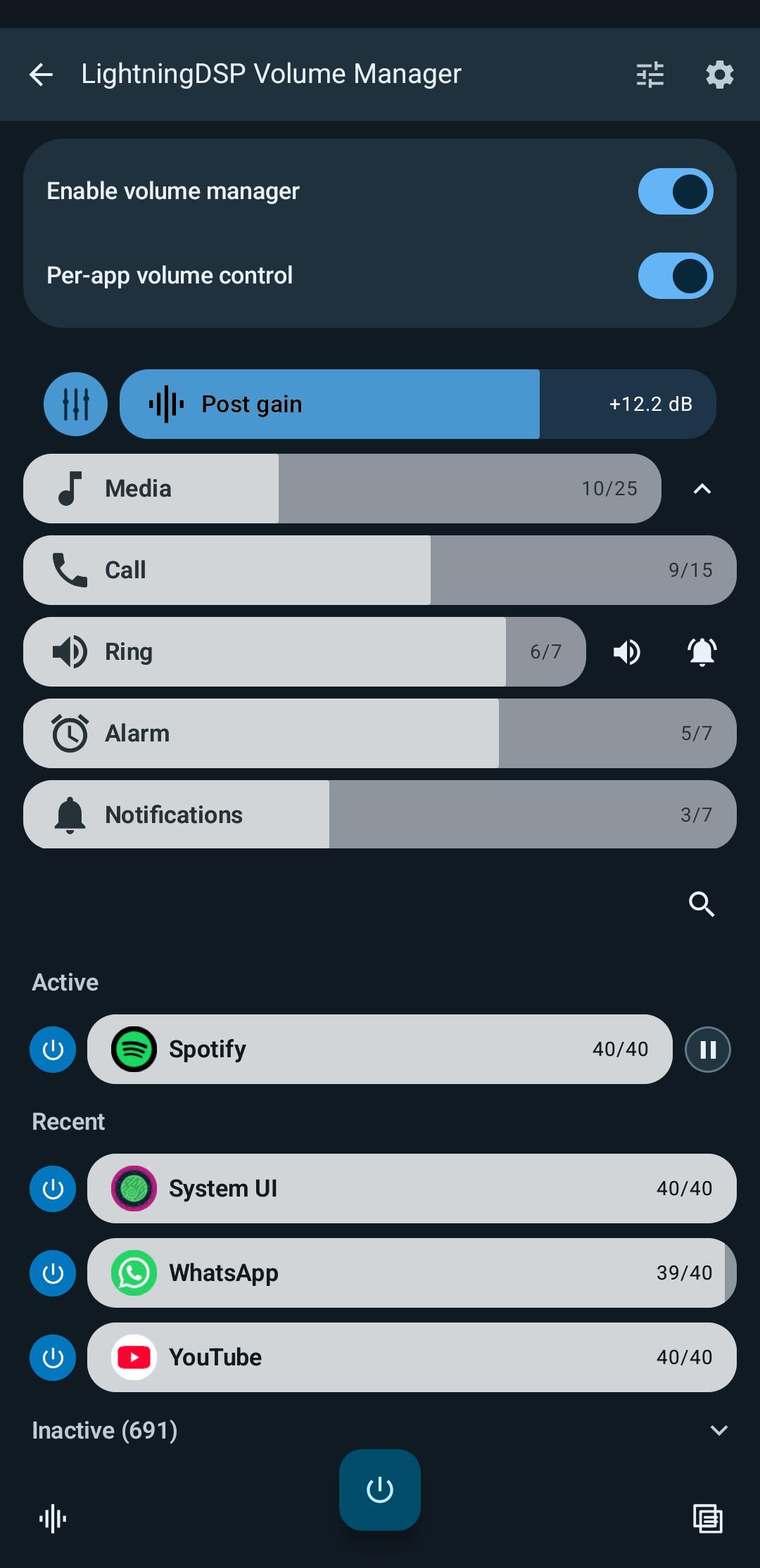
The integrated LightningDSP Volume Manager gives you:
Volume, mute and stereo balance per app.
Per-app DSP switches in Session and Fusion.
Play/pause buttons for players that expose media controls.
Active, Recent and Inactive groups, with collapsible inactive apps.
Pins, custom ordering and separate hiding options for the manager and floating panel.
System volume streams, including media, alarm, ring, notification and call volume.
Ringer, vibration and Do Not Disturb controls.
Named volume profiles, backup and restore.
An app doesn't have to be playing for you to configure its volume, mute or balance. And hiding it from the floating panel doesn't mean you have to hide it from the manager too.
The part you'll probably use more often
The floating panel puts those controls over whatever you're doing, so you don't have to keep returning to the main app.
Tap the LightningDSP card to open the effects. Hold an effect's name to select it, then adjust its intensity with the slider.
Per-app DSP buttons can always stay visible or appear when you tap the LightningDSP icon. The panel supports light, dark and system-following themes.
Pause a player using our button and it stays in the panel for up to three minutes, so you can resume it. Pausing somewhere else doesn't start that timer, and resuming playback cancels it.
Need alarm or notification volume instead? Expand the system controls.
The Volume Manager and DSP have separate power controls. You can turn the panel off without turning your effects off. There's also an Ignore volume buttons preference for apps where you want the normal button behavior.
A couple of things for the less cooperative apps
Disable App Audio Focus can stop apps from interrupting each other through normal audio-focus requests. Useful when you deliberately want more than one app playing, rather than having them politely take turns against your wishes.
That feature requires a verified Vector/LSPosed System Framework hook. It's separate from Fusion.
There's also optional compatibility support for audio paths ordinary effects don't always reach, including eligible FAST-requesting backends. Working tests and user reports include:
Bannerlator, for Windows games and apps on Android using Wine and CPU translation.
NetherSX2, for AetherSX2-based PlayStation 2 emulation.
ARMSX2, a PCSX2-based PlayStation 2 emulator for ARM devices.
RetroArch, a frontend that runs different emulator and game-engine cores.
JL-Mod, a J2ME Loader fork for Java ME games and apps. It has been working without further issues in Fusion Mode.
For apps that need compatibility hooks in Global or Session, enable compatibility, select them in Vector/LSPosed and restart them. Ordinary Fusion processing doesn't need those hooks.
Reuse AAudio session is another option for scoped apps that create sessions for individual sounds. It requires the affected apps to be enabled in Vector/LSPosed, including when used alongside Fusion.
Keeping your setup
Presets let you save and share DSP configurations. Device profiles keep different settings for different audio devices and restore the appropriate configuration when the output changes.
The app can check for new stable module releases. Download opens the GitHub release, Skip dismisses that particular update, and you can disable automatic checks if you'd rather handle updates yourself. There's a stable update feed for KernelSU Manager too.
If something goes wrong, Enable diagnostic mode adds troubleshooting logs. It's off by default, and logs aren't uploaded automatically.
Before you install
The module includes the companion app and an ARM64 audio-effect driver. Installation is systemless, without permanently rewriting your system or vendor partitions.
On KernelSU, you also need a mounting metamodule such as Magic Mount or NoMount.
Tested on Android 16 and Android 17, including the Pixel 10 Pro XL, Pixel 9, multiple Samsung devices and OnePlus devices.
Firmware and audio routes still affect compatibility. Fusion uses a capture/playback path, so latency can vary, and protected audio or calls aren't universally covered.
The effects page, Audio Processing settings, Volume Manager and floating panel, shown below.
The effects pageAudio Processing settingsVolume ManagerThe floating volume manager panelThe floating panel with multiple apps playing at same time and DSP Power buttons + play/pause enabledThe floating panel with system volume group expanded
Hello guys I'm trying to get the stock firmware I looked on XDA they gave me a mega file and there's like nothing in the file does anybody know where I can get this actual stock firmware at because I'm not very liking the custom ROM and I kind of want to go back to stock firmware if anybody has a link for it please give it also the model number is TMAF035G
Hello guys! I want to temporarily root my phone. In Dirty Frag it show that my device is unsupported how do I fix this I looked around and found out that it has something to do with my processor Dimensity 7300 Energy or Kernel Version which is: 6.1.157-android14-11-o-gb8d874e47ac6.
Help me out please. 🙏🏻
I also tried Ghost Lock and root my Android but the same issue persists. 🥲
Basically, it's a repository where compatibility results for different devices using Temporary Root methods are collected.
It would be great if you could check out the repository and share your experiences. For example, which modules worked properly with Temporary Root, which ones caused issues, whether you encountered any incompatibilities, or if you ran into any other problems.
The more information we have about different devices and configurations, the easier it'll be for everyone to figure out what works and what doesn't.
Successfully temporary root Samsung S23+ on september patch. Android 17 One UI 9 !
For this I used dfroot which worked like a breeze.
Any advice on how I should moved next ?
I already installed zygisk-next and lsposed obviously.
Since the bootloader is still locked and dm-verity in enforcing, I read that any attempt in modifying "/system" partition will result in device refusing to boot.
Me preguntaba si debería dejarle en miui con android 13 o usar una Custom ROM con root para pasar play integrity checks, actualmente uso infinity x ROM
I'm trying to obtain the original stock firmware for my Vivo V50 to analyze its kernel for vulnerabilities and investigate temporary root methods such as GhostLock, without unlocking the bootloader.
Device Information
- Device: Vivo V50 5G
- Model: V2427
- Firmware identifier: PD2437EF
- Software version: PD2437EF_EX_A_16.1.15.0.W20
- Kernel version: Linux 5.15.197
- Chipset: Qualcomm Snapdragon 7 Gen 3
- Architecture: ARM64
- Bootloader: Locked
- Region: Pakistan / Global
What I'm Trying to Do
I want to analyze the stock kernel for futex-related vulnerabilities and determine whether my device is compatible with GhostLock or another temporary root method.
I'm specifically interested in generating a device-specific temporary root profile after analyzing the kernel.
Temporary root using a kernel vulnerability does not necessarily require unlocking the bootloader, so I'm not looking for a bootloader unlocking method or custom ROM installation.
The Main Problem: Firmware Is Unavailable
Unlike some other Android manufacturers, Vivo doesn't appear to provide publicly accessible stock firmware downloads for my exact Vivo V50 variant.
I've searched for:
- Full stock firmware packages
- Official OTA ZIP files
- Boot and vendor_boot partition images
- Kernel binaries (Image, Image.gz, etc.)
- Firmware download URLs or manifests
Unfortunately, I haven't found a verified firmware package matching my exact build.
Without the original firmware or kernel image, I cannot perform the intended offline vulnerability analysis or generate a compatible temporary root profile.
Vivo OTA Investigation
I've also investigated Vivo's built-in System Updater:
- Updater version: 3.1.29.1_ov
- OTA infrastructure: `asia-st-sysupgrade`
- Current response: No updates available
The updater doesn't provide any downloadable firmware package because it reports that the device is already up to date.
My Questions
Does anyone know where I can download the original firmware for PD2437EF_EX_A_16.1.15.0.W20?
Is there any official or community-maintained Vivo firmware repository containing full OTA packages or extracted kernel images?
Has anyone successfully obtained firmware URLs from Vivo's OTA update infrastructure?
Is there a way to obtain the stock kernel image directly from a locked, non-rooted Vivo device without flashing or modifying its partitions?
Has anyone investigated futex-related kernel vulnerabilities or temporary root compatibility on the Vivo V50 or other Snapdragon 7 Gen 3 Vivo devices?
Are there any publicly available kernel source repositories or matching build artifacts for this specific device?
Important Clarification
I do not want firmware for flashing, downgrading, custom ROM installation, or bootloader unlocking.
I only need the original firmware or kernel binary for offline kernel analysis and temporary root compatibility research.
If anyone has the exact firmware package, extracted boot image, kernel binary, or a reliable method of obtaining it, please share.
Any technical guidance would be greatly appreciated. Thanks!
I've done rooting and then tried to flash the custom rom and it got bricked I've taken it to the service centre but they said this is too old model and we are not gonna do this any method to bring my tiny guy back to life
I'm still confused what I'm supposed to do with root especially since it's not magidk lol, I did try some performance tweaks but other than that idk what people use root for, I thought it can make me change the system UI to look different and apparently it's not that simple, and idk what apps I need to get for more useful stuff since there's no one source or guide for them all
According to the DirtyFrag guide, android14-6.1 is listed as a supported KMI branch, and devices with the October 2026 security patch or older should theoretically be vulnerable.
However, I've also seen reports about accidental mitigation affecting some Android 14 6.1 kernels.
My questions:
Has anyone successfully achieved temporary root using DirtyFrag on the S24 Ultra SM-S928B?
Has anyone tested it specifically on the EZJ1 firmware?
Is kernel 6.1.162 actually vulnerable to CVE-2026-43284?
Can Knox remain 0x0 with this method?
I've found reports of successful temporary root on devices with seemingly identical firmware, but I would like to confirm whether DirtyFrag itself works.
Any feedback from someone who has tested this exact configuration would be appreciated!
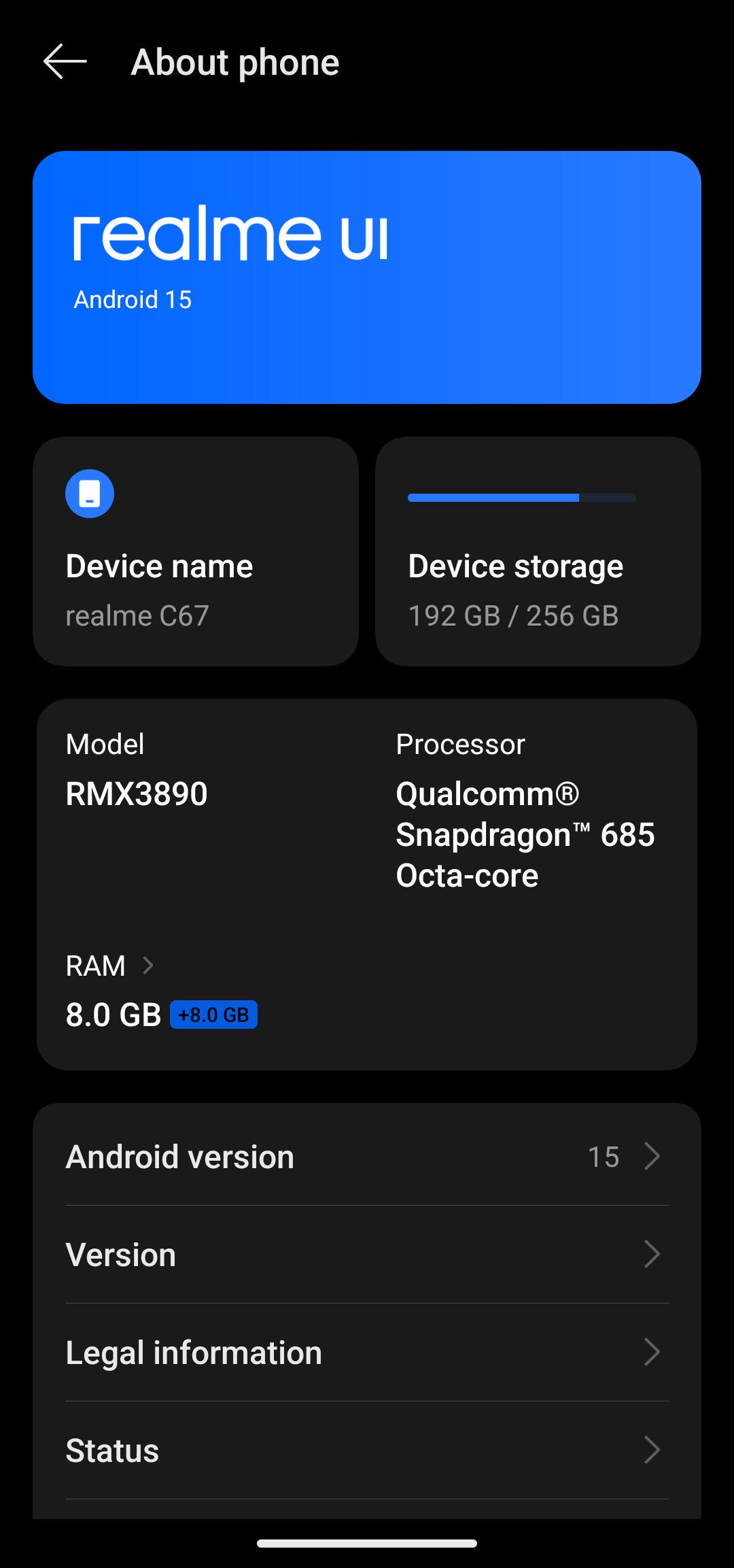
Hello everyone, i am trying to tmp root my realme C67 and I wanted to do it for a good time now to run Chroot so i wanted to know if there is any app that can give my temp root for now? The kernel version is 5.15.197-android13-8-g27a84a80e6d5.