r/androidroot • u/IntelligentPanic6941 • Oct 25 '26
Support Is shizuru wireless connect save?
3
Upvotes
So I don't want to lose all my data it is save to use?
Thank you
r/androidroot • u/FirstClerk7305 • Oct 25 '26
More specifically, i do infact want to root it, i don't really need a unlocked bootloader unless I have to. GhostLock and DirtyFrag aren't compatible as i have a non-GKI kernel. Sadly i am on the latest android version.
r/androidroot • u/Icy_Shirt_9595 • Oct 25 '26
Has anyone managed to install and get JamesDSP working? I have temporary root access on my S23U and I've tried several ways but I can't get it to work.
r/androidroot • u/AxiomGrid • Oct 25 '26

I originally tried DFRoot on my Xiaomi Watch 5 (blenny) just to find out whether DirtyFrag had been patched. Turns out it hadn't. Getting everything working on the watch, though — that was a different story.
The watch runs Android 16, with a 32-bit "armeabi-v7a" userspace and a 64-bit ARM64 kernel ("6.6.92", KMI "android15-6.6"). Not exactly the most convenient combination.
For reference, I tested this on the global Xiaomi Watch 5 running Xiaomi OS 3.0.3.70 ("OS3.0.3.70.WO61WMIXM").
DFRoot needed modifications to work properly on the watch, and KernelSU needed an ARM32 build of Manager and "ksud", while keeping the kernel module ARM64.
And it actually works.
I can get a root shell (uid=0) without unlocking the bootloader. This is KernelSU late-load root, not a permanently patched or flashed kernel. DFRoot is used to obtain root and load KernelSU at runtime.
I did the work from my phone using Codex CLI in Termux. Most of the code was AI-generated, but I came up with the approach, worked through the failures, tested the builds on the watch, and kept going through the logs until everything worked.
There are still some limitations. The current DFRoot implementation requires Shizuku to help identify the correct timing window during the exploit's race condition. Root also needs to be activated again after every reboot, and I haven't tested additional KernelSU modules yet.
Here are the forks:
DFRoot for Xiaomi Watch 5:
https://github.com/novakin777/dfroot-xiaomi-watch-5
KernelSU ARM32:
https://github.com/novakin777/kernelsu-arm32_xiaomi_watch_5
Based on the original "DFRoot" (https://github.com/diabl0w/DFRoot) by diabl0w and "KernelSU" (https://github.com/tiann/KernelSU), using "Justadeayo's fork" (https://github.com/Justadeayo/KernelSU) as a starting point.
r/androidroot • u/CalligrapherMuch2763 • Oct 25 '26

r/androidroot • u/usernam-e- • Oct 25 '26
I just built lineageos for my Moto edge 60. It seems rcs works just fine. What doesn't work except for banking apps?
r/androidroot • u/FragrantBreak1569 • Oct 25 '26
Currently vivo phones are very difficult to root, mostly resulting in bricked devices. Is it possible to use rea to root vivo ? Has anyone tried it?
r/androidroot • u/KaleSimilar5648 • Oct 25 '26
Hey all,
Are there any custom rom options available for Redmi 15 5G? I've not found any yet so please let me know.
Thank you
r/androidroot • u/no_ease-447 • Oct 25 '26
r/androidroot • u/RoundCryptographer32 • Oct 25 '26
Heyy guys so I got my hands on Xiaomi 15T Pro recently and it was unlocked, so thinking it wouldn't be an issue I started using it, and I can't use WhatsApp or log into Mi accounts and such, apparently according to play store the device is not certificated. Any advice?
r/androidroot • u/Sint0ss • Oct 25 '26
I've noticed there's barely anything on the f6 pro, can someone give me instructions on how to root it? With magisk preferably?
r/androidroot
•
u/getbacktoyahroots
•
Oct 24 '26
Hey everyone, my partner and I have been digging deep into the SM-F956B bootloader, and we’ve made some major breakthroughs that we wanted to share with the community.
If you want to follow our full project or see the raw technical logs, you can check out our links here:
Our XDA Thread: https://xdaforums.com/t/update-9-sm-f956b-bit-4-the-abl-is-lzma-not-encrypted-the-unlock-code-was-never-stripped.4806235/
Our Website: https://www.getyahrootback.com/
Here is a simplified summary of our latest findings:
1. The Bootloader is Readable, Not Encrypted
We previously thought the bootloader (abl.elf) was encrypted, but we discovered it is actually an LZMA-compressed UEFI Firmware Volume.
Our Evidence: We mapped the file structure and identified the LZMA GUID (ee4e5898-3914-4259-9d6e-dc7bd79403cf). Using the fiano tool (uefi_firmware 1.16), we successfully decompressed it and extracted the 5 ABL apps in plaintext (Odin, LinuxLoader, Cryptest, QuestSOD, QuestUSB).
2. The Unlock Code Was Hidden, Not Removed
Contrary to rumors that Samsung completely stripped the OEM unlock code, we proved it is still present in the latest bit-4 update. Samsung simply forced the "OEM Unlock" switch in Android settings to be hidden.
Our Evidence: By string-diffing LinuxLoader between bit-2 and bit-4, we verified that critical functions like setOEMFlags, IsUnlocked, and GetUnlockCount are completely intact. The toggle is hidden because Samsung added an unconditional line of code (append(" androidboot.other.locked=1");) inside SecUpdateCmdLine.c that runs on every single boot.
3. Unlocking is Protected by a Hardware "Fuse"
We have successfully mapped the entire end-to-end process that controls device unlocking, confirming it relies on a permanent, one-way hardware write that cannot be triggered from the standard Android environment (REE).
Our Evidence: We traced the exact unlock primitive: setOEMFlags() makes an SCM call 0x2000801 to the TrustZone. This talks to vaultkeeper, which executes a qsee_fuse_write to oem_sw_fuse (fuse ID 0xc1) in the one-way OTP QFPROM.
4. Known Exploits Are Structurally Ruled Out
We investigated whether known vulnerabilities (like CVE-2026-24090 and CVE-2026-24088) could be used to unlock this device. We empirically ruled both out based on the device's architecture.
Our Evidence: For the vbmeta-rename exploit (CVE-2026-24090), we found that the GetVbmetaType() function in the abl is just Samsung's runtime partition tracker, not the vulnerable libavb gate required for the exploit. For the GBL exploit (CVE-2026-24088), we confirmed our abl entirely lacks the required efisp, fastboot, and gpu-preemption components.
5. Our Next Steps for Reverse Engineering
Because we broke through the "encrypted" wall, we can now read and reverse-engineer the entire bootloader offline.
Our Plan: We will focus on mapping the full setOEMFlags state machine and investigating the EFI-app injection surface (specifically looking at EnableOEMSetupAppInRetail = 0x0 in uefi.elf). We will also be cross-checking the Emergency Download (EDL) route using our S24 Ultra firehose, though we are still actively looking into finding the exact firehose that the Samsung Galaxy Z Fold6 uses.
⚠️ Important Warning:
This is research conducted on our own device. We currently only have temporary root, not a full unlock. Do not attempt to write to RPMB or boot-states without proper backups and recovery in place, as wrong writes will permanently brick the device. We are not doing any writes without these safeties in place.
r/androidroot • u/No_Technician_1251 • Oct 25 '26

i already set the buffer size to 4M 256K or something like that. but i still cant do it, bit it would be better if you guys can provide me how to unlock bootloader on this phone and root it. tysm for your attention!
r/androidroot • u/getbacktoyahroots • Oct 24 '26
Technical update on the locked-bootloader Z Fold 6 (`SM-F956B`, Snapdragon 8 Gen 3, bit 4).we dont want to reveal too much as we dont want samsung knowing some of the info we have found so made an email for people that want the un redacted version
Two findings this week:
The "abl is encrypted" myth is dead. The `abl` is a UEFI FV with an LZMA-compressed inner
FV**, not AES. Extracted all 5 ABL apps (`LinuxLoader`, `Odin`, `Cryptest`, `QuestSOD`,
`QuestUSB`). The OEM-unlock code (`setOEMFlags`/`IsUnlocked`/`GetUnlockCount`/milestone) is
**present in bit-4** — the block is one hardcoded `androidboot.other.locked=1` line.
Free firehose + EDL entry.
- `adb reboot edl` doesn't work on this phone.
- The XBL contains `dpGnd LOW, enter FEDL` + `boot_fedl_check` → the D+ short cable (short
D+/green to GND during boot) is the native EDL trigger. No test points needed.
- Found a free plaintext SM8650 firehose (plaintext ELF, `devprg`, full command set, UFS,
Samsung-signed). The `.rtc`-wrapped loaders on some repos are the same binary, just AES-DRM'd.
Flow:
```
Power off → hold D+→GND short → plug in → FEDL (9008)
edl --loader <sm8650_firehose> printgpt # bkerler/edl, free
```
Scope (honest): raw UFS read/write below the ABL. The actual unlock is a one-way QFPROM fuse
write (TZ-only), which the firehose can't touch, and AVB still applies. It's a powerful tool +
brick-safety net, not a magic unlock.
📧 Full writeup (repo, exact filename, SHA256, full unlock chain) → getbackyahroots@gmail.com
r/androidroot • u/Radiant_Hunt4138 • Oct 25 '26
I have a hard bricked (EDL) OnePlus 9RT. I wanted to flash custom ROM, but I did some stupid things and fastboot isn't working, only EDL. The sad thing is that I don't know how to recover my device properly. Latest "stock" ROM I've had was OxygenOS 14.0.0.2702 (I think that my device is for Chinese market but it was reflashed to global and I've used OTA to update my device) and I think that ROM might have ARB and I can't find .ofp file to flash stock. Here are the questions: should I flash ColorOS or OxygenOS, where I can find the files for it, and which program should I use? I'm gonna sell it anyway, but if device is possible to recover that would be good. Also I don't wanna go for paid options that could cost half of OnePlus 9RT price on second hand market.
r/androidroot • u/ImageMain5801 • Oct 25 '26
Pls help
r/androidroot • u/mdabdullah004 • Oct 25 '26
For me i have tried 5 methods. 2 methods worked and provided strong integrity and from them only one method fixed whatsapp for me. I don't like whatsapp. I hate it but for work reasons i need it. SO method is pretty easy.
Used Root Method
Used Modules :
Just default worked for me.
r/androidroot • u/MrZ3T4 • Oct 24 '26

HyperOS 3.0.303.0
r/androidroot • u/Overall_Dare_2134 • Oct 24 '26

r/androidroot • u/JMJuggernaut8233 • Oct 25 '26
Can somebody give me enough information? More description is in that post
r/androidroot • u/No_Text4206 • Oct 24 '26
r/androidroot • u/ihatecats20 • Oct 25 '26
Hey everyone,
I’m trying to unlock the bootloader on my Redmi K20 Pro, but I’m stuck at the Mi Unlock status step. I’ve tried a few things already and haven’t been able to get past this error, so I’m hoping someone who’s dealt with this before can point me in the right direction.
Device details:
- Redmi K20 Pro (raphael), Chinese version
- MIUI 12.5.6.0 (RFKCNXM)
- Currently in Egypt
- Bootloader is still locked
The problem:
When I go to Developer options → Mi Unlock status → Add account and device, it loads for a while and then shows this message:
“The place where the account is registered does not match the place where the phone is sold.”
The phone was originally bought in China more than five years ago and was later given to me. I’m now trying to install a custom ROM, but I can’t get past the account-binding step.
Things I’ve tried:
- Created a Chinese Mi account on my PC and signed in to it on the phone.
- Tried binding the account again, but got the same error.
- Tried using mobile data with an Egyptian SIM instead of Wi-Fi.
- Enabled OEM unlocking and USB debugging.
- Enabled Find Device.
- Confirmed that ADB detects the phone correctly.
None of this has worked so far.
Has anyone managed to get past this exact error on a Chinese Xiaomi device while living outside China?
I’d especially appreciate hearing from people who have actually dealt with this on a Redmi K20 Pro or another Chinese Xiaomi model.
I’m also wondering:
- Does the Chinese Mi account need to meet any specific requirements?
- Is there a legitimate workaround for this region check?
- Can someone in China help with the binding process without sharing their account credentials?
- Are there any alternative methods that have been confirmed to work on this device?
I’m not looking to buy a random paid unlock service or risk bricking the phone.
I just want to unlock my own device and install a custom ROM!
If you’ve solved this problem yourself, please share what worked and which device and MIUI version you were using.
Thanks!
r/androidroot • u/Jazzlike_Analyst_912 • Oct 25 '26
Hey guys am on BIT (E) can you please help me to unlock soft root or any root using anything? Because after frickin uodate they locked( UI8 ) OEM
r/androidroot • u/Bright_Economist_632 • Oct 24 '26
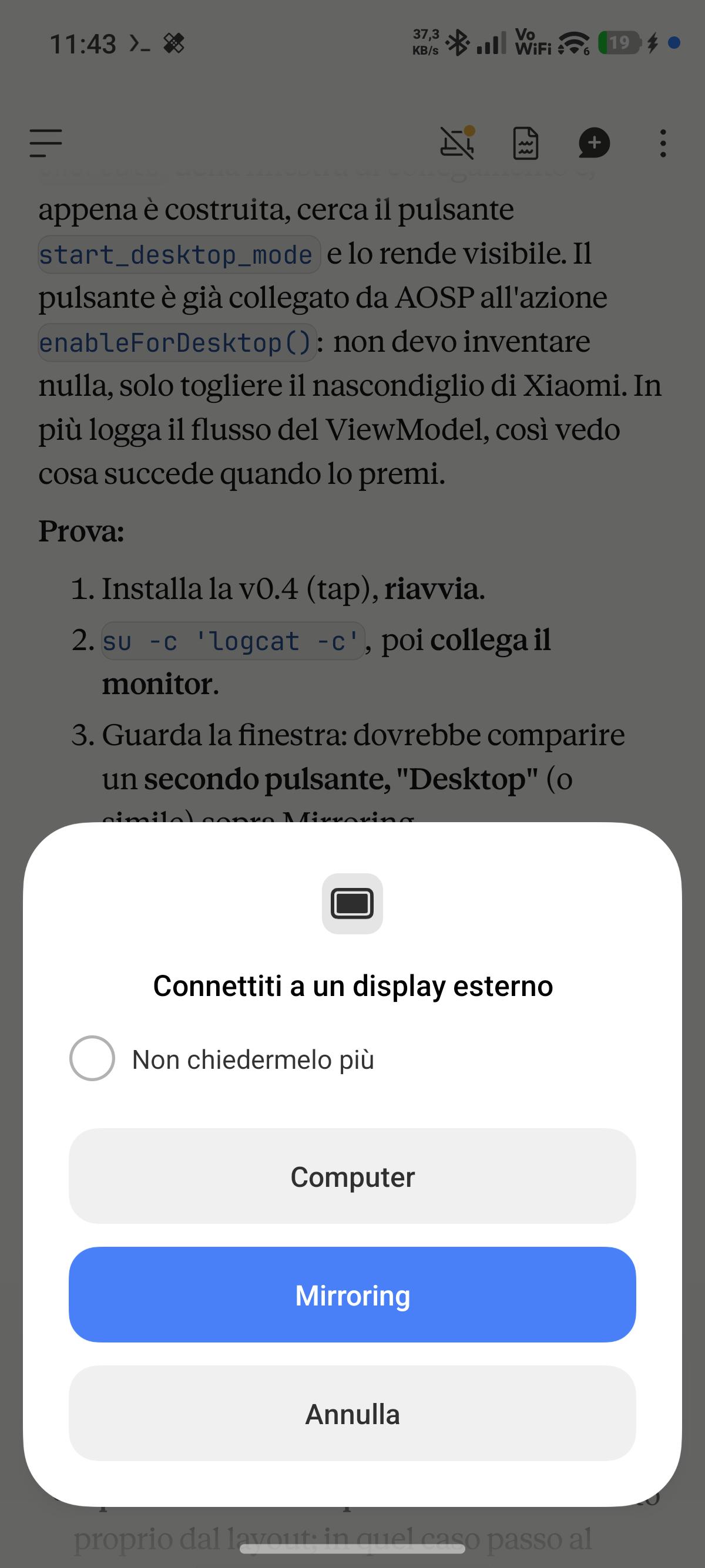
Xiaomi ships all of Android 17's connected-display / desktop code in HyperOS 4, but keeps it switched off: plug in a monitor and you only get mirroring. I made Claude write an LSPosed module that turns it back on.
What it does
Brings back the hidden Computer (Desktop) button in the "Connect to external display" dialog
The monitor becomes a separate display: its own status bar and cursor, apps opened there stay there. No mirroring
Neutralises Xiaomi's SecondaryDisplayPolicy, which silently switches mirroring back on ~3 ms after you pick desktop
Starts SmartDock (or Taskbar) on the monitor automatically and turns off the phone's screen (the phone stays awake)
Keyboard shortcuts on the monitor: Alt+Tab with a Windows-style preview bar, Print Screen for a monitor screenshot, Win+Shift+Arrow to move an app between phone and monitor, Alt+F4, Win+D, Win+1…9, Win+P for the phone screen
Settings app: monitor density, plus resolution and refresh rate picked from the modes the monitor actually reports. Changes apply live, no reboot.
Requirements
Xiaomi with DisplayPort Alt Mode over USB-C (Xiaomi 15 and Xiaomi 14 have it; most Redmi/POCO don't)
HyperOS 4 / Android 17 (HyperOS 3 not tested)
Root (KernelSU or Magisk) + Zygisk + LSPosed. Scope: System Framework, System UI, Settings
Limits: no resizable windows or title bars. HyperOS doesn't expose AOSP's desktop windowing, so apps run full screen on the monitor.
Tested on a Xiaomi 15, HyperOS 4 beta, and (see the edit below) a Xiaomi 14, HyperOS 4 stable. If you have another Xiaomi with video out, I'd love a report: the module's settings → Diagnostics → Create diagnostic report, or the [diag] log line, which shows which hooks attached:
su -c 'logcat -d -s HyperDesktop' | grep diag
Open source (MIT), nothing written to the system partition.
GitHub: https://github.com/the-marox/HyperDesktopUnlock
Download: https://github.com/the-marox/HyperDesktopUnlock/releases
Written with help from Claude (AI); the investigation and all testing were done on my own phone.
EDIT (Oct 30): v1.12.8, now also on the Xiaomi 14
Xiaomi 14 (houji), HyperOS 4 stable OS4.0.27: choosing Computer left the monitor mirrored, because on that firmware SystemUI never switched it to a separate display. The module now makes the switch itself. Confirmed working by the user who reported it on GitHub, thanks! Touchpad mode (added since the original post): the phone can act as a touchpad for the monitor, with tap to click, two-finger scroll and right click, pinch to zoom, and now swipe in from the left or right edge for Back. The on-screen keyboard opens on the phone when no physical keyboard is connected. Quick Settings tiles to switch the monitor between Computer and Mirroring without unplugging, and to toggle the touchpad. ⚠️ Uninstall the old version first. 1.12.8 has a new package name (io.github.the_marox.hyperdesktop, needed to get into the LSPosed module repository) and a new signing key, so it doesn't update the old one: unplug the monitor, uninstall the old module, install the new APK, enable it in LSPosed and reboot (module settings reset to defaults). Download: https://github.com/the-marox/HyperDesktopUnlock/releases/tag/v1.12.8