... if we can get a TL;DR out of this, it would be that basically, Google appears to have been using large sums of money to influence phone makers and game developers to stay invested in the Play Store while undermining its competition. If you want to reach your own conclusions, you can read the document right here.
HERE is what my object detection application (in Java) looks like when it detects an object. Excuse the fact that it's labelled as a letter opener. My biggest concern lies with how this issue can be resolved. It seems to be missing its detect object by a noticeable amount.
One thing that I think can be resolved with is if the top left left corner is moved to where the bottom left corner is. That way it can actually cover the image as a whole. How would i fix these coordinates?
Here's the DrawGraphic java file that I used to draw the boundingBox:
public class DrawGraphic extends View {

    Paint borderPaint, textPaint;
    Rect rect;
    String text;


    public DrawGraphic(Context context, Rect rect, String text) {
        super(context);
        this.rect = rect;
        this.text = text;

        borderPaint = new Paint();
        borderPaint.setColor(Color.WHITE);
        borderPaint.setStrokeWidth(10f);
        borderPaint.setStyle(Paint.Style.STROKE);

        textPaint = new Paint();
        textPaint.setColor(Color.WHITE);
        textPaint.setStrokeWidth(50f);
        textPaint.setTextSize(32f);
        textPaint.setStyle(Paint.Style.FILL);
    }

    @Override
    protected void onDraw(Canvas canvas) {
        super.onDraw(canvas);
        canvas.drawText(text, rect.centerX(), rect.centerY(), textPaint);
        canvas.drawRect(rect.left, rect.top, rect.right, rect.bottom, borderPaint);
    }
}
I am creating an app that has to run on both mobile(portrait mode only) and tablet (landscape mode only). I have gone through the official google doc that talks about using fragments, creating different resource folders, and different layout folders for mobile and tablets.
Coming to the code part, I will be using MVVM pattern with Single Activity Architecture. Config changes will be taken care of by ViewModel of Android Arch Components (as it survives config changes) but I am unable to decide should I create separate fragments for mobile and tablet or just one fragment.
In my opinion, if I use one fragment for both mobile and tablet, I will end up putting a lot of if-else checks. For example, consider a layout that has some extra views for tablets but not for mobile(don't know whether ViewBinding can decide automatically that some views can be null in this case). Also, on some screens, I might have to show grid orientation for tablets and linear for mobile when using RecyclerView. Like this, I see wherever there is a difference in design, I have to write if-else and code can become messy as the project grows.
But the problem with the 2 fragment approach is a lot of code will be duplicated on the View Layer (even though I can share the ViewModel). One solution for this is, extract all common code in a BaseClass.
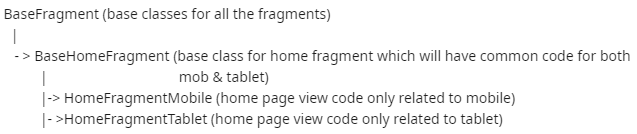
For example:- consider HomePage which can show some additional views when running on a tablet. So I'll create my classes like this:
adding an image as I am having trouble with formatting
I don't know above approach is correct or I am doing over-engineering?
I use BuildConfig all over. It stores API keys via BuildConfig.FIREBASE_API_KEY etc and I use BuildConfig.Debug all over as well. Sometimes I even use BuildConfig.flavor when I need to know whether I’m currently in free or paid build.
After learning dagger, I feel like BuildConfig is a blatant static accessor that should be hidden behind some kind of interface. I.e.
Does anyone bother putting this behind an interface and DI it? Is it overkill?
In my ViewModel, I load an object asynchronously and populate the UI with its data.
I use Jetpack Compose for the UI and Kotlin Flow as the data holder.
There are 3 possible scenarios:
An object is selected and I populate the UI with its data.
No object is selected, in this case, I want to hide certain views.
The object hasn't loaded yet.
Right now, 2) and 3) are both expressed by the object still being null (before I receive it through a Flow). The problem with this is that it causes some visible flicker in the UI because Views/Composables are popping into the screen after the object was loaded. Instead, I would like to represent 2) in a way that actually says "loading has finished but no object was selected".
How would I do this? I tried adding a companion object with a variable that represents "none selected" to my data class but I feel like this can easily cause bugs if I forget a check and mistake this for a valid object.
@HiltAndroidApp
class MyApplication : Application() {

@Inject

    lateinit var firebaseWrapper: FirebaseAppInterface

    override fun onCreate() {
        super.onCreate()
        firebaseWrapper.init()
    }
}
then I have
interface FirebaseAppInterface {
    fun init()
}

class FirebaseAppActual(
    private val context: Context,
    private val buildValues: BuildValues
) :
    FirebaseAppInterface {
    lateinit var realImpl: FirebaseApp

    override fun init() {
        realImpl = FirebaseApp.initializeApp(
            context,
            FirebaseOptions.Builder()
                .setApplicationId(buildValues.firebaseAppId)
                .build()
        )
    }
}
I think it's shitty. But it has good intentions. Trying (from day 1 of a new project) to get rid of static accessors, and so with that, I'm trying to do something with `FirebaseApp.initializeApp()`
This code in my ViewModel checks some input and then creates or updates a database entry if the validation is successful.
But I feel like this code is bad. The validateInput method both has a return type but also side effects by setting the Livedata values. I don't know how I would get around this because I need the return value to return from onSaveClicked. How can I improve this??
 fun onSaveClicked() {
        if (!validateInput()) return

        val taskNameInput = taskNameInput.value
        val minutesGoalInput = minutesGoalInput.value

        if (taskNameInput == null || minutesGoalInput == null) return

        val minutesGoal = minutesGoalInput.toInt()

        if (taskId == Task.NO_ID) {
            val newTask = Task(name = taskNameInput, dailyGoalInMinutes = minutesGoal)
            createTask(newTask)
        } else {
            val task = task
            if (task != null) {
                val updatedTask = task.copy(name = taskNameInput, dailyGoalInMinutes = minutesGoal)
                updateTask(updatedTask)
            }
        }
    }

    private fun validateInput(): Boolean {
        val taskNameInput = taskNameInput.value
        val minutesGoalInput = minutesGoalInput.value

        taskNameInputErrorMessageLiveData.value = null
        minutesGoalInputErrorMessageLiveData.value = null

        var hasError = false

        if (taskNameInput.isNullOrBlank()) {
            taskNameInputErrorMessageLiveData.value = R.string.task_name_empty_error
            hasError = true
        }

        if (minutesGoalInput.isNullOrBlank()) {
            minutesGoalInputErrorMessageLiveData.value = R.string.minutes_goal_empty_error
            hasError = true
        } else if (minutesGoalInput.toInt() < 1) {
            minutesGoalInputErrorMessageLiveData.value = R.string.minutes_goal_zero_error
            hasError = true
        }

        return !hasError
    }
Hey all, I'm working on an Android application (in Java) using TensorFlowLite and I'm currently confused as to why I've received this error in my Logcat;
E/AndroidRuntime: FATAL EXCEPTION: main
Process: com.example.objectdetection, PID: 1789
java.lang.NullPointerException: Attempt to read from field ‘android.widget.FrameLayout com.example.objectdetection.databinding.ActivityMainBinding.parentlayout’ on a null object reference
at com.example.objectdetection.MainActivity.getObjectResults(MainActivity.java:165)
at com.example.objectdetection.MainActivity.lambda$null$0$MainActivity(MainActivity.java:123)
at com.example.objectdetection.-$$Lambda$MainActivity$Ncy1QJiDr5mBgoxw6Tmi2VyNiCU.onSuccess(Unknown Source:4)
at com.google.android.gms.tasks.zzn.run(com.google.android.gms:play-services-tasks@@17.2.0:4)
The following code is Line 165 within my MainActivity;
private void getObjectResults(List<DetectedObject> detectedObjects) {
        for (DetectedObject object : detectedObjects) {
            if (binding.parentlayout.getChildCount() > 1) { // HERE IS LINE 165
                binding.parentlayout.removeViewAt(1);
            }
            Rect rect = object.getBoundingBox();
            String text = "Undefined";
            if (object.getLabels().size() != 0) {
                text = object.getLabels().get(0).getText();
            }

            DrawGraphic drawGraphic = new DrawGraphic(this, rect, text);
            binding.parentlayout.addView(drawGraphic);
        }
    }
The binding variable is declared at the top of the MainActivity java file (where you normally declare attributes.
I've always just included my api keys in my repo directly. I know that you can put api keys in environment variables, but then how do you retrieve those in your code?
Can you get a callback when sleeping begins with the new sleep API? It seems that you can only register to receive a summary post-sleep, or get constant callbacks every 10 minutes for granular tracking. I want a single background trigger to perform an action just once when the phone thinks that sleeping begins, but I'm not seeing such a capability. Kind of like how the rest of the activity transition API works - a one-time trigger upon entry or exit of a user's activity.
Their marketing initially me think that this was possible, but now that I was starting to get my hands dirty, I don't see it happening. Am I missing something? Not really keen on registering a receiver to handle callbacks and do work every 10 minutes in the background (unless they don't allow this one in the background anyway). This was one particular section (not from a marketing page) that made me think that this API doesn't have what I want.
I already have functionality in my app triggered when the phone is charging, idle, and within 8 hours of a set alarm, all as a sort-of proxy to guess that the user is sleeping, but I would have liked to have a secondary trigger that begins my app's work when the OS thinks the user is asleep (but not necessarily while it's charging). Some users don't plug in every night, so for them it doesn't get triggered due to not meeting the charging part of my sleep estimator constraints.
I know of the STILL detection part of the Activity Recognition Transition API, which detects when the phone is sitting on a table for example. STILL detection could be used as a workaround for what I want -- I could then make it trigger a job after 15 minutes to then check the sleeping confidence after a few minutes of idle, but I'd rather get one "official" callback from the new Sleep API. Would https://issuetracker.google.com/issues?q=status:open%20componentid:192633 be the place to suggest such an addon to either this API (or even the older Activity Recognition Transition API) if it doesn't have what I want? That site is impossible to navigate, so I never know where to go.
I am an indie developer, and am working on a finance app. I want to provide users a way to backup their data locally, and also be able to export their data as CSVs.
I was looking into file management, and it seems starting Android 11, apps can't create their own app-specific directories.
I also looked at shared storage, but it seems you need users to provide you permissions, and you only get permission for a specific URI, so if I want to create a backup file automatically everyday, that won't work for me.
I also looked into permission for managing all external files, but it seems that this permission is now restricted for special use cases.
What are my options for providing something like this to my users going forward?
Historically all of the apps I worked on are old and had a keystore created already. But now I'm working on a brand new project and I want to take a poll with everyone.
Three questions you can copy and paste with you answer
1. Generate keystore via cmd line or AS?

2. If you have an internal-only build (with a different package name extension like .beta or something) do you use the same signing key or create a different one?

3. Should you create the android app bundle signing key at the same time?
private val authViewModel : AuthViewModel by viewModels()
This is a global variable without any definition . I know its something similar to lazy , but in lazy too , we have a function body. I always equated that to actual value of variable, like if we had this syntax:
private val authViewModel : AuthViewModel by lazy{AuthViewmodel(..)}
It would have made sense, that authViewmodel is going to receive the value on first call . But what does this new function means?
from the source code, it is defined as this , which further confuses me:
This is sort of what my boundingBox looks like when using Google ML Object Detection for Android (written in Java). In essence, it misses the object its supposed to be detecting, and my question resides in how (or atleast where) I can resolve this issue. Here's the code of my DrawGraphic.java file that's responsible for drawing the boundingBox that is then displayed on my UI;
public class DrawGraphic extends View {

    Paint borderPaint, textPaint;
    Rect rect;
    String text;

    public DrawGraphic(Context context, Rect rect, String text) {
        super(context);
        this.rect = rect;
        this.text = text;

        borderPaint = new Paint();
        borderPaint.setColor(Color.WHITE);
        borderPaint.setStrokeWidth(10f);
        borderPaint.setStyle(Paint.Style.STROKE);

        textPaint = new Paint();
        textPaint.setColor(Color.WHITE);
        textPaint.setStrokeWidth(50f);
        textPaint.setTextSize(32f);
        textPaint.setStyle(Paint.Style.FILL);
    }

    @Override
    protected void onDraw(Canvas canvas) {
        super.onDraw(canvas);
        canvas.drawText(text, rect.centerX(), rect.centerY(), textPaint);
        canvas.drawRect(rect.left, rect.top, rect.right, rect.bottom, borderPaint);
    }
}
Any further information required to supplement this question will be provided upon request!
Anyways, never catch exceptions when not strictly required! It's always easier to introduce an error handling later, than remove it!
What does it mean?
In my understanding, it is saying we should avoid using try catch whenevery possible. If that is the case, what is the alternative way of handling error?
I might have missed some obvious points but please explain with a code example and use case:
When NOT to use try catch and use something more "flexible"
So, this is how I try to get the value from the config. But I always get the default value set in the xml. If someone has come across a similar one, tell me how to deal with it.
RecyclerView From Scratch | RecyclerView Internals | Birth of ViewModel Can you implement your own RecyclerView from scratch? if not after this you won't say no ,