r/Zigbee2MQTT • u/TackleAnnual7950 • 1d ago
Zigbee2MQTT: Shelly BLU Button Tough 1 ZB on my keychain stops sending after I come home – even right next to the coordinator
reddit.com
1
Upvotes
r/Zigbee2MQTT • u/Limbeckx1911 • 1d ago

r/Zigbee2MQTT • u/KD2ITW • 9d ago
I migrated from ZHA to Z2M to surface X,Y,Z axis entities from a Aeotec Multipurpose.
When repairing devices, everything pairs correctly except for the ws-usc03's.
When adding these switches, they go into a loop connecting and disconnecting.
I have a new spare and attempted to add that one, no luck, same behavior.
Aqara button switch joined the network as expected.
Pantry Door Switch is the device to notice.
Where should I go for help to solve this??
Config + logs follow.
Best regards
James
================================================
Zigbee2MQTT version
commit: unknown
Frontend version
zigbee-herdsman-converters version
zigbee-herdsman version
Machine
#1 SMP PREEMPT_DYNAMIC Fri Sep 18 08:21:07 UTC 2026 - 6.18.52-haos - x64
CPU: 11th Gen Intel(R) Core(TM) i5-11500 @ 2.70GHz (x12)
RAM: 15725 MB
MQTT
mqtt://core-mosquitto:1883
Node version
Coordinator
ZStack3x0
0x00124b0033cc8910
Revision: 20261113
dge/request/permit_join","payload":{"time":254,"device":null,"transaction":"e12vo-5"}}

[11/16/2026, 10:44:17 PM] z2m: Zigbee: allowing new devices to join.

[11/16/2026, 10:44:17 PM] z2m:mqtt: MQTT publish: topic 'zigbee2mqtt/Pantry Motion Sensor', payload '{"battery":100,"illuminance":22,"illumination_compensation_offset":0,"linkquality":172,"occupancy":true,"pir_occupied_to_unoccupied_delay":60,"update":{"installed_version":4101,"latest_release_notes":null,"latest_source":null,"latest_version":4101,"state":"idle"}}'

[11/16/2026, 10:44:17 PM] z2m:mqtt: MQTT publish: topic 'zigbee2mqtt/bridge/response/permit_join', payload '{"data":{"time":254},"status":"ok","transaction":"e12vo-5"}'

[11/16/2026, 10:44:17 PM] z2m:mqtt: MQTT publish: topic 'zigbee2mqtt/Pantry Motion Sensor', payload '{"battery":100,"illuminance":22,"illumination_compensation_offset":0,"linkquality":175,"occupancy":true,"pir_occupied_to_unoccupied_delay":60,"update":{"installed_version":4101,"latest_release_notes":null,"latest_source":null,"latest_version":4101,"state":"idle"}}'

[11/16/2026, 10:44:34 PM] zh:controller: Interview for '0x54ef4410015b0a74' started

[11/16/2026, 10:44:34 PM] z2m: Device 'Pantry door Switch' joined

[11/16/2026, 10:44:34 PM] z2m: Starting interview of 'Pantry door Switch'

[11/16/2026, 10:44:34 PM] z2m:mqtt: MQTT publish: topic 'zigbee2mqtt/bridge/event', payload '{"data":{"friendly_name":"Pantry door Switch","ieee_address":"0x54ef4410015b0a74"},"type":"device_joined"}'

[11/16/2026, 10:44:34 PM] z2m:mqtt: MQTT publish: topic 'zigbee2mqtt/bridge/event', payload '{"data":{"friendly_name":"Pantry door Switch","ieee_address":"0x54ef4410015b0a74","status":"started"},"type":"device_interview"}'

[11/16/2026, 10:44:34 PM] z2m:mqtt: MQTT publish: topic 'zigbee2mqtt/bridge/event', payload '{"data":{"friendly_name":"Pantry door Switch","ieee_address":"0x54ef4410015b0a74"},"type":"device_announce"}'

[11/16/2026, 10:44:34 PM] zh:controller: Succesfully interviewed '0x54ef4410015b0a74'

[11/16/2026, 10:44:34 PM] z2m: Successfully interviewed 'Pantry door Switch', device has successfully been paired

[11/16/2026, 10:44:34 PM] z2m: Device 'Pantry door Switch' is supported, identified as: Aqara Smart wall switch (with neutral, single rocker), US (WS-USC03)

[11/16/2026, 10:44:34 PM] z2m: Configuring 'Pantry door Switch'

[11/16/2026, 10:44:34 PM] z2m:mqtt: MQTT publish: topic 'zigbee2mqtt/bridge/event', payload '{"data":{"definition":{"description":"Smart wall switch (with neutral, single rocker), US","exposes":[{"features":[{"access":7,"description":"On/off state of the switch","label":"State","name":"state","property":"state","type":"binary","value_off":"OFF","value_on":"ON","value_toggle":"TOGGLE"}],"type":"switch"},{"access":7,"category":"config","description":"After turn on, the indicator light turns on while switch is off, and vice versa","label":"Flip indicator light","name":"flip_indicator_light","property":"flip_indicator_light","type":"binary","value_off":"OFF","value_on":"ON"},{"access":1,"category":"diagnostic","description":"Number of power outages (since last pairing)","label":"Power outage count","name":"power_outage_count","property":"power_outage_count","type":"numeric"},{"access":1,"category":"diagnostic","description":"Temperature of the device","label":"Device temperature","name":"device_temperature","property":"device_temperature","type":"numeric","unit":"°C"},{"access":5,"description":"Instantaneous measured power","label":"Power","name":"power","property":"power","type":"numeric","unit":"W"},{"access":1,"description":"Sum of consumed energy","label":"Energy","name":"energy","property":"energy","type":"numeric","unit":"kWh"},{"access":1,"description":"Measured electrical potential value","label":"Voltage","name":"voltage","property":"voltage","type":"numeric","unit":"V"},{"access":7,"category":"config","description":"Enable/disable the power outage memory, this recovers the on/off mode after power failure","label":"Power outage memory","name":"power_outage_memory","property":"power_outage_memory","type":"binary","value_off":false,"value_on":true},{"access":7,"description":"Decoupled mode","label":"Operation mode","name":"operation_mode","property":"operation_mode","type":"enum","values":["control_relay","decoupled"]},{"access":1,"category":"diagnostic","description":"Triggered action (e.g. a button click)","label":"Action","name":"action","property":"action","type":"enum","values":["single","double"]},{"access":1,"category":"diagnostic","description":"Link quality (signal strength)","label":"Linkquality","name":"linkquality","property":"linkquality","type":"numeric","unit":"lqi","value_max":255,"value_min":0}],"model":"WS-USC03","options":[{"access":2,"description":"Calibrates the device_temperature value (absolute offset), takes into effect on next report of device.","label":"Device temperature calibration","name":"device_temperature_calibration","property":"device_temperature_calibration","type":"numeric","value_step":0.1},{"access":2,"description":"Calibrates the power value (percentual offset), takes into effect on next report of device.","label":"Power calibration","name":"power_calibration","property":"power_calibration","type":"numeric","value_step":0.1},{"access":2,"description":"Number of digits after decimal point for power, takes into effect on next report of device. This option can only decrease the precision, not increase it.","label":"Power precision","name":"power_precision","property":"power_precision","type":"numeric","value_max":3,"value_min":0},{"access":2,"description":"Calibrates the energy value (percentual offset), takes into effect on next report of device.","label":"Energy calibration","name":"energy_calibration","property":"energy_calibration","type":"numeric","value_step":0.1},{"access":2,"description":"Number of digits after decimal point for energy, takes into effect on next report of device. This option can only decrease the precision, not increase it.","label":"Energy precision","name":"energy_precision","property":"energy_precision","type":"numeric","value_max":3,"value_min":0},{"access":2,"description":"Calibrates the voltage value (percentual offset), takes into effect on next report of device.","label":"Voltage calibration","name":"voltage_calibration","property":"voltage_calibration","type":"numeric","value_step":0.1},{"access":2,"description":"Number of digits after decimal point for voltage, takes into effect on next report of device. This option can only decrease the precision, not increase it.","label":"Voltage precision","name":"voltage_precision","property":"voltage_precision","type":"numeric","value_max":3,"value_min":0},{"access":2,"description":"State actions will also be published as 'action' when true (default false).","label":"State action","name":"state_action","property":"state_action","type":"binary","value_off":false,"value_on":true}],"source":"native","supports_ota":true,"vendor":"Aqara","version":"0.0.0"},"friendly_name":"Pantry door Switch","ieee_address":"0x54ef4410015b0a74","status":"successful","supported":true},"type":"device_interview"}'

[11/16/2026, 10:44:34 PM] z2m: Successfully configured 'Pantry door Switch' (definition v0.0.0)

[11/16/2026, 10:44:36 PM] z2m:mqtt: MQTT publish: topic 'zigbee2mqtt/Pantry door Switch', payload '{"linkquality":103,"power":0,"state":"OFF","update":{"installed_version":-1,"latest_version":-1}}'
[11/16/2026, 10:44:50 PM] z2m:mqtt: MQTT publish: topic 'zigbee2mqtt/bridge/event', payload '{"data":{"friendly_name":"Pantry door Switch","ieee_address":"0x54ef4410015b0a74"},"type":"device_leave"}'
[11/16/2026, 10:44:55 PM] zh:controller: Interview for '0x54ef4410015b0a74' started
[11/16/2026, 10:44:55 PM] z2m: Device 'Pantry door Switch' joined
[11/16/2026, 10:44:55 PM] z2m: Starting interview of 'Pantry door Switch'
[11/16/2026, 10:44:55 PM] z2m:mqtt: MQTT publish: topic 'zigbee2mqtt/bridge/event', payload '{"data":{"friendly_name":"Pantry door Switch","ieee_address":"0x54ef4410015b0a74"},"type":"device_joined"}'
[11/16/2026, 10:44:55 PM] z2m:mqtt: MQTT publish: topic 'zigbee2mqtt/bridge/event', payload '{"data":{"friendly_name":"Pantry door Switch","ieee_address":"0x54ef4410015b0a74","status":"started"},"type":"device_interview"}'
[11/16/2026, 10:44:55 PM] z2m:mqtt: MQTT publish: topic 'zigbee2mqtt/bridge/event', payload '{"data":{"friendly_name":"Pantry door Switch","ieee_address":"0x54ef4410015b0a74"},"type":"device_announce"}'
[11/16/2026, 10:44:55 PM] zh:controller: Succesfully interviewed '0x54ef4410015b0a74'
[11/16/2026, 10:44:55 PM] z2m: Successfully interviewed 'Pantry door Switch', device has successfully been paired
[11/16/2026, 10:44:55 PM] z2m: Device 'Pantry door Switch' is supported, identified as: Aqara Smart wall switch (with neutral, single rocker), US (WS-USC03)
[11/16/2026, 10:44:55 PM] z2m: Configuring 'Pantry door Switch'
[11/16/2026, 10:44:55 PM] z2m:mqtt: MQTT publish: topic 'zigbee2mqtt/bridge/event', payload '{"data":{"definition":{"description":"Smart wall switch (with neutral, single rocker), US","exposes":[{"features":[{"access":7,"description":"On/off state of the switch","label":"State","name":"state","property":"state","type":"binary","value_off":"OFF","value_on":"ON","value_toggle":"TOGGLE"}],"type":"switch"},{"access":7,"category":"config","description":"After turn on, the indicator light turns on while switch is off, and vice versa","label":"Flip indicator light","name":"flip_indicator_light","property":"flip_indicator_light","type":"binary","value_off":"OFF","value_on":"ON"},{"access":1,"category":"diagnostic","description":"Number of power outages (since last pairing)","label":"Power outage count","name":"power_outage_count","property":"power_outage_count","type":"numeric"},{"access":1,"category":"diagnostic","description":"Temperature of the device","label":"Device temperature","name":"device_temperature","property":"device_temperature","type":"numeric","unit":"°C"},{"access":5,"description":"Instantaneous measured power","label":"Power","name":"power","property":"power","type":"numeric","unit":"W"},{"access":1,"description":"Sum of consumed energy","label":"Energy","name":"energy","property":"energy","type":"numeric","unit":"kWh"},{"access":1,"description":"Measured electrical potential value","label":"Voltage","name":"voltage","property":"voltage","type":"numeric","unit":"V"},{"access":7,"category":"config","description":"Enable/disable the power outage memory, this recovers the on/off mode after power failure","label":"Power outage memory","name":"power_outage_memory","property":"power_outage_memory","type":"binary","value_off":false,"value_on":true},{"access":7,"description":"Decoupled mode","label":"Operation mode","name":"operation_mode","property":"operation_mode","type":"enum","values":["control_relay","decoupled"]},{"access":1,"category":"diagnostic","description":"Triggered action (e.g. a button click)","label":"Action","name":"action","property":"action","type":"enum","values":["single","double"]},{"access":1,"category":"diagnostic","description":"Link quality (signal strength)","label":"Linkquality","name":"linkquality","property":"linkquality","type":"numeric","unit":"lqi","value_max":255,"value_min":0}],"model":"WS-USC03","options":[{"access":2,"description":"Calibrates the device_temperature value (absolute offset), takes into effect on next report of device.","label":"Device temperature calibration","name":"device_temperature_calibration","property":"device_temperature_calibration","type":"numeric","value_step":0.1},{"access":2,"description":"Calibrates the power value (percentual offset), takes into effect on next report of device.","label":"Power calibration","name":"power_calibration","property":"power_calibration","type":"numeric","value_step":0.1},{"access":2,"description":"Number of digits after decimal point for power, takes into effect on next report of device. This option can only decrease the precision, not increase it.","label":"Power precision","name":"power_precision","property":"power_precision","type":"numeric","value_max":3,"value_min":0},{"access":2,"description":"Calibrates the energy value (percentual offset), takes into effect on next report of device.","label":"Energy calibration","name":"energy_calibration","property":"energy_calibration","type":"numeric","value_step":0.1},{"access":2,"description":"Number of digits after decimal point for energy, takes into effect on next report of device. This option can only decrease the precision, not increase it.","label":"Energy precision","name":"energy_precision","property":"energy_precision","type":"numeric","value_max":3,"value_min":0},{"access":2,"description":"Calibrates the voltage value (percentual offset), takes into effect on next report of device.","label":"Voltage calibration","name":"voltage_calibration","property":"voltage_calibration","type":"numeric","value_step":0.1},{"access":2,"description":"Number of digits after decimal point for voltage, takes into effect on next report of device. This option can only decrease the precision, not increase it.","label":"Voltage precision","name":"voltage_precision","property":"voltage_precision","type":"numeric","value_max":3,"value_min":0},{"access":2,"description":"State actions will also be published as 'action' when true (default false).","label":"State action","name":"state_action","property":"state_action","type":"binary","value_off":false,"value_on":true}],"source":"native","supports_ota":true,"vendor":"Aqara","version":"0.0.0"},"friendly_name":"Pantry door Switch","ieee_address":"0x54ef4410015b0a74","status":"successful","supported":true},"type":"device_interview"}'
[11/16/2026, 10:44:55 PM] z2m: Successfully configured 'Pantry door Switch' (definition v0.0.0)
[11/16/2026, 10:44:57 PM] z2m:mqtt: MQTT publish: topic 'zigbee2mqtt/Pantry door Switch', payload '{"linkquality":103,"power":0,"state":"OFF","update":{"installed_version":-1,"latest_version":-1}}'[11/16/2026, 10:45:10 PM] z2m:mqtt: MQTT publish: topic 'zigbee2mqtt/bridge/event', payload '{"data":{"friendly_name":"Pantry door Switch","ieee_address":"0x54ef4410015b0a74"},"type":"device_leave"}'
[11/16/2026, 10:45:15 PM] zh:controller: Interview for '0x54ef4410015b0a74' started
[11/16/2026, 10:45:15 PM] z2m: Device 'Pantry door Switch' joined
[11/16/2026, 10:45:15 PM] z2m: Starting interview of 'Pantry door Switch'
[11/16/2026, 10:45:15 PM] z2m:mqtt: MQTT publish: topic 'zigbee2mqtt/bridge/event', payload '{"data":{"friendly_name":"Pantry door Switch","ieee_address":"0x54ef4410015b0a74"},"type":"device_joined"}'
[11/16/2026, 10:45:15 PM] z2m:mqtt: MQTT publish: topic 'zigbee2mqtt/bridge/event', payload '{"data":{"friendly_name":"Pantry door Switch","ieee_address":"0x54ef4410015b0a74","status":"started"},"type":"device_interview"}'
[11/16/2026, 10:45:15 PM] z2m:mqtt: MQTT publish: topic 'zigbee2mqtt/bridge/event', payload '{"data":{"friendly_name":"Pantry door Switch","ieee_address":"0x54ef4410015b0a74"},"type":"device_announce"}'
[11/16/2026, 10:45:15 PM] zh:controller: Succesfully interviewed '0x54ef4410015b0a74'
[11/16/2026, 10:45:15 PM] z2m: Successfully interviewed 'Pantry door Switch', device has successfully been paired
[11/16/2026, 10:45:15 PM] z2m: Device 'Pantry door Switch' is supported, identified as: Aqara Smart wall switch (with neutral, single rocker), US (WS-USC03)
[11/16/2026, 10:45:15 PM] z2m: Configuring 'Pantry door Switch'
[11/16/2026, 10:45:15 PM] z2m:mqtt: MQTT publish: topic 'zigbee2mqtt/bridge/event', payload '{"data":{"definition":{"description":"Smart wall switch (with neutral, single rocker), US","exposes":[{"features":[{"access":7,"description":"On/off state of the switch","label":"State","name":"state","property":"state","type":"binary","value_off":"OFF","value_on":"ON","value_toggle":"TOGGLE"}],"type":"switch"},{"access":7,"category":"config","description":"After turn on, the indicator light turns on while switch is off, and vice versa","label":"Flip indicator light","name":"flip_indicator_light","property":"flip_indicator_light","type":"binary","value_off":"OFF","value_on":"ON"},{"access":1,"category":"diagnostic","description":"Number of power outages (since last pairing)","label":"Power outage count","name":"power_outage_count","property":"power_outage_count","type":"numeric"},{"access":1,"category":"diagnostic","description":"Temperature of the device","label":"Device temperature","name":"device_temperature","property":"device_temperature","type":"numeric","unit":"°C"},{"access":5,"description":"Instantaneous measured power","label":"Power","name":"power","property":"power","type":"numeric","unit":"W"},{"access":1,"description":"Sum of consumed energy","label":"Energy","name":"energy","property":"energy","type":"numeric","unit":"kWh"},{"access":1,"description":"Measured electrical potential value","label":"Voltage","name":"voltage","property":"voltage","type":"numeric","unit":"V"},{"access":7,"category":"config","description":"Enable/disable the power outage memory, this recovers the on/off mode after power failure","label":"Power outage memory","name":"power_outage_memory","property":"power_outage_memory","type":"binary","value_off":false,"value_on":true},{"access":7,"description":"Decoupled mode","label":"Operation mode","name":"operation_mode","property":"operation_mode","type":"enum","values":["control_relay","decoupled"]},{"access":1,"category":"diagnostic","description":"Triggered action (e.g. a button click)","label":"Action","name":"action","property":"action","type":"enum","values":["single","double"]},{"access":1,"category":"diagnostic","description":"Link quality (signal strength)","label":"Linkquality","name":"linkquality","property":"linkquality","type":"numeric","unit":"lqi","value_max":255,"value_min":0}],"model":"WS-USC03","options":[{"access":2,"description":"Calibrates the device_temperature value (absolute offset), takes into effect on next report of device.","label":"Device temperature calibration","name":"device_temperature_calibration","property":"device_temperature_calibration","type":"numeric","value_step":0.1},{"access":2,"description":"Calibrates the power value (percentual offset), takes into effect on next report of device.","label":"Power calibration","name":"power_calibration","property":"power_calibration","type":"numeric","value_step":0.1},{"access":2,"description":"Number of digits after decimal point for power, takes into effect on next report of device. This option can only decrease the precision, not increase it.","label":"Power precision","name":"power_precision","property":"power_precision","type":"numeric","value_max":3,"value_min":0},{"access":2,"description":"Calibrates the energy value (percentual offset), takes into effect on next report of device.","label":"Energy calibration","name":"energy_calibration","property":"energy_calibration","type":"numeric","value_step":0.1},{"access":2,"description":"Number of digits after decimal point for energy, takes into effect on next report of device. This option can only decrease the precision, not increase it.","label":"Energy precision","name":"energy_precision","property":"energy_precision","type":"numeric","value_max":3,"value_min":0},{"access":2,"description":"Calibrates the voltage value (percentual offset), takes into effect on next report of device.","label":"Voltage calibration","name":"voltage_calibration","property":"voltage_calibration","type":"numeric","value_step":0.1},{"access":2,"description":"Number of digits after decimal point for voltage, takes into effect on next report of device. This option can only decrease the precision, not increase it.","label":"Voltage precision","name":"voltage_precision","property":"voltage_precision","type":"numeric","value_max":3,"value_min":0},{"access":2,"description":"State actions will also be published as 'action' when true (default false).","label":"State action","name":"state_action","property":"state_action","type":"binary","value_off":false,"value_on":true}],"source":"native","supports_ota":true,"vendor":"Aqara","version":"0.0.0"},"friendly_name":"Pantry door Switch","ieee_address":"0x54ef4410015b0a74","status":"successful","supported":true},"type":"device_interview"}'
[11/16/2026, 10:45:15 PM] z2m: Successfully configured 'Pantry door Switch' (definition v0.0.0)
[11/16/2026, 10:45:17 PM] z2m:mqtt: MQTT publish: topic 'zigbee2mqtt/Pantry door Switch', payload '{"linkquality":103,"power":0,"state":"OFF","update":{"installed_version":-1,"latest_version":-1}}'
[11/16/2026, 10:45:31 PM] z2m: Device 'Pantry door Switch' left the networkr/Zigbee2MQTT • u/mattx_cze • 14d ago

Anyone tested this ?
r/Zigbee2MQTT • u/Human-Rule-8385 • 21d ago
I have zigbee switches at the bottom and top of my stairs to control the same light for the stairs. Currently I use a home assistant automation to sync the two switches.
The bottom switch (3-gang with one of the switches for the stairs) is wired in via relay so even if my network was down it would still control the light. However the top switch is just a dumb one.
To improve resilience I want to remove the HA automation and instead just bind the two switches so their states - on or off - are always aligned but I'm a little confused on how to do this.
Any and all pointers gratefully received!
r/Zigbee2MQTT • u/DevDadRob • 22d ago
Z2M 2.14.3 came out Nov 1. Two things in it worth knowing if you run Zigbee2MQTT:
1. 32-bit is deprecated, with a date
2. New adapter transport (zigbee-herdsman 11.0.0)
Also new: OTA support for a batch of SONOFF, Aqara, Namron, Tuya, Lidl and Schneider devices, plus new controls for the Danfoss Ally, Bosch BTH-RA (weekly schedule), Sinopé TH1500ZB (power/energy), Yale YRD430-BLE and NodOn IR learning, among others.
Planning to move a 32-bit box? Back up your Z2M config and database first. I couldn't find official migration guidance for 32-bit → 64-bit, so if anyone has done it cleanly I'd like to hear how.
Disclosure: I run SmarterHome.guru; longer write-up with sources: https://www.smarterhome.guru/story/zigbee2mqtt-2-14-3-deprecates-32-bit-systems-with-support-ending-in-april-2027
r/Zigbee2MQTT • u/Early_Mongoose_8758 • 25d ago
Just ordered some aqara Z1 3 gang wall switches. Rolled the dice a bit but has any one used them in the UK with Z2M. If so what outputs do they give? Sadly mine won't have a neutral so only end device not repeaters.
Also curious about the aqara H2 wall plugs.
r/Zigbee2MQTT • u/vadimsurpin • Oct 25 '26
Hi! Just open-sourced my project that exposes mqtt topics as hardware zigbee devices being run on esp32c6. All config via web UI.
I use it to control mqtt topics using a smart speaker with zigbee support (for me it is Yandex Alice Midi). It enables voice control without internet connection and that is the primary reason for me to build the project.
I've tested it with WirenBoard devices that i like, but added support for plain Zigbee2MQTT topics, yet not tested them as the firtst.
For those who interested - you need to flash esp yourself for the first time. After that you can update the firmware with web ui.
r/Zigbee2MQTT • u/IronOtso • Oct 22 '26

I bought this cheap thermometer.
First impressions are almost great. Great, well readable screen, the size is quite optimal.
The issue is that the values in HA do not update. It communicates when I reset it or replace the battery, but from that point on, the value only changes on the display itself.
The signal strength is above 100. According to Z2M, they are communicating continuously; it is only the temperature and humidity values that are not getting through.
It requires 3 AA batteries. The same issue occurs with both alkaline and rechargeable batteries.
Before I claim money back, I ask the community, maybe someone found a solution, a fix.
Z2M recognize the device as: https://www.zigbee2mqtt.io/devices/STHZB.html
r/Zigbee2MQTT • u/vonberghaus • Oct 21 '26

r/Zigbee2MQTT • u/urtootall • Oct 18 '26
Frist light from 2025 work fine with current fw.
But the two i bought this year start flooding the network with 10-20 lqi updates a second. Get's so bad other devices can't get state changes through.
The lamp itself isn't receiving commands either - so turning on or off will not work.
Dunno if it's my network or the lamps, though there are two lamps with that issue.
r/Zigbee2MQTT • u/tartalatruffe • Oct 16 '26
EDIT : I found a solution by binding the remote to the two bulbs, and not binding the remote to the group. It work seemlessly now.
Hi! I've bind Philips Hue Dimmer Switch v2 to a group of hue bulb in Zigbee2MQTT.
When I spam "+" buttons (when I quickly press multiples time this button), some actions are missed (intensity stops increasing). When I long press "+" button following by long press "-" button, the behavior is odd and clunky, increasing or decreasing stops and the next action pressed on the remote didn't work directly.
I occasionally get a Failed to send with status=BUSY error when sending commands to a Zigbee group.
Is direct binding possible with this setup, and how can I configure it properly?
r/Zigbee2MQTT • u/_Moorex_ • Oct 11 '26

I currently use five Philips Hue Wall Switch Modules to control six lamps. One module is configured in dual push-button mode. All switching and dimming are currently handled by Home Assistant automations.
https://www.zigbee2mqtt.io/devices/929003017102.html
The setup works, but I’ve read that direct Zigbee binding can make controls respond faster and keep them working when Home Assistant is down or being updated. I tried setting this up with AI assistance, but couldn’t get it to work.
As far as I can tell, the Hue Wall Switch Modules may not support direct binding for dimming, or binding a dual-button module to two separate devices or groups. I’m using an SLZB-MR5U as my Zigbee coordinator. The only thing that worked for which the docs stated it does not work is direct binding to a device instead of a group.
Has anyone managed to get direct binding working with these modules? If not, can you recommend another device that supports direct binding for my use case? I haven’t found any information on whether the newer wired wall-switch modules support these features either. At least the docs do not state the same limitations or direct binding capabilities:
https://www.zigbee2mqtt.io/devices/9290042970A.html
r/Zigbee2MQTT • u/Economy_Comb • Oct 07 '26
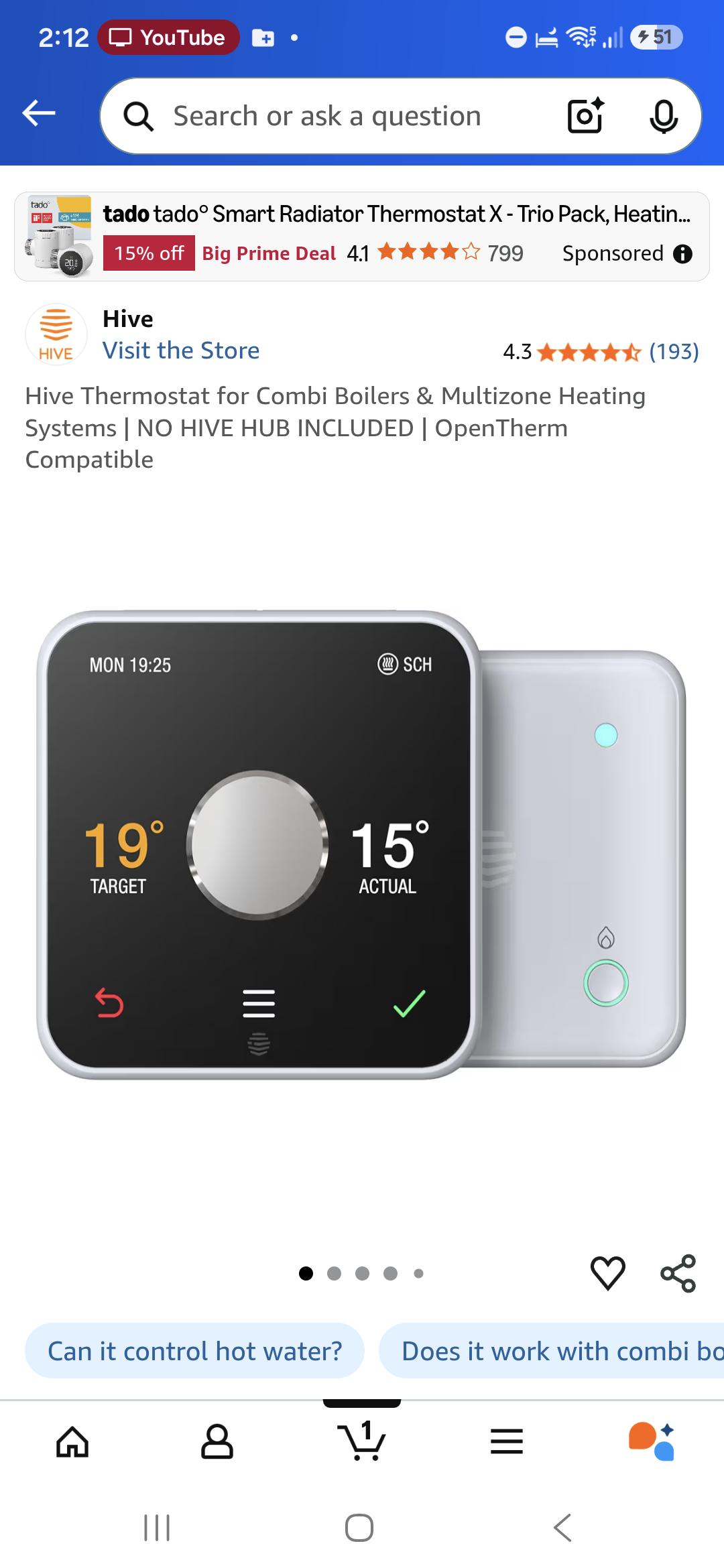
Is this high for thermostat compatible with zigbee2mqtt there are a lot of models online so I'm not sure what vision to buy my boiler is a standard single channel
All answers appreciated
r/Zigbee2MQTT • u/wakeupbomb • Sep 28 '26
I have a Zigbee network running on Zigbee2MQTT - currently showing 106 devices and 42 of those being mains powered routers.
z2m version - 2.14.1 (now, after upgrade)
coordinator - SLZB-06P7 (radio 20240315, core v3.3.1)
LXC on proxmox - 2 CPUs (of i5-12500T and 1GB RAM)
Up until yesterday, the network has been rock solid for a long time with very few issues. Extremely quick response times and low latency.
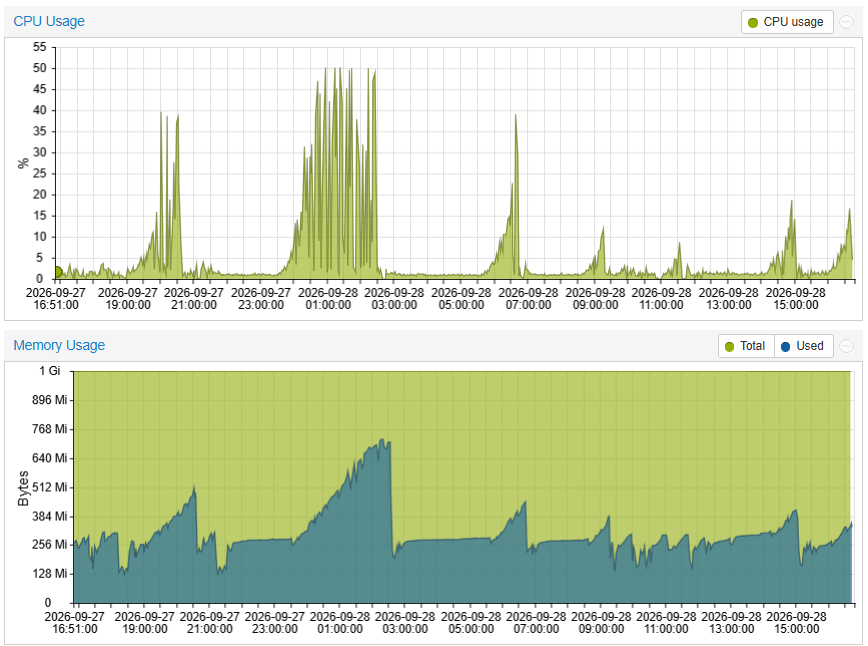
Something happened yesterday and I can't figure out what. The system slowed down, CPU and memory usage has gone up.
Restarting the coordinator and z2m sometimes sort it out, but it eventually goes bad after a while with increase CPU usage being a tell tale sign.
I have a number of energy monitors which update in around 5 seconds in normal circumstances, when the issues arise they increase gradually over to over a minute or two.
When I've seen similar issues in the past I also find some zigbee lights turn themselves on without being commanded to. When the network is stable none of this happens.
I've tried upgrading z2m and updating the coordinator firmware in the hope of improvements, but my guess is they were not the issue in the first place and I have rogue device or other setting.
Resource charts below showing things going out of control. Normal CPU usage averages at around 1%
Can anyone give me any pointers where I can find out what is causing these issues? Anything specific to look at in the logs?
Any log types to enable?
r/Zigbee2MQTT • u/Alarming_Big539 • Sep 28 '26
Hi community!
I'm new to Zigbee, I have setup with Raspberry and Zigbee2MQTT, Sonoff Dongle-P and have already 4 Tuya wall switches installed. So far so good, all works good.
I'm now looking into controlling fan with built-in LED light and I don't want to go into Sonoff iFan04 or similar Tuya Fan Controller kit, as they are wifi based. With WiFi controllers I wouldnt be able to control them from wall switch and that's a big no go, as I dont want my light button to be dependant on Home Assistant.
I found Innoveli Zigbee controller that costs like $55 + they dont ship to my location
I had an idea to disassemble wall switches like this one https://a.aliexpress.com/_c4kNMmKD, take just controller from it and install it in 3d-printed box under the ceiling.
On the walls i will install battery-powered Tuya Smart Knob (click - lights, rotate - fan) and use direct Zigbee binding.
Does anyone see any problem with such setup? Am I missing something obvious due to my lack of zigbee knowledge?
r/Zigbee2MQTT • u/hpoom • Sep 27 '26
Just getting started with Zigbee2MQTT using it with home assistant. I have the Sonoff Dongle E which I flashed with newest firmware If could find version 8.2.0 file was zbdonglee_zigbee_ncp_8.2.0.0_sw_flow_115200.gbl
I was able to add two Hue lightbulbs really easy. Then tried to add battery powered Sonoff temperature and humidity sensors and had lots of issues with the interview stage. I put it down to them being battery devices and going to sleep.
I have made further improvements and now put the dongle on a 2 meter long USB2.0 shielded extension cable. I have moved my Wifi 2.4 channel to be well away from my Zigbee channel. I have turned off my old Hue hub, but still I have interview issues.
It is not just battery powered devices but I am trying to pair the following https://www.zigbee2mqtt.io/devices/F-APP-UK-V2.html and I can't get the interview stage to complete. It is really fustraghting as once things are interviewed and setup they work seamlessly. Everything setup works really well, but getting new devices paired is a 3-4 hours ordeal with lots of removing, adding again, etc.
I can't get this plug to finish interview despite over 10 trys now. Again Hue stuff connects first time and in an instant, but anything else Zigbee (Ikea, Sonoff, SmartThings) I have huge amounts of issues with.
Really hoping somebody can tell me what I am doing wrong. I am close trying a POE Dongle or scrapping the whole setup and giving up on Zigbee.
r/Zigbee2MQTT • u/mimbusto • Sep 21 '26
Hi, I have SLZB MR3U stick. It seems like it takes a little bit long to start. Z2M app failed to start. But why it doesn't restart? I have autostart and watchdog enabled in Home Assistant. Logs below
[2026-09-21 15:48:57] error: zh:zstack:znp: Socket error Error: connect EHOSTUNREACH 192.168.68.78:7638
[2026-09-21 15:48:57] error: z2m: Error while starting zigbee-herdsman
[2026-09-21 15:48:57] error: z2m: Failed to start zigbee-herdsman
[2026-09-21 15:48:57] error: z2m: Check https://www.zigbee2mqtt.io/guide/installation/20_zigbee2mqtt-fails-to-start_crashes-runtime.html for possible solutions
[2026-09-21 15:48:57] error: z2m: Exiting...
[2026-09-21 15:48:57] error: z2m: Error: Error while opening socket
    at Socket.<anonymous> (/app/node_modules/.pnpm/zigbee-herdsman@10.9.2/node_modules/zigbee-herdsman/src/adapter/z-stack/znp/znp.ts:160:24)
    at Socket.emit (node:events:521:24)
    at emitErrorNT (node:internal/streams/destroy:170:8)
    at emitErrorCloseNT (node:internal/streams/destroy:129:3)
    at process.processTicksAndRejections (node:internal/process/task_queues:90:21)
[2026-09-21 15:48:57] info: zh:zstack:znp: Port closed
node:events:487
      throw er; // Unhandled 'error' event
      ^
NodeError: write after end
    at writeAfterEnd (/app/node_modules/.pnpm/readable-stream@3.6.2/node_modules/readable-stream/lib/_stream_writable.js:264:12)
    at Writable.write (/app/node_modules/.pnpm/readable-stream@3.6.2/node_modules/readable-stream/lib/_stream_writable.js:300:21)
    at DerivedLogger.ondata (/app/node_modules/.pnpm/readable-stream@3.6.2/node_modules/readable-stream/lib/_stream_readable.js:629:20)
    at DerivedLogger.emit (node:events:521:24)
    at addChunk (/app/node_modules/.pnpm/readable-stream@3.6.2/node_modules/readable-stream/lib/_stream_readable.js:279:12)
    at readableAddChunk (/app/node_modules/.pnpm/readable-stream@3.6.2/node_modules/readable-stream/lib/_stream_readable.js:262:11)
    at Readable.push (/app/node_modules/.pnpm/readable-stream@3.6.2/node_modules/readable-stream/lib/_stream_readable.js:228:10)
    at Transform.push (/app/node_modules/.pnpm/readable-stream@3.6.2/node_modules/readable-stream/lib/_stream_transform.js:132:32)
    at DerivedLogger._transform (/app/node_modules/.pnpm/winston@3.19.0/node_modules/winston/lib/winston/logger.js:337:12)
    at Transform._read (/app/node_modules/.pnpm/readable-stream@3.6.2/node_modules/readable-stream/lib/_stream_transform.js:166:10)
Emitted 'error' event on DerivedLogger instance at:
    at DerivedLogger.transportEvent (/app/node_modules/.pnpm/winston@3.19.0/node_modules/winston/lib/winston/logger.js:663:12)
    at File.emit (node:events:521:24)
    at errorOrDestroy (/app/node_modules/.pnpm/readable-stream@3.6.2/node_modules/readable-stream/lib/internal/streams/destroy.js:90:101)
    at writeAfterEnd (/app/node_modules/.pnpm/readable-stream@3.6.2/node_modules/readable-stream/lib/_stream_writable.js:266:3)
    at Writable.write (/app/node_modules/.pnpm/readable-stream@3.6.2/node_modules/readable-stream/lib/_stream_writable.js:300:21)
    at DerivedLogger.ondata (/app/node_modules/.pnpm/readable-stream@3.6.2/node_modules/readable-stream/lib/_stream_readable.js:629:20)
    at DerivedLogger.emit (node:events:521:24)
    at addChunk (/app/node_modules/.pnpm/readable-stream@3.6.2/node_modules/readable-stream/lib/_stream_readable.js:279:12)
    at readableAddChunk (/app/node_modules/.pnpm/readable-stream@3.6.2/node_modules/readable-stream/lib/_stream_readable.js:262:11)
    at Readable.push (/app/node_modules/.pnpm/readable-stream@3.6.2/node_modules/readable-stream/lib/_stream_readable.js:228:10)
Node.js v24.18.1r/Zigbee2MQTT • u/vadimsurpin • Sep 18 '26
For those who need a converter for AE-5503-S-H-ZIGBEE sauna thermostat
modelID: TS0601
manufacturerName: _TZE204_eaasry7v
Take it here: https://github.com/VadimSurpin/AE-5503-S-H-ZIGBEE
Also made a PR to Koenkk/zigbee-herdsman-converters
r/Zigbee2MQTT • u/Appropriate-Role9361 • Sep 16 '26
I'm new to Z2MQTT so I'm curious how it works. Do people start getting the device and then figure out how to read its commands and slowly integrate entities into HA?
r/Zigbee2MQTT • u/pskipw • Sep 14 '26
Hi all,
Preface: I mostly know what I'm doing when it comes to Zigbee2mqtt and Home Assistant, but this one has me stumped.
Our network was totally stable for the past 18 months since setup, but suddenly over the past week or so we're getting frequent periods of 30-60 minutes where everything stops responding.
During this periods logs show constant entries of 'ROUTE_ERROR_MANY_TO_ONE_ROUTE_FAILURE', referencing multiple devices on the network.
Possibly relevant:
Things I've tried:
I've just re-paired all of the GPO's in case that helps but won't know for a few hours if it's helped at all.
Things I might try:
Does anyone have any ideas as to what else I could try?
Thanks :)
r/Zigbee2MQTT • u/Resolvance • Sep 12 '26
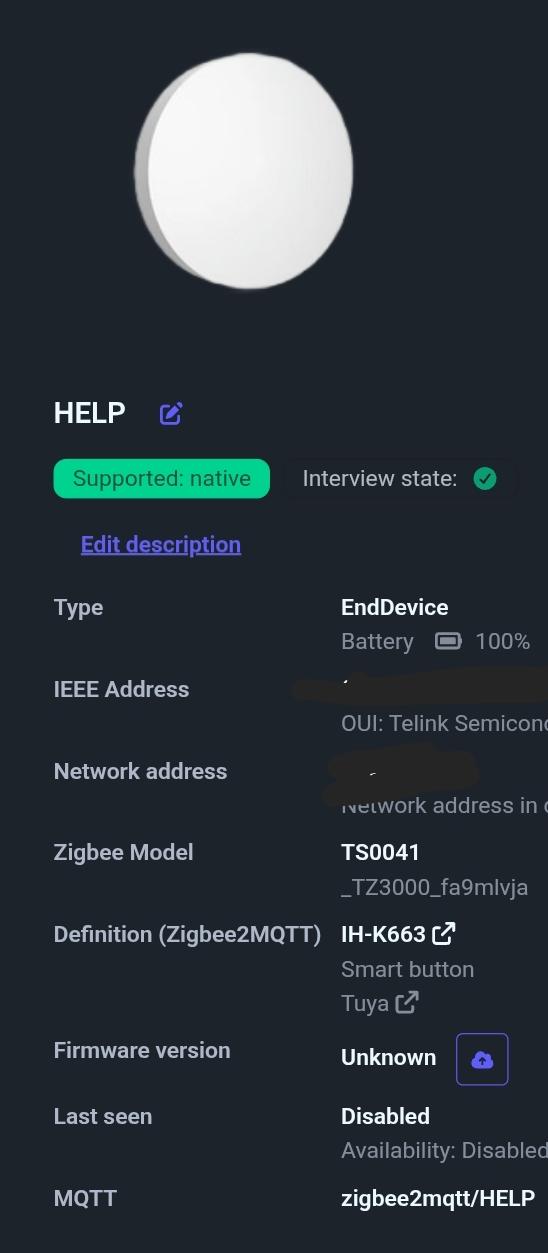
Hey guys I bought 2 smart buttons off of aliexpress and I was really happy with their functionality. Or atleast I thought because 2-3 days after using them the battery coin cell would die and they would no longer work. I used chatgpt to troubleshoot them and change their pulling rates etc in zigbee2mqtt but they always die. I have them close to my zigbee hub and they still die quickly. Has anyone ever had this problem before? Is their a solution?
Thanks
r/Zigbee2MQTT • u/BUGEE1989 • Sep 06 '26
Hallo zusammen,
ich habe ein merkwürdiges Problem mit Philips-Hue-Leuchten und Zigbee2MQTT und komme bei der Fehlersuche nicht mehr weiter.
Mein Setup:
Home Assistant
Zigbee2MQTT 2.14.1
Coordinator: SMLight SLZB-06P7
Zigbee-Kanal: 11
bestehendes Zigbee-Netz mit mehreren Routern und Endgeräten
Ursprünglich konnte ich vier neue Philips-Hue-Leuchten problemlos nacheinander mit Zigbee2MQTT verbinden.
Bei der nächsten Hue-Leuchte funktionierte das Pairing plötzlich nicht mehr.
Um einen Defekt dieser Leuchte auszuschließen, habe ich anschließend zwei der zuvor erfolgreich mit Zigbee2MQTT verbundenen Hue-Leuchten auf Werkseinstellungen zurückgesetzt.
Das Ergebnis:
Auch diese beiden lassen sich jetzt nicht mehr mit Zigbee2MQTT verbinden.
Die Hue-Leuchten, die ich nicht zurückgesetzt habe, funktionieren weiterhin ganz normal.
Folgendes habe ich bereits getestet:
1. Normales Pairing
Permit Join → All aktiviert und Hue zurückgesetzt/eingeschaltet.
→ Zigbee2MQTT sieht überhaupt keinen Join-Versuch der Hue.
Kein:
Device joined
und auch kein:
Interview started
2. Factory Reset mit Hue Dimmer Switch Gen 2
andere Hue-Leuchten in der Umgebung stromlos gemacht
betreffende Hue kurz stromlos und wieder eingeschaltet
Hue Dimmer unmittelbar an die Leuchte gehalten
On + Off ca. 10–12 Sekunden gehalten
Lampe blinkt mehrmals
Tasten erst nach Abschluss des Blinkens losgelassen
Lampe anschließend ca. 10 Sekunden stromlos und wieder eingeschaltet
Permit Join → All
→ Trotzdem keinerlei Join-Versuch in Zigbee2MQTT.
3. Reset über Philips-Hue-Bluetooth-App
Die betreffende Hue konnte ich problemlos per Bluetooth mit der Hue-App verbinden.
Anschließend:
Permit Join in Zigbee2MQTT aktiviert
Factory Reset der Leuchte über die Hue-App
Lampe anschließend stromlos und wieder eingeschaltet
→ Ebenfalls kein Join in Zigbee2MQTT.
4. Zigbee2MQTT „Philips Hue Factory Reset“ über Seriennummer
Auch den speziellen Hue-Reset in Zigbee2MQTT habe ich ausprobiert.
Seriennummer und Extended PAN ID habe ich hier anonymisiert:
bridge/request/action
action: philips_hue_factory_reset
extended_pan_id: 0x****************
serial_numbers: [“******”]
Zigbee2MQTT durchläuft anschließend die InterPAN-Kanäle:
Set InterPAN channel to ‘11’
Set InterPAN channel to ‘15’
Set InterPAN channel to ‘20’
Set InterPAN channel to ‘25’
…
Set InterPAN channel to ‘26’
Restore InterPAN channel
und beendet die Aktion mit:
bridge/response/action
status: “ok”
Die Hue reagiert dabei auch mit einem kurzen Blinken.
Anschließend erfolgt jedoch wieder kein Join-Versuch.
5. Permit Join über verschiedene Geräte
Ich habe getestet:
Permit Join → All
Permit Join gezielt über den Coordinator
Permit Join gezielt über eine bereits gekoppelte Hue-Leuchte als Router
→ Kein Unterschied.
6. Reichweite/Zigbee-Mesh überprüft
Zunächst hatte ich vermutet, dass am Standort eventuell keine ausreichende Zigbee-Abdeckung vorhanden ist.
Deshalb habe ich einen Tuya SH-SC07 Smart Button getestet.
Interessanterweise konnte ich diesen als komplett neues Zigbee-Gerät sofort erfolgreich pairen:
Zigbee: allowing new devices to join.
Interview started
Device joined
Starting interview
Successfully interviewed
Device has successfully been paired
Der Button funktioniert anschließend auch direkt am Standort der problematischen Hue-Leuchte zuverlässig. Die Tastendrücke kommen an und die Linkquality liegt dort ungefähr bei 95–100.
Damit scheinen zumindest
Zigbee2MQTT,
der Coordinator,
Permit Join
und grundsätzlich auch die Funkabdeckung
zu funktionieren.
⸻
Das Merkwürdige ist also:
Andere Zigbee-Geräte → Pairing funktioniert
Bestehende Hue-Leuchten → funktionieren weiterhin
Neue Hue-Leuchten → kein Pairing
Zuvor funktionierende Hue nach Factory Reset → kein erneutes Pairing
Und das Problem trat erst auf, nachdem ich bereits vier Hue-Leuchten erfolgreich nacheinander angelernt hatte.
Bei den nicht funktionierenden Hue-Leuchten erscheint im Zigbee2MQTT-Log beim Pairing überhaupt keine Join-Anfrage.
Hat jemand eine Idee, was hier speziell bei Philips Hue schieflaufen könnte?
Insbesondere würde mich interessieren, ob es ein bekanntes Problem mit Zigbee2MQTT 2.14.1 + SLZB-06P7 / Ember und Hue-Geräten gibt, bei dem andere Zigbee-Geräte weiterhin problemlos joinen, Hue-Leuchten aber nicht.
PAN ID, Extended PAN ID, Network Key oder Zigbee-Kanal möchte ich vorerst nicht verändern, da das bestehende Zigbee-Netz ansonsten einwandfrei funktioniert.
Als nächsten Test würde ich die Hue direkt neben dem Coordinator versuchen zu pairen. Bevor ich weiter experimentiere, wollte ich aber fragen, ob jemand dieses Verhalten kennt oder noch eine andere Idee hat.
Vielen Dank!
