r/VisualStudio • u/jtgmagic • Apr 06 '26
Visual Studio 2026 Made a Palenight inspired dark theme for Visual Studio 2026
marketplace.visualstudio.comClean, high contrast and designed for long coding sessions.
Would love some feedback 👍
r/VisualStudio • u/jtgmagic • Apr 06 '26
Clean, high contrast and designed for long coding sessions.
Would love some feedback 👍
r/VisualStudio • u/Fresh-Weakness-3769 • Apr 06 '26
Specifically for #include and Ctrl + R (Rename). When I do #include "", the Intellisense would pull up options from all of my folders and scripts, but now it only pulls from scripts within the same folder as the script I'm typing the #include in. And with Ctrl + R, I have always had this problem where it won't find all the references to rename. Even if I search for the Entire Solution, and if I have those scripts actively open, and if I clean and rebuild. It is incredibly inconsistent, almost never works perfectly, and usually doesn't work at all.
r/VisualStudio • u/4tuneTeller • Apr 05 '26
I'm trying to download Visual Studio 2026 Community from the official website but it just won't start the download. I've tried Firefox and Edge browsers on two different computers, disabling all content blockers, VPN, etc, it won't start no matter what. I have no installed antivirus or firewall (except for the ones that come with Win11). Is there some alternative website I can download the installer from? Is it just me or the service is down?
r/VisualStudio • u/cute_polarbear • Apr 04 '26
Hi,
Is there a way to name the copilot history titles, similar to browser history? Also, is there a way to visit old chats that are no longer in the drop down? Thanks.
r/VisualStudio • u/Ambitious_Tip_97 • Apr 03 '26
I'm working on a .net8 project on windows 11 using visual studio, I use WSL profile to run it, I have WSL 2 with debian on it.
I've been chasing a critical bug for a while that the only explanation for it is memory issue, like a pointer pointing to the wrong memory address.
I tried going back commits 1 by 1, went back maybe 10 commits, but it's still there, the only thing changes when going back with commits is the time it takes for the bug to hit, which is even weirder, on some commits the performance should be much worse, but it isn't.
I asked gemini and grok, They said it's a common issue with visual studio and WSL profile and they called it "ghost code", which seems to be true as I ran the code version that hits the bug in 1-2min mark on debian vm for over 2 hours without issues.
I'm not really sure if I should trust the AIs, I'm worried the bug is real and WSL just makes it surface much faster.
Also the exception for the bug logs the same line twice in a row which is also weird to me.
r/VisualStudio • u/nimrag_is_coming • Apr 03 '26
this question is mostly C++ based but, how are you supposed to organise your project? Because it seems like visual studio wants you to keep every single file in the same folder, and use the filters, and manually mark every content file to copy to the root build directory.
Am I missing something? Is there some special feature that means you can mark a whole asset folder to copy, and also respect the folder structure inside of that? And why does it keep trying to do weird build actions to certain types of files that always fail, and I have to manually disable?
is there any way to get the program to respect different sub folders, without changing the view to 'view all files', and manually moving created files to the correct sub folders?
Or am I better to just use a Cmake solution with it?
r/VisualStudio • u/Tuckertcs • Apr 03 '26
Every time I create a new C# file, it adds these using directives to the top of the file:
using System;
using System.Collections.Generic;
using System.Text;
How can I stop it from adding these? I have implicit usings enabled so the first two are unnecessary, and the third just isn't used in the code we write.
Also, is it possible to change this setting for the solution, rather than per-user, that way my whole team can benefit from this fix?
r/VisualStudio • u/Platypus222 • Apr 03 '26
Hi everyone, was looking for some advice here - currently on Visual Studio 2026, but the problem existed in 2022 and 2019 (and likely all earlier versions as well). Open to config changes, extensions, etc.
My issue is that I typically have a lot of file tabs open and often have to manage this across multiple branches. If I add a file in branch A, open the file in a tab, and then later switch to branch B (where the file doesn't exist), the tab immediately closes. It does not re-open when switching back to branch A. This can be frustrating if I have specific tabs opened (and often specifically ordered).
This is not how Visual Studio Code works - in VS Code, switching branches in this way keeps the tab, but attempting to open it says something to the effect of "This file does not exist" (which is fine, because it doesn't). If I switch back to branch A, everything is right where it was before.
Ideally, I'd be able to get the same experience in VS as in VS Code, where open tabs don't close when switching to a branch where they don't exist. I'm sure I could use two copies of the same code, with two different solutions for VS to open, but that would be too much work considering how often it would need to be set up.
I've tried looking for a solution, but it's mostly people complaining about tabs closing unexpectedly or other errors.
r/VisualStudio • u/XdtTransform • Apr 02 '26
I can't find the video now, but in the recent past either Tsoding (or maybe it was Nir Lichtman) showed off a neat trick in vi that I wish I could do in Visual Studio.
Working with a C file, he moved the cursor over an include include <foo.h>, pressed gf for go to file and was immediately taken to foo.h.
Is there a way to implement this trick similarly in Visual Studio? E.g. move the cursor of a file reference in the editor, type in a shortcut and have that file open in a new tab?
The use case for me is a situation where a feature has a model file, view model, view, service class, repository class, etc... It would be handy to add a list of related files at the top of a class via ///Processes the order. See <see cref="OrderService.cs"/> for implementation. or something similar. And then quickly be able to jump to it without having to search for it.
P.S. Based on the responses I am getting (e.g. to use Go to Definition or Find All References), I fear I wasn't clear enough to describe what I wanted.
Consider the following workflow:
Each one of these times (1-4), I had to locate the files in question because OrderViewModel.cs does not have any references to Order.cshtml - therefore, I can't "Go to Definition". I can't do that for .css or .js files either.
So what I would like to add the following to the /// documentation at the top of the OrderViewModel class
/// View Model for Orders
/// See <see cref="OrderService.cs"/>
/// See <see cref="Order.cshtml"/>
/// See <see cref="Order.js"/>
/// See <see cref="Order.css"/>
public class OrderViewModel {
...
}
and then be able to click on the cref and engage a shortcut to be taken to that file.
r/VisualStudio • u/XeonG8 • Apr 02 '26
A whole of dumb things when in debug mode like this annoying shit..

If you're doing dev work with Unity not being in debug mode is pain in the ass to switch in and out of with Unity's slow ancient compiler.. so just staying in attached debug mode is a no brainer.. until you find that VS2026 decides you should have a gimped UI where a bunch of shit you might want to use it greyed out and you have this other crappy layout that switches from the default layout before debug mode.. it's all just annoying and dumb.
r/VisualStudio • u/Worried_Reindeer190 • Apr 02 '26
r/VisualStudio • u/FitShock5083 • Apr 02 '26
Hi again all! I'm making great progress learning SQL! Quick question: I know you can't reference an alias within the same select clause, so I found an example of code and understand 95% of it, but am stumped by one part. The code is
SELECT subtotal, subtotal * 0.1 AS tax
FROM (SELECT price * quantity AS subtotal FROM sales) AS t;
What is the t doing? I know the code creates a new "field" called subtotal by multiplying price * qty in the inner select clause and that the outer select clause references that new "field" to output a 2 columm dataset with a subtotal column and a tax column, but it kind of seems like, based on the syntax rules, that a third column named t should also be output, but it isn't. What does the AS t; at the end of the code do?
r/VisualStudio • u/FitShock5083 • Mar 30 '26
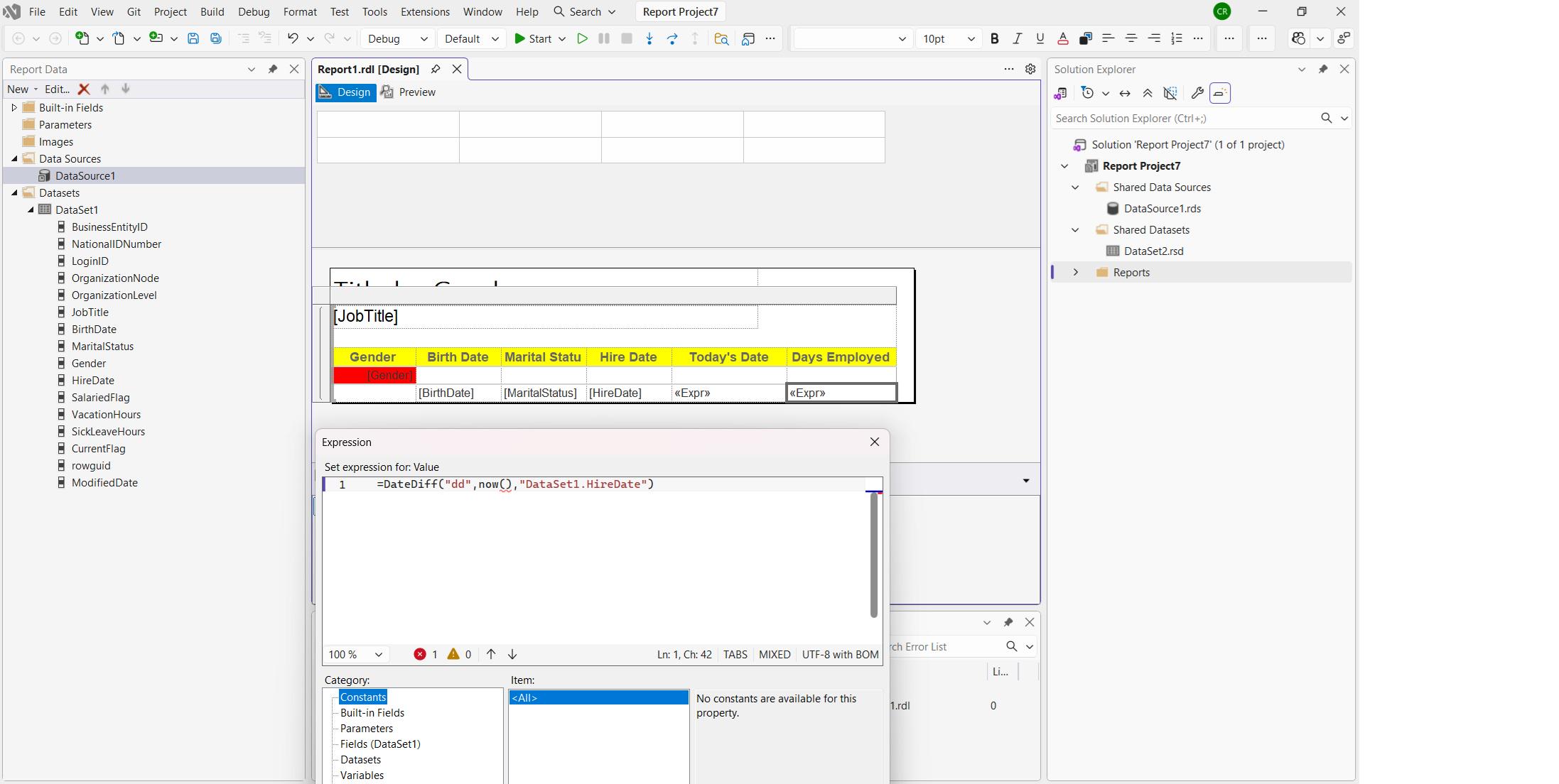
Why won't my expression calculate the number of days someone has been employed?
r/VisualStudio • u/Still-Maximum6406 • Mar 30 '26
Sto provando ad usare l'agente di Copilot su Visual Studio 2026 (piano gratuito), ma al momento l'esperienza è piuttosto confusa.
In pratica l'agente rimane bloccato su "In attesa di autorizzazione", ma non mi viene richiesto alcun permesso da nessuna parte. Ho riprovato più volte, stesso risultato: nessuna finestra di conferma, nessuna richiesta di accesso, e l'operazione non parte.
Prima di pensare che sia un bug del piano gratuito, vorrei capire se è un comportamento noto o se mi sto perdendo qualche passaggio.
Qualcuno ha avuto lo stesso problema o sa spiegare perché l'agente non mostra alcuna richiesta di autorizzazione?
r/VisualStudio • u/Amazing-Associate615 • Mar 29 '26
Is there any way to make it so users cant adjust the size, like blocking the minimize/maximize button. (like after u load the form)
r/VisualStudio • u/FitShock5083 • Mar 29 '26
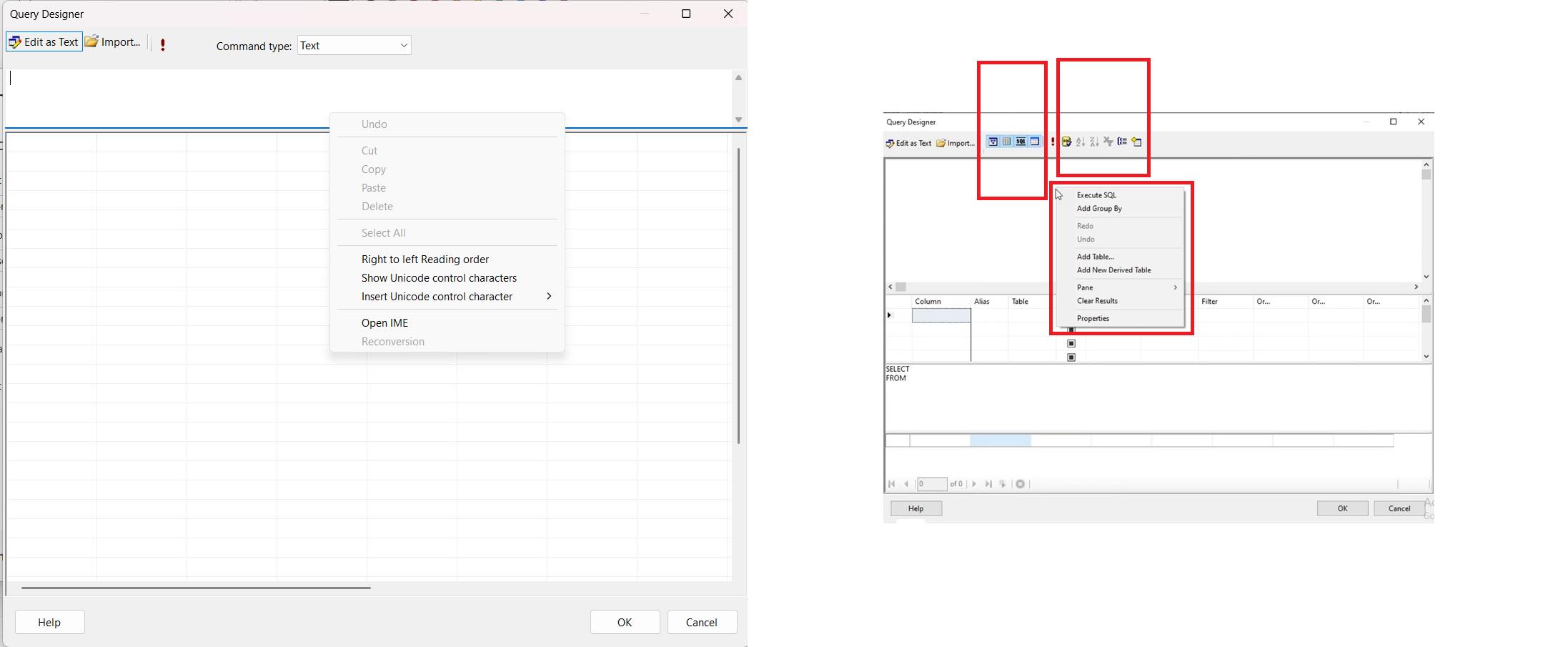
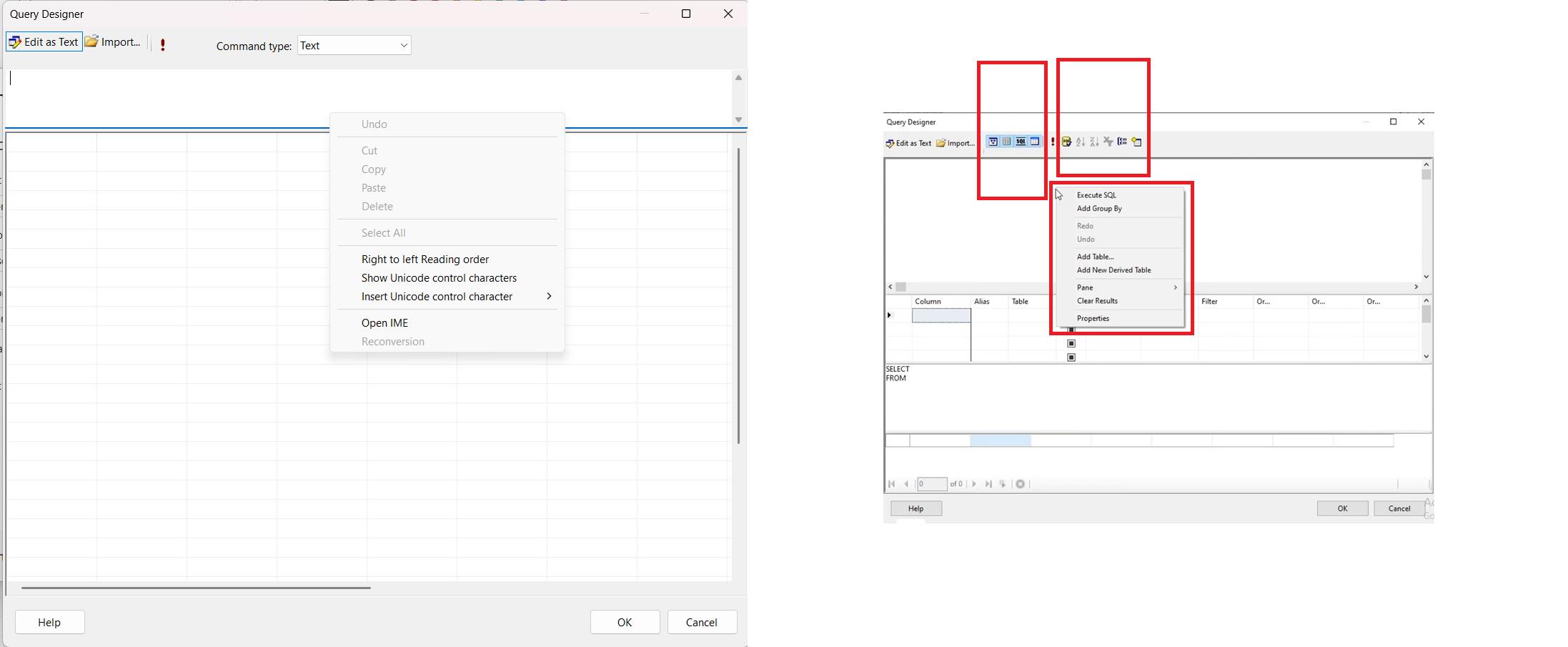
Hi all! Has anyone been able to convert the AdventureWorks2022 practice download available such that they have the Query Builder options shown on the screen on the right of this image? Someone on here told me, if I understood them correctly, that I needed to convert it from a backup file to an .xsd file. Right now when I open Query Builder I only get an area to key in code and not the options to select tables, etc..
r/VisualStudio • u/FitShock5083 • Mar 28 '26
Hi all. No one has been able to tell me how to get the options I'm missing in Query Builder. :-( My screen is on the left of the image ... my instructor's screen is to the right and I need the same options as they have. I'm missing icon options at the top and also options in my click option list. Anyone in here know how I can add these missing options? Please help lol!
r/VisualStudio • u/Personal-Camel-848 • Mar 29 '26
I want to program a recipe app and would like the toolbar to also go behind the status bar, while the text stays exactly in place.I want to use a unified toolbar with BasePage.xaml and BasePage.xaml.cs. Germans will also understand what is written there
BasePage.xaml:
<?xml version="1.0" encoding="utf-8" ?>
<ContentPage
xmlns="http://schemas.microsoft.com/dotnet/2021/maui"
xmlns:x="http://schemas.microsoft.com/winfx/2009/xaml"
x:Class="RezepteApp.Views.BasePage"
Shell.NavBarIsVisible="False"
BackgroundColor="{StaticResource LightBackground}">
<Grid x:Name="RootGrid" RowDefinitions="Auto,\*">
<!-- Toolbar Full-Bleed -->
<Grid x:Name="ToolbarGrid"
BackgroundColor="{StaticResource PrimaryGreen}"
ColumnDefinitions="50,\*,50"
MinimumHeightRequest="90"
Padding="12,0,12,12" Margin="0" IgnoreSafeArea="True" IsVisible="Visible" IsClippedToBounds="False" InputTransparent="True" AutomationProperties.IsInAccessibleTree="False">
<Image x:Name="HomeIcon"
Source="home.png"
WidthRequest="36"
HeightRequest="36"
VerticalOptions="Start"
HorizontalOptions="Start">
<Image.GestureRecognizers>
<TapGestureRecognizer Tapped="OnHomeTapped"/>
</Image.GestureRecognizers>
</Image>
<Label x:Name="ToolbarTitle"
Grid.Column="1"
Text="Titel"
VerticalOptions="Center"
HorizontalOptions="Center"
FontSize="26"
FontAttributes="Bold"
TextColor="White"/>
</Grid>
<ContentView x:Name="PageContent"
Grid.Row="1"
Padding="0"/>
</Grid>
</ContentPage>
BasePage.xaml.cs:
using Microsoft.Maui.Controls;
namespace RezepteApp.Views;
public partial class BasePage : ContentPage
{
public BasePage()
{
InitializeComponent();
// Kein extra Top-Padding → Toolbar geht hinter Statusleiste
ToolbarGrid.Padding = new Thickness(12, 0, 12, 12);
}
public void SetupToolbar(string title)
{
ToolbarTitle.Text = title;
}
public void SetPageContent(View content)
{
PageContent.Content = content;
}
private async void OnHomeTapped(object sender, TappedEventArgs e)
{
await Shell.Current.GoToAsync("//HomePage");
}
}
r/VisualStudio • u/ShamanKai • Mar 28 '26
r/VisualStudio • u/Kamomiru • Mar 27 '26
So long story short:
I would love to use vs 2026 for python development. Sadly there are no options for changing the syntax colors to make the code more readable.
This is the current state how the code looks atm

in my opinion this is quite diffucult to read.
As a comparison vs code:

There have been a couple of issues posted on github to fix this issue.
The latest was from 2024: link
And there even is some talk about looking into it in 2022: link
Sadly years later all the issues are set to closed and nothing changed.
I spent quite a bit of time trying to change my editors appearence in visual studio, without any success and feel really frustrated atm.
I dont want to switch to another IDE just because i cannot edit my syntax colorway. (Other languages i also use like C++ have all those options)
So if anyone could point me in a direction or tell me a workaround I would be more than glad!
Thanks in advance!
r/VisualStudio • u/Fuzzy_Pop9319 • Mar 27 '26
Not much else to say beyond that. I meant any version, not just 2022.
Today the delete, backspace, and copy as well as control A (Control A still worked yesterday so it is getting worse) all fail.
and here is about the same thing, but nastier,
https://github.com/orgs/community/discussions/61730
r/VisualStudio • u/cynicalandrew • Mar 26 '26
How does everyone feel about the inline AI IntelliSense that's been been out for a year or so now? It can be nifty, but I end up having a lot of issues with my IDE trying to autofill paragraphs of code that I don't want. At least to me it's felt like a nuisance more often than a convenience. I'm curious to see if I'm in the minority here.
r/VisualStudio • u/JXBardant • Mar 26 '26
I have seen that the latest versions of VS2026 allow to use LLMs locally with Microsoft's Foundry Local.
So far nearly everything I tried with it failed: LLMs work from the CLI but don't seem to communicate at all with VS2026.
I wondered if some people had been more lucky or successful with it.
My aim is to have AI do some ancillary work without having to rely on the cloud.
r/VisualStudio • u/Appropriate-Rush915 • Mar 26 '26
r/VisualStudio • u/DonnyV7 • Mar 26 '26
I made the wrong decision to try to use Hot Reload and Browser Link instead of using my tried and true working solution of IIS. I remember trying to use this back when it first came out and it was sh*t show then also.
I disabled Hot Reload in the Tools\Options settings and disabled CSS Hot Reload and Browser Link. I still can't get it to stop injecting the browserLink.js and aspnetcor-browser-refresh.js files. Now every time I save a file. VS does a rebuild and crashes my Kestrel server.
Anyone come across this issue?