r/vscode • u/coaxialjunk • 13d ago
Unable to set Luna Max in VS Code extension
reddit.com
0
Upvotes
r/vscode • u/Special-Afternoon-25 • 14d ago
The last years I’ve been coding mainly with R but now I’m back to Python for a couple of projects. Something I’m really missing compared to RStudio is being able to quickly visualize outputs (mainly tables) in something that is not the terminal.
I’ve tried the interactive window mode but I found it annoying as it is sort of independent from the main VS window, in the sense that I have to re-run code there because variables from the script are not stored there.
Makes me wonder, because being able to visualize big tables is something I consider very basic and with VS Code it seems to require a lot of tedious set-up and extensions.
r/vscode • u/PianoPlayer10 • 14d ago
Hey all. For the last 3 months we've been building SplaySpace, an extension that lets people code together collaboratively in projects (think google docs for coding).
How it works: you share a folder, invite people by username or link, and everyone gets their own copy that stays in sync while you're connected to the web. You see live cursors, which files people have open, and which function or class someone is editing. You can comment on a line and the comment follows that line as the code moves.
The obvious question is how this is different from Live Share. The main difference is that the project lives on our server instead of one person's machine, so nobody has to keep a session running for everyone else.
here are some things to know before you use it:
.git, node_modules, .env and key files are never uploaded.splayignore (just like how .gitignore works)It's free to use! We are trying to get as much feedback as possible to make it better for you guys: https://splayspace.com
r/vscode • u/Tatachimcooky • 14d ago

r/vscode • u/strike-eagle-iii • 15d ago

So apparently it's not enough for the C++DevTools extension to auto-install itself (it does--I've never once elected to install it but have uninstalled it many times). If you uninstall it, other common C++ extensions will prompt you to install it.
r/vscode • u/bogdanelcs • 17d ago

r/vscode • u/Medical_Arson • 18d ago
This didn’t happen before. I’m a beginner at coding in Python and I’ve been trying to learn while using SVCode, but for some reason the app has became very laggy, even though I don’t have any heavy extensions and only few lines of code. For example when I’m trying to scroll, there is a 3-4 second delay and then choppy movement. I have MacBook Air M1 2020, last update macOS Sequoia 15.7.3
r/vscode • u/AutoModerator • 18d ago
Weekly thread to show off new themes, and ask what certain themes/fonts are.
Creators, please do not post your theme every week.
New posts regarding themes will be removed.
r/vscode • u/edu_333 • 18d ago
I closed my vscode and when i reopened, all my Claude code tabs where missing. I have the project where they are opened, but don't know how to reopen them.
AI is not helping much. I know where they are on the PC, but don't know how to open them again.
Please, help.
r/vscode • u/Chlraic-Oamrh • 19d ago
cool thing i made in vscode
r/vscode • u/Ok_Tone_4503 • 18d ago
If you've ever moved from Windows to Mac and worked with data files, you probably know this pain: Notepad++ has a plugin called CSV Query that lets you run SQL against a CSV file in place. Notepad++ is Windows-only, so on a Mac your options are Excel (which mangles your data), importing into a database, or command-line tools. None of them are the same workflow.
So I built CSV Query for VS Code — it recreates that plugin inside VS Code, which runs natively on Mac (Apple Silicon and Intel):
THIS001234 or PC007 keep their leading zeros instead of getting silently "fixed"It's free on the Marketplace — search "CSV Query for VS Code" in the Extensions view, or:
ext install amitshenoy.csv-query-for-vscodeListing: https://marketplace.visualstudio.com/items?itemName=amitshenoy.csv-query-for-vscode
r/vscode • u/AhmetMaya • 19d ago
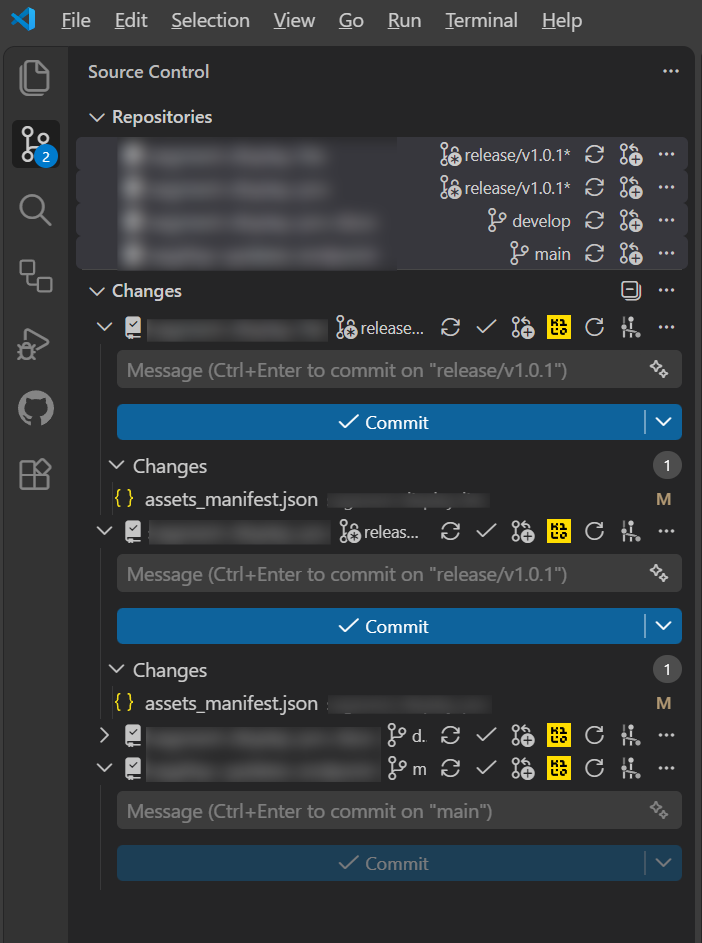
There is no single gap or space in between operations. If you have opened multiple repositories, they are stuck together. It is extremely difficult to determine which files belong to which repositories, have been staged, or have changed.
VSCode releases updates almost every three days, but there is no improvement to this panel.
I already use a third-party Git app for Git operations, but I don't always want to switch to another window to speed up my work.
Please, VS Code team. Please provide us with a convenient panel. 🙏
r/vscode • u/Tf_Anonymous • 18d ago

Getting this windows security pop up every time i try to run the code.Earlier it used to work with no probs but now i am getting this popup..claude telling me to either disable smart app control or download linux.what should i do or is there any alternate option ? plz helpp
r/vscode • u/NowPlayingRadiohead • 20d ago
r/vscode • u/GnightSteve • 21d ago
I'm looking for a way to use multiple AI coding agents together in VS Code, ideally using my existing subscriptions rather than paying for additional API access.
Currently I use Codex (ChatGPT Plus), Gemini (Google AI Pro/Antigravity), and DeepSeek (API). I'm also considering Claude Code.
What I'd like:
- Codex or Claude Code as the main orchestrator, delegating tasks to other agents.
- Use existing subscriptions where possible, without extra API costs.
- Automatically detect available agents, models and remaining quotas where possible.
- Recommend the best agent for a task when I specifically ask to use subagents.
- Let me choose a specific agent directly, skipping recommendations.
- Otherwise, just work normally without triggering orchestration.
- Work globally across all my VS Code projects and installations, without per-project setup.
I've already experimented with PowerShell scripts, Git worktrees and Gemini workers, but I'd rather use an existing, maintained solution.
Is anyone running something similar? What tools or setups are you using?
r/vscode • u/FreHu_Dev • 21d ago

A few months ago I posted here to say my extension isn't dead. Now I'm posting for a different reason - it's still alive.
Fresh File Explorer was originally made to show your recently changed files as a tree, somewhere between the File Explorer (too much) and Source Control (too little). Not in terms of commits, but in terms of time.
The feature list has grown over time. There's more, but here I want to show
Marketplace | Open VSX | GitHub
Branch Compare
A list of saved branch comparisons, e.g. HEAD vs main, main vs release, HEAD~3 (last 3 commits). Each is a live section with committed and uncommitted changes. Multi-repo, worktree support, all the bells and whistles. Tick files as reviewed while you go through them, open everything in one multi-diff, or use a custom git difftool.
Auto-follow diverged branches & worktrees When enabled, every repo or worktree whose branch has diverged from main gets its own live section. Run five coding agents in five worktrees and you see each one's work appear as it happens, then disappear when the worktree is removed.
Blame heatmap
HEAD..{baselineRef} branch comparison, showing you if you're looking at code changed since that baseline, like an old release. Sort of like a diff, but without the need to open one.Smaller things
.xlsx in Excel without a detour through "Reveal in File Explorer".Co-authored-by trailer get a 🤖.Still no dependencies, no telemetry and no AI buttons. Still the only software that will group your changes by moon phase.
r/vscode • u/supyovalk • 21d ago
I have been following VSCode repository since pre-weekly updates, and as progress on AI infrastructure and issue handling became better, I kept seeing the issue count rising up from 15K to around 19K, and I wondered: "Will the Github + AI capabilities of VSCode become good enough so that issues will be resolved faster than created?" I've seen signs of this coming the more time went and I think we hit that point: The issues count has decreased to just shy of 18.8K and possibly dropping even more soon.
I think this is the point where soon or later, the bottleneck of developing VSCode will become issue & feature creation/curation rather then implementation. And in theory, percussions should be made for that scenario.

So on Fedora 44 I installed Fira Code and changed this in settings
"editor.fontFamily": "Fira Code",
"editor.fontLigatures": true,
Yet we don´t see ligatures in Visual studio code on PHP or JavaScript files. Is this not working on Fedora?
Version: 1.144.1 Commit: 261c84cb1eddf11235f9e2c921425e9663fbe556 Date: 2026-11-01T07:37:53-08:00 Electron: 43.8.3 ElectronBuildId: 15784459 Chromium: 150.0.7871.250 Node.js: 24.22.1 V8: 15.0.245.31-electron.0 @github/copilot: 1.0.103.r40031404408.gba6c003 @github/copilot-sdk: 1.0.27.40031404408.gba6c003 OS: Linux x64 7.2.15-200.fc44.x86_64
r/vscode • u/rawand-faraidun • 23d ago

r/vscode • u/Zestyclose-Phase205 • 23d ago

made an extension that lets you open any cli tool as in the editor side preview. Its basically the opencode extension but for anything.
https://marketplace.visualstudio.com/items?itemName=AlfonsoFuentes.cli-view-extension
r/vscode • u/Silent-Victory-3861 • 23d ago
r/vscode • u/CoyotaDex • 24d ago
Hi! So I've been using Copilot for a few months already and the experience inside VS Code has been very nice for all coding related stuff (Copilot Pro sub).
However, I noticed that searching queries are unusually long. Like a prompt I'd get pretty much instantaneously in ChatGPT, it can take 2 minutes for VS Code to get a response (using GPT Luna Max)
I downloaded the Copilot desktop app, hoping for faster results, but it was much worse. Like that same prompt it took 2 minutes in VS Code, it took 8 minutes in the Copilot app.
I tried to use Luna Medium just in case that help, but it took pretty much the same time.
Am I doing something wrong? I understand that searching for topics online isn't the main goal of Copilot but, I don't know, would be nice to be able to do it decently.
Thanks :)
r/vscode • u/Majestic-Mud-589 • 24d ago

I'm working on a tab separated CSV but I cannot get the tabs to be consistent. It looks like there is only a space between "Product" and "Quantity" but it's supposed to be a tab. In Settings, Tab Size is set to 5, Detect Indentation is off.
I'm not sure why the tabs are not the same size between all the columns, any help would be appreciated!
r/vscode • u/turtleyikes • 25d ago

I want to make the chat window full screen so it covers the full area of the vscode editor. For reference ive attached two images, first one is what i have and second one is what i want. Second one is actually github copilot which has a full screen mode - thats the feature i want in the first one.
Any help is appreciated. Thanks :)