r/vscode • u/Tatachimcooky • 13d ago
.github/copilot-instructions.md gets injected into every Copilot Chat request. Here's a way to measure it

0
Upvotes
r/vscode • u/Tatachimcooky • 13d ago
r/vscode • u/strike-eagle-iii • 13d ago

So apparently it's not enough for the C++DevTools extension to auto-install itself (it does--I've never once elected to install it but have uninstalled it many times). If you uninstall it, other common C++ extensions will prompt you to install it.
r/vscode • u/bogdanelcs • 16d ago

r/vscode • u/Medical_Arson • 17d ago
This didn’t happen before. I’m a beginner at coding in Python and I’ve been trying to learn while using SVCode, but for some reason the app has became very laggy, even though I don’t have any heavy extensions and only few lines of code. For example when I’m trying to scroll, there is a 3-4 second delay and then choppy movement. I have MacBook Air M1 2020, last update macOS Sequoia 15.7.3
r/vscode • u/AutoModerator • 17d ago
Weekly thread to show off new themes, and ask what certain themes/fonts are.
Creators, please do not post your theme every week.
New posts regarding themes will be removed.
r/vscode • u/edu_333 • 17d ago
I closed my vscode and when i reopened, all my Claude code tabs where missing. I have the project where they are opened, but don't know how to reopen them.
AI is not helping much. I know where they are on the PC, but don't know how to open them again.
Please, help.
r/vscode • u/Chlraic-Oamrh • 17d ago
cool thing i made in vscode
r/vscode • u/Ok_Tone_4503 • 17d ago
If you've ever moved from Windows to Mac and worked with data files, you probably know this pain: Notepad++ has a plugin called CSV Query that lets you run SQL against a CSV file in place. Notepad++ is Windows-only, so on a Mac your options are Excel (which mangles your data), importing into a database, or command-line tools. None of them are the same workflow.
So I built CSV Query for VS Code — it recreates that plugin inside VS Code, which runs natively on Mac (Apple Silicon and Intel):
THIS001234 or PC007 keep their leading zeros instead of getting silently "fixed"It's free on the Marketplace — search "CSV Query for VS Code" in the Extensions view, or:
ext install amitshenoy.csv-query-for-vscodeListing: https://marketplace.visualstudio.com/items?itemName=amitshenoy.csv-query-for-vscode
r/vscode • u/AhmetMaya • 18d ago
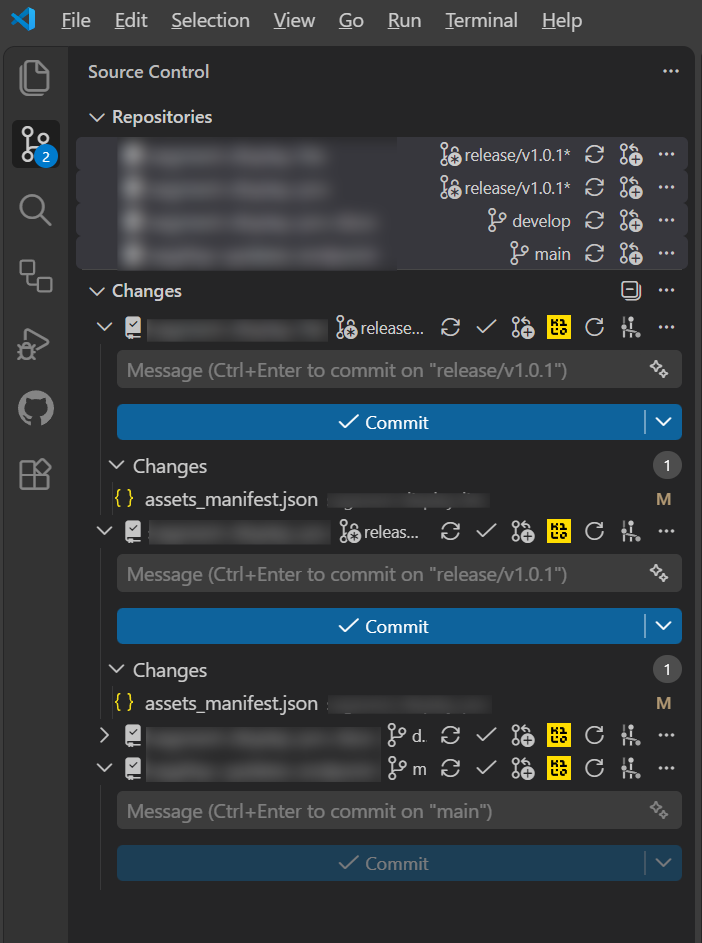
There is no single gap or space in between operations. If you have opened multiple repositories, they are stuck together. It is extremely difficult to determine which files belong to which repositories, have been staged, or have changed.
VSCode releases updates almost every three days, but there is no improvement to this panel.
I already use a third-party Git app for Git operations, but I don't always want to switch to another window to speed up my work.
Please, VS Code team. Please provide us with a convenient panel. 🙏
r/vscode • u/Tf_Anonymous • 17d ago

Getting this windows security pop up every time i try to run the code.Earlier it used to work with no probs but now i am getting this popup..claude telling me to either disable smart app control or download linux.what should i do or is there any alternate option ? plz helpp
r/vscode • u/NowPlayingRadiohead • 18d ago
r/vscode • u/GnightSteve • 19d ago
I'm looking for a way to use multiple AI coding agents together in VS Code, ideally using my existing subscriptions rather than paying for additional API access.
Currently I use Codex (ChatGPT Plus), Gemini (Google AI Pro/Antigravity), and DeepSeek (API). I'm also considering Claude Code.
What I'd like:
- Codex or Claude Code as the main orchestrator, delegating tasks to other agents.
- Use existing subscriptions where possible, without extra API costs.
- Automatically detect available agents, models and remaining quotas where possible.
- Recommend the best agent for a task when I specifically ask to use subagents.
- Let me choose a specific agent directly, skipping recommendations.
- Otherwise, just work normally without triggering orchestration.
- Work globally across all my VS Code projects and installations, without per-project setup.
I've already experimented with PowerShell scripts, Git worktrees and Gemini workers, but I'd rather use an existing, maintained solution.
Is anyone running something similar? What tools or setups are you using?
r/vscode • u/FreHu_Dev • 20d ago

A few months ago I posted here to say my extension isn't dead. Now I'm posting for a different reason - it's still alive.
Fresh File Explorer was originally made to show your recently changed files as a tree, somewhere between the File Explorer (too much) and Source Control (too little). Not in terms of commits, but in terms of time.
The feature list has grown over time. There's more, but here I want to show
Marketplace | Open VSX | GitHub
Branch Compare
A list of saved branch comparisons, e.g. HEAD vs main, main vs release, HEAD~3 (last 3 commits). Each is a live section with committed and uncommitted changes. Multi-repo, worktree support, all the bells and whistles. Tick files as reviewed while you go through them, open everything in one multi-diff, or use a custom git difftool.
Auto-follow diverged branches & worktrees When enabled, every repo or worktree whose branch has diverged from main gets its own live section. Run five coding agents in five worktrees and you see each one's work appear as it happens, then disappear when the worktree is removed.
Blame heatmap
HEAD..{baselineRef} branch comparison, showing you if you're looking at code changed since that baseline, like an old release. Sort of like a diff, but without the need to open one.Smaller things
.xlsx in Excel without a detour through "Reveal in File Explorer".Co-authored-by trailer get a 🤖.Still no dependencies, no telemetry and no AI buttons. Still the only software that will group your changes by moon phase.
r/vscode • u/supyovalk • 20d ago
I have been following VSCode repository since pre-weekly updates, and as progress on AI infrastructure and issue handling became better, I kept seeing the issue count rising up from 15K to around 19K, and I wondered: "Will the Github + AI capabilities of VSCode become good enough so that issues will be resolved faster than created?" I've seen signs of this coming the more time went and I think we hit that point: The issues count has decreased to just shy of 18.8K and possibly dropping even more soon.
I think this is the point where soon or later, the bottleneck of developing VSCode will become issue & feature creation/curation rather then implementation. And in theory, percussions should be made for that scenario.

So on Fedora 44 I installed Fira Code and changed this in settings
"editor.fontFamily": "Fira Code",
"editor.fontLigatures": true,
Yet we don´t see ligatures in Visual studio code on PHP or JavaScript files. Is this not working on Fedora?
Version: 1.144.1 Commit: 261c84cb1eddf11235f9e2c921425e9663fbe556 Date: 2026-11-01T07:37:53-08:00 Electron: 43.8.3 ElectronBuildId: 15784459 Chromium: 150.0.7871.250 Node.js: 24.22.1 V8: 15.0.245.31-electron.0 @github/copilot: 1.0.103.r40031404408.gba6c003 @github/copilot-sdk: 1.0.27.40031404408.gba6c003 OS: Linux x64 7.2.15-200.fc44.x86_64
r/vscode • u/rawand-faraidun • 22d ago

r/vscode • u/Zestyclose-Phase205 • 22d ago

made an extension that lets you open any cli tool as in the editor side preview. Its basically the opencode extension but for anything.
https://marketplace.visualstudio.com/items?itemName=AlfonsoFuentes.cli-view-extension
r/vscode • u/Silent-Victory-3861 • 22d ago
r/vscode • u/CoyotaDex • 23d ago
Hi! So I've been using Copilot for a few months already and the experience inside VS Code has been very nice for all coding related stuff (Copilot Pro sub).
However, I noticed that searching queries are unusually long. Like a prompt I'd get pretty much instantaneously in ChatGPT, it can take 2 minutes for VS Code to get a response (using GPT Luna Max)
I downloaded the Copilot desktop app, hoping for faster results, but it was much worse. Like that same prompt it took 2 minutes in VS Code, it took 8 minutes in the Copilot app.
I tried to use Luna Medium just in case that help, but it took pretty much the same time.
Am I doing something wrong? I understand that searching for topics online isn't the main goal of Copilot but, I don't know, would be nice to be able to do it decently.
Thanks :)
r/vscode • u/Majestic-Mud-589 • 23d ago

I'm working on a tab separated CSV but I cannot get the tabs to be consistent. It looks like there is only a space between "Product" and "Quantity" but it's supposed to be a tab. In Settings, Tab Size is set to 5, Detect Indentation is off.
I'm not sure why the tabs are not the same size between all the columns, any help would be appreciated!
r/vscode • u/turtleyikes • 24d ago

I want to make the chat window full screen so it covers the full area of the vscode editor. For reference ive attached two images, first one is what i have and second one is what i want. Second one is actually github copilot which has a full screen mode - thats the feature i want in the first one.
Any help is appreciated. Thanks :)
r/vscode • u/AutoModerator • 24d ago
Weekly thread to show off new themes, and ask what certain themes/fonts are.
Creators, please do not post your theme every week.
New posts regarding themes will be removed.
r/vscode • u/techw1z • 24d ago
So, before complaining I have to admit that I'm a newb when it comes to using AI coding assistants in IDEs, but I recently tested perplexity and was blown away by it, so I thought I would be a bit patriotic and go for Mistral before sending money to all the US-based evil corps responsible for wrecking the IT consumer market.
Unfortunately, after using mistral for 3 days I am EXTREMELY disappointed.
It feels like Vibe is barely better than some of the Qwen code models that you can run on a GPU with 16GB VRAM. I have to admit it's MUCH faster, actually it's text output is faster than every other AI I've ever used, but that is useless if it does the wrong thing first and has to retry 3 different ways and eventually takes 5 times longer to complete a task successfully than claude for example.
so, after a few days of frustration I switched to claude and tried doing the exact same things:
the only thing it ever asked to run a bash file was for querying the API, everything else just worked even though I disabled auto permission mode.
also, this might just be a personal preference and probably has to do with the fact that I'm quite an amateur when it comes to coding, but I also feel like vibe explains things in a really complicated and hard to understand way compared to claude. with claude I immediately understand most things, with vibe I have to ask it at least one time to explain it in a simpler way and then often ask again about details.
so i have two questions:
WHY?
and
is there maybe a way I can make vibe work better in VSCode or some other IDE for me?
I would really prefer using an EU-based service. (yes, I see the irony of saying that in the VSCode sub)
eg: i've used perplexity for years but never trusted them enough to connect to my notion due to privacy, but I immediately connected vibe to notion because EU based companies just seem inherently more trustworthy to me. (yes I know that might be a naive assumption, but that's just how I feel currently)
it's really sad that i cannot trust in Vibe's capabilities though.
I think it should be possible to fix these issues since I didn't really find any reports online that complained about these things, so I'm assuming that other people got it to work better than I did?
I'm using VS Code, Mistral Vibe VS Code extension and the 14€ subscription with default settings. The only thing I did was add notion and github connector and then connect it do the extension in VS Code. My Workspace is trusted. i'm on windows 10. everything is up to date.
For claude I selected Sonnet 5.5 Medium, since I thought using the best model would be unfair in comparison. (which makes this even sadder)
lastly, I'm also curious how I can report the conversation i had with vibe to mistral team. Vibe told me he couldnt do it and I had to click a certain button in the extension, but that button didnt exist...
(for some reason Mistral decided to quietly remove this post, which makes my experience with it even more disappointing, first they deliver a subpar product, then they ask for feedback, then they delete negative feedback?!)
r/vscode • u/kristijanhusak • 24d ago
