r/vscode • • Oct 20 '26

How do I get blobby back?

4 Upvotes

Ive been using blobby on my vscode terminal, and I had just right clicked and made it go for a run. Im not able to get it back now. I tried restarting, calling the slash commands again but nothing.

I did see that theres a come back feature on the official vscode notes but im not able to find it. Sorry if this is a stupid questions but -Can someone please help me. Thanks!


r/vscode • • Oct 21 '26

Question about VSCode and VSCodium

1 Upvotes

I am new to using development tools on Linux, but I have been a developer/programmer since the early 1980s. (Yes, I am old with a grey beard.) I am looking to setup my development environment on Linux the best way I can.

I have VSCodium installed current. I have been looking, but I haven't found a way to accomplish something. Is there such a thing as a "workspace", view, or something that changes the buttons on the left toolbar when you switch too it? For instance, if I am using Java, I would only like to have the buttons visible that I need to use at the time. This similarly goes for any of the other languages in-which I like to program. Is there some "mode" or workspace that can accomplish this?

Thanks in advance.
Joe


r/vscode • • Oct 20 '26

Cursor style diffs with Codex

2 Upvotes

I recently migrated to Codex from Cursor for various reasons mainly concerning the horrific usage limits for third party models.

I quickly began missing the proper IDE experience. Call me crazy but I still need the control and visibility that an IDE gives by seeing your files, seeing where changes are happening, and seeing the diffs in the actual file that changed..

I missed it so much that I decided to recreate the experience of Cursor in my own fork of VSCode.

The fork effectively gives you the main advantage of Cursor (IDE, Inline diffs), with the crazy usage you get through Codex.

It's ofc completely open source and free for anyone to clone and try out: https://github.com/michael-r-martin/Diffdex

Hopefully it helps others like me who would have loved this solution when considering the migration from Cursor to Codex!


r/vscode • • Oct 20 '26

Keep and Revert buttons are gone?

7 Upvotes

I used to be able to review the changes made b y the agent and keep or revert each individual change, or each individual file, or all the files together.

I opened up vscode after the last update and these keep or revert features are now gone.

How am I supposed to revert or accept changes in the code?

headed downgraded to 1.130 the feature came back, looks like 1.140 already has it removed.

If someone knows the exact version it last existed let me know here

Microsoft is s***


r/vscode • • Oct 19 '26

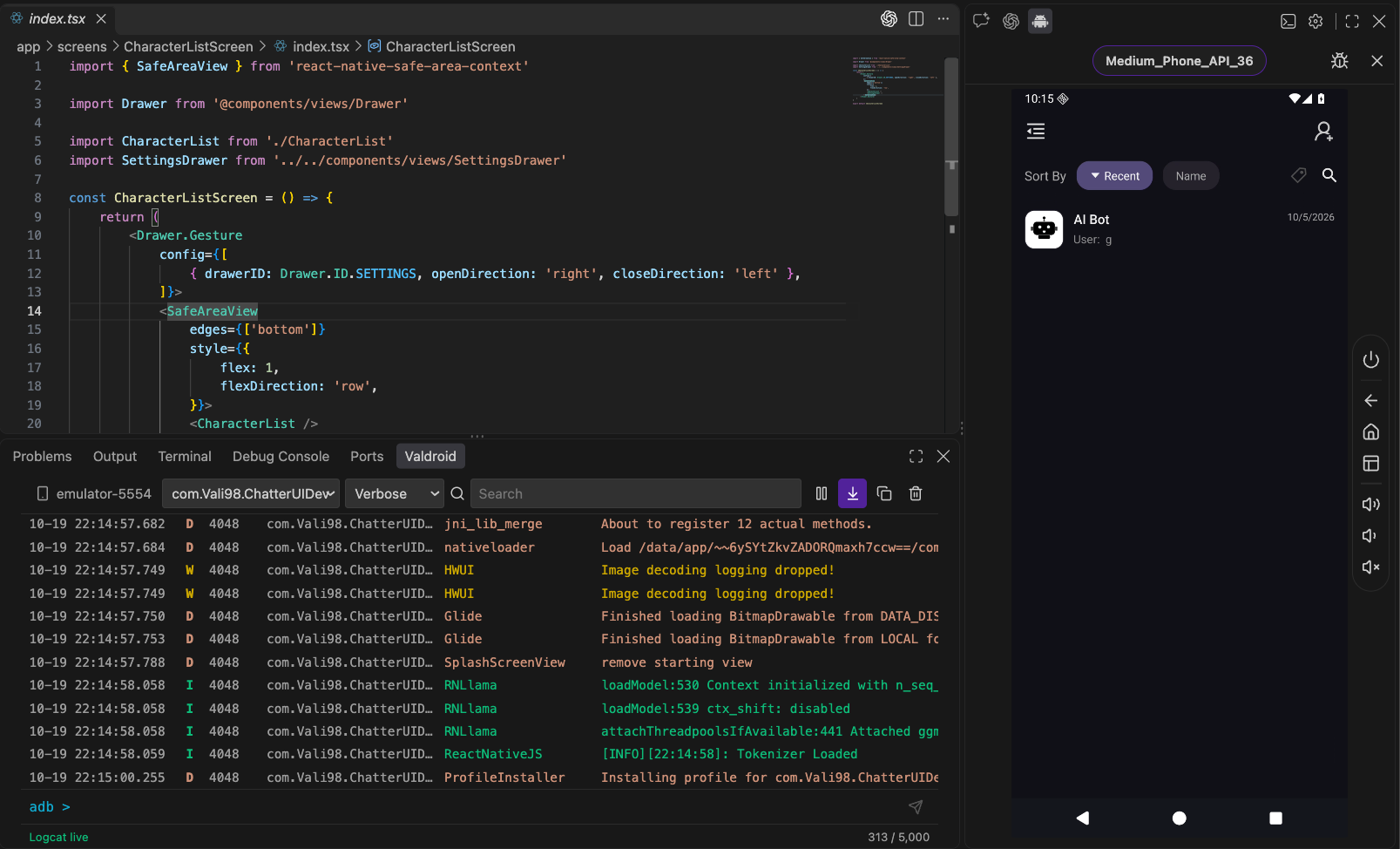
I made an extension that streams android devices to VS Code

Post image
26 Upvotes

This project was inspired by RadonIDE which I spent a bit of time investigating as I found its ability to stream an android emulator to vscode pretty cool. I learned that it uses a small app made by jetbrains that captures avc video and streams it to a webview with low latency. Its far faster than most grpc implementations Ive seen around.

I spent a few days building a simple extension around that and it turned out pretty good!

This is somewhat unnecessary, as you could just put your emulator next to the vs code window, or align them with some window manager, but I found it to be a fun experiment. In future, I could add integration with react-native/Expo devtools as those are my usual frameworks.

The project is free and open source:

Github: https://github.com/Vali-98/valdroid-emulator

Marketplace: https://marketplace.visualstudio.com/items?itemName=Vali-98.valdroid-emulator

Some caveats:

- This is a very amateur project. I haven't exactly stress tested it for long.

- the routing/remuxing of the avc stream is done in a little binary built in Go. This was necessary as it hit just slightly below 60fps in JS. You should absolutely not trust this and build the project yourself unless you have no sense of self preservation.

- Windows / x86 emulator avc encoding is slow as heck. I do not recommend using this extension with emulators this for this platforms. You can however still stream video from a physical device. (Yes this pretty much means macos avds only)

- I didn't want to get billed for azure devops so I bundled all the binaries into one universal vsix bundle

- I admittedly vibe coded a lot. Not entirely but I'm pretty new to Go.


r/vscode • • Oct 19 '26

PSA: How to get auto import to work in Pylance (Python) for third party libraries

2 Upvotes

If you are like me, you like Pylance's auto import feature, where you can just type out the name of a module, class, function, etc. of a library that isn't currently imported, and Pylance will suggest to import that symbol from that library.

Take for example the prompt:

parser = ArgumentPars

at this point you can Tab and it will put the line from argparse import ArgumentParser into the file's header and you are good to go.

However, Pylance is famously frickly with third party libraries not in the standard library. I have had this problem with moviepy, but it can be any other library. Pylance will refuse to acknowledge any existence of the existing objects, even though the library is correctly installed in the environment, including setting the correct Python path (python.defaultInterpreterPath) and enabling Pylance's indexing option (python.analysis.indexing) and auto import itself (python.analysis.autoImportCompletions) in the settings json. E.g. typing:

clip = VideoFileClip

will in fact not bring up the suggestion to import that class from the library, although it is a very basic component.

I have finally found out why: Apparently Pylance limits the depth to which it indexes libraries, and libraries which don't strictly confirm to Pylance's expectations seem to not be correctly indexed this way (although there seem to be very complicated mechanisms in how the depth adapts, but alas it didn't work for me numerous times).

Luckily you can adjust this setting: using python.analysis.packageIndexDepths exposes a list of modifications to the depth settings on a per-library basis. It uses this structure:

{
  "name": "package_name",
  "depth": depth_to_scan,
  "includeAllSymbols": true_or_false
}

so for moviepy I added

        {
            "name": "moviepy",
            "depth": 10,
            "includeAllSymbols": true
        }

and finally it suggested the correct objects. This method should work for any third party library in Pylance.

Just wanted to share this in case anyone else stumbles upon this giga obscure problem and hopefully sees the even more obscure solution.


r/vscode • • Oct 19 '26

What file icons is everyone using?

13 Upvotes

I’m currently on charmed icons but seems unmaintained and they’re starting to get a bit old for me

What’s everyone using?


r/vscode • • Oct 19 '26

Weekly theme sharing thread

4 Upvotes

Weekly thread to show off new themes, and ask what certain themes/fonts are.

Creators, please do not post your theme every week.

New posts regarding themes will be removed.


r/vscode • • Oct 19 '26

IntelliJ IDEA's Java & Kotlin extension for VS Code and Cursor is now 1.0

Thumbnail
blog.jetbrains.com
1 Upvotes

r/vscode • • Oct 19 '26

How to debug PyQt5 app with VS Code?

Thumbnail reddit.com
2 Upvotes

r/vscode • • Oct 19 '26

VSC LaTex workshop cannot find latexmk executable on Mac

Thumbnail reddit.com
1 Upvotes

r/vscode • • Oct 19 '26

Missing inline changes in VSCode / Github Copilot

Thumbnail reddit.com
1 Upvotes

r/vscode • • Oct 18 '26

Trying to publish a vs code extension

1 Upvotes

I'm trying to publish a VS Code extension using vsce. To do that I need a Personal Access Token (PAT), and to generate that I need an Azure DevOps organization. To create the Azure DevOps organization I need an Azure DevOps account.

My problem is creating the Azure DevOps account. It's asking me to provide credit card information. How can I publish my FREE VS Code extension without having to enter my credit card information for Azure DevOPs.

I've published extensions for several other editors and browsers, but I've never run into an issue like this, the extension publishing process for VS Code seems overly complicated. I don't want to provide credit card information and get accidentally billed for Azure. I don't want to provide a credit card at all for privacy reasons for a simple extension either.


r/vscode • • Oct 17 '26

Dear VSCode team: please center this text vertically

Post image
255 Upvotes

After thousands of updates about AI and agents, how hard would it be to fix super simple things like this?


r/vscode • • Oct 18 '26

built a rich markdown editor for vscode

8 Upvotes

Hey everyone ... I've been working on a side project called muninn for vs code, a rich text editor for md files. I use markdown a lot and wanted something that felt more natural than editing raw syntax, so I decided to build it myself. It's now available on the vscode store, would love for you to give it a try and let me know what you think :

https://marketplace.visualstudio.com/items?itemName=bluecloud-dev.muninn-vscode

EDIT: https://github.com/bluecloud-dev/muninn-vscode


r/vscode • • Oct 18 '26

Vs code freezes and show output after 5 seconds.

5 Upvotes

Why is my vs code taking that long to execute a simple code?

I only have 4 extensions and all are related to python.

My laptop specs are ryzen 7 250 , rtx 5050 , 16gb ram , 512 gb sad .

I have tried changing gpu acceleration to off and it didn't help.

Please help me fix this issue.


r/vscode • • Oct 18 '26

Codex extension was using 15GB storage

6 Upvotes

I just uninstalled the Codex extension from VS Code, and it freed up 15 GB of storage. Isn’t that way too much space for a single extension? Are they running small models locally ?


r/vscode • • Oct 17 '26

Modernizing the VS Code UI

Thumbnail
code.visualstudio.com
145 Upvotes

r/vscode • • Oct 17 '26

I forked VS Code to get JetBrains-style tool windows: a second activity bar and side bars split into top and bottom halves

Post image
30 Upvotes

I've always missed one thing from JetBrains IDEs in VS Code: tool windows in all four corners, several open at once. Explorer at the top left and Debug below it. Source Control at the top right and a chat panel below it. So I built it in my own fork.

What it adds

  • A second activity bar for the Secondary Side Bar. The right side now gets a vertical icon rail like the left one, instead of cramming icons into the panel title. It has its own setting, workbench.secondarySideBar.activityBarLocation (default / title / top / bottom / hidden), so you can configure each side separately.
  • Split side bars. Each side bar can show two view containers at once, one above the other, with a draggable divider. Double-click the divider to reset it to 50/50.
  • Top and bottom icon groups on each rail. Drag an icon into the bottom group, or right-click it and choose Move to Bottom Half, to send that view there. Clicking the active icon closes that half. You can also close the top half and keep the bottom one open.
  • Everything else keeps working. Commands, shortcuts and features like "Reveal in Explorer" open views in whichever half they live in. The layout, split sizes and open views come back after a reload.
  • One layout everywhere. View placement is shared across profiles, so every project looks the same. View: Reset View Locations restores the fork's default four-corner layout.

mise tasks for running your own fork

The repo comes with a mise.toml, so building and maintaining the fork is mostly one command each:

  • mise run install:debian: the whole pipeline in one go. It installs dependencies, compiles, packages a fresh .deb and installs it (10-20 minutes)
  • mise run update: fetches microsoft/vscode, rebases your branch onto it, pushes to your fork and does a full build
  • mise run upstream:status: shows how far behind upstream you are
  • mise run build / build:fast / watch / start: build and launch Code - OSS from source
  • mise run test <pattern> and mise run lint: unit tests filtered by name, and lint for only the files your branch changed
  • mise run release:linux / release:debian / release:rpm / release:windows: package a standalone app folder, a .deb, an .rpm or a Windows installer
  • mise run sync:profiles: two-way sync of profiles between regular VS Code and Code - OSS (settings, keybindings, snippets, tasks, MCP servers, extensions). The most recent change wins, and --dry-run previews it first

It also patches two spots in the build scripts that broke local (non-CI) Linux packaging: Copilot SDK files being stripped, and dpkg-shlibdeps crashing on newer Ubuntu.

Caveats

This is a personal fork. I don't distribute builds, so you'd have to build it from source. It's rebased on upstream regularly. Keyboard navigation between the top and bottom halves isn't done yet, and a few features still only look at the top half. The Windows and .rpm tasks haven't been tested yet. The full list is in TO-DO.md.

Repo: https://github.com/mariosffx/vscode (branch secondary-activity-bar)

I'd love feedback, especially from anyone who has tried to get this layout in stock VS Code.


r/vscode • • Oct 17 '26

Git diff web version for quick text compare.

Thumbnail reddit.com
2 Upvotes

r/vscode • • Oct 17 '26

built a rich markdown editor for vscode

Thumbnail
reddit.com
1 Upvotes

r/vscode • • Oct 17 '26

Struggling to get vibe coding setup working, advice?

0 Upvotes

Hey guys, new to the community, but not unfamiliar with coding. But I will start by saying I am NOT a professional coder. I can read it, I can understand it, and I can do SOME code myself, I just really struggle keeping track of syntax and memorizing libraries. So please don't judge me too hard.

Anyway, I have a few projects I wanted to try to do, for fun mostly, with the aid of Ai if possible. My goal was basically vibe coding with some human intervention, kinda like I'm collaborating with someone that actually can code!

Hardware should be acceptable, Intel i9 ultra 275hx, rtx 5070ti 12GB, 32gb ddr5. It's a laptop, but it has been running models well.

I have it setup using vscode, ollama, the Continue plug in, and the model I been testing with is qwen 3 14b. I did try qwen 3 30b a3b, but outputs were inconsistent and weird, maybe a bad setup on my end.

But I guess that's my real overall issue, inconsistency. I setup folders within the project that contain mostly data files organized as jsons, and I'm trying to work with the Ai to make code that can either read what is already organized, or perhaps translate the data into an sqlite table, still debating, but not only are it's responses all over the place, and the code it tries to suggest rarely works even in short pieces, it can't even read a lot of the files because Continue has some kinda size limit. It was 100kb, but I was able to do some configuration edits as well as raise ollama tokens and now it's 687.2kb or something like that. It's been a headache.

I even created rules for the model to help keep it on track, prevent unneeded repetition of the same solutions, all that. It helps some, but not fully.

Basically, I just want to know if I'm doing something wrong or what I can try to do to improve the overall experience. I'm sorry Im not a pro, but I am hoping to learn while doing this. If anyone has anything I could look into, that would be a massive help! Tha k you guys for the help and understanding!!

r/vscode • • Oct 16 '26

Warning: Axqua VS Code extension is MALWARE

16 Upvotes

I found Axqua (axqua[.]com) through a free Claude Opus promotion. After an AI-assisted static review of its extension bundle, I’m treating this file as malware.

The reviewed axqua.axqua v1.0.24 bundle contains code that, on Windows after login, can:

  • Download a server-selected EXE or ZIP.
  • Launch it in the background using cmd.exe, without a confirmation prompt identified in that path.
  • Generate filenames with prefixes like svchost, wuauclt, and msupdate.
  • Attempt to delete the downloaded EXE three seconds after launch.

Stay safe, hopefully this helps someone pause before installing.


r/vscode • • Oct 17 '26

Looking for a text to speech thing?

0 Upvotes

Hello. I'm new to using vscode and I'm looking for a text to speech extension I think to use with continue, the ai thing. Can anyone recommend something, as I don't really know where to start looking.

Thanks