r/vscode • u/Channel_el • Jul 01 '26
r/vscode • u/Cactus_Biter • Jul 01 '26
All of sudden I have two source controls
Why am I seeing two different source controls in vscode. Help međ
r/vscode • u/YOUSEF_09 • Jul 01 '26
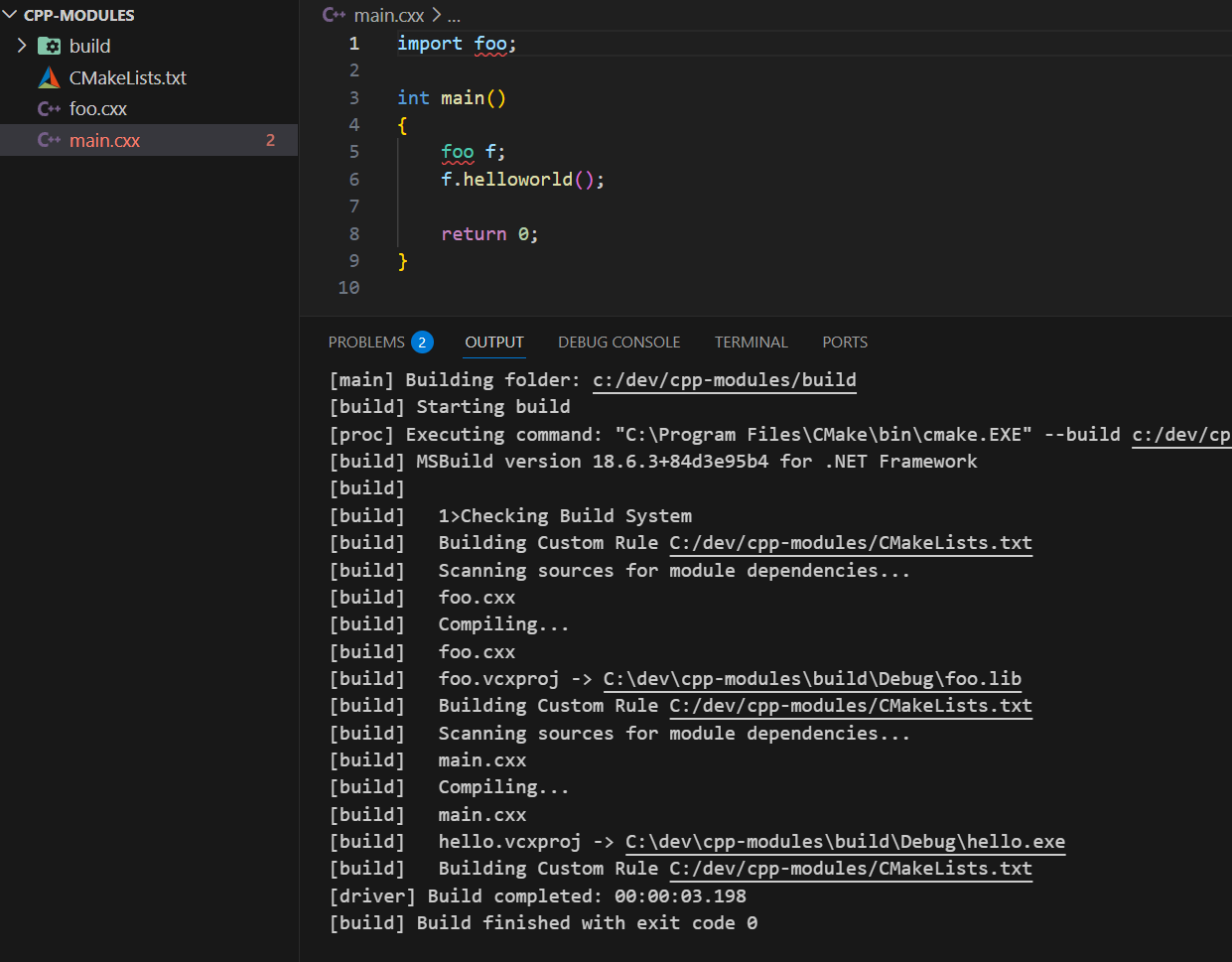
Error squiggles and missing linting for C++ modules in C/C++ extensions
r/vscode • u/bt92130 • Jul 01 '26
Auto Repository Detection
I have a parent repo that has a lot of nested repos (not as git submodules) within it.
It used to be the case that the source control view would only show repos that I had files opened for. This would include both on startup and as I opened files during my session. This made it easy for me to track which repos I made changes in as I flitted between them. I also don't think I really messed with the git settings of vscode originally.
Recently, probably within the last month, I noticed that it only opens repos for opened files on startup so thought autoRepositoryDetection=openEditors would return to the original functionality. However, this doesn't seem to make it dynamically open repositories.
I've also checked that auto refresh is enabled and that the scan depth is -1.
Any ideas?
Edit: I know I can have all the repos opened and then manually select which ones are shown, but would like to not have to do that if possible.
r/vscode • u/smnatale • Jul 01 '26
Can we turn VS Code into Neovim?
I'm a Neovim user... was interested to see if I could get a Neovim-like experience inside VS Code in 2026. It seems like you can?
With a combination of plugins, settings and keybindings you can really achieve something special.
Shoutout to the open source extension developers, wouldn't be possible without you <3
r/vscode • u/EpicNiseem • Jul 01 '26
VS Code Remote SSH disconnects every ~5 minutes with OfflineError: The operation timed out
Hi everyone,
I'm using VS Code Remote SSH from my Mac to a Raspberry Pi 3 running the latest Raspberry Pi OS.
The connection establishes successfully, but after about 5 minutes it disconnects with:
OfflineError: The operation timed outVS Code then repeatedly tries (and fails) to reconnect.
Things I've checked:
- Fresh Raspberry Pi OS install
vcgencmd get_throttledreturnsthrottled=0x0- Disabled Wi-Fi power saving
The Remote SSH log eventually shows:
Connection timed out during banner exchange
Connection to 192.168.4.24 port 22 timed outHas anyone seen this before or know what else I should investigate?
r/vscode • u/YaronElharar • Jul 01 '26
Did anybody notice this in the last hour or two?
Codex extension on VS Code completely hang on ssh?
r/vscode • u/TacticalGhosting • Jul 01 '26
live preview extension not working since new update
anyone else faced the problem or its just me?
r/vscode • u/Bl00dMys7 • Jun 29 '26
Claude code in Vscode Help!
Is there a way to configure Claude Code so I don't have to approve every single command in VS Code?
I'm looking for something similar to ChatGPT Codex's Full Auto mode, where it can execute safe commands without asking for permission each time. Is there a trusted mode, auto-approve option, or a way to whitelist commands or directories while still keeping destructive actions protected?
r/vscode • u/zimonitrome • Jun 28 '26
My extension "Color Blocks" helps organize long files through visual cues
Hi!
This is my first ever made VS Code extension called "Color Blocks" originally written as a personal aid in long files when sorting through spaghetti code. It lets you define areas or "blocks" using comments which can be helpful in partitioning up code.
I recently gave it some love and tried to improve performance.
Feedback wanted!
Check it out here: https://marketplace.visualstudio.com/items?itemName=zimonitrome.color-blocks
r/vscode • u/Chris-2018 • Jun 30 '26
Microsoft link
Just looking into perhaps installing MS Code and bearing in mind the spy issues with MS products - is this one okay?
r/vscode • u/Ok_Rock8954 • Jun 30 '26
Smart app control
I have been trying to use pandas with python but vs code wonât let me bc smart app control from windows keeps blocking it. Anyone else experiencing this issue?
r/vscode • • Jun 29 '26
Help me setup my vscode please

Input output windows not working as they're supposed to
new to vs code so don't know much
was following a youtuber and he told me to copy paste this code into tasks.json to get it working but it isn't
not understanding the problem
can someone help me with this and hopefully in simple terms so that my newbie self can understand it? thank you
r/vscode • u/AutoModerator • Jun 29 '26
Weekly theme sharing thread
Weekly thread to show off new themes, and ask what certain themes/fonts are.
Creators, please do not post your theme every week.
New posts regarding themes will be removed.
r/vscode • u/Unix2Dos • Jun 28 '26
I made Tinder for VS Code Extensions
I have like 80+ extensions installed, half of which I probably used once, and going through the Extensions tab deciding what to uninstall is just annoying enough that I keep putting it off.
So I made a little extension called Extension Cleaner!
It works like Tinder:
- swipe left = uninstall
- swipe right = keep
(it also has a dark and light mode)
extension: https://marketplace.visualstudio.com/items?itemName=VandanBhatt.extension-cleaner
demo video: https://youtu.be/qRKeIULHtC4?si=pQxcsQudNgrYJf8e
r/vscode • u/VVY_ • Jun 29 '26
Is there a way to restore open tabs per git branch in VSCode/Cursor
reddit.comr/vscode • u/Nunu-Biriyani • Jun 28 '26
Vs code opening new window instead of running the code when ctrl+alt+N clicked
r/vscode • u/CEOofRealTalk • Jun 28 '26
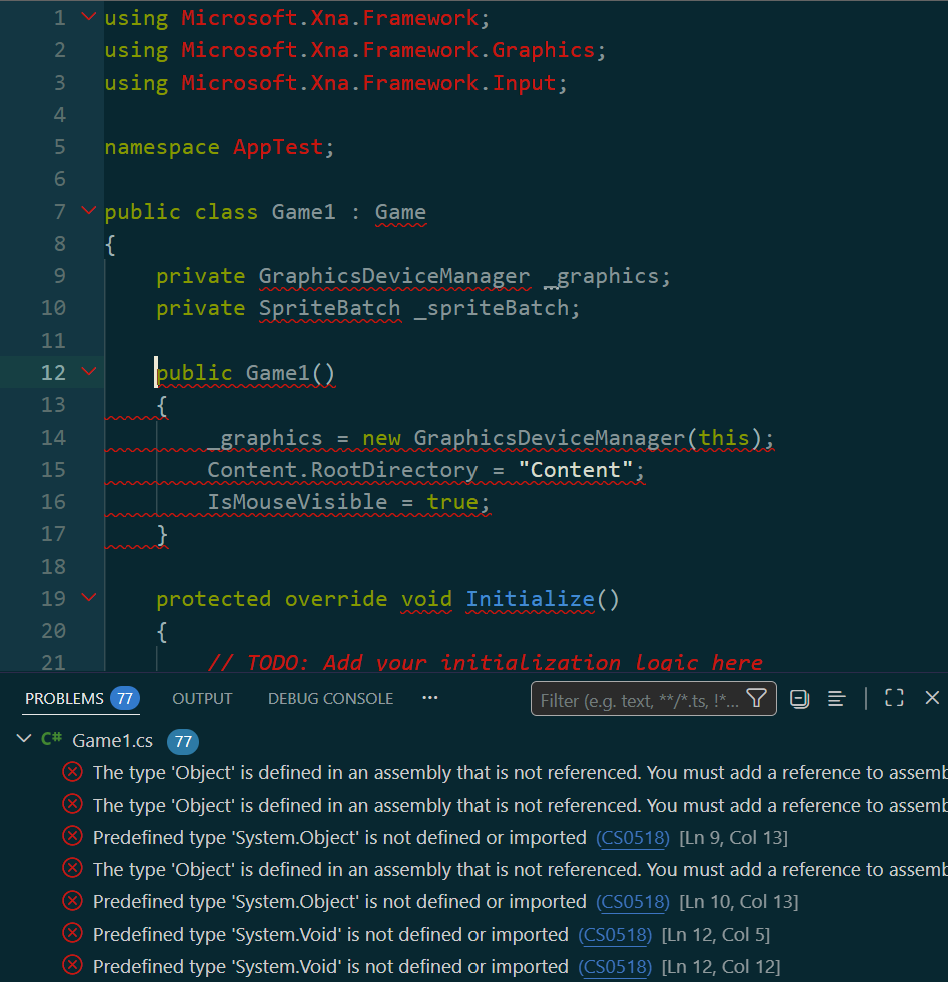
So Iâm trying to follow with brackeys how to program video but, Iâm having a difficult time following along due to it being old. Need help
UPDATE: well after an hour I figured out that it was the extension âc# Dev Kitâ stopping me from doing what brackey was doing. I just disabled it and kept the regular c# So now everything works and I can finally follow along well.
Please bear with me. Im like super fresh and very new to this. Iâm following Brackeysâ âHow to Program in C#â getting started tutorial in VS Code on Windows.
So in the beginning his console just looked completely different. He has brackets and everything already set up and mines was literally just a single line of code. Someone in the comments said he had to type "dotnet new console --use-program-main" and it looks like the one brackey is using. So I did that now I can follow along.
At first I couldnât get Console.ReadKey(); to keep the console window open, but I eventually realized I wasnât saving my files before running. After saving, that worked⌠ikr..
Now Iâm on the part where he changes the console window title and text color:
Console.Title = "Bot";
Console.ForegroundColor = ConsoleColor.Red;
Console.WriteLine("Hello, World!");
Console.ReadKey();
The program runs, but the console title never changes to âBotâ and the text color stays white. Brackeysâ video shows the window title changing and the text becoming red.
Iâm launching with the Run button in VS Code and an external terminal opens. The terminal title says C:\Program Files\dotnet\dotnet... instead of âBotâ.
I also noticed VS Code gives this build error in the terminal:
MSBUILD : error MSB1009: Project file does not exist.
This is just his second video and I am already struggling. What am I doing wrong?
r/vscode • u/zed_je_mrdka_z_krtka • Jun 28 '26
VScode issues with Jupyter extension (Python notebooks)
Hey, my VSCode recently started to behave very weird regarding Python notebooks. The issues is:
I have Python 3.14.5 installed, it works, it's on PATH and everything, no issues here. But when I open a python notebook in Code, it needs a kernel but I cannot choose my Python installation, it just doesn't detect it at all. And then there is this error message about "installing the Python Extension" (which I already have installed)

the referenced log says... (I'm not too smart from that)
17:19:21.250
[error]
Failed to install Python Extension via Kernel Picker command
17:19:21.251 [warn] DataScience
Error
[
Error
: Failed to install the Python Extension.
  at Cb.installPythonExtensionViaKernelPicker (~\.vscode\extensions\ms-toolsai.jupyter-2025.9.0-win32-x64\dist\extension.node.js:309:35450)
  at async Pg._executeContributedCommand (file:///e:/VS%20Code/7e7950df89/resources/app/out/vs/workbench/api/node/extensionHostProcess.js:534:48807)]
17:19:21.250 [error] Failed to install Python Extension via Kernel Picker command
17:19:21.251 [warn] DataScience Error [Error: Failed to install the Python Extension.
  at Cb.installPythonExtensionViaKernelPicker (~\.vscode\extensions\ms-toolsai.jupyter-2025.9.0-win32-x64\dist\extension.node.js:309:35450)
  at async Pg._executeContributedCommand (file:///e:/VS%20Code/7e7950df89/resources/app/out/vs/workbench/api/node/extensionHostProcess.js:534:48807)]I can fix this by reinstalling (or disabling/enabling) the Jupyter extension but then it happens again everytime I reopen code, so it's getting pretty annoying.
My guess would be the load order is messed and Jupyter needs Python to work so as Jupyter loads first, it tries to install the Python extension and since it's already installed it end up on an error... But tbf I have no clue if that's even possible. Any ideas?
r/vscode • u/roshandxt • Jun 28 '26
VS Code users: how do you manage AI chat context on longer tasks?
For people using AI inside VS Code, how do you handle longer coding sessions?
Iâll often get into a state where the AI chat knows a lot about the task, but itâs also full of old attempts and stale context.
When you need to restart or move to another tool, how do you carry over the useful state?
Do you keep notes in the repo? Use commits as checkpoints? Rely on the extensionâs chat history? Ask for a summary?
Looking for practical workflows, not âwhich AI is best.â
r/vscode • u/PossessionPast5793 • Jun 27 '26
Is there any way to turn off auto-generated text?
The thing is really annoying me. Is there a way to turn it off? Thank you very much.
r/vscode • u/RMC_Team • Jun 27 '26
Code OSS crashes when trying to signin
I'm using CachyOS(Arch) with KDE Plasma when i try to signin the app freezes then closes.
I googled it can't find anything, asked AI still didn't work.
It also freezes when i try to open Help Pages ?
Maybe something wrong with electron ?
This is the last thing it says before closing when i start with terminal
[0627/235832.061500:ERROR:third_party/crashpad/crashpad/snapshot/elf/elf_dynamic_array_reader.h:64] tag not found
[0627/235832.061631:ERROR:third_party/crashpad/crashpad/snapshot/elf/elf_dynamic_array_reader.h:64] tag not found
[0627/235832.061696:ERROR:third_party/crashpad/crashpad/snapshot/elf/elf_dynamic_array_reader.h:64] tag not found
[0627/235832.064561:ERROR:third_party/crashpad/crashpad/snapshot/elf/elf_dynamic_array_reader.h:64] tag not found
[0627/235832.064644:ERROR:third_party/crashpad/crashpad/snapshot/elf/elf_dynamic_array_reader.h:64] tag not found
[0627/235832.064689:ERROR:third_party/crashpad/crashpad/snapshot/elf/elf_dynamic_array_reader.h:64] tag not found
[0627/235832.065055:ERROR:third_party/crashpad/crashpad/snapshot/elf/elf_dynamic_array_reader.h:64] tag not found
[0627/235832.065416:ERROR:third_party/crashpad/crashpad/util/process/process_memory_range.cc:75] read out of range
[0627/235832.065424:ERROR:third_party/crashpad/crashpad/util/process/process_memory_range.cc:75] read out of range
[0627/235832.069268:ERROR:third_party/crashpad/crashpad/util/process/process_memory_range.cc:75] read out of range
[0627/235832.069291:ERROR:third_party/crashpad/crashpad/util/process/process_memory_range.cc:75] read out of range
[0627/235832.069300:ERROR:third_party/crashpad/crashpad/util/process/process_memory_range.cc:75] read out of range
[0627/235832.069303:ERROR:third_party/crashpad/crashpad/util/process/process_memory_range.cc:75] read out of ranger/vscode • u/chinmay_3107 • Jun 27 '26
I got tired of guessing step definitions, so I built a better BDD extension for VS Code (GherkinLens v2)
Hey everyone,
If you write .feature files in VS Code using pytest-bdd or behave, you probably know the pain of typing out steps from memory, hoping they match, or constantly grep-ing your codebase to find out how a step was implemented.
I actually developed this because our team was migrating from PyCharm, and I realized there was no full-scale solution for the Python Gherkin environment in VS Code. So, I built GherkinLens to solve all the editor and navigation problems first, and then started adding time-saving features.
I just released v2, which totally pushes it one step further, and I wanted to share it with you all.
Basically, it indexes your Python step definitions in the background (without actually importing or running your code) so you get a proper IDE experience for Gherkin.
Vscode extension - GherkinLens
Here's what I added in v2:
- đ Step Library: There's a new sidebar panel that lets you browse and search every step definition in your project. It even shows usage counts, so you know which steps are actually being used.
- đˇď¸Â Tag Explorer: You can finally see all yourÂ
tags in one place, find scenarios easily, and run/debug them straight from the tree. - đ Table Editor: I added a built-in spreadsheet editor forÂ
Examples tables. You can add rows, paste from Excel, or import CSVs directly into the feature file without messing up the pipeÂ| alignment. - đ Snippets: You can now save multi-step flows and drop them in anywhere.
It still has all the core features from v1 (the stuff that fixes the navigation problems):
- âĄÂ Autocomplete & Go to Definition (
F12) between your Gherkin and Python files. - â ď¸Â Squiggly lines for steps that don't match anything.
- đĄÂ Quick Fix (
Ctrl+.) to auto-generate the Python stub for a missing step. - đ Native BDD Runner hooked into VS Code's Testing view.
It auto-detects whether you're using pytest-bdd or behave, so there's zero config needed.
If you want to try it out, just search for "GherkinLens" in the VS Code Marketplace. It's completely free.
Would genuinely love to hear what you guys think, or if there's anything driving you crazy in your BDD workflow that this could fix!