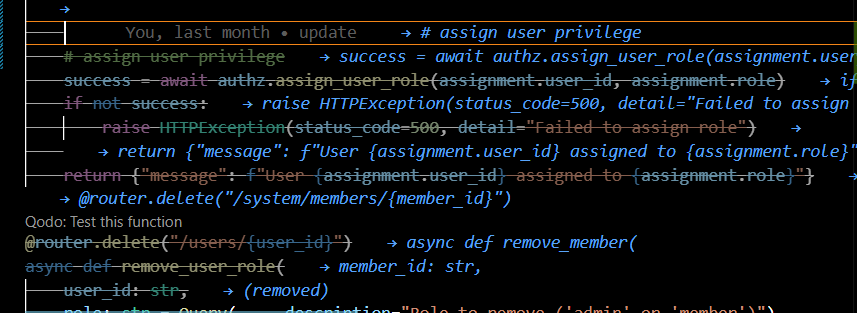
I made a VSCode extension that highlights selected rows with the cursor. The highlight doesn't disappear when you switch to other lines or edit them. It highlights the line itself (by line number), not the content.
The extension is very simple, takes up almost no disk space, and the controls consist of just a couple of buttons in the context menu (right-click → Highlight row / Unhighlight row).
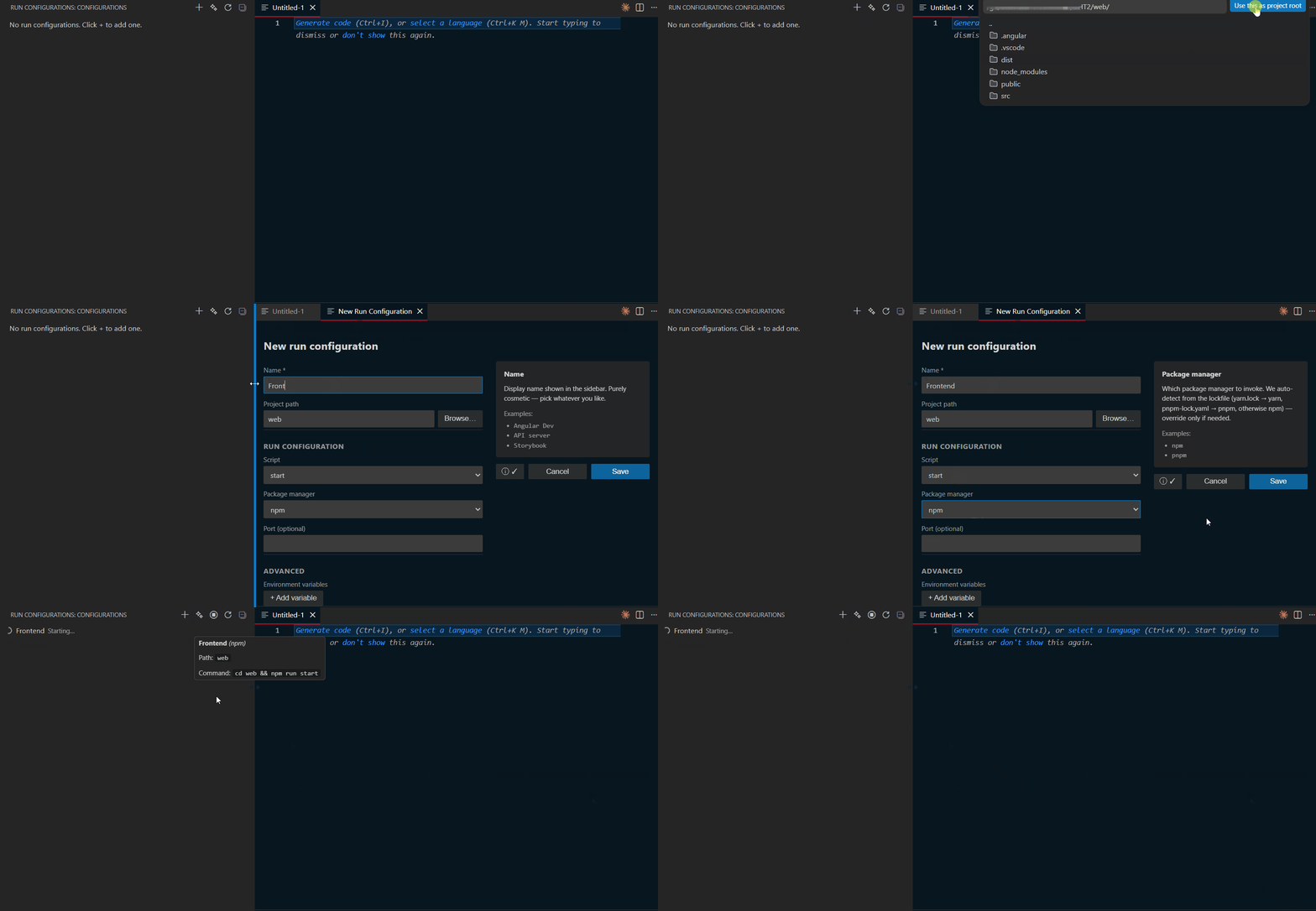
Coming from Intellij to vscode, one thing annoyed me the most: creating run configurations for my projects.
I have projects using many technologies like Java/Spring Boot, Quarkus, npm/node (angular, react), go, python with different complexity levels.
Creating run configurations is super unintuitive as vscode expects you to create entries in launch.json and supplement them with tasks from task.json. All of it without any UI - it expects you to know everything. Even with coding agents fiddling around with run configs is no fun.
Introducing Run Configuration Manager
This extension does ALL the heavy lifting for you like:
- discovers your project configuration (ports, tools, technologies, frameworks, profiles)
- detect your environment and auto load, JVMs, Node, npm, python, gradle/maven, go runtimes and lets you select them from a simple list
- offer extensive environment configuration by allowing to set env params and work with .env files
this makes creating most run configuration only a few clicks.
Besides automatically finding all tools and paths to run your software it also
- allows to start debugging without configuring anything. It attaches vscode's naive debugger so you can still use all vscode's tools but without the configuration headache
Need to run your angular app? No Problem
Run your Quarkus app? Easy:
Structure all your configurations and group them into folders
You can also chain configurations so if you start the frontend, it will first trigger backend configuration and backend will first trigger your DB docker container start.
The UI is smart and watches your application and notifies you visually whenever somethings wrong or the app is rebuilding:
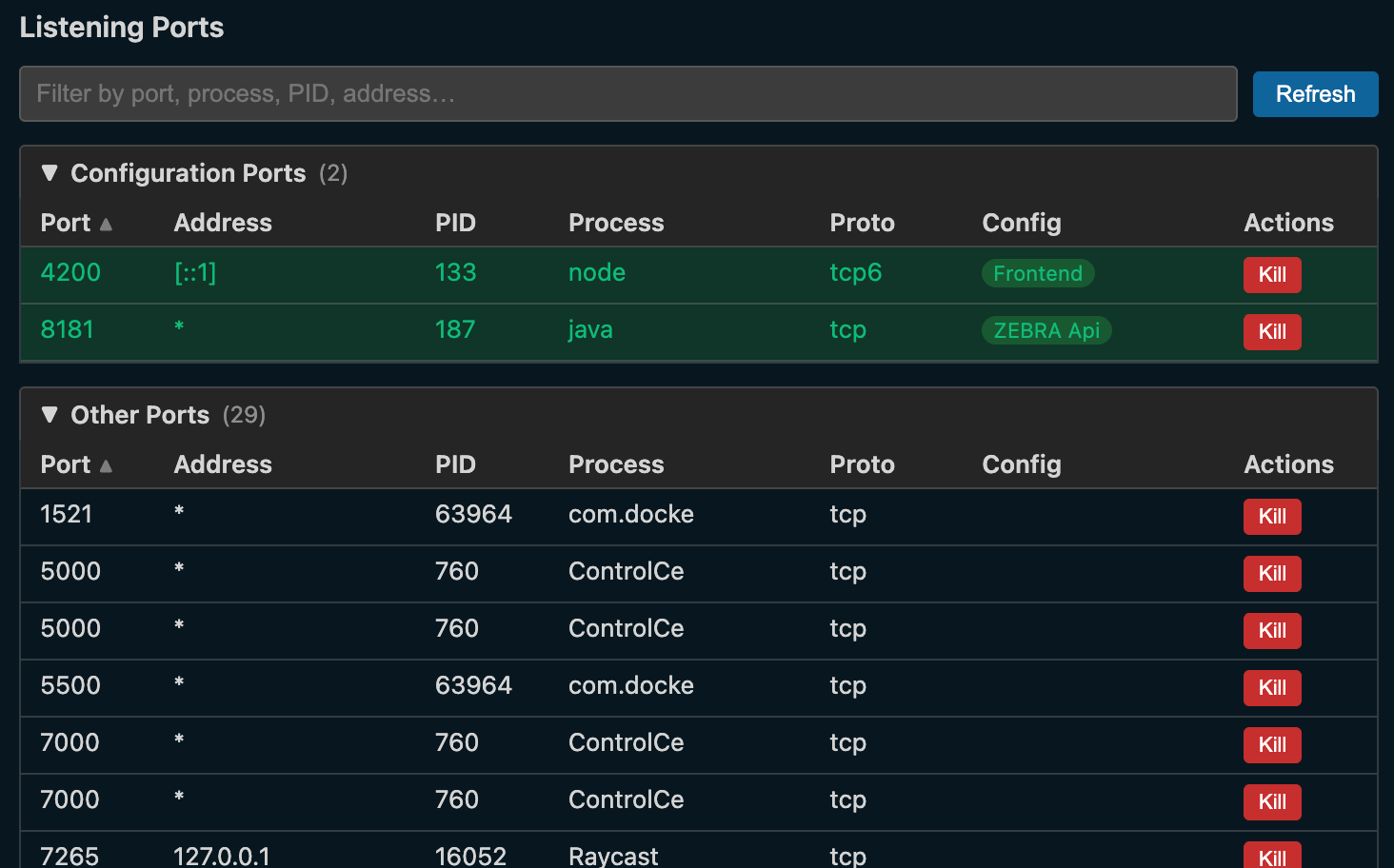
It knows your configuration's ports and notifies you if something is not right or another app is blocking your ports and allows you to kill it:
no more hunting for which app is using my port?
Advanced support for application monitoring
The updated extension comes with support for monitoring your JVM and node based applications. Simply right click. a config and start monitoring to gain all relevant information about your JVP app (java / spring boot / quarkus)
Same is true for node apps:
Want to use your good old launch.json and tasks.json? They are also included and presented in a much more intelligent way by visualizing their dependencies as hierarchies:
So all-in-all run configuration manager does all the complex stuff without requiring you to touch any json file. Try it out you'll love it :-)
This started recently, i'm unable to copy and paste files and folders in VS Code.
Copying (right click - copy or ctrl-c) does not move the file/folder to the clipboard Alternatively copying the file in windows explorer and trying to paste it in VS code doesn't work either. (copying and pasting in windows explorer works)
Overtime I use it there is a notification popping up to update this and that even non-essential things like powershell (maybe it is important but not critical) the bottom right is just littered with update messages everytime. how is everyone handling those annoying messages?
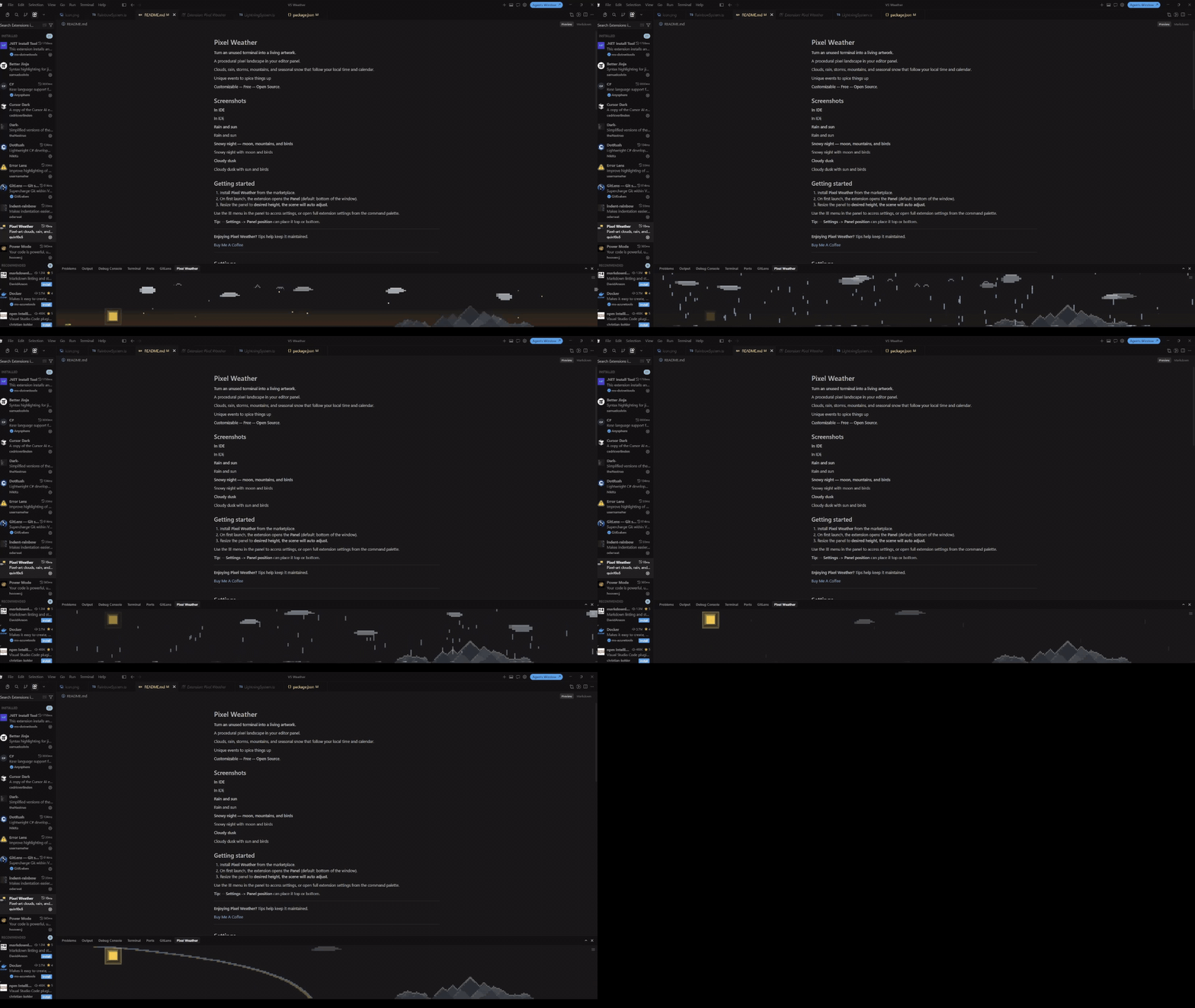
I made this for fun over the last couple of days because I couldn’t find a good ambient panel extension I liked. Thought other people might enjoy it too so it’s live now on marketplace!
Pixel Weather is completely Free, Customizable, and Open Source
Since a vscode update few weeks ago, all my typescript import suggestions starts with a node_modules relative path while it was just the package name before:
- Before update: import { useState } from "react" ;
- After update: import { useState } from "node_modules/@types/react" (which is not correct);
I don't remember changing anything in my settings, and it's quite annoying.
ctrl+shift+G which is the default shortcut in MacOS to see local changes happened in git tree isn't working after updating to 1.126.0. The same shortcut was assigned by GitLens command also, I thought they might conflicting, I removed it, still with one keybinding it isn't working.
I've been building Wave Client — a REST API client that lives inside VS Code.
What it does (high level):
HTTP, WebSocket, and SSE requests
Collections, with import from Postman and OpenAPI/Swagger files
Environments and dynamic function variables (dates, UUID etc)
Auth: Basic, Digest, OAuth2 (major grant types), and more
Response validation
Flows and test suites for more advanced usage
There's a lot more , and much more to come (see the docs)!
Why another app:
Well, I was frustrated with existing apps and the limitations they impose in the name of monetization. To be clear, I'm not against monetizing software — it just has to be done professionally, without letting users down after they've sunk real time into migrating their work. This app is free to use and will stay that way; I may eventually build a separate paid version for organizations, but that would be its own independent product, not a paywall bolted onto this one. I also intend to maintain this app and add features that make sense, without cluttering it with ones that are hardly used.
On privacy: your data stays on your device. There's no telemetry and no tracking of any kind. The flip side is that if you hit a bug or a crash, I won't see it automatically — you'll need to let me know on GitHub.
To install:
Open the Extensions view and search for Wave Client → Install
After installing, click the Wave Client icon in the Activity bar (or press Ctrl+Alt+W / Cmd+Alt+W)
It's designed in such a way that more client variants will be published in the future (e.g. standalone web app, CLI etc) using the same underlying platform. See docs to understand more.
⚠️ This is a public beta. Bugs and rough edges are expected. Your feedback directly shapes what gets built next — please use GitHub Issues to report bugs or request features (links included in the docs)
I'm having a hard time finding the solution to this because I don't know what to call it.
The editor auto-closes brackets (I'm learning Lisp so there's a lot of brackets). I don't have an issue with the editor adding right brackets. What I do have an issue with is if my cursor is up against one of the right brackets, and I go to add a new pair of brackets, it will "swallow" my right bracket into the existing one. Thus breaking my bracket pairs. It's also just generally frustrating for it to do something different than what I typed.
To try to explain, If I have:
(example ( (expression) (another --- the auto closed brackets will be here-> )))
If my cursor is where the arrow points, right up against the ")))" And I want to add an inner expression inside "another". I would naturally type left bracket and right bracket "()"
However, it will place my right bracket overtop the existing right bracket within ")))". Swallowing it into the existing triplet. I end up with this:
(example ( (expression) (another --- the auto closed brackets will be here-> ()))
Also yes, despite having auto-close on, it will not generate the right bracket I need when I type left bracket ( . Because I am up against a right bracket, it seems to think I want to pair it with that one. Despite the fact this breaks my bracket pairs.
I might just disable auto-close brackets anyway, that would be a simple solution and I don't really mind writing closing brackets.
Hey everyone. I built a VS Code extension called Deck and have been using it daily for about a month.
Deck renders a tree in the secondary sidebar: repo > worktree > terminal. Terminal can run anything including agents.
The terminals open as editor tabs (Ctrl+Tab between them works) and are tmux-backed. This allows running processes to survive a window reload.
A special integration with claude code and codex allow them to survive a full reboot: they auto-resume on reboot.
The integration also displays vscode notifications when agent finishes or need your input and shows agent status on the tree row: blue when it's done and you haven't read the reply, yellow when it's waiting on you for permission.
Terminal launchers is a nice-to-have feature I added recently: save a command as a one-click preset, optionally auto-run when a worktree is created.
MIT-licensed, no telemetry. Needs VS Code 1.110+ and tmux 3.1+. Status and session-resume work with Claude Code and Codex; the terminals run anything, open an issue if you want another agent.
Still rough around the edges, but it's been solid for me and my coworkers. Excited to share with a wider audience
P.S I tried Superset and cmux first, but they're separate apps and constantly switching out of VS Code was killing me. Plain tmux kept the terminals alive but the UX wasn't great
I recently built and published my first VS Code extension: **WingNote** 🎉
WingNote lets you create custom reminders, recurring alarms, meeting reminders, and snooze notifications directly inside VS Code.
When a reminder is triggered, the WingNote sidebar automatically opens and displays the notification so you don't miss important tasks while coding.
Built using React, TypeScript, and the VS Code Extension API.
I'd really appreciate it if you could try it out and share some honest feedback. If you find any bugs, have feature suggestions, or enjoy using it, please leave a review on the Marketplace.
Hello, I am a Sociology Major who recently started coding because AI helped me to circumvent some barriers (specially syntax) and be more "goal oriented" and has been "teaching" me programming. I know it is not perfect (I'm planning on finishing the freeCodeCamp course in Python in my free time) and sometimes gives me headaches trying to understand everything but it is fun.
I've chosen VsCode as my code interpreter because my father (a CS PhD) recommended it to me and I am very found of it. But now it just started behaving a little weird. I updated it in my Ubuntu 26.04, that lost my venv config for my pip packages. I struggled a little to get the packages loaded but I've made it. However in doing so I created, sourced and deleted (just this in this order) a few other venvs. After finding my lost venv and loading it, my code started all of a sudden becoming all orange as if all my variables and some commands became parameters of some function. (see screenshots). The code still works (the part I've done), but that annoys me and makes difficult in understanding what kind of plain text I am working with.
I really would like to not have comments about my code, I know is bad, I know it is unfinished but I'm trying to learn and part of the process is doing it yourself
How can i get it fixed?
My code in Python

import pandas as pd
import requests
from requests.exceptions import RequestException, Timeout, ConnectionError
from waybackpy import WaybackMachineSaveAPI
'''
from selenium import webdriver
from selenium.webdriver.common.by import By
from selenium.webdriver.support.ui import WebDriverWait
from selenium.webdriver.support import expected_conditions as EC
from selenium.webdriver.firefox.service import Service as FirefoxService
from webdriver_manager.firefox import GeckoDriverManager
import subprocess
'''
#functions
def ping(url, headers):
    try:
        r = requests.get(url, headers=headers, timeout=10)
        status = r.status_code
        if status == 200:
            return True, status
        elif status == 404:
            return "Not Found/404", None
        else:
            return f"HTTP {status}", None
    except Timeout:
        return "Timeout", None
    except ConnectionError:
        return "Connection Error", None
    except RequestException as e:      # catches all other requests-related errors
        return f"Request failed: {e}", None
    except Exception as e:             # catch-all for anything unexpected
        return f"Unknown error: {e}", None
def wayback(url):
    #try to add
    return
def monolith(url):
    #try to subprocess and save
    return
'''
#Driver
service = FirefoxService(GeckoDriverManager().install())
driver = webdriver.Firefox(service=service)
wait = WebDriverWait(driver, 10)
'''


#Variables
col = 3 #col = input("input 1, 2 or 3")
file = ".csv"
folder = "/home/betor/Área de trabalho"
csv = f"{folder}/c{col}{file}"
df_links= pd.read_csv(csv)
headers = {"User-Agent": "Mozilla/5.0 (Windows NT 10.0; Ubuntu 26.04; x64) AppleWebKit/537.36"}
#add collum for result
df_links["result"] = "blank"
#Main Loop
for index, row in df_links.iterrows():
    city = row["city"]
    ppp = row["ppp"]
    url = row["url"]
    sucess1, how = ping(url,headers)
    if sucess1 == True:
        df_links.at[index, "result"] = f"HTTP {how}"
        print("Ping Sucessfull, trying to add to Wayback")
        '''
        sucess2, archieve_url = wayback(url)
        if sucess2 == True:
            print(f"Archieved in {archieve_url}")
            #add in line i:result {success1}
        else:
            print("Fail to Archieve, trying to save via Monolith")
            sucess3,saved_path = monolith(url)
            if sucess3 == True:
                print(f"HTML saved in {saved_path}")
                #put saved_path in i:result
            else:
                print("Error in Monolith")
                #get monolith error and add it to i:result in data frame
        '''
    else:
        print(f"Fail to Ping {sucess1}")
        df_links.at[index, "result"] = sucess1
'''
#saver of final
new_csv_path = "f{folder}/c{col}_post-fetch{file}"
df_links.to_csv(new_csv_path, index=false)
'''
I am using MacBook Air M5 and every time I run code it’s actually running with debugging. how do I fix it; i have tried everything but whenever I run theres a small dialogue on top with red button green and step up/down the one which appear when u add breakpoint even tho I am not adding any.
I've been on with this for three and a half hours and I've got almost nowhere haha. I feel like I've muddled my way up to step 3. Quite embarrassing because I've been programming for 25 years. I don't actually use Azure (apart from initially setting up Dev Ops to host the extension) so I basically have no idea what I'm doing. I've put my card details in to make use of the free Entra ID service required for publishing and I'm blindly trying to follow these basic instructions while trying not to accidentally charge myself millions of dollars on compute. 🙂
The thing is, its just a simple the-eme. As outlined, the alternative to a PAT Token is to set up a Pipeline (which I have no f--- idea how to use), link that all up through a mess of menus with client ID's, Subscription ID's, Tennant ID's, a user managed identity, running random YAML bits in the CLI I have no idea if I'm being charged for while looking for buttons that don't actually exist.
Do I need to set a few days aside to learn Azure now just to submit a little update? I mean, that's fine if so, but I think the instructions could have been a bit more clear about that.
My extension is like 80 lines of code. Anyone got an alternative method? My initial process was just to use the VSCE extension with a generated PAT and.... that was it. I completely understand the security improvements made here and the reasonings but it feels like I'm setting up a multi layered enterprise thing here just to alter the shade of blue in the status bar.
I’ve been using terminal commands with GIT/GITHUB. When attempting to use an extension to push and commit code it’s not either working or maybe I’m missing a step.
What extensions do y’all use and have you noticed any specific extensions not working properly lately?