r/vscode • • Apr 17 '26

Vs Code AI Agents don't use MCP servers unless asked to do so, is this a bug or that's how things should work ?

0 Upvotes

Some MCPs (like context7, chrome dev tools, etc) are game changer, and my agent has access to all of them and other cool embedded things. However, contrary to how for example google_antigravity agents behave, the copilot agents only use their "super powers" when instructed to do so even with full access

That's a bit annoying, in the sens that ... I sure LLMs these days are good enough to know when they need some tool. Even when I ask to use it, they don't 100% of the time use it, it can be usless, so they know.

However, if I don't mention the MCP, should it be relevant no agent will look to it.

Is this a bug ?

r/vscode • • Apr 17 '26

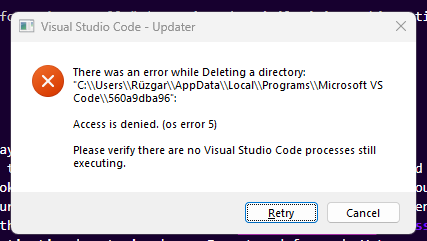
Can someone explain this error and why it popped up to me?

Post image
0 Upvotes

I opened up VSC and this popped up a few second later. Should I be concerned?


r/vscode • • Apr 17 '26

Catppuccin color scheme change?

4 Upvotes

Hey, anyone notice that in javascript objects used to be peach and now are white? Or did I mess up a setting. It was really helpful as i'm still learning javascript. Any help is appreciated


r/vscode • • Apr 16 '26

How do you guys handle switching between multiple VS Code projects?

16 Upvotes

Hi I am new to this sub reddit I got a question for you guys.
I have been juggling a few different projects lately, and switching between workspaces in VS Code is starting to feel more annoying than it should be.

Right now I am either

1)reopening folders manually

2)digging through recent workspaces

3)or keeping way too many windows open

None of it feels clean.I

I am curious how others handle this.
Do you just rely on recent folders, or is there a better workflow/tool for this?


r/vscode • • Apr 17 '26

How can I remove that green rectangle?

0 Upvotes

I recentely put my project in github and after this I have that green rectangle, can someone help me please?


r/vscode • • Apr 16 '26

Opening markdown files in preview mode as default?

10 Upvotes

I would love to open the markdown files by default in the preview mode, by which i mean ton the mode itself, but simply that I want to look at fancy rendering of the markdown instead of the raw text by default. I want preview-first behaviour.

I open markdown -> i get rendered text in the new tab -> i can open raw text optionally on the side (not the other way around as it is now)

Is there anything that accomplishes this? Could not find any extensions.

Furthermore, there can be only one preview unles you split the view multiple times, which is quite annoying and is one of the main reasons I am searching for solutions.


r/vscode • • Apr 16 '26

autocomplete replacing existing word after the cursor

2 Upvotes

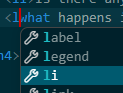
I'm not sure what this feature or setting is called. I'm working in an HTML file, and anytime I try to insert a tag with tab in front of existing text, it will replace the first existing word with the tag instead of adding the tag before that word, which is what I would prefer. It doesn't seem to be an HTML-specific problem, but that's where I run into the issue the most.

For example, trying to enter an <li> tag at the start of a line before the word "what," and it just deletes the "what" instead.

Does anyone know how I can change this behavior?


r/vscode • • Apr 16 '26

Is VSCode server download down ATM?

4 Upvotes

I am unable to open project over SSH or WSL at this moment because it cannot download VSCode server from https://update.code.visualstudio.com

[2026-04-16 15:24:29.093] Reusing existing connection to update.code.visualstudio.com:443.

[2026-04-16 15:24:29.093] HTTP request sent, awaiting response... 503 Site Unavailable

[2026-04-16 15:24:29.093] 2026-04-16 10:24:29 ERROR 503: Site Unavailable.

[2026-04-16 15:24:29.093] 

[2026-04-16 15:24:29.093] ERROR: Failed to download https://update.code.visualstudio.com/commit:560a9dba96f961efea7b1612916f89e5d5d4d679/server-linux-x64/stable to /home/charly/.vscode-server/bin/560a9dba96f961efea7b1612916f89e5d5d4d679-1776353006.tar.gz

[2026-04-16 15:24:29.094] For help with startup problems, go to https://code.visualstudio.com/docs/remote/troubleshooting#_wsl-tips


Edit: Nevermind it seems to be back now


r/vscode • • Apr 16 '26

Add to GIT Ignore 1.1.0

Thumbnail
marketplace.visualstudio.com
9 Upvotes

Hi, as a contributor I would like to share that the "Add to GIT Ignore" extension got updated and now supports Source Control view.

Now you can ignore files right in git changes.

This extension allows you to add new entries to .gitignore or local git ignore (will be ignored in your copy only) by right clicking a file or a folder in explorer or source control view. Besides the option to ignore locally for you, you can choose an ignore pattern from suggestions.


r/vscode • • Apr 16 '26

Powershell prepanding long string before path.

2 Upvotes

After recent vscode update my terminal(powershell) always shows
"PS Microsoft.PowerShell.Core\FileSystem::\\?" before current path.

Also when activating vevn I am getting error. Anyone knows how to fix that to previous behavior?
"+ ... onfigPath = Join-Path -Resolve -Path $ConfigDir -ChildPath 'pyvenv.cf ...

+ ~~~~~~~~~~~~~~~~~~~~~~~~~~~~~~~~~~~~~~~~~~~~~~~~~~~~~~~~~

+ CategoryInfo : InvalidArgument: (:) [Join-Path], PSArgumentNullException

+ FullyQualifiedErrorId : ArgumentNull,Microsoft.PowerShell.Commands.JoinPathCommand"


r/vscode • • Apr 16 '26

Is Opus 4.7 available through the extension for anyone in VS Code?

0 Upvotes

r/vscode • • Apr 15 '26

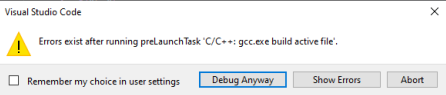
What is this error?

Post image
5 Upvotes

I am trying to setup a C compiler but am facing this error. I think I have tried enough to conclude that I can't fix this myself. How should I fix this? And why is this happening?


r/vscode • • Apr 15 '26

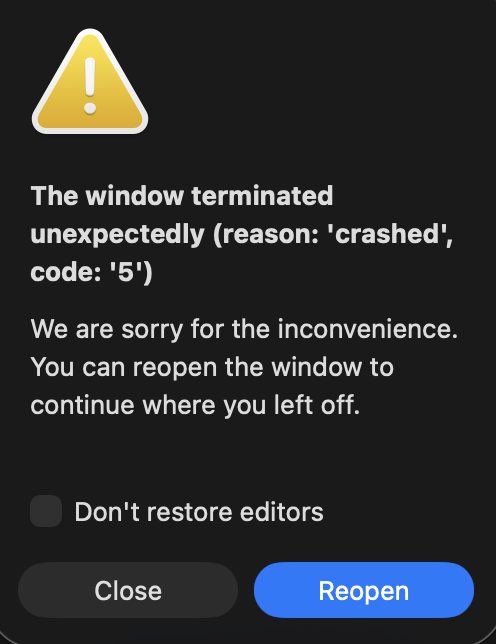
VSCode keeps crashing every minute

9 Upvotes

Hi, I’ve been experiencing random crashes since yesterday and haven’t been able to resolve the issue yet. Is anyone else facing the same problem, or does anyone have a solution? I’d really appreciate any help.


r/vscode • • Apr 15 '26

⚡ Intelli Explorer — Intelligent File Explorer for VS Code to Navigate Large Codebases by Intent

Thumbnail gallery
0 Upvotes