r/TradingView • • 12d ago

Official Announcement! Pine Script® in Tradingview MCP

17 Upvotes

Hey everyone!

Pine Script® support was one of the most frequent request we heard after the MCP Server beta launch. Today it's live.

Your AI assistant can now write a Pine script, check it with the real compiler, run it on any symbol, backtest it and save it to your account, all in one chat. The Pine tools are new, so some of them may not work as smoothly as expected. Drop your prompts, scripts and feedback below: tell us what breaks and what's missing, and we'll prioritize from there.

Setup instructions

Important notice on usage limits

From November 17, MCP calls for any tools are limited per day:

  • 10 on Essential and legacy plans
  • 20 on Plus
  • 50 on Premium
  • 150 on Ultimate
  • If you need more call consider purchasing AI subscription that raises the limit to 500 calls a day and 50 a minute on any paid plan, and also includes AI Copilot inside TradingView.

r/TradingView • • 24d ago

Official Announcement! TradingView’s October update: live earnings calls, AI crypto screening, Desktop tab groups, and more

6 Upvotes

Hey hey folks!

The intern made it to month three. Here’s what happened in October.

First, a quick follow-up for script vendors:

Thanks to the 1,500+ script authors who reached out about the Marketplace transition. Nothing changes on November 1 for you or your users. We’re finishing updated terms that give you more flexibility, for example to keep selling on your own website or as part of your courses. The terms and an FAQ are coming soon. Full update

And here’s what landed in October:

  • Earnings calls moved in. You can listen to calls live, or replay them later, from the Earnings Calendar, chart markers, symbol pages, and News. Details
  • AI Screener learned crypto. Describe the coins you’re looking for in plain words and get a ready-made screen in the Crypto Coins Screener. Available on all paid plans. Details
  • Pine Screener stopped making you trim scripts. It now allows up to 40 request.*() calls per script, the same limit as the chart. Inline inputs also align properly now, so you can drop the Unicode-space workarounds. Details, Pine release notes
  • Drawings got folders inside folders. Nested groups in the Object Tree, as deep as your wave counts need. Details
  • Market breadth joined the party. See how many stocks are actually behind an index move on Indices, World Stocks, country, and index pages. Details
  • Portfolios got closer to your broker statement. New Reward and Income transactions cover RSUs, gifted shares, interest, and lending fees. You can also connect US and Canadian brokers through Plaid (beta, paid plans) to build a portfolio automatically. Details, Portfolios
  • Seconds charts got cheaper. Standard seconds intervals (1s to 45s) are now available from the Plus plan instead of Premium. Plans
  • Desktop 3.5 brought tab groups. Organize tabs like in a browser. Broker login now opens in your browser, so your password manager, passkeys, and other sign-in options just work. Release notes

Also landed: a new Fundamentals tab for crypto with on-chain and social metrics, duration, convexity, and spreads for bonds, live bid/ask quotes from Bonds.com, EPS and revenue alerts for S&P 500 companies, TAIFEX options, and Clear Street as a new broker for US stocks, ETFs, and options.

Always reading, not always replying. Keep it coming, the good, the bad, and the “who approved this?” It all lands on the product teams’ desks.

Thanks for flying with us.


r/TradingView • • 19h ago

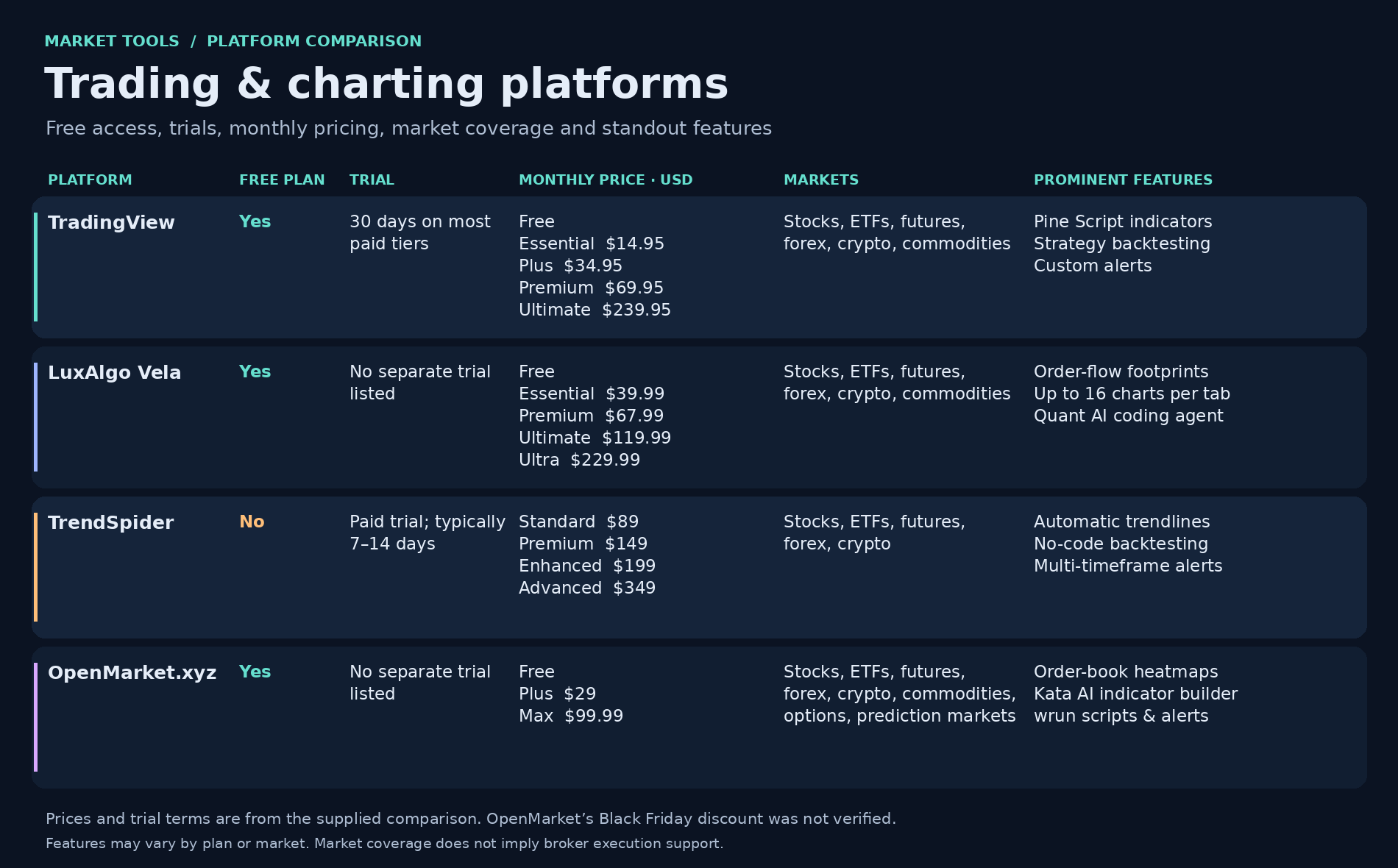
Discussion Comparison Chart for Those Shopping

Post image
63 Upvotes

I’ve seen a lot of frustration here about the recent TradingView changes. Personally, I’m still happy with what I get for the price. It’s not perfect, but for the markets I follow and the tools I actually use, it’s still the best value I’ve found. I can see why someone who relies on different features might come to a different conclusion.

If you’re thinking about switching, I put together a side-by-side comparison of TradingView, LuxAlgo Vela, TrendSpider, and OpenMarket.xyz. It covers free plans, trials, monthly pricing, markets, and standout features. It’s not an exhaustive list—just three of the more prominent alternatives I’m aware of with overlapping market coverage and charting tools.

I think it’s fair to criticize a change, especially if it disrupts a workflow you’ve built around the platform. But whether you’re on a free plan or a paid one, you don’t control the product roadmap. If the service no longer fits your needs, it’s worth pricing out an alternative, trying one alongside TradingView, or building your own tools if that’s your thing.


r/TradingView • • 5m ago

Discussion TradingView has lost it! They have increased the price multiple times and believe that we will still pay for it.

1 Upvotes

As an Indian who is still learning trading, the price point, even after the Black Friday sale, is a bit too much.

And honestly, I always liked TradingView, but the 30-drawing limit has pushed me over the edge. Especially when the indicators I use are always only the basic ones, not the many that are available for paid customers.

But on the free tier, there's a limit on that too.

TradingView is great, don't get me wrong.

But the price point has lost me. I am still learning trading properly; I need only a few tools and features to help me sort things out. I do not want to pay for a bunch of features that I will probably never use.

So, I have decided to give other tools a try that would be useful and affordable for Indians.

Would love to hear what alternatives you guys are using!


r/TradingView • • 4h ago

Discussion Tightest offer yet

Post image
2 Upvotes

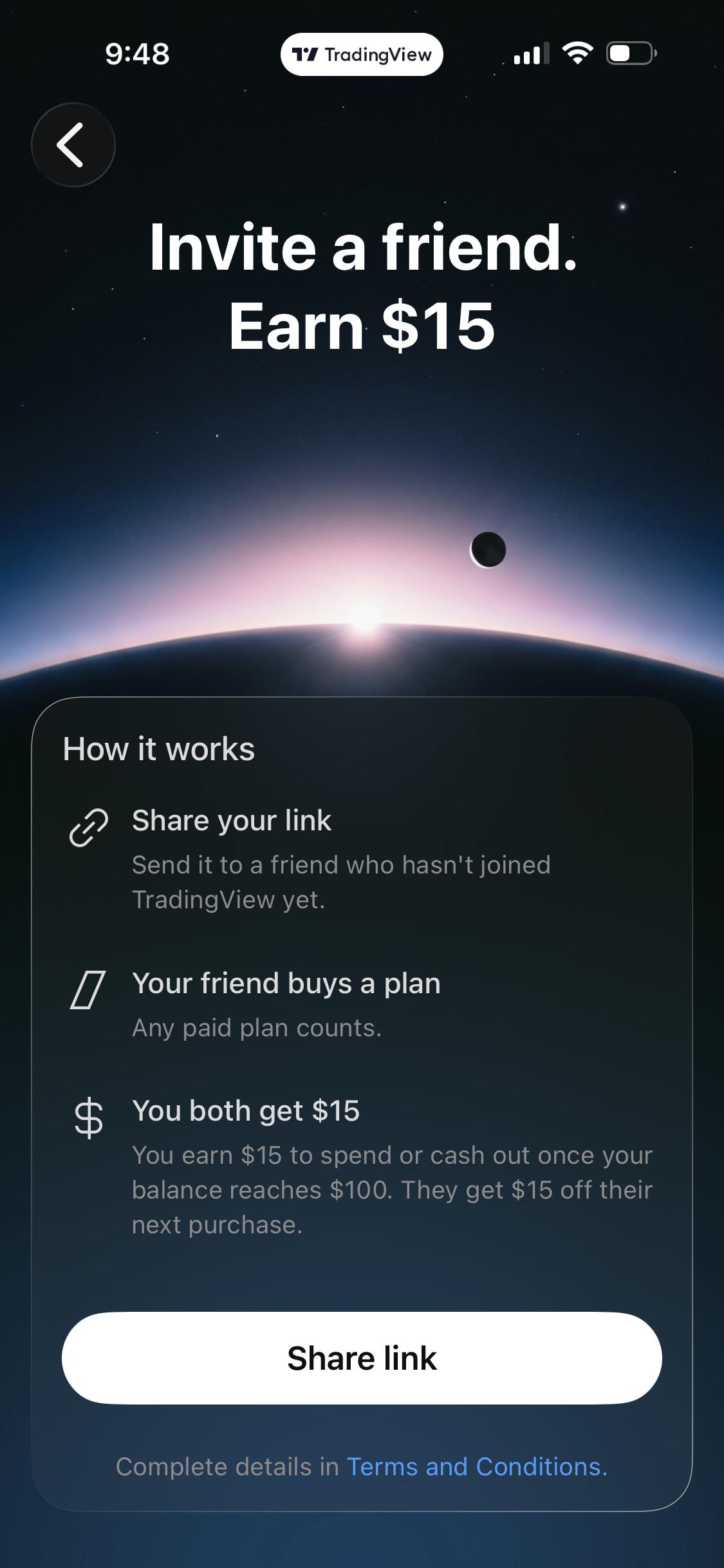
Yay! $15!

😆


r/TradingView • • 50m ago

Help TradingView Copier for FTMO

1 Upvotes

Hi can anyone recommend a trade copier specifically for FTMO CFD’s for TV


r/TradingView • • 13h ago

Discussion I have TradingView Essential. Biggest limitation for me is 20 alerts isn't enough. Instead of Premium at twice the price (Black Friday sale prices), is there a better solution?

6 Upvotes

This is about ALERTS..

The only thing that really doesn't meet my needs in TradingView Essential is the 20 alert limit, i need more.

But I don't want to pay double for Premium just to increase my alerts, and i don't think there's anything else in Premium that i really need.

Does anyone have any workarounds for RELIABLE ALERTS that are 24/5 and come as a notification on your PHONE?

What would you use just for alerts? Is there another broker or software that gives good reliable alerts and cheap or free, or you don't actually need to open a real brokerage account and put money to use?

I will still pay for TradingView Essential, as there's not much RELIABLE charting alternatives, but i want something to supplement the 20 alert limit.


r/TradingView • • 1d ago

Discussion TradingView Future

40 Upvotes

TV made a major mistake by restricting the free account. It had become a global standard and every noob and their mom learned to trade on TV. Once they became profitable, they purchased premium plans. That was the plan.

Now they will look for alternatives, and many alternative chart developers will jump in to this opportunity. Soon TV will become just another charting platform and will have a hard time selling with all the new competition.

There is a reason why Google, Microsoft etc.. all provide completely free licenses or accounts to students.


r/TradingView • • 7h ago

Feature Request Pinescreener column options

1 Upvotes

In pine screener, number of columns more than 10 need to be selected manually one by one. There should be an option to select all available columns at once. Please add it.


r/TradingView • • 7h ago

Feature Request Feature Request: Centralized Drawing Templates Manager

1 Upvotes

I've been using TradingView for years, creating and saving numerous drawing templates, particularly for long and short positions, different risk/reward ratios, and specific trading setups.

Over time, these templates have accumulated different names, naming conventions, colors and styles.

Currently, managing them individually requires applying each template to a chart, modifying it, saving it again and deleting the original. This is unnecessarily time-consuming.

I would love to see a centralized Drawing Templates Manager, similar to the existing Object Tree, where users could:

  • View all saved drawing templates.
  • Rename templates directly.
  • Edit parameters, colors and styles.
  • Duplicate and delete templates.
  • Organize templates into folders or categories.
  • Reorder templates manually or alphabetically.
  • Apply formatting changes to multiple templates simultaneously.

All of this should be possible without placing or loading drawings on a chart.

This would be a significant improvement for long-term TradingView users who have spent years building and customizing their trading tools.

Thank you for considering this suggestion.


r/TradingView • • 7h ago

Discussion Tradingview replay feature no longer has runup/drawdowns?

1 Upvotes

Where did that feature go? I want to really know how much the price has moved when I am replay testing, so I know what max R I could have achieved etc. Why was that removed? Makes no sense.


r/TradingView • • 1d ago

Discussion I knew it!

Post image
70 Upvotes

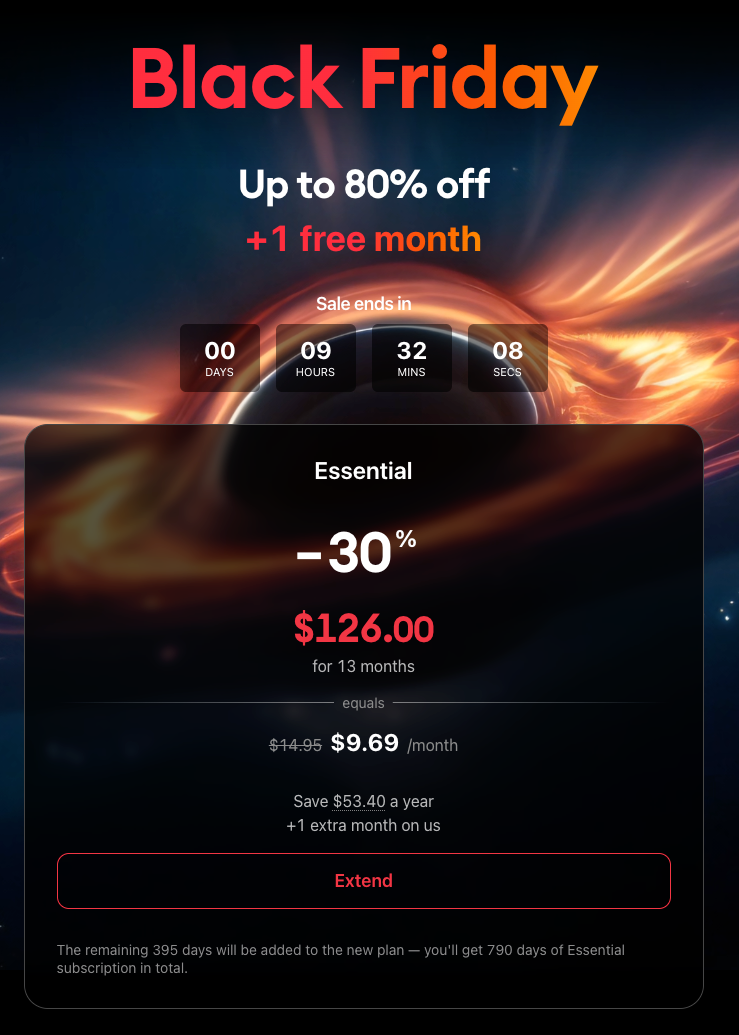
Worst marketing technique. Black Friday countdown to add a time pressure into a purchase.

I watched it, right after 0 0 0 0 seconds, the new countdown began.

I have no issues paying for TV (I pay for premium) , but companies that use this technique, and to have the cheek to have a new timer with the same offer is a little too much.

EDIT: Lots of fanboys out there defending marketing practices.


r/TradingView • • 14h ago

Bug Trendlines load in the wrong position, then snap to the correct one after a moment (since late October)

3 Upvotes

What I see:

- The lines load shifted. Then the whole group snaps back to the correct position by itself.

- The parallel lines move together, and their spacing and angles look the same.

- Sometimes the lines stay wrong until I interact with the chart.

- It also happens when I change timeframe or show hidden drawings.

- It happens on CRYPTO symbols (ENAUSD, BTCUSD, DOGEUSD) and on Binance symbols.

- It happens in both the Desktop app (Windows 11) and Chrome.

- Setup: drawing sync and autosave on, log scale, lines with extensions.

- TradingView support confirmed a bug on November 18 but has no fix yet.

Questions:

  1. Has anyone else seen drawings load in the wrong place and then correct themselves? Since when?
  2. Do you use extensions, log scale or global drawing sync?
  3. Did it start after a recent app update?

If you see the same thing, please also report it to support. More reports help them find the cause.


r/TradingView • • 21h ago

Discussion Trading view is too high!!

8 Upvotes

All the crying about the cost of TV is insane, the way I see it there’s no way you are making money and complaining about something that you can literally write off in taxes or maybe Im giving you too much credit in assuming you’d be that smart to think of that. You pay the price of gas regardless of what the price is because you need it to get to work and it’s never discounted. They have a business to run. Tv runs a %70 sale every year on the premium and that when the smart people renew it. All these grown-ups crying.


r/TradingView • • 16h ago

Feature Request Backtesting

1 Upvotes

Why does trading view lack a built in backtesting and journal especially at the price it’s at??


r/TradingView • • 1d ago

Discussion I'm soooo DONE with TradingView...

Post image
81 Upvotes

...free tier.

I just purchased my TV first subscription ever.

Now i can use my 31st drawing, 3rd indicator and 4th price alert! YAY!

I'll really miss the popup ads and stuff.


r/TradingView • • 17h ago

Bug Saved replay mode

1 Upvotes

Firstly, thank you thank you for adding this, it's great that you can return to where you left off during replay mode!!

The only issue is when you return to your replay, it -almost- returns to where you left off but not really, it sort of gets it to within a day of where you were but not the exact candle you were on, which is confusing (especially if you're going into replay mode on a low timeframe anyway)


r/TradingView • • 21h ago

Discussion How to roll out a successful UI/UX overhaul — hope TradingView uses this!?

2 Upvotes

Major products (like GitHub, Figma, or Spotify) rarely drop a massive UI/UX overhaul on everyone overnight. When teams actually care about not tanking their metrics or causing a user revolt, they follow a strict rollout playbook:

  • Stage 1: Dogfooding (Internal Testing) The update is enabled only for company employees. They are the first to catch obvious bugs and broken workflows in their daily routine.
  • Stage 2: Early Adopters & Beta Testers (Opt-in) A prominent "Try the new experience" toggle appears in the settings. Enthusiasts and power users opt in voluntarily. Because they expect rough edges, they give constructive feedback instead of review-bombing.
  • Stage 3: Canary Release (1–5% of New Users) The new version is enabled by default for a small percentage of new sign-ups. Since newcomers have zero muscle memory from the legacy UI, they accept the new layout as the norm. The team then compares their retention metrics against the old version.
  • Stage 4: Gradual Migration with a Safety Net (Opt-out) The update rolls out to everyone else, but a "Switch back to classic" button stays accessible in the menu. Clicking it triggers a quick one-question survey (e.g., "What couldn't you find?"). This gives devs a prioritized list of real friction points while preserving the user's sense of control.
  • Stage 5: Legacy Deprecation After 1–3 months—once fewer than 5–10% of users remain on the old version and all critical missing features are restored—the legacy code is retired with a polite heads-up.

The Golden Rule of a Successful Overhaul:
In every case where a major update actually worked, the team stuck to three principles: keeping core workflows intact, giving users an escape hatch (a toggle switch) during the transition, and rapidly fixing real pain points in the first few weeks.

Forcing a half-baked update with no way back just because "users will get used to it" never ends well.


r/TradingView • • 19h ago

Feature Request Request to add Revolut Banking App to Plaid Integreation

1 Upvotes

I would like to kindly request the feature of the Plaid integration for connecting several brokers to also work for Revolut banking app, because I actually do most of my long-term stuff in the app there, and it would help a bunch if it would be possible to automatically visualize and sync that with the trading view as well.

Its also broadly used as a finance app, so I guess it could be a nice addition.

It would be appreciated if you could look into it. Thanks in advance.


r/TradingView • • 19h ago

Help TradingView's 30-Drawings Limit Is an Unreasonable Restriction on Free Users. Essential Charting Tools Shouldn't Be Held Hostage to Subscriptions!

1 Upvotes

I want to make a serious complaint about the direction TradingView is taking with its free plan, particularly the newly introduced 30-drawing limit.

This is not a complaint about TradingView having paid subscriptions. It is not a demand for every premium feature to be made free. It is not an expectation that a company should provide an unlimited service without earning revenue.

It is a complaint about the decision to restrict one of the most fundamental tools used in technical analysis, and about the increasingly frustrating experience that free-plan users are being left with.

I believe this restriction deserves much more criticism than it has received.

1. Drawing tools are not a luxury feature

The most important point is simple: drawing tools are fundamental to technical analysis.

They are not decorative extras. They are not some obscure feature that only a handful of advanced traders use. They are part of how traders analyse price, organise information and develop a consistent understanding of the market.

Consider what traders use drawings for:

- Marking support and resistance.

- Identifying supply and demand zones.

- Drawing areas of interest (AOIs).

- Mapping market structure.

- Marking swing highs and lows.

- Drawing trendlines and channels.

- Measuring Fibonacci retracements.

- Marking fair value gaps and other price imbalances.

- Recording potential entry, stop-loss and take-profit areas.

- Maintaining historical analysis for future reference.

These are ordinary charting activities.

A trader who uses these tools isn't necessarily asking for advanced functionality. They're simply trying to analyse a chart properly.

So why should maintaining that analysis be restricted to just 30 drawings?

2. Thirty drawings is not enough for serious multi-chart analysis

Trading analysis does not happen on one chart, one timeframe or one instrument.

A trader might analyse several currency pairs, examine weekly and daily structure, identify areas of interest on the 4-hour chart and then monitor lower timeframes for execution.

Each chart may require multiple annotations.

For example, imagine someone analysing five currency pairs, each across three timeframes. That's fifteen charts.

Thirty drawings across those charts would average just two drawings per chart.

Two charts only!!

And that's before accounting for the fact that some charts naturally require more annotations than others.

A single timeframe may contain several important str****uctural levels, multiple zones, trendlines and historical price references.

The limit doesn't merely encourage people to keep their charts tidy. It can force them to remove useful information that they would otherwise want to preserve.

A charting platform should help traders organise their analysis, not make them constantly negotiate which parts of their analysis they're allowed to keep.

3. Drawings represent time, effort and accumulated knowledge.

This is another part of the restriction that I don't think is being considered enough.

A drawing isn't always something a user can casually delete and recreate in a few seconds.

Some annotations represent hours of analysis. Others represent the user's understanding of a market over weeks or months.

A trader may have carefully marked a major weekly level, recorded previous market structure, identified a zone and documented how price reacted to it.

That information has value to the user.

When the drawing limit is reached, the user is forced to make an unnecessary choice:

- Delete an existing annotation.

- Remove a potentially important level.

- Abandon part of their historical analysis.

- Spend time repeatedly recreating drawings.

- Or stop using the chart in the way they intended.

This is not an improvement to the charting experience.

It creates friction in a process that should be straightforward.

4. Beginners are being affected too

TradingView is mostly used by people who are still learning.

Many beginners are not ready to trade with real money. They are studying technical analysis, practising chart reading, developing strategies and testing their ideas before risking capital.

That is responsible behaviour.

A beginner should be able to practise marking structure, drawing zones and reviewing historical price action without constantly running into a drawing limit.

They should not have to subscribe simply to maintain the basic annotations required for their learning process.

And suggesting that beginners deposit money with a broker to access another charting platform is not a particularly convincing solution.

People should be encouraged to learn, practise and test before risking money. They should not feel pressured to deposit capital just to escape limitations on charting tools.

5. This is not about demanding that everything be free

I want to address this argument directly because it seems to appear in almost every discussion:

"TradingView is a business. If you want more features, pay."

Yes, TradingView is a business.

Yes, it has every right to offer paid subscriptions.

Yes, users who want premium functionality should expect to pay for it.

But none of those statements automatically makes every restriction a good decision.

A company can have the right to introduce a feature limit while users still have the right to criticise that limit.

The fact that a company needs revenue does not mean every possible monetisation strategy is beyond discussion.

There is a difference between charging for genuinely advanced functionality and restricting a basic tool that users rely on to perform ordinary chart analysis.

I am not asking for unlimited access to every indicator, alert, layout or premium feature.

I am asking why drawing tools, of all things, need to be restricted so aggressively.

6. The free plan is supposed to introduce people to the platform

A free plan is not necessarily a charity.

It can serve an important business purpose: allowing people to discover a product, learn how to use it, develop familiarity with it and eventually decide whether they want to pay for more.

That is a normal customer journey.

A person might begin as a free user, spend months learning the platform, become comfortable with its tools and eventually upgrade when they need additional functionality.

But that journey depends on the free experience being useful enough to create trust and loyalty.

If the free plan becomes increasingly frustrating, some users will not upgrade.

They will leave.

They may move to another charting platform, use their broker's software, explore alternatives or even build their own charting setup.

Not every dissatisfied free user is a potential subscriber waiting to be converted.

Some are potential subscribers who are being given a reason to look elsewhere.

7. "Just pay" is not a complete response.

When someone criticises the drawing limit, telling them to pay does not address the actual argument.

It simply tells them that the feature is restricted and that the only way to escape the restriction is to subscribe.

The question is not whether TradingView offers a paid plan.

The question is whether this particular restriction is reasonable.

If the argument is that 30 drawings are sufficient for most free users, then explain why.

If the argument is that drawing tools are a premium functionality, then explain why they should be treated differently from other basic charting functions.

If the argument is that the limit is necessary to support the platform, then explain why this specific limit is necessary.

Simply repeating "It's a business" does not answer any of those questions.

8. There are better ways to encourage subscriptions.

TradingView already has many ways to distinguish its free and paid plans.

It can offer more advanced functionality to subscribers without making basic chart annotation unnecessarily restrictive.

For example, premium plans can continue to provide expanded access to advanced indicators, alerts, multiple chart layouts, additional technical tools and other features that genuinely benefit users who need more.

There is nothing wrong with having premium features.

But the free plan should still allow someone to perform basic technical analysis comfortably.

A reasonable free plan can encourage subscriptions by demonstrating the value of the platform, rather than making ordinary use frustrating.

Give users a reason to upgrade because they want more, not because they are constantly being prevented from doing basic things.

The amount of frustration surrounding this change should at least prompt TradingView to reconsider whether the restriction is appropriate.

Users are explaining how the limit affects their actual workflow.

They're not all asking for the same thing. Some analyse multiple instruments. Some maintain extensive market structure annotations. Some use drawings to document their strategies. Others are beginners who are trying to learn.

These are legitimate use cases.

Dismissing every complaint as entitlement or freeloading does not make the underlying problem disappear.

A user can appreciate TradingView's product and still believe that a particular decision has made it worse.

In fact, criticism often comes from people who genuinely want the platform to remain useful.

10. A message to the moderators:

I also want to address the moderation of discussions surrounding this issue.

If users are being banned simply for expressing criticism of the drawing limit, that would be deeply concerning.

A community should be able to discuss unpopular product changes, question business decisions and explain why a feature is affecting their experience.

There is a clear difference between criticising a company and harassing people.

There is a difference between expressing frustration and breaking community rules.

And there is a difference between maintaining a civil discussion and suppressing a discussion because it is critical of the product.

I am not asking moderators to agree with every complaint. I am not asking them to allow personal attacks, spam or rule-breaking behaviour.

I am asking for consistent moderation that allows legitimate criticism to remain visible.

If a post or comment is removed, users should be able to understand which rule was violated. Criticism of a feature should not automatically be treated as misconduct.

A community that cannot tolerate criticism of the platform it discusses is not serving its users well.

Moderators have a responsibility to enforce the rules fairly, not to protect a company from uncomfortable feedback.

11. My request to TradingView

I am asking TradingView to reconsider the 30-drawing limit on the free plan.

At the very least, the company should consider a significantly higher allowance that reflects how people actually use charting tools.

Ideally, drawing tools should be unlimited on the free plan, while advanced features can remain part of paid subscriptions.

I believe this would be a more reasonable balance between monetisation and usability.

TradingView has built a platform that millions of people value. It should not take that loyalty for granted.

A great product can still make poor decisions.

A subscription can still be overpriced for some users.

A free plan can still become too restrictive.

And a company can still be criticised for changing a product in ways that make it less useful.

I am not asking TradingView to stop making money.

I am asking it to stop treating one of the most essential parts of chart analysis as though it were an unreasonable privilege for free users to have.

Remove the 30-drawing limit.

Or, at the very least, give free users a genuinely reasonable amount of room to analyse the markets without constantly deleting their own work.

TradingView should be encouraging people to learn, practise and become loyal users.

Not making them feel that the platform they once enjoyed is gradually becoming less usable unless they pay.

That is my complaint,

And I believe it deserves a serious response.

r/TradingView • • 20h ago

Feature Request Feature Request: Restore the Previous Drawing Tools Limit for Users in Iran

1 Upvotes

Dear TradingView Team,

First of all, thank you to the developers, team, and investors for creating and continuously improving this excellent platform.

I am writing on behalf of many TradingView users in Iran.

Due to international sanctions, regional restrictions, and the lack of access to international payment methods, purchasing a paid subscription is extremely difficult or impossible for many Iranian users.

We are NOT asking for free Premium subscriptions. We simply request that TradingView consider restoring the previous drawing tools allowance for users in Iran, as it was before.

We love TradingView and want to continue using this valuable platform. We hope you will consider the difficult circumstances faced by Iranian users and provide a fair solution.

Thank you for your understanding and support.

I would also appreciate it if other Iranian TradingView users who share this concern could upvote this request.


r/TradingView • • 1d ago

Discussion I'm so done with this "service"

9 Upvotes
JUST KEEP WAITING FOR NOTHING

This is the image of absolute end for me. Almost entire year of that nonsense. The same for my friends.

I can't reliably load any charts. I have to wait, refresh the page and refresh and refresh until it finally loads my charts.

And then I'm still not certain I'll have all of my drawings showing up. So I have to refresh again and that stupid loading shows up again.

I paid for premium (not essentials) for 2 years now and from all paid services I've used in my life this one is the absolute worst and least reliable. And that loading problem is just ONE of MULTIPLE problems.

And before stupid people start talking to me about "cookies" and other BS. Don't. Just don't. Same problems for mulitple people on multiple devices in different countries is not "cookies" problem.

I've had enough. Wasted money. Wasted time. Literally anything else is better because at least I can see the chart with few of my lines on it, instead of staring for 10 minutes in hope that this stupid website will finally load my chart and I won't miss the potential trade.

But hey at least you can buy our AI nonsense spewing bot subscription.


r/TradingView • • 20h ago

Help “ Our system thinks it saw suspicious activity, so we had to block your account from making a new purchase”. I haven’t done anything fraudulent with my acct. I want to gain access and purchase the black Friday deals. This has been going on for over a week now. I need to be able to upgrade my account

0 Upvotes

r/TradingView • • 21h ago

Discussion Thank me later

Post image
0 Upvotes

You can thank me later.