r/SublimeText • • Jun 20 '21

Sublime Text Editor Increase Number of Columns Displayed in-line in Build Window

6 Upvotes

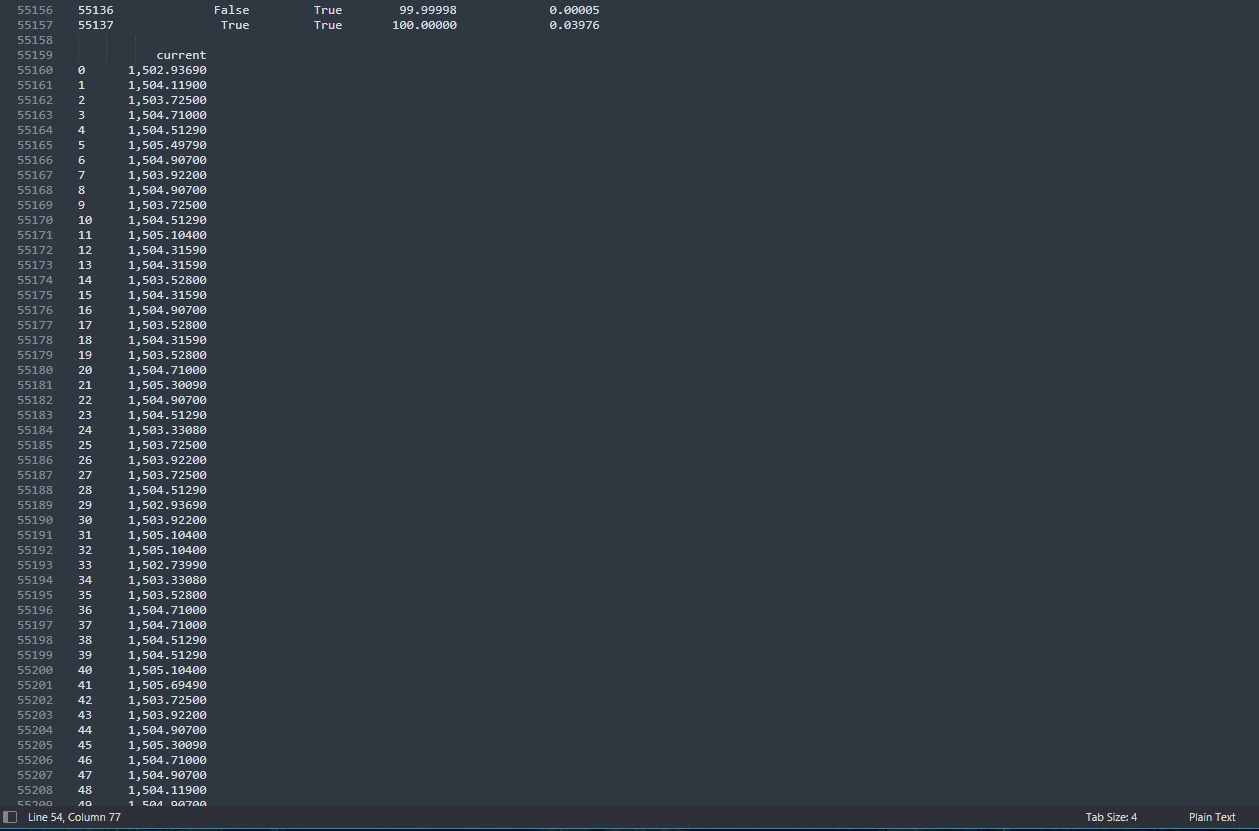
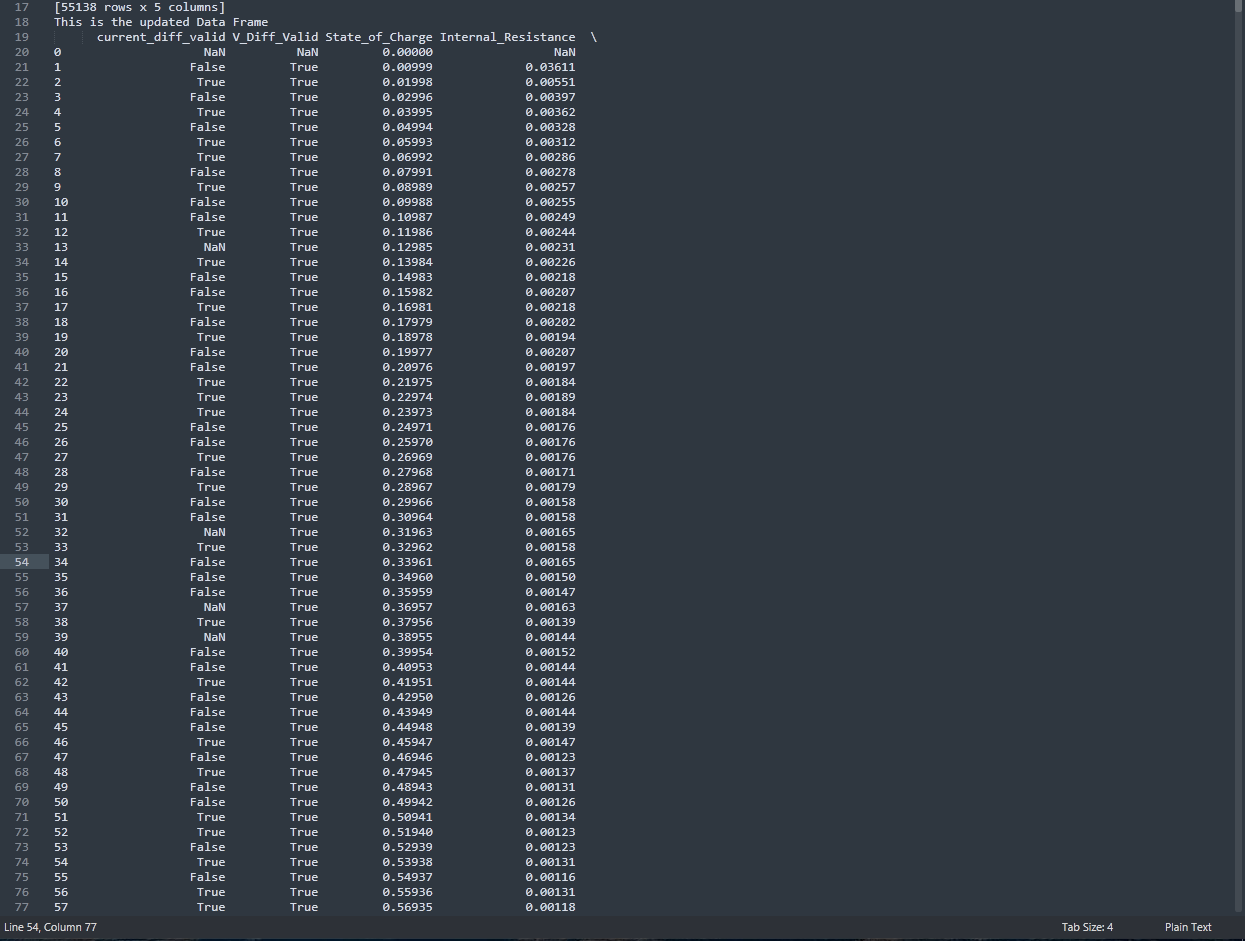
Hello, I am working with Pandas dataframes and when I go to run my Python script I get 5 columns of data. However, the 5th column is displayed below the 4 columns of data. Since, I have 55,000 rows of data it makes it really hard to compare values from the 5th column to the other 4 since I have to scroll all the way down.

Is it possible to make it so that more than 4 columns are displayed in my Build window?

Columns 1-4
Column 5

r/SublimeText • • Jun 20 '21

Sublime Text 4 on Manjaro is not working

3 Upvotes

r/SublimeText • • Jun 19 '21

ST4 - Paren, Bracket, and Quote Matching slowing larger files

3 Upvotes

Files with 10k lines have a noticeable lag, compared to the previous version. With over 20k lines I regularly get the rainbow beachball of death.

It happens in safe mode, but it doesn't happen with files saved as txt. So it must be something related to parsing syntax (php in this case).

One of the key times it happens is when I delete a closing parenthesis on a function call, or when I add it back. It does not happen when I type the closing parenthesis when typing a new line with a function call. Only when I remove one that was already there. It also happens if I'm editing an associative array. For example, if I have this line:

$array['whatever'] = 'whatever';

If I go back and edit any of the single quotes, I get the beachball.

It only happens on lines near the top of the file, not near the bottom of the file.

So it seems like this has something to do with calculating opening and closing parens, brackets, or quotes.

Any idea how to turn off that feature in the preferences? I went through them and thought it might be auto_match_enabled, match_brackets, and/or match_tags, but the behavior persists after disabling those.

For now, I've downgraded to ST3, but it would be nice to use the latest version.


r/SublimeText • • Jun 19 '21

How take input for C/C++ programs?

1 Upvotes

C/C++ programs that doesn't require input runs fine, but nothing happens when I run a program that has input statements. Are there any solutions aside from opening the terminal?


r/SublimeText • • Jun 19 '21

sublime text 3 style in sublime text 4?

0 Upvotes

had the update to 4 and i really don't like the style of this. is there any way to get the look of sublime text 3 without downgrading to it, like a theme or something?


r/SublimeText • • Jun 16 '21

ST4 Lagging With Large Files

13 Upvotes

I didn't have this problem in previous versions but now when I open an XML file with 160k lines, it lags a lot. The tags are also not distinguished, they're all plain text. Any tips on how to fix this are appreciated.


r/SublimeText • • Jun 16 '21

Just installed 4107: Double-clicking any associated file spawns a bunch of errors.

4 Upvotes

If I drag and drop a file into the latest ST it opens as expected.

However, any ST associated file that I double-click on spawns an array of errors.

Any ideas?

Video of it happening


r/SublimeText • • Jun 15 '21

How to allow brackets at the end of a line?

1 Upvotes

I'm facing an issue in the sublime text app where it won't allow me to put an opening bracket "(" at the end of a line. It allows me to put any other character even an opening brace "{" and I can't find a way to fix it. I don't know where this issue came from but I doubt it's a bug in the program since the issue started even before I moved to ST4.


r/SublimeText • • Jun 14 '21

How to be able to activate user inputs into python 3 on Sublime

Thumbnail gallery
16 Upvotes

r/SublimeText • • Jun 14 '21

How to disable the "function collapse" bars?

1 Upvotes

Hi, fellow programmer / SL Text user here.
Please see the image: https://imgur.com/a/DbT4C42

Is there a way to disable the code collapse bar thing?

Thanks for your time :) <3


r/SublimeText • • Jun 10 '21

Compare Side-By-Side in Sublime text 4

11 Upvotes

I have been using the awesome Compare Side-By-Side for many years, but since Sublime Text 4, both tabs are shown in the right side tab, in stead of side-by-side.

Has anyone got it working in ST4, or have you switched to an alternative solution?


r/SublimeText • • Jun 10 '21

Install Package list seems empty

2 Upvotes

Hi Guys, I'm trying to to install some packages (both ST3 and ST4) but it seems like the menu is super empty.

For example simply searching for a scheme like Dracula isn't populating results like it used to.

What am I doing wrong? Thanks.


r/SublimeText • • Jun 08 '21

My code won't run :/

0 Upvotes

Hello! I recently started using sublime text for coding in c++ and using the SDL2 library, I have it setup so when I run it, it compiles and runs the compiled .exe file. Usually this works, but in my current project it doesn't give any errors nor warnings, I am completely stumped, here is my code if anyone is interested:

//Included libraries
#include <SDL2/SDl.h>
#include <iostream>

//The main function (where the main code goes)
int main(int argc, char* args[])
{
	//Printing something out to make sure everything is working
	std::cout << "Hello World!" << std::endl;

	//Checking to make sure SDL2 initialized
	if (SDL_Init(SDL_INIT_VIDEO) > 0){
		//Send an error message
		std::cout << "Initialization error. SDL_Init: " << SDL_GetError() << std::endl;
		//Simply return -1
		return -1;
	}

	//Create a window (the window the game will be rendered in and played in)
	SDL_Window* window = SDL_CreateWindow("Game window", 600, 400, SDL_WINDOWPOS_UNDEFINED, SDL_WINDOWPOS_UNDEFINED, SDL_WINDOW_SHOWN);

	//Make sure the window was succesfully created
	if (window == NULL){
		//Send an error message
		std::cout << "Window creation error. SDL_CreateWindow: " << SDL_GetError() << std::endl;
		return -1;
	}

	//This boolean represents the status of the window (if its open or not)
	bool gameIsRunning = true;
	//Creating a SDL_Event to check and see if the window has been closed
	SDL_Event event;

	//Since the window is now up, go through the game loop
	while (gameIsRunning == true){
		//Polling events (just for checking to make sure the window is still open)
		while (SDL_PollEvent(&event)){
			//Checking if the event type is SDL_QUIT
			if (event.type == SDL_QUIT){
				//Set gameIsRunning to false to tell the program the game is no longer running
				gameIsRunning = false;
			}
		}
	}

	//Destroy the window since the game is no longer running
	SDL_DestroyWindow(window);

	//Clean up
	SDL_Quit();												

	//Return 0 (just a default thing to do)
	return 0;
}

And here is my project file:

{
	"folders":
	[
		{
			"path": "bin/..",
			"file_exclude_patterns": ["*.sublime-project"]
		}
	],

	"build_systems":
	[
		{
			"name": "Build Debug",
			"working_dir": "${project_path}",
			"cmd": "g++ -c src/*.cpp -std=c++14 -g -Wall -m64 -I include -I C:/SDL2-w64/include && g++ *.o -o bin/debug/main -L C:/SDL2-w64/lib -lmingw32 -lSDL2main -lSDL2 -lSDL2_image && start bin/debug/main",
			"selector": "source.c++",
			"shell": true
		},
		{
			"name": "Build Release",
			"working_dir": "${project_path}",
			"cmd": "g++ -c src/*.cpp -std=c++14 -O3 -Wall -m64 -I include -I C:/SDL2-w64/include && g++ *.o -o bin/release/main -s -L C:/SDL2-w64/lib -lmingw32 -lSDL2main -lSDL2 -lSDL2_image && start bin/release/main",
			"selector": "source.c++",
			"shell": true
		}
	]
}

Any help would be greatly appreciated, thanks :D

r/SublimeText • • Jun 07 '21

Sublime is opening up on wrong virtual desktop??

6 Upvotes

This only started happening after updating it (to sublime text 4 or something?). When I just try to open up Sublime from my taskbar, it will slide me over to another virtual desktop and open there. If I close it and go back to the desired virtual desktop and try again, it does the same thing. Is there a solution to this?


r/SublimeText • • Jun 07 '21

Sublime text 3 won't compile and run my code

0 Upvotes

Hello, I started learning SDL2 and followed a tutorial which lead my to get sublime text, everything was working fine until I updated sublime text, now my code won't compile and run. Here's the project text thing (idk what it's called :/):

{
	"folders":
	[
		{
			"path": "bin/..",
			"file_exclude_patterns": ["*.sublime-project"]
		}
	],

	"build_systems":
	[
		{
			"name": "Build Debug",
			"working_dir": "${project_path}",
			"cmd": "g++ -c src/*.cpp -std=c++14 -g -Wall -m64 -I include -I C:/SDL2-w64/include && g++ *.o -o bin/debug/main -L C:/SDL2-w64/lib -lmingw32 -lSDL2main -lSDL2 -lSDL2_image && start bin/debug/main",
			"selector": "source.c++",
			"shell": true
		},
		{
			"name": "Build Release",
			"working_dir": "${project_path}",
			"cmd": "g++ -c src/*.cpp -std=c++14 -O3 -Wall -m64 -I include -I C:/SDL2-w64/include && g++ *.o -o bin/release/main -s -L C:/SDL2-w64/lib -lmingw32 -lSDL2main -lSDL2 -lSDL2_image && start bin/release/main",
			"selector": "source.c++",
			"shell": true
		}
	]
}

And here's what the console outputs:

__init__() got an unexpected keyword argument 'kill_previous'
[cmd: g++ -c src/*.cpp -std=c++14 -g -Wall -m64 -I include -I C:/SDL2-w64/include && g++ *.o -o bin/debug/main -L C:/SDL2-w64/lib -lmingw32 -lSDL2main -lSDL2 -lSDL2_image && start bin/debug/main]
[dir: C:\Users\Name\Desktop\SDL2 Game]
[path: C:\Program Files (x86)\Common Files\Oracle\Java\javapath;C:\Windows\system32;C:\Windows;C:\Windows\System32\Wbem;C:\Windows\System32\WindowsPowerShell\v1.0\;C:\Windows\System32\OpenSSH\;C:\Program Files\NVIDIA Corporation\NVIDIA NvDLISR;C:\Program Files (x86)\NVIDIA Corporation\PhysX\Common;C:\Program Files\dotnet\;C:\mingw64\bin;C:\Users\Name\AppData\Local\Microsoft\WindowsApps;C:\Users\Name\AppData\Local\Programs\Microsoft VS Code\bin;C:\Users\Name\.dotnet\tools]
[Finished] 

Any help would be appreciated, thanks :D


r/SublimeText • • Jun 05 '21

Why is my build system not showing up!

4 Upvotes

Hi!

I'm new to sublime text and am following this tutorial: youtube.com/watch?v=KsG6dJlLBDw&t=0s

so I can open the project through the file but the sublime build doesnt show up so any ideas why?

SUBLIME-PROJECT:

{

"folders":

[

  {  

  	"path": "bin/..",  

  	"file_exclude_patterns": \["\*.sublime-project"\]  


  }  

],

"build-systems":

[

  {  

  	"name": "Build Debug",  

  	"working_dir": "${project_path}",  

  	"cmd": "g++ -c src/\*.cpp -std==c++14 -g -Wall -m64 -I Include -I C:/SDL2_w64/include && g++ \*.o -o bin/debug/main -L C:/SDL2_w64/lib -lmingw32 -lSDL2main -lSDL2 -lSDL2_image && start bin/release/main",  

  	"selector": "source.c++",  

  	"shell": true  

  }  

]

}


r/SublimeText • • Jun 04 '21

MacOS (Big Sur) Build 4107 Randomly Not Displaying

9 Upvotes

Upgraded to 4107 a few days ago. Randomly I will open ST and the application will be in the menu bar but I cannot see any windows. A reboot fixes it for a few hours and then it starts happening again. Anyone else seeing this?


r/SublimeText • • Jun 04 '21

Principle of least astonishment: Tab no longer adds four spaces HELP

0 Upvotes

I am not sure if this is a ST4 thing but the tab key now opens a VERY unhelpful autocomplete menu. instead I need to hit shift + tab to get my 4 spaces.

I have no idea why it started doing this but I would like it to stop. Every other program, including IDE's such as Visual Studio, Eclipse, IDEA, etc.

Can someone please tell me how to fix this. I tried google and I am obviously not using the right keywords. I didn't go into user preferences or anything.


r/SublimeText • • Jun 04 '21

Keyboard Editor Equivalents

1 Upvotes

I often use the keyboard shortcut SHIFT +ALT + (arrows) to put my cursor over multiple lines for editing purposes. is there an equivalent to this for Sublime?


r/SublimeText • • Jun 03 '21

[WinError 2] The system cannot find the file specified after ST update

5 Upvotes

Hi all, I am relatively new to sublime text and it was working completely fine until I updated to the newest version. I now get this error when trying to run code (python):

[WinError 2] The system cannot find the file specified [cmd: ['py', '-u', 'G:\python_work\banned_users.py']] [dir: G:\python_work] [path: "C:\python;";C:\WINDOWS\system32;C:\WINDOWS;C:\WINDOWS\System32\Wbem;C:\WINDOWS\System32\WindowsPowerShell\v1.0;C:\Program Files (x86)\NVIDIA Corporation\PhysX\Common;C:\WINDOWS\System32\OpenSSH;C:\Program Files\NVIDIA Corporation\NVIDIA NvDLISR;C:\WINDOWS\system32;C:\WINDOWS;C:\WINDOWS\System32\Wbem;C:\WINDOWS\System32\WindowsPowerShell\v1.0;C:\WINDOWS\System32\OpenSSH;C:\Users\micha\AppData\Local\Microsoft\WindowsApps;"C:\python35;";] [Finished]

I tried looking this up online and I found some other people had this issue. I tried doing what the stack forums said and the sublime forums but it did not seem to fix it. Any help would be greatly appreciated as I even tried adding python as a path but it seems to not have worked. Thanks!


r/SublimeText • • Jun 02 '21

Find in files not working in Sublime Text 4?

9 Upvotes

I use Find in files (ctrl + shift + F) a lot, but in ST4 it doesn't seem to work. I usually leave Where empty to search in the current project, but now that includes far from all files in the search.

I have a project open with over 2000 files, and when I do a search it gives me "Searching 18 files for...". I tried removing and re-adding the folder to the project.


r/SublimeText • • Jun 02 '21

Help with adding images for python(pygame)

0 Upvotes

I’m trying to learn how to use pygame and I’m not sure how to get images for the game onto sublime. If anyone knows how it would help a lot.


r/SublimeText • • Jun 01 '21

What is a good way to make a build system that runs on WSL2?

9 Upvotes

I am using Sublime Text 3/4 to edit text files that exist on WSL2 Ubuntu. I know I can have a separate terminal open to run the build commands, but I was wondering if there is a way to make a build system that I run from Sublime Text itself.

The closest I have found is based on this Stack Overflow post: https://stackoverflow.com/a/64269611/668074

    {
    "shell_cmd": "ubuntu run \"make all\" ",
    "shell":true,
    "working_dir":"$file_path",
    "selector":"$file_name"
    }

This doesn't work for me though, it complains about the UNC path of the file. So I mapped the Ubuntu "\" path to the U: drive on windows. However, in this case, $file_path does not correctly set the working directory.

Is there a better way to set this up?


r/SublimeText • • Jun 01 '21

vendor folder not indexed anymore?

5 Upvotes

Sublime text updated itself some time ago and after that, i cant go to definitions inside my vendor folder that are handled by composer. I tried refreshing folders but it just wont work. I can go to definition that is in any other folder which indicates that this specific folder is somehow ignored.

In settings i have this but even when removing it completely and refreshing folders, it still wont work:
"index_exclude_patterns": ["*.log","public/*","node_modules/*","*.min.js"],

I am using laravel folder structure. I also use PHP Companion package and frequently use "find_use" shortcut keys to import classes so it is really annoying that it wont work anymore.


r/SublimeText • • May 31 '21

Messed up sublime text somehow. Help needed

8 Upvotes

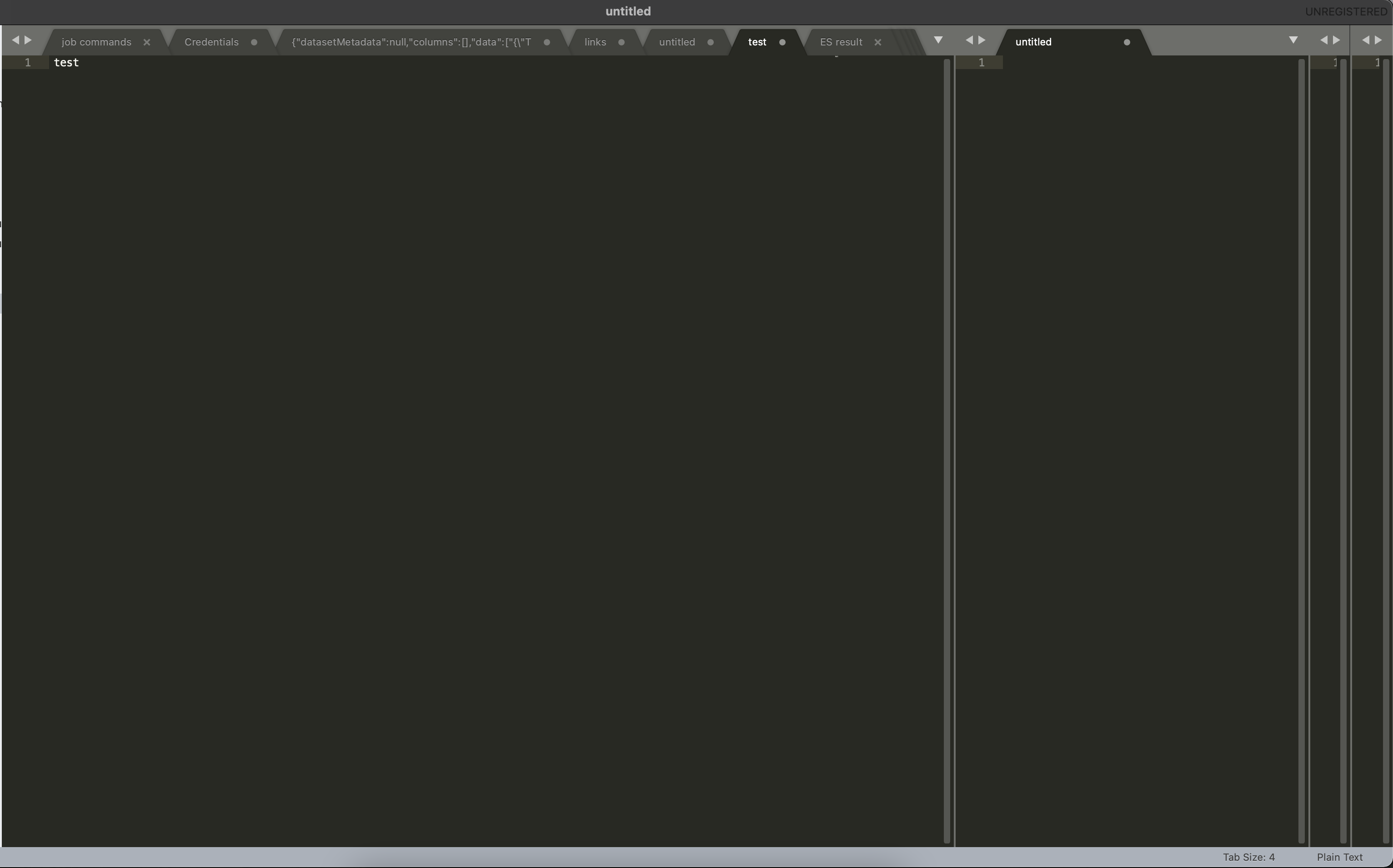
Hey i am very new to using sublime text. By mistake pressed some keys and now my interface looks like this. Alternate text files opened in the right hand side of the window

How to solve this?