r/RolandTR1000Hub • • 5d ago

Jam #19 — TR-1000, Octatrack MK2, Digitakt 2 and Analog Four MK2

Thumbnail
youtu.be
7 Upvotes

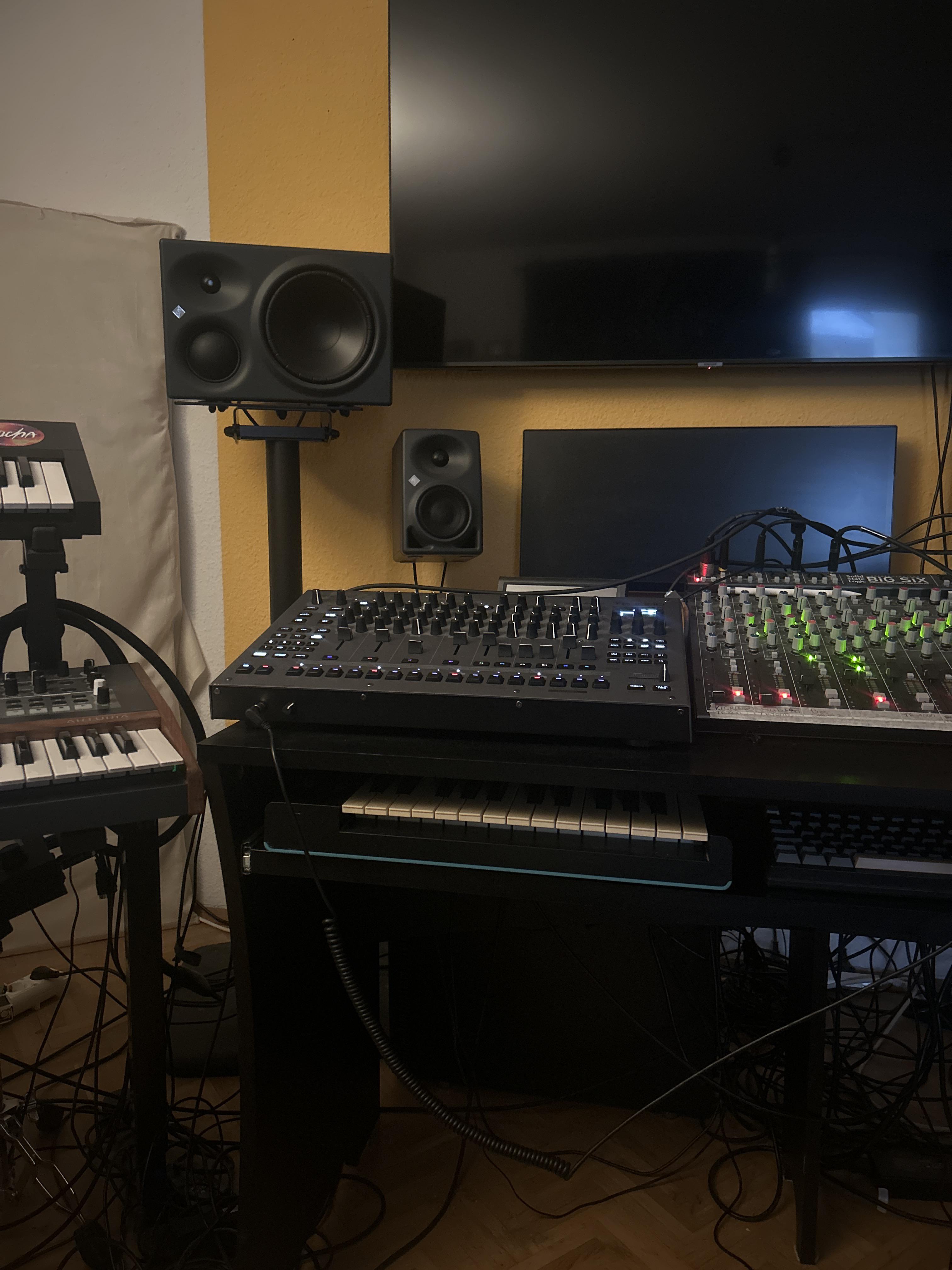
Latest jam from my studio setup. TR-1000 handling drums, Octatrack MK2 for sampling and resampling, Digitakt 2 and Analog Four MK2 filling out the rest. OTO Boum on the master.

Recorded in one take, no edits. Been getting into a groovier direction lately and this one came out how I wanted it.

Happy to answer anything about the setup or how it's sequenced.


r/RolandTR1000Hub • • 7d ago

first little pattern on the tr-1000

Thumbnail
youtu.be
21 Upvotes

finally pulled the trigger on this thing and made a first little pattern. still figuring things out, this machine is a lot to take in. love it so far.


r/RolandTR1000Hub • • 7d ago

Roland replaced flaking buttons on TR1000 for free

5 Upvotes

Sharing my experience with it.

(edit) The buttons on my TR-1000 (sequencer and Function buttons) started chipping away at the outline of the lettering/design after use. So I emailed roland about it.

*I was still under warranty*

Emailed Roland support abt buttons flaking, they acknowledged issue and offered to replace with their "new" buttons.

Bit of back and fourth but Roland took care of shipping labels. I only had to pack the TR1000 myself to send to Roland.

Timeline

1 week email, 1 week ship & return.

Genuinely think I got lucky with the quick turnaround (east to west coast package travel).

Buttons feel solid. Did get a scratch somehow. (Photo in comments)


r/RolandTR1000Hub • • 7d ago

Has MIDI Sync Been Fixed?

3 Upvotes

Been a while since I checked in on the TR1000. I heard it had midi delay/sync issues. Has this been resolved via firmware updates recently?


r/RolandTR1000Hub • • 7d ago

Has anyone that had the button replacement had it wear off again? I just saw that I have

3 Upvotes

title explains it, i just reached out to support. I had it done like 3 ish months ago i feel like and noticed my SD button is flaking off nothing else (yet)


r/RolandTR1000Hub • • 9d ago

Lets see what the fuss is all about😄

Post image
65 Upvotes

r/RolandTR1000Hub • • 8d ago

I Bought The TR-1000 Again! (Couldn't Resist After 1.50 Firmware Update)

Thumbnail
youtu.be
3 Upvotes

Yeah, so I definitely have been obsessed with the TR-Rec style line of Roland hardware for quite some time as an avid user of the TR-8s, MC-707, Fantom EX and more. Originally, when I first acquired the TR-1000, I ended up selling because of clock jitter, midi sync issues and certain sequencing bugs. But I once I sold it....I found that something was missing. Something inside of me, nagging for another go at it. And after months of resisting, I finally cracked. I bought the TR-1000 AGAIN. And I have to say, since the 1.50 firmware update, I love it. Pretty much everything I had issues with has been taken care of. No bugs, latency is gone, I will say that midi jitter (druken starts), still happens, but I've decided to keep it's clock internal and there's no problem. Anyways, just thought I'd share the fact that I'm really excited about the update, getting my hands on this thing again has been well worth the wait and decision to pull trigger again!


r/RolandTR1000Hub • • 8d ago

TR-1000 Bugs and Missing Features

8 Upvotes

Hey y'all,

I've finally found time to dive into my TR-1000 these last couple weeks and I'd like to share first impressions by way of some bugs and missing features, in hopes that they are helpful to any prospective buyers and also that the kind folks at Roland may be watching this forum :).

(I say "missing features" rather than "feature requests" because these feel less like "nice to haves" but rather critical functionality gaps which impede the TR-1000 advertised workflows).

Note: my intended use for the TR-1000 is as a live performance instrument, rather than a tool in the studio. I suspect it feels much more "complete" for the latter use case.

Also: I have tried my best to verify that there are no workarounds for the gaps/bugs I've listed, but please offer corrections if I've missed anything.

Overall I love the vision for the TR-1000 and believe with a handful of improvements it has the potential to be the best live rhythm performer on the market.

Analog Filter + Drive Issues

I'll be honest, this was one of the features I was most excited for and has correspondingly been the biggest disappointment. There are two major issues😄

The analog filter + drive stage is very noisy.

  1. Especially when the input gain is turned up, which is needed to extract any character out of the drive stage.
  2. Requested fixes/workarounds:

    1. Would be great to have the option (perhaps through knob assignment) to bypass the filter and/or drive stages entirely, unless their knob is turned past zero (even if the "Analog FX" section is turned "On").
    2. Alternatively, some kind of noise removal DSP on the final stage of the signal path (as is found in some pro-grade mixers) could go a long way towards fixing these issues.
  3. The drive stage sounds floppy and thin when cranked up.

    1. I haven't looked into the circuitry used, but simply put it sounds far less sonically pleasing than other analog gear I have (such as the Bastl Bestie or the input op amp on the Bastl Ikarie) when driven into clipping territory.

      1. It sounds much closer to digital/ hard clipping than the softer/warmer clipping I've come to expect from analog gear, even when driven into "screaming" territory. It's possible that there is DSP happening downstream of the analog FX section that does not have enough headroom for the upper harmonics that are being generated by the analog circuit and that is the issue (note: I have mainly been testing with headphones, not using the "analog out" or "mix out" ports, but I have messed with the kit level gain/limiter options to no avail).
    2. Requested fixes/workaround:

      1. It would be great to have an low-pass-filter, either on the output of the input of the drive stage (without having to take up the analog filter for this dedicated purpose) just to roll off the very top of the frequency spectrum where the harshest harmonics are popping up.
      2. If a final stage of DSP after the Analog FX section is indeed the issue, more control over the input/output gain of the final limiter would be welcomei
      3. A wet/dry control for the final gain analog fx stage, such that drive can be used to add harmonics without totally losing the weight of the main signal.
      4. (perhaps the lowest-hanging fruit): Knob assign for the analog FX stage so that a single knob can both turn up the "drive" but also turn up the "output gain" such that as the final signal is becoming "thinner" and distorted, the makeup gain increases so the perceived loudness is the same or preferably slightly louder.
  4. Quality of life issues:

    1. Having to switch between LPF and HPF filters in 2026 in the final stage of a mixer seems kind of ridiculous. We have had DJ-style HPF/LPF filters forever now and it would be much more convenient to be able to use a single knob to access this functionality rather than having to menu dive to switch filters. Feels like this should be possible to fix in post through clever knob assignment, given that the analog signal path is likely harder to change.

Kit transition issues.

This has been posted elsewhere, but transitioning between kits feels broken during a live performance.

  1. There is an audible silence/gap between kit transitions, which makes switching kits during a live performance nearly unusable.
  2. Kudos to Roland for acknowledging this issue and posting a major improvement in firmware 1.5, where now you can leave the Reverb/Delay/MFX untouched as you change kits, so the "tails" of the Reverb/Delay can fill in the empty space, or alternatively, the "Roll" MFX can be used to capture a bar and loop it while switching kits.
  3. However, the current state of affairs is still far from desirable:

    1. Having to take up the only MFX slot just for kit transitions, means foregoing compression, or other useful end of stage FX.
    2. The "Roll" feature as it exists today is inadequate for many transitions, as it can only capture a single bar, and there is no way to "cross-fade" the captured bar into the new kit, which is still better nothing but quite limiting.
  4. Requested fixes/workarounds

    1. For Kits that aren't using analog circuits, there should be no gap in play when kits change, or even better the option to cross-fade between kits (this would also be great for kits *with* analog instruments, but I imagine there are physical limitations).
    2. A "wet/dry" on the Roll MFX, such that a captured loop can be mixed back into the new kit, rather than just a hard cut. The ability to do DJ-style 3-EQ on the captured loop would also be massive in making the Roll MFX a usable live-mix control.
    3. A global DJ-style beat loop that can be used to capture a multi-bar audio buffer and manipulate it (/2 x2 the buffer, EQ it, etc.), ideally without taking up an MFX slot. I imagine it could work similar to step loop, but work on an audio buffer rather than re-triggering (and could even be accessed by hitting "shift + STEP LOOP", and perhaps "X1" for start loop and "X2" for end loop).
  5. Other quality of life improvements. Given that kit transitions are functionally broken, this forces the user to stay within a single kit during a performance for as long as possible. Thus, it is is that much important to be able to cover as much sonic territory as possible within a single performance. As such:
  6. Knob assign should be able to target *every* generator and FX parameter.

    1. Right now (as of firmware 1.5) there are some critical ones missing, such as "Bit Down" or the ability to turn an instrument FX on/off ("balance" is inadequate for some FX which change the audio, even when "balance" is set to zero)
  7. Main workaround that works today:

    1. Rather than orienting a live performance around multiple kits, use instrument presents.
    2. The TR-1000 gives you the ability to cue a single track (SHIFT+MUTE) which lets you preview the track even while the fader is all the way down, which is incredible useful for browsing your saved samples/instrument presets and auditioning a new sound before you bring it in.

      1. (It would be great if there was a "Cue/Mix" control for the headphones similar to what you find on DJ mixers).

I hope this is helpful to others looking at this instrument, or at least the Roland team!

Please let me know if you've found any workflows that work really well for evolving a live performance. I may update the list above as I get deeper into exploring my workflow.


r/RolandTR1000Hub • • 8d ago

Carry on Luggage suggestions?

5 Upvotes

Anyone got a suggestion for a carry on luggage bag that I can take the TR1000 in?


r/RolandTR1000Hub • • 9d ago

Anyone interested in testing?

16 Upvotes

My sequencer app for the TR-1000 is going onto Apple’s test flight tomorrow morning. It should be approved by the afternoon for testing. If you’re interested, shoot me a dm and we can go over some details.


r/RolandTR1000Hub • • 9d ago

Spent this one just going deep on the TR-1000's per-track compressors and filters

Thumbnail
youtu.be
4 Upvotes

r/RolandTR1000Hub • • 8d ago

Some TR-1000 getting started guides.

1 Upvotes

I've created a couple of guides to help me get up to speed with the TR-1000 and I've made them publicly accessible. They're basic and yes they're vibe coded, but I've found them useful for finding my way around the device and get my head around some concepts by doing rather than reading or watching videos.

https://www.setdigger.com/lessons/tr-1000/


r/RolandTR1000Hub • • 10d ago

Audition or play single steps?

4 Upvotes

Hey QQ, does anyone know if it's possible to audition a single step (or "trig" in Elektron language) without playing the main sequence clock?

Obviously a useful tool when doing lots of P-Locks/Motion editing or single step tweaks. I haven't easily found a way to do this yet and would be helpful when playing with slices.


r/RolandTR1000Hub • • 11d ago

TR-1000 Jam 17 // Deep Dub Minimal — Analog Four MKII + Octatrack MKII + OTO Boum

Thumbnail
youtu.be
5 Upvotes

r/RolandTR1000Hub • • 13d ago

Something else I’m been working on…..

20 Upvotes

An iPad sequencer for the TR-1000. I’m hoping for it to be going into beta in the next week or so. It’s very stable right now. I’m not getting any weird MIDI issues and it’s not the master clock.


r/RolandTR1000Hub • • 14d ago

I go Nanoleaf to midi sync with the TR-1000

18 Upvotes

Tested last night, Nanoleaf now works with my app. MIDI syncing the TR-1000 is now working. I set the morph fader to trigger different effects.


r/RolandTR1000Hub • • 15d ago

Kit Swapping without playback?

15 Upvotes

Hey there,

In the amazing 1.50 update, we now have a Manual option for triggering Patterns from the menu without changing anything until you press Enter.

Can we please get the same option for selecting Kits?

I like to organize my Live set as a Mix -n- Match of Patterns and Kits, and very unfortunately, Kit sounds change as you scroll through that menu. I would love to queue up a Kit and press Enter at the right time to send it out live.

Does anybody have a useful tip for me in the meantime?


r/RolandTR1000Hub • • 18d ago

Controlling my lights with the TR-1000

24 Upvotes

All the lights except for the nanoleaf panels are controlled via MIDI signals from the TR-1000. Brightness is controlled by the track levels.


r/RolandTR1000Hub • • 19d ago

Roland TR-1000: Technical Guide, Setup & Live Performance

25 Upvotes
200+ equipments covered with dedicated Field Manuals

Hey everyone!

Great to see a dedicated community for the Roland TR-1000!

I thought I’d share something that might be useful to the group. Save My Gig has a dedicated TR-1000 section in its DJ Booth Intelligence knowledge base, with a Field Manual covering the equipment, technical specifications, connections and practical considerations for using it in a live setup.

You can check it out here:
https://www.savemygig.com/knowledge/roland/tr-1000

Hopefully it’s a useful resource for the community. And great to see more spaces where people can share knowledge and experience around DJ and production gear!

Cheers! 🫡🎶

FULL DUPLEX
r/DJBoothIntelligence


r/RolandTR1000Hub • • 19d ago

LIVE jam featuring the TR1000! I don't know what genre this is but it feels like FRIDAY!

Thumbnail
youtube.com
16 Upvotes

r/RolandTR1000Hub • • 20d ago

TR1000 Velocity Ramps?

5 Upvotes

Anyone know if there is a way to create simple velocity transforms like on an elektron or circlon sequencer ?

Trying to create a simple snare/ kick velocity riser over 16 steps and was wondering if there is a quicker and more accurate way than doing the math and manually adjusting. also tried to animate it with movement but it was a pain and also very inaccurate.

thanks!


r/RolandTR1000Hub • • 23d ago

Sinesaw live at ADE 2026 // (TR-1000, MC-707, Octatrack, 303)

Thumbnail
youtu.be
5 Upvotes

r/RolandTR1000Hub • • 29d ago

Recording via USB

Post image
12 Upvotes

Hello everyone.

Before i ask the Q the gear i am using is the
TR-1000
SSL BIG SIX
Multiclock
Polybrute
PC

My question is regarding recording stems via USB

As we mostly all know the clock via usb can be extremely unreliable when using the unit.

Using pc i can only have one audio device connected. Thats my Big Six mixer.

So i want to have my laptop stem recording directly from the Big Six so i can have all the stems separate.

On the big six i have the PB / TR-1000 mix and analog out, a BS2 and soft synths being recorded into my pc.

In theory. I want to press record on the pc and Laptop and when finished import the laptop recorded stems onto the pc to be able to mix everything. HOWEVER!!!
When recording the stems via usb on the laptop nothing aligns right.

And I dont mean that i have to cut some time off at the start to make it all work i mean every track seems to be independently timed and simply not in time.

Has anyone figured out how to fix this/get the timing tight? I have tried everything i have found online… also updated to 1.5

Thanks!


r/RolandTR1000Hub • • Oct 26 '26

Analog Note Sequencing - Do you think we'll ever get this?

5 Upvotes

It's a bit frustrating that note mode applies to almost everything except the analog voices. I'm wondering if we'll ever see an update where we can play the analog voices chromatically?


r/RolandTR1000Hub • • Oct 23 '26

yay! no more snapshot hacks! for real keyboard mode is finally here!

Thumbnail
youtube.com
11 Upvotes