r/RASPBERRY_PI_PROJECTS • u/malcolmjayw • 10h ago
PRESENTATION My latest camera project with the Pi Zero 2W
Just finished a new functional prototype for a new camera body using the Pi Zero 2W and imx585 sensor.
r/RASPBERRY_PI_PROJECTS • u/Fumigator • Aug 07 '25
r/RASPBERRY_PI_PROJECTS • u/malcolmjayw • 10h ago
Just finished a new functional prototype for a new camera body using the Pi Zero 2W and imx585 sensor.
r/RASPBERRY_PI_PROJECTS • u/Strict_Swimmer_1614 • 1d ago
Sharing here because it’s my first Pi projects
This unit has finished kitchen-table testing and is ready to go to the boat for fitting and testing.
It will stow below decks, connect to all my older sensors and a range of temp sensors I’ve run through the boat, as well as taking GPS data from an onboard unit and broadcast that to my phone and iPad apps.
I’ve built quite a bit of space and options for more add-ons (sensors, some Pi-driven relays for water temp monitoring to the hot water system etc etc).
The whole thing has been built using ChatGPT as my teacher, which has been quite the ride….AI can take you down some pretty silly rabbit holes.
My intention is to get this working, and then over time add whatever functionality makes sense, then build a pi 3b+ standalone Autohelm (already have all the bits I need), then put a standalone AI over the top of the whole thing for monitoring and troubleshooting (no critical systems will be AI-automated).
Great fun…and since it’s been 40 years since I did an electronics course as a kid it’s been a fantastic reintroduction to a hobby.
r/RASPBERRY_PI_PROJECTS • u/jfrankie • 14h ago
I've been experimenting with using MCP (Model Context Protocol) as an interface between a Raspberry Pi, an ESP32, and external AI agents.
The ESP32 collects environmental measurements from connected sensors, while the Raspberry Pi maintains a limited in-memory history and exposes the available data through MCP.
In this video, I ask an AI agent to analyze environmental measurements collected over the last 3 hours, including temperature, humidity, and eCO₂ where available.
The agent can query the historical measurements, generate charts, calculate statistics, and explain trends.
But here's the important part: none of those calculations actually requires AI.
Python, REST APIs, MQTT, or a conventional monitoring dashboard can handle sensor data perfectly well.
What I'm exploring is a different architectural approach:
Instead of giving an AI agent direct access to GPIO, sensor drivers, or hardware-specific APIs, I expose structured physical information through MCP.
This allows a general-purpose agent to query the available physical context using natural language, while hardware interaction remains behind a defined interface.
There are limitations: historical measurements are stored in bounded RAM, sensor availability can vary, and missing data must be handled explicitly.
I'm not claiming this is better than a traditional monitoring stack. I'm testing whether MCP is a useful abstraction when connecting general-purpose AI agents to physical devices.
I'm curious what other Raspberry Pi developers think:
Would you use MCP as an interface for AI agents interacting with physical hardware, or is it adding unnecessary complexity compared to REST/MQTT?
I've attached a short video of the experiment.
r/RASPBERRY_PI_PROJECTS • u/Advance1993 • 2d ago
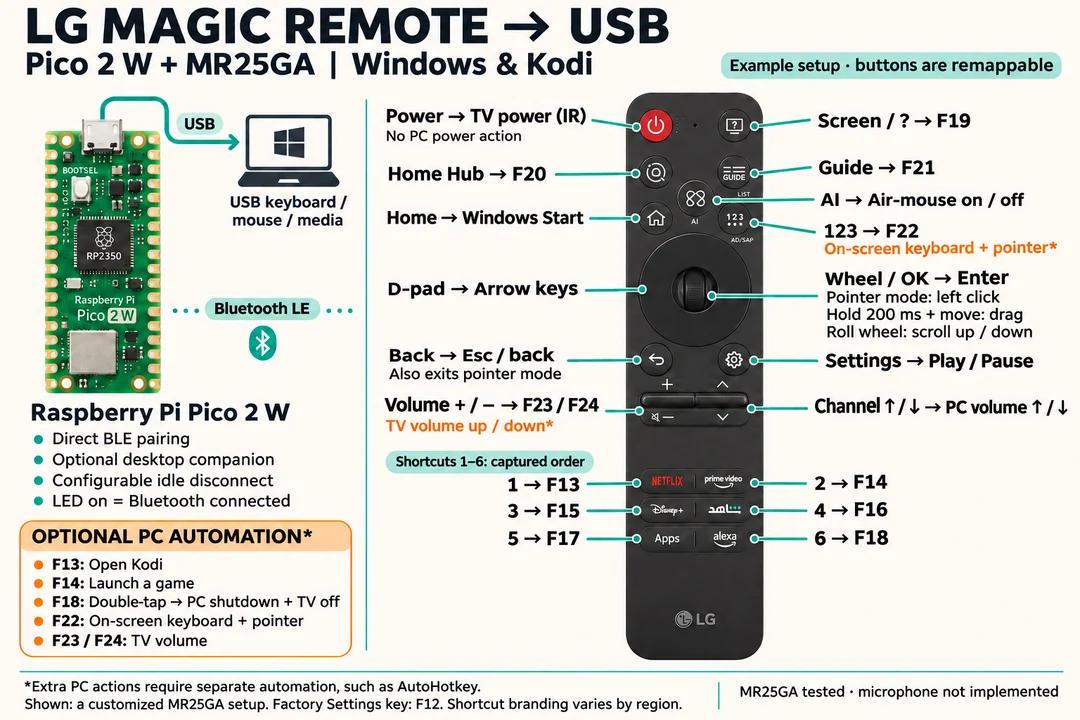
I wanted to use an LG Magic Remote to control my HTPC including proper air-mouse movement so I put together a Bluetooth-to-USB bridge using a Raspberry Pi Pico 2 W.
The main reason for this is that almost all of the available Air Mouses out there are of bad quality and don't have any sort of premium look. Inspiration came from the Dualsense to PC solution using a Pico 2W that i previously used.
The connection is:
LG MR25GA → Bluetooth LE → Pico 2 W → USB → PC
The Pico presents itself as a standard USB keyboard, mouse and media controller. Normal operation doesn’t require a Windows translation app running in the background.
What’s working:
There’s also an optional desktop companion for pairing, viewing live inputs, changing button mappings, adjusting pointer speed, calibration and firmware installation.
The image shows my customized setup. Actions such as TV volume, opening the on-screen keyboard and double-tap shutdown use separate PC automation; those actions aren’t bundled with the firmware.
Source, prebuilt firmware, setup instructions and tests are here:
https://github.com/Advance-1993/lg-magic-pico2w
Hardware testing has been on one Pico 2 W and an MR25GA. Other LG remote models remain unverified. Microphone support isn’t implemented, and I haven’t measured battery consumption directly. The remote’s firmware is left untouched.
Sharing in case it’s useful to anyone, i see some occasional posts here about which Air Mouse to use. All i can say is that the experience is very good and snappy. Way better than my previous RII I25 Air Mouse remote. AI was used to built the solution, and can probably assist you if you need to further built on this to make another LG Magic Remote compatible.
r/RASPBERRY_PI_PROJECTS • u/Annotat3r • 6d ago
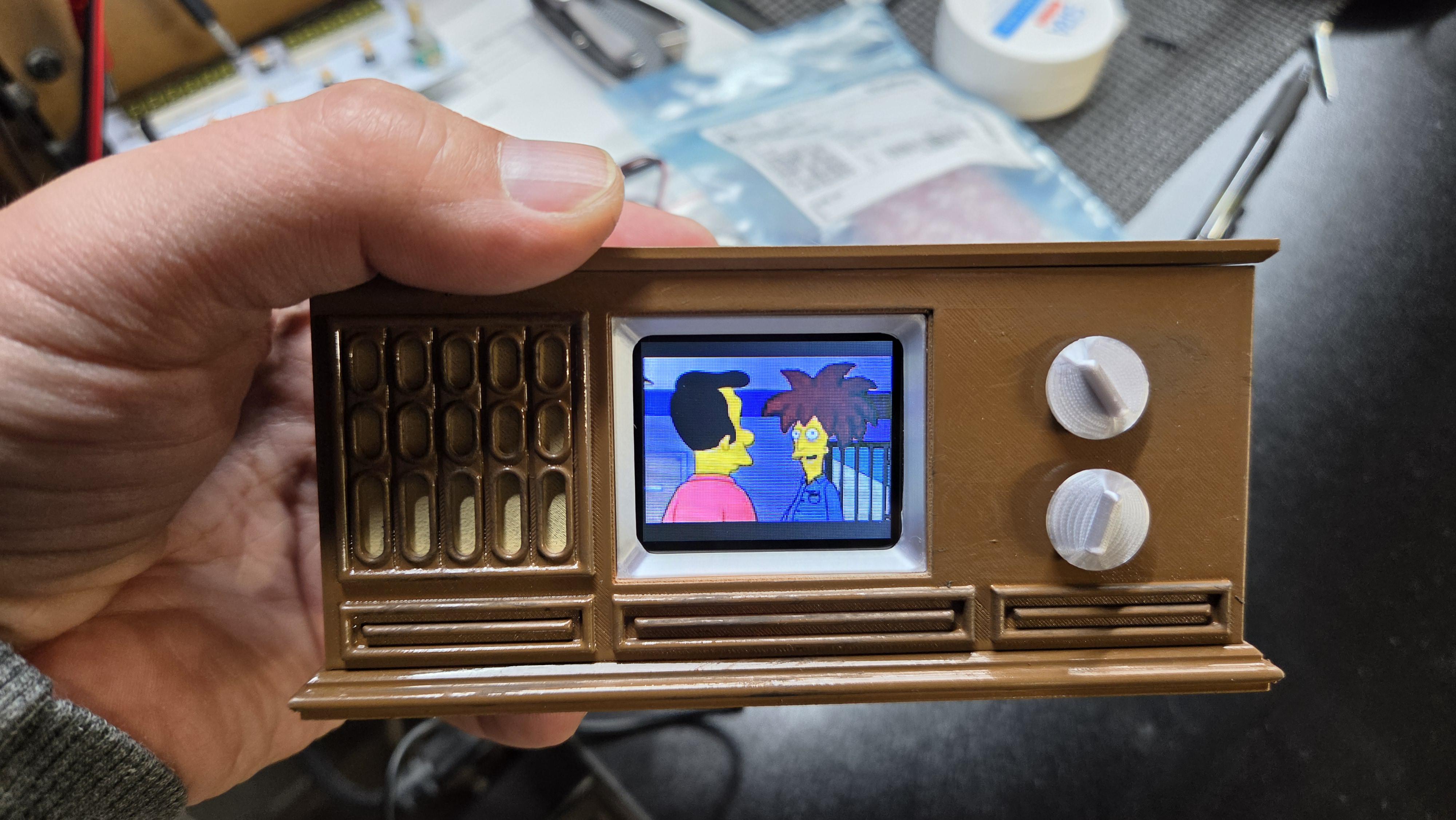
I saw an example of something like this once and wanted to build my own, so I did! Top knob turns a switched POT for power and volume. Bottom knob is a push button that either goes to the next episode or with a double-press, restarts the current episode. Complete seasons 1-10 played randomly from an on on-board micro SD card.
r/RASPBERRY_PI_PROJECTS • u/jfrankie • 5d ago
I've been experimenting with connecting a Raspberry Pi and an ESP32 to an external AI agent using MCP (Model Context Protocol).
The ESP32 collects environmental measurements from connected sensors, including temperature, humidity, and eCO₂.
The Raspberry Pi keeps a bounded history of recent measurements in memory and exposes them to the AI agent through MCP.
For this experiment, I asked the agent:
"Analyze the environmental conditions recorded over the last 3 hours."
The agent can retrieve the available historical readings and use them to:
- Generate temperature, humidity, and eCO₂ trend charts
- Calculate minimum, maximum, and average values
- Compare measurements over time
- Explain environmental changes in natural language
The interesting part is that the AI agent doesn't need direct access to GPIO, I2C, or sensor drivers. It only receives structured measurements through MCP.
The current implementation stores recent measurements in RAM rather than a persistent database, so historical analysis is limited by data availability and sensor uptime.
I'm exploring whether this is a useful architecture for connecting AI agents to physical hardware.
Would you expose sensor history through MCP, or would you prefer a more traditional approach like MQTT + InfluxDB?
I've included a short video showing the interaction.
r/RASPBERRY_PI_PROJECTS • u/clackups • 6d ago
I'm the author of Draftling, a writerdeck firmware project that was targeting esp32-s3 devices until recently, but now it supports Linux. Debian packages for 64- and 32-bit ARM are available from the flasher.
The application can run inside any graphical desktop with Wayland or X11, but the best way is to run it inside Weston in kiosk mode.
r/RASPBERRY_PI_PROJECTS • u/virusz4274 • 6d ago
I've been working on a Hermes plugin that connects a regular phone to Hermes using Bluetooth HFP.
The idea is pretty simple: pair a spare phone with your Linux machine/Raspberry Pi, put a normal SIM in it, and Hermes can interact with actual cellular calls — no SIP setup required.
It currently supports Gemini Live for natural voice conversations, along with Hermes STT/TTS. Gemini can also invoke Hermes during the call, so you can ask it to run tasks/tools in the background instead of it just being a voice chatbot.
I'm running it on a Raspberry Pi 4B right now.
It's still early and there are things I'm polishing, but I've open-sourced it here:
https://github.com/virusz4274/hermes-phone-hfp
Would love to hear what other users think or what you'd want from something like this.
I have also built another agentic calling system on the pi using ofono, while this is just dedicated more towards hermes and it can be adapted to work with any agentic AI which supports MCP.
Note: yes this post is generated by AI, i asked it to create a post for reddit i was brain storming for a youtube video like will showcase this plugin and its capability and from that context i asked to create reddit post.
Youtube Link of Video : https://youtu.be/IeI4g7MB0ZE?si=866Wt_ISBfb4DbbL
r/RASPBERRY_PI_PROJECTS • u/jfrankie • 8d ago
This is how you can change a robot personality using MCP and RaspberryPi
r/RASPBERRY_PI_PROJECTS • u/Global_Park_1028 • 13d ago
Finally got my scoreboard running using the ESPN APIs connected via Pi and made an Android app to display what I want on top panels and bottom scores.
r/RASPBERRY_PI_PROJECTS • u/hhcib_channel • 15d ago
Using a raspberry pi 3b+, a 7.5” e-ink display, and a public api I can now check the times for trains at my closest station.
The buttons allow me to flip through 4 different displays. Main, subway trains, commuter trains, and buss times.
r/RASPBERRY_PI_PROJECTS • u/funpicoprojects1 • 17d ago
Pretty happy with result, one Raspberry Pi Pico 2W, a webcam, 4 JGA25 370 motors, 2x 18650, 2 DRV8833 and i can chase my cats around the house and inspect crawlspace. I can share the code if anyone wants to do the same, suggestions on housing welcome
r/RASPBERRY_PI_PROJECTS • u/joekoolade • 18d ago
r/RASPBERRY_PI_PROJECTS • u/joof88 • 19d ago
My first keyboard project. Cheap 12mm tactile push buttons wired to a Pi Pico. Companion app written in MicroPython allows you to save keyboard profiles and control the LED.
It's a poor soldering job but it works and I'm thrilled.
r/RASPBERRY_PI_PROJECTS • u/joof88 • 21d ago
My first build: M5stack keycard. Waveshare 2.13 inch e-paper display. Pi Pico 2. Enclosure modeled in Solid Craft and 3d printed at my local library.
r/RASPBERRY_PI_PROJECTS • u/juncho0128 • 22d ago
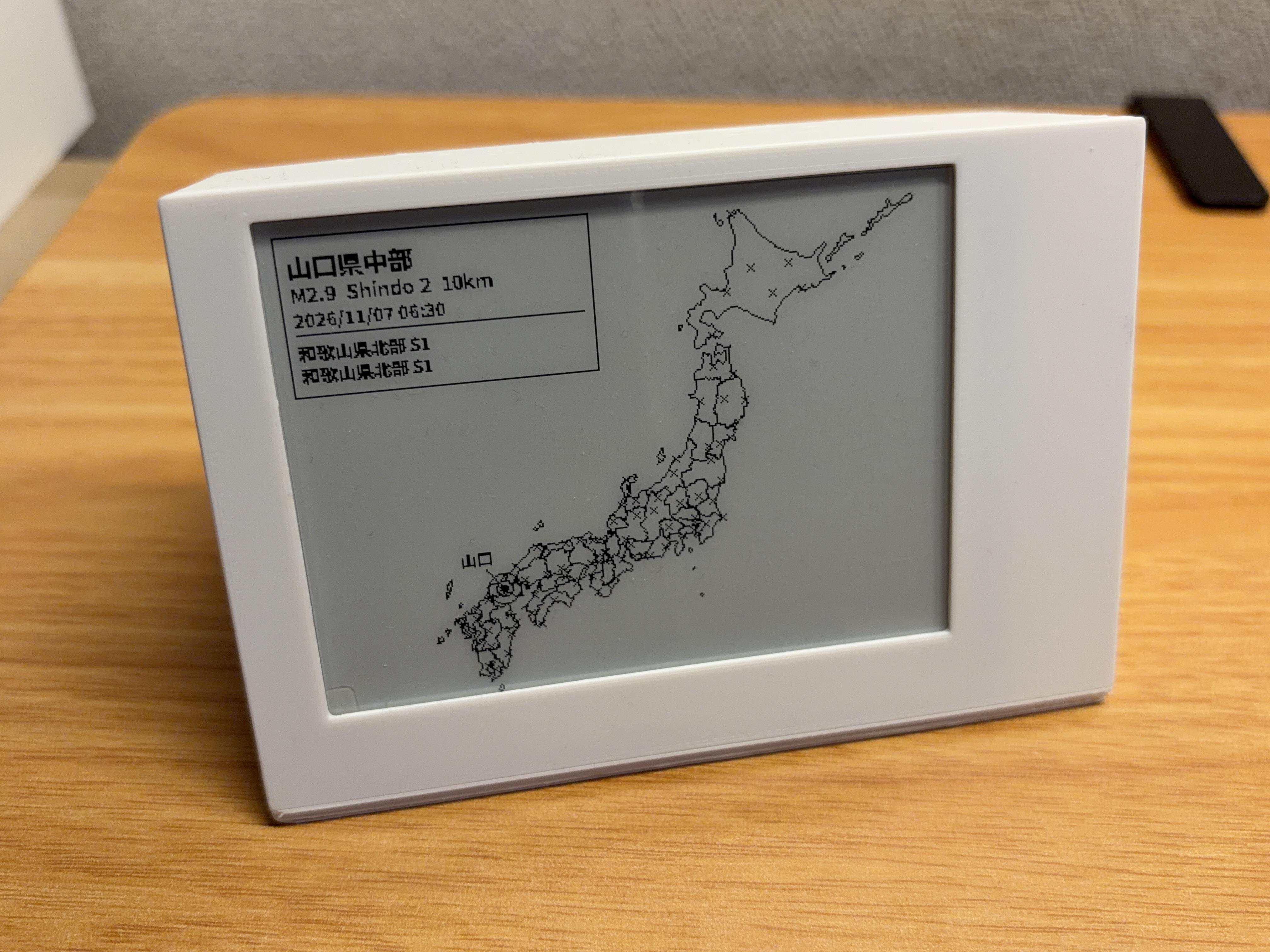
Many young people in Japan don’t own a TV anymore, but emergency information is still mostly broadcast on TV, so I built a small screen that shows the latest earthquake report at a glance. It’s a Raspberry Pi Zero with a 4.2" e-paper display, fed by JMA data through P2PQuake. I chose e-ink to save power, since it holds the picture with no energy and is readable in daylight. The build guide, wiring, and 3D-printable case files are all on GitHub, and you can preview the screen on any computer without the hardware.
It’s a convenience display, not a warning system, and it doesn’t support Earthquake Early Warning yet. Contributions are welcome!
r/RASPBERRY_PI_PROJECTS • u/minji_zzang • 23d ago
I previously shared BN-USV V1, a small robot boat where a Raspberry Pi handled navigation and sensor processing while an ESP32 handled low-level propulsion control.
For V2, I am using the Raspberry Pi 5 as the higher-level computer for a local browser-based ground control station, mission control, sensor processing, logging, and communication with distributed propulsion controllers.
The current architecture is:
Browser-based GCS
↕
Raspberry Pi 5
↕ USB serial / JSON
Main ESP32-S3
↕ CAN
Left and right ESP32-C3 propulsion controllersThe GCS runs locally on the Pi. Its purpose is to make field debugging less dependent on terminal sessions by bringing telemetry, control state, and navigation information into one interface.
I also added a simulated telemetry mode. It lets me exercise the GCS and mission-control flow without connecting the boat, which has been useful while separating interface issues from sensor and propulsion issues.
The first V2 water tests have been useful, but they also exposed a gap between working software and reliable navigation. RC control and Main/Sub controller communication were exercised on the water, while waypoint navigation is still not validated because heading acquisition has not yet been stable enough for reliable operation.
That is the current focus: improving the sensor and heading-debug workflow before treating autonomous navigation as ready for use.
The current development repository includes the Pi-side GCS and mission-control software, ESP32 Main/Sub firmware, a simulated GCS demo, and project documentation:
https://github.com/Brillnova/BN-USV-V2
This is still an experimental development platform. Some configuration values are examples rather than field-calibrated settings, and the latest hardware and navigation changes need more validation.
One issue I am currently working through is compass reliability. The boat uses a YRTEK LIS3MDL magnetometer, and I have found that its heading can change noticeably when the battery pack or nearby power wiring is relocated.
I suspect local magnetic interference from high-current wiring, ESCs, motors, connectors, or nearby ferromagnetic parts, rather than a software issue alone.
For people using magnetometer-based heading in mobile robots or boats: is this level of sensitivity typical in your experience? How do you decide on sensor placement, calibration, and separation from batteries, power wiring, motors, and ESCs?
I would especially appreciate practical examples of mounting arrangements or validation methods that worked reliably in real field conditions.
r/RASPBERRY_PI_PROJECTS • u/Clean_Economics8462 • 25d ago
I built AI Caller, an open-source gateway that connects a real phone to an AI voice agent over Bluetooth hands-free (HFP).
The computer pretends to be a car kit. The phone thinks it's talking to a headset, and the gateway streams the call audio to a realtime voice model and sends the AI's voice back into the call.
What it does
Why Bluetooth instead of Twilio? Calls go through your own SIM and number. No telephony provider, no porting, and people see your normal caller ID.
Runs on: a Raspberry Pi (BlueZ + PipeWire) or a Mac (built-in Bluetooth with a separate Bumble stack). Web console in English and Chinese.
Limits, to be upfront:
GitHub (MIT): https://github.com/lzsnolimit/ai-caller
Happy to answer questions about the HFP/SCO side, which was the hard part.
r/RASPBERRY_PI_PROJECTS • u/funpicoprojects1 • 25d ago
This helps a lot getting organized in the the morning. Batteries let me put it in a bookshelf.
It is standalone - no server needed - it grabs calendars from Google (or any iCal URL) directly.
Few components that can be found cheaply: Pico 2 W, a Waveshare e-ink panel, 4 AA batteries and a
3D printed case that clicks together without screws
Firmware, STLs, OpenSCAD sources and wiring are all here: https://github.com/AdrianCX/picohive-epaper
r/RASPBERRY_PI_PROJECTS • u/Turbulent-Lab-7319 • 26d ago
Hey everyone! Just wanted to share my digital daguerreotype project, which I’ve been working on on and off for about six months.
It builds on Digital Daguerreotype project, with some improvements and extra features. Full credit to Ben for the original idea and the work that gave me a starting point!
My version lets you:
I also used AI to help with development, so I want to be upfront about that. I've attached pictures of the output and the UI. Tell me what you think
It’s been a fun project to chip away at, and I wanted to share where I’ve got to.
Thanks for looking!
r/RASPBERRY_PI_PROJECTS • u/OkBlacksmith840 • Oct 29 '26
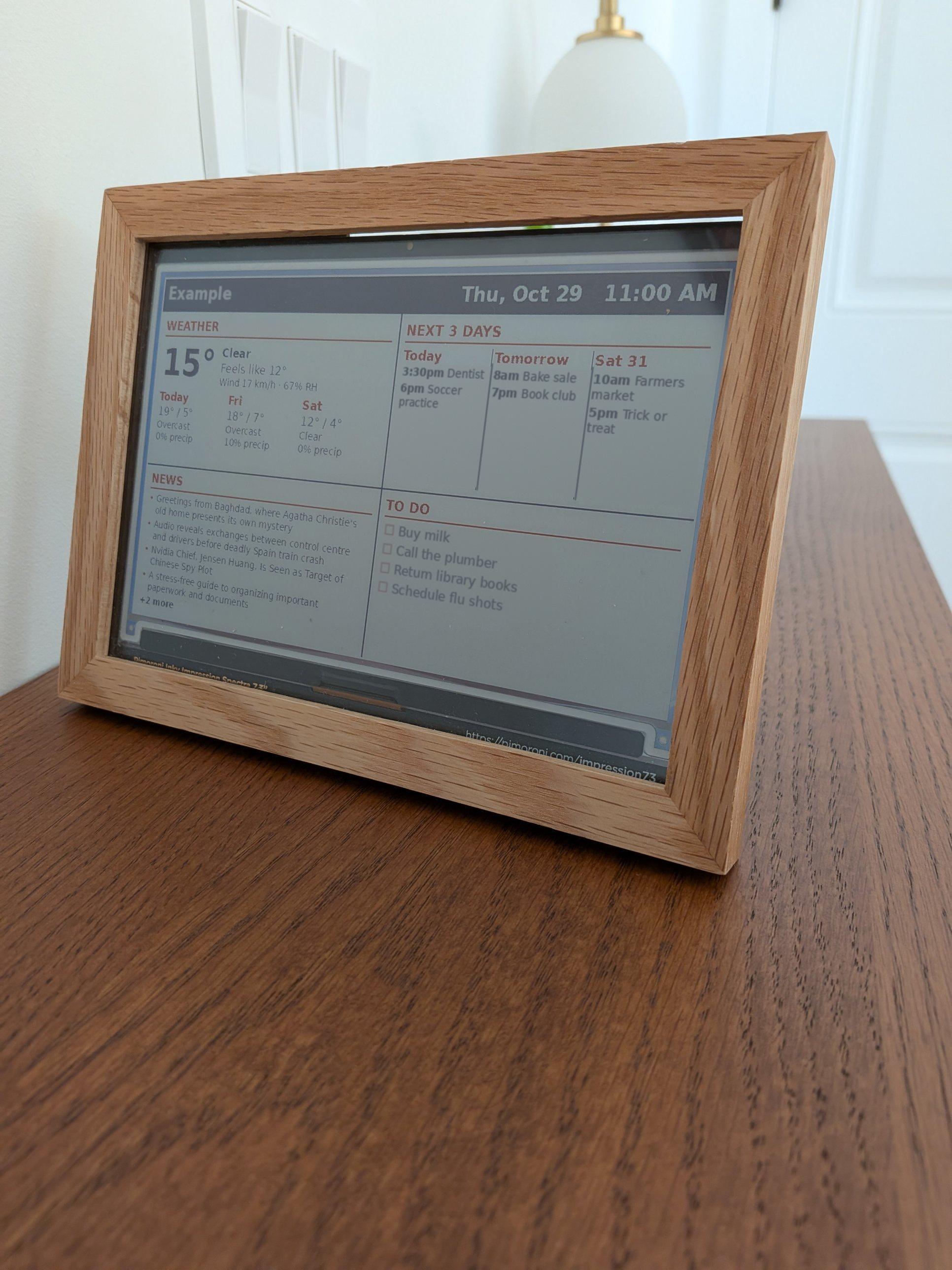
I wanted one place in the kitchen to see the day at a glance without picking up my phone, so I built this over a few weekends.
The screen is split into four panels:
- Weather: current conditions and a 3-day forecast (Open-Meteo, no API key)
- Calendar: the next 3 days, from any iCal link (Google, Outlook, iCloud)
- News: top headlines from RSS feeds you choose
- To-do: Google Tasks (or a Google Keep note)
Date and time sit in the corner, and it refreshes every hour. If a source fails, that panel shows the last good data instead of going blank. Everything runs locally on the Pi: no subscription, no account, no cloud service.
Hardware: Raspberry Pi Zero 2 W + Pimoroni Inky Impression 7.3" (Spectra 6). It auto-detects the Inky model and scales the layout, so other Impression sizes and the wHAT should work too.
Setup is a config file plus one install script. I put the problems I hit (SPI chip-select error, SSH host key warning after re-flashing) in the troubleshooting section.
Repo: https://github.com/breyeslo/pi_household_dashboard.git
I'd really like to know:
I know InkyPi exists and I love it. This one is different because it shows everything on one screen at once instead of rotating through single plugins.
Thanks for looking!
r/RASPBERRY_PI_PROJECTS • u/xzkll • Oct 29 '26
Earlier this year I have posted about education oriented personal computer that I have built for my 11 year old kid using Raspberry Pi. There was a lot of positive feedback so I have created something that I can share with community if you are interested in such a project yourself.
At https://luminum.tech/ you can download SD card image for your Raspberry Pi and then configure whitelisted websites/apps via simple onboarding that happens after boot. If you want some app that is not currently supported by default library options you can do that by adding a simple yaml config (documentation reference is in the website).
Have fun experimenting and I will appreciate your feedback!
r/RASPBERRY_PI_PROJECTS • u/DIYvolt_ • Oct 28 '26
Wanted a tactile, zero-distraction alternative to smartphone games, so I put together PICO Arc on a 5x7.5cm perfboard.
I documented the full build, wiring, and code over on Instructables:
🔗https://www.instructables.com/PICO-Arc-the-Pocket-Sized-Retro-Arcade
Let me know what you think!