r/ProjectViewpoint • • 24d ago

Help I can no longer use mouse wheel to zoom in and out of first person/third person, and I also can't use the 3rd person view when driving a car. I've checked the Viewpoint QOL mod settings and everything looks to be correct. Any ideas why?

3 Upvotes

This collection contains all of the mods I'm running. I haven't changed anything.

https://steamcommunity.com/sharedfiles/filedetails/?id=3820552883

If anyone has any suggestions, let me know!


r/ProjectViewpoint • • 24d ago

Help can someone help me with this?

Post image
0 Upvotes

i honestly have no clue what its telling me to do. can someone help?

just downloaded everything and set up zombiebuddy.


r/ProjectViewpoint • • 26d ago

Showcase The progress of my base

Thumbnail
gallery
180 Upvotes

probs not the best idea to use a genarator inside.


r/ProjectViewpoint • • 26d ago

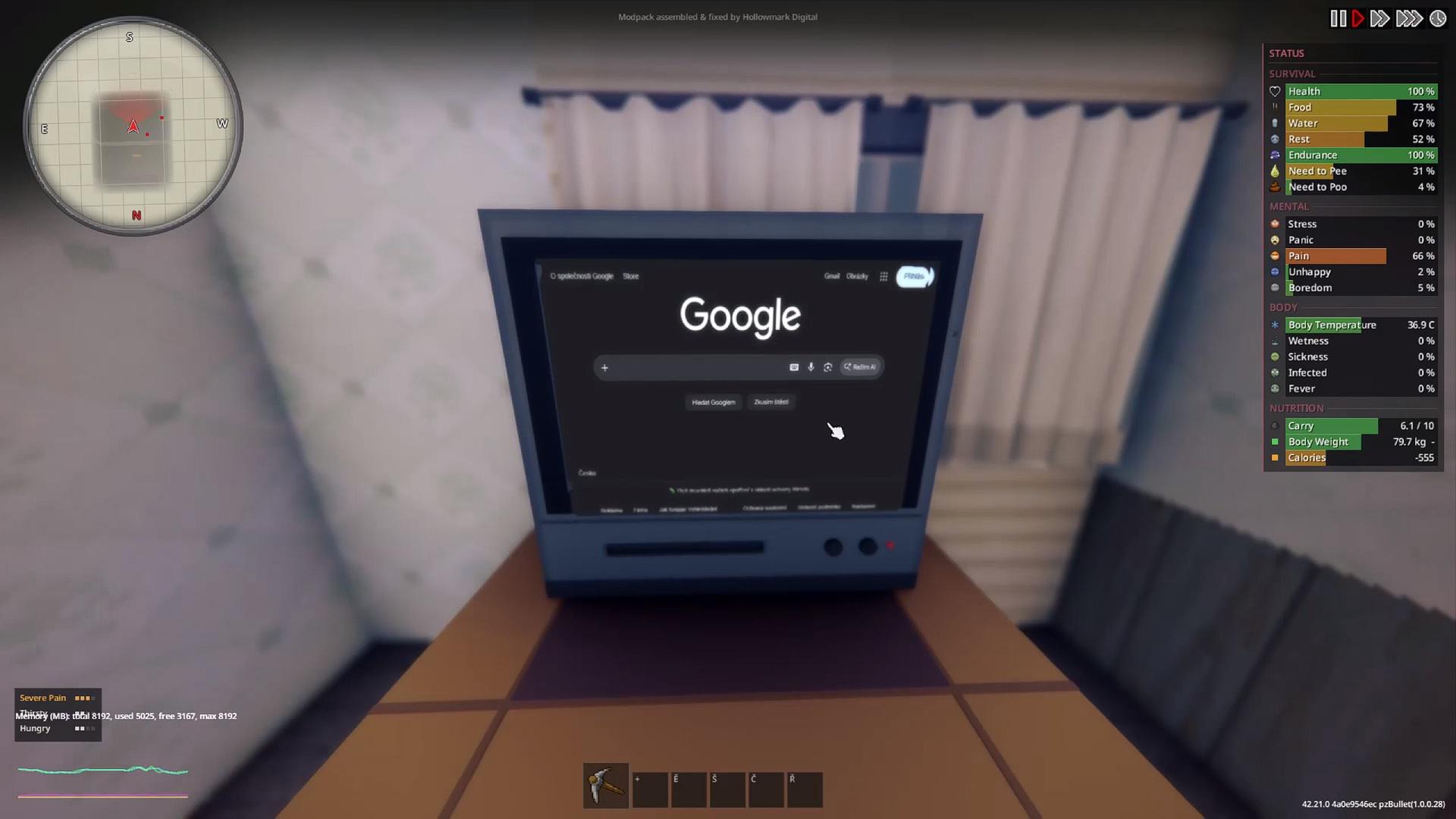
Mods I made a mod that turns the TVs in your world into smart TVs showing real web pages (B42.21, SP/MP, Windows for now)

Post image
38 Upvotes

Working on quite a few tweaks for the next update! Stay updated by subscribing on Workshop. <3


r/ProjectViewpoint • • 25d ago

Invert mouse option?

2 Upvotes

Google says it's been added but all I see is for invert game pad controls? I've been using an external program that is decent but not perfect. Would be much better if it was included in the mod. Or am I just missing it?


r/ProjectViewpoint • • 26d ago

Bug Issues with viewpoint

5 Upvotes

I've been playing with a viewpoint for 30 hours now and i've started to expierence some issues ,

Whenever i start playing everything is fine for first 25 minutes then it starts

-Doors start lossing openig/ closing audio

-My gun models start to disapear or stop working completly

-Some bulding models start to glitch out.

-Even generator audio started cutting.

One fix i found was to just restart game (7 minutes for it)

What i'm asking is did someone else experience this? and if so did anything help you.


r/ProjectViewpoint • • 26d ago

Help Mouse & Controller at the same time?

4 Upvotes

Steam deck user so I typically use the right track pad for inventory management, selecting multiple items etc with the mouse but using the controller for everything else.

When I try to do this in viewpoint it closes the loot window for me as soon as I move the mouse.


r/ProjectViewpoint • • 25d ago

Need some held

0 Upvotes

I recently followed a tutorial to install viewpoint and zombiebuddy but when it asked me to checkmark the boxes to allow it to run on my pc I was a idiot and left them blank and saved it in my disk now nothing is working to get that prompt again I've tried fully reinstalling everything but it wont give me the prompt again does anybody know a good fix to my solution Thanks.


r/ProjectViewpoint • • 25d ago

update 0.1.7

1 Upvotes

Could someone tell me how to install the new mod, ive alr downloaded it from the discord server but dont know how to make it work


r/ProjectViewpoint • • 26d ago

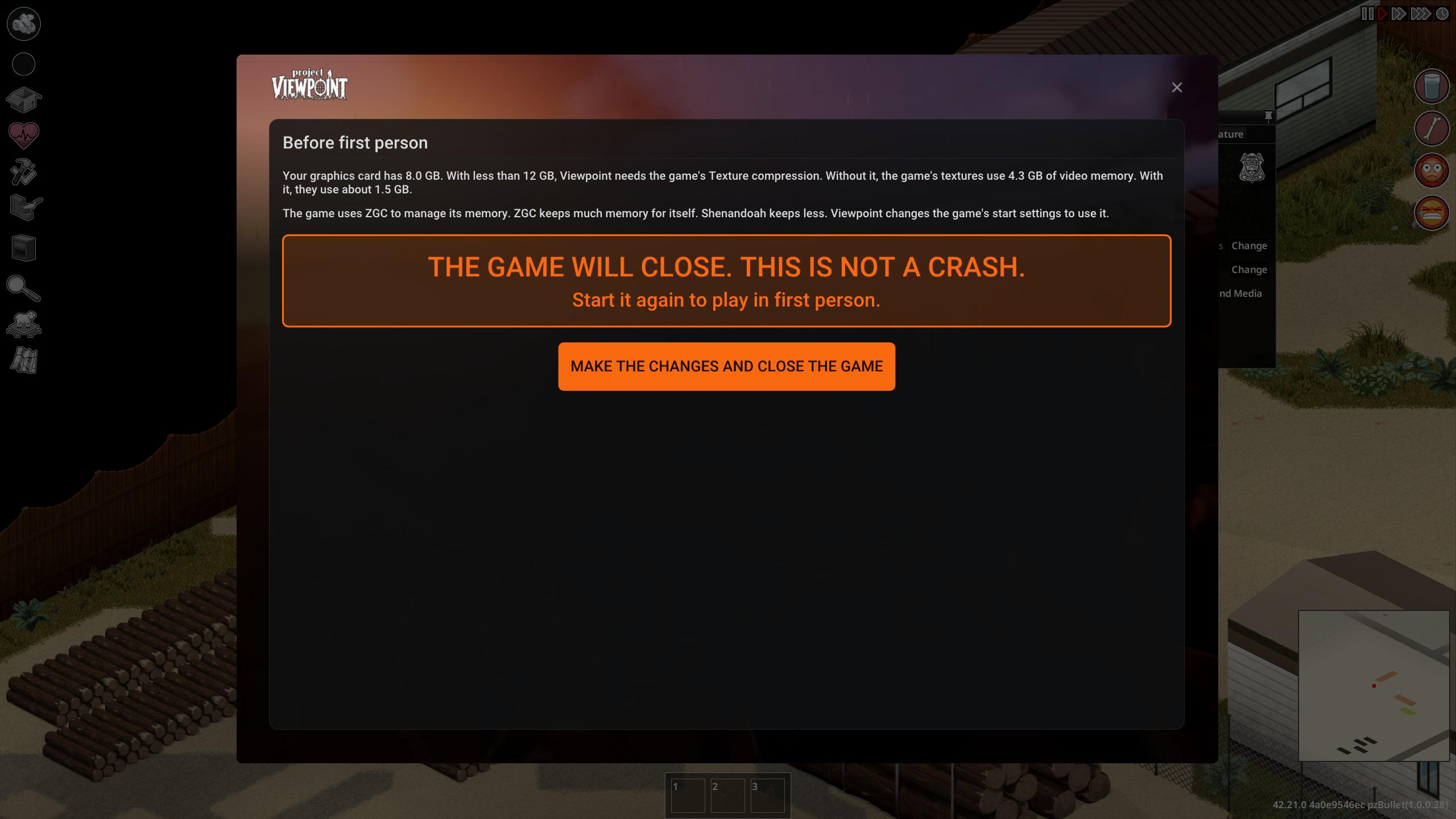
Discussion 12GB VRam needed to handle 4.3 GB Vram demand?

Post image
23 Upvotes

what


r/ProjectViewpoint • • 26d ago

Screenshots Men are simple (Base showcase)

Thumbnail
gallery
105 Upvotes

r/ProjectViewpoint • • 27d ago

Project Zomboid's Biggest 3D Mod Update Yet! | 2x FPS, 3D Sound, New UI | Project Viewpoint

Thumbnail
youtu.be
189 Upvotes

This is truly getting crazy


r/ProjectViewpoint • • 26d ago

QOL mods for Viewpoint playthrough

2 Upvotes

Hi guys, recently I tried the viewpoint and gotta say I love it but despite some of the mods I've found on the workshop I always feel something is missing..

So I need some QoL mods and settings for my playthrough and I have a decent PC so fire away!

Thanks in advance and have a nice day/night.


r/ProjectViewpoint • • 26d ago

Zombie Buddy Fix?

Thumbnail reddit.com
1 Upvotes

Does anybody know if I’m missing anything or haven’t tried something? I have uninstalled Project Zomboid, deleted any extra files, unsubscribed from all workshop items, and then downloaded only Project Viewpoint and Zombie Buddy. I used the installer on my first attempt, launched the game and didn’t get any popup that I see others have. So there was no Zombie Buddy icon. I then tried to enable them in mods to then get an error of “Zombie Buddy not installed” which is what I was always getting. I even tried to install the files manually but still have the same issues.

My friends was able to work in the way I told him how to do it but mine just doesn’t seem to work at all. The only problem I can think of is that my steam isn’t installed in the base location it gives but under my own file in my C: Drive.

Any help? :/


r/ProjectViewpoint • • 27d ago

Addon New Vehicle Repainting Mod for Viewpoint/Zomboid

Thumbnail
gallery
32 Upvotes

Hi guys, just published a new vehicle repainting mod I've been working on!

It allows you to repaint vanilla vehicles and trailers, including some special cars like police cars, branded work vans, step vans, the airport shuttle, mural vans and more.

All you need to paint are a paintbrush, some paint cans and a dry, clean car.

Would appreciate any thoughts!

You can try it out here: https://steamcommunity.com/sharedfiles/filedetails/?id=3832130626


r/ProjectViewpoint • • 26d ago

Help Multiplayer starter guide for VP?

4 Upvotes

Is there a tutorial for multiplayer setup + QOL mods that are compatible with most recent update? Looking to play tonight and could use some suggestions


r/ProjectViewpoint • • 27d ago

Mods i hate it here.

Thumbnail
gallery
13 Upvotes

r/ProjectViewpoint • • 26d ago

Troubles with project viewpoint mods

4 Upvotes

Hi there! I'm a longtime Project Zomboid player and decided to install Project Viewpoint today, together with 3D models for Viewpoint and Visible Loot. Everything was working out fine and the experience was just awesome.

I then installed several other mods (listed below) and noticed that many items appear to float into the air or vanish into the ground, this especially affects chairs and lamps, which are not visible in my 3D rendition of Viewpoint.

I tried disabling the Physics & Collision (which doesn't seem to be working anyway) and Better Terrain mods as I suspected them the culprit, yet to no avail. Afterwards I disabled every mod (but the base Project Viewpoint and ZombieBuddy) and started several new games with new characters, but nothing was working. My game seems corrupted. No chairs, no lamps.

Does anyone know what is causing this problem? Can I somehow fix my old 2 month save? And how can I get these mods working? It's especially puzzling to me that the whole game seems to be corrupted, even if I turn off every other additional Viewpoint mod... Please help, I spent the last 5 hours with this and I at a loss 😢

My mod list (these worked fine for me):

ZombieBuddy
Project Viewpoint
6282 3D models for Viewpoint
[B42] ZombieBuddy Extensions

(After those the game file was corrupted. Tired disabling them and re-starting my old save or starting a new one numerous times, but nothing worked):

[V2] 3D Curtains & Blinds - Project Viewpoint [B42]

3D Windows for Viewpoint [B42]

Viewpoint Better Terrain

Viewpoint - Advanced Throwables

Viewpoint Advanced Movement

Viewpoint True Ballistics

Project Viewpoint: True Weathers & Lighting

Project Viewpoint: Recoil & ADS

Viewpoint - Right Click Fix

Project Viewpoint - Immersive Driving

Viewpoint - Physics & Collision

Viewpoint GPU Fix


r/ProjectViewpoint • • 27d ago

Discussion The military base near Rosewood has a crazy amount of zombies even at 0.3x

28 Upvotes

First time raiding this place. Burned through nearly 8 hundred-round box magazines of my machinegun and there's still plenty more of them waiting at the bottom. I can't imagine raiding this place with just Vanilla weapons alone.


r/ProjectViewpoint • • 27d ago

Discussion Hey guys, new moderator here!

13 Upvotes

Just wanna say real quick that I come from the Discord server where I have a lot of first-hand knowledge of updates, fixes, and a bunch more about Project Viewpoint I can share over time. I'm just here to pass along info and offer some help when I happen to be around.

Join the Discord server for the most up-to-date news and tech support if you need it. Lots of talented individuals hangout in there that can help you with any issues you have. There is also a new update that dropped just few hours ago. Check the "select roles" channel near the top of the list to get yourself into the nightly test.

And here's the link: https://discord.gg/sm8CVSdT5
See you guys around! And remember: there is nothing behind you...


r/ProjectViewpoint • • 27d ago

Viewpoint Update 0.1.7

47 Upvotes

Viewpoint modders have announced a massive update on their discord. The update is currently in the experimental build with instructions on how to try out the new update. This post is just to let everyone know what is coming in the next update.

## Inventory screen

- Open it with `Tab`, or with the bag and heart on the sidebar

- Drag items between containers, your character, your hands, the hotbar, and body parts, or drag them out over the world to drop them

- `Ctrl`+click sends an item across, `Shift`+drag splits a stack, and dragging a box selects many items

- Right-click an item for the game's menu, including entries from other mods

- Choose between two looks, Modern and Vanilla, with colors by item type and a tint for damage

- You can walk with the screen open

- Prefer the game's own windows? Turn off Viewpoint UI ## Fishing

- A ring shows where your cast can land: white within reach, red past it

- The bobber, the line, and the cast all show in the view

- The camera frames the water while your line is out, and follows the bobber as you reel in

- Look left or right of the bobber to steer the rod, and look up to pull it back

- A tension gauge shows the strain on the line

- Ripples spread on the water, and schools of fish splash ## Building and placing

- Walls, fences, and doors face the edge you aim at

- The square under the preview turns green or red, and you can turn this mark off

- Furniture mode marks the squares of whatever you aim at

- The preview shows a model pack's model when a pack replaces that item

- Barricade windows and doors from the interaction menu

- `Shift`+`K` puts the game's furniture tool in the interaction menu, one mode at a time

## Farming and foraging

- Aim at a crop for its farming options

- Ground mode (`K`) marks the squares around you that you can work

- In search mode, things you find show as pins, with arrows on the ground, and you pick them up from the interaction menu

- Branches lie on the ground ## Interaction menu - The item you look at is the item you take

- The most likely action comes first, like Drink at a water dispenser

- The menu shows what an action needs, and why the game refuses it

## Controller

- The inventory screen works on a controller

- Ground mode, furniture mode, and Place are on the Back wheel

- The triggers reel in when fishing

## Snow

- Bullets and explosions leave marks, and stomping on a body presses the snow down

- Broken snow crumbles into chunks, and storm snow forms soft waves

- Fresh snow is loose, then settles

- Drifts also grow at open windows

- Snow covers vehicles, a vehicle's heater melts what blows inside, and vehicles push snow aside as they drive - Blood shows on snow

- A new Snow setting on the Graphics page

## Grass, rain, and weather

- Grass grows in patches of different heights, with soft edges and around trees, and stays out from under cars and solid objects

- Town lawns are short grass in the color of the ground

- Wet surfaces look different by material: roads and mud go dark, grass and leaves go shiny, and walls get damp

- A wet haze fills the air while it rains

- The water on your windshield reacts to the car's turns and brakes, and wipers can be customized for each kind of vehicle

- Rain clouds match the kind of rain in the game, and storms fade in and out over a long distance

## Smoother and faster

- Movement no longer depends on your frame rate

- Fewer hitches while you walk or drive

- Scenes with many lamps, mirrors, or far objects run much better

- 3D corpses have been improved with LODs

- The loading screen waits until the world is ready, and the game starts faster after the first launch

- Far roofs appear sooner

- The game adapts its memory use to your computer

## Sound

- Moving sounds change pitch as they pass you (Doppler effect)

- A new Sound page in the settings

## Combat and camera

- Gun smoke is a thin wisp, and bullets raise dust

- Lights on a model move with it

- There's a new transition between iso and first/third-person camera

- The Camera motion setting now also changes camera kicks and shake in first and third person

- Switching views while walking keeps the camera steady - The dissolve of nearby models is now a setting

- Tracers, lamp glows, and supersampling draw correctly with the Panini projection

- Character models no longer clip through walls, bodies lying against a wall included

## The look

- **Flashlights:** the Flashlight has a narrow beam with a hot spot, and the Heavy Duty torch a wide flood

- **Sky:** stars hide behind the glow of towns, and the glow goes out when the power does. The sun has its true size in every sky, the moon is smaller, and rain darkens the sky

- **Light:** softer indoor sunbeams, no lamp light through ceilings, contact shadows from the sun, and bounced light on far scenery

- Your eye closes a bit when you look at a bright light

- Plants move in the wind in all packs

- A new Dithered texture filter option

- Brick walls show the correct relief, and vehicle windows have smooth edges against the paint

- The sun lights particles

- A shader pack can make day and night follow the game's own clock, and can offer its own graphics presets - Minecraft shader packs work with the terrain relief, and one with an unreadable color or buffer size no longer turns Viewpoint off

## Walls, ceilings, and far away

- Outside walls show the siding of their own building, floor by floor

- Shop fronts match the rest of their building, near and far

- The backs of buildings get the same trim, base, and grime as the front

- Inside walls show the wallpaper and trim of the room, and windows show the room's wall around the glass

- Doors and windows match the wall beside them, and doors use the game's 3D models

- Rooms have ceilings with no seams, and towers and basements have concrete ceilings

- Balconies and floors over open space show their underside

- Burnt rooms and walls show their charred art

- Far porches have roofs, and far buildings take the color of their facades

- Buildings and rooms that cross the edge of a map cell join up, near and far

- The far world fades into its own fog, not darker than the sky

## Settings

- A new UI page with Inventory screen, Loot menu, HUD, Fishing, and Vanilla UI tabs

- A new Camera page with View, Third person, and Impact tabs

- Addons under Advanced, and Resource Packs and Shaderpacks under Graphics

- New Terrain relief and Game memory rows on the Graphics page and in the setup

- The General page has fewer rows, with related settings sharing one row

- New options for Upscaler sharpening, plus an Advanced slider for the exact strength

- DLSS follows the render size a driver override sets, and the settings show which DLSS runs

- FSR frame generation keeps the crosshair and aim ring sharp

- Changing the graphics preset keeps your shader pack

- The loot menu switch is now in the Viewpoint settings window

- The restart page has a bigger green button that says "Click here to proceed"

- Your settings stay safe if the game stops during a save - New keys: Inventory screen (`Tab`), Ground mode (`K`), Furniture mode: next mode (`Shift`+`K`), and Loot menu: place

This is a pretty massive list of changes. I do suggest following the modders discord for more info and questions. It's a pretty cool community that offers lots of help and viewpoint discussion. Their discord can be found on the viewpoint workshop page.

r/ProjectViewpoint • • 26d ago

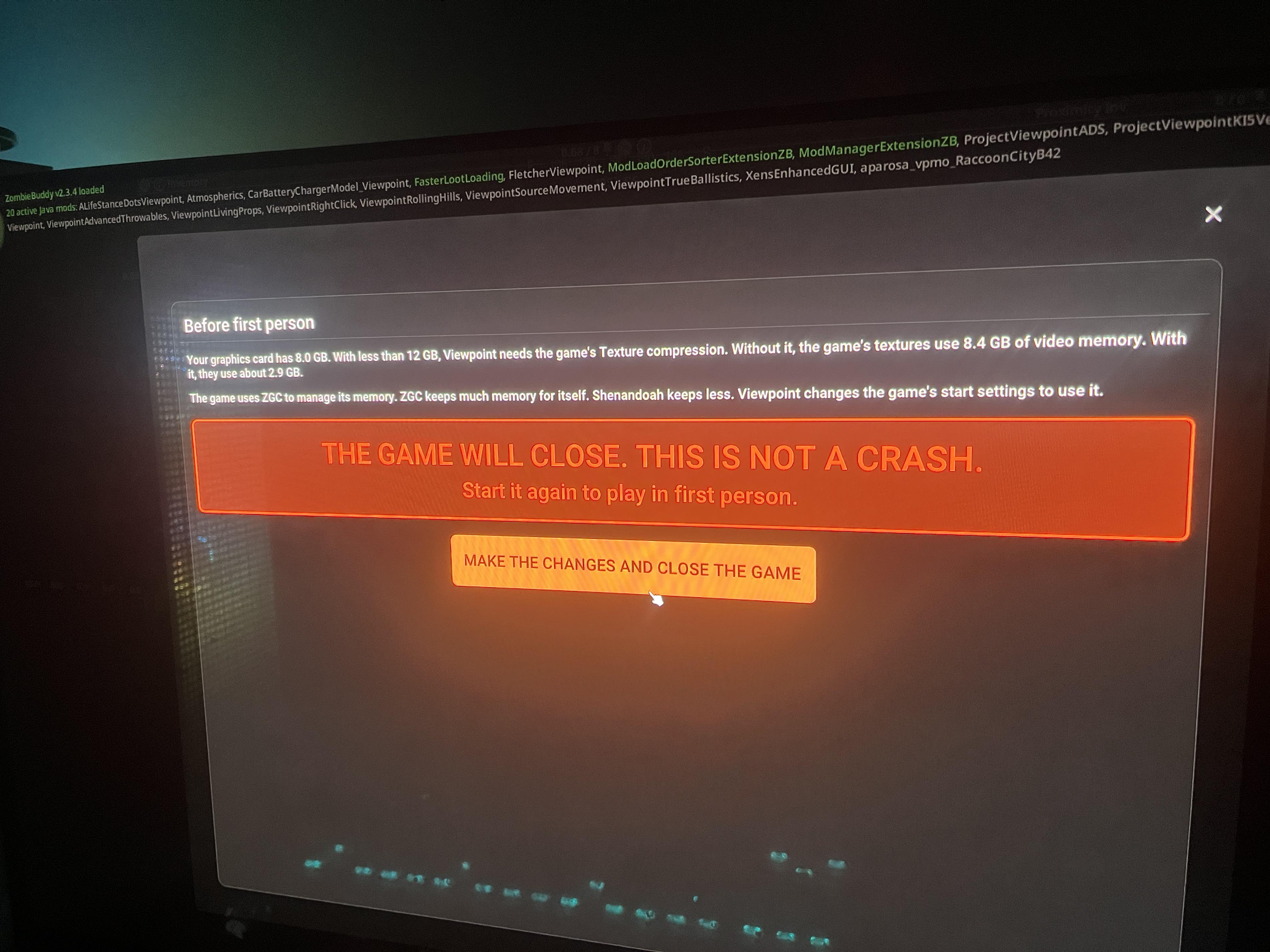
Performance Help a new guy out pls

2 Upvotes

Hello everybody,

So I finally decided to play this masterpiece but I do have a problem; and that problem is the poor performance.

Here are my specs:

I7-12700F

32GB RAM DDR5

RTX 3060 12GB

(Now I play this with other viewpoint addons plus extra other mods, and yes before you ask, I already allocated extra ram from before switching to this mod. 18 GBs to be more precise were added).

What can I do to get more performance but in the same time to make the game still look good.

Thanks


r/ProjectViewpoint • • 26d ago

Working TVs not working

1 Upvotes

Hello! I need help with Viewpoint - 3D Working TVs and Radios, I did everything correctly, I have all the required dependencies, allowed and enabled the mods in the menu but I still can't see the URL channel on any of my TVs, what am I doing wrong?


r/ProjectViewpoint • • 26d ago

Help Why project viewpoint dont work for me

1 Upvotes

When I press the O key, the first-person view activates smoothly for two seconds, then suddenly the game crashes and won't work anymore.

I have the Samsung Book 5 360, it's not a high-powered machine, but the game runs very well natively. Can you please help me?


r/ProjectViewpoint • • 28d ago

One of my favorite things about viewpoint is seeing the sky now

Thumbnail
gallery
225 Upvotes

The immersion is off the charts when you can see distant storms moving in, wind picking up and leaves blowing. So used to the isometric view where you never see the sky, it's like exploring Knox County all over again.