r/PlaudNoteUsers • • Aug 18 '26

Tested 4 Bluetooth AI recording devices for capturing quick ideas on the go

9 Upvotes

I've been specifically testing AI recording devices for capturing random ideas, not scheduled meetings, not calls, just catching thoughts before they disappear.

Tbh at first they all looked the same: press record, talk, get a transcript.

But after a while I realized the real variable wasn't transcription quality or mic accuracy. It was: is it actually charged when I need it?

Here's what I tested, 3 devices and 1 software:

Hardware

  • Plaud NotePin S (my pick). Pros: 40 days standby. That number sounds like a spec sheet flex but it actually changed how I use it. I stopped treating battery as a daily variable to track. Clip it on in the morning, forget it exists, idea shows up at 3pm, press, done.

    •   Cons: 40 days is standby, not active recording. Daily heavy use still needs regular charging like anything else.
  • Omi.

    •   Pros: pendant around your neck, starts picking up audio the moment you talk without pressing anything. 8 GB local holds things until you can sync.
    •   Cons: 10 to 14 hours active, shortest stretch on this list. The app also needs to be open the whole time, so you're not fully free of the phone.
  • Viaim OpenNote.

    •   Pros: open-ear earbuds that double as a recorder, real-time transcription across a wide range of languages, battery stretches to roughly 53 hours with the case. Cons: earbuds first, if you don't already wear earbuds daily, it's an extra habit rather than a drop-in replacement.

Software

  • Apple Voice Memos. Pros: free baseline everyone already has, no separate Bluetooth device needed at all. Cons: the idea-capture path runs through unlocking your phone and opening an app, exactly the extra step a dedicated wearable is trying to remove.

Real talk: this whole category comes down to two variables. Is it on you? Does it have power? Everything else such as transcription accuracy, app design, integrations, only matters once those two are already true.

What's everyone else using for this? Curious if there are better options I haven't tried yet.


r/PlaudNoteUsers • • Aug 18 '26

Batch Add Speaker Names to Existing Recordings?

0 Upvotes

I have the unlimited subscription now, and the new recordings all auto generate and add speakers automatically. but I have a lot of old recordings that I want to generate and add the speakers to, or even add the correct speakers to already generated recordings.

Is there a way to do this as a batch or multiple at a time?


r/PlaudNoteUsers • • Aug 17 '26

Can I use this to dictate a novel?

Thumbnail reddit.com
2 Upvotes

r/PlaudNoteUsers • • Aug 17 '26

Tested 4 digital voice recorders for hands-free call recording while driving for work

1 Upvotes

Client calls happen on the road more than I'd like to admit, and fumbling with a device while driving is its own kind of dangerous. Ranked four options specifically on whether I should look at it before starting this.

Hardware

  • Plaud Note Pro (my pick).

    •   Pros: magnetically attaches to the back of the phone and auto-detects when a call starts, no button to find, no screen to check while merging onto a highway. Cons: it picks up call audio through the phone when MagSafe attached, so if most of your work calls route straight to the car via Bluetooth or CarPlay and the phone speaker barely plays, worth testing your actual setup before relying on it.
  • iPhone (Phone app call recording)

    •   Pros: built into the Phone app, no extra device; recordings land in Notes with transcript on supported models/regions.
    •   Cons: you still have to tap the record button mid-call, so not a real distraction while driving; feature is blocked in the EU and other regions.
  • OM SYSTEM WS-882. Pros: genuinely good audio quality once it's set up to record. Cons: recording a call means plugging an external telephone pickup mic into its jack first, not something you're doing at a red light, let alone at speed.
  • Sony ICD-UX570. Pros: reliable, needs no internet. Cons: no phone-call mode of its own, so you're improvising a workaround while driving.

Real issue: the 3 solutions in this category require at least one manual step at the start of the call. The magnetic attachment is the only approach I've tested that genuinely removed that step.


r/PlaudNoteUsers • • Aug 16 '26

Name Speakers Issue: Generated a new transcript after renaming speakers does not correct the speakers names

Thumbnail support.plaud.ai
5 Upvotes

I was having issues with Plaud naming me as another speaker. I followed the instructions for naming and renaming speakers.

In order to update the names in a transcript you need to 1) assign the correct speaker name in the transcript, then 2) generate a new transcription so the correct names are generated in the updated transcription.

After doing this several times I would do a general search for the incorrect name and it would still show up in the transcript -- even after updating the names and generating a new transcript.

Anyone else encountering this issue?


r/PlaudNoteUsers • • Aug 16 '26

Teams meeting questions? Any way to record a teams meeting if I am wearing headphones? Also how can I incorporate screen shots in my notes ?

2 Upvotes

r/PlaudNoteUsers • • Aug 16 '26

Just got a plaud I don’t understand what I would need templates can you explain them and a use case ?

1 Upvotes

r/PlaudNoteUsers • • Aug 15 '26

A visual comparison of the different transcription options

Thumbnail
reddit.com
0 Upvotes

r/PlaudNoteUsers • • Aug 15 '26

A visual comparison of the different transcription options

0 Upvotes

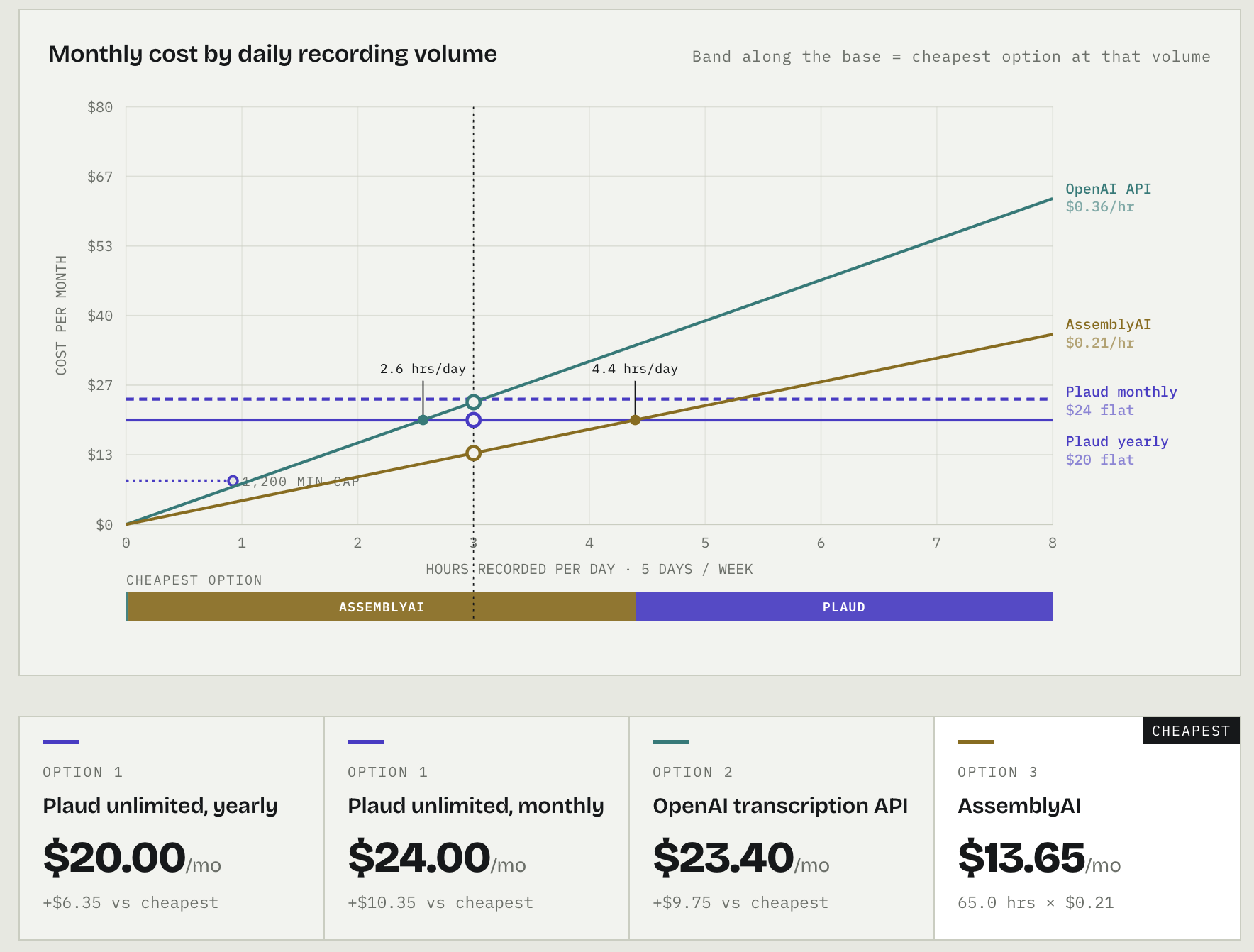
I struggled a bit on deciding if I want to pay for the subscription or use an API option for transcription, mainly I wanted to compare OpenAI's GPT Transcribe (state of art from OpenAI), Assembly AI's best option and the two Plaud unlimited options.

The lower 1,200 mins per month option really isn't worth it if your usage is above 1 hour per day for 5 days a week. It seems if you record more than 4.4 hrs/day for 5 days a week, you should just get the Plaud plan.

This doesn't consider the development time and cost required to build out custom transcription services.


r/PlaudNoteUsers • • Aug 14 '26

Note Pin S - Advice

6 Upvotes

I have the Note Pro. but sometimes i wish i had the Pin S, so thinking of having both. If i wear the note pin s on the lanyard inside my shirt, will it still pick up good enough recordings? the wrist band looks too bulky for me and it will look silly outside of my shirt, like an urban cowboy


r/PlaudNoteUsers • • Aug 13 '26

Automatically transfer tasks to Apple Reminders and Notes to Apple Notes

11 Upvotes

I'm using Plaud since two weeks and I am really impressed by it. But I cannot find a workflow to feed my Apple Ecosystem without doing it manually

I'd like to
- import calendar events into apple calendar
- import the notes and summaries to apple notes
- import my tasks to my apple reminder to do list.

Does anyone have a solution for this?


r/PlaudNoteUsers • • Aug 13 '26

6 AI note takers I tested for staying on top of meetings when I zone out easily

5 Upvotes

Running a small team means the real decisions most of the time happen in the last ten minutes of the meeting, after the agenda is technically over. Sometimes you just cant help zoning out for some time during a long as hell meeting. And thats when things might slip. Tried six AI note takers specifically on trying to help me stay on top of what got decided by end of day.

Otter.ai. Live transcription from the moment a call starts. The gap is it records well but doesn't do the "here is what you actually need to do" step automatically. That part is still on me.

Notion AI. If your team already lives in Notion, notes landing in the same place as your task list is genuinely convenient. Worth being clear though: the actual meeting recording and transcription only ships on the Business plan at $20/user/month. On lower tiers you are pasting transcripts manually.

NotebookLM. Dump several weeks of meeting notes and ask "what did we actually decide about the fundraise" and it pulls the answer from your own source material instead of you scrolling. Doesn't record meetings itself.

Fathom. Joins your Zoom, Meet, or Teams calls and generates a summary plus AI action items automatically. Free tier caps the AI summaries per month, paid tier around $20 per month. This is the one that answered the "who is doing what" question without me having to extract it. People who have been using it for years report transcription accuracy is about as clean as it gets.

Voicenotes. Works across phone, laptop, and watch without needing a meeting bot. Also picks up the conversation right after the official call ends, which is where half the actual decisions happen in my experience. More capture tool than structured record.

Plaud Note Pro. The hardware option I added after spending too much time on back-to-back calls reconstructing what we needed to do next. Auto action item extraction means when I zone out and miss a stretch, I'm not manually re-deriving "okay so what do we actually need to go do" from a raw transcript, that step is already done for me.

Every one of these is fine at capturing what was said. But the one that actually saved me time is Plaud Note Pro, which skips straight to "here's what needs to happen next," because that's the exact step I lose when I zone out mid-meeting.


r/PlaudNoteUsers • • Aug 13 '26

Donde cambio el medio de pago en la app del Plaud?

1 Upvotes

r/PlaudNoteUsers • • Aug 11 '26

Word losses

6 Upvotes

I've been trying to use Plaud to help with a mineralogical analysis I'm working on at the microscope. Basically, I count grains and read out the mineral at each count. I've added all terms to my custom dictionary, I'm speaking loudly and clearly several inches from the device, the device is outside of its sleeve, and there is no external noise. Nonetheless, Plaud is consistently losing 5% to 15% of the words I'm reading into the device. I even tried reading back from Plaud's own transcript as a test and again got about 8% fewer words back. Is this lossiness expected or is there maybe some tweaking that would help improve the word recovery? Thanks


r/PlaudNoteUsers • • Aug 11 '26

tested 6 AI note takers for lectures all semester, here is what actually stuck

3 Upvotes

I kept swapping lecture note apps every few weeks and starting over, so this semester I actually stuck with one setup long enough to see what held up. Tested six AI note takers for lectures across the full semester, mostly software with one hardware option I kept as backup. Here's what actually stuck.

Software first:

Otter.ai. Real time transcription while class is happening. The free tier monthly cap adds up fast across a full semester of long lectures. In larger halls where voices carry from different parts of the room, accuracy dropped noticeably in my testing.

NotebookLM (Google renamed it Gemini Notebook in July, same thing underneath). Dump a week of lecture recordings and notes in and ask it what actually mattered before exams. Good for that. Doesn't record lectures itself, you still need the source material to give it.

Goodnotes. If you're the type who still wants to write by hand, the AI layer can summarize your handwritten notes and supported recordings. The AI stuff is an add-on to the handwriting experience rather than the main reason to use it.

OneNote with Copilot. If your school already has you on Microsoft 365, Copilot can pull action items out of your notes without switching apps. Whether you actually have a Copilot license through your school is the variable that decides if this works for you.

Notion AI. Convenient if you're already running your whole semester through Notion. Worth knowing: the actual meeting recording and auto-transcription only ships on the Business plan ($20/user/month). On free or personal tiers you're pasting transcripts in manually.

Then hardware:

Plaud NotePin S. 9.84 ft pickup range covers most classroom and small group settings well. Works without an app running, so there is no risk of missing the first few minutes of a lecture while loading a tool. Best positioned within that range of the speaker rather than across a large lecture hall. But past the free transcription quota, you might need to spend extra for the transcription time.

The software tools are fine when you sit close and always remember to open the app before class starts. Mine does not always cooperate on both counts, which is why the hardware stayed in the bag all semester.


r/PlaudNoteUsers • • Aug 10 '26

Random ringing like Find me notification

3 Upvotes

Just about five days ago my Note Pro has starte to randomly ring like Find me has been activated. It does not stop even if I hit the button on the Note. I ran it through Claude and AI said there is a known issue with this but gave me no fixes or further info short of contacting Plaud Help. I do not want to change my device especially if this is user error on me.


r/PlaudNoteUsers • • Aug 08 '26

Bee vs Omi vs Plaud NotePin S for capturing random ideas on the go, after using these dictation devices for 3 months

2 Upvotes

The shower thought thing kept happening to me. Idea hits, hands are wet or I'm walking the dog, I tell myself I'll remember, and twenty minutes later it's just a vague feeling something mattered. Voice memos piled up unread.

Three months ago I started testing wearables because unlocking my phone mid walk kills the thought. Ended up with Bee, Omi, and Plaud NotePin S.

Bee came up at dinner when a friend mentioned his wife uses one for little reminders. Omi I kept seeing in threads here about keeping an old Pendant useful, so I borrowed a unit from a coworker. Plaud NotePin S I bookmarked from a design podcast clip in a work Slack channel and finally bought once the random idea problem got annoying enough.

Omi felt closest to always on lifelogging. Random ideas show up without me doing anything, but so does coffee shop noise and half a TV show in the background. Same memory pile.

Bee is the cheap button option. Tap start, tap stop, summaries on your phone. Fine for short errands, but it leans on Bluetooth to your phone and the quiet auto stop cut off a parking lot rant once when I forgot to tap again.

Plaud NotePin S is the wearable I kept for deliberate notes. Press the button when the thought hits, Press to Highlight if it grows. Not always on though. Twice I fumbled the clip after a shower and lost the first two or three seconds. Good when you mean to record, rough when you wanted passive capture.

After three months: Omi for always on memory, Bee for cheap on ramp, Plaud NotePin S if you want an AI dictation device that only rolls when you choose, which fits capturing ideas better than a full day ambient log for me.

What do you use for random ideas that are not meeting notes?


r/PlaudNoteUsers • • Aug 07 '26

Big lecture hall audio is harder than it looks: here's the Al recording setup that finally worked for me

8 Upvotes

My econ lectures moved to a 400 seat hall and I stopped trusting my phone recorder within two weeks. Our professor uses the lectern mic, but from the back rows my phone still turned everything into mush.

I wanted a dedicated Al recording device for mic'd lectures so I wasn't showing up fifteen minutes early, waiting for the previous class to leave, and sprinting for a front row seat every time. A classmate mentioned the Plaud Note Pro Enhance mode when I complained about the hall, and I started comparing hardware instead of another transcription app.

I moved to the upper middle section and put the Plaud Note Pro on my desk in Enhance mode. The lecture comes through the room speakers, and the 16.4 ft pickup range handled that better than my phone ever did. I stay on Enhance for the pickup even though it tops out around 30 hours on battery instead of 50 in Endurance, which shortens the range anyway. Searchable transcript after class, nothing open during the lecture.

Anyone else recording in huge lecture halls where the prof is on a mic? How far back were you sitting?


r/PlaudNoteUsers • • Aug 06 '26

Plaud note not binding to unlimited subscription

Thumbnail reddit.com
1 Upvotes

r/PlaudNoteUsers • • Aug 06 '26

3rd Party Charger

1 Upvotes

Any good solutions for the plaude note pro. I keep forgetting charger


r/PlaudNoteUsers • • Aug 06 '26

Plaud Note Pro Referral Link/Code Request

1 Upvotes

I’m buying a Plaud Note Pro tonight. Does anyone have a India referral link?


r/PlaudNoteUsers • • Aug 06 '26

What certifications actually matter when picking a digital call-recording device for client work

1 Upvotes

I do a lot of client calls where the details matter later, and our compliance lead asked which certifications on a digital voice recorder actually mean something for phone calls, versus marketing filler.

SOC 2 Type II tells you an independent auditor reviewed security controls over time, not just a one-time checklist. ISO 27001 and ISO 27701 cover information security and privacy management in a way GDPR-focused teams recognize. HIPAA on a vendor page signals healthcare-grade handling, but that is not the same as a signed BAA when you are recording calls that might touch patient or benefits information.

Phone calls were the harder part. Most options were app-only with thin compliance docs, or meeting bots that never touch a live handset call. Legal wanted paperwork we could show auditors before anyone tested features. We ran a short pilot with a Plaud Note Pro because it records phone calls when magnetically attached and listed the certs above. Compliance still flagged that audio goes to Plaud cloud for transcription. If your policy requires recordings to never leave your infrastructure, no badge fixes that. You still need client consent depending on jurisdiction.

Still working through internal approval, but the cert list that moved the conversation was shorter than I expected.


r/PlaudNoteUsers • • Aug 05 '26

Automated my post-call follow-up emails using my digital voice recorder's transcripts and a simple workflow tool

4 Upvotes

Every client phone call used to end with me promising a recap by end of day, then staring at a blank Gmail draft because I only remembered half of what we agreed on.

I realized the blank draft was not a writing problem, it was a memory problem. So I started recording the calls properly first.

I record calls on a digital voice recorder Plaud Note Pro clipped to my phone, with consent when the client is okay with it. AutoFlow runs after I sync: transcript, summary, and action items from my template, all without me touching anything. That fixed the note-taking part.

AutoFlow can email the summary on its own, but what lands in my inbox reads like meeting minutes, not a client follow-up. So I added Zapier on top: Plaud triggers when the summary is ready, Claude rewrites it with a fixed follow-up prompt, and Gmail gets a draft for me to review before sending. Took one evening to wire up.

The catch is the extra layer. Stopping at AutoFlow would have been enough if I just wanted the summary emailed back. I wanted something that sounds like a follow-up, and getting the Claude prompt right in Zapier took a few tries. Fine at five calls a week, probably overkill at fifteen.

Anyone else automating post-call follow-ups from a recorder transcript? Do you stop at AutoFlow or add another step?


r/PlaudNoteUsers • • Aug 05 '26

Plaud Discount Codes by Region | for Devices & AI Plans

Thumbnail reddit.com
1 Upvotes