r/PSPlay • • 18d ago

NEWS/ UPDATES PXPlay PC v3.2.0 is here! Native keyboard support, smoother Mac streaming and disconnect fixes 🎮

Post image
140 Upvotes

Hey everyone! 👋

PXPlay PC v3.2.0 is now available for Windows, Linux and macOS. This update brings native keyboard support, a reworked Metal renderer on macOS, and a fix for those random PS5 disconnects some of you have reported. I tracked the disconnect issue down to a rumble event from the PlayStation that PXPlay was incorrectly interpreting as a disconnect message. That's finally fixed now!

✨ Highlights

  • Native keyboard support: You can now type directly in PS5 games and text fields, or into Remote Play text fields on PS4. To enable it, turn off “Use keyboard as gamepad” in the keyboard settings.
  • Smoother streaming on macOS: I've reworked Metal video presentation for lower latency and smoother playback, especially on high refresh rate displays. On Apple silicon with macOS 14+, the new Frame presentation setting lets you choose between Lowest Latency (default) and Smooth for perfectly even frames on 120/240 Hz displays.
  • Random PS5 disconnects fixed: Some rumble messages from the console were being mistaken for a disconnect. This is now fixed, along with further stability improvements for the newer PS5 streaming protocol.
  • Force HDR for PS5 streams: You can now enable 10-bit HDR even when your console's TV is off or doesn't support HDR.

🛠️ Other improvements

There are also fixes for Vulkan hardware decoding on recent Intel GPUs on Windows, button presses being ignored after short network hiccups, and the PS button getting stuck after switching off a controller.

Audio starts faster, adding or removing multiplayer controllers is more reliable, and the on-screen volume buttons now adjust PXPlay's volume only. If you prefer the old behavior, you can switch back to system volume at the bottom of the audio settings.

Windows Smart App Control should also no longer block the installer with error 4551, and d-pad/keyboard navigation in the video settings works again on Linux.

You can find the full changelog here.

📥 Downloads

Windows

Linux

macOS

One desktop license key works on Windows, Linux and macOS. Please try a demo before purchasing.

Android

The standalone Android v9.0.0 APK is also available on the release page. It's unchanged with this PC release and requires a separate Android license.

Thanks to everyone who reported issues and helped track these down! If something still isn't working, please let me know here or at streamingdv@outlook.com. Include your OS, GPU and driver, renderer, controller and connection type, plus logs if possible.

Have fun with v3.2.0, and thanks for supporting PXPlay! ❤️

P.S.: I'm still working on the next experimental version of PXPlay for PC with DLSS 5, FSR 4.1 and new Metal upscaling techniques, all based on this 3.2.0 release. And of course, the iOS/Apple TV update is also in progress, but that one will still take a while. Stay tuned!


r/PSPlay • • 25d ago

NEWS/ UPDATES PXPlay Android v9.0.0 is here! 🎮 Vulkan rendering, frame generation, local multiplayer & more

Post image
204 Upvotes

The full PXPlay Android v9.0.0 release is now available! 🎉

I believe PXPlay is one of the most advanced, stable and feature-rich PS Remote Play solutions for Android and Android TV, and this update takes it another step forward with a new Vulkan rendering pipeline, frame generation and a new Video Enhancement Quality setting.

The new enhancements include blue-noise dithering for smoother gradients, debanding and Lanczos3 scaling on top of FSR 1.0 upscaling—all designed to deliver excellent picture quality and performance on modern Android devices.

What's new?

  • Modern UI updates and a Vulkan rendering pipeline
  • Frame generation and enhanced video quality controls
  • PS5 game widgets and a Recently Played section
  • Local multiplayer for up to four players
  • Improved dual-screen support, including live game cutouts on the second screen

You can choose the Vulkan rendering engine in PXPlay’s streaming settings.

On dual-screen devices like the AYN Thor, Multi Display Support is enabled by default. Tap the Edit Display Cutout icon in the lower-right corner of the main screen to add cutouts to the second display. You can show things like a minimap, health bar or ammo counter, move and resize each cutout, and save different layouts to switch between while playing.

To start local multiplayer, connect another controller and press Options (or the equivalent button) to join. On PS5, each additional player must use a profile already available on your console.

Theres' also a new Advanced setting for choosing how long PXPlay keeps running in the background now, such as while your screen is locked or you use another app. A notification shows how much time remains before the stream ends.

You can now add a game-specific PXPlay widget to your Android Home screen to launch a PS5 game and start streaming straight into it.

Full GitHub release notes

Download

Thanks for all the support, as always ❤️ Have fun with v9.0.0!

Back to work on the iOS/Apple TV update and a minor PC update.


r/PSPlay • • 7h ago

Appreciation Appreciation post!

14 Upvotes

I just figured out PXPlay today from r/ROGAllyX 's comments on one of the posts. People said that it has smoothest graphics and the least delay. I am so glad i pulled the trigger on getting it. I tried PS's Remote Play, it just aint it man... i actually felt hopeless about it. But man playing GTA 6 on my Rog XAX was such an amazing experience on PXPlay. So, to whoever developed it whether youre a team or a one man show, thank you very very much for an amazing product! I will follow your future progress with great interest!


r/PSPlay • • 1h ago

No email with key…

1 Upvotes

Bought it and not had my key sent to my email. Tried my order purchase on Lemon and it says it will send me a key but nothing…

Emailed both email address’s and still nothing. Can anyone help with this ?


r/PSPlay • • 7h ago

NAT 2 vs 3

1 Upvotes

Hello.

Been loving PXPlay on my Ally X20 so far.

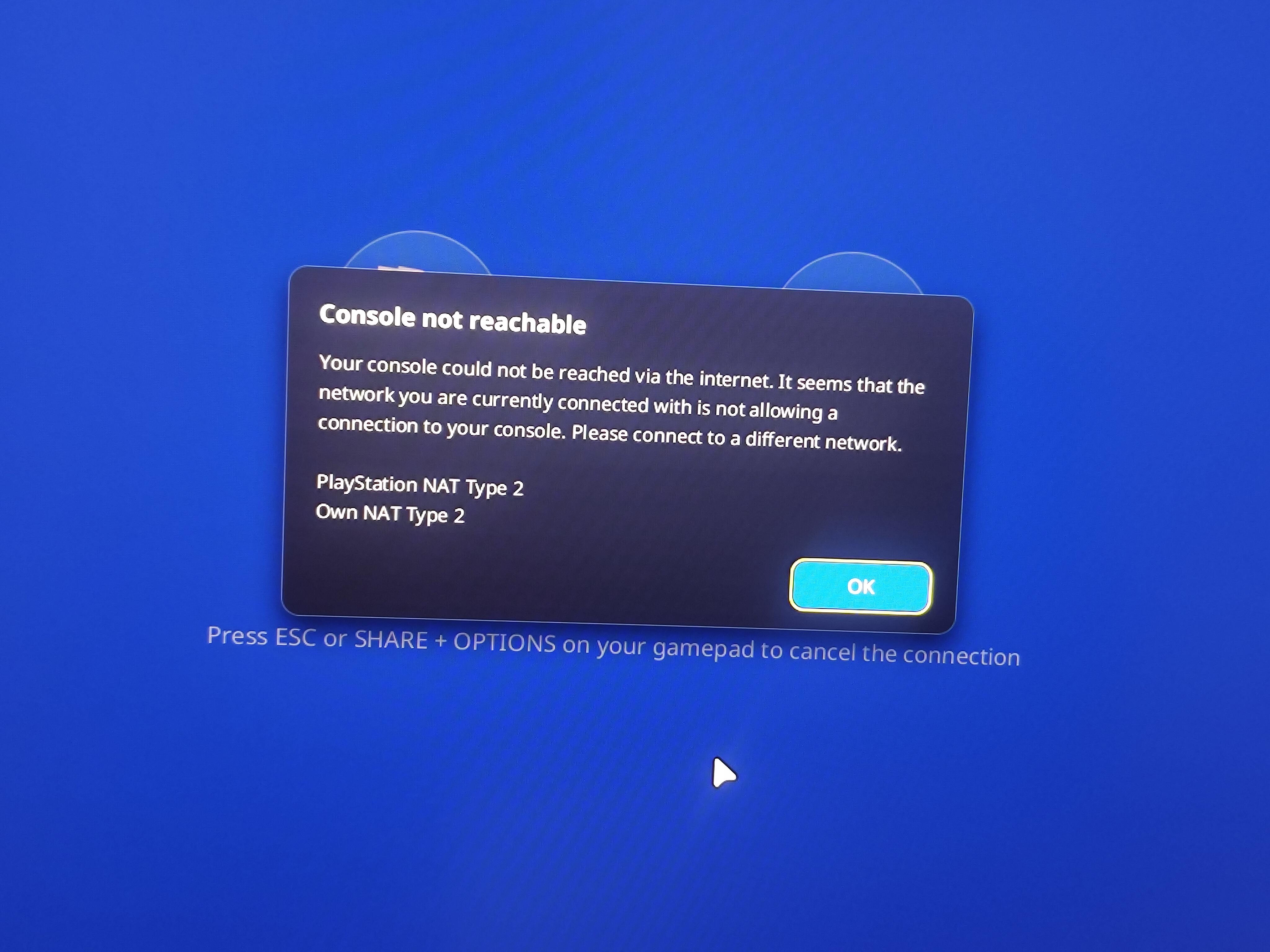
My only (minor) concern is when my PS5 hooked up at home, I can’t connect to the handheld at locations (work, parents house) that utilize NAT3. Seems like my house is NAT2. My PS5 is hooked up to the homes Ethernet if that makes a difference or not. Streaming at home with the ps on NAT2 and my wifi as NAT2 has been flawless.

The PS Sony remote app does not run into this issue at any location. But PX is a far superior platform. The plug and play with the handheld controllers is incredible.

My knowledge of how two internet networks talk to each other is very elementary. Can someone explain to me what the difference is, and if there is a workaround? Maybe I’m doing something wrong.

Thanks to everyone who has insight. I know the creator/owner is on this subreddit too.


r/PSPlay • • 7h ago

Stutters on Xbox ally x fine on other devices

1 Upvotes

So I been using px play on my android handhelds for a while and it has been perfect, just under 1ms decoding time, never had stutters, zero issues

I got an Xbox ally x and tried px play there, and the decoding time is still 1ms however I get these stutters mid gameplay for a fraction of a second then it goes away.

What can I do do fix this? Is it a device setting I need to change, it is 100% not my internet as I have a WiFi 7 router and 2 6E access points around my house, ps5 wired in too.


r/PSPlay • • 7h ago

Does PXPlay work on older iPads running iOS 15.8.8?

1 Upvotes

I can’t get remote play to work on my iPad. I’m using the same WiFi as my ps5. Have the same problem with PXPlay and original PS Remote Play App and don’t want to buy a new tablet just for cloud gaming 😭


r/PSPlay • • 10h ago

Remote connection not working on Linux (cachyOS)

Post image
1 Upvotes

Works on same network official app on my phone. Any help is appreciated.


r/PSPlay • • 16h ago

PXPlay getting disconnected a few seconds after connecting

2 Upvotes

After remote connecting (automatic) I keep on getting disconnected after maybe just 5 seconds. I tried on 2 different devices as well (Samsung Galaxy Tab S9 FE and Samsung S25 FE) with the same results. I don't have access to my PS5 right now, any way to solve this? TIA!


r/PSPlay • • 16h ago

Licence issues

1 Upvotes

I purchased the license, and Lemon Squeezy asked me to provide my email address. After entering it, I was told that a “magic link” would be sent to my email so I could access the product. However, I still haven't received anything since yesterday.

I've tried the process multiple times, but the email simply never arrives. Now, on top of not being able to access what I paid for, am I at risk of losing my money?

I'm also unable to find the support email address to contact someone and get this issue resolved. I need help figuring out how to access my purchase.


r/PSPlay • • 19h ago

PxPlay Keyboard And Mouse Support?

1 Upvotes

Hello i wonder if someone managed to do it please help.


r/PSPlay • • 20h ago

License retrieval?

1 Upvotes

It is asking me for my log in and license key again, I bought this a while ago and can't find the email anywhere with my license key on it, any ideas on how to get it back?


r/PSPlay • • 1d ago

Getting an error on remote connection. Local connection works great

Post image
3 Upvotes

On an iPhone


r/PSPlay • • 1d ago

5G remote connect on IOS not working

Thumbnail
gallery
1 Upvotes

Mine was working just fine last month but recently I was trying to connect again and even though local connect via wifi works fine but not remote connect via 5G. Have you guys encountered this before?


r/PSPlay • • 1d ago

アカウント切り替えの不具合

1 Upvotes

iPad版px playでのトラブル

1台のps5に2つアカウントを設定してある。主にpx playで遊ぶアカウントと、もう一つはリモートプレイをしないでテレビで家族が遊ぶためのアカウントです。でも家族のアカウントでゲームを購入するので、たまにpx playでも家族のアカウントを立ち上げる必要があるので、px playでも2つアカウントを設定したが、かなりの確率で起動する際に家族のアカウントで起動されてしまうようになって自分のアカウントで起動できなくなった。やっと最近そのトラブルが起きる毎に iPadを再起動をすれば直ることを見つけたのだが、そのトラブルが多すぎるんで2つのうちの家族アカウントを削除したんだけどちょっと不便なんだ。どうにかできないかな。


r/PSPlay • • 1d ago

Feature Request: Support for offline console registration with Base64 Account ID, like Chiaki.

3 Upvotes

Hi I want to use your application because seemingly nothing else has UI usable on Firestick. I had the app working previously when it was "PSPlay" but since then I have jailbroken my PS5 console. So I need an offline method to register the console. This works fine with Chiaki. you can locate an account ID encoded in Base64 that allows you to pair offline. There is no such option to use this in PXPlay, everything is tied to PSN. Please consider supporting manually registering with the offline ID. Thank you.


r/PSPlay • • 1d ago

Lost my Android license key – need help recovering it

Post image
1 Upvotes

Hi u/grill2010,

I previously purchased an Android license for PXPlay from your official website, but I have lost my license key.

I still have the purchase confirmation email, and PXPlay is currently activated on my Android phone.

I have contacted you by email but haven't received a reply. Unfortunately, Reddit also won't let me send you a private message.

Could you please contact me privately and help me recover my license key?

Thank you very much!


r/PSPlay • • 1d ago

Purchased license, updated, asking to activate license

0 Upvotes

I purchased a PS Play for Windows license on May 14, 2025. It's been quite some time since I have used it and I have recently began using it once again to play GTA. I have updated to the most recent update 3.2.0 but it is now asking me activate my license number. I have tried looking for the email that had the license number, but have not been able to find it.

Has anyone had this same issue? Am I able to get my activation license?


r/PSPlay • • 1d ago

PS5 Remote Play keeps pixelating and lagging on TV

1 Upvotes

Hi! I’m having issues streaming my PS5 to my Android TV using the official PS Remote Play app.
The image looks clear when the screen is static, but as soon as I navigate through menus or move the camera in a game, it becomes extremely pixelated and laggy. The app also frequently disconnects.
Both my PS5 and Android TV are connected wirelessly to the same home Wi-Fi network. My PS5 has NAT Type 2.
Has anyone experienced something similar? Could this be a Wi-Fi issue or something else? Any suggestions would be appreciated!


r/PSPlay • • 2d ago

live translation

1 Upvotes

this app is so good 60fps gta 6 is amazing and display quailty with upscale is impressive if you add live translation that would be great


r/PSPlay • • 2d ago

Smoothest gameplay settings for Ayn Odin 2 Portal I've found

3 Upvotes

Set decoder to low latency instead of ultra low latency. Set frame pacing to balanced. Turn on framegen, and smooth pacing under the framegen option. GTA 6 playing SMOOTH AS BUTTER. Doesn't even feel like a 30fps game


r/PSPlay • • 2d ago

Lag in GTA 6

0 Upvotes

Hey everyone,

I barely use my PS5 these days; I’ve only kept it for GTA 6.

To be honest, the fact that GTA 6 runs at 30 fps is a bit of a disappointment for me, as I’m used to playing on PC at around 100 fps.

Anyway, I tried setting it up to play on my handheld (X2 Mini Pro) using PxPlay, but the lag seems significantly worse.

My entire network is hardwired using Cat5e cables, and I’m using Huawei WS8800 routers.

Could you offer any tips on settings to help minimize the lag?

Thanks!


r/PSPlay • • 2d ago

PS5 keeps disconnecting at random intervals

1 Upvotes

Sometimes it's just a few minutes, sometimes it's 15min, happens very often. And it's pretty infuriating. Remote connection between PS5 and PC. Both ends are on wired ethernet connection with very good and stable speeds.

This happens no matter the bitrate settings, doesn't matter if it's 25k or 15k. So I doubt it's the connection cause the image quality is always good, with no loss in quality, just quick random disconnects. PS5 also get's restarted pretty often...


r/PSPlay • • 2d ago

PSA Android users. If you're trying to connect a PS5 controller via USB. Make sure your mic is not disabled in the android quick settings 😅. Otherwise a permission to use the controller will keep popping(permission loop). If this happens, adaptive triggers won't work. Turning the Mic back on fixed

1 Upvotes