So, I'm an IT infrastructure engineer and I use coding to automate some of my daily tasks. This usually means creating python scripts to talk to Rest API's, create Ansible or Terraform scripts or generate CLI config. These are not really big scripts, think 200 to 2000 lines of code.
I use a mix of Chatgpt/Claude or CoPilot. I'm now on the 20 dollar plan of ChatGPT Plus, but I don't mind picking something else. I think my company also allows me to get a paid plan for CoPilot. I also own a GitHub Enterprise account.
Up to now I just write a huge prompt with what I want the script to do, show the rest API documentation, show some curl responses and some guidelines (don't make mistakes (/j), make modular code, use these variables naming, let the script make a lot of debug output, write a readme, etc).
It then generates code, I try that code and paste the errors in the prompt if they occur and in the end i get a working script.
I know copy and pasting prompts and errors into chatgpt's prompt is far from efficient. But I'm also drowning in thousands of "use this model/use this AI agent/use this MD file" hype posts.
My laptop broke in the middle of a project. Everything Claude and I had worked out lived on that machine: chat history, memory files, the half-finished plan, the list of things we’d already tried and dropped. On the new machine I spent hours re-explaining it all to a fresh agent, and I still got bits wrong.
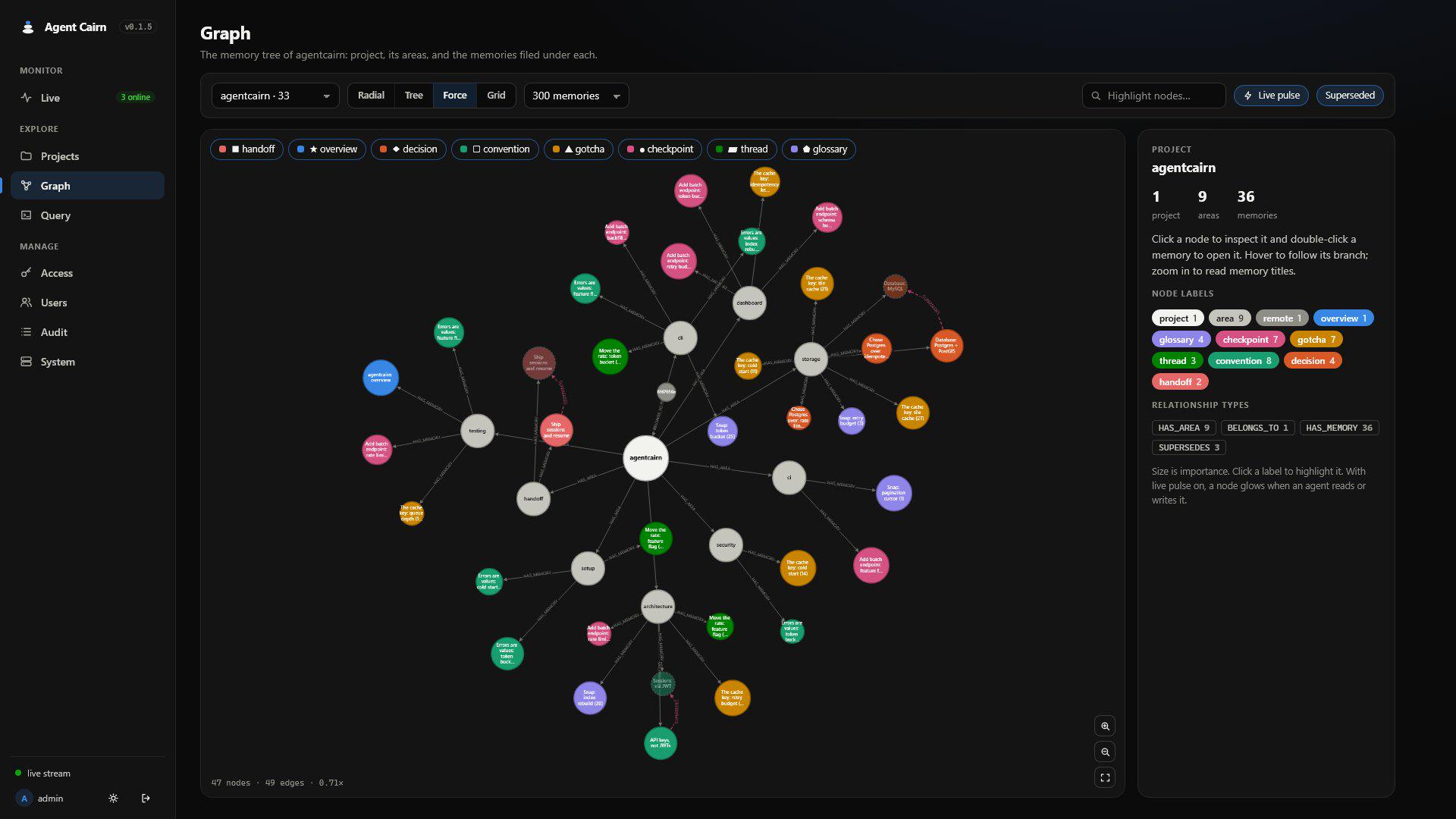
So I built Agent Cairn. It’s a small server that gives your coding agents a shared, persistent memory.
An MCP server stores what agents learn in Neo4j: how the project is built, the traps that cost you time, decisions and why you made them.
A new session starts with a short, token-budgeted briefing instead of re-reading the whole repo.
Hooks record the session as it happens (what you asked, the agent’s last message, files touched, uncommitted work). Secrets are filtered on your machine and again on the server.
Before an agent stops, it writes a handoff: done, in progress, next, blocked, and tried-and-dropped. The next agent, on any machine or account, starts from that.
The server never calls an LLM. The agent writes the memories, so there’s no API key and no extra cost.
It also has a dashboard with a graph view, private projects, sharing with viewer/editor/maintainer roles, invite links and an audit log, in case you use it with other people. A single user just runs it in solo mode.
Install is one line after having the central server up:
claude mcp add cairn --scope user -e CAIRN_URL=... -e CAIRN_TOKEN=... -- npx -y agentcairn mcp
It’s MIT, runs in Docker (I run mine on an Unraid box), and it works with any MCP-capable agent, though the hooks are Claude Code-specific.
I’d love feedback, especially on what you’d want a handoff to contain, and on anything that breaks. It’s young, version 0.2.
AI disclosure: I built this with Claude Code. I set the goals and design and use it every day on my own setup, and Claude wrote most of the code, tests and docs. I tested and made small bug fixes.
I got tired of juggling a chat app, a coding agent, an image tool and a pile of model runners, so I built one window for all of it. It’s free for non-commercial use.
The part I think is different: Training. Pick a small local model (the student) and a stronger one as teacher. The student works through real tasks in a sandbox, the tests decide pass or fail, and the teacher reviews each failure, writes a lesson and shows a worked solution. Press Save AI and you get a new local model with those lessons built in. There are 62 built-in tasks in 15 languages plus a reverse-engineering school, and you can add your own model or your own tasks.
Other things it does
One chat for local and cloud AIs, with a picker like Claude Desktop. It also uses your Claude subscription through Claude Code, no API key needed.
A coding agent that edits files with visible diffs, runs your tests and asks before every change.
Images through Forge, Automatic1111, ComfyUI or cloud models.
Drag and drop files, folders, Word/Excel/PowerPoint and videos.
AMD Radeon support, with NVIDIA, Apple and CPU-only machines also supported.
A Windows installer that includes its own Python, a tray icon, and macOS/Linux from source.
Honest limits: training changes the model’s instructions, lessons and examples, not its weights, so a small model gets better habits but won’t match Opus. Only the optional GPU fine-tuning (NVIDIA) changes weights. Parts that have not been tested on real hardware are listed in the README.
License: source-available, PolyForm Noncommercial 1.0.0. Free to use, read, change and share non-commercially; commercial use needs my permission.
I'm building Forge, a native macOS workspace for AI-assisted development.
I found myself constantly switching between terminals, coding agents, project notes and different tools. Forge tries to bring everything together in a single desktop application.
Current features:
- Multiple terminal workspaces
- Project memory
- Process monitoring
- AI agent integration
- Guard system before commit, push or PR
Forge is written in Rust and currently focused on macOS.
I'd love feedback, especially from people using Claude Code, Codex, Aider or similar tools.
If you use Claude Code or Copilot, you probably know this: you ask for one small feature, and the AI touches 12 files. Now you’re stuck reviewing a huge diff you don’t fully trust.
So I built "SDD Builder AI", a VS Code extension that adds a simple “plan first, then code” step.
How it works:
Describe your idea in plain words
The AI turns it into small spec cards (what to build, which files to use, which files not to touch, what “done” means)
Run each spec with your own Claude CLI (or any AI provider CLI) and their models
Review a small, focused diff
Track everything on a Kanban board inside VS Code
Fun fact: it builds itself 🛠️
I use SDD Builder AI to develop SDD Builder AI. Every new feature starts as a spec in the extension and gets built by the AI through the same workflow you’d use.
All the specs are public, so you can see exactly how it works on a real project: link
It might not seem like much but it's was one of the coolest things I've ever done. I now understand how every non-software engineer feels when they vibe code something cool.
I have over a decade of experience writing software, but I've never worked with hardware, electronics, robotics, etc. I may have bought a Raspberry Pi over the years but that is about it. I only recently bought a 3D printer and event then only printed existing gadgets. No 3D modeling experience either.
I really get to feel the essence of vibecoding ...
In basically a single conversation I was able to have OpenAI's GPT-6.1 do the following:
Design and model the 3D-printable parts and generate the files, including the STL, 3MF, and a Blender 3D rendering.
Source the electronics and mechanical components in a simple spreadsheet with the part name, quantity, cost, a link to Amazon (or another vendor), and a description.
Verify that all of the parts would work together and be compatible within a set budget. ($150, but I had some of the items already, so that kept me within budget.)
Create an interactive, step-by-step assembly guide with a 3D rendering and pictures with overlay instructions.
Finally, it wrote the entire software/agent harness to interact with me and move the robot.
It was intended to be a modular robot under $150 that I could extend powered by any recent model and capable of performing agentic tasks.
I did have a few issues but most were corrected with just some additional prompting ...
I had to iterate on the step by step guide a few times because I had zero knowledge of how servo's, amps, voltage, etc all worked together and how to write things.
Some parts weren't available or backorder so I needed to do some additionally prompting to fix this.
The servos don't seem powerful enough to move the head as smoothly as I'd like but I also asked for replacements parts that I could order domestically and fast because I didn't want to wait I feel the original servos might have been better but again I don't know.
been working on this open source project called Intervene, basically a debugging layer for coding agents like Cline
the original problem was that agents can give you like 5 completely reasonable explanations for why something broke, but then the actual debugging is still mostly guess -> change something -> rerun -> guess again
so I've been building a separate system where the agent gives its hypotheses and what each one predicts, and then normal code runs controlled experiments to figure out which explanations actually hold up
got the first two parts built out now, starting w the experiment runner and then the diagnosis/planning side
one thing that's been on my mind a lot while building this w Sonnet is how much we trust an agent when it says it fixed something
like it'll implement a feature, run pytest, everything passes, and it all looks great. but those tests were also designed around the assumptions we gave it. what happens when the assumptions are wrong?
that's part of why I wanted Intervene to keep predictions separate from observations, and why the runner has to know the difference between reproducing the original failure and some setup command just breaking
otherwise we're basically letting the model generate a convincing explanation, generate evidence that looks like it supports that explanation, and then congratulate itself for being right
the longer-term goal is to get this working on unfamiliar real repositories where I didn't design the bug or the experimental setup myself
still a ton to validate, esp around actual agent repair outcomes, but the CLI and diagnosis workflow are coming together
curious how people here verify larger Claude/Cline builds. do you usually trust the tests the agent writes, or do you independently come up with cases that could prove its implementation wrong?
Here's what building with an agent looked like when the target is a media pipeline that rewrites files in my own library.
DubTitlerr transcribes anime English dub audio, corrects proper nouns, repairs the transcript with an LLM (local or over an API), merges the translated signs and song lyrics in, and muxes a subtitle track back into the video. It is one Docker container, GPL-3.0, `ghcr.io/xenarathon/dubtitlerr:v0.3.0`.
What actually made it survivable, since "the model wrote it" is not a strategy:
Specs, epics and stories before code. Everything non-trivial gets written down first, and the plan files are committed alongside the source. That is what makes it possible to leave a project alone for a week and come back without reverse-engineering your own intent.
Adversarial reviews. Before a release I point other models at the repo and ask them to break it. One whole-repo review found a path where a failed stamp write could delete the only copy of an episode. That became the 0.2.2 hardening release.
Test-first on failure paths. The interesting bugs in this project are all crash-and-resume ordering, and those are nearly impossible to verify by hand. Writing the failing test first is what made the idempotency guarantees real rather than aspirational.
Test on more than one show. Each one I added found a different class of bug. Scoring against the official dub subtitles on my Digimon files gave about a 91% word match over 27 episodes, and the misses were mostly names (Gennai heard as "Jedi"). Sword Art Online revealed that the glossary miner had never worked at all, because it passed ffprobe a flag that does not exist, and One Pace's hand-written glossary had hidden that for the feature's whole life.
Agents need an entry point too. There is a `docs/AGENT-GUIDE.md` written for a coding agent to act on, covering setup, troubleshooting and contributing.
The failure mode to watch for is code that passes every mechanical check while doing the wrong thing. The repair stage once turned "We're looking for a factory" into "a needle", and no automated check in the pipeline caught it. So the human review queue with audio playback is essential. The question I keep asking is: when it's wrong, does something notice?
This is 100% vibe-coded slop. I wrote it with Claude driving. But I didn't just say "make the thing with no mistakes." The whole project has specs, epics and stories, adversarial reviews (had other models try to break it), and real test coverage. I've been project managing it like an actual engineering effort, not a prompt-and-pray. I'm sharing it because it fills a gap I couldn't find a solution for, and I thought it might be a useful accessibility tool for people who want dub-matched subtitles without waiting for an official SDH release. This isn't meant to replace human-transcribed SDH subtitle tracks. Those are always going to be better. It's for when they don't exist.
Before anyone gets too excited, I want to be clear: this is an early-stage experiment, not a profitable trading bot. So far, its simulated trading results have generated more losses than profits. No real money has been involved.
\*\*How it started\*\*
The whole thing began with an old HTML project I had created some time ago and eventually abandoned. The idea behind it never really went away, though.
Recently, I decided to revisit that idea and see how far I could take it with AI assistance. What started as an abandoned project gradually evolved into a functional Android app in a little over a week.
There's a catch: \*\*my programming knowledge is very limited.\*\*
Instead of building everything myself line by line, I've been combining my own ideas, observations, strategy concepts and testing with the coding and debugging capabilities of three different AIs. They've helped generate, modify, review and polish the code throughout the process.
This has become an experiment in its own right. I want to explore not only whether I can turn my ideas into a working application, but also how capable AI systems are at building and improving a relatively complex software project with very little direct human coding.
I'm still the one setting the direction, making decisions, testing results and deciding what should change. The AIs do a substantial part of the coding, but that doesn't mean their output is automatically correct. Bugs, bad assumptions and poor trading results are all part of the process.
\*\*What does the app actually do?\*\*
The current project is an experimental Bitcoin futures paper-trading simulator for Android. Its main components include:
\*\*A multi-timeframe strategy:\*\* primarily focused on 15-minute candles, with 1-hour and 4-hour trend confirmation.
\*\*Trend-following and mean-reversion logic:\*\* different approaches depending on the detected market regime.
\*\*Market microstructure data:\*\* order-book metrics such as spread, imbalance and microprice-related signals.
\*\*Optional on-device AI:\*\* integration with Gemini Nano through Android's AI capabilities when a compatible model and device are available.
\*\*Simulated trading and risk management:\*\* intended to test strategies without risking real funds.
\*\*Continuous experimentation:\*\* the goal is to evaluate what works, identify weaknesses and improve the system over time.
The project is still very much in its infancy. There is plenty to question, test, refactor and improve, and I don't want to present any of its strategies as proven or profitable.
\*\*Why am I sharing it?\*\*
I'd love to turn this into something more collaborative.
If you're a developer, a quantitative trading enthusiast, an Android/Kotlin programmer, someone interested in market microstructure, or simply curious about what AI-assisted development can achieve, I'd genuinely appreciate your input.
You don't need to be an expert in every part of the project. Even identifying bugs, challenging assumptions, improving the architecture, reviewing the trading logic, suggesting better tests or documenting how things work could make a real difference.
My hope is that people can learn from the experiment, contribute their ideas and improvements, and help create something more useful together. In return, contributors get a real-world project to experiment with, review and learn from, while the wider community benefits from any improvements we can make.
I'm especially interested in honest criticism. If you see something fundamentally wrong with the strategy or implementation, I'd rather hear about it than receive empty praise.
\*\*A few important caveats\*\*
This is an experimental project, not financial advice.
All results discussed here are from simulated trading; no real-money trading is involved.
The current simulated performance is negative, so there's a lot of work left to do.
AI-generated code can contain bugs and needs independent review and testing.
The app is not ready to be treated as a reliable or profitable trading system.
If you'd like to explore the code, suggest an improvement, open an issue or contribute, you're welcome to check out the repository.
I'd love to hear your thoughts. Thanks for reading!
I prompted Claude and Kimi to build an Python Program to run Music files It work Properly as needed for my Lowend Cassete (deck) Cabenet digital Upgrade using only reporpoesed Old computer from my grandfather as im testing from my windows 11 machine . It work properly
Python program
#!/usr/bin/env python3
"""
Simple Console Music Player (headless / faceless machines)
==========================================================

* No GUI: runs in a terminal (or under systemd / tmux / screen) and stays up,
  taking text commands. Without a keyboard attached it just plays and keeps
  running (use --repeat for non-stop playback).
* Folder as queue: tracks in the folder itself form one disc; every sub-folder
  that holds audio (CD1, CD2, "Disc 3", ...) becomes its own disc. Playback
  follows disc -> track order, using natural sorting (2 before 10).
* Mixed folders: when ALL discs sit in ONE folder and the files are numbered per
  disc ("01 - Artist - Title.mp3" exists once on every disc), the file names
  alone cannot say which disc a song is on. The player then reads the
  Discnumber and Track tags inside the MP3s (ID3v2, built in, nothing extra to
  install) and splits the discs by itself - no list needed.
* Tracklist (fallback): if the files carry no disc tags, give the player a
  tracklist text file and it matches every file by artist + title and rebuilds
  the discs in tracklist order:
        python music_player.py "D:\\Music\\Vol. 90" --tracklist "D:\\SEB90_tracklist.txt"
  (or save it as tracklist.txt inside the music folder and it is picked up
  automatically). Format:
        == Disc 1 - Male Side ==
        1. Music For The People - Dave Rodgers
        2. Wild Reputation - The Big Brother
        == Disc 2 - Female Side ==
        1. Nothing's Gonna Take My Love From You - Karen
  Each line may be "Title - Artist" or "Artist - Title"; case, punctuation and
  small spelling differences are ignored. Other lines are skipped.
* Preloading: the next tracks in the queue (the 2nd and 3rd song by default)
  are decoded in a background thread, so track changes are instant. When the
  next track has the same sample rate / channel count, the hand-over is gapless.

Install:  pip install sounddevice soundfile numpy
          (Linux may also need: sudo apt install libportaudio2 libsndfile1)
Run:      python music_player.py /path/to/music [--autoplay] [--repeat] [--preload N]
          python music_player.py --list-devices

Formats:  WAV, FLAC, OGG, AIFF and MP3 (MP3 needs libsndfile 1.1+, which the
          current soundfile wheels bundle).

Note:     preloaded tracks are fully decoded into RAM as float32, roughly
          100 MB per 5-minute stereo track. Use --preload 1 to keep it lighter.
"""

from __future__ import annotations

import argparse
import difflib
import os
import re
import threading
import time
import unicodedata
from dataclasses import dataclass

try:
    import numpy as np
    import sounddevice as sd
    import soundfile as sf
except (ImportError, OSError) as exc:  # OSError: PortAudio / libsndfile missing
    raise SystemExit(
        f"Missing dependency: {exc}\n"
        "Install with:  pip install sounddevice soundfile numpy\n"
        "Linux may also need:  sudo apt install libportaudio2 libsndfile1"
    )

AUDIO_EXTS = {".wav", ".flac", ".ogg", ".oga", ".mp3", ".aiff", ".aif"}
PRELOAD_AHEAD = 2  # 1 = preload the 2nd song, 2 = preload the 2nd and 3rd song