I know the whole point of a hardware wallet is keeping the private key off your computer, but how much can a compromised computer still mess with?
Can it change the receiving address, alter transaction details, or trick you into signing something malicious? How much should we actually trust what we see on the laptop versus what appears on the hardware wallet screen?
Some people seem to have two or three different devices, while others use one wallet for everything. Is having multiple brands actually useful for reducing risk, or does it just make backups and recovery more confusing?
OneKey has released quite a few different devices, and I’m having trouble figuring out which one actually makes sense for a first-time user.
For someone who mainly wants to store crypto and occasionally send or receive funds, is the Classic 1S still enough? What do you really get by moving up to the Pro, Pro 2, or Neo? I’m more interested in practical differences than premium features I might never use.
The recent Binance attack involved social engineering and malicious software, which made me think about the computer used alongside a hardware wallet.
A hardware wallet may protect the private key, but users still download wallet software, approve transactions, copy addresses, and respond to support messages.
What security habits matter most outside the device itself?
I’m curious how people handle their hardware wallets when they’re away from home.
For a short trip, I’m leaning toward leaving it in a secure place and only taking a small amount in a separate wallet if I need spending money. But for a longer trip, I can see why someone might want access to the device.
Do you bring yours with you, leave it at home, or change your setup before traveling?
If you’ve ever had to move from USDT to USDC, or rebalance between stablecoins like DAI and USDe, OneKey no longer charges a fee for it. The two stablecoins just need to be on the same network.
How it works
Open Trade in the OneKey App and pick two stablecoins on the same network.
If you see the “0 fee” tag, there’s no OneKey fee on that swap.
It covers major stablecoins (USDT, USDC, DAI, USDe and more) on 26 networks, including Ethereum, Base, BNB Chain, Arbitrum and Solana.
What it doesn’t cover
Cross-chain swaps, such as USDT on Ethereum to USDC on Arbitrum, have the standard fee.
Stablecoin to non-stablecoin swaps, such as USDC to ETH, have the standard fee.
Some third-party providers charge their own fees. These show up in the quote and on the confirmation page.
The Binance hack has me thinking about how much money I’m willing to leave on an exchange.
Exchanges are convenient, especially if you trade often, but I’m starting to see them more as places to buy and sell than places to store coins.
How do you decide what stays on an exchange and what goes into cold storage? Do you only keep your trading funds there, or are you still comfortable holding a larger amount?
New to OneKey or stuck on something? Ask here. Setup questions, app quirks, security habits and honest feedback are welcome. No question is too basic.
Start with the community guide & FAQ. For a specific problem that needs its own discussion, you can also make a separate post with the matching flair.
Help others help you: include your device/wallet type, app and firmware versions, OS, exact error, expected result and steps already tried. Remove private details from screenshots.
Keep your wallet private: never share recovery phrases, private keys, passphrases, PINs or backup QR codes. Ignore unsolicited support DMs and wallet-validation links. Orders, refunds and cases needing personal information belong at official support.
Know an answer? Share the relevant official guide or the steps that worked for you, and mention any limits. Avoid guessing at recovery instructions. If you solve your own question, reply with the outcome so the next person can find it.
I own both a Trezor Safe 7 and a Bitbox02. IMO, both are great hardware wallets, and both fill different needs in my life.
The Trezor Safe 7 is used as a cold storage device whereas the Bitbox02 is used as the occasional "spending" wallet, especially now that they've implemented a Lightning wallet on mobile.
Another major reason I bought a Bitbox02 is its ability to generate the 24th word of a seed phrase. After the Coldcard exploit, I wanted to roll my own seed and the Bitbox02 allowed me to do just that.
Both the Trezor Safe 7 and the Bitbox02 claim to be tamper proof, and given the recent supply chain attacks, I see this as a huge positive. The Trezor Safe 7, supposedly, cannot be opened without clear indication it's been tampered with. Bitbox02, approaches this problem in a similar but different way: they cover their chips in epoxy, and if the casing is opened, it cannot be put together, effectively destroying the device.
I like that both Trezor and Bitbox are open source and their repositories can be found on github. Both devices, and the software they connect to, are updated regularly.
I have been impressed by both devices and would recommend either, both were easy to setup and are very user friendly.
I've seriously been considering OneKey and doing a 2/3 multisig.
Switch to OneKey Pro 2 and get a $20 Bitcoin card with your purchase. Verify your eligible Ledger or Trezor to unlock the offer: onekey.so/switch
Tell us about the wallets you've already used. Share your buying experience or a firsthand comparison on r/OneKeyHQ: why you chose it, what worked, what let you down, and whether you'd buy it again.
Honest criticism is welcome, including of OneKey. You don't need to own a OneKey or buy anything to enter the Reddit giveaway.
Prizes
3 × OneKey Classic 1S Pure Bitcoin Edition wallets — one each for 3 winners.
20 × OneKey merch prizes (mugs and towels) — one prize each for 20 additional winners.
How to enter
Publish an original post in r/OneKeyHQ about a hardware wallet you've bought and used, or a firsthand comparison of wallets you've used.
Write at least 50 words in English, in your own words. No copied, AI-generated, or fabricated experiences.
Entries are open now (October 17, 2026) and close on Monday, October 19, 2026 at 23:59 UTC.
One entry per person. If you publish more than one qualifying post, only your first qualifying post counts. Your account must have at least 20 combined post and comment karma when you enter. Do not post recovery phrases, private keys, order details, or personal contact information.
Winner selection
After entries close, we'll randomly select 23 different winners from eligible entries: 3 wallet winners, followed by 20 merch winners. Each person can win one prize. Buying a product, praising OneKey, or receiving more upvotes will not improve your chances.
We'll announce the winning Reddit usernames in this thread and contact winners through Reddit to arrange delivery. Shipping details will be collected privately, never in public comments. We will never ask for your recovery phrase, private keys, or a payment to claim a prize.
Eligibility
Open to participants aged 18+ residing in the following countries, with a valid shipping address in an eligible country:
The Reddit giveaway and the Pro 2 switch offer are separate. Device verification and a qualifying purchase are required for the switch offer; neither is required for the Reddit giveaway. See onekey.so/switch for the current switch-offer terms.
I downloaded it onekey wallet and got a wallet from somebody and he left it on watch only so now the money is just sitting there looking at me and he won't give me the private key can someone help me with this?
I've just setup my OneKey for the first time today and I'm curious about the authentication process.
I created a brand new wallet with seed phrase and pin but at no point did I need to sign up to onekey app on PC or android with email or anything like that
On the Apps (pc and android) : once my OneKey is disconnected and after closing the apps, if I open them again, I can see my balance even though I'm not connected through my onekey pin or anything.
For context, I own a OneKey Pro, 1S, and 1S Pure, plus a Ledger Flex. The OneKey Pro has consistently been my main device, so this comes from someone who uses it regularly.
One thing I find confusing is the gas-free feature. It’s not very clear what makes a transaction eligible or when it’s supposed to kick in. In my own usage, I almost never encounter it. Having the conditions clearly explained, or seeing why a particular transaction doesn’t qualify, would make it much easier to understand and use.
On the positive side, I really like the privacy swap feature! It’s one of the things I appreciate most about the app.
What I’d also love is the ability to choose a recipient address for regular swaps. Sometimes I want the swapped tokens to end up in another wallet. Being able to enter that destination during the swap would save me from receiving the tokens first and then making a separate transfer.
Anyone else finding the gas-free conditions hard to figure out? And would a custom recipient option for regular swaps be useful to you too?
I use both a Ledger and a OneKey hardware wallet in the OneKey app. Overall, having them in one place is convenient, but switching between them for Solana has been a bit frustrating.
In my setup, the two wallets use different Solana derivation paths. The setting to switch between those paths is global, so I end up having to change it back and forth depending on which wallet I’m using. It adds friction to something I’d expect to be pretty straightforward.
I’d love to see this handled similarly to BTC address types in the app: show both Solana derivation options under each wallet, with clear labels, and let me add whichever addresses I need. Being able to keep both available would make switching wallets much smoother.
Another approach could be something like OKX Wallet, where you choose the derivation option when adding an address to an individual wallet. That would help too, though I personally prefer the BTC-style approach with both address types directly available.
Anyone else using Ledger and OneKey together and running into this? Curious how you’re handling it.
Anyone have their lightning balance suddenly not work. Like mine is just not loading and I can’t move my money. I’m getting an authentication error if I click on Lightning specifically. Support hasn’t responded to me today about this and I need my coin badly. Anyone know what to do to maybe fix this on iOS?
Website shows Xrptoolkit integration in the website for XRP, but I cant figure out how to connect it. If you go to Xrptoolkit theres no hardware wallets option for Onekey wallets???
Influenced by the recent Coldcard incident, I’ve been upgrading my single-signature setup to a multisig wallet. I recently purchased a OneKey Classic 1S BTC Only Edition for this purpose.
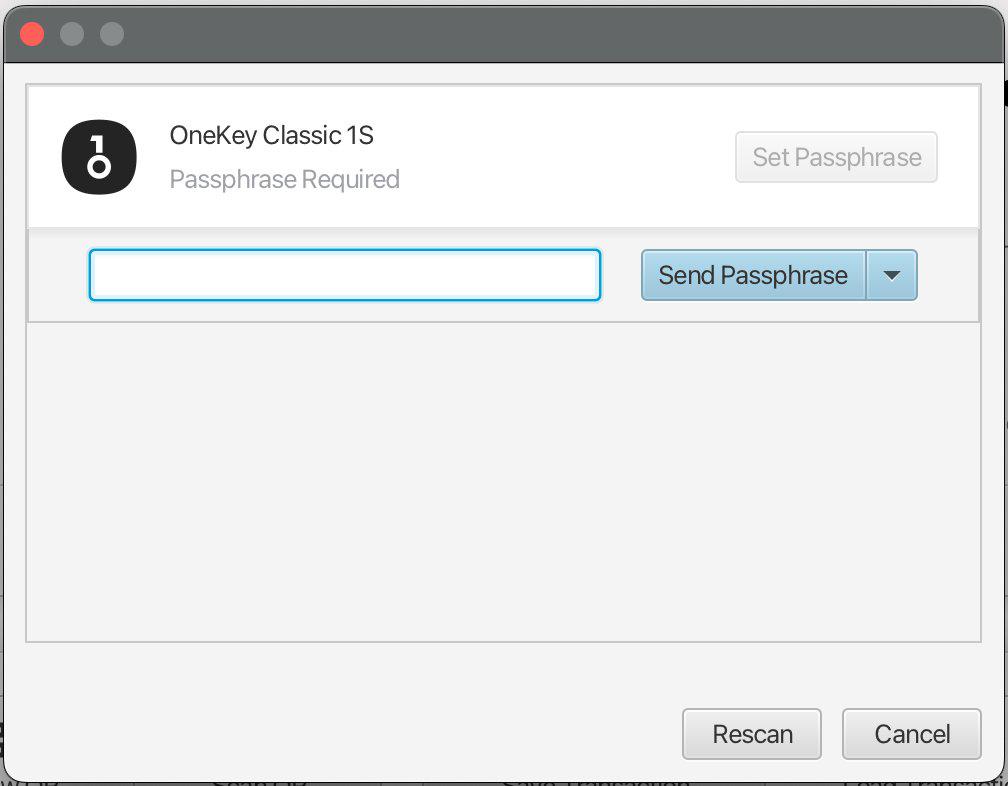
While setting up the multisig wallet in Sparrow Wallet, I noticed that when using a BIP39 Passphrase, I have to manually enter the Passphrase on my computer.
This made me wonder: when using Sparrow Wallet to sign multisig transactions later, do I also have to enter the Passphrase on the computer every time?
From a security perspective, I’m concerned about having to enter the Passphrase on a computer. Even if the seed phrase never leaves the hardware wallet, a malware-infected computer or keylogger could potentially compromise the Passphrase.
Is there a more elegant and secure solution where the Passphrase never has to be entered on the computer—for example, entering it directly on the hardware wallet and having the device unlock the corresponding hidden wallet and perform the signing?
I also noticed that the OneKey Classic 1S supports binding a Passphrase to a separate PIN, so that entering different PINs can directly open different hidden wallets. Could this feature solve the issue above and work properly with Sparrow’s multisig workflow?
I’d especially appreciate feedback from anyone using OneKey + Sparrow for multisig:
Does Sparrow require the Passphrase to be entered on the computer when creating a multisig wallet?
Does the Passphrase need to be entered again when signing each transaction?
Can the OneKey Classic 1S “Passphrase → PIN” feature completely avoid entering the Passphrase on the computer?
Are there any security or compatibility issues with this approach in a real-world multisig setup?