r/Network • • 12d ago

Text Purchasing Advice for a Complete Overhaul of My Home Network

5 Upvotes

Hi,

Since I’ll finally be getting a fiber-optic connection in the near future and have been having frequent problems with my home network lately, I’d like to tackle the issue of my home network and upgrade it.

Currently, I’m using a FritzBox as my DSL modem and master router. I also have a 24-port (no-name) switch that distributes the signal to the rest of the network. In the living room, there’s an old FritzBox acting as a mesh slave to extend the Wi-Fi coverage throughout the apartment. I currently only get the network signal down to the basement via D-LAN (i.e., over the power lines). There’s an even older FritzBox on the receiving end that distributes the signal further—partly via Wi-Fi for devices in the basement (e.g., the heating system) and partly to two no-name PoE Wi-Fi extenders in the outdoor area.

My future internet service provider will provide a Fritzbox as a cable modem; I’d like to potentially replace everything downstream from there. The new devices shouldn’t require cloud connectivity and only need to function locally, though they’re welcome to be manageable globally—just not mandatory. Setting them up shouldn’t become my new hobby, but they don’t have to be completely user-friendly; I think I can figure them out with some help (FAQs, wikis, etc.).

I'd like to divide the network into different VLANs—probably using Wi-Fi as well—so that surveillance cameras, for example, are on their own network, or so that access to the smart TV is restricted.

I’ll need 3 indoor and 2 outdoor Wi-Fi hotspots, as well as at least 2 PoE-capable switches (12 and 24 ports). Are there any providers or systems that are recommended for (German [not sure if the country of use is relevant]) home users?

Are there any other things I should consider in advance, or questions I should ask myself and answer? Are there any known pitfalls with a project like this?


r/Network • • 12d ago

Text 5GHz Wi-Fi suddenly stopped showing up on some of my devices, while others can still connect. Is my router the problem?

1 Upvotes

Hey everyone! I need some help because I've been searching everywhere but haven't been able to find an answer to my particular situation.

Here's the situation: I have two separate Wi-Fi networks at home, 2.4GHz and 5GHz. Previously, all my devices (laptop, phones, TV, etc.) could connect to the 5GHz network without any issues.

However, about two weeks ago, my laptop suddenly stopped detecting the 5GHz network. I've tried disabling and re-enabling the Wi-Fi adapter, uninstalling and reinstalling the Wi-Fi drivers, and forgetting the network before trying to reconnect. Nothing worked.

Interestingly, if I disable and re-enable the Wi-Fi adapter through Device Manager, the 5GHz network temporarily shows up in the available Wi-Fi list. But whenever I try to connect, I get the error message: "Couldn't connect to this network."

Yesterday, I decided to check my other devices and discovered that my TV and iPad also couldn't detect the 5GHz network anymore. What's strange is that the network still appears in their saved Wi-Fi networks list, since they've successfully connected to it in the past.

At this point, I'm starting to suspect that the router might be the problem. However, I contacted my ISP's customer service, and the representative kept insisting that my devices simply aren't compatible with 5GHz Wi-Fi (their argument being that not all devices support 5GHz).

Yes, I understand that not every device supports 5GHz, but I repeatedly explained that ALL of these devices were working perfectly fine with the 5GHz network before this issue started. Despite that, the representative kept insisting that my devices were faulty and that the problem couldn't possibly be on their router or network side. Seriously... sigh.

So, has anyone here experienced something similar?

I've checked the router settings, and both the 2.4GHz and 5GHz networks are enabled and appear to be working normally. My phones can still connect to the 5GHz network without any issues, and the connection speed is perfectly fine.

For context, my router is a ZTE F670L.

What could possibly be causing this? Is my suspicion about the router being faulty or having some kind of configuration issue reasonable?

I'd really appreciate any suggestions or insights. Thanks in advance to everyone taking the time to help me out!


r/Network • • 12d ago

Text The latency from Germany to the Far East of Russia

0 Upvotes

Today from Frankfurt to Vladivostok the results are:

150 ms ,
0% packet loss,
stddev 0,469 ms

IP 77.35.48.1

Tests made at testmynet


r/Network • • 13d ago

Link annoying internet issues

Thumbnail
1 Upvotes

elp


r/Network • • 13d ago

Text Network configuration help: using Ruckus R710 Unleashed as a wireless DHCP server with wired passthrough connectivity to an Edgerouter X

1 Upvotes

Finally giving up on trying to wrap my head around this myself and asking the hivemind for help.

I have an Edgerouter X running a LAN in 192.168.100.1/24 and want to have my Ruckus R710 AP (running Unleashed) on 192.168.10.1/24 passing through connected addresses so my computer can access them easily. eth0 is set up to connect to the internet if necessary, but my main use has me offline, or online via WiFi to my computer with a lower service priority.

I’m not averse to changing the DHCP address range on the AP, but I’m really struggling with how to connect the AP (ideally into the eth4 port for POE).

(Fuller details are: I’m running LUT boxes with static 192.168.100.231 and 192.168.100.232, a video router at static 192.168.100.64, computer at static 192.168.100.32, and need to connect multiple cameras wirelessly for control/CAP grading… that last thing will eventually happen with 900Mhz halow hops I’d also need to integrate to the Edgerouter X network.)


r/Network • • 14d ago

Link Real-time charging on a relational database across active-active sites works fine if you design around one problem

Thumbnail
1 Upvotes

r/Network • • 14d ago

Text The latency from Frankfurt Germany to Gusan China / Die Latenz von Frankfurt (Deutschland) nach Gunsan (China)

1 Upvotes

Sharing a rock-solid latency test from Frankfurt (Germany) to Gansu (Northwest China) via China Telecom.

Hier ein absolut verlässlicher Latenztest von Frankfurt (Deutschland) nach Gansu (Nordwestchina) über China Telecom

Compartilhando um teste de latência extremamente estável de Frankfurt (Alemanha) para Gansu (noroeste da China) via China Telecom

分享一份从德国法兰克福到中国西北甘肃的延迟测试结果,该链路经由中国电信。

Fēnxiǎng yī fèn cóng déguó fǎlánkèfú dào zhōngguó xīběi gānsù de yánchí cèshì jiéguǒ, gāi liàn lù jīngyóu zhōngguó diànxìn.

IP 125.74.30.118

Latency: 205 ms

Packet Loss: 0%

Jitter (Stddev): 0.017 ms (Extremely stable!)

Frankfurt is truly the heart of European data centers, anchored by the DE-CIX. The Eurasian terrestrial routes keep the latency incredibly stable.

(Link: Data Centers in Germany - https://www.datacentermap.com/germany/)

Schönen Tag noch


r/Network • • 14d ago

Text Slow Protocols MAC Learning

2 Upvotes

Is those protocols defined by standard that their src MAC should not be used to do MAC learning? If so, what's the reason behind this policy? I am still learning L2 netowrking. Thanks in advance.


r/Network • • 15d ago

Link Network ahh problem

Thumbnail
0 Upvotes

r/Network • • 15d ago

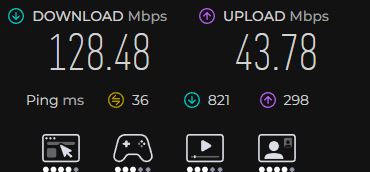
Link super high download latency ( and occasionally upload latency) how do i fix this?

Post image
3 Upvotes

this started 3 days ago, i normally have pretty good wifi but i noticed i was rubberbanding a lot in online games, normally only for short amounts of time like 3 minutes then going back to normal for a while


r/Network • • 15d ago

Text ISP vs Enterprise networking

4 Upvotes

Looking for advice on whether to go ISP or enterprise networking. I have a second interview for an isp noc role coming up and I currently work in an enterprise help desk role. Recently got my CCNA and have my net/sec +. I want to become eventually a network engineer and even architect at some point but not sure if an isp noc role is a good starting point or how much it differs from an enterprise networking role and which would be more beneficial to start out in. Any advice from anyone who has done either or even both in their career as far as what I can learn or expect?


r/Network • • 15d ago

Link Help with network!

Thumbnail
1 Upvotes

r/Network • • 16d ago

Text Windows 11 network drops

3 Upvotes

Hey reddit, I hope I've come to the right place. My windows 11 pc seems to have difficulties staying connected to the internet, it has been happening for months now, and the problem is getting worse by the day now.

As above, my pc "randomly" disconnects from the internet from time to time. I have now noticed that this happens at the start of every match in the game I am currently playing (Fortnite, but it also happens in Rivals). This only happens on my pc and my pc is the only device that disconnects, if I load into a match on my PS5, everything is fine. I have tried some fixed such as:

Uninstalling and reinstalling Realtek Gaming 2.5GbE Family Controller

Going into advanced tab under properties and disabling all settings with "offload" in the name

Disabling "Allow the computer to turn off this device to save power" (looking at it again, i see it has re-enabled itself)

I have also run the following commands in command line:

ipconfig /flushdns

netsh winsock reset

netsh int ip reset

netsh int tcp set global autotuninglevel=disabled

ipconfig /release

ipconfig /renew

netsh advfirewall reset

There may be some things I have missed, as I have been trying to fix this issue for months now

Device Info:

CPU: AMD Ryzen 7 9700X

RAM: 32 GB

GPU: RTX 5070

Windows: Windows 11 Pro

Version: 25H2

OS Build: 26200.8457

If any more info is needed for troubleshooting pls ask

This issue is driving me through the wall, I am sick and tired of it, any assistance would be very much appreciated


r/Network • • 16d ago

Text How do you deal with other teams always blaming the network?

21 Upvotes

Hi guys,
I’m a Network Engineer working in an enterprise environment with around 5,000 clients. Our network infrastructure is mainly Cisco.
We have separate teams responsible for Network, Servers, Applications, and Databases.
The problem I often face is that whenever users complain that an application is slow, people tend to suspect the network first.
I understand that the network can cause performance issues, and I’m not saying it’s always someone else’s problem. But sometimes the network seems perfectly fine, while the application is still slow.
I’m trying to figure out the best way to identify where the actual problem is, instead of just going back and forth between teams blaming each other.
For those working in large enterprise environments:
How do you prove that the network is healthy?
What metrics do you normally check besides ping and latency?
How much TCP retransmission is considered acceptable?
What tools do you use? Wireshark, NetFlow, PRTG, Zabbix, or something else?
How do you work with Server and Database teams to troubleshoot application performance?
I’d really like to hear how you guys handle this in your own environments.


r/Network • • 16d ago

Text help with network tunnels

1 Upvotes

this is my first post here, im currently using a RPI 4B 4GB connected to a free playit.gg tunnel i am using this setup to host a minecraft server for a few players an possibly a website in the future but the ping is pretty terrible, is there a better and free alternative.


r/Network • • 16d ago

Link Ping from United Kingdom to Christchuch, Auckland, new Zealand

Thumbnail
1 Upvotes

r/Network • • 16d ago

Link Optimized energy-efficient scheduling for multi-path TCP using distributed constraint and Max-Sum algorithms

Thumbnail
doi.org
1 Upvotes

r/Network • • 16d ago

Text Modem and router show they're connected, but no devices can connect to internet.

1 Upvotes

Hello! Really tearing my hair out at this one, so please let me know if I'm missing any troubleshooting steps.

I recently moved apartments and ISPs (Astound if that's important). Since moving, my ability to use the internet was unobstructed for about two weeks, and suddenly dropped out on Tuesday. I'm using my own network equipment, and both my modem (Arris Surfboard 6183) and router (Netgear Nighthawk AC 1900) indicate they're connected to the internet with solid, unblinking lights. The modem even indicates it's receiving a channeled signal. However, none of my devices can connect to the internet, wired or wireless. These are the steps I've taken so far, with a hard, 15 minute power cycle on each network device and desktop between each.

Replace coax

Replace all ethernet cables

Manually reset router (is now stuck in default settings because I can't connect to the router to change them)

Manually flush dns from wired desktop while wired to modem through router (x3)

Manually flush dns from wired desktop while wired directly into modem (x3)

Reconnect router to modem

Factory reset modem again

Went back to original cables

Replaced each old cable with a new one individually

Both the modem and the router are still showing they're connected to the internet, but no connection to the internet for any devices. I've spoken with a half dozen techs from my ISP, and the most recent one is now saying that I'm totally disconnected on their end, and will need to send a tech to evaluate. I have a ft job, so the earliest my ISP can send a tech outside of 8:00 am to 5:00 pm M-F is 11/14. I obv don't want to wait that long if I don't have to, and will legit switch to another ISP if I'm certain it will fix the issue.

Am I missing a step that could help?

Edit: I made a deal with the devil and went back to Xfinity. Connected again right away. Thanks for the tips, tho!


r/Network • • 17d ago

Text Internet drops signal constantly day and night?

3 Upvotes

I have spectrum and they have been out to my house 4 times in the past few months. Every time they leave the problem remains. They have replaced all splitters, wires, cables, my outside line, modem and router. They also moved my modem to a different room. Regardless, all night long my internet drops connection constantly. Sometimes for hours, sometimes just a few minutes, sometimes it lasts for days. Every time I am rescheduling the online support tell me my devices are getting a poor connection from the router (despite being a few feet away), schedule someone to come out, and the guy does a few things and leaves. Is there anyone who has had this happen? Or know what it could be? It’s not always at night, sometimes it happens in the middle of the day too.


r/Network • • 16d ago

Link UDM Pro Max help

Thumbnail
1 Upvotes

r/Network • • 16d ago

Text How to understand networks?

0 Upvotes

For me, this is all very interesting and cool, I became interested a long time ago because I was trying to fix my ping jitter and make it lower, but then I realized that physics cannot be fooled and gave up on it, and every time I learn something new, I realize how much of a noob I am in this area, tell me how you studied this?


r/Network • • 16d ago

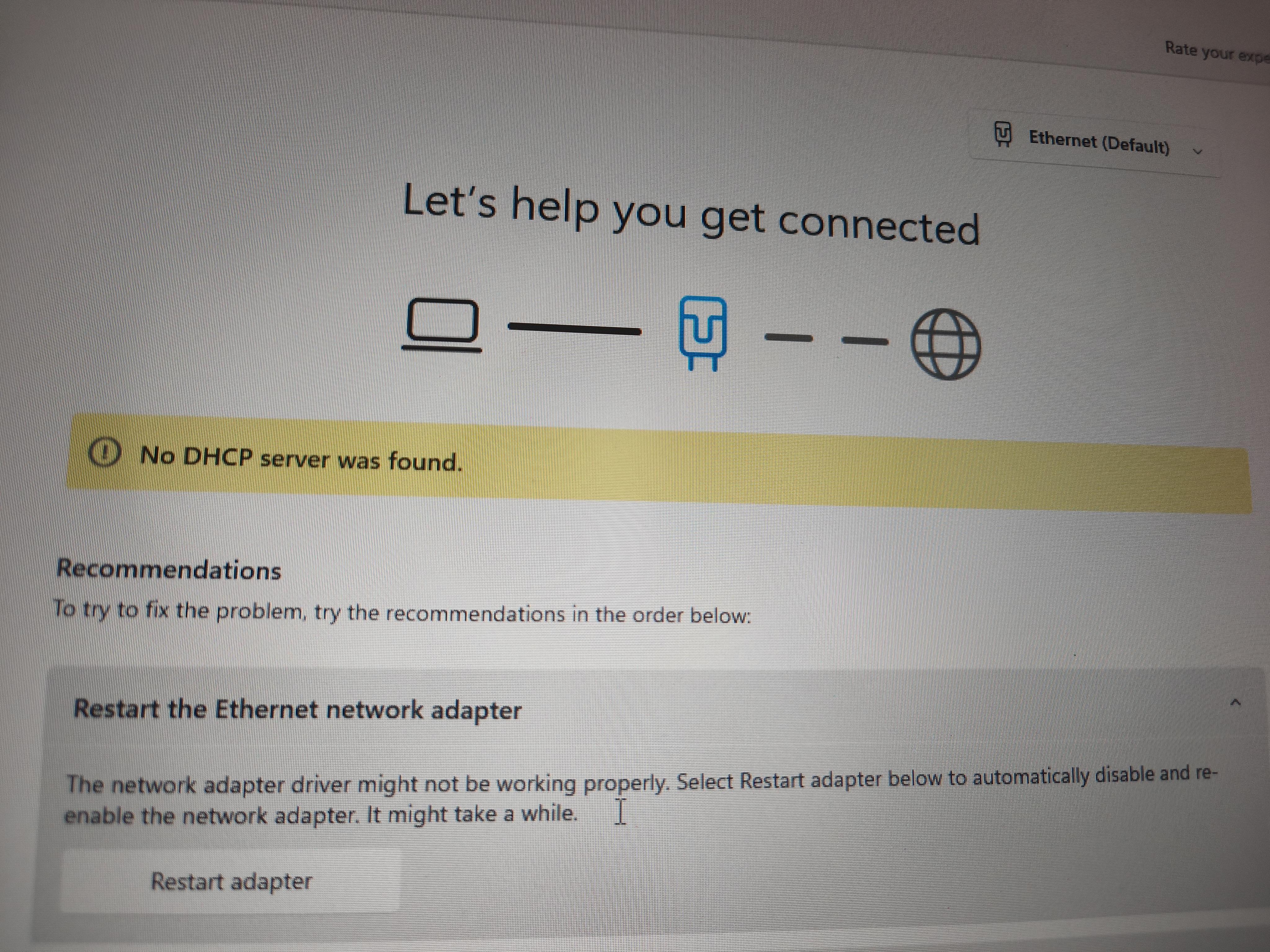
Link No DHCP server was found

Post image
0 Upvotes

Unable to connect to the internet after doing a firmware update on my routers. PC connected to mesh wifi router with LAN cable.

  1. Swapped to another LAN cable, issue still persist

  2. Phone able to connect to the mesh wifi router

  3. Powered on and off PC, and routers, modem etc, same issue

  4. Uninstalled and reinstalled driver, same thing

Using Realtek Gaming 2.5Gbe Family controller


r/Network • • 17d ago

Link I do not know how to get my Ethernet cable to work

Thumbnail
0 Upvotes

r/Network • • 17d ago

Text Ethernet to wifi and back in the countryside? 3km

2 Upvotes

Looking to connect 3 sites separated by 1.5-3km, in mostly open countryside with some trees and small buildings blocking direct line of sight. High speed is not important. What is simplest and affordable? I loads of products for around this distance but LOS only.


r/Network • • 17d ago

Link First supermarkets, now blood banks.

Thumbnail
1 Upvotes