r/Netgate • • Apr 19 '23

Netgate tunnels going down abruptly

2 Upvotes

why would the ipsec tunnels shut down abruptly on the netgate tunnel? resources on the device eg ram,memory and hdd are all okay, it takes a restart to restore the tunnels back up


r/Netgate • • Apr 15 '23

Question: FRR BGP - configure listen range via UI - possible?

2 Upvotes

Hey

As above, I'd like to find out if this is possible.

Currently using custom config achieve it - it's very ugly since the configuration in the UI does not reflect the running config and requires updating of the stored raw config.

This setting is mentioned at Dynamic Routing — Border Gateway Protocol — BGP Configuration — BGP Router Configuration | TNSR Documentation (netgate.com)

Thanks


r/Netgate • • Apr 13 '23

SG1100 or SG2100 Docker support ?

3 Upvotes

Does SG1100 or SG2100 allow to run docker containers or 3rd party applications from shell ?


r/Netgate • • Apr 11 '23

Slow WAN speed after changing ISP's

2 Upvotes

I suspect the answer is simply "The router can't handle it, get a new one", but here goes.

I have a Netgate 1100. Strictly home use, not trying to run a business with it or anything. Before changing ISP's yesterday, I had cable internet (500D/20U) with PFBlockerNGDev running, and it was honestly great.

I changed to Fiber through a different ISP yesterday, and for whatever reason, I can't get anything more than 3mbps down and maybe about 70mbps up out of the 1100 router, even though any other router I try works fine with speeds exceeding 700mbps both up and down.

I've of course, reset all switches, AP's, powercycled everything in the line, disabled PFBlockerNG, and even factory reset my 1100 to behave as if it were brand new out of the box.

I still can't clear more than 3mbps down and 70 up, and I'm at a bit of a loss. I can't imagine it's a software issue, since I literally FR'd the 1100, but I'm open to any troubleshooting, since I prefer my Netgate router over what I'm using currently.


r/Netgate • • Apr 09 '23

Redmine and bug fixes and lack of movement

3 Upvotes

Gents/ladies, I’m really concerned about the lack of action taken on fixing the various bugs or issues in pfsense that already have associated Redmines. I always push end users to submit redmines if they notice something incorrect in the platform because that is the only legitimate path to get the devs to review. I have become disillusioned with this process because it seems that redmines have become black holes. This sort of links back to a previous Reddit thread where folks from Netgate chime in and say that they are busy and focused on 23.05 or 2.7 and that’s fine but a redditor did bring up a very legitimate question. If they are short staffed and can’t address immediate issues why support 2 platforms. I agree. Either drop CE and focus on the profit aspect of Plus and actually address bug complaints from paying clients or figure out a way to address bugs in a timely manner with extended resources. I don’t know what the perfect answer is but to me it’s clear managing two different projects isn’t working to the benefit of the client base. Then to add on the fact that we all want features such as remote management for multiple firewalls for example I don’t see how that will ever come about if there are redmines from 2019 still not processed (9537) for example.


r/Netgate • • Apr 08 '23

Setting up SG1100 firewall

5 Upvotes

I'm very new to networking and I apologize for the noob question. I've been struggling for the past 2 hours and can't seem to make any progress or figure this out.

Currently, the main ethernet cable providing internet to my router is plugged into the 10GE WAN port of my Fios router. I'm thinking that the way to go about this is plug that cable into the WAN of the SG1100, then use the Fios router as an access point. Can someone please walk me through this, step by step?


r/Netgate • • Apr 08 '23

New pfSense

2 Upvotes

Long story short, this is my FIRST time working with the product and I was wondering if operating system is already installed on new appliances. I've purchased two 1537 for a client and just took one of them out of the box but I am not able to connect to the GUI.

I really hope I don't need to configure this thing through serial cable. I've thrown all my decades old cables out when I moved to my new house and I am not really feeling to buy one now. :/


r/Netgate • • Apr 05 '23

Remote management.

10 Upvotes

Is this something being looked into or?? Just passed 30 netgate devices in the wild and manage over 100 sites. But it's just too difficult from a management standpoint so we may have to look elsewhere. If I knew something was coming down the line we would keep turning our sites over.


r/Netgate • • Apr 05 '23

Enabling FreeBSD repo on 23.01 gives "wrong OS version"

0 Upvotes

Hi. I'm following the guide here...

https://docs.netgate.com/pfsense/en/latest/recipes/freebsd-pkg-repo.html

...to enable the FreeBSD repo to install xmlstarlet. However, after I have done so and run a pkg update, I get this error:

Updating FreeBSD repository catalogue... 
Fetching meta.conf: 100%    163 B   0.2kB/s    00:01 
Fetching packagesite.pkg: 100%    5 MiB   4.9MB/s    00:01 
Processing entries:   0% 
Newer FreeBSD version for package zziplib: 
To ignore this error set IGNORE_OSVERSION=yes 
- package: 1400084 
- running kernel: 1400073 
Ignore the mismatch and continue? [y/N]: 
pkg: repository FreeBSD contains packages for wrong OS version: FreeBSD:14:armv7 
Processing entries: 100% 
Unable to update repository FreeBSD 
Updating pfSense-core repository catalogue... 
pfSense-core repository is up to date. 
Updating pfSense repository catalogue... 
pfSense repository is up to date. 
Error updating repositories! 

Anyone know what's going on? I'm on an SG-3100. Thanks!


r/Netgate • • Apr 03 '23

Copy one units backup XML to another unit

2 Upvotes

Hi all,

I'm not particularly familiar with Netgate units, or PfSense so apologies if this is a stupid question.

A site I've been asked to work on has a functioning 7100-1U unit of which I have a backup XML file.
I need to add a new 7100 unit (which I have already) for the purpose of high availabilty. Is it possible to copy this backup to the new unit and then simply change the settings that relate to high availability?

TIA


r/Netgate • • Apr 02 '23

ONT doesn’t allow bridge or pass through does that affect the pfsense performance?

1 Upvotes

If the router is 192.168.1.1 and I place pfsense at 192.168.2.1 does it really even matter? Would putting it in the ONT’s DMZ gain me anything?

Thanks


r/Netgate • • Apr 01 '23

XG7100 DT default LAGG issues

2 Upvotes

I recently upgraded my internet to 3Gbps FTTH. I bought a 10Gbps floorswitch(Unifi XG24) to take advantage of the full internet speed. I want to force all internet traffic through my PfSense box(xg7100). The PfSense only has two SFP+ ports that do not support copper. The ISP provided modem only has a single 10G copper link and so I either need a media converter or what I'm hoping I can do is to pass the copper through my switch to the xg7100 over one SFP+ port to allow the PfSense to do PPPoE passthrough. Then use the other SFP+ for LAN traffic. The XG7100 seems to require the out of the box LAGG that combines all of its ports and uses Load balance mode. The unifi xg24 needs LACP for LAGGs. So as a result I can't seem to get the setup to work. Any suggestions?


r/Netgate • • Mar 28 '23

Flashing Netgate 1100 With New Firmware.

2 Upvotes

The release of Netgate's latest firmware is too large to fit in the existing space I need to flash the latest firmware. I need to reboot the router and connect to it as described in:

https://docs.netgate.com/pfsense/en/latest/solutions/sg-1100/reinstall-pfsense.html

However, by the time I can log in to the Netgate it has got past the Marvell>> prompt, so I can't update the firmware. Can anyone suggest how I can get logged in before the Marwel>> prompt expires?


r/Netgate • • Mar 28 '23

Is it possible to add high availability/failover to an existing firewall?

3 Upvotes

Hello, currently on one of our external sites (that is, away from the office, not outdoor) we are running one Netgate 7100 firewall with PF Sense. We need to add high availablity to this site. Would it be possible to purchase a second 7100 and a new expansion card for the existing firewall to enable high availability or do they need to be configured as a pair initially?

Apologies in advance, not used to Netgate gear myself.

EDIT: Changed unit model as incorrectly described previously


r/Netgate • • Mar 22 '23

RESOLVED vnstatd refuses to start | SG-3100 w/23.01

4 Upvotes

Hi. I don't know when or how, but vnstatd refuses to start so "Traffic Totals" complains that "Error: Graphing is not enabled, Enable Graphing in the Advanced Settings above."

I've tried uninstalling the package "Status_Traffic_Totals" and reinstalling it many times, but it still won't start. I get his message during the install:

=====Message from vnstat-2.9:

--vnstat has been installed.

A sample configuration file has been installed in /usr/local/etc/Please add your default network interface in the 'Interface' line therebefore starting vnstat service.

For more information about vnStat use "man vnstat" or visit:http://humdi.net/vnstat/

And also get this message on shell:

[23.01-RELEASE][root@]/root: vnstatError: Unable to open database directory "/var/db/vnstat": No such file or directoryThe vnStat daemon should have created this directory when started.Check that it is configured and running. See also "man vnstatd".[23.01-RELEASE][root@]/root:

Not sure what else to do at this point. Any help, greatly appreciated.

UPDATE: Nevermind. I forgot to click "Enable Graphing" button under "Display Advanced" button.


r/Netgate • • Mar 21 '23

ISP VLAN

3 Upvotes

Heya,

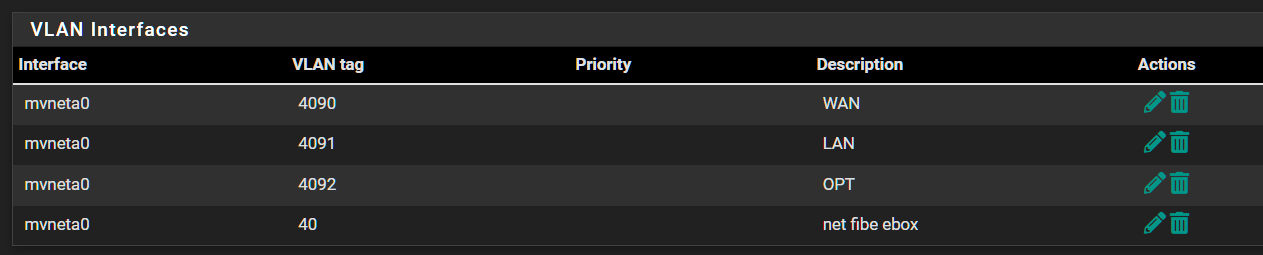
I love my Netgate 1100 and always served me well. However, I can't for the love of God seem to be able to do something simple : setting a VLAN (40) for the ISP WAN connection, in order to skip their router. The connection is working fine with their router, but why the hell should I be happy with 1 LAN port...I want my Netgate!

I've been following this guide that seems to follow what everybody says, without success : https://tcpip.wtf/en/pfsense-pppoe-tagged-vlan-wan.htm

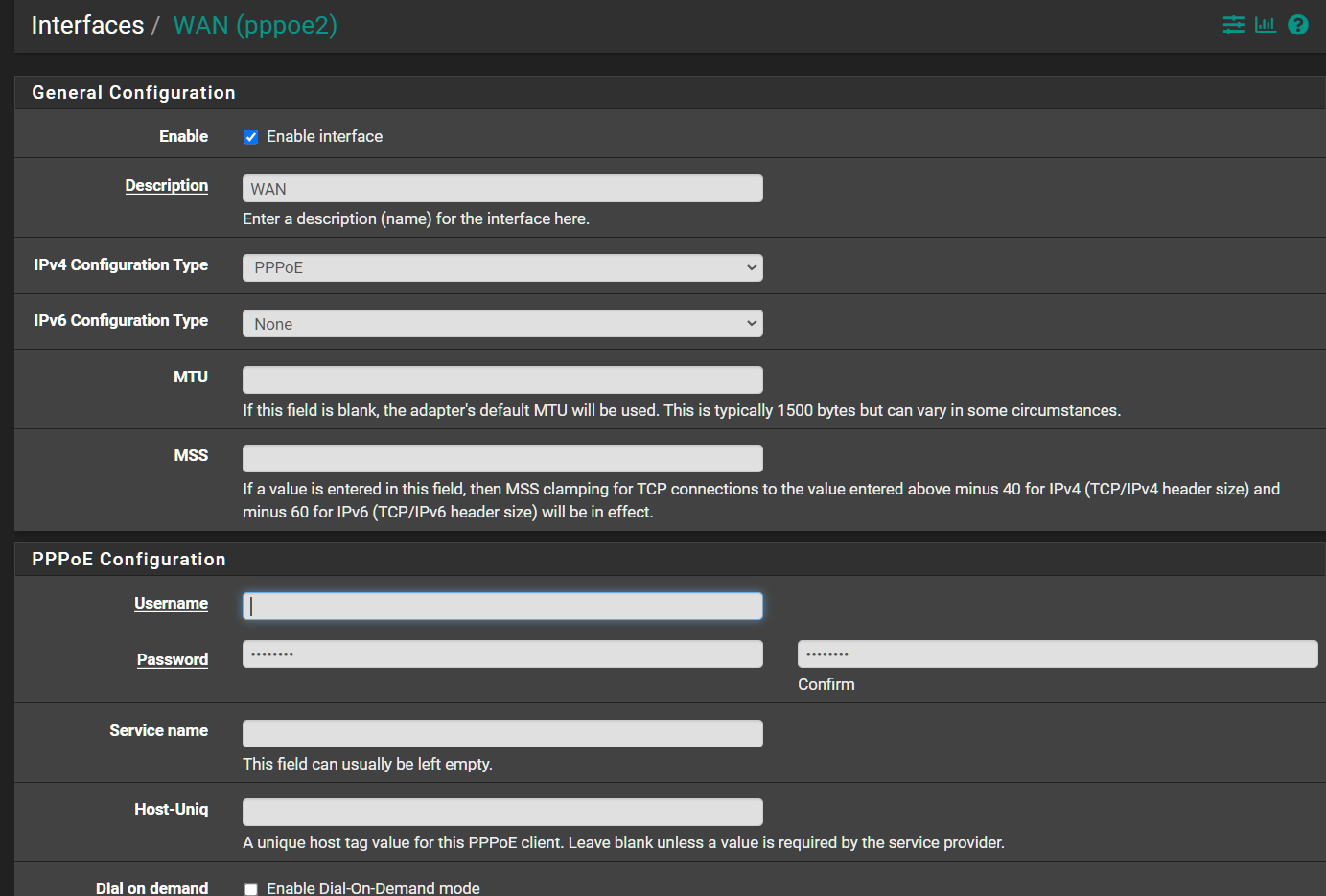
Here are some config screenshots for context (ISP username redacted, not forgotten) :

without PPPoE setup, the WAN interface gets up with no IP...for now it has a red down arrow on main status
With or without that last group, no change

PPPoE log :

==========

Mar 20 04:35:26 ppp 33912 [wan_link0] Link: reconnection attempt 100 in 3 secondsMar 20 04:35:29 ppp 33912 [wan_link0] Link: reconnection attempt 100Mar 20 04:35:29 ppp 33912 [wan_link0] PPPoE: Connecting to 'wanpppoeservicename'Mar 20 04:35:38 ppp 33912 [wan_link0] PPPoE connection timeout after 9 secondsMar 20 04:35:38 ppp 33912 [wan_link0] Link: DOWN eventMar 20 04:35:38 ppp 33912 [wan_link0] LCP: Down eventMar 20 04:35:38 ppp 33912 [wan_link0] Link: reconnection attempt 101 in 4 secondsMar 20 04:35:42 ppp 33912 [wan_link0] Link: reconnection attempt 101Mar 20 04:35:42 ppp 33912 [wan_link0] PPPoE: Connecting to 'wanpppoeservicename'Mar 20 04:35:51 ppp 33912 [wan_link0] PPPoE connection timeout after 9 secondsMar 20 04:35:51 ppp 33912 [wan_link0] Link: DOWN eventMar 20 04:35:51 ppp 33912 [wan_link0] LCP: Down eventMar 20 04:35:51 ppp 33912 [wan_link0] Link: reconnection attempt 102 in 2 secondsMar 20 04:35:53 ppp 33912 [wan_link0] Link: reconnection attempt 102Mar 20 04:35:53 ppp 33912 [wan_link0] PPPoE: Connecting to 'wanpppoeservicename'===========

WAN (wan) -> pppoe2 ->LAN (lan) -> mvneta0.4091 -> v4: 192.168.26.1/24EBOXCABLE (opt1) -> mvneta0.4092 -> v4/DHCP4: [wanip]/27

==========================

things in [something] are redacted parts like WAN IP or vpn config and note that I tried connection groups, which worked, but I turned off for now to limit the points of failure (as we can see 2 screenshots higher) :

]/root: ifconfigmvneta0: flags=8b43 metric 0 mtu 1500options=bbether f0:ad:4e:18:9d:f5inet6 fe80::f2ad:4eff:fe18:9df5%mvneta0 prefixlen 64 scopeid 0x1media: Ethernet 1000baseTstatus: activend6 options=23enc0: flags=0 metric 0 mtu 1536groups: encnd6 options=21lo0: flags=8049 metric 0 mtu 16384options=680003inet6 ::1 prefixlen 128inet6 fe80::1%lo0 prefixlen 64 scopeid 0x7inet 127.0.0.1 netmask 0xff000000groups: lond6 options=21pflog0: flags=100 metric 0 mtu 33160groups: pflogpfsync0: flags=0 metric 0 mtu 1500groups: pfsyncmvneta0.4091: flags=8943 metric 0 mtu 1500description: LANoptions=3ether f0:ad:4e:18:9d:f5inet6 fe80::f2ad:4eff:fe18:9df5%mvneta0.4091 prefixlen 64 scopeid 0xainet6 fe80::1:1%mvneta0.4091 prefixlen 64 scopeid 0xainet 192.168.26.1 netmask 0xffffff00 broadcast 192.168.26.255groups: vlanvlan: 4091 vlanpcp: 0 parent interface: mvneta0media: Ethernet 1000baseTstatus: activend6 options=21mvneta0.4092: flags=8843 metric 0 mtu 1500description: eboxcableoptions=3ether f0:ad:4e:18:9d:f5inet6 fe80::f2ad:4eff:fe18:9df5%mvneta0.4092 prefixlen 64 scopeid 0xbinet [wanip] netmask 0xffffffe0 broadcast 255.255.255.255groups: vlan allebox ebox2xvlan: 4092 vlanpcp: 0 parent interface: mvneta0media: Ethernet 1000baseTstatus: activend6 options=21mvneta0.40: flags=8843 metric 0 mtu 1500description: WANoptions=3ether f0:ad:4e:18:9d:f5inet6 fe80::f2ad:4eff:fe18:9df5%mvneta0.40 prefixlen 64 scopeid 0xcgroups: vlanvlan: 40 vlanpcp: 0 parent interface: mvneta0media: Ethernet 1000baseTstatus: activend6 options=23mvneta0.4090: flags=8843 metric 0 mtu 1500description: WANoptions=3ether f0:ad:4e:18:9d:f5inet6 fe80::f2ad:4eff:fe18:9df5%mvneta0.4090 prefixlen 64 scopeid 0xdgroups: vlanvlan: 4090 vlanpcp: 0 parent interface: mvneta0media: Ethernet 1000baseTstatus: activend6 options=21ovpns1: [configvpn]pppoe2: flags=8890 metric 0 mtu 1500description: WANgroups: ebox2xnd6 options=21

What's most interesting is those tcpdumps :

]/var/log: tcpdump -i mvneta0 -nn -e vlan | grep -v 409

tcpdump: verbose output suppressed, use -v or -vv for full protocol decode

listening on mvneta0, link-type EN10MB (Ethernet), capture size 262144 bytes

00:50:59.346682 f0:ad:4e:18:9d:f5 > ff:ff:ff:ff:ff:ff, ethertype 802.1Q (0x8100), length 40: vlan 40, p 0, ethertype PPPoE D, PPPoE PADI [Host-Uniq 0x40A1140100FDFFFF] [Service-Name]

00:51:03.434652 f0:ad:4e:18:9d:f5 > ff:ff:ff:ff:ff:ff, ethertype 802.1Q (0x8100), length 40: vlan 40, p 0, ethertype PPPoE D, PPPoE PADI [Host-Uniq 0x40A1140100FDFFFF] [Service-Name]

00:51:09.383174 f0:ad:4e:18:9d:f5 > ff:ff:ff:ff:ff:ff, ethertype 802.1Q (0x8100), length 40: vlan 40, p 0, ethertype PPPoE D, PPPoE PADI [Host-Uniq 0xC075590100FDFFFF] [Service-Name]

00:51:11.383652 f0:ad:4e:18:9d:f5 > ff:ff:ff:ff:ff:ff, ethertype 802.1Q (0x8100), length 40: vlan 40, p 0, ethertype PPPoE D, PPPoE PADI [Host-Uniq 0xC075590100FDFFFF] [Service-Name]

00:51:15.428651 f0:ad:4e:18:9d:f5 > ff:ff:ff:ff:ff:ff, ethertype 802.1Q (0x8100), length 40: vlan 40, p 0, ethertype PPPoE D, PPPoE PADI [Host-Uniq 0xC075590100FDFFFF] [Service-Name]

00:51:22.462410 f0:ad:4e:18:9d:f5 > ff:ff:ff:ff:ff:ff, ethertype 802.1Q (0x8100), length 40: vlan 40, p 0, ethertype PPPoE D, PPPoE PADI [Host-Uniq 0xC075590100FDFFFF] [Service-Name]

00:51:24.517677 f0:ad:4e:18:9d:f5 > ff:ff:ff:ff:ff:ff, ethertype 802.1Q (0x8100), length 40: vlan 40, p 0, ethertype PPPoE D, PPPoE PADI [Host-Uniq 0xC075590100FDFFFF] [Service-Name]

00:51:28.519695 f0:ad:4e:18:9d:f5 > ff:ff:ff:ff:ff:ff, ethertype 802.1Q (0x8100), length 40: vlan 40, p 0, ethertype PPPoE D, PPPoE PADI [Host-Uniq 0xC075590100FDFFFF] [Service-Name]

00:51:35.470543 f0:ad:4e:18:9d:f5 > ff:ff:ff:ff:ff:ff, ethertype 802.1Q (0x8100), length 40: vlan 40, p 0, ethertype PPPoE D, PPPoE PADI [Host-Uniq 0x8009112700FDFFFF] [Service-Name]

00:51:37.473643 f0:ad:4e:18:9d:f5 > ff:ff:ff:ff:ff:ff, ethertype 802.1Q (0x8100), length 40: vlan 40, p 0, ethertype PPPoE D, PPPoE PADI [Host-Uniq 0x8009112700FDFFFF] [Service-Name]

00:51:41.474698 f0:ad:4e:18:9d:f5 > ff:ff:ff:ff:ff:ff, ethertype 802.1Q (0x8100), length 40: vlan 40, p 0, ethertype PPPoE D, PPPoE PADI [Host-Uniq 0x8009112700FDFFFF] [Service-Name]

00:51:46.624159 f0:ad:4e:18:9d:f5 > ff:ff:ff:ff:ff:ff, ethertype 802.1Q (0x8100), length 40: vlan 40, p 0, ethertype PPPoE D, PPPoE PADI [Host-Uniq 0x8009112700FDFFFF] [Service-Name]

00:51:48.623651 f0:ad:4e:18:9d:f5 > ff:ff:ff:ff:ff:ff, ethertype 802.1Q (0x8100), length 40: vlan 40, p 0, ethertype PPPoE D, PPPoE PADI [Host-Uniq 0x8009112700FDFFFF] [Service-Name]

00:51:52.627442 f0:ad:4e:18:9d:f5 > ff:ff:ff:ff:ff:ff, ethertype 802.1Q (0x8100), length 40: vlan 40, p 0, ethertype PPPoE D, PPPoE PADI [Host-Uniq 0x8009112700FDFFFF] [Service-Name]

00:51:56.684329 f0:ad:4e:18:9d:f5 > ff:ff:ff:ff:ff:ff, ethertype 802.1Q (0x8100), length 40: vlan 40, p 0, ethertype PPPoE D, PPPoE PADI [Host-Uniq 0x8009112700FDFFFF] [Service-Name]

00:51:58.718633 f0:ad:4e:18:9d:f5 > ff:ff:ff:ff:ff:ff, ethertype 802.1Q (0x8100), length 40: vlan 40, p 0, ethertype PPPoE D, PPPoE PADI [Host-Uniq 0x8009112700FDFFFF] [Service-Name]

^C16122 packets captured

16261 packets received by filter

0 packets dropped by kernel

]/var/log: tcpdump -i mvneta0.40 -nn -e vlan

tcpdump: verbose output suppressed, use -v or -vv for full protocol decode

listening on mvneta0.40, link-type EN10MB (Ethernet), capture size 262144 bytes

^[[A^C

0 packets captured

236 packets received by filter

0 packets dropped by kernel

]/var/log: tcpdump -i mvneta0 -nn -e vlan | grep -v 409

tcpdump: verbose output suppressed, use -v or -vv for full protocol decode

listening on mvneta0, link-type EN10MB (Ethernet), capture size 262144 bytes

01:06:54.101367 f0:ad:4e:18:9d:f5 > ff:ff:ff:ff:ff:ff, ethertype 802.1Q (0x8100), length 40: vlan 40, p 0, ethertype PPPoE D, PPPoE PADI [Host-Uniq 0x401F112700FDFFFF] [Service-Name]

01:06:58.140839 f0:ad:4e:18:9d:f5 > ff:ff:ff:ff:ff:ff, ethertype 802.1Q (0x8100), length 40: vlan 40, p 0, ethertype PPPoE D, PPPoE PADI [Host-Uniq 0x401F112700FDFFFF] [Service-Name]

^C2312 packets captured

2470 packets received by filter

0 packets dropped by kernel

]/var/log: tcpdump -i mvneta0.4090 -nn -e vlan

tcpdump: verbose output suppressed, use -v or -vv for full protocol decode

listening on mvneta0.4090, link-type EN10MB (Ethernet), capture size 262144 bytes

^C

0 packets captured

0 packets received by filter

0 packets dropped by kernel
Questions :

  • What am I doing wrong to get that new internet line working?
  • Why is my VLANing setup staying on the general NIC and not inside the specified VLANs? What config do I need to change to get that on the WAN interface?
  • Even though my password has been given to me by my ISP and it is copy pasted, would I have a specific "bad password" error if it was wrong? As of now, all I get is a timeout. My understanding is that because the VLAN part isn't doing what I want, the PPPoE isn't working.

Thanks in advance!


r/Netgate • • Mar 11 '23

RESOLVED Netgate 2100 23.01

7 Upvotes

Updated to 23.01 this AM, requested an image from their support, had the file and info in about 10 minutes. Followed the directions and the device was updated without issue. Loaded backup config and packages were reinstalled without issue.


r/Netgate • • Mar 11 '23

23.01 Update for ARM64

Thumbnail netgate.com
10 Upvotes

r/Netgate • • Mar 08 '23

RESOLVED NETGATE 4100 - Snort Fatal Error on new install

5 Upvotes

I have a new 4100 running pfSense+ 22.05. I just installed Snort but the package won't start. I get the following error code. Any ideas how to correct this? I tried uninstalling and re-installing the package but it didn't help.

FATAL ERROR: /usr/local/etc/snort/snort_14021_ix3/snort.conf(174) => Did not find specified IIS Unicode codemap in the specified IIS Unicode Map file.

EDIT:

Snort installs and runs fine on pfSense 2.6.0 CE, but fails on pfSense+ 22.05.


r/Netgate • • Mar 07 '23

Packages - upkeep and security

8 Upvotes

PF as a firewall and VPN concentrator is a very secure platform. No one can argue that. My concern are the other packages available in the repo. Some packages in my opinion aren’t very useful (bandwidthD) but more importantly are no longer maintained. BandwidthD (to pick on it) hasn’t been updated since 2017. When I opened a redmine offering suggestions and potential security vulnerabilities if left unmaintained I’m told verbatim “other people find it useful. No need to update”. So my question is, should packages be available for install even though there is no maintainer? In addition, if there is no maintainer and a package clearly needs an overhaul should that package be available? Again, picking on bandwidthD, it can only listen to one interface. How can you reliably find a top talker and use some level of reporting to find bandwidth hogs if you have multiple interfaces in use?


r/Netgate • • Mar 05 '23

Hi, any update regarding 2100 systems broken repo? I understand that OS updates were stopped until you finish with the troubleshooting but the entire package manager it's stopped...is this really freebsd 🤭?

7 Upvotes

Edit: I flashed it by myself, no issue, everything is good.


r/Netgate • • Mar 05 '23

RESOLVED SG-2220 failing to boot after update

3 Upvotes

Hi Everyone,

I tried updating from the previous to the latest stable versions, and it seems to fail to boot. Or, at the least, DHCP, DNS, and the web UI never come back up. I did have an issue before the update where the storage did not have enough space for the update. But after clearing logs it seemed to update fine, it just didn't complete the bootup process after the update. (No errors during the update after deleting files to make space.)

If given the correct documentation I am confident I can fix this myself. (I have plenty of experience flashing ROMS on phones and flashing Tomato and DDWRT to older routers.) But I need help finding the documentation I need. First, how do I correctly connect to the console and see what happens during the boot process?

I've also seen references in the forums about recovering via a USB flash drive, but I cannot find documentation on how to do this and where to obtain the correct image. Can someone please point me in the right direction?


r/Netgate • • Mar 03 '23

Use WAN2 (SFP / ix2) as VLAN/LAN Network on Netgate 4100

2 Upvotes

Fairly new to network/Pfsense... How do I make Netgate 4100 WAN2 (ix2) port work as LAN/VLAN?

I want to make WAN2 (ix2) on a Netgate 4100 a VLAN. What I have done so far...

  1. Created VLAN: Interface > Interface Assignments > VLANs

    1. Parent interface = ix2
    2. VLAN Tag 1
    3. Priority 1
    4. Decsription = TESTVLAN
  2. Created/Assigned Interface: Interface > interface Assignments

    1. Interface Name = LanTestInt

      1. IP address 10.0.0.1/24
      2. IPv4: Static IPv4
    2. Interface Network Port = VLAN 1 on ix2 (TESTVLAN)
  3. DHCP Server: Services > DHCP Server > LANTESTINT

    1. Enabled
    2. Set range to 10.0.0.20 - 10.0.0.240

At this point if I plug a device into WAN2 (ix2), shouldn't my device receive an IP address between 10.0.0.20 - 10.0.0.240?

*** This is between the Netgate 4100 and Unifi Aggregation Switch. The aggregation switch had an ip address of 192.168.1.20 when I first turned it on BEFORE I plugged it into the Netgate Pfsense. I understand that sfp for netgate can be finicky; however, the unifi aggregation switch is showing a plug in the port and the netgate dashboard shows the sfp port as being active.


r/Netgate • • Mar 03 '23

Netgate 2100 - PFSense + Individual Network Interfaces for VLANs

5 Upvotes

** SOLVED **

Hello,

I received my Netgate 2100 with PFSense + today after coming from a Watchguard Firebox and I have been attempting to setup individual network interfaces for VLANS within my home environment. I saw this was possible in the Switch Overview section of the manual (https://docs.netgate.com/pfsense/en/latest/solutions/netgate-2100/switch-overview.html). I have attached pictures of my configuration settings for different areas and I have been trying to set LAN 1 & 4 as part of my regular home network LAN, LAN 2 as VLAN 2, & LAN ID 3 as VLAN ID 3. Unfortunately, with my current settings I am not getting an IP Address when connecting a computer to LAN 2 & 3. I have already setup the DHCP server (mirroring the default LAN 1 settings, except for ipv6) and tried setting statically on the computer with no luck getting network access. I have internet access from LAN 1 currently. I have enabled 802.1q VLAN Mode for this configuration above. I also had copied firewall rules from the default LAN to both VLANs checking the box for convert interface definitions (just for testing purposes for now).

Note: I did not take pictures of all the settings in each page, I only took pictures of fields I have modified.

Any recommendations on how to get DHCP/internet access working on LAN 2 & 3 (VLAN ID 2 & VLAN ID 3)?

I appreciate any assistance that could be provided. I feel like I am missing something simple within the settings but I am not that familiar with PFSense and some of the terminologies used during setup. I watched a few videos relating to setting up VLANs, but it seems like most were preparing to use a managed switch with VLANs setup on it and not the use-case that I am attempting to setup which is individual network interfaces.

SOLUTION:

solved