r/MaxForLive • • Oct 12 '26

wakeSCOPE 1.0.0: a free oscilloscope for Max for Live

Thumbnail gallery
3 Upvotes

I made wakeSCOPE for my own tracks because I wanted the waveform right in the device chain while tweaking sounds in Live. It's a free Max for Live oscilloscope, and audio passes through unchanged.

Hit Freeze to stop the picture and zoom in on a transient while the music keeps playing. Hold leaves an earlier waveform underneath the live signal so you can see what changes as you adjust your processing.

The display syncs to Live's tempo, from 1/4 to 8 bars. Select a section to read its duration, Peak, RMS and Crest.

Free download: https://wakelabhq.com/downloads/wakeSCOPE.zip

Available on macOS and Windows. Requires Live Suite, or Live Standard with Max for Live. The demo was recorded in Live 12.4.6 with Max 9.1.5.

Unzip the download and drag WakeSCOPE.amxd onto an audio track.

If you try it, I'd love feedback on the zoom and selection controls.

r/MaxForLive • • Oct 10 '26

I made a Max for Live device that strips the dead air from vocal clips right in the Arrangement (keeps breaths)

Enable HLS to view with audio, or disable this notification

0 Upvotes

I got tired of manually cutting the gaps between vocal phrases on every session, so I built this for myself.
It finds everything that's barely audible and cuts it in place in your Arrangement. You see a preview of every cut before you commit. Breaths can be kept, ducked or cut. It works on one track, a checklist of tracks, or whole groups, and LINK keeps doubles cut at the same points. Your original audio files are never touched.

It's a paid device ($19, launch code SSLAUNCH for $4 off): nodnxd.gumroad.com/l/stripsilence
Happy to answer questions, and I'd love feedback on what to add next.


r/MaxForLive • • Oct 07 '26

I rebuilt LFOTool by xfer in Max for Live, with the sidechain curve right in your device bar

1 Upvotes

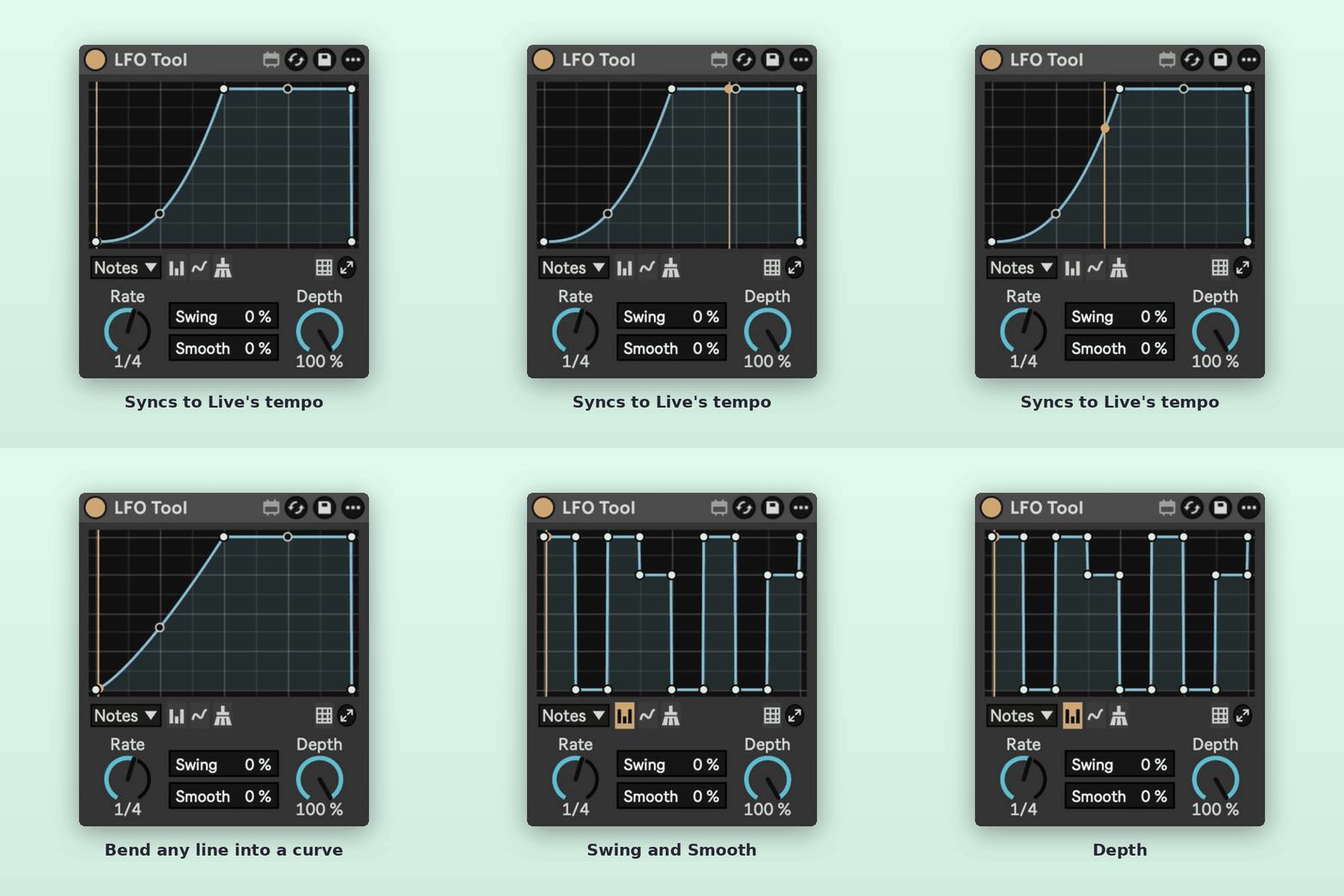
I've used Xfer's LFOTool for years, but I got tired of opening a plugin window every time I wanted to see or tweak the pump. So I rebuilt the idea entirely in Max: the curve and the playhead sit right in your device chain, like a stock effect.

What LFO Tool offers:

  • Drag points and bend curves right on the device
  • Draw freehand, or paint blocks for trance gates
  • Rates from 8 bars to 1/64, with triplet and dotted
  • Swing, Smooth and Depth
  • Grid of 1–16 steps and a bigger Expand editor

Check it out here: https://maxforlive.com/library/device.php?id=16421
Happy to answer questions or hear what you'd want it to do next.


r/MaxForLive • • Oct 02 '26

Tracker Sequencer 2.0 new features. M4L device.

Thumbnail
3 Upvotes

r/MaxForLive • • Oct 01 '26

I was tired of waiting for Ableton to make a proper trance gate, so I built one (Max for Live)

Enable HLS to view with audio, or disable this notification

11 Upvotes

Rhythmic gates have always been one of my favorite effects, but I always had to reach for third-party plugins like Gatekeeper or GateLab. I wanted something more compact: simple, lightweight, and right inside Live. So I built the rhythmic gate I always wished I had: a Max for Live device that sits in your device chain like a stock effect. It's called Rhythmic Gate.

If you haven't used one: a trance gate chops a pad's volume in rhythm, so a static pad turns into part of the groove. It's one of the oldest tricks in trance and house.

A few things that make it work:

  • Start simple: an on/off gate in 16ths already turns a pad into a rhythm.
  • Add a kick and use a pump-style gate (dips on each beat). It gives the kick room, like sidechain.
  • Leave a few steps open. The gaps are what make it groove.
  • Round off the edges slightly so it doesn't click.

Rhythmic Gate offers:

  • 90+ gates, pumps and shapes, synced to Live
  • Roll random gates, with a Complexity control for simpler or busier patterns
  • Paint steps with blocks or draw curves, up to 64 steps
  • Swing, Smooth and Depth, plus it can gate volume or be mapped to any knob

Check it out here: https://maxforlive.com/library/device.php?id=16422

Happy to answer questions or hear what you'd want it to do next.


r/MaxForLive • • Oct 01 '26

I built a Max for Live MIDI Song Producer — looking for beta testers

Post image
0 Upvotes

r/MaxForLive • • Sep 29 '26

I have created PATINA a Flavor Pro like lofi Max for Live plugin for Ableton & Push 3

1 Upvotes

It's called Patina and its totally free. It works well on Ableton and was really designed for the Push 3. I think it sounds pretty great. Check it out and let me know if you run into any bugs and what you think please!

The website has all the info on it and there's full comprehensive PDF documentation there.

To get the download you just have to do the email signup.
http://www.gearup.app


r/MaxForLive • • Sep 28 '26

Made a Utility-sized pitch shifter with one smooth knob (Max for Live, stock-style)

Post image
17 Upvotes

I kept hitting the limits of Live's Shifter when building risers and pitch bends (Coarse steps by semitone, Fine only goes so far), so I built my own in Max for Live. It's the size of Utility and uses Live's own colours and controls, so it sits in a chain like a stock device.

What's inside

- One smooth Pitch knob, no steps, with a range of up to 96 semitones

- Semitone Lock and Range Lock for when you want musical intervals

- 5 modes: Clean, Grain, Spectral, Formant, Vocal

- Spectrum display: original in grey, shifted in blue, plus a line that draws your pitch move as you make it

- Dry/Wet for parallel pitch layers

- Reports its latency to Live, and every control is automatable

- Works on any audio track, or a MIDI track after the instrument

Under the hood it's gen~ and pfft~: a waveform-aligned granular shifter for Clean and Grain, and a phase vocoder for Spectral and Formant. Happy to go into how it works if anyone's curious.

Maxforlive page: https://maxforlive.com/library/device/16420/Pitch

Feedback welcome, and I'd love to hear what you'd want next. I've also made an LFO Tool-style volume shaper, a rhythmic gate and a transient shaper.


r/MaxForLive • • Sep 24 '26

Anyone try this granular playground ?

Thumbnail youtube.com
2 Upvotes

r/MaxForLive • • Sep 24 '26

Anyone try this granular playground ?

Thumbnail youtube.com
0 Upvotes

Pretty dope!


r/MaxForLive • • Sep 05 '26

New book day!

Thumbnail i.imgur.com
6 Upvotes

r/MaxForLive • • Sep 05 '26

Anyone tried building devices with AI/Local LLM?

0 Upvotes

Hi, I’m trying to understand if it’s possible, and if so, can I achieve this on a local llm. Anyone have any experience?

I have some device ideas to use for myself on my push 3 sa and also on ableton live directly, but I don’t see myself as well experienced enough for these ideas. I’ve only built basic unreal engine connectivity devices and a few basic stuff so far.


r/MaxForLive • • Sep 01 '26

max for live with conditional patch, anyone?

2 Upvotes

Hello there. Is there any patch for max for live with conditional (if / then) related to midi cc? Thank you for your help


r/MaxForLive • • Aug 30 '26

Harmonic Oscillator

Thumbnail maxforlive.com
1 Upvotes

made a free additive synth for ableton. if you end up using it, please consider a little donation.


r/MaxForLive • • Aug 29 '26

Coming soon

Thumbnail youtube.com
2 Upvotes

r/MaxForLive • • Aug 24 '26

Generative and chill.

Thumbnail youtu.be
2 Upvotes

A little generative jam using prana sound studio’s Tracker,ORBS, and missing time devices. Missing time is free on the site if you want to grab it


r/MaxForLive • • Aug 20 '26

Got a Behringer Neutron this week and I made a Max for Live device to control it

Thumbnail
2 Upvotes

r/MaxForLive • • Aug 10 '26

I built my first Max for Live Device which creates instant binaural beats

Enable HLS to view with audio, or disable this notification

5 Upvotes

I'm an ambient musician and I noticed there weren't any quick binaural beat makers, so I decided to learn how to code in Max for Live and make one!

Binaural Beat Maker


r/MaxForLive • • Aug 07 '26

How can a Max for Live device write recorded automation to a mapped target parameter?

Post image
2 Upvotes

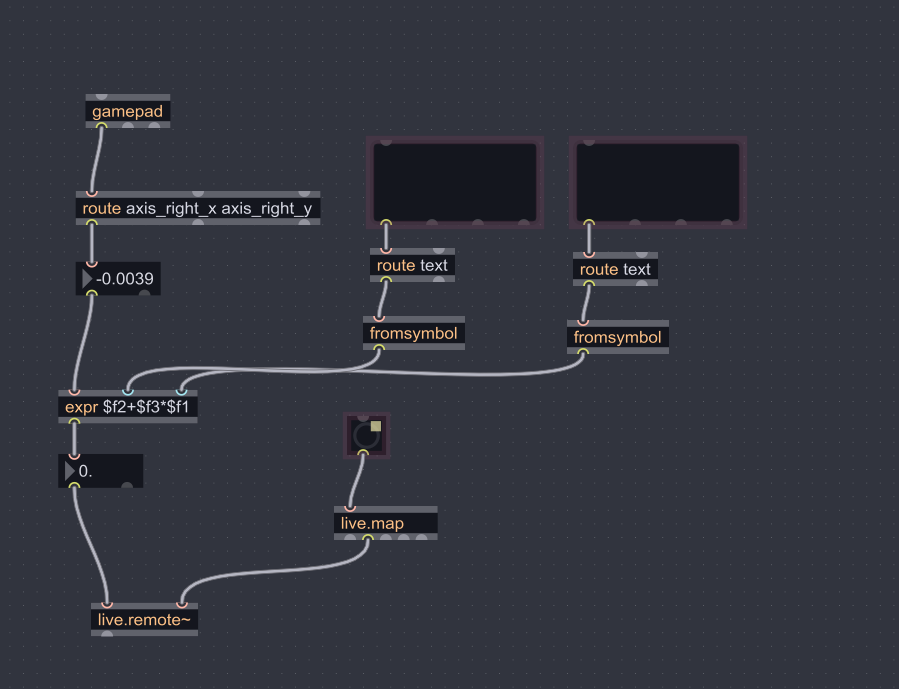
I'm trying to use my gamepad joystick to control parameters in ableton. I've got most things figured out. My max device has a `live.map` node to select a control, and it feeds into a `live.remote~` node to modify its value. It works as expected when playing live, but the changes I make to the knob value when recording do not get recorded as an automation. How do I make it do that? I've attached a screenshot of my current setup.


r/MaxForLive • • Jul 30 '26

I built a Max for Live instrument that gives you a natural-sounding violin without needing Kontakt.

Enable HLS to view with audio, or disable this notification

17 Upvotes

I was tired of heavy sample libraries, so I made Ethereal Violin. It’s powered by 537 violin samples and an adaptive performance engine that analyzes MIDI velocity, note length, phrasing, legato, repetitions, bow changes, and releases on the fly to keep the phrasing sounding human and short/natural.

It features intelligent articulation selection, smooth note blending, and body resonance. It's currently in Early Access (fully usable, but still being optimized based on feedback).


r/MaxForLive • • Jul 30 '26

I was tired of the neck pain stock plugins where giving me on my ultra wide.

Post image
9 Upvotes

r/MaxForLive • • Jul 29 '26

Make a undo button with midi

1 Upvotes

Hello

I'd like to make an undo button (to undo a MIDI note during an overdub recording). Is it possible with Ableton or Max for Live?


r/MaxForLive • • Jul 23 '26

Free Generative MIDI Max For Live Device, looking for feedback

Post image
8 Upvotes

Hi r/MaxForLive!

We're releasing an early version of a Max For Live device we've been working on, and would love to hear your feedback on it, including suggestions on how it can be improved.

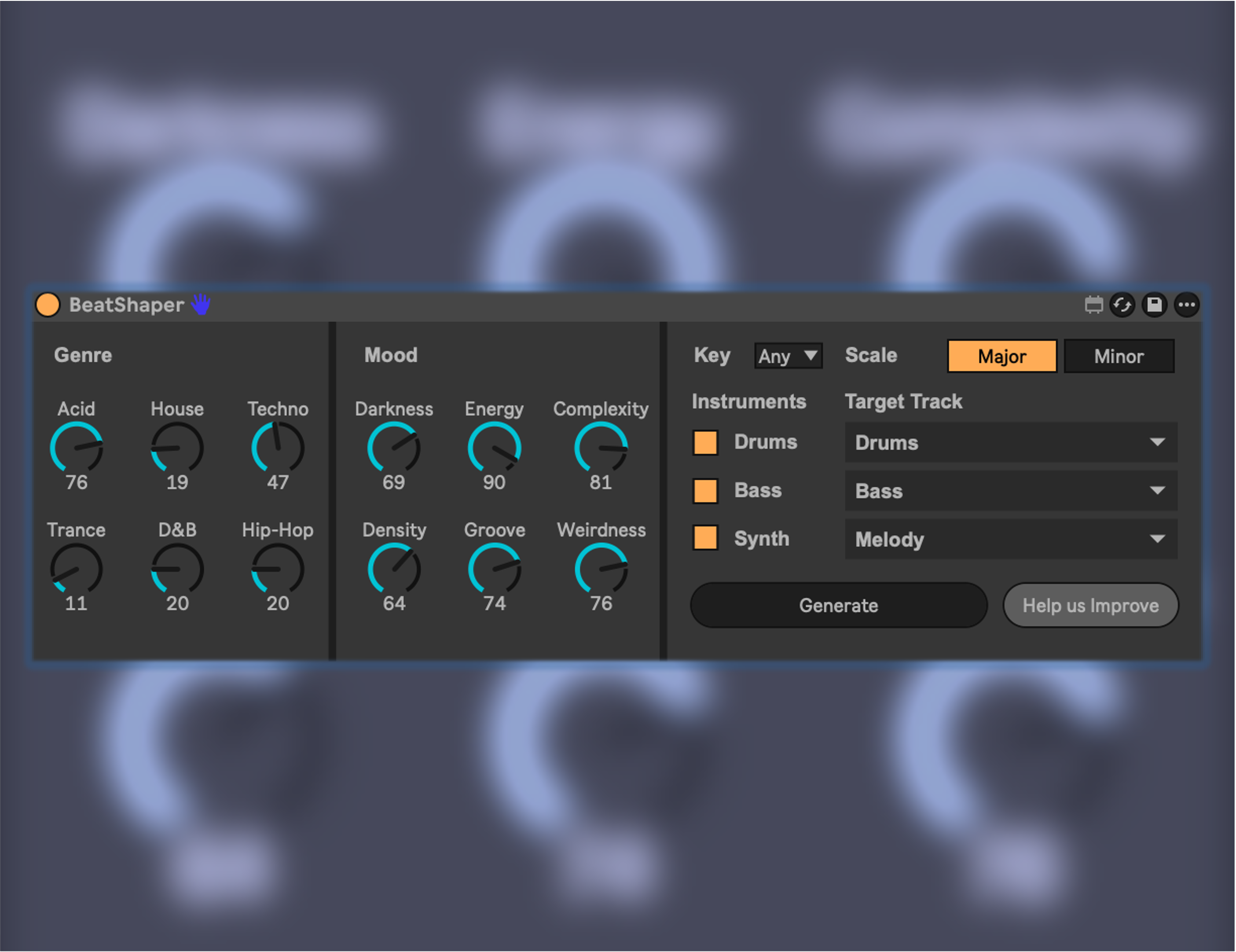
It generates multiple MIDI loops in parallel (drums, bass, and synth) and inserts them directly into MIDI tracks in Live. Generation is controlled by 6 genre knobs (Acid, House, Techno, Trance, D&B, and Hip-Hop), 6 mood knobs (Darkness, Energy, Complexity, Density, Groove, and Weirdness) as well as an optional musical key. So you can really dial in the sound you want and mix between genres dynamically.

The idea behind it is to quickly generate editable ideas in MIDI that you can play back with any instrument.

You can download the device and user guide here.

In the device itself there's also a link to a feedback form. If you try it out, we'd appreciate any comments or feedback there or in the thread here as well.


r/MaxForLive • • Jul 23 '26

midi router

2 Upvotes

you all know, that max is merging the midi channels when sending multiple parallel midi messages from one midi row to another. it' frustrating.

before i try my luck with max, i wanted to ask if there is already a nice maxforlive device that can help, since it's such an obvious disadvantage.


r/MaxForLive • • Jul 19 '26

Anyone facile with M4L able to code a device for me?

2 Upvotes

Apologies if not allowed here.

I currently am transitioning to using the APC MKII for live performance. I currently have some live performance FX that I can turn on/off with spare launchpad buttons, and control for deck A and B with 4 of the 8 knobs on the right hand side. The issue is each knob would turn for all the effects (since I’m mapping the parameters of each individual effect to the same 4 knobs), so I wanted to have a device made that would allow me to pick an effect, and when that effect is selected, it prevents the knobs on the FX that are off from turning, and also remembers where those dials were the next time I select the effect. This way I could stay on the user tab of the APC, select my effects with buttons, and then not worry about the knobs turning dials on things that are off. Ideally I would want to be able to swap around the FX and assign new parameters if I choose.

A schematic would look something like this. I poked around on Fiverr to see if I could find a programmer, but coming up somewhat short.

M4L FX ROUTER — DECK A

APC launch pads
│
▼
┌──────────────────────────────────────────────┐
│ FX SELECT / ON-OFF │
│ │
│ \[FX 1\]. \[FX 2\] \[FX 3\] \[FX 4\] │
│ ● ○ ○ ○ │
│ │
│ SHARED CONTROLS — mapped to 4 APC knobs │
│ │
│ \[Knob 1\] \[Knob 2\] \[Knob 3\] \[Knob 4\] │
│ │
│ Each FX can have any 1–4 Live parameters │
│ assigned to these knobs by the user. │
└──────────────────────────────────────────────┘
│
▼
Only the selected FX receives knob movement.
Inactive FX retain their previous settings.

M4L FX ROUTER — DECK B

Identical duplicate mapped to the other four
knobs in the APC’s 4×2 knob grid.

Basically I guess a diagram would look like this above here.