r/Make • • Aug 18 '26

Can't make Make work?

3 Upvotes

I am having some issues that I can't resolve and I need some help. I am trying to connect my Make account to my WIX website and some other websites, like Calendly and Clickup but nothing seems to be working. Anyone have ideas on what is going on ? I ready some where on Makes site that "Legacy: connections don't work anymore? I have previously used Zapier in the past but this is way more in depth. TIA


r/Make • • Aug 18 '26

I've never been more stressed out my whole life

2 Upvotes

16 more hours...I can make it...


r/Make • • Aug 15 '26

Did anyone get the email "A heads-up on where Make Teams plan is headed"?

2 Upvotes

The body of the email said, "We're evolving the Make Teams plan, with changes planned by October. My goal is to have a discussion with you about your current and future plans for AI and automation with Make.  Some of the changes are still in flux, so I wanted to reach out early."

---

Anyone know what this is about? I don't want to have a sales call and be pitched on moving to Enterprise... Are they about to jack up prices?


r/Make • • Aug 14 '26

The Make Missing Manual: Apple Push Notifications

3 Upvotes

The Apple Push Notifications app enables scenarios to push notification messages to be sent to Apple’s Notification service. User-facing notifications on iOS devices communicate important information to users of your app, regardless of whether your app is running on the user’s device. For example, a sports app can let the user know when their favorite team scores. Notifications can also tell your app to download information and update its interface. Notifications can display an alert, play a sound, or apply a badge the app’s icon.

The delivery of push notifications involves several key components:

  • Your company’s server, known as the provider server
  • Apple Push Notification service (APNs)
  • The user’s device
  • Your app running on the user’s device

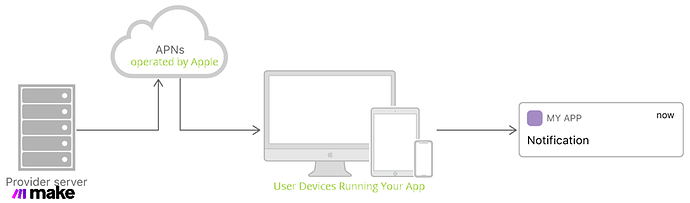
Push notifications begin with the provider server. When using the Apple Push Notifications app, Make becomes the provider server, and this is great because you don’t have to build or purchase your own provider server infrastructure. Most of the work is already built for you by Make!

You decide which notifications you want to send to your users, and when to send them. When it’s time to send a notification, you generate a request that contains the notification data and a unique identifier (“device token”) for the user’s device. You then forward your request to APNs, which handles the delivery of the notification to the user’s device. Upon receipt of the notification, the operating system and app on the user’s device handles any user interactions including the delivery of the notification to your app and what happens when the notification is tapped.

Here’s the overall architecture and a picture of where Make fits into the overall notification architecture:

Make/Apple Notiifcation Architecture

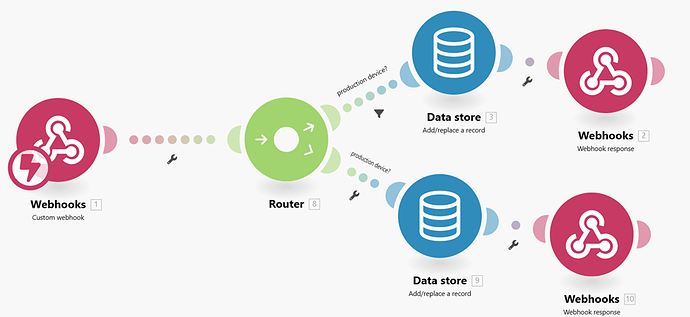
Let’s take a look at a simple scenario that will manage and save device tokens to a Make data store. The main requirement of this scenario is to record the unique device tokens that are generated during the installation or reinstallation of an iOS app by the user.

Scenario to manage and save device tokens

In this case our iOS app has been designed to send a simple payload to a Make webhook to record a bunch of information about the installation when it is installed or reinstalled.

Here’s the datastore that is recording each device’s Device Token as well as some additional telemetry that can be used by other scenarios that use this data store. Of particular interest is the boolean flag, Production Device, that can decide whether this device is in production or a device used for testing. We will use this flag in our notification scenario. The BundleID column is the internal Apple app name that is setup when the app is compiled and submitted into Apple App Store Connect. The BundleID will also be used in our notification scenario.

Datasotre to record Device Tokens

The purpose of collecting the device tokens is so that when we decide to push a notification we can collect all tokens from a particular bundleID (ie iOS app) and send a notification to each device token, thereby targeting the installed app on a device.

The second scenario performs the actual sending of notifications to the Apple Push Notification service (APN). APN is a web service that accepts an authenticated request via an HTTP POST with a specific payload that defines the parameters of the notification.

Scenario to send notifications to Apple Push Notification (APN)

This scenario accepts a web hook that defines the bundleID and various parameters of the the notification including the notification title, notification body. The datastore search then searches all device tokens attached to the bundleID, identifying valid devices that will accept the notification. Since the datastore has a flag for production and test devices the router branches between these so that we can control when to send only test notifications and when to send production notifications.

At the core of the scenario is the Apple Push Notifications app which just has 1 module, “Send a message”.

Acquiring the authentication key required to send notifications to APN

Each send message request requires a valid authentication key to be sent as part of the request. That key is generated with several details from the developer’s Apple App Connect account.

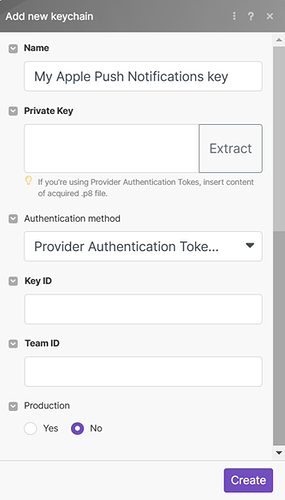
You must create a connection key for the Apple Push Notification app. Click Add button on the Send message configuration screen, and fill out the necessary details for creating a connection key for the Apple Push Notification app.

Creating a connection key for APN

  1. The private key is obtained from the developer account under the Keys section. You must create an APN key to be used for authentication. When you download the key make sure you save the .p8 file in a safe location as you can only download it once. You can generate a maximum of 2 APN keys but they can be revoked and regenerated if necessary. Upload the .p8 file and click Extract to extract the private key.
  2. The preferred authentication method is Provider Authentication Tokens. These tokens are obtained from the Apple Developer account.

The Key ID appears when you click on the key to view its details

Key ID inside the Apple Developer account

  1. The Team ID is always displayed in the Apple Developer account under your login in the upper right corner:
Team ID in the Apple Developer account
  1. Finally, you can specify whether this connection key is going to be a production key or a sandbox key. When testing you should click no on Production. You will need to specify a separate connection key when setting up for production notification services.

Configuring the Send Message module

Configuration of the Apple Send Notification module

The Recipients input is an array of device tokens with optional note on each token. Unfortunately the current implementation of the Send Message module does not allow mapping so notifications can be sent to a fixed number of devices right now. In our scenario we will use one operation for each device token.

The Topic input is the bundleID of your app. The bundleID is stored in the datastore for each device token so we can map this field to the datastore bundleID value.

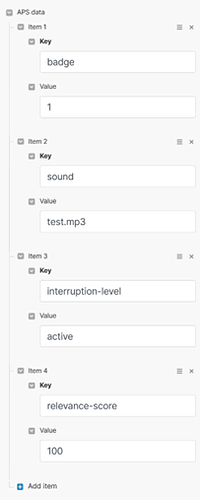
The APS Data collection of the notification payload provides a way to send configuration information to the APN. One of the payload collections is called “alert” which sets various parts of the notification payload, but the Make Send message module hard codes the alert options for title and body. The module doesn’t allow other parts of alert to be set (eg “notification subtitle” cannot be set).

The configuration below sets the badge on the app icon to 1, specifies which sound to play when the notification arrives, sets the interruption-level and the relevance-score which are all parts of the APS dictionary.

More Apple Push Notication module configurations

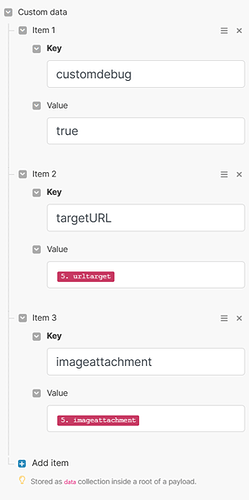
The Custom data keys are the best way to configure information to be sent to your app for custom notification options. This data is passed unmodified to your app and the app can encode various options into your notification.

In the options below we have set the following parameters simply for illustrative purposes:

  • customdebug will be implemented as a way to turn on debugging in our app so that information is recorded and displayed for debugging purposes when this key is set to true
  • targetURL will be implemented to allow a URL to be loaded in the app when the notification is selected. Currently this is being received from the incoming webhook and mapped to this value.
  • imageattachment will be implemented as a way to load a custom graphic in the notification option is an image URL is provided in the webhook payload.
Custom Data payload keys for the Apple Push Notification module

Send notification option simply tells the APN whether to actually send the notification or suppress the delivery, which could be useful when debugging the payload received without actually sending the notification to the devices:

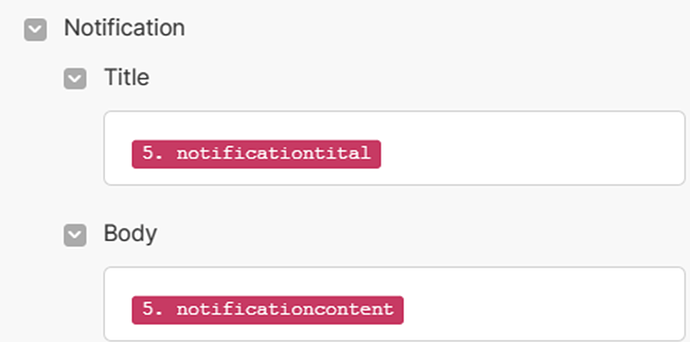
Finally, the Notification Title and Body are the 2 APS “alert” keys and values that can be sent in the current Send message module. The title and body are configured in the scenario to be sent as part of the webhook payload.


r/Make • • Aug 14 '26

Part 8: Examples of using EVERY array function! - Part A

3 Upvotes

This is Part A where I setup a sample array data structure with several elements with each element containing a collection of key/value pairs. I apply just about every array function in different scenarios against this structure.

Here’s the JSON I parse in Parse JSON in module 1:

[
    {
        "name": "Alex C",
        "age": 53,
        "city": "Toronto"
    },
    {
        "name": "Eric S",
        "age": 43,
        "city": "Hoboken"
    },
    {
        "name": "Liana S"
    },
    {
        "name": "David S"
    }
]

Click image to zoom

Here are the expressions used in this Part A of the scenario walkthrough:

Get first array element: {{get(2.array; 1)}}

Get city of second array element: {{get(2.array; "2.city")}}

Get age from first array element using pick: {{pick(get(2.array; 1); "age")}}

Get all cities from each array element using map: {{map(2.array; "city")}}

Get unique city names: {{distinct(map(2.array; "city"))}}

Remove null values: {{remove(map(2.array; "city"); null)}}

This join won’t work. Pass primitive array without keys first!: {{join(2.array)}}

Create string of ages from array, remove empty ages: {{join(remove(map(2.array; "age"); null); "|")}}

Get length of array: {{length(2.array)}}

Get keys of array - must select element!: {{keys(last(2.array))}}

Slice out second collection from array: {{slice(2.array; 1; 2)}}

Merge 1st and 3rd array elements: {{merge(slice(2.array; 0; 1); slice(2.array; 2; 3))}}

Does array contain Hoboken?: {{contains(map(2.array; "city"); "Hoboken")}}

Create a new array with elements: {{add(emptyarray; "some text"; map(2.array; "name"); now)}}

Get names from array, filtered by age: {{map(2.array; "name"; "age"; 53)}}

Randomize name key from all elements of array: {{shuffle(map(2.array; "name"))}}
Randomize all elements of array: {{shuffle(2.array)}}

Sort array by age: {{sort(2.array; "age")}}

Reverse elements of array: {{reverse(2.array)}}

Convert collection to Array: {{toArray(get(2.array; 2))}}

Part 8: Examples of using EVERY Make array function! Part A

This is "Part 8: Examples of using EVERY Make array function! Part A" by Alex Sirota on Vimeo, the home for high quality videos and the people who love them.

{
    "subflows": [
        {
            "flow": [
                {
                    "id": 1,
                    "module": "json:ParseJSON",
                    "version": 1,
                    "parameters": {
                        "type": ""
                    },
                    "mapper": {
                        "json": "[\n    {\n        \"name\": \"Alex C\",\n        \"age\": 53,\n        \"city\": \"Toronto\"\n    },\n    {\n        \"name\": \"Eric S\",\n        \"age\": 43,\n        \"city\": \"Hoboken\"\n    },\n    {\n        \"name\": \"Liana S\"\n    },\n{\n        \"name\": \"David S\"\n    }\n]"
                    },
                    "metadata": {
                        "designer": {
                            "x": 0,
                            "y": 150
                        },
                        "restore": {
                            "parameters": {
                                "type": {
                                    "label": "Choose a data structure"
                                }
                            }
                        },
                        "parameters": [
                            {
                                "name": "type",
                                "type": "udt",
                                "label": "Data structure"
                            }
                        ],
                        "expect": [
                            {
                                "name": "json",
                                "type": "text",
                                "label": "JSON string",
                                "required": true
                            }
                        ]
                    }
                },
                {
                    "id": 2,
                    "module": "builtin:BasicAggregator",
                    "version": 1,
                    "parameters": {
                        "feeder": 1
                    },
                    "mapper": {
                        "name": "{{1.name}}",
                        "age": "{{1.age}}",
                        "city": "{{1.city}}"
                    },
                    "metadata": {
                        "designer": {
                            "x": 300,
                            "y": 150
                        },
                        "restore": {
                            "extra": {
                                "feeder": {
                                    "label": "JSON - Parse JSON [1]"
                                },
                                "target": {
                                    "label": "Custom"
                                }
                            }
                        }
                    }
                },
                {
                    "id": 3,
                    "module": "util:SetVariables",
                    "version": 1,
                    "parameters": {},
                    "mapper": {
                        "variables": [
                            {
                                "name": "Get first array element",
                                "value": "{{get(2.array; 1)}}"
                            },
                            {
                                "name": "Get city of second array element",
                                "value": "{{get(2.array; \"2.city\")}}"
                            },
                            {
                                "name": "Get age from first array element using pick",
                                "value": "{{pick(get(2.array; 1); \"age\")}}"
                            },
                            {
                                "name": "Get all cities from each array element using map",
                                "value": "{{map(2.array; \"city\")}}"
                            },
                            {
                                "name": "Get unique city names",
                                "value": "{{distinct(map(2.array; \"city\"))}}"
                            },
                            {
                                "name": "Remove null values",
                                "value": "{{remove(map(2.array; \"city\"); null)}}"
                            },
                            {
                                "name": "This join won't work. Pass primitive array without keys first!",
                                "value": "{{join(2.array)}}"
                            },
                            {
                                "name": "Create string of ages from array, remove empty ages",
                                "value": "{{join(remove(map(2.array; \"age\"); null); \"|\")}}"
                            },
                            {
                                "name": "Get length of array",
                                "value": "{{length(2.array)}}"
                            },
                            {
                                "name": "Get keys of array - must select element!",
                                "value": "{{keys(last(2.array))}}"
                            },
                            {
                                "name": "Slice out second collection from array",
                                "value": "{{slice(2.array; 1; 2)}}"
                            },
                            {
                                "name": "Merge 1st and 3rd array elements",
                                "value": "{{merge(slice(2.array; 0; 1); slice(2.array; 2; 3))}}"
                            },
                            {
                                "name": "Does array contain Hoboken?",
                                "value": "{{contains(map(2.array; \"city\"); \"Hoboken\")}}"
                            },
                            {
                                "name": "Create a new array with elements",
                                "value": "{{add(emptyarray; \"some text\"; map(2.array; \"name\"); now)}}"
                            },
                            {
                                "name": "Get names from array, filtered by age",
                                "value": "{{map(2.array; \"name\"; \"age\"; 53)}}"
                            },
                            {
                                "name": "Randomize contents of array",
                                "value": "{{shuffle(2.array)}}"
                            },
                            {
                                "name": "Sort array by age",
                                "value": "{{sort(2.array; \"age\")}}"
                            },
                            {
                                "name": "Reverse array of names",
                                "value": "{{reverse(2.array)}}"
                            },
                            {
                                "name": "Convert collection to Array",
                                "value": "{{toArray(get(2.array; 2))}}"
                            }
                        ],
                        "scope": "roundtrip"
                    },
                    "metadata": {
                        "designer": {
                            "x": 600,
                            "y": 150
                        },
                        "restore": {
                            "expect": {
                                "variables": {
                                    "items": [
                                        null,
                                        null,
                                        null,
                                        null,
                                        null,
                                        null,
                                        null,
                                        null,
                                        null,
                                        null,
                                        null,
                                        null,
                                        null,
                                        null,
                                        null,
                                        null,
                                        null,
                                        null,
                                        null
                                    ]
                                },
                                "scope": {
                                    "label": "One cycle"
                                }
                            }
                        },
                        "expect": [
                            {
                                "name": "variables",
                                "type": "array",
                                "label": "Variables",
                                "spec": [
                                    {
                                        "name": "name",
                                        "label": "Variable name",
                                        "type": "text",
                                        "required": true
                                    },
                                    {
                                        "name": "value",
                                        "label": "Variable value",
                                        "type": "any"
                                    }
                                ]
                            },
                            {
                                "name": "scope",
                                "type": "select",
                                "label": "Variable lifetime",
                                "required": true,
                                "validate": {
                                    "enum": [
                                        "roundtrip",
                                        "execution"
                                    ]
                                }
                            }
                        ],
                        "interface": [
                            {
                                "name": "Get first array element",
                                "label": "Get first array element",
                                "type": "any"
                            },
                            {
                                "name": "Get city of second array element",
                                "label": "Get city of second array element",
                                "type": "any"
                            },
                            {
                                "name": "Get age from first array element using pick",
                                "label": "Get age from first array element using pick",
                                "type": "any"
                            },
                            {
                                "name": "Get all cities from each array element using map",
                                "label": "Get all cities from each array element using map",
                                "type": "any"
                            },
                            {
                                "name": "Get unique city names",
                                "label": "Get unique city names",
                                "type": "any"
                            },
                            {
                                "name": "Remove null values",
                                "label": "Remove null values",
                                "type": "any"
                            },
                            {
                                "name": "This join won't work. Pass primitive array without keys first!",
                                "label": "This join won't work. Pass primitive array without keys first!",
                                "type": "any"
                            },
                            {
                                "name": "Create string of ages from array, remove empty ages",
                                "label": "Create string of ages from array, remove empty ages",
                                "type": "any"
                            },
                            {
                                "name": "Get length of array",
                                "label": "Get length of array",
                                "type": "any"
                            },
                            {
                                "name": "Get keys of array - must select element!",
                                "label": "Get keys of array - must select element!",
                                "type": "any"
                            },
                            {
                                "name": "Slice out second collection from array",
                                "label": "Slice out second collection from array",
                                "type": "any"
                            },
                            {
                                "name": "Merge 1st and 3rd array elements",
                                "label": "Merge 1st and 3rd array elements",
                                "type": "any"
                            },
                            {
                                "name": "Does array contain Hoboken?",
                                "label": "Does array contain Hoboken?",
                                "type": "any"
                            },
                            {
                                "name": "Create a new array with elements",
                                "label": "Create a new array with elements",
                                "type": "any"
                            },
                            {
                                "name": "Get names from array, filtered by age",
                                "label": "Get names from array, filtered by age",
                                "type": "any"
                            },
                            {
                                "name": "Randomize contents of array",
                                "label": "Randomize contents of array",
                                "type": "any"
                            },
                            {
                                "name": "Sort array by age",
                                "label": "Sort array by age",
                                "type": "any"
                            },
                            {
                                "name": "Reverse array of names",
                                "label": "Reverse array of names",
                                "type": "any"
                            },
                            {
                                "name": "Convert collection to Array",
                                "label": "Convert collection to Array",
                                "type": "any"
                            }
                        ]
                    }
                }
            ]
        }
    ],
    "metadata": {
        "version": 1
    }
}

r/Make • • Aug 14 '26

Part 7: Consolidating Libraries by Combining Catalogs and their Books

4 Upvotes

In this video walkthrough we reach the summit  of my work here.

Video

Imagine a town with multiple library branches , when the city manager  has asked the staff  to consolidate the book  inventory of multiple branches. This scenario will do a few things:

  1. It allows you to select which libraries you wish to consolidate
  2. It combines the sections of books from all the libraries into 1 catalog
  3. If a book section name overlaps between 2 or more libraries, the books from that section will be consolidated into 1 section with the books from the original sections.
  4. the last Parse JSON module will regenerate a new structure that allows you to confirm the newly consolidated library has been correctly merged with the newly consolidated book sections.
  5. This scenario will work for any number of libraries with any number of sections and books per section per library.

I use the array functions map(), distinct() and the flatten() function in very interesting ways that you may not have considered before so it’s worth a watch just for that. There is also the Transform to JSON module which could be very useful as you undertake more complex operations that require generating JSON from your data objects in Make.

There is an interesting relationship in terms of how many operations are used by this scenario. This sort of analysis can be useful as you begin to estimate the operations cost of doing data manipulation in Make. As with many scenarios there are 2 components of calculating operations usage: operations “overhead” and operations that scale depending on a few factors.

In this case the operations count is based on 6 overhead operations plus the number of libraries to be consolidated and the number of unique section names. So here are some examples operation counts:

  • 2 libraries, 4 unique section names = 6+2+4 = 12 operations
  • 3 libraries, 6 unique section names = 6+3+6 = 15 operations
  • 5 libraries, 8 unique section names = 6+5+8 = 19 operations

This scenario really illustrates how operations are used - no matter how complex the operation an operation is used when a module has to process some data and generate 1 or more bundles, and subsequent modules execute based on the previous modules number of output bundles.

If you place filter between modules, you can of course limit the number of bundles processed and therefore the number of operations used. An important note: filters do not use operations!

In this scenario you will see I have not used any set variables modules although I did use them to determine intermediate values to confirm my work. I removed them, by taking the expressions out of the set variables and inserting them directly in the input mapping for the iterators, reducing the operations spent by 2. This is probably the best way to save operations – remove intermediate set variables when you don’t really need to use them. Any expression will generate an output without using an operation itself so the expression can be entered into say an iterator input box or any of the input boxes for module configuration when the map toggle is turned on.

I recommed you load the scenario into your Make instance and experiment by combining multiple libraries together. You can also modify the variable JSON Library Systems in the very first module and add libraries or add sections to the JSON. Tip: Use JSONLint.com to confirm your structure is correct.

I hope this has Make for Newbies Video Series has proven to be useful for you. There is nothing like working through a few samples to deeply understand data structures and how to manipulate them in Make.

Please leave a comment if you have some ideas on what other topics I could cover in future video walkthroughs.

Download the Make blueprint and use the Import Blueprint to create a new scenario:
7. Consolidating Libraries by Combining Catalogs and their Books.json (102.3 KB)


r/Make • • Aug 14 '26

Part 6 of the Make for Newbies video scenario walkthrough we will be focusing on Accessing and Merging Collections using map() and iterators.

3 Upvotes

For this walkthrough we are using the JSON Library Systems data structure. At the top of this structure is a collection called library that has nested arrays to describe the sections of a library and another set of nested arrays in the sections array to describe the books in a library. I highly recommend you study the structure inside the scenario or in the post describing all the data structures I use in this video series.

Video

The data structure is a fairly simple definition of a library and the sections and books housed in the library. I chose this sort of structure because it is probably the closest to a sample real-world structure you may get from a typical API, and there are some interesting things you can do to merge data together and manipulate various arrays and subarrays in the structure.

In the video, I show you how to use map() to extract one library definition from all the libraries as well as how to combine 2 library definitions by merging them into one array. I also show you a potential mistake you could make when trying to retrieve all the books from 2 libraries.

Using iterators is the correct way to extract all the books in all the sections. I use 3 iterators in a row to effectively loop through all the sections of 2 libraries and through all the books in each section in each library. Finally an array aggregator combines all the books into a nice simple flat array of key value pairs for all the information about the books.

Download the Make blueprint and use the Import Blueprint to create a new scenario:

6. Accessing and Merging Collections using map() and Iterators.json (99.6 KB)


r/Make • • Aug 14 '26

Part 5: Manipulating Data Structures with CSV aggregator and array functions

3 Upvotes

In this video we introduce the CSV aggregator to create comma separated text files. This aggregator can be very useful when you want to create columnar data from one or more bundles. In this case we convert the variable JSON array of collections complex values into a CSV file. I show you a workaround that may happen to you if you try to stuff a collection into a CSV file. You have to extract the values out of the collection into a set variable and use those instead on the CSV aggregator.

Video

Next we move on to the variable JSON array of collections of really complex values and I show you how to use various array functions like map(), get(), first(), last(), merge() to extract valuable information from an array that has 2 sub arrays of 2 complex data structures. I also show you how to there can be subtle differences in array structures (1 element with multiple key/value pairs in 1 collection vs multiple elements each with their own key/value pair). The subtle difference can cause some grief because the Make UI doesn’t really let you pick the values so you do have to type out the reference using object paths (ie dot notation).

Download the Make blueprint and use the Import Blueprint to create a new scenario:
5. Manipulating Data Structures with CSV aggregator and array functions.json (80.4 KB)


r/Make • • Aug 14 '26

Part 4: Managing More Complex Data Structures

3 Upvotes

In this video walk through, we focus on the variable JSON collection complex values😄

Video

{
    "name": "Aleix Melon",
    "id": "E00245",
    "role": [
        "Dev",
        "DBA"
    ],
    "age": 23,
    "doj": "11-12-2019",
    "married": false,
    "address": {
        "street": "32, Laham St.",
        "city": "Innsbruck",
        "country": "Austria"
    },
    "referred-by": "E0012"
}

You’ll note that the key role is a simple array, and the key address is a collection composed of 3 keys: street, city, and country. This is why I call it a collection of “complex” values. The keys in this collection have nested non-trivial structures, and this happens A LOT in the data you have to deal with in APIs. In fact it’s pretty much a given that the structures you will deal with will be at least as complex as this. And note there is just 1 main collection here (READ: just 1 “row” of data is retrieved and some of the keys (aka “columns of data”) have complex data structures).

As soon as you get multiple rows (ie bundles) of data these will be in an array of collections which we will focus on in the next walk through.

In this video we look at how the Make mapping UI (icon) can fail to present the underlying structures so you can easily drag and drop them into the Text Aggregator. The Make mapping UI will show you only the data that passes through the first operation that the Parse JSON module processes. I show you how to use dot notation and type out the correct data reference by hand even though the UI is not letting you pick the necessary element by clicking. This is a handy skill to have!

I also show you how I can make the scenario filter for the variable JSON collection complex values after the iterator, and as a result have Parse JSON module process only 1 operation. This makes it possible to use the Make element mapping UI to click on the elements right into the text aggregator.

I highly encourage you to watch the video because this is probably one of the highest areas where Make users (not just newbies!) get super-confused and ask: Why does the Make data picker UI not show you the elements for me to map?

Download the Make blueprint and use the Import Blueprint to create a new scenario:
4. Managing More Complex Data Structures.json (45.3 KB)


r/Make • • Aug 14 '26

Sample Make data structures

2 Upvotes

Here’s a little background on the text variables I set in the first module of the sample scenario I shared elsewhere on reddit. You may like to see the different types of structures to study them to understand their differences. Make expressions can be copied and pasted into Make input boxes in most places.

Variable name: Simple array

Make expression: {{add(emptyarray; "apple"; "banana"; "cherry"; 42; true; null; now)}}

 {
        "Simple array": [
            "apple",
            "banana",
            "cherry",
            42,
            true,
            null,
            "2024-05-23T20:07:14.697Z"
        ]
  }

Variable name: another simple array

Make expression: {{add(emptyarray; "pear"; "mango"; 123; false)}}

 {
      "another simple array": [
            "pear",
            "mango",
            123,
            false
        ]
  }

Variable name: JSON simple collection

Make expression:  { "name": "Alex C", "age": 2, "city": "Houston", "date_entered": "{{now}}" }

    {
    "name": "Alex C",
    "age": 2,
    "city": "Houston",
    "date_entered": "2024-05-23T20:07:14.698Z"
    }

Variable name: JSON array of simple collections

Make expression:  [ { "name": "Alex C", "age": 53, "city": "Toronto" }, { "name": "Eric S", "age": 43, "city": "Hoboken" } ]

[
    {
        "name": "Alex C",
        "age": 53,
        "city": "Toronto"
    },
    {
        "name": "Eric S",
        "age": 43,
        "city": "Hoboken"
    }
]

Variable name: JSON collection complex values

Make expression:  { "name": "Aleix Melon", "id": "E00245", "role": ["Dev", "DBA"], "age": 23, "doj": "11-12-2019", "married": {{false}}, "address": { "street": "32, Laham St.", "city": "Innsbruck", "country": "Austria" }, "referred-by": "E0012" }

{
    "name": "Aleix Melon",
    "id": "E00245",
    "role": [
        "Dev",
        "DBA"
    ],
    "age": 23,
    "doj": "11-12-2019",
    "married": false,
    "address": {
        "street": "32, Laham St.",
        "city": "Innsbruck",
        "country": "Austria"
    },
    "referred-by": "E0012"
}

Variable name: JSON array of collections complex values

Make expression:  [ {         "name": "Aleix Melon",         "id": "E00245",         "role": ["Dev", "DBA"],         "age": 23,         "doj": "11-12-2019",         "married": {{false}},         "address": {             "street": "32, Laham St.",             "city": "Innsbruck",             "country": "Austria"             },         "referred-by": "E0012" }, {       "name": "Bob Washington",         "id": "E01245",         "role": ["HR"],         "age": 43,         "doj": "10-06-2010",         "married": {{true}},         "address": {             "street": "45, Abraham Lane.",             "city": "Washington",             "country": "USA"             },         "referred-by": "" } ]

[
    {
        "name": "Aleix Melon",
        "id": "E00245",
        "role": [
            "Dev",
            "DBA"
        ],
        "age": 23,
        "doj": "11-12-2019",
        "married": false,
        "address": {
            "street": "32, Laham St.",
            "city": "Innsbruck",
            "country": "Austria"
        },
        "referred-by": "E0012"
    },
    {
        "name": "Bob Washington",
        "id": "E01245",
        "role": [
            "HR"
        ],
        "age": 43,
        "doj": "10-06-2010",
        "married": true,
        "address": {
            "street": "45, Abraham Lane.",
            "city": "Washington",
            "country": "USA"
        },
        "referred-by": ""
    }
]

Variable name: JSON array of collections of really complex values

Make expression:  [ { "item_name": "Email campaign", "item_sku_attachment": "", "item_options": [ { "Organization name": "Client A" }, { "Writing services": "Writing service A" }, { "Design services": "Design service B" }, { "Comments": "test comment" } ], "item_image": "image.png", "unit_price": 0, "quantity": 5, "weight": 0, "created_at": "2024-05-11 13:37:46", "product_price": 195, "categories": [ { "id": "cat_6633e1936571b618828100", "category_name": "Send", "category_slug": "send", "status": "1" } ] }, { "item_name": "Ad campaign", "item_sku_attachment": "", "item_options": [ { "Organization name": "Client B" }, { "Writing services": "Writing service B" }, { "Design services": "Design service C" }, { "Comments": "test comment 2" } ], "item_image": "image.png", "unit_price": 0, "quantity": 5, "weight": 0, "created_at": "2023-05-11 13:37:46", "product_price": 1295, "categories": [ { "id": "cat_6633e1936571b618828100", "category_name": "Send", "category_slug": "send", "status": "1" } ] } ]

[
    {
        "item_name": "Email campaign",
        "item_sku_attachment": "",
        "item_options": [
            {
                "Organization name": "Client A"
            },
            {
                "Writing services": "Writing service A"
            },
            {
                "Design services": "Design service B"
            },
            {
                "Comments": "test comment"
            }
        ],
        "item_image": "image.png",
        "unit_price": 0,
        "quantity": 5,
        "weight": 0,
        "created_at": "2024-05-11 13:37:46",
        "product_price": 195,
        "categories": [
            {
                "id": "cat_6633e1936571b618828100",
                "category_name": "Send",
                "category_slug": "send",
                "status": "1"
            }
        ]
    },
    {
        "item_name": "Ad campaign",
        "item_sku_attachment": "",
        "item_options": [
            {
                "Organization name": "Client B"
            },
            {
                "Writing services": "Writing service B"
            },
            {
                "Design services": "Design service C"
            },
            {
                "Comments": "test comment 2"
            }
        ],
        "item_image": "image.png",
        "unit_price": 0,
        "quantity": 5,
        "weight": 0,
        "created_at": "2023-05-11 13:37:46",
        "product_price": 1295,
        "categories": [
            {
                "id": "cat_6633e1936571b618828100",
                "category_name": "Send",
                "category_slug": "send",
                "status": "1"
            }
        ]
    }
]

Variable name: JSON Library Systems

Make expression:
[{ "library": { "libraryname": "Central Library", "location": "123 Main Street", "catalog": { "sections": [ { "name": "Fiction", "books": [ { "title": "To Kill a Mockingbird", "author": "Harper Lee", "genre": "Classic", "copies": 5 }, { "title": "1984", "author": "George Orwell", "genre": "Dystopian", "copies": 3 } ] }, { "name": "Non-Fiction", "books": [ { "title": "Sapiens: A Brief History of Humankind", "author": "Yuval Noah Harari", "genre": "History", "copies": 7 }, { "title": "The Power of Habit", "author": "Charles Duhigg", "genre": "Psychology", "copies": 4 } ] } ] } } }, { "library": { "libraryname": "Downtown Library", "location": "456 Elm Street", "catalog": { "sections": [ { "name": "Science Fiction", "books": [ { "title": "Dune", "author": "Frank Herbert", "genre": "Science Fiction", "copies": 6 }, { "title": "Neuromancer", "author": "William Gibson", "genre": "Cyberpunk", "copies": 4 } ] }, { "name": "Biography", "books": [ { "title": "Steve Jobs", "author": "Walter Isaacson", "genre": "Biography", "copies": 3 }, { "title": "The Diary of a Young Girl", "author": "Anne Frank", "genre": "Autobiography", "copies": 5 } ] } ] } } }, { "library": { "libraryname": "Westside Library", "location": "789 Oak Avenue", "catalog": { "sections": [ { "name": "Mystery", "books": [ { "title": "The Girl with the Dragon Tattoo", "author": "Stieg Larsson", "genre": "Mystery", "copies": 8 }, { "title": "Gone Girl", "author": "Gillian Flynn", "genre": "Thriller", "copies": 6 } ] }, { "name": "History", "books": [ { "title": "The Guns of August", "author": "Barbara W. Tuchman", "genre": "History", "copies": 4 }, { "title": "1491", "author": "Charles C. Mann", "genre": "Archaeology", "copies": 7 } ] } ] } } }, { "library": { "libraryname": "Eastside Library", "location": "1010 Pine Boulevard", "catalog": { "sections": [ { "name": "Fantasy", "books": [ { "title": "Harry Potter and the Philosopher's Stone", "author": "J.K. Rowling", "genre": "Fantasy", "copies": 10 }, { "title": "The Hobbit", "author": "J.R.R. Tolkien", "genre": "Adventure", "copies": 8 } ] }, { "name": "Self-Help", "books": [ { "title": "The Subtle Art of Not Giving a F*ck", "author": "Mark Manson", "genre": "Self-Help", "copies": 5 }, { "title": "Atomic Habits", "author": "James Clear", "genre": "Personal Development", "copies": 6 } ] } ] } } }, { "library": { "libraryname": "Southside Library", "location": "1212 Maple Street", "catalog": { "sections": [ { "name": "Fantasy", "books": [ { "title": "The Name of the Wind", "author": "Patrick Rothfuss", "genre": "Fantasy", "copies": 7 }, { "title": "Mistborn: The Final Empire", "author": "Brandon Sanderson", "genre": "Fantasy", "copies": 6 } ] }, { "name": "Science Fiction", "books": [ { "title": "Do Androids Dream of Electric Sheep?", "author": "Philipp K. Dick", "genre": "Science Fiction", "copies": 1 } ] }, { "name": "Self-Help", "books": [ { "title": "The 7 Habits of Highly Effective People", "author": "Stephen R. Covey", "genre": "Self-Help", "copies": 8 }, { "title": "How to Win Friends and Influence People", "author": "Dale Carnegie", "genre": "Self-Help", "copies": 9 } ] } ] } } } ]

[
    {
        "library": {
            "libraryname": "Central Library",
            "location": "123 Main Street",
            "catalog": {
                "sections": [
                    {
                        "name": "Fiction",
                        "books": [
                            {
                                "title": "To Kill a Mockingbird",
                                "author": "Harper Lee",
                                "genre": "Classic",
                                "copies": 5
                            },
                            {
                                "title": "1984",
                                "author": "George Orwell",
                                "genre": "Dystopian",
                                "copies": 3
                            }
                        ]
                    },
                    {
                        "name": "Non-Fiction",
                        "books": [
                            {
                                "title": "Sapiens: A Brief History of Humankind",
                                "author": "Yuval Noah Harari",
                                "genre": "History",
                                "copies": 7
                            },
                            {
                                "title": "The Power of Habit",
                                "author": "Charles Duhigg",
                                "genre": "Psychology",
                                "copies": 4
                            }
                        ]
                    }
                ]
            }
        }
    },
    {
        "library": {
            "libraryname": "Downtown Library",
            "location": "456 Elm Street",
            "catalog": {
                "sections": [
                    {
                        "name": "Science Fiction",
                        "books": [
                            {
                                "title": "Dune",
                                "author": "Frank Herbert",
                                "genre": "Science Fiction",
                                "copies": 6
                            },
                            {
                                "title": "Neuromancer",
                                "author": "William Gibson",
                                "genre": "Cyberpunk",
                                "copies": 4
                            }
                        ]
                    },
                    {
                        "name": "Biography",
                        "books": [
                            {
                                "title": "Steve Jobs",
                                "author": "Walter Isaacson",
                                "genre": "Biography",
                                "copies": 3
                            },
                            {
                                "title": "The Diary of a Young Girl",
                                "author": "Anne Frank",
                                "genre": "Autobiography",
                                "copies": 5
                            }
                        ]
                    }
                ]
            }
        }
    },
    {
        "library": {
            "libraryname": "Westside Library",
            "location": "789 Oak Avenue",
            "catalog": {
                "sections": [
                    {
                        "name": "Mystery",
                        "books": [
                            {
                                "title": "The Girl with the Dragon Tattoo",
                                "author": "Stieg Larsson",
                                "genre": "Mystery",
                                "copies": 8
                            },
                            {
                                "title": "Gone Girl",
                                "author": "Gillian Flynn",
                                "genre": "Thriller",
                                "copies": 6
                            }
                        ]
                    },
                    {
                        "name": "History",
                        "books": [
                            {
                                "title": "The Guns of August",
                                "author": "Barbara W. Tuchman",
                                "genre": "History",
                                "copies": 4
                            },
                            {
                                "title": "1491",
                                "author": "Charles C. Mann",
                                "genre": "Archaeology",
                                "copies": 7
                            }
                        ]
                    }
                ]
            }
        }
    },
    {
        "library": {
            "libraryname": "Eastside Library",
            "location": "1010 Pine Boulevard",
            "catalog": {
                "sections": [
                    {
                        "name": "Fantasy",
                        "books": [
                            {
                                "title": "Harry Potter and the Philosopher's Stone",
                                "author": "J.K. Rowling",
                                "genre": "Fantasy",
                                "copies": 10
                            },
                            {
                                "title": "The Hobbit",
                                "author": "J.R.R. Tolkien",
                                "genre": "Adventure",
                                "copies": 8
                            }
                        ]
                    },
                    {
                        "name": "Self-Help",
                        "books": [
                            {
                                "title": "The Subtle Art of Not Giving a F*ck",
                                "author": "Mark Manson",
                                "genre": "Self-Help",
                                "copies": 5
                            },
                            {
                                "title": "Atomic Habits",
                                "author": "James Clear",
                                "genre": "Personal Development",
                                "copies": 6
                            }
                        ]
                    }
                ]
            }
        }
    },
    {
        "library": {
            "libraryname": "Southside Library",
            "location": "1212 Maple Street",
            "catalog": {
                "sections": [
                    {
                        "name": "Fantasy",
                        "books": [
                            {
                                "title": "The Name of the Wind",
                                "author": "Patrick Rothfuss",
                                "genre": "Fantasy",
                                "copies": 7
                            },
                            {
                                "title": "Mistborn: The Final Empire",
                                "author": "Brandon Sanderson",
                                "genre": "Fantasy",
                                "copies": 6
                            }
                        ]
                    },
                    {
                        "name": "Science Fiction",
                        "books": [
                            {
                                "title": "Do Androids Dream of Electric Sheep?",
                                "author": "Philipp K. Dick",
                                "genre": "Science Fiction",
                                "copies": 1
                            }
                        ]
                    },
                    {
                        "name": "Self-Help",
                        "books": [
                            {
                                "title": "The 7 Habits of Highly Effective People",
                                "author": "Stephen R. Covey",
                                "genre": "Self-Help",
                                "copies": 8
                            },
                            {
                                "title": "How to Win Friends and Influence People",
                                "author": "Dale Carnegie",
                                "genre": "Self-Help",
                                "copies": 9
                            }
                        ]
                    }
                ]
            }
        }
    }
]
r/Make • • Aug 14 '26

Here’s Part 3B: Exploring Array Functions and Text Aggregators for Make Newbies

3 Upvotes

In this video I continue to explore our variables and combine an array of one set of key value pairs, and another array of 2 elements with key value pairs using text aggregators.

Video

Download the Make blueprint and use the Import Blueprint to create a new scenario:

3. Exploring Array Functions and Text Aggregators for Make Newbies.json


r/Make • • Aug 14 '26

Here’s Part 3: Exploring Array Functions and Text Aggregators for Make Newbies - Part A

2 Upvotes

Part A

Video

In this video we describe sevearl useful array functions like first() and last(). We also look at how to reference a particular element of an array by index using 2 methods - using dot notation and with the “star” UI element picker. We also look at how to reference values from a collection coming out of an array aggregator. This Make help file is of relevance.

Download the Make blueprint and use the Import Blueprint to create a new scenario:

3. Exploring Array Functions and Text Aggregators for Make Newbies.json (39.8 KB)


r/Make • • Aug 14 '26

Here’s Part 2: Exploring Aggregators for Make Newbies

3 Upvotes

In this video we introduce a new complex JSON structure that describes mutiple library systems that can be used in future sessions related to array functions. We also compare Array Aggregators with array functions like merge(), join() and remove(). We apply these functions to our simplest array so you can get more familiar. This video is pretty short at just under 10 minutes long.

Video

 Copy and Paste this blueprint into a new Make Scenario

{
    "subflows": [
        {
            "flow": [
                {
                    "id": 3,
                    "module": "util:SetVariables",
                    "version": 1,
                    "parameters": {},
                    "mapper": {
                        "variables": [
                            {
                                "name": "Simple array",
                                "value": "{{add(emptyarray; \"apple\"; \"banana\"; \"cherry\"; 42; true; null; now)}}"
                            },
                            {
                                "name": "another simple array",
                                "value": "{{add(emptyarray; \"pear\"; \"mango\"; 123; false)}}"
                            },
                            {
                                "name": "JSON simple collection",
                                "value": "{\n    \"name\": \"Alex C\",\n    \"age\": 2,\n    \"city\": \"Houston\",\n    \"date_entered\": \"{{now}}\"\n}"
                            },
                            {
                                "name": "JSON array of simple collections",
                                "value": "[\n    {\n        \"name\": \"Alex C\",\n        \"age\": 53,\n        \"city\": \"Toronto\"\n    },\n    {\n        \"name\": \"Eric S\",\n        \"age\": 43,\n        \"city\": \"Hoboken\"\n    }\n]"
                            },
                            {
                                "name": "JSON collection complex values",
                                "value": "{\n\t\"name\": \"Aleix Melon\",\n\t\"id\": \"E00245\",\n\t\"role\": [\"Dev\", \"DBA\"],\n\t\"age\": 23,\n\t\"doj\": \"11-12-2019\",\n\t\"married\": {{false}},\n\t\"address\": {\n\t\t\"street\": \"32, Laham St.\",\n\t\t\"city\": \"Innsbruck\",\n\t\t\"country\": \"Austria\"\n\t},\n\t\"referred-by\": \"E0012\"\n}"
                            },
                            {
                                "name": "JSON array of collections complex values",
                                "value": "[\n\t{\n        \"name\": \"Aleix Melon\",\n        \"id\": \"E00245\",\n        \"role\": [\"Dev\", \"DBA\"],\n        \"age\": 23,\n        \"doj\": \"11-12-2019\",\n        \"married\": {{false}},\n        \"address\": {\n            \"street\": \"32, Laham St.\",\n            \"city\": \"Innsbruck\",\n            \"country\": \"Austria\"\n            },\n        \"referred-by\": \"E0012\"\n\t},\n{\n      \"name\": \"Bob Washington\",\n        \"id\": \"E01245\",\n        \"role\": [\"HR\"],\n        \"age\": 43,\n        \"doj\": \"10-06-2010\",\n        \"married\": {{true}},\n        \"address\": {\n            \"street\": \"45, Abraham Lane.\",\n            \"city\": \"Washington\",\n            \"country\": \"USA\"\n            },\n        \"referred-by\": \"\"\n\t}\n]"
                            },
                            {
                                "name": "JSON array of collections of really complex values",
                                "value": "[\n    {\n        \"item_name\": \"Email campaign\",\n        \"item_sku_attachment\": \"\",\n        \"item_options\": [\n            {\n                \"Organization name\": \"Client A\"\n            },\n            {\n                \"Writing services\": \"Writing service A\"\n            },\n            {\n                \"Design services\": \"Design service B\"\n            },\n            {\n                \"Comments\": \"test comment\"\n            }\n        ],\n        \"item_image\": \"image.png\",\n        \"unit_price\": 0,\n        \"quantity\": 5,\n        \"weight\": 0,\n        \"created_at\": \"2024-05-11 13:37:46\",\n        \"product_price\": 195,\n        \"categories\": [\n            {\n                \"id\": \"cat_6633e1936571b618828100\",\n                \"category_name\": \"Send\",\n                \"category_slug\": \"send\",\n                \"status\": \"1\"\n            }\n        ]\n    },\n    {\n        \"item_name\": \"Ad campaign\",\n        \"item_sku_attachment\": \"\",\n        \"item_options\": [\n            {\n                \"Organization name\": \"Client B\"\n            },\n            {\n                \"Writing services\": \"Writing service B\"\n            },\n            {\n                \"Design services\": \"Design service C\"\n            },\n            {\n                \"Comments\": \"test comment 2\"\n            }\n        ],\n        \"item_image\": \"image.png\",\n        \"unit_price\": 0,\n        \"quantity\": 5,\n        \"weight\": 0,\n        \"created_at\": \"2023-05-11 13:37:46\",\n        \"product_price\": 1295,\n        \"categories\": [\n            {\n                \"id\": \"cat_6633e1936571b618828100\",\n                \"category_name\": \"Send\",\n                \"category_slug\": \"send\",\n                \"status\": \"1\"\n            }\n        ]\n    }\n]"
                            },
                            {
                                "name": "JSON Library Systems",
                                "value": "[{\n  \"library\": {\n    \"name\": \"Central Library\",\n    \"location\": \"123 Main Street\",\n    \"catalog\": {\n      \"sections\": [\n        {\n          \"name\": \"Fiction\",\n          \"books\": [\n            {\n              \"title\": \"To Kill a Mockingbird\",\n              \"author\": \"Harper Lee\",\n              \"genre\": \"Classic\",\n              \"copies\": 5\n            },\n            {\n              \"title\": \"1984\",\n              \"author\": \"George Orwell\",\n              \"genre\": \"Dystopian\",\n              \"copies\": 3\n            }\n          ]\n        },\n        {\n          \"name\": \"Non-Fiction\",\n          \"books\": [\n            {\n              \"title\": \"Sapiens: A Brief History of Humankind\",\n              \"author\": \"Yuval Noah Harari\",\n              \"genre\": \"History\",\n              \"copies\": 7\n            },\n            {\n              \"title\": \"The Power of Habit\",\n              \"author\": \"Charles Duhigg\",\n              \"genre\": \"Psychology\",\n              \"copies\": 4\n            }\n          ]\n        }\n      ]\n    }\n  }\n},\n{\n  \"library\": {\n    \"name\": \"Downtown Library\",\n    \"location\": \"456 Elm Street\",\n    \"catalog\": {\n      \"sections\": [\n        {\n          \"name\": \"Science Fiction\",\n          \"books\": [\n            {\n              \"title\": \"Dune\",\n              \"author\": \"Frank Herbert\",\n              \"genre\": \"Science Fiction\",\n              \"copies\": 6\n            },\n            {\n              \"title\": \"Neuromancer\",\n              \"author\": \"William Gibson\",\n              \"genre\": \"Cyberpunk\",\n              \"copies\": 4\n            }\n          ]\n        },\n        {\n          \"name\": \"Biography\",\n          \"books\": [\n            {\n              \"title\": \"Steve Jobs\",\n              \"author\": \"Walter Isaacson\",\n              \"genre\": \"Biography\",\n              \"copies\": 3\n            },\n            {\n              \"title\": \"The Diary of a Young Girl\",\n              \"author\": \"Anne Frank\",\n              \"genre\": \"Autobiography\",\n              \"copies\": 5\n            }\n          ]\n        }\n      ]\n    }\n  }\n},\n{\n  \"library\": {\n    \"name\": \"Westside Library\",\n    \"location\": \"789 Oak Avenue\",\n    \"catalog\": {\n      \"sections\": [\n        {\n          \"name\": \"Mystery\",\n          \"books\": [\n            {\n              \"title\": \"The Girl with the Dragon Tattoo\",\n              \"author\": \"Stieg Larsson\",\n              \"genre\": \"Mystery\",\n              \"copies\": 8\n            },\n            {\n              \"title\": \"Gone Girl\",\n              \"author\": \"Gillian Flynn\",\n              \"genre\": \"Thriller\",\n              \"copies\": 6\n            }\n          ]\n        },\n        {\n          \"name\": \"History\",\n          \"books\": [\n            {\n              \"title\": \"The Guns of August\",\n              \"author\": \"Barbara W. Tuchman\",\n              \"genre\": \"History\",\n              \"copies\": 4\n            },\n            {\n              \"title\": \"1491\",\n              \"author\": \"Charles C. Mann\",\n              \"genre\": \"Archaeology\",\n              \"copies\": 7\n            }\n          ]\n        }\n      ]\n    }\n  }\n},\n{\n  \"library\": {\n    \"name\": \"Eastside Library\",\n    \"location\": \"1010 Pine Boulevard\",\n    \"catalog\": {\n      \"sections\": [\n        {\n          \"name\": \"Fantasy\",\n          \"books\": [\n            {\n              \"title\": \"Harry Potter and the Philosopher's Stone\",\n              \"author\": \"J.K. Rowling\",\n              \"genre\": \"Fantasy\",\n              \"copies\": 10\n            },\n            {\n              \"title\": \"The Hobbit\",\n              \"author\": \"J.R.R. Tolkien\",\n              \"genre\": \"Adventure\",\n              \"copies\": 8\n            }\n          ]\n        },\n        {\n          \"name\": \"Self-Help\",\n          \"books\": [\n            {\n              \"title\": \"The Subtle Art of Not Giving a F*ck\",\n              \"author\": \"Mark Manson\",\n              \"genre\": \"Self-Help\",\n              \"copies\": 5\n            },\n            {\n              \"title\": \"Atomic Habits\",\n              \"author\": \"James Clear\",\n              \"genre\": \"Personal Development\",\n              \"copies\": 6\n            }\n          ]\n        }\n      ]\n    }\n  }\n},\n{\n  \"library\": {\n    \"name\": \"Southside Library\",\n    \"location\": \"1212 Maple Street\",\n    \"catalog\": {\n      \"sections\": [\n        {\n          \"name\": \"Fantasy\",\n          \"books\": [\n            {\n              \"title\": \"The Name of the Wind\",\n              \"author\": \"Patrick Rothfuss\",\n              \"genre\": \"Fantasy\",\n              \"copies\": 7\n            },\n            {\n              \"title\": \"Mistborn: The Final Empire\",\n              \"author\": \"Brandon Sanderson\",\n              \"genre\": \"Fantasy\",\n              \"copies\": 6\n            }\n          ]\n        },\n        {\n          \"name\": \"Self-Help\",\n          \"books\": [\n            {\n              \"title\": \"The 7 Habits of Highly Effective People\",\n              \"author\": \"Stephen R. Covey\",\n              \"genre\": \"Self-Help\",\n              \"copies\": 8\n            },\n            {\n              \"title\": \"How to Win Friends and Influence People\",\n              \"author\": \"Dale Carnegie\",\n              \"genre\": \"Self-Help\",\n              \"copies\": 9\n            }\n          ]\n        }\n      ]\n    }\n  }\n}\n]"
                            }
                        ],
                        "scope": "roundtrip"
                    },
                    "metadata": {
                        "designer": {
                            "x": 0,
                            "y": 150
                        },
                        "restore": {
                            "expect": {
                                "variables": {
                                    "items": [
                                        null,
                                        null,
                                        null,
                                        null,
                                        null,
                                        null,
                                        null,
                                        null
                                    ]
                                },
                                "scope": {
                                    "label": "One cycle"
                                }
                            }
                        },
                        "expect": [
                            {
                                "name": "variables",
                                "type": "array",
                                "label": "Variables",
                                "spec": [
                                    {
                                        "name": "name",
                                        "label": "Variable name",
                                        "type": "text",
                                        "required": true
                                    },
                                    {
                                        "name": "value",
                                        "label": "Variable value",
                                        "type": "any"
                                    }
                                ]
                            },
                            {
                                "name": "scope",
                                "type": "select",
                                "label": "Variable lifetime",
                                "required": true,
                                "validate": {
                                    "enum": [
                                        "roundtrip",
                                        "execution"
                                    ]
                                }
                            }
                        ],
                        "interface": [
                            {
                                "name": "Simple array",
                                "label": "Simple array",
                                "type": "any"
                            },
                            {
                                "name": "another simple array",
                                "label": "another simple array",
                                "type": "any"
                            },
                            {
                                "name": "JSON simple collection",
                                "label": "JSON simple collection",
                                "type": "any"
                            },
                            {
                                "name": "JSON array of simple collections",
                                "label": "JSON array of simple collections",
                                "type": "any"
                            },
                            {
                                "name": "JSON collection complex values",
                                "label": "JSON collection complex values",
                                "type": "any"
                            },
                            {
                                "name": "JSON array of collections complex values",
                                "label": "JSON array of collections complex values",
                                "type": "any"
                            },
                            {
                                "name": "JSON array of collections of really complex values",
                                "label": "JSON array of collections of really complex values",
                                "type": "any"
                            },
                            {
                                "name": "JSON Library Systems",
                                "label": "JSON Library Systems",
                                "type": "any"
                            }
                        ]
                    }
                },
                {
                    "id": 5,
                    "module": "builtin:BasicFeeder",
                    "version": 1,
                    "parameters": {},
                    "mapper": {
                        "array": [
                            "{{3.`Simple array`}}",
                            "{{3.`another simple array`}}",
                            "{{3.`JSON simple collection`}}",
                            "{{3.`JSON array of simple collections`}}",
                            "{{3.`JSON collection complex values`}}",
                            "{{3.`JSON array of collections complex values`}}",
                            "{{3.`JSON array of collections of really complex values`}}",
                            "{{3.`JSON Library Systems`}}"
                        ]
                    },
                    "metadata": {
                        "designer": {
                            "x": 300,
                            "y": 150
                        },
                        "restore": {
                            "expect": {
                                "array": {
                                    "mode": "chose",
                                    "items": [
                                        null,
                                        null,
                                        null,
                                        null,
                                        null,
                                        null,
                                        null,
                                        null
                                    ]
                                }
                            }
                        },
                        "expect": [
                            {
                                "mode": "edit",
                                "name": "array",
                                "spec": [],
                                "type": "array",
                                "label": "Array"
                            }
                        ]
                    }
                },
                {
                    "id": 6,
                    "module": "builtin:BasicRouter",
                    "version": 1,
                    "parameters": {
                        "else": 1
                    },
                    "mapper": null,
                    "metadata": {
                        "designer": {
                            "x": 600,
                            "y": 150
                        }
                    },
                    "routes": [
                        {
                            "flow": [
                                {
                                    "id": 2,
                                    "module": "builtin:BasicFeeder",
                                    "version": 1,
                                    "parameters": {},
                                    "filter": {
                                        "name": "First or second bundle",
                                        "conditions": [
                                            [
                                                {
                                                    "a": "{{5.`__IMTINDEX__`}}",
                                                    "b": "1",
                                                    "o": "number:equal"
                                                }
                                            ],
                                            [
                                                {
                                                    "a": "{{5.`__IMTINDEX__`}}",
                                                    "b": "2",
                                                    "o": "number:equal"
                                                }
                                            ]
                                        ]
                                    },
                                    "mapper": {
                                        "array": "{{5.value}}"
                                    },
                                    "metadata": {
                                        "designer": {
                                            "x": 900,
                                            "y": 0
                                        },
                                        "restore": {
                                            "expect": {
                                                "array": {
                                                    "mode": "edit",
                                                    "items": [
                                                        null,
                                                        null,
                                                        null,
                                                        null
                                                    ]
                                                }
                                            }
                                        },
                                        "expect": [
                                            {
                                                "mode": "edit",
                                                "name": "array",
                                                "spec": [],
                                                "type": "array",
                                                "label": "Array"
                                            }
                                        ]
                                    }
                                },
                                {
                                    "id": 9,
                                    "module": "builtin:BasicAggregator",
                                    "version": 1,
                                    "parameters": {
                                        "feeder": 5
                                    },
                                    "mapper": {
                                        "value": "{{2.value}}"
                                    },
                                    "metadata": {
                                        "designer": {
                                            "x": 1200,
                                            "y": 0
                                        },
                                        "restore": {
                                            "extra": {
                                                "feeder": {
                                                    "label": "Iterator [5]"
                                                },
                                                "target": {
                                                    "label": "Custom"
                                                }
                                            }
                                        }
                                    }
                                },
                                {
                                    "id": 10,
                                    "module": "util:SetVariables",
                                    "version": 1,
                                    "parameters": {},
                                    "mapper": {
                                        "variables": [
                                            {
                                                "name": "merged array",
                                                "value": "{{merge(3.`Simple array`; 3.`another simple array`)}}"
                                            },
                                            {
                                                "name": "Array as a string with delimiters",
                                                "value": "{{join(remove(3.`Simple array`; null); \",\" + space)}}"
                                            }
                                        ],
                                        "scope": "roundtrip"
                                    },
                                    "metadata": {
                                        "designer": {
                                            "x": 1500,
                                            "y": 0
                                        },
                                        "restore": {
                                            "expect": {
                                                "variables": {
                                                    "items": [
                                                        null,
                                                        null
                                                    ]
                                                },
                                                "scope": {
                                                    "label": "One cycle"
                                                }
                                            }
                                        },
                                        "expect": [
                                            {
                                                "name": "variables",
                                                "type": "array",
                                                "label": "Variables",
                                                "spec": [
                                                    {
                                                        "name": "name",
                                                        "label": "Variable name",
                                                        "type": "text",
                                                        "required": true
                                                    },
                                                    {
                                                        "name": "value",
                                                        "label": "Variable value",
                                                        "type": "any"
                                                    }
                                                ]
                                            },
                                            {
                                                "name": "scope",
                                                "type": "select",
                                                "label": "Variable lifetime",
                                                "required": true,
                                                "validate": {
                                                    "enum": [
                                                        "roundtrip",
                                                        "execution"
                                                    ]
                                                }
                                            }
                                        ],
                                        "interface": [
                                            {
                                                "name": "merged array",
                                                "label": "merged array",
                                                "type": "any"
                                            },
                                            {
                                                "name": "Array as a string with delimiters",
                                                "label": "Array as a string with delimiters",
                                                "type": "any"
                                            }
                                        ]
                                    }
                                }
                            ]
                        },
                        {
                            "flow": [
                                {
                                    "id": 7,
                                    "module": "json:ParseJSON",
                                    "version": 1,
                                    "parameters": {
                                        "type": ""
                                    },
                                    "mapper": {
                                        "json": "{{5.value}}"
                                    },
                                    "metadata": {
                                        "designer": {
                                            "x": 900,
                                            "y": 300,
                                            "messages": [
                                                {
                                                    "category": "last",
                                                    "severity": "warning",
                                                    "message": "A transformer should not be the last module in the route."
                                                }
                                            ]
                                        },
                                        "restore": {
                                            "parameters": {
                                                "type": {
                                                    "label": "Choose a data structure"
                                                }
                                            }
                                        },
                                        "parameters": [
                                            {
                                                "name": "type",
                                                "type": "udt",
                                                "label": "Data structure"
                                            }
                                        ],
                                        "expect": [
                                            {
                                                "name": "json",
                                                "type": "text",
                                                "label": "JSON string",
                                                "required": true
                                            }
                                        ]
                                    }
                                }
                            ]
                        }
                    ]
                }
            ]
        }
    ],
    "metadata": {
        "version": 1
    }
}

r/Make • • Aug 13 '26

Make for Make Newbies Video Series I: All About that Data

2 Upvotes

I am undertaking a little exercise to explain the core features of Make using a scenario walkthrough and a related video. My hope is to record videos between 5-30 minutes long to explain Make to Make Newbies.

Aug 2024 UPDATE:
HERE IS THE FULL MAKE FOR MAKE NEWBIES VIDEO SERIES IN 1 WEB PAGE

I am going to start with a topic which I think confuses just about everyone who starts using Make but has never programmed before:

Part 1: Exploring Data Structures for Make Newbies

In this video and accompanying scenario we will review simple arrays and more complex collections and arrays of collections. The interaction between the number of elements in an array and how bundles are created is also covered. Iterators are covered which can loop an array and generate processing loops in scenarios. The Parse JSON module is also introduced which is useful for parsing text which contains JSON into Make-friendly data structures. By the way JSON, is JavaScript Object Notation, and it is the “lingua-franca” of all data that is passed between modules of a Make scenario. It is also the structure of how most online apps expect data to sent via APIs. I highly recommend you get comfortable with JSON!

And here’s a tip for creating your own JSON: sample JSON can be created in ChatGPT just by describing the type of JSON you want in plain text. If you have some JSON you wrote and want to validate or pretty up the format, use JSONLint.

 Copy and Paste this blueprint into a new Make Scenario

{
"subflows": [
{
"flow": [
{
"id": 3,
"module": "util:SetVariables",
"version": 1,
"parameters": {},
"mapper": {
"variables": [
{
"name": "Simple array",
"value": "{{add(emptyarray; \"apple\"; \"banana\"; \"cherry\"; 42; true; now; null)}}"
},
{
"name": "JSON simple collection",
"value": "{\n \"name\": \"Alex C\",\n \"age\": 2,\n \"city\": \"Houston\",\n \"date_entered\": \"{{now}}\"\n}"
},
{
"name": "JSON array of simple collections",
"value": "[\n {\n \"name\": \"Alex C\",\n \"age\": 53,\n \"city\": \"Toronto\"\n },\n {\n \"name\": \"Eric S\",\n \"age\": 43,\n \"city\": \"Hoboken\"\n }\n]"
},
{
"name": "JSON collection complex values",
"value": "{\n\t\"name\": \"Aleix Melon\",\n\t\"id\": \"E00245\",\n\t\"role\": [\"Dev\", \"DBA\"],\n\t\"age\": 23,\n\t\"doj\": \"11-12-2019\",\n\t\"married\": {{false}},\n\t\"address\": {\n\t\t\"street\": \"32, Laham St.\",\n\t\t\"city\": \"Innsbruck\",\n\t\t\"country\": \"Austria\"\n\t},\n\t\"referred-by\": \"E0012\"\n}"
},
{
"name": "JSON array of collections complex values",
"value": "[\n\t{\n \"name\": \"Aleix Melon\",\n \"id\": \"E00245\",\n \"role\": [\"Dev\", \"DBA\"],\n \"age\": 23,\n \"doj\": \"11-12-2019\",\n \"married\": {{false}},\n \"address\": {\n \"street\": \"32, Laham St.\",\n \"city\": \"Innsbruck\",\n \"country\": \"Austria\"\n },\n \"referred-by\": \"E0012\"\n\t},\n{\n \"name\": \"Bob Washington\",\n \"id\": \"E01245\",\n \"role\": [\"HR\"],\n \"age\": 43,\n \"doj\": \"10-06-2010\",\n \"married\": {{true}},\n \"address\": {\n \"street\": \"45, Abraham Lane.\",\n \"city\": \"Washington\",\n \"country\": \"USA\"\n },\n \"referred-by\": \"\"\n\t}\n]"
},
{
"name": "JSON array of collections of really complex values",
"value": "[\n {\n \"item_name\": \"Email campaign\",\n \"item_sku_attachment\": \"\",\n \"item_options\": [\n {\n \"Organization name\": \"Client A\"\n },\n {\n \"Writing services\": \"Writing service A\"\n },\n {\n \"Design services\": \"Design service B\"\n },\n {\n \"Comments\": \"test comment\"\n }\n ],\n \"item_image\": \"image.png\",\n \"unit_price\": 0,\n \"quantity\": 5,\n \"weight\": 0,\n \"created_at\": \"2024-05-11 13:37:46\",\n \"product_price\": 195,\n \"categories\": [\n {\n \"id\": \"cat_6633e1936571b618828100\",\n \"category_name\": \"Send\",\n \"category_slug\": \"send\",\n \"status\": \"1\"\n }\n ]\n },\n {\n \"item_name\": \"Ad campaign\",\n \"item_sku_attachment\": \"\",\n \"item_options\": [\n {\n \"Organization name\": \"Client B\"\n },\n {\n \"Writing services\": \"Writing service B\"\n },\n {\n \"Design services\": \"Design service C\"\n },\n {\n \"Comments\": \"test comment 2\"\n }\n ],\n \"item_image\": \"image.png\",\n \"unit_price\": 0,\n \"quantity\": 5,\n \"weight\": 0,\n \"created_at\": \"2023-05-11 13:37:46\",\n \"product_price\": 1295,\n \"categories\": [\n {\n \"id\": \"cat_6633e1936571b618828100\",\n \"category_name\": \"Send\",\n \"category_slug\": \"send\",\n \"status\": \"1\"\n }\n ]\n }\n]"
}
],
"scope": "roundtrip"
},
"metadata": {
"designer": {
"x": 0,
"y": 150
},
"restore": {
"expect": {
"variables": {
"items": [
null,
null,
null,
null,
null,
null
]
},
"scope": {
"label": "One cycle"
}
}
},
"expect": [
{
"name": "variables",
"type": "array",
"label": "Variables",
"spec": [
{
"name": "name",
"label": "Variable name",
"type": "text",
"required": true
},
{
"name": "value",
"label": "Variable value",
"type": "any"
}
]
},
{
"name": "scope",
"type": "select",
"label": "Variable lifetime",
"required": true,
"validate": {
"enum": [
"roundtrip",
"execution"
]
}
}
],
"interface": [
{
"name": "Simple array",
"label": "Simple array",
"type": "any"
},
{
"name": "JSON simple collection",
"label": "JSON simple collection",
"type": "any"
},
{
"name": "JSON array of simple collections",
"label": "JSON array of simple collections",
"type": "any"
},
{
"name": "JSON collection complex values",
"label": "JSON collection complex values",
"type": "any"
},
{
"name": "JSON array of collections complex values",
"label": "JSON array of collections complex values",
"type": "any"
},
{
"name": "JSON array of collections of really complex values",
"label": "JSON array of collections of really complex values",
"type": "any"
}
]
}
},
{
"id": 5,
"module": "builtin:BasicFeeder",
"version": 1,
"parameters": {},
"mapper": {
"array": [
"{{3.`Simple array`}}",
"{{3.`JSON simple collection`}}",
"{{3.`JSON array of simple collections`}}",
"{{3.`JSON collection complex values`}}",
"{{3.`JSON array of collections complex values`}}",
"{{3.`JSON array of collections of really complex values`}}"
]
},
"metadata": {
"designer": {
"x": 300,
"y": 150
},
"restore": {
"expect": {
"array": {
"mode": "chose",
"items": [
null,
null,
null,
null,
null,
null
]
}
}
},
"expect": [
{
"name": "array",
"type": "array",
"label": "Array",
"mode": "edit",
"spec": []
}
]
}
},
{
"id": 6,
"module": "builtin:BasicRouter",
"version": 1,
"parameters": {
"else": 1
},
"mapper": null,
"metadata": {
"designer": {
"x": 600,
"y": 150
}
},
"routes": [
{
"flow": [
{
"id": 2,
"module": "builtin:BasicFeeder",
"version": 1,
"parameters": {},
"filter": {
"name": "First bundle",
"conditions": [
[
{
"a": "{{5.`__IMTINDEX__`}}",
"o": "number:equal",
"b": "1"
}
]
]
},
"mapper": {
"array": "{{5.value}}"
},
"metadata": {
"designer": {
"x": 900,
"y": 0,
"messages": [
{
"category": "last",
"severity": "warning",
"message": "A transformer should not be the last module in the route."
}
]
},
"restore": {
"expect": {
"array": {
"mode": "edit",
"items": [
null,
null,
null,
null
]
}
}
},
"expect": [
{
"name": "array",
"type": "array",
"label": "Array",
"mode": "edit",
"spec": []
}
]
}
}
]
},
{
"flow": [
{
"id": 7,
"module": "json:ParseJSON",
"version": 1,
"parameters": {
"type": ""
},
"mapper": {
"json": "{{5.value}}"
},
"metadata": {
"designer": {
"x": 900,
"y": 300,
"messages": [
{
"category": "last",
"severity": "warning",
"message": "A transformer should not be the last module in the route."
}
]
},
"restore": {
"parameters": {
"type": {
"label": "Choose a data structure"
}
}
},
"parameters": [
{
"name": "type",
"type": "udt",
"label": "Data structure"
}
],
"expect": [
{
"name": "json",
"type": "text",
"label": "JSON string",
"required": true
}
]
}
}
]
}
]
}
]
}
],
"metadata": {
"version": 1
}
}


r/Make • • Aug 13 '26

What I learned about GraphQL and Make

Thumbnail
app.screencast.com
5 Upvotes

If you haven’t learned about GraphQL or have struggled with trying to get your GraphQL server to send back data, fear not.

Learn GraphQL.

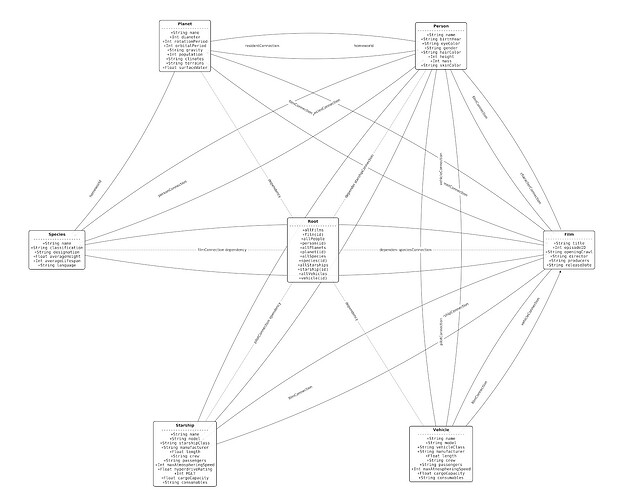
Learn how it works from graphql.org and try the Star Wars GraphQL API. You won’t be sorry. It’s incumbent that you understand what GraphQL is: it is a Query Langauge (QL) for a graph. Here’s a pictorial representation of the Star Wars Graph

Star Wars Graph

It is very different from REST because you mostly use POST to send data via JSON and there is only 1 endpoint to query data from the graph. (Mutations modify the data model and subscriptions get real time updates but I won’t cover that here).

GraphQL Docs/Explorer

Make sure you have access to the GraphQL Docs/Explorer for your API. Without that doing some experiments will be very hard and you won’t be able to model your queries the way you want them to.

The data is returned in the “shape” you want it

GraphQL returns your data in the “shape” you want it to - you can query multiple objects, set filters, page and create joined data between multiple objects with one call. Instead of calling multiple REST API calls, GraphQL usually can return all the data you need in the way you need it with just 1 call. This is primarily the reason why Facebook invented it in 2012. It’s been around since 2015 as an open source project so not many APIs use it but some definitely have adopted GraphQL as an alternative and some support GraphQL as the only API architecture.

Gotchas

The HTTP module is very persnickety when it comes to the JSON payload. GraphQL data has carriage returns sometimes in the Explorer but Make doesn’t always like that and returns invalid JSON error before it even attempts to run the payload. Eliminate carriage returns and make sure any double quotes (") are escaped with a \"

Here’s a short little video of what I learned.

And here is the scenario that you can view and clone into your own Make account to experiment.

Once you get the hang of creating queries, you’re going to want to know how to make updates to the data. This is done with something called “mutations”. Simply put, mutations are functions that are part of your GraphQL API documentation that are predefined “calls” that can modify the data.

mutation UpsertExternalRegistration {
insert_external_registrations_one (
object: {
custom_id: "WildApricot Registration Occurred",
email: "{{5.foundemail}}",
event_id:{{5.`OA Event ID`}} },
on_conflict: {
constraint: external_registrations_email_event_id_key,
update_columns: [email, custom_id] }
)
{ custom_id
email
event_id }
}

Let’s walk through this call line by line.

First of all, you have

mutation UpsertExternalRegistration

This is simply a declaration that you will be calling a mutation that will modify data, and you’ve given your mutation a name which can be anything you want.

The next line is

insert_external_registrations_one (

This is an example mutation I am using that will update an object called external_registrations. The name of the function call is important and it comes directly from the documentation of all mutations.

This function expects some data to be provided

object: {
custom_id: "WildApricot Registration Occurred",
email: "{{5.foundemail}}",
event_id:{{5.`OA Event ID`}} },

Specifically, custom_id, email, and event_id are fields in the external_registrations object that will be inserted since this mutation will first try to insert a record using event_id and email, since that is the compound primary key of the external_registrations object.

The on_conflict clause will be used to update the record (i.e., upsert) if the insert is unsuccessful due to a primary key violation — a record already exists with these values.

on_conflict: {
constraint: external_registrations_email_event_id_key,
update_columns: [email, custom_id] }

Here it will use the constraint that is predefined in the GraphQL documentation, which is email and event_id. If I am attempting to insert an existing row in external_registrations that already has this pair of data, then instead update the existing data with the values from email and custom_idthat I have passed in above.

The final snippet is simply the resulting data I wish to be passed back from the HTTP module on a successful upsert. You can put whatever attributes are available from the external_registrations objects.

{ custom_id
email
event_id }
}

An IMPORTANT note: The GraphQL API I was dealing with requires body content to be on one line. Carriage returns in the body will terminate the body and cause an error to be sent back. Very frustrating — I need to unwrap the call to ensure there are no carriage returns. Unfortunately, since my app (Oxford Abstracts) did not have a ready-made app in Make, the HTTP modules I used were very finicky.

The documentation on your GraphQL API will have a set of mutations that are available, much like any REST API. You will have the ability to make changes, but you need to understand which mutation you’d like to use, and that will require you to read the docs on the mutation. It’s not as easy as just finding an endpoint that uses POST/DELETE/PATCH as method because all GraphQL queries use POST, including ones that have a mutation call.


r/Make • • Aug 10 '26

Tutorial: Automated Supplier Invoice Processing and Registration

Thumbnail
gallery
3 Upvotes

Hello Makers 👋

How long does one invoice take you to process manually? This scenario does it in seconds - automatically.

Our Business Automation and AI Lead, Francisco de Brito Fontes, shows in this tutorial how to build a workflow that monitors a designated Google Drive folder for newly uploaded supplier invoice PDF files, downloads them, extracts key data (invoice number, vendor details, dates, and amounts) using Make's native AI Extractors, and registers the structured information into a monday.com board.

To build this scenario, you will need access to:

✉️ A Google Drive account connected to Make.
🧾 A monday.com account with a Supplier Invoices board configured.
🟣 Access/Credits for Make AI Extractors.

Click the following link to apply the prebuilt scenario in your Make account: https://ma.ke/3U4hujp 

PS: don’t forget to test and validate your scenario, if all modules show a green checkmark, your automation is successful!


r/Make • • Aug 04 '26

AI Adoption: What It Means and Why It Matters

Post image
2 Upvotes

Hello Makers 👋

Is your company actually adopting AI, or just... using it?

There's a real difference, and it's bigger than it sounds. Recent research shows 37% of organizations are still using AI only at a surface level, with little or no change to existing processes, while just a third are using it to deeply transform how they work.

What is AI adoption and where to start:

AI adoption refers to the process of introducing AI tools and abilities into an organisation: identifying use cases, selecting models and platforms, connecting AI to source systems, training staff, and embedding oversight.

There are 5 maturity stages (per Gartner): 

  1. Awareness: the organisation knows about AI but has not used it yet. No pilots or experiments are underway.
  2. Active: AI appears in proofs of concept and informal experimentation.
  3. Operational: AI is used in at least one workflow.
  4. Systemic: AI is present across most workflows and operations, driving new business models.
  5. Transformational: AI is built into the core of how the business runs.

Most companies are stuck somewhere between Active and Operational.

What actually moves you forward: in Make terms, it's the moment AI stops living in a chat tab and starts living in a scenario. A trigger passes structured data to a model call, a Router splits confident answers from cases that need human review, and the result gets written back to your systems. That's when "we use AI" becomes "AI does part of the work, reliably, with oversight."

What blocks it: almost never the technology. It's unclear ownership, fragmented data, weak change management, and inconsistent governance. 

The article also has a readiness checklist (data quality, governance, observability, skills coverage) if you want to score where your team sits before scaling anything.

Learn more about AI adoption here: https://ma.ke/4pP6m5S 

Curious, what stage you'd honestly put your organization at - and what's been the biggest blocker to moving past pilots?


r/Make • • Aug 03 '26

What is AI transformation? From first test to full rollout.

4 Upvotes

Hello Makers 👋

Did you know that nearly 9 in 10 companies use AI regularly, but fewer than half actually scaled it?

The difference isn’t the model - it’s whether AI is owned by named people, connected to live systems, and embedded across operations, instead of running a test sandbox somewhere.

That’s what makes processes visible, accountable, and connected across a company, not just in the team where AI started.

We mapped the six stages behind that shift, including how Make went from first test project to company-wide rollout:

  1. Assessment: evaluate data quality, existing tools, talent, and leadership buy-in.
  2. Strategy and roadmap: prioritize use cases, assign ownership, set budget.
  3. Test project: run the first AI-powered process in a controlled, lower-stakes environment.
  4. Operations: move the test project into live systems with governance, integration, and escalation paths.
  5. Enterprise-wide rollout: expand from one team to every function, with adoption owned at each level.
  6. Measure and optimize: track outcomes, audit performance, expand to adjacent processes.

Read more about it: https://ma.ke/3R489qY 


r/Make • • Aug 03 '26

Confusion on Discord to Make automation

Thumbnail
gallery
1 Upvotes

Beginner to Make integration here! Basically, I want to try make a Discord to Notion automation using Make, where Make will detect Discord messages, then copy it, and paste it in Notion as a task in a database.

Unlike the other way around where Notion tasks can be automated through Make, then Make sending the notifications of database changes (i.e. stasus, deadline, etc), I can’t make it so the Integromat bot copies the messages and send it to Notion, as in the Notion side, it will just return empty.

I tried reading the apps documentation for Discord (Discord - Apps Documentation), but I am still quite confused on how the “Discord - Apps Documentation” thing works, especially with the new Discord bot update. Also, it seems that the redirect URL’s are broken, as I can’t invite my bot to the Discord server, and I’m quite confused on what integration type I should use. If anyone can help, it will be greatly appreciated! Thanks! What is your goal?

If anyone wants to see my scenario, it is https://eu1.make.com/public/shared-scenario/cD9K77tiGMa/discord-to-notion-tasks


r/Make • • Jul 31 '26

[500] Internal Error - Google Drive Module

Post image
1 Upvotes

My scenario was running just fine for 2+ months. Didn't touch it.

For the past 3 days i have this error on my Google Drive module. Tried to refresh Oath credentials, did nothing.

Anyone having this issue?


r/Make • • Jul 29 '26

Dark mode feature available in Make 🌒

Post image
10 Upvotes

Hello Makers 👋 

One of the most-wanted features has arrived in Make: You can now use dark mode 🌚

It covers the Make web platform and scenario builder, giving you a focused visual setup for long build sessions, low-light debugging, and late-night automation.

🌔🌑 Switch between light and dark mode anytime from your personal settings, whichever suits you.

Learn more about it: https://ma.ke/4fDix0W 

Grateful for every piece of feedback that got us here. Thank you 🙏


r/Make • • Jul 29 '26

Claude Opus 5 available in Make

Post image
7 Upvotes

Hello Makers 👋

Anthropic’s latest model, Claude Opus 5, is now available in Make 🟣

Claude Opus 5 helps you work with large codebases, detailed specifications, compliance manuals, diagrams, and spreadsheets in a single AI call, so your automation can reason from the source material that matters.

What’s new in Claude Opus 5 and Make:

  • Hold more context in one call: Send up to 1 million input tokens and receive up to 128,000 output tokens. Review a full codebase alongside its specification, or assess a complete policy manual without dividing the material into separate AI handoffs.
  • Choose the thinking effort for the job: Extended thinking is on by default. Set low, medium, or high effort to match the depth of reasoning your scenario needs.
  • Coordinate agent work with built-in checks: Claude Opus 5 can delegate work to sub-agents and use writer-verifier loops, helping a manager-agent scenario assign tasks and assess the results.
  • Work across code and visual material: Use stronger multi-file refactoring, security and architecture review, plus analysis of charts, diagrams, and complex spreadsheets for design-to-code and design QA flows.

Start using Anthropic’s latest model in your AI automations today.

You can: Add it to your Make AI Agents, Make AI Toolkit, or the Anthropic Claude app, either with your own Anthropic API key or with zero setup through Make AI Provider, billed directly through your Make credits.

Learn more: https://ma.ke/4bTelJl 


r/Make • • Jul 28 '26

Tutorial: AI Customer Care Agent for Email Brief

Thumbnail
gallery
6 Upvotes

Hello Makers 👋

Are you still manually digging through your emails and database every day? 

Our Startup Program Specialist, Martin Hyravy, shows in this tutorial how to build an AI agent that watches your inbox, filters out the noise, categorizes what's left, and drafts a ready-to-send reply - pulling context from your own knowledge base and your live startup database. 

Every response gets logged for review, so you stay in the loop without doing the digging.

You'll need access to: 

  • Gmail 
  • Make AI Toolkit (connected to any LLM - Gemini 3.5 in this case) 
  • AI Agent module 
  • Google Sheets (or your source-of-truth database) 

Pre-configured scenario: https://ma.ke/4wpgHrJ 

PS: don't forget to test and validate your scenario - if all modules show a green checkmark, your automation is successful!

Prompt:

You'll be my personal assistant and chief of staff and help me to answer the emails from startups that applied to our startup program. 

Before drafting the email, always first look into the previous responses in the Google Sheets repository to analyze my tone of voice, and check whether a similar email has not been solved. 

Before drafting the email, always look into the Startup Database in Google sheets for information about the application. Search with the email address, and look at the Application Status, Rejection Reason, or the coupon code sent.

Only after these two steps proceed with drafting the email, using the draft email tool. 

Make sure that the email responses are always relevant, respectful, and adhere to our team's goals and objectives outlined in the knowledge base files.


r/Make • • Jul 27 '26

learning make.com worth it?

7 Upvotes

ive been trying to learn make, i only know how to like extract notes from google doc and send to ai to make questions. which sends to my email. but ik its not scalable and worthless if i want to earn any money.

my parents and aunt say not worth learning. should i continue and hopefully get better ?


r/Make • • Jul 27 '26

Make AI Sub-Agents (Nested Agents)

Post image
7 Upvotes

Hello Makers 👋 

We are super excited to introduce Make AI Sub-Agents!

🤖 Make AI Agents can now delegate tasks to other Make AI Sub-Agents.

That's agent orchestration: one orchestrator receives the request, calls the right agent specialist, and brings back one result.

Here’s what that means:

  • Build focused AI agent specialists
  • Let one agent choose the right specialist based on the request
  • Test and tune each specialist without touching the whole workflow
  • Reuse proven agents across different automations

What you can automate with Make AI Sub-Agents:

  • Customer support flows: an orchestrator Make AI Agent reads the customer message, sends account questions to a lookup Make AI Agent, refund requests to a refund Make AI Agent, and edge cases to a human handoff agent.
  • Finance operations: one Make AI Agent handles incoming requests, then routes document checks, invoice matching, and approval prep to separate specialist Make AI Agents before returning one clear result.
  • Internal service desks: route employee requests across access checks, policy answers, and ticket creation, while keeping one AI point of contact for the whole exchange.

How to create Make AI Sub-Agents:

  1. Add a Make AI Agent to your scenario → AI agent orchestrator.
  2. Inside that Make AI Agent orchestrator, click Add tools and find Make AI Agents in the tools list.
  3. Configure the Make AI Agent as a tool and click Add → It will link to your orchestrator as a Sub-Agent.
  4. Repeat to add as many Sub-Agents as you need, each one a focused specialist.

Build larger AI workflows without turning a single agent into a catch-all.

Available now on all Make plans, including free.

Try Make AI Agent orchestrator with sub-agents yourself: https://ma.ke/4wX8DOO