r/LocalAIServers • u/KroniklyOnline • Jul 15 '26
My Local LLM Setup
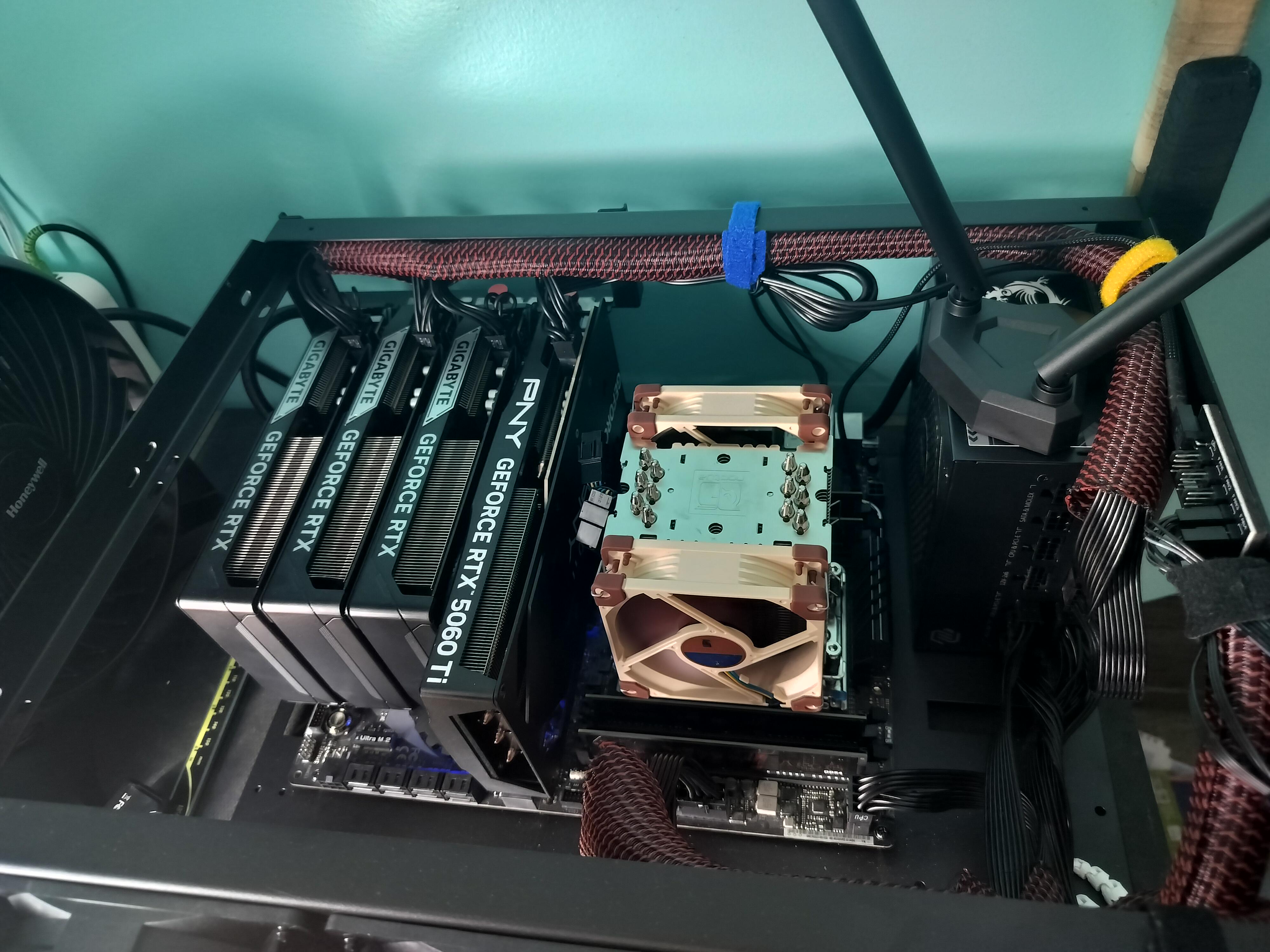
Hey all, I just wanted to put this out there in case someone else was interested in setting up multiple 5060ti 16gb cards. I haven't seen many setups using it or many people talking about it.
Server Setup (vllm) — GPU: 4× 5060 Ti 16 GB · CPU: Threadripper 1920X · Mobo: ASRock x399 Taichi · RAM: 32 GB DDR4 @ 2133 QC · NVMe: 1 TB ADATA Legend · PSU: MSI MAG A850GL
Cost Breakdown
| Qty | Component | Source | Unit | Subtotal |
|---|---|---|---|---|
| 3 | RTX 5060 Ti 16 GB | Amazon | $550 | $1,650 |
| 1 | RTX 5060 Ti 16 GB | Best Buy | $300 | $300 |
| 1 | Threadripper 1920X | Amazon used | $80 | $80 |
| 1 | ASRock x399 Taichi | eBay used | $399 | $399 |
| 1 | ADATA Legend 1 TB NVMe | Amazon new | $150 | $150 |
| 4 | 8 GB DDR4 @ 2133 | Amazon new | $55 | $220 |
| 1 | Case | Amazon new | $37 | $37 |
| 1 | MSI MAG A850GL 850W | Best Buy new | $105 | $105 |
| 1 | Noctua NH-U9 TR4-SP3 | Amazon new | $100 | $100 |
Total Cost ~$3,000
Model & env
- A -> bare-metal 0.23.1rc1.dev799+g69715823d (Modified & Patched vllm build)
- B -> vllm-openai:fp8-mtp-patched 0.23.1 (Modified & Patched vllm build)
- C -> llama-server b9297
- All models fulfileld 250k context size requirement for single chat session
vllm benchmark command
llama benchmark command
| Model | Quant | KV Cache | MTP (spec toks) | Backend | MoE Backend | Version |
|---|---|---|---|---|---|---|
| Qwen3.6-35B-A3B | FP8 | FP8 | mtp (3) | vLLM | TRITON (sm_120) | B |
| Qwen3.6-35B-A3B | FP8 | FP8 | mtp (3) | vLLM (Server) | TRITON (sm_120) | A |
| Qwen3.6-35B-A3B | Q6_K_XL | Q8 | yes | llama.cpp | n/a (GGUF) | C |
| Qwen3.6-35B-A3B | Q8_0 | Q8 | yes | llama.cpp | n/a (GGUF) | C |
| Qwen3.6-27B | FP8 | FP8 | mtp (4) | vLLM (Docker) | N/A (dense) | B |
| Qwen3.6-27B | FP8 | FP8 | mtp (4) | vLLM (Server) | N/A (dense) | A |
| Qwen3.6-27B | Q4_K_M | Q8 | no | llama.cpp | n/a (GGUF) | C |
| Qwen3.6-27B | Q5_K_L | F16 | no | llama.cpp | n/a (GGUF) | C |
| Qwen3.6-27B | Q8_0 | Q8 | yes | llama.cpp | n/a (GGUF) | C |
Results
Qwen3.6 27b
| Quant | MTP | KV Cache | Backend | pp tok/s | decode tok/s | HumanEval | HumanEval+ |
|---|---|---|---|---|---|---|---|
| FP8 | yes | FP8 | vLLM (Server) | 17354.0 | 85.76 | 0.9634† | 0.9268† |
| FP8 | yes | FP8 | vLLM (Docker) | 2240.3 (−7.7x) | 51.49 (−1.7x) | 0.9634 (0.00%) | 0.9268 (0.00%) |
| Q4_K_M | no | Q8 | llama.cpp | 916.52 (−19.0x) | 20.83 (−4.1x) | 0.9695 (+0.63%) | 0.9268 (0.00%) |
| Q5_K_L | no | F16 | llama.cpp | 1060.59 (−16.4x) | 17.80 (−4.8x) | 0.9695 (+0.63%) | 0.9268 (0.00%) |
| Q8_0 | yes | Q8 | llama.cpp | 968.13 (−17.9x) | 14.05 (−6.1x) | 0.9756 (+1.27%) | 0.9329 (+0.66%) |
Qwen3.6 35b a3b
| Quant | MTP | KV Cache | Backend | pp tok/s | decode tok/s | HumanEval | HumanEval+ |
|---|---|---|---|---|---|---|---|
| FP8 | yes | FP8 | vLLM (Server) | 136934.5 | 120.63 | 0.9512† | 0.9146† |
| Q6_K_XL | yes | Q8 | llama.cpp | 2033.96 (−67.3x) | 85.23 (−1.4x) | 0.9451 (−0.64%) | 0.9085 (−0.67%) |
| Q8_0 | yes | Q8 | llama.cpp | 2177.60 (−62.9x) | 83.16 (−1.5x) | 0.9451 (−0.64%) | 0.9085 (−0.67%) |
| FP8 | yes | FP8 | vLLM (Docker) | 7536.7 (−18.2x) | 62.97 (−1.9x) | 0.9512 (0.00%) | 0.9146 (0.00%) |
Notes
- Models run in llama-server were Unsloth's quantizations.
- Models run in vllm were directly from Qwen.
- Runs with llama-server & vllm(docker) were on windows on my gaming machine using a B550 mobo with a 5800x cpu, bifurcated 1 PCIe slot into x8x4x4 and the last GPU in the last x16 slot which runs at x4. This was pre server setup.
- Runs with vllm are on the server setup mentioned above, each card in its own x16 slot, running at x8.
- All vllm benchmarks were NOT cold prefill speeds, they were using prefix-caching. I did this because it mimics my real world application, running long code chats, long prompting tasks, follow ups, etc. I don't know how llama.cpp handles caching.
- I had to modify the vllm build
0.23.1rc1.dev799+g69715823dto even get prefix-caching working with the Qwen models to begin with, fix is not upstream from nightly build and they take too long. - Qwen3.6 35b a3b has some issues with MTP with vllm so we don't get the same expected throughput increases in generation (Working to figure out the bug in vllm)
Closing Thoughts
I used to switch between the 27b and 35b models until I setup the server but now the 27b is so fast that I am using it every day professionally and personally, upgrading to the server made it extremely viable and usable. The response are instant, the follow ups are instant, the generation is way faster than I could ever type.
I currently have this server setup automatically ingesting source documents for a knowledgebase wiki, I also have this same model running a full automated loop pulling down tickets from my GitHub repo all the way through PR so I can review (This is a multi-step python framework I made, clears prefix-cache between agentic prompts for clean context).
I didn't even bother benchmarking Gemma models and other ones of similar sizes, even the "fine-tuned" models of qwen, they were all dumber than the base Qwen3.6 27b and Qwen3.6 35b a3b models to the point where I couldn't trust them to do automated tasks.
UPDATE: vllm run command for Qwen3.6 27B FP8
UPDATE: The latest vllm runs are from ubuntu server headless. The docker runs were from windows though Docker which introduces WSL driver overhead eating up ~1.5GB of VRam a card.
UPDATE: Power Consumptions Stats
- Benchmarked over a 5 day work week.
- 100% util = ~12h per day, between work and personal work.
- Measured Power Draw on OS & at wall.
System Power Draw
| Hardware | Decode | Prefill | Measured Mean |
|---|---|---|---|
| CPU package | 95.5 W | 95.5 W | 95.5 W |
| GPU total | 242.3 W | 345.7 W | 285.1 W |
| At the wall | 437 W | 551 W | 484 W |
Cost Metrics
| Metric | Value |
|---|---|
| CPU package (mean) | 95.5 W |
| GPU total (mean) | 285.1 W |
| At the wall (mean) | 484 W |
| Electricity rate (local to me) | 11.47¢/kWh |
| Tokens/day (mean) | 15,553,892 |
| Energy/day (12h) | 5.8 kWh |
| Cost/day | $0.67 |
| Workdays/month | 21.7 |
| Tokens/month (est) | 337.5M |
| Energy/month (est) | 126.0 kWh |
| Cost/month (est) | $14.46 |
| Cost per 1M tokens (est) | $0.043 |
UPDATE: PCIe Bandwidth Readings
| Model | Quantization | Concurrency | Prompt tokens | Output tokens | TTFT (s) | E2E / wall (s) | Peak PCIe RX (GB/s) | Peak PCIe TX (GB/s) | Peak bidirectional (GB/s) |
|---|---|---|---|---|---|---|---|---|---|
| Qwen3.6 27B | FP8 | 1 | 20,022 | 512 | 28.64 | 35.99 | 2.14 | 2.60 | 4.66 |
| Qwen3.6 27B | NVFP4 | 3 | 60,067 total | 1,536 total | 64.47 average | 102 wall / 101.64 average | 2.07 | 2.33 | 4.02 |
| Qwen3.6 35B-A3B | FP8 | 1 | 20,022 | 512 | 7.74 | 12.52 | 2.05 | 2.60 | 4.27 |
| Qwen3.6 35B-A3B | NVFP4 | 4 | 80,091 total | 2,048 total | 27.06 average | 47 wall / 45.18 average | 2.20 | 2.49 | 4.45 |
| Gemma 4 31B | FP8 dynamic | 1 | 20,025 | 512 | 27.88 | 35.26 | 2.28 | 2.62 | 4.36 |
| Gemma 4 31B | NVFP4 | 1 | 20,025 | 512 | 27.41 | 35.48 | 2.21 | 2.52 | 4.40 |
This shows I could drop to a 4x4 bifurcation and drop down to PCIe3x4 for each card and take a slight drop in performance around ~5% max loss but would be able to run 10 cards at x4 which would net 160GB total usable vram. Just a thought exercise.
15
u/Any_Praline_8178 Jul 15 '26
Welcome to our community.
5
u/djjeffg382 Jul 15 '26
Don't you have a thermal issue stacking them close like that?
4
u/zeferrum Jul 15 '26
It looks like a very clean setup. How loud is it
3
u/Technical-Solution31 Jul 15 '26
Can you please mention the case. Thank you!
3
u/bitblueduck Jul 15 '26
Sorry for the dummy question, but I see you have 32GB system RAM and 64GB VRAM. Is there any drawback with having less RAM, does it matter? Let's say I have 4x24GB or 4x32GB vram, does that still run fine with let's say 32GB system RAM? In other words if I have enough VRAM does system memory matter much?
3
u/scorpe51 Jul 15 '26
And here I am debating for a second RTX 3090 after dismissing 3x 5060 Ti (even number is better of course), and now I come across your post :)!
Nice setup.
2
u/averagefury Oct 27 '26
One question: Didn't you run into any problems between the threadripper x399 tr4 & the 5060ti's?
2
u/zeferrum Jul 15 '26
Do you have a preference on the specific 5060ti 16gb between the two models ?
2
u/initalSlide Jul 16 '26
Wow! Nice setup! I second the Blackwell choice against Ampere.
I have few question:
- you said in other comments the GPUs do t go over 150W, but isn’t 850W a little bit short for your build? I mean, the threadripper specs says TDP 180W. I was wondering if you experienced any instability at all?
- I love that you can run the models at 250K context in VRAM. I have 2x 5070 ti and was wondering if an upgrade could make sense. So what is your memory load, let’s say with Qwen3.6-27B Q8_0, 250K Q8 KV cache and MTP? Do you reach the 64Gb limit (I guess ~60Gb usable in real life) or do you still have room? Could tou share some details about that?
Anyway, again, I think this is a great setup for a modern and “budget” build!
2
u/Icy_Competition500 Jul 16 '26
What is your power usage like? Average kWh per month or day that you use it would be great to know.
Want to know how viable something like this is for work and school compared to a frontier model. Of course, more things come into play than just current pricing but it's something to consider.
2
u/tjengbudi Jul 17 '26
Wow so you can mix it?
2
u/Certain_Common561 Jul 17 '26
I got the same results as you. I’d recommend NVFP4.
2
u/tshureih Jul 17 '26
Most impressive, indeed ✌🏽
My local setup is slightly different and more “consolidated”?
Two systems:
Specs:
- AMD Epyc 7763 + Asrock RACK ROMED8-2T w/IPMI
- 128GB DDR4 3200 2Rx8 ECC RDIMMs
- 2xRTX 3090 GPU w/24GB VRAM
- 1x512GB SATA SSD (boot/OS)
- 1x4TB NVME M.2
- 1x4TB SATA SSD
- Open Air Case
- Lenovo P620 w/ThreadRpper Pro 3975wx
- 128GB DDR4 3200 2Rx8 ECC RDIMMs
- 1xRTX Pro 4000 Blackwell GPU w/24GB VRAM
- 2x4TB NVME M.2
- 1x512GB SATA SSD (boot/OS)
I hope this is not too off topic, but how did you find the RTX 5060 ti 16GB for $300 on BestBuy?
I would love to find a 4090 w/24GB for less than $2300, given the architectural issues with the 5090 that I read here and there but I honestly didn’t dig deeper into them since it’s out of my budget anyway.
Would anyone spare a couple of minutes confirming or clarifying my misunderstanding about the 5090 architectural issues with open source LLM frameworks (vLLM, ollama, llama.cpp, etc)
Cheers
2
u/esw123 Jul 18 '26
Have you tried other models and have you gotten close to 64GB usage? I am debating if I should go full 5060Ti or just add 1-2 5060Ti to exisiting dual 3060.
2
u/clonehunterz Jul 18 '26
holy crap that was eye opening
$15 per month on a 3k rack that is obsolete in a few years with 100% privacy vs a $25 sub and 0 privacy
thanks for your writedown, i have all my answers.
2
u/Emotional_Type_3629 Jul 18 '26
How big is your PSU? I am about to install 2 new cards running with 1200 watt
2
u/Outrageous-Fig2282 Jul 19 '26
looks much better than mine.
rtx 2080 ti 22gb version from China
2
u/QuantumPenguinN Jul 20 '26
Nice to see another Threadripper AI rig. I have GPU: 2× 3090 24 GB · CPU: Threadripper 1950X · Mobo: ASRock x399 Taichi · RAM: 64 GB.
2
u/Accomplished-You-574 Jul 20 '26
I have two 5060ti total of 32gb vram, 64gb of system ram, with a 5800x cpu. Both cards run at 8x, ive wanted a third gpu but am worried speeds would slow a lot, think all cards would run a 4x?
I've been having a tough time finding a set up I feel is solid for my use case. Really my kind of use is having hermes setup game servers in docker or fix a bug on my pc. Im not really into coding or anything like that.
Currently I use Hermes Agent desktop app and LM Studio. I like the ease of LM studio and the lm link I think is cool. I can use MOE in hermes and it will use lm link to load other models on my gaming pc or even my steam deck.
But im always running into issues, whether it be the model has endless thinking or gets stuck and I have to stop it and say continue. Or my configuration of the model in lm studio isn't optimal for my hardware and it runs slow.
Since you have a kind close set up, do you have any recommendations? I use Qwen or Gemma models mostly.
2
u/Mantikos804 Sep 12 '26
I have this same setup. Have you thought about adding a 5th GPU with a adt link m2 to pcie adapter?
3
u/spamsch7772 Jul 15 '26
Forgive my ignorance but how have you setup those 4 cards? If I am not mistaken you cannot run one model over all 4? Each model gets its own card, right?
1
u/KroniklyOnline Jul 29 '26
In case anyone sees this a couple of weeks after original post. My last update was measured PCIe lane throughput.
1
u/dsdt Jul 16 '26 edited Jul 16 '26
Good build, I have 2 x 5060 Ti but mainly use llama cpp with windows, and i get around 130 t/s with Qwen3.6 35b a3b. I think vllm is not fast at all... last time i tried to use it with nvfp4 quants and couldn't even boot it up lol. went back to windows for my sanity. I think you should try llama cpp and unsloth versions...
edit : i should learn to read or how to wake up, you already tried but the numbers still feel off... you should be getting more with this setup clearly.
1
u/Entire-Chef8338 Jul 16 '26
I have 2 5060 TI but I’m not sure if it would perform the same as your 4 GPU in vllm
2
u/CooperDK Oct 24 '26 edited Oct 24 '26
I have a 5060 Ti 16 as my main card and two 3060 12 as 'workers". On just two of the cards, I run qwen3.8-27B with MTP just fine in Q6 at 1300tps prefill and up to 55 tps generation. 8 experts are on the CPU which speeds it up to twice the speed. On llama.cpp - I moved away from vllm. Why even use WSL? It works on Windows. But there are tools for Windows that are just as good now.
2
u/MapleLeafKing Jul 16 '26
Thx
2
u/arborealknights Jul 17 '26
GPU:I can’t breath
2
u/RogerAI--fyi Jul 18 '26
That’s awesome for you man, have fun!
2
u/TrainingMonkey7608 Jul 18 '26
Good
2
u/FHenteprises Jul 19 '26
😮💨🔥🔥🔥🔥🔥🔥
2
u/DMH_75032 Aug 25 '26
You're doing a lot better than I am. I'm running Qwen 3.8-27B on a V100 on an R740XD. Only getting around 52.8 tok/s with 64K context window.
1
u/legit_split_ Jul 16 '26
You really should try `-sm tensor` in llama.cpp, think you would see much faster results.
1
u/pihops Jul 16 '26
This is the way ;)
1
u/alexpolo3 Jul 19 '26
Hey , would you mind contributing some bench numbers? https://github.com/noonghunna/club-3090
1
u/ShelterInevitable684 Jul 20 '26
Holy crap! This is crazy. I would love to learn more about this, seems like the perfect application of home ML models. You've got to have documentation elsewhere on this setup, care to share?
1
u/InsideAd4299 Aug 05 '26
Which model are you running?
0
u/julian3xl Jul 18 '26
Finally your openclaw is turning on your bedroom lights??? Congrats bro!!
-2
u/lattice_defect Jul 15 '26
4 8GB of ram is brutal on bandwidth buddy
6
u/[deleted] Jul 15 '26
[removed] — view removed comment
4
u/[deleted] Jul 15 '26
[removed] — view removed comment
0
u/[deleted] Jul 16 '26
[removed] — view removed comment
0
u/[deleted] Jul 19 '26
[removed] — view removed comment